WIP limits that actually limit
Cap how many tasks a column can hold. Go over and the badge turns red, so the whole team sees the bottleneck before it becomes overtime.
WIP limits, timers and flow reports built in
Drag tasks across columns, cap work in progress, and track time without leaving the board. Set up in a minute, free to start, quick to love.
Free plan, no card required.
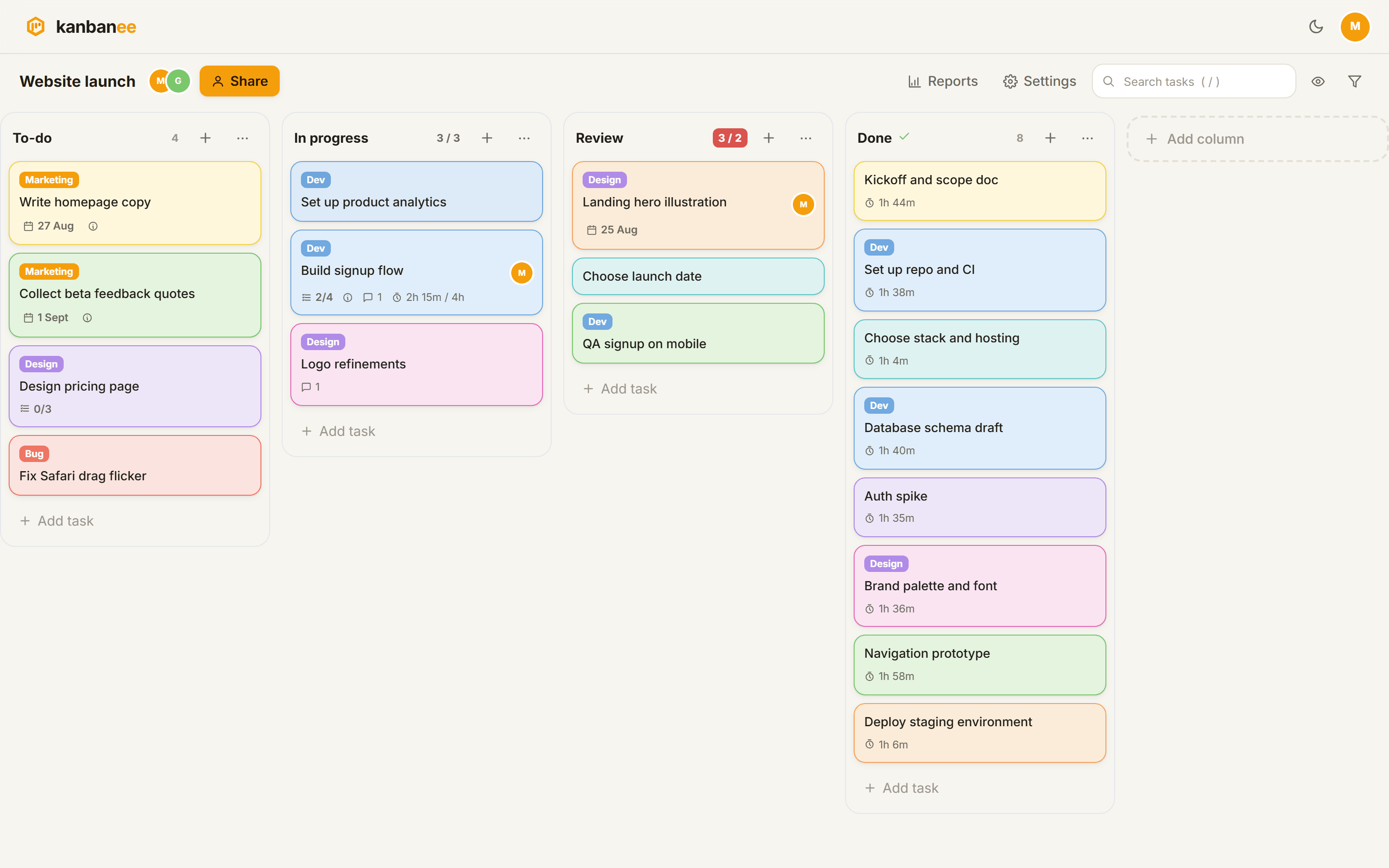
The classic kanban toolkit, rebuilt with a modern face and no clutter.
Cap how many tasks a column can hold. Go over and the badge turns red, so the whole team sees the bottleneck before it becomes overtime.
Subtasks, labels, members, due dates, rich descriptions with images, comments with @mentions and a full time log on every task.
Start a timer on any task. The stopwatch logs real minutes; the Pomodoro walks you through focus and break cycles. No second app.
Time by member and label, weekly throughput, cumulative flow and cycle time. Numbers that answer how the work is going.
Kanbanee runs in the browser on desktop and phone. Columns snap side to side on mobile and drag works with a long press.
The Free plan has 2 boards with unlimited members, WIP limits, timers and the recycle bin. Upgrade only when you need more.
The 3-step wizard sets up your columns and WIP limits. Defaults are sensible and everything stays editable later.
One keystroke adds a task; drag cards left to right as work moves. Invite teammates to the boards they need, and only those.
Timers feed the time report, card moves feed throughput and cycle time. Improvement stops being guesswork.
One board model, many kinds of work.
Backlog to done with WIP limits, cycle time and a board your standup can actually point at.
A private board with a capped Doing column is the cheapest focus tool there is.
Ideas, drafting, review, published. Labels per channel, due dates per launch.
One board per client, invite them as viewers, keep the work honest and visible.
Courses and deadlines as cards, Pomodoro timer for the actual studying.
Renovations, moves and errands flow through a board just like sprints do.
Yes. The Free plan includes 2 boards you own, unlimited members, columns with WIP limits, subtasks, comments, timers and the recycle bin. Pro adds unlimited boards and the reports suite.
$6 per month, or $48 per year (two months free). One subscription unlocks Pro on your account; boards you own get unlimited, and reports open up on every board you can see.
Kanbanee is built around flow, not just lists: WIP limits with a visible red state, built-in time tracking with Pomodoro, and flow reports (throughput, cumulative flow, cycle time) that Trello needs power-ups for.
Yes. Invites are per board. Members see only the boards they are invited to, and you can remove them or revoke pending invites at any time.
They go to the board's recycle bin, where anyone on the board can restore them. After 30 days they are gone for good.
Yes: n adds a task, / jumps to search, Esc closes dialogs. The full cheat sheet lives in the board menu.
Pick a starting point in the board wizard; every column and limit stays editable.
To-do
Doing
Done
The classic three-column start for any kind of work.
Use this template →Backlog
In progress
Review
Done
Backlog through review with WIP limits on the middle columns.
Use this template →Ideas
Drafting
Editing
Published
From idea to published, with labels per channel.
Use this template →Leads
Contacted
Proposal
Won
Leads move right as deals warm up; nothing falls through.
Use this template →To learn
Studying
Learned
Topics as cards, a capped Studying column, Pomodoro on top.
Use this template →This week
Today
Waiting
Done
Plan Monday, finish Friday, review what moved.
Use this template →Free plan, no card required.