
Physical Kanban Board: What to Build and How to Run It
Updated at
The Answer
A physical kanban board is a whiteboard, a wall or a desk panel split into columns, with one card per task that a person moves by hand as the work changes state. The build is four things. A surface, half inch tape for the dividers, a pad of sticky notes, and a marker. Twenty minutes start to finish. For that you get a board nobody has to open, standing in the room where the team already gathers, where a card that has sat still all week is obvious to everyone who walks past it. The wall pays for that in memory. It has no history, no search, no view from home, and no cycle time unless somebody writes the dates on the cards by hand. Which is why most teams I have run end up keeping one of each.
What Is a Physical Kanban Board?
A physical kanban board is a real surface in a real room, divided into columns that stand for the statuses work passes through, with every task written on a card that somebody picks up and moves. Nothing about it is metaphorical. The columns are strips of tape, and the cards really do peel off in your hand.
Kanban started here. The system Toyota built on its shop floors ran on paper cards travelling between stations, and the card itself was the signal that authorised the next step. Software copied the layout decades later, so the physical version is the original, and every tool on the market is still working out how to reproduce its visualization on a screen.
Kanban visualization means something concrete on a wall. Stand in front of one and you can read four things without asking anybody a question:
- how much work is in flight right now
- which column the pile-up is in
- what is blocked, and roughly how long it has been stuck
- what nobody has touched since the last time you looked
What Do You Need to Build a Physical Kanban Board?
Four things. A surface, something to divide it into columns, cards, and a marker. I have never needed a fifth.
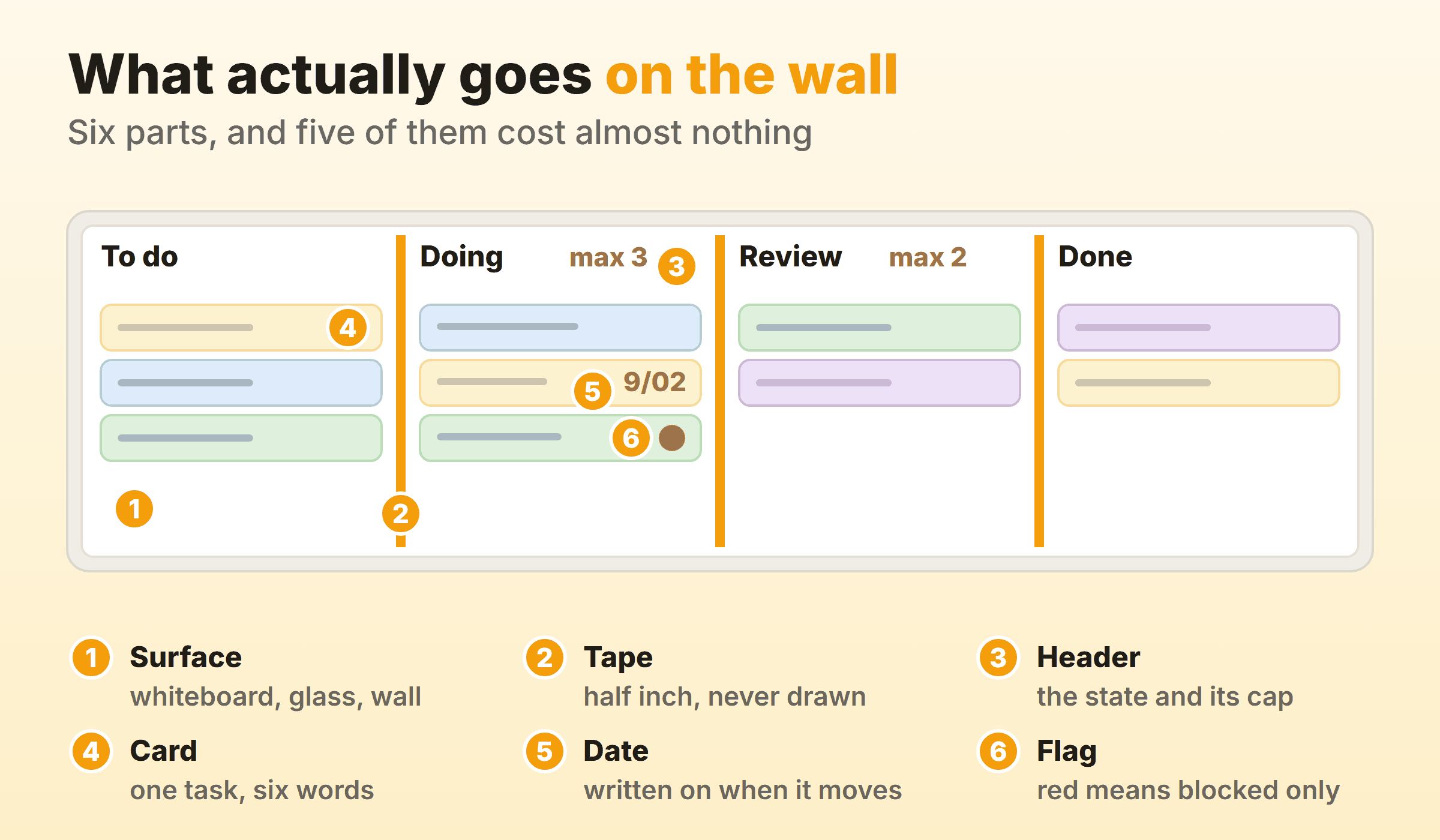
I have built these in meeting rooms, on a kitchen wall, and once down the side of a filing cabinet because it was the only vertical metal in the office. Location does most of the work here. Put a good board in a corridor nobody walks down and people stop reading it inside a fortnight.
Which Surface Should You Use?
| Surface | What it costs you | Best for |
|---|---|---|
| Dry erase whiteboard | Wall space and about the price of a monitor | The default office kanban board for a co-located team |
| Bare or painted wall | Nothing, but you tape directly onto paint | A kanban wall for a big team or a long workflow |
| Magnetic board and card kit | Real money, and much less faff | Boards that get rearranged often |
| Desk board or a small easel | Almost nothing | One person, or a kanban board desk setup at home |
| Printed sheet in a frame | A sheet of A3 | Trying the idea out before you commit wall space |
A kanban whiteboard is the default for good reason. Column headers get rewritten when the workflow changes, you can draw a swimlane across it at eleven in the morning because a project needs one, and dry erase holds sticky notes better than painted plaster does. Four foot by three carries three columns and a small team. Go up to six by four and you get five columns plus room for six people to stand in front of it at once.
A kanban wall is what happens when the board outgrows the whiteboard. Tape the columns straight onto plaster and you get as much width as the room has, at the cost of finding out how good that paint is the first time a card peels away with a flake of it attached.
Two cheaper answers. A magnetic kanban board kit swaps notes for reusable magnetic cards and magnetic lane tape, which earns its price if the board gets rebuilt often or the room is warm enough to defeat adhesive. A printable kanban board proves the habit before you spend anything. Print the columns, stick the sheet where you look every morning, and if you are still moving cards a fortnight later, buy the whiteboard.
What Should the Cards Be?
Sticky notes, for almost everybody. A kanban board with sticky notes is cheap, disposable, and forces brevity because the note is small. The standard three inch square note is the right size for a card that a person can read across a room.
Sticky notes also fall off, and the reason is mechanical. On a standard pad the glue sits in a strip along one edge, so on a vertical surface the whole note hangs from that strip. Peeling a note upwards off the pad curls it away from the wall, and pulling it sideways instead leaves it flat. The glue also gives up on dust, on rough plaster, and on anything warm, which is why the cards nearest a radiator are the ones on the floor in the morning.
The alternatives, in order of what they cost:
- Index cards and low-tack tape. They survive being carried to a meeting and back, and a paragraph fits where a sticky note takes one line.
- Magnetic cards. Reusable, wipeable, and they never drop. Steel surfaces only, and plenty of modern whiteboards are not magnetic.
What Divides the Columns?
Half inch electrical tape or gaffer tape. A drawn marker line lasts until the first person leans on it with a sleeve, and then the board has four columns in some places and three in others. Tape survives that, and it still peels off in ten seconds the day the workflow changes.
How Do You Set Up the Columns?
Set up the columns from the workflow you already run, not from a template you found. Write down what genuinely happens to a piece of work between somebody asking for it and somebody using it, including the waiting. The step by step version of that exercise is the same whether the board ends up on a wall or on a screen, because the hard part is the workflow, not the medium.
Three columns is the floor. To do, Doing, Done. Most office kanban boards want four or five, because there is nearly always a state where the work is finished by one person and waiting on another. Call that state what it is. In review, waiting on client, ready to ship. Kanban board statuses that name a job title instead of a state stop making sense the week somebody changes teams.
One warning specific to walls. Every column you add makes each column narrower, and once a column is too narrow to hold a three inch note you have run out of board. On a four foot board, four is about the limit, and you want six feet of width before a fifth column stops feeling cramped.
How Do You Set a WIP Limit on a Physical Board?
Draw the slots onto the surface.
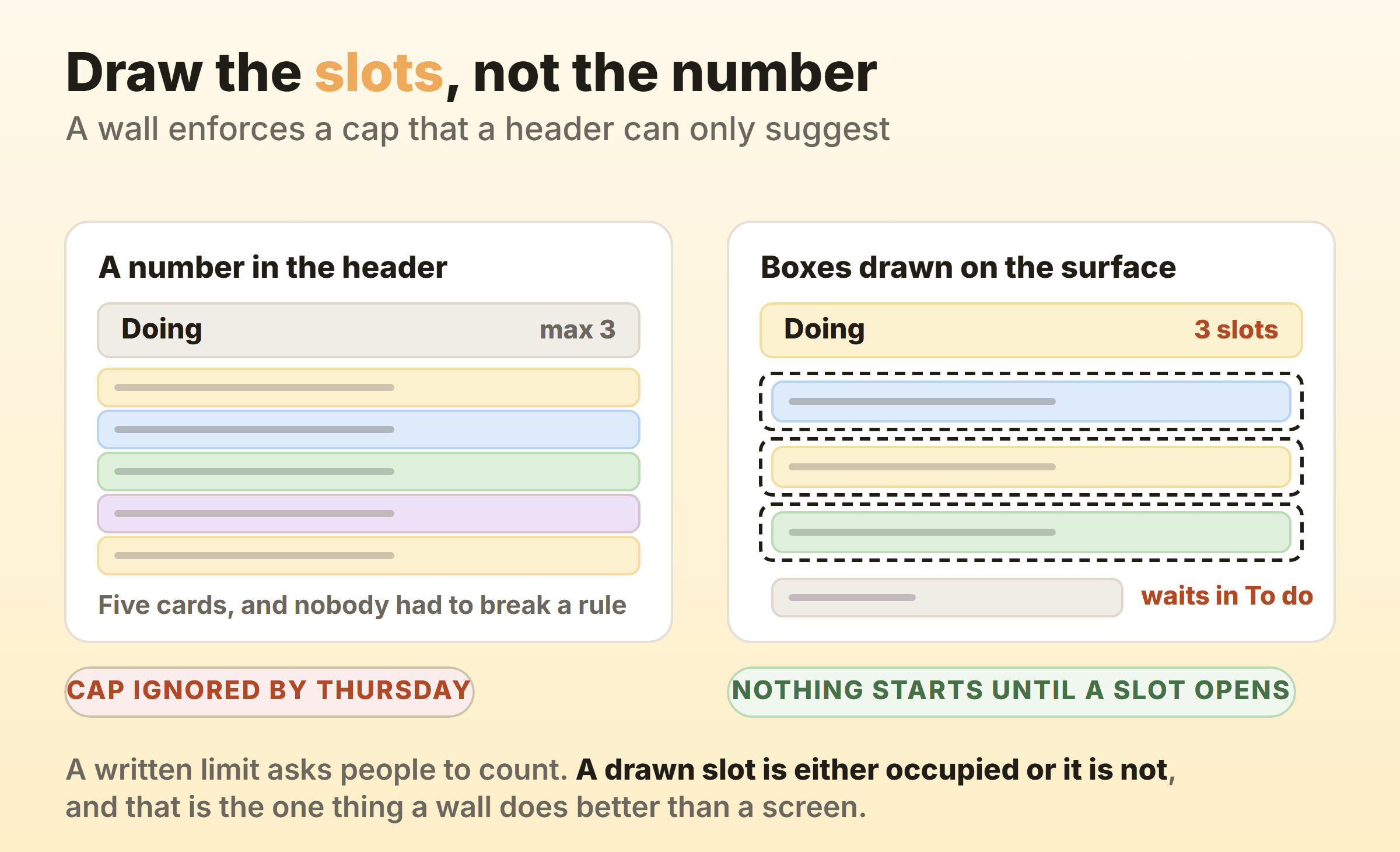
This is the one thing a wall does better than software, and almost nobody exploits it. Writing “max 3” in a column header asks people to count, and people do not count. Drawing three boxes on the surface removes the question. Either a box is empty or it is not, and a card in somebody’s hand with no empty box in front of it goes back where it came from.
Software faces a choice here that a wall never has to make. Block the drag and people find it infuriating. Let the move through with a red badge and the cap becomes advisory. Most tools pick the badge. The wall sidesteps the question, because the card and the space it needs are the same physical object.
I cap the Doing column at two on my own board. Two is probably too tight for a team of six and I have lost that argument before, but on a board where I am the only person moving cards, a third piece of work that would rather be started than finished has nowhere to sit.
What Do You Write on a Card?
Write a title short enough to read from three metres, the initials of whoever owns it, and the date it entered the first working column. Front of the card, nothing else. The fields worth keeping on a kanban card are the same on paper as in software, but the wall enforces a discipline software does not, because you run out of space.
Six words is a good ceiling for the title. If the task will not fit on one line of a sticky note, it is usually two tasks that somebody has bundled together to avoid deciding between them.
Use colour for one dimension and one only. Card colour by type of work, or by team, or by client, but not by all three at once, because a board with three colour systems running through it is a board nobody reads. Everything else goes on the back of the card, where estimates, links and notes can live without cluttering the front.
How Do You Keep a Physical Kanban Board Honest?
Walk the board once a day, right to left, starting with the column closest to Done. Two questions per card. What would move this one column further, and is anything stopping it. That is the entire ceremony and it takes under ten minutes for a team of six.
Walls fail quietly. Cards stop moving, everyone keeps working, and after three weeks the board describes a fortnight that already happened. Nobody announces it. You just notice the standup has drifted into people reading updates off their laptops.
Three habits that prevent it:
- Date the card when it starts moving. Small number in the corner, written the day it leaves To do. Two seconds, and it turns the board into the only cycle time record you have.
- Add a dot for every week a card sits still. Keep red for blocked and use any other colour for these. Three dots is a conversation, and it is visible from across the room in a way a timestamp never is.
- Reseat the board every Friday. Five minutes. Press every card back down along its glued edge, clear Done into a drawer or a photo, rewrite anything gone illegible.
Manufacturing runs the same idea with the cards attached to the bins rather than to a board, which is how the physical version cuts out manual counting. An empty bin carrying its card is itself the reorder signal, so nobody has to walk the aisle tallying stock to know what to order.
Where Does a Physical Kanban Board Break Down?
A physical kanban board breaks down in four places, and all four come from the same limitation. The board shows you the present state of the work and keeps no record of anything else.
It Has No Memory
Move a card and the previous state is gone. There is no undo, no audit trail, and no answer to when something actually started unless a human wrote the date on it. Six weeks into a project the awkward question is rarely about today’s board. Somebody wants to know what happened in March, and the wall has already forgotten.
It Cannot Be Searched
Forty cards on a wall is forty cards you read one at a time. Find every task tagged to one client and you are standing there squinting. Kanban task management on paper works beautifully up to a point, and the point is roughly where you can no longer take the whole board in from one position.
It Only Exists for the People in the Room
One person working from home on Thursday means the board is wrong for that person all Thursday. A photo in a group chat is not a fix, because the board they are looking at is already stale by the time it arrives, and they cannot move a card in a photograph. Any team with a genuinely hybrid week is running a board that is accurate for some of its members some of the time.
Every Metric Costs You a Tally
Cycle time, throughput and a cumulative flow diagram all come from column timestamps, and a wall produces no timestamps. You can get there by hand. Write the start date on every card, write the finish date when it lands in Done, and keep a tally on a sheet each week. It works, and it is genuinely useful, and roughly nobody sustains it past the second month. A digital board stamps every move without being asked, which is why flow metrics are a report you open in a tool like Kanbanee and a clipboard habit on a wall.
Should You Run a Physical Board, a Digital One, or Both?
Run the physical board if the team shares a room, the work turns over inside a few weeks, and what you need from it is people looking at it. Nothing on a screen competes with a wall for making work impossible to ignore. Run software if anybody is remote, if the work runs longer than a few weeks, or if somebody is going to ask you for numbers.
Most teams end up with both, and the pairing survives when one of them is clearly the record. Cards move on the wall all day because that is where the conversation happens, and one person spends five minutes each evening making the digital board match. One direction of sync, always the same direction.
Two boards that both claim to be current is how this goes wrong, and you can spot it inside a week. Somebody asks where a task is, gets two different answers, and after that everyone quietly picks a favourite and stops updating the other. A portable kanban board carried between a home desk and an office hits the same wall at a smaller scale, so decide which one you will trust on a Monday morning before you build the second.
FAQ
How big should a physical kanban board be?
Big enough that every column holds a three inch sticky note with room either side, and small enough to read from where the team stands. Four foot by three suits three columns and a handful of people, and six by four handles five columns and a team of six. Beyond that you are into kanban wall territory, taping columns straight onto plaster.
What size sticky notes work best on a kanban board?
Three inch squares for tasks, because that is the size that forces a short title and stays legible across a room. Smaller notes work for sub-tasks stuck onto a parent card. Larger ones are useful as column headers or swimlane labels, not as cards, because a big card invites somebody to write a paragraph on it.
How do you stop sticky notes from falling off the board?
Pull each note sideways off the pad rather than upwards, which stops it curling away from the surface. Then press it down along the glued edge, not in the middle. Keep the board off warm walls and away from radiators, and wipe the surface before you build. If cards still drop, the surface is the problem, and index cards with low-tack tape or a magnetic set will solve it permanently.
Is a magnetic kanban board worth buying?
Worth it if your cards outlive the tasks on them, if the board gets rebuilt often, or if adhesive keeps failing in your room. Not worth it for a first board, because you do not yet know what your columns should say.
Can a remote team use a physical kanban board?
Not as the shared board, no. A wall is only true for the people standing in front of it, and nobody can move a card in a photograph. What does work is a personal physical board for your own tasks running alongside the team’s digital one, because then nobody else depends on the wall.
Does a printable kanban board work for one person?
Yes, and it is the right way to start. Print three columns, stick the sheet where you will see it every morning, and use small notes so one task cannot swallow a column. Two weeks of moving cards proves the habit, and that is the moment to spend money on a surface.