
Kanban for Software Development: Boards, WIP Limits and CI/CD
Updated at
The Answer
Kanban for software development runs delivery as a continuous pull system instead of a series of sprints. Work lives as cards on a board whose columns match the states code really passes through, usually ready, in progress, in review, in staging and released, and most of those columns carry a limit on how many cards may sit in them at once. Nobody commits to a fixed scope for a fixed window. A developer finishes something, checks for room in the column ahead, and pulls the next card. The board stops where the automation starts, so CI/CD owns everything after the merge button and the columns only cover states where a change can wait on a person. What an engineering team gets out of this is visibility of the queues between writing and shipping, because on most teams the delay is not in the coding column at all. It sits in review, in waiting for a deploy window, and in half-finished branches nobody has opened since Tuesday.
What Does Kanban for Software Development Look Like in Practice?
Kanban for software development looks like one board holding every change in flight, laid out left to right in the order work moves, with a number at the top of each column saying how many cards are allowed there.
That is the whole visible mechanism. The Kanban Guide reduces the practices to three: define and visualise the workflow, actively manage the items in it, and improve it over time. The kanban methodology reached software through David J. Anderson, who documented it in a 2010 book after applying it to engineering teams at Microsoft and Corbis. Everything past those three practices is local convention.
Kanban for developers is not a separate variant, though. There is no separate kanban engineering method, only the same three practices applied to states that happen to involve a branch, a pipeline and a queue of pull requests.
The part that catches engineering teams out is what “visualise the workflow” means. Not the process you wish you had. The one you have this week, ugly parts included: the ticket that sat in ready-for-QA for four days, the deploy that only happens on Thursdays, the approval from a team eight hours ahead of you.
The columns a developer kanban board actually needs
Start from the states a change can be in where a person could hold it up, and give each one a column.
For most teams that shakes out as something like:
- Ready - specified enough to start, ordered, small
- In progress - somebody has it open in an editor
- In review - branch pushed, pull request open, waiting on another human
- In staging - merged and deployed somewhere that is not production
- Done - released, or released and verified, depending on your definition
Two rules stop this sprawling. If no human decision can stall a step, it is not a column: a build that runs in four minutes without anyone touching it does not need board space. And split a column the moment you cannot tell whether a card is being worked on or waiting. An in-progress column quietly holding three cards nobody has touched in a week is the most common lie on a software board.
What one card should represent
One card should represent one change that can reach production on its own.
Stricter test than “one ticket”. A card that says “authentication” is not one change, it is a project. A card that says “add rate limiting to the login endpoint” is one change, because it can be written, reviewed, merged and deployed without waiting on anything else on the board.
Sizing follows from that. Teams argue about story points for months before noticing that on a kanban board the estimate does almost no work. What matters is whether the card can move alone, and roughly whether it is a day or a week. Anything bigger gets split before it goes up, not after it has spent a fortnight wedged in review.
Why Do Software Teams Move to Kanban Instead of Sprints?
Software teams move to kanban instead of sprints when the work will not sit still for two weeks.
Three patterns push teams over. Support and incident load that arrives unannounced, which turns every sprint planning session into a negotiation about what to drop. Dependencies on other teams, so the sprint ends with three items at ninety percent. And a release process that is already continuous, where holding finished code back to line up with a sprint boundary is pure waiting.
Kanban deletes the boundary. There is no commitment to protect, so an urgent bug does not break a plan, it just gets pulled ahead of something else. The trade is real. Nothing forces a conversation about scope on a fixed date, so a team that was only planning because scrum made it plan will quietly stop planning. The kanban vs scrum comparison covers where each one holds up.
Where Do WIP Limits Bite on a Developer Kanban Board?
WIP limits bite hardest on the review column of a developer kanban board, which is precisely where most teams forget to put one.
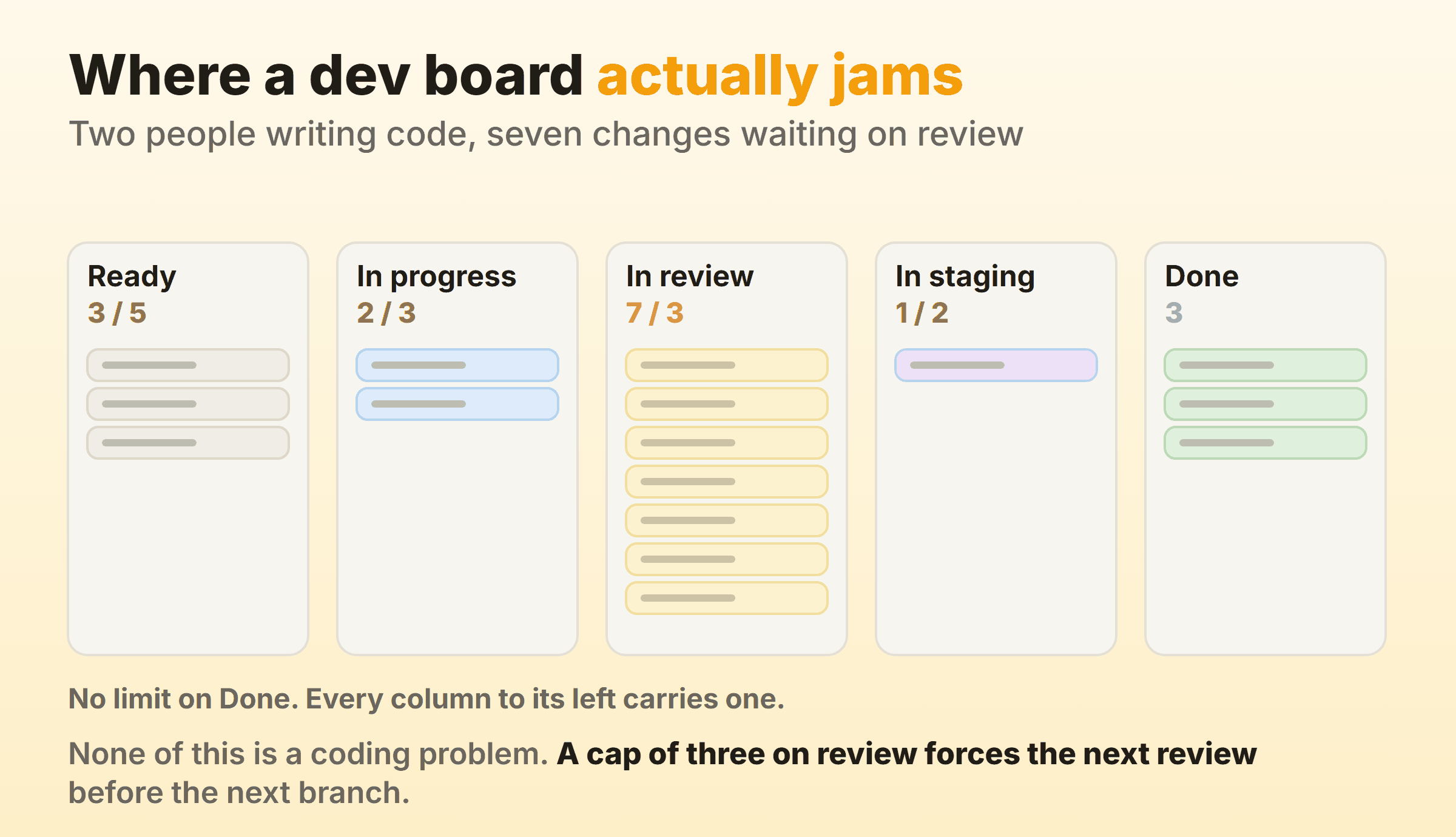
I have watched some version of that board a dozen times. Two people writing code. Seven changes open, reviewed by nobody, quietly rotting into merge conflicts. Adding developers does nothing here. The team is not short of code. It is short of finished code.
A limit on the review column flips the incentive in one move. When review is full you cannot start anything new, so the only legal action left is to go and review something. Feels like an interruption for about a week. Then it feels like the normal way to work.
Sane opening numbers for a team of five: three in progress, three in review, two in staging. Set them, watch them get hit, then argue about the number with evidence rather than opinion. In Kanbanee a limit is a per-column setting, a checkbox and a number in the column menu that arrives pre-filled at 3, and the badge turns red the moment the column goes over. It stays a soft limit, so the drag is never blocked. That part matters. A hard block only teaches people to lie about which column something is in.
How Does Kanban Work With DevOps and CI/CD?
Kanban works with DevOps and CI/CD by covering the half of delivery a pipeline cannot reach: the part where work waits on a person. The pipeline owns everything after the merge button. The board owns everything before it, plus the decision about what gets pulled next.
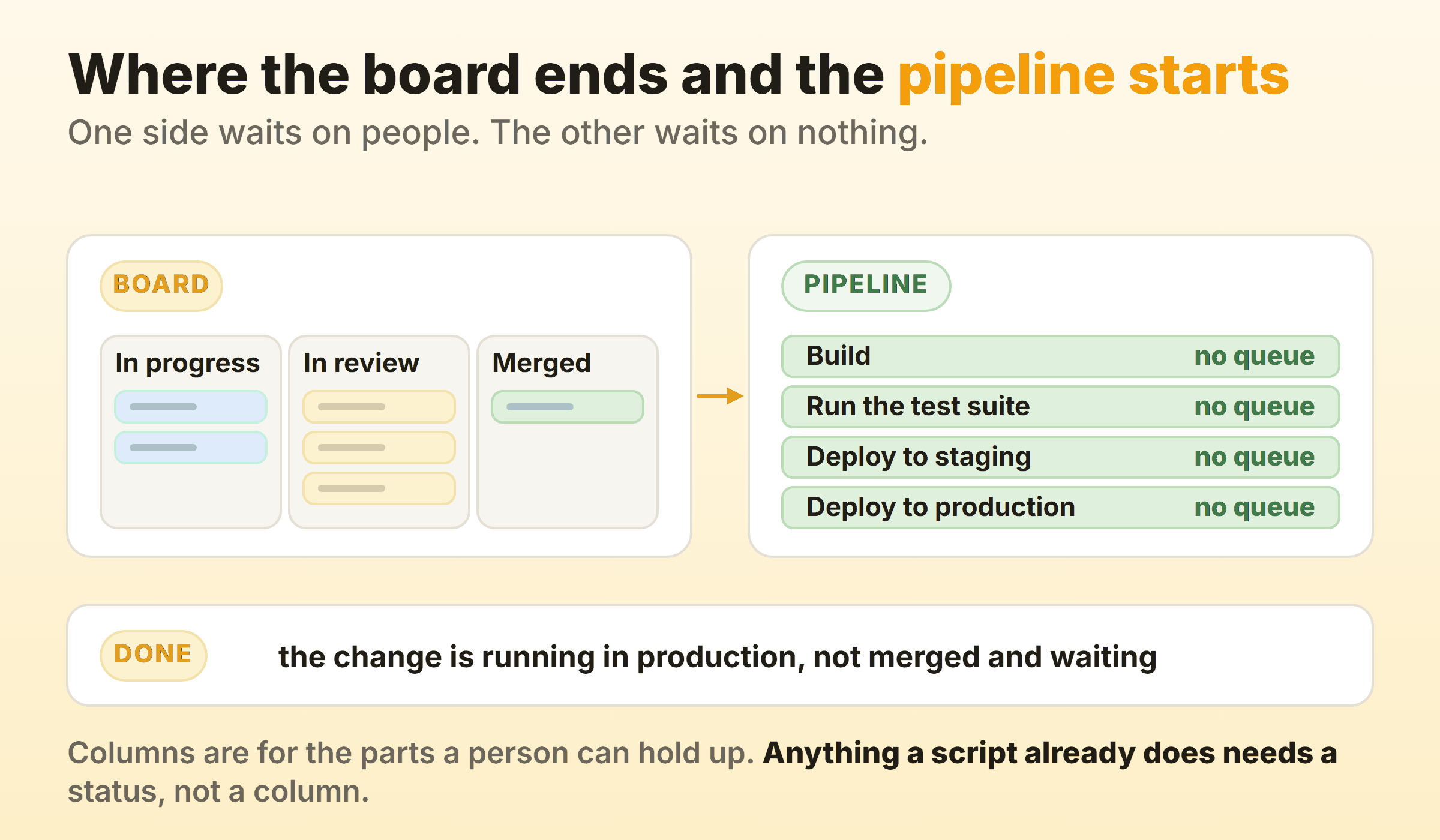
Kanban, DevOps and CI/CD get named together often enough that people assume they compete for the same slot. They do not. That split above is the useful way to think about kanban in DevOps. A DevOps kanban board should not have a building column, because nothing queues there. It needs columns for every state where a change can sit still because a human has not acted.
Kanban and continuous integration
Continuous integration and a WIP limit push in the same direction, which is why the pairing works.
Martin Fowler’s definition has every team member integrating at least daily, with each integration verified by an automated build. A card sitting in progress for six days is, by that standard, a CI failure in the post. A continuous integration kanban board shows that drift before any build does, because aging cards in the in-progress column are the earliest warning you get that branches have wandered apart.
The board also gives a broken build somewhere to live. A red build is not a card. It is a stop signal on the column, and the convention worth adopting is that nothing new gets pulled while the build is red.
Kanban and continuous delivery
Kanban and continuous delivery agree on the goal and divide the work of getting there.
Continuous delivery, in Fowler’s framing, means software that is always in a deployable state. Kanban does not make that true. The pipeline and the test suite do. What kanban adds is constant pressure to keep batches small, because a column capped at three cannot hold a six-week branch and everything else simultaneously. Small batches are the precondition for continuous delivery, and a WIP limit is the cheapest way to force them.
Continuous delivery kanban boards differ from ordinary ones at the right-hand end. Where release is a decision, ready-to-release is a real column and it needs a limit, since a pile of finished-but-undeployed changes is inventory sitting on a shelf. Where release is automatic, that column should not exist.
Where continuous deployment changes the board
Under kanban, continuous deployment removes the last human column, so the board gets shorter.
When every merge goes to production by itself there is no staging queue, no release train, no ready-to-deploy pile. The board ends at review. Done means the change is live, and the only thing left to watch is whether it behaved, which is a monitoring question rather than a board question.
Teams that reach this point often keep the old columns anyway, out of habit. Delete them. A column that never holds a card for more than a minute is decoration, and it makes the cumulative flow diagram harder to read for nothing in return.
What Should Done Mean on a Software Kanban Board?
Done on a software kanban board should mean the change is in production and behaving, not that the pull request got merged.
This is the definition most worth arguing about, because everything downstream leans on it. If done means merged, cycle time stops measuring anything a customer experiences. Work can be done for eleven days and still be invisible to every user.
DORA measures change lead time from the point a change is committed to version control to the point it is deployed in production, and treats it as a core delivery metric. Choose a Done that lines up with that and your board numbers mean something outside the team room. Choose merged and you are measuring an internal handoff.
Cannot deploy that often? Keep the honest version. A released column after merged, with the wait between them plainly on display. Hiding a two-week release cycle by calling merge the finish line does not shorten the release cycle.
How Do You Handle Bugs, Incidents and Unplanned Work?
Handle bugs and incidents on a kanban board by giving them a route that needs no replanning, then capping how much of that route you allow.
Three approaches, in order of how much structure they add:
- Just pull them. Small bugs join the same queue as everything else, ranked against it. Works up to a surprisingly high volume.
- An expedite lane. One swimlane across the top for production incidents, limit of one. Whatever is in it gets pulled next by whoever is free, and it is allowed to jump a WIP limit.
- A capacity split. A fixed share of the board reserved for unplanned work, say two of six in-progress slots.
The failure mode is an expedite lane with no limit. Once everything is expedited the lane is just the board, and every WIP limit underneath it stops meaning anything. I keep one expedite slot and no more. If it is occupied the next incident waits behind it, which is uncomfortable exactly often enough to be informative.
Which Metrics Should an Engineering Team Track?
An engineering team running kanban should track four things, and velocity is not one of them.
| Metric | What it tells you | How to read it |
|---|---|---|
| Cycle time | How long a change takes from start to done | Use the 85th percentile, never the average |
| Throughput | How many changes finish per week | The input to any forecast |
| Work in progress | How much is open right now | The lever you can actually pull |
| Aging | How long each open card has been sitting | The only leading indicator on the list |
Aging is the one to check daily. Cycle time and throughput describe work that already finished, so by the time they look bad the damage is behind you. Aging tells you a card is in trouble while there is still something to do about it.
Read cumulative flow weekly rather than daily. A band that widens over time is a queue growing, and on a software board it is usually review again.
Which Tool Should Run the Board?
Run the board in whatever tool sits closest to the code, as long as it can do three things: name columns after your real states, put a limit on a column, and show you cycle time.
Jira is where most engineering teams land, because the board sits over issues already linked to branches and pull requests. Column constraints act as WIP limits and the control chart gives you cycle time, though the setup work is real. The guide to kanban in Jira covers the mapping between statuses and columns, which is the part that bites first.
Dedicated kanban tools trade that integration for a much shorter route to a working board. Physical boards still beat both for a co-located team of four, right up until somebody starts working from home.
Whichever you pick, resist modelling your entire engineering process in it during week one. Copy the board you drew on the whiteboard, run it for a month, change it when a column proves useless.
What Goes Wrong in the First Month?
Four failures show up almost every time. None is a flaw in the kanban process itself, and all four are cheap to avoid.
- No limits anywhere. A board without WIP limits is a status display. Useful, but it will not change how anything flows.
- Columns named after people or teams. “With QA” and “Backend” describe who is holding a card, not what state it is in, and they stop meaning anything the moment somebody takes leave.
- A backlog treated as column one. The kanban backlog is an unordered pool feeding a short ready queue. Two hundred cards in the first column makes the board unreadable and buries the queue that matters.
- Standups that read the columns aloud. Walk the board right to left and ask what is blocking the oldest card. Anything else is a status meeting with a board in the background.
FAQ
Is kanban good for software development?
Kanban suits software development well when work arrives continuously and the team already deploys often. It suits it badly when the organisation needs a hard commitment on a date, because kanban offers a forecast with a confidence level rather than a promise.
Can two developers run kanban?
Two developers can run kanban, and the limits get tighter rather than looser. A pair typically runs one or two in progress and two in review, which is enough to make the review queue visible. Below about three people the board is mostly a memory aid, and that is still worth having.
Do you still estimate work in kanban?
Most teams stop estimating in points and switch to counting finished items per week, then forecast from that history. Sizing does not disappear entirely, since a card still has to be small enough to move on its own, but the estimate is no longer an input to a commitment.
Does kanban replace scrum ceremonies?
Kanban replaces none of them by default and requires none of them. Teams moving over usually keep the standup and the retrospective, drop sprint planning in favour of refilling the ready queue when it empties, and drop the review or fold it into a demo whenever there is something to show.
How many columns should a developer kanban board have?
Four to six columns covers most software teams. Fewer than four and the review queue hides inside in-progress. More than seven and cards start moving sideways for administrative reasons rather than because their state changed.
Is kanban part of agile?
Kanban is agile in the sense that it optimises for short feedback loops and responding to change, but it is not part of the Scrum framework and it predates the Agile Manifesto in its manufacturing form. Teams run it inside agile organisations, alongside scrum, and in operations groups that would never call themselves agile.