
Electronic Kanban Board: How E-Kanban Systems Work
Updated at
The Answer
An electronic kanban board is a kanban board where the replenishment signal is a database record instead of a physical card, so the moment a bin empties or a capped column frees a slot, the system raises the request on its own. E-kanban is the same mechanic named from the factory side. On a shop floor the trigger is usually a barcode scan on an emptied container. Software teams get it from a column counter dropping from 3 / 3 to 2 / 3. Underneath, both run one loop: something gets used up, the shortfall is detected without anybody being asked to notice, and the replacement is capped at what went out. Going electronic buys speed and a record of every move, and it costs you the wall everybody used to walk past on the way to the canteen.
What Is an Electronic Kanban Board?
An electronic kanban board is software that holds the kanban signal as a record rather than as a piece of card stock. Columns, cards, limits and the pull rule survive the move intact, so most of what is true of a kanban system on paper stays true on screen. What changes is who has to spot that a signal fired. A paper card sits in a collection post until a runner walks past, while a record can push a notification the second a count crosses a threshold.
The idea travelled out of Toyota, where a kanban was a physical instruction to make or move parts. Toyota still describes the just-in-time half of its production system as making “only what is needed, when it is needed, and in the amount needed” on its own Toyota Production System page. Electronic kanban leaves that sentence alone and swaps the laminated card for a row in a database.
Two quite different products get sold under the name. One is a replenishment system for parts and stock, wired into purchasing and usually into an ERP. The other is a team board for knowledge work, with limits on the columns and cards that people drag. Both uses are legitimate. Mixing them up is how a plant ends up trialling a project management tool for a supplier programme and wondering why there is nowhere to put a lead time.
Electronic Kanban, E-Kanban and Digital Kanban Board: Four Names for One Thing
Electronic kanban, e-kanban, digital kanban board and virtual kanban board all point at the same thing, and no standards body has ever ruled on which is correct. Manufacturing writing leans on e-kanban and electronic kanban. Software marketing leans on digital kanban board and online kanban board, mostly because that is what buyers type into a search box. Use whichever phrase your audience already says.
Where the words do diverge is scope. An online kanban board is any board you reach through a browser, which tells you nothing about signals or limits. An e-kanban system implies the whole replenishment loop, including whoever fills the order at the far end of it. A tool can be the first without being the second, and most of the free ones are.
How Does an E-Kanban System Work?
An e-kanban system works as a loop with four moves, and only the last one gives people trouble. Something downstream gets consumed. A trigger fires. The system writes an order record. Whoever supplies the item replaces exactly what went out, then stops.
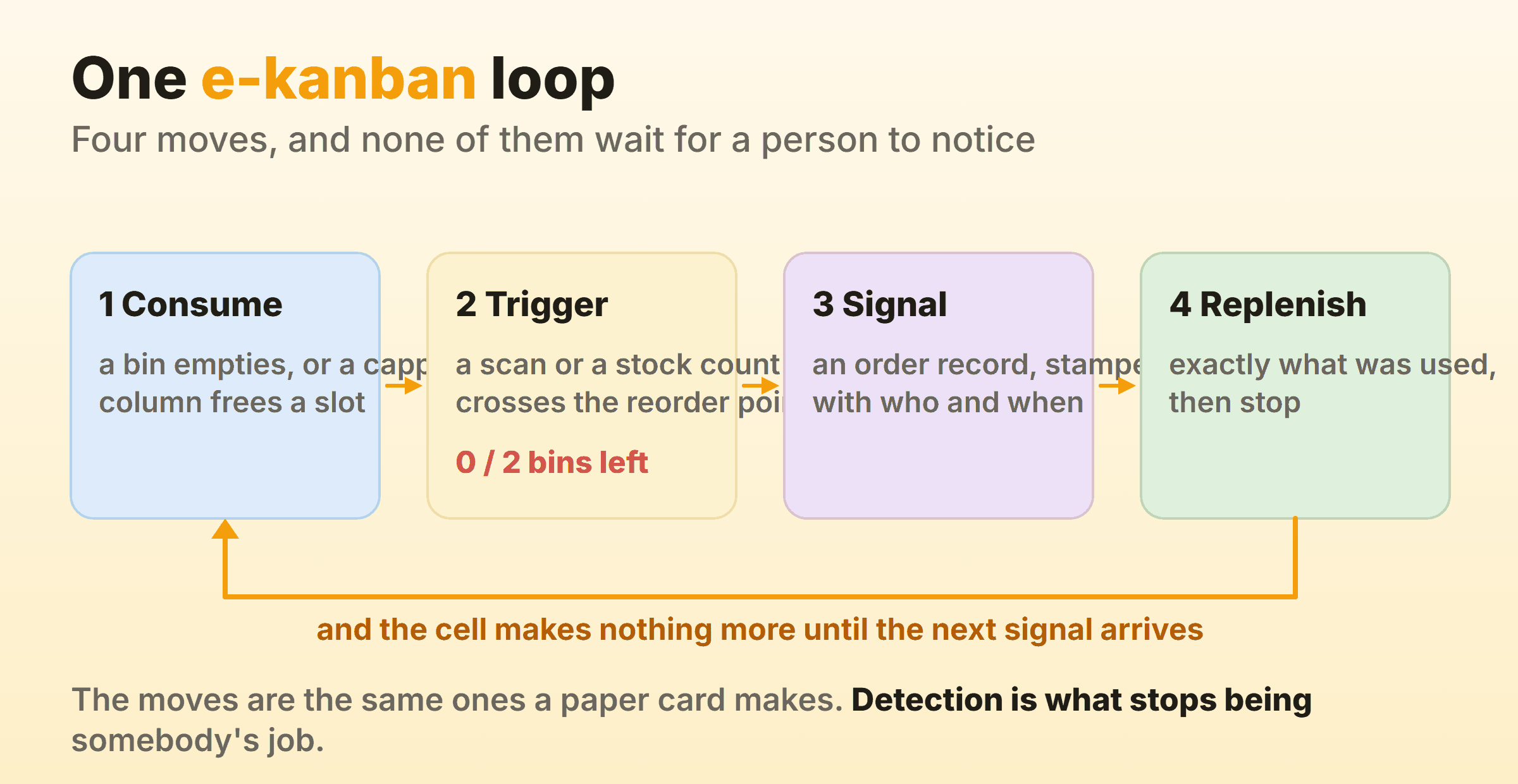
Stopping is the move that breaks. A queue with visible demand sitting in it feels like an invitation to get ahead, and the discipline of a pull system rests entirely on the upstream cell sitting still until the next signal turns up. Electronic kanban polices that better than paper ever did, because the record says how much was authorised and anything above that figure has a number attached to it.
What Fires the Trigger?
The trigger is whatever detects that consumption happened, and four of them cover almost every implementation:
- A barcode or QR scan on an emptied bin or container. The workhorse in most plants, and the cheapest thing to retrofit onto a rack that already exists.
- An RFID read as a container leaves its slot, which takes the scan off the operator entirely and costs a great deal more.
- A stock level in the ERP crossing a reorder point. No hardware at all, which is where most e-kanban quietly starts.
- A card leaving a capped column, which is what the identical loop looks like on a team board.
None of these needs a person to remember anything, and that is the whole benefit. Paper card systems fail when a card gets lost, when somebody pockets it, or when the runner is off sick on a Thursday. An electronic kanban system fails more quietly. The trigger fires, a mail lands in an inbox nobody watches, and three weeks later a line stops with a perfectly correct order sitting unopened in it.
How Is E-Kanban Used in Manufacturing?
E-kanban is used in manufacturing to replace the card that authorises a part to be made or moved, and it lands in three places. Internal replenishment between cells on one site. Supplier replenishment across a company boundary. Stock at the point of use, meaning the racks of fasteners, gloves and consumables a line burns through without anybody raising a purchase order for them.
The Lean Enterprise Institute lexicon splits the physical card in two, and the split survives digitisation unchanged. A production kanban tells a cell what to make. A withdrawal kanban authorises moving parts from one place to another. In an e-kanban system those become two record types with different destinations. Collapsing them into a single order object is a common shortcut, and it costs you the ability to tell a make request from a move request later, when somebody asks where the delay actually sat.
Two-Bin and Supplier E-Kanban
Two-bin is the simplest e-kanban to run and the one most plants start with. Every part gets two containers on the rack. The line draws from the front one, and when it empties an operator scans the label on it, which places the order while the back bin covers the lead time. Nobody counts anything. Nobody walks the rack on a Friday with a clipboard.
Supplier e-kanban extends that loop past the factory gate. The scan writes an order straight into the supplier’s system rather than into a buyer’s queue, and the supplier ships against a standing agreement instead of a fresh purchase order every time. Industrial distributors run their own branded e-kanban portals for exactly this, which is why a plant often ends up with three or four of them side by side, one per vendor, none of them talking to the others.
The trade there is worth saying out loud. A supplier-run portal usually costs the customer nothing and gives the supplier a live view of your consumption. A system you own costs money and integration effort, and keeps that consumption data on your side of the wall.
How Many Kanban Cards Does the Loop Need?
The number of kanban cards in a loop comes from demand during the replenishment lead time, plus whatever safety buffer you want, divided by how many pieces fit in one container. Halve the lead time and the demand term halves with it, so the card count comes down without anybody having to argue about how much safety is enough. In the reviews I have sat in on, the argument goes to safety stock every time and the lead time never gets touched, which is backwards, because the lead time is the number that also improves everything downstream of it.
Doing this electronically changes one thing, and it is the thing worth having. Card counts on paper get set once at implementation and then never revisited, because changing them means printing, laminating and collecting the old ones back in. A record-based system recalculates from actual consumption history and puts a new number in front of you to approve, so a part whose demand halved over two quarters stops tying up two bins of stock it no longer needs.
E-Kanban Inside ERP and MRP
E-kanban and MRP answer different questions, and running both at once is normal rather than a contradiction. MRP explodes a forecast into a plan and pushes orders out against dates. E-kanban ignores the forecast and reacts to what actually left the rack. Most plants land on kanban for the fast movers, a small share of the part numbers carrying most of the daily volume, with conventional scheduling underneath for the long tail.
Major ERP platforms ship kanban functionality inside their production planning modules, including event-driven variants where a manual trigger stands in for a container count. Whether you use that or buy something separate comes down to one question worth asking on day one. Does the signal need to reach a supplier who will never log into your ERP? If it does, a bolt-on with its own supplier portal saves you a year of arguing about licences.
What Do You Give Up When the Card Goes Electronic?
You give up ambient visibility, and it is a bigger loss than teams expect going in. A rack of cards or a wall of sticky notes is readable by anybody who walks past, including people who never think about the board at all. Nobody has to open anything. Nobody needs an account. A supervisor crossing the floor sees a full collection post and knows a cell is behind before a single person tells them.
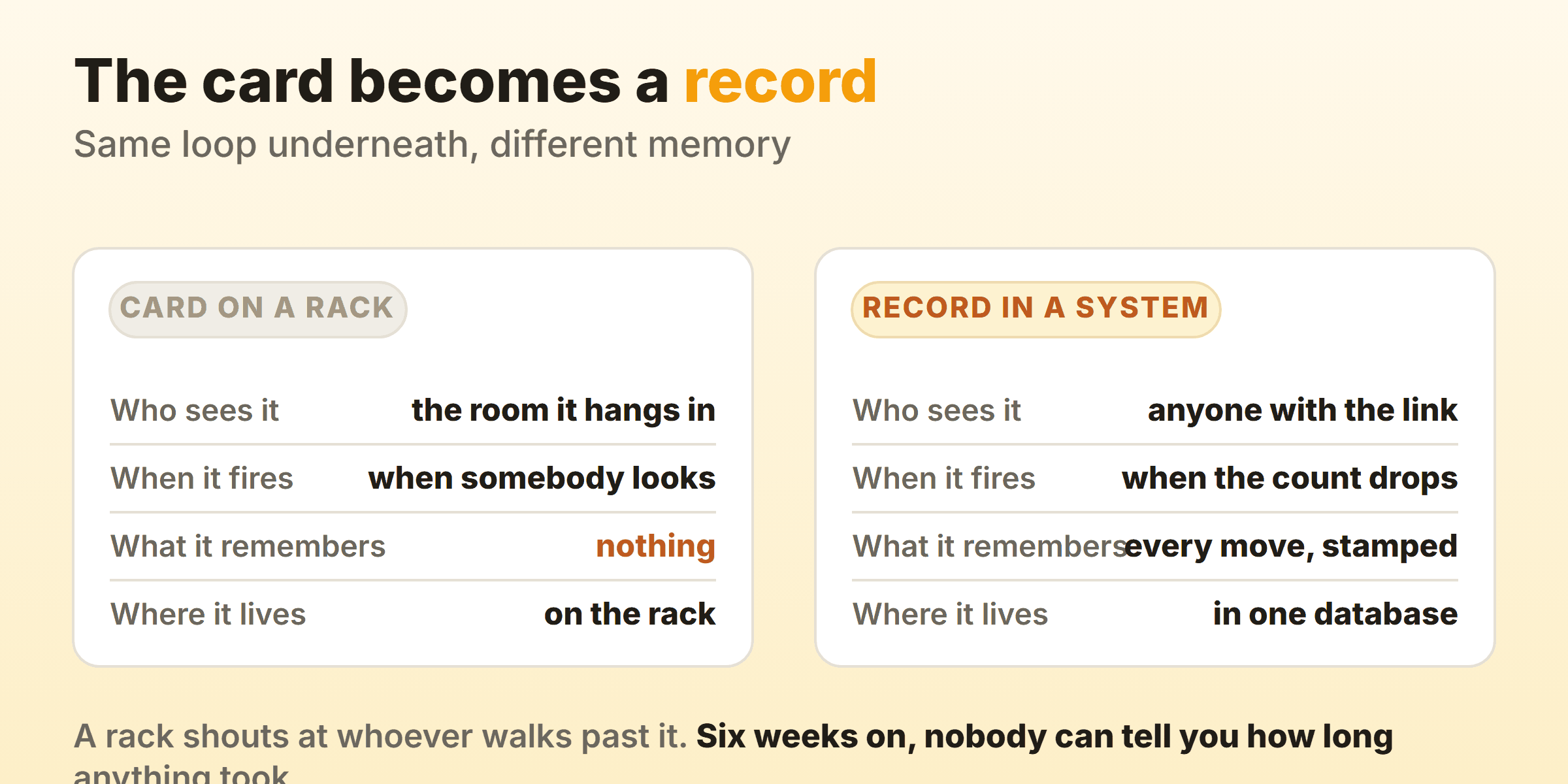
Memory is what comes back in exchange. A card records nothing about its own history, so the second it goes back on the rack, the question of how long that loop took becomes unanswerable. An electronic record keeps every state change with a timestamp, which makes cycle time, throughput and a cumulative flow diagram fall out of data you were generating anyway.
Two smaller costs ride along with it. Screen discipline is the first, because a board nobody opens is worse than a wall nobody looks at, and the fix is a monitor bolted to the spot where the wall was rather than a policy in a document. Login friction is the second. Every person you ask to create an account is a person who might not, and on a shop floor that number is never zero, which is why shared kiosk logins and scan-only stations exist.
Plenty of plants run both on purpose. Cards on the floor for visibility, a record behind them for measurement. That is a deliberate answer rather than a failure to commit.
What Should Electronic Kanban Software Do?
Electronic kanban software needs to do four things, and a fair amount of what gets sold as e-kanban software only does the first one properly:
- Hold a limit and show you breaking it. A column or a bin with a cap on it, and a visible state when the cap is exceeded. Without this the tool is a task list with headings.
- Fire a signal without being asked. A notification, a webhook, a mail to a supplier, an order row written into the ERP. Something has to leave the tool on its own.
- Keep the history. Every state change with a timestamp, which is what makes cycle time and throughput computable months later.
- Let the far end of the loop in. Whoever fills the request needs a way in that does not cost a full seat licence.
Team boards do the first and third well and the second and fourth badly. Replenishment systems do the second and fourth well and frequently have no concept of a limit at all. A plant that needs both usually buys both, and the question worth settling early is which of the two holds the data you will eventually want to report on.
In Kanbanee, WIP limits stay off until you switch them on per column from the column menu, using a checkbox and a number pre-filled at 3. The badge then reads as a count over the limit and turns red the moment you cross it. The limit stays soft on purpose, so dragging a card in over the cap is never blocked. A hard block just teaches people to route work around the board. On the fourth item it does nothing at all, because there is no API and no supplier portal yet, which makes it the team-board half of e-kanban without the purchasing half.
Is There a Free Electronic Kanban Board?
Free electronic kanban boards exist, and for one team inside one company they are usually enough. Free tiers in this category cap boards, integrations or reporting rather than headcount, because a vendor wants your whole team inside the tool where the habit forms. Read the specific cap before you commit a team to anything, since “free forever” and “free for one project” get marketed using the same word.
Free stops working the moment the loop crosses a company boundary. Supplier e-kanban involves a contract, an integration and somebody else’s stock held on your behalf, and that combination is not a free-tier product anywhere. For the manufacturing side, a spreadsheet is the honest free option. It works until two people edit the same row.
How Do You Move a Physical Board to E-Kanban?
Moving a physical board to an electronic kanban board takes about a week, provided you resist rebuilding the process while you are at it. Copy the columns exactly as they stand, wrong names and all. Copy the limits. Run both for a fortnight with the wall as the source of truth and the screen as the copy, and fix whatever the screen version cannot represent.
Somebody always notices mid-migration that the board has been missing a review column for a year. They add it, adjust two limits, rename three columns, and now nobody can say whether the new numbers came from the new tool or the new process. Change one thing. The tool.
After the fortnight the wall comes down, and this is where people flinch. Leave it up and half the team reads one while half reads the other, and inside a month neither is accurate. If ambient visibility genuinely matters on your floor, put a screen where the wall was and keep it on. Do not keep the wall.
FAQ
What does the e in e-kanban stand for?
Electronic. E-kanban, electronic kanban and eKanban are one word written three ways, and the hyphen carries no meaning at all. Some manufacturing vendors write it as eKanban to match a product name. Nobody will misunderstand you whichever you pick.
Does e-kanban need barcodes or RFID?
No. Plenty of e-kanban systems run on nothing more than a stock level in the ERP crossing a reorder point, with no scanning hardware anywhere on site. Barcodes earn their keep when consumption happens away from a desk and the figure in the system would otherwise drift away from what is on the rack. Start without them. Add scanning the first time you catch the system and the shelf disagreeing.
Can you run e-kanban in a spreadsheet?
For a single site with a short part list, yes. One sheet holds the part, the bin count, the reorder point and the supplier, and a conditional format turns a row red when the count drops under the trigger. What a sheet cannot do is stop two people editing the same row, keep an audit trail anybody trusts, or send anything to a supplier without a human pressing send. That ceiling arrives sooner than most people plan for.
What is supplier e-kanban?
Supplier e-kanban is a loop whose replenishment end sits inside another company, so the consumption signal leaves your site instead of landing in a buyer’s queue. The practical question is who owns the portal it lands in. Take the supplier’s and you pay nothing and hand them a live view of what you burn through. Run your own and you pay for it, keep that data, and turn every new vendor into an integration rather than a login.
Does an electronic kanban board need real-time sync?
For a replenishment loop, no. A poll every minute is invisible against a lead time measured in days. Real-time matters when several people drag cards on one board at the same moment and need to see each other move, which is a team-board problem and not a manufacturing one. Plenty of team boards poll rather than syncing live, which nobody notices on a board a handful of people touch and everybody notices with a dozen on it at once.