
Power BI Kanban Board: AppSource Visuals and Flow Metrics
Updated at
The Answer
A Power BI kanban board is a custom visual you import from AppSource, because Microsoft’s own overview of visualizations in Power BI walks through the built-in set and no board appears in it. Three listings show the range: Softcial’s Kanban Tasks Viewer Chart is free and displays up to three buckets, PowerGraph’s Kanban Task Board is certified by Power BI and installs free with paid plans from $1.99 per user per month, and Ectrics puts drag between stages and SharePoint write-back on the Premium tier of its KanbanFlow visual. Outside a documented write-back route like that one, a Power BI visual reads the semantic model, and dragging a card rewrites nothing at the source. So the power bi kanban board worth building is usually a pair of charts Microsoft documents for board data: cycle time and a cumulative flow diagram.
Does Power BI Have a Kanban Board?
Power BI gets a kanban board by import. Microsoft’s overview of visualizations in Power BI settles it, touring the built-in set by category from bar and column charts through tables and matrices, maps, cards, KPIs, the AI visuals, slicers, buttons and the Power Apps visual. No kanban board appears on that list, and no board of any kind. The page closes the tour with the route out: “Beyond built-in visuals, you can download additional visuals from Microsoft AppSource or create your own custom visuals.”
So whether Power BI does kanban depends on which half you mean. You can draw the picture. The practice around the board runs into the read-only nature of a report visual about ten minutes in.
How Do You Import a Kanban Visual From AppSource?
Microsoft’s import instructions work the same in Power BI Desktop and the service: the ellipsis in the Visualizations pane, then “Select Get more visuals from the menu”, then AppSource visuals and the visual you want, then Add, then OK once it imports. The icon lands at the bottom of the pane for that report only, and a right-click plus Pin to visualization pane keeps it for later ones. Take the Download Sample on the way past, because it hands you a semantic model and report built by the publisher, which is the closest thing to a template on offer and the quickest way to learn whether a visual does what its screenshots imply.
Which AppSource Kanban Visuals Are Worth Knowing?
Four listings, split by what you are willing to pay and whether anyone needs to move a card.
| Visual | Publisher | Certified | Price on the listing | The constraint that matters |
|---|---|---|---|---|
| Kanban Tasks Viewer Chart | Softcial Visuals | No certified badge on the listing | Free | Displays up to 3 buckets |
| Kanban Task Board | PowerGraph | “This visual is certified by Power BI” | Install free, paid plans from $1.99 per user per month | Paid plans need a licence for every creator and viewer |
| KanbanFlow - Visual for Power BI | Ectrics | “This visual is certified by Power BI” | “Additional purchase may be required” | Drag between stages sits on the top tier |
| Deneb | Daniel Marsh-Patrick | “This visual is certified by Power BI” | Free | You write the Vega or Vega-Lite specification yourself |
Softcial’s free visual is honest about being small. Softcial’s listing states its own ceiling: “Display up to 3 buckets” and “Display up to 10 tasks per bucket” with automatic vertical scrolling. Three columns is To Do, Doing, Done and nothing wider, which works as a status tile on an executive page. Add a review stage and a blocked lane and you have run out of buckets.
PowerGraph’s Kanban Task Board is the one to read the pricing tab on twice. It installs free, and paid plans start at $1.99 per user per month or $19.90 per user per year on the smallest band after a first month free, falling to $1.31 per user per month on the largest band listed. Every plan description carries the same line: “both report creators and report viewers require a license”. Two dollars a head is nothing until forty viewers need one too. Paying unlocks more cards and buckets, more than 42 icon shapes, and drag-and-drop bucket ordering. That orders the buckets, and nothing in the plan text describes a drag that moves a card or writes to its source.
Ectrics’ KanbanFlow is the only one of the four whose listing describes writing back to the source, and it describes a full board loop, with cards “organised into swim lanes by stage or sprint column” and aging indicators that colour cards by days in stage. Write-back is scoped to one tier. “Premium: write notes back to SharePoint via Power Automate, drag items between stages and sync the source list.” Tiers run as a Trial with unlimited time, Basic at 12 euros a month, Pro at 29 and Premium at 59, and the listing says “Licences are managed via ectrics.com” with no per-seat Microsoft licence required.
What Does “Certified by Power BI” Mean on a Kanban Visual?
Certification means the code passed a review. Microsoft defines it this way: “Certified Power BI visuals are Power BI visuals in AppSource that meet the Microsoft Power BI team code requirements and testing. The tests performed are designed to check that the visual doesn’t access external services or resources.” The certification page adds that the process is optional and that visuals “that aren’t certified, aren’t necessarily unsafe”.
Certified visuals can be exported to PowerPoint and rendered in report subscription emails, so a board that has to appear in a Monday morning email needs to be one. Whether the visual works is a separate question, and the same page says so plainly. “Microsoft isn’t the author of third-party custom visuals, and we advise customers to contact the author directly to verify the functionality of these visuals.” Read the Visual capabilities block either way, because Softcial’s says the visual “Can access external services or resources”, which is exactly what the certification tests check for.
Can You Drag a Card in a Power BI Kanban Board?
Not in an ordinary Power BI visual, and this is the part that catches teams out. A visual is bound to fields in the semantic model and its job is to draw them. Move a card on screen and you have rearranged a picture, while the row in SharePoint or the work item in Azure Boards sits where it was. Microsoft’s visualizations overview names the exception itself: “For advanced scenarios like write-back, you can use translytical task flows to trigger actions and update data directly from your reports.”
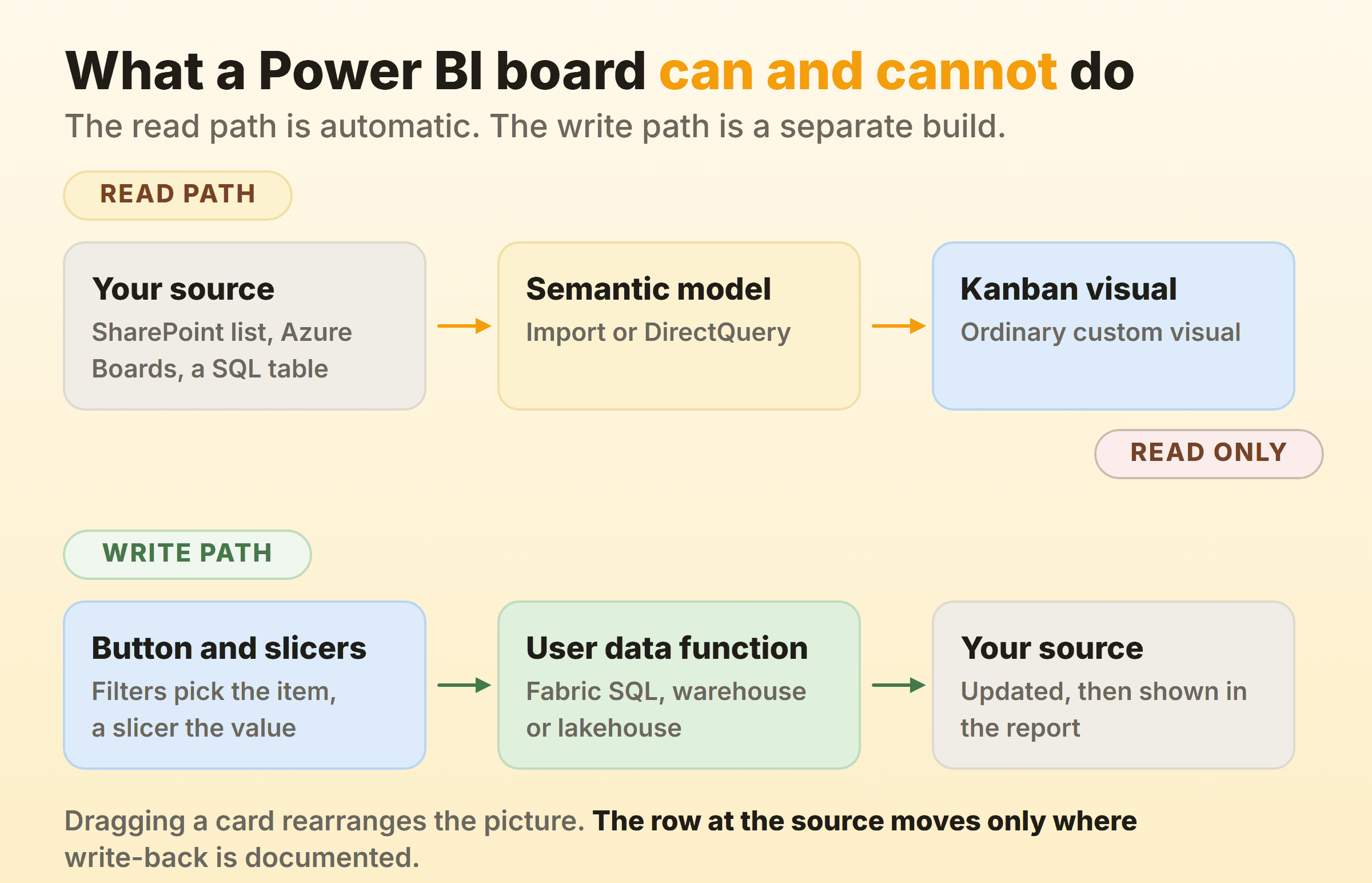
Three documented routes make a report change the data underneath it, and only the third involves a drag.
A Data Function Button
Translytical task flows are the first-party route. They “work by using user data functions in Fabric to invoke functions on the underlying Fabric data sources”, covering add, edit and delete plus calls out to an external API, with native connection management for Fabric SQL databases, warehouses and lakehouses.
The report side is a data function button, which stores an explicit reference to a specific Workspace, Function set and Data function. Microsoft’s own example pairs an input slicer with a Submit discount button, and the user data function “automatically updates the data source records that match the applied filters”, so the filters pick the item and the slicer carries its new value. Then the documented limits bite. “User data functions must return a str type to be added to a report”, and “Data function buttons don’t automatically rebind across workspaces”, so a report moved by a deployment pipeline keeps pointing at the original function. A state change here is a filter, a slicer and a button press, never a drag.
The Power Apps Visual
The Power Apps visual embeds a canvas app and passes it the filtered rows, which lets the app write to the same source. Its published limits explain why the app usually ends up sitting beside the report.
- The row ceiling is hard. The number of records Power BI can pass to the visual through the
PowerBIIntegrationobject “is limited to 1000”. - The loop does not close on its own. “If you write back data from the app to the same data source as the report, your changes won’t be reflected immediately in Power BI Desktop. Changes are reflected on the next scheduled refresh.” Immediate refresh needs an app created from the visual itself and a DirectQuery source.
- Traffic runs one way. “The Power Apps visual can’t filter the data or send any data back to the report.”
Write-Back Built Into the Visual
The third route is to buy it, which is what Ectrics sells on its Premium tier. Confirm the tier before anyone promises a team a draggable board.
How Do You Get Board Data Into Power BI?
Through a connector, and its shape decides what the report can say. Azure DevOps is a well documented case, and Microsoft’s Power BI integration page names three methods with a clear preference.
- OData queries. “Power BI can execute OData queries. OData queries are powerful and can filter and aggregate data before returning it to Power BI.” Microsoft recommends this one “except for simpler reports on Boards data”.
- The Azure DevOps Data Connector. The simple option, built on Analytics views, with two catches: “This connector only works with Boards data (work items)”, and it “provides a flat-list of work items, and doesn’t support work item hierarchies”.
- The OData Feed connector. “Only use this method if you have a small account.” No server-side query folding, so every filter is applied after all the data has been pulled in.
Microsoft’s sample reports list the access needed as a project member with at least Basic access. The same logic applies to whichever tool holds your cards, and if it sits in the Microsoft stack then the Microsoft 365 board options and the Azure Boards guide are the two to read next to this.
Then there is refresh, the quiet reason a Power BI board misleads people. The Power BI pricing page lists the refresh rate for Power BI datasets as 8 per day on Pro and 48 per day on Premium Per User. Eight refreshes a day suits a report, and it will let a board view go stale under a standup, because the card being pointed at may have moved two hours ago. Authoring itself costs nothing, since “Power BI Desktop is the data exploration and report authoring experience for Power BI, and is available as a free download”, with Pro at $14.00 per user per month paid yearly to publish and share.
Which Kanban Metrics Should the Power BI Report Show?
The metrics Power BI is good at are the ones a board on its own does not show: how long work takes, and how it has piled up over time. Microsoft publishes both as sample reports for Azure Boards data.
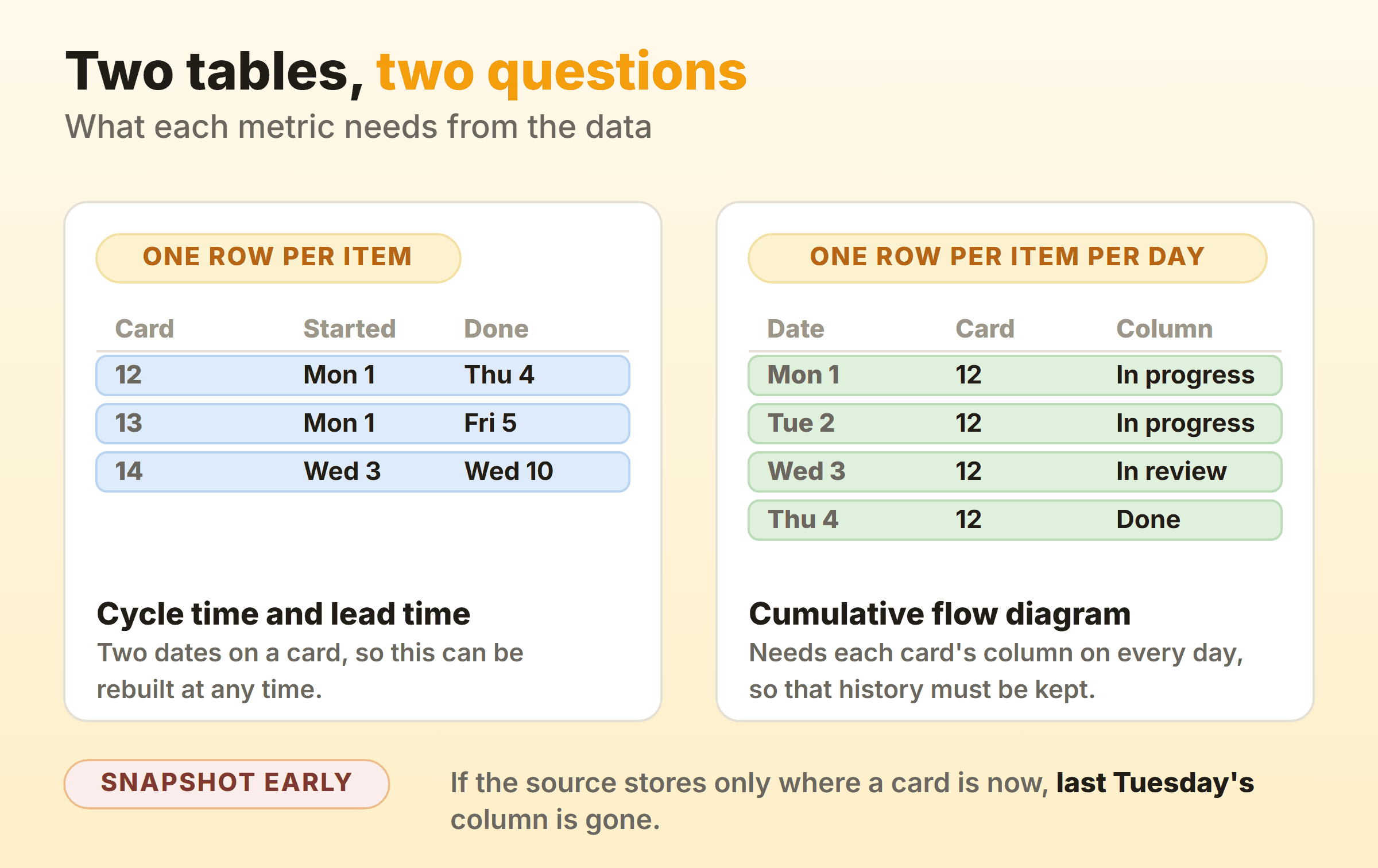
Cycle Time and Lead Time
Microsoft’s lead time and cycle time sample defines them without ambiguity: “Lead time measures the total time from the creation of work items to their completion. Cycle time measures the time it takes for a team to complete work items once they start actively working on them.” Its query pulls the WorkItems entity with CycleTimeDays, LeadTimeDays and CompletedDateSK, then charts completed date against average lead time.
Values exist only for finished work, because “The system calculates values for Lead Time Days and Cycle Time Days only for work items that are completed”. That catches people out, and so does the zero. CycleTimeDays=0 is what an item that starts and finishes on the same day returns.
Where a source has no such fields, a calculated column over two date columns, started and completed, builds them.
Here is where I part company with the sample. It charts an average, and an average is the one number nobody can plan with, because the tail is what hurts. Chart the 85th percentile of cycle time instead, which is all a usable forecast needs.
“Nine days, 85 percent of the time” is a promise. “An average of five days” is an invitation to be disappointed twice a month, and the reasoning behind that preference sits in our guide to kanban metrics.
The Cumulative Flow Diagram
The cumulative flow sample is a stacked area chart. Add DateValue to Axis as a date rather than a date hierarchy, Count to Values and ColumnName to Legend, then filter the legend to the columns you care about. Board order takes a second query against BoardLocations for ColumnName and ColumnOrder, then Sort by Column on that query’s ColumnName and a relationship between the two queries.
Those queries “specify the WorkItemBoardSnapshot entity set as they return data calculated for the board over time”, and group the rows by DateValue and ColumnName, among other fields, into daily counts. That is where the two charts on this page part company. Two dates on a card are enough to rebuild cycle time whenever somebody asks. A cumulative flow diagram is gone for good once your source stores only where each card is now, because no query brings back last Tuesday’s column. So start snapshotting before you need the chart. A daily copy of card ID, column and date into a table is an afternoon of work, and from a source like that it is the only history you will ever get.
When Does a Power BI Kanban Board Stop Being the Right Tool?
When describing the work stops being enough. Power BI handles the describing half well, and a flow report on real board data gives a management conversation numbers to argue with. Running the work is a different job. It needs a cap that shows up at the moment somebody wants to break it, a drag that writes, and a refresh measured in seconds instead of hours.
So split it. I keep Power BI for cycle time, throughput and the cumulative flow diagram, pointed at whatever system holds the work. The daily board stays in the tool the team touches, where a WIP limit can turn red while somebody is still deciding.
Kanbanee is built for that second layer. Caps sit per column and stay off until you switch them on, the badge shows count against limit and turns red past the cap, and the drag still goes through, because a soft limit that argues beats a hard one people route around. Cycle time, weekly throughput and a cumulative flow diagram arrive as reports on the Pro plan at $6 per month or $48 per year, and the free plan covers two boards you own with unlimited members. The trade is real. There is no API, so those reports live in the app and not in Power BI, and the board polls for changes instead of pushing them to your screen. Column drag needs a desktop.
FAQ
Is there a free Power BI kanban board visual?
Yes. Softcial Visuals lists the Kanban Tasks Viewer Chart at Free, and Deneb is free and certified if you are willing to write a Vega or Vega-Lite specification. PowerGraph’s Kanban Task Board installs free with paid plans above it. Check what free covers first, since Softcial’s listing says the visual displays up to three buckets with up to ten tasks in each.
Can you drag and drop cards in a Power BI kanban board?
Only where write-back is documented. A standard Power BI visual reads the semantic model, so a drag rearranges the picture and nothing else. Ectrics scopes “drag items between stages” and write-back to SharePoint via Power Automate to the Premium tier of its KanbanFlow visual. First-party, the documented pattern is a data function button, an input slicer and the report’s filters.
Can a Power BI kanban board enforce WIP limits?
Nothing in the four listings covered here describes a cap on cards per column. A measure counting items per status plus conditional formatting will colour a number once a column is over its limit, which reports a breach after the fact. Behaviour only changes at the moment of the move, and an imported model refreshed 8 times a day on Pro is never at that moment.
Do report viewers need a licence for a paid Power BI kanban visual?
For PowerGraph’s Kanban Task Board, yes. Every paid plan on that listing says “both report creators and report viewers require a license”. Ectrics takes a different approach, stating that licences are managed via ectrics.com with no per-seat Microsoft licence required. Settle which model you are buying before the report reaches a whole department.