
Best Kanban App: 8 Apps Compared for Android, iPad and Desktop
Updated at
The Answer
Pick the best kanban app by the device you update the board from. At a desk almost everything below works, and the decision comes down to price and whether a column can carry a cap. On a phone in a corridor, the shortlist shrinks to the tools that ship a real native client. Trello is the safe default, with apps for iPhone, iPad, Android, Mac and Windows. Jira earns its place when the work already lives inside it. Obsidian with the Kanban plugin suits a personal board that never leaves your own disk. Every entry below gives what it runs on, the limit you hit first, and who it is wrong for.
What Separates the Best Kanban App From a Board in a Browser?
The best kanban app installs on your device, sits on the home screen, and opens while the browser version is still fetching its fonts. A digital kanban board in a browser tab draws the same columns and syncs the same cards. Only one of the two survives a lift, a tunnel, or an airport.
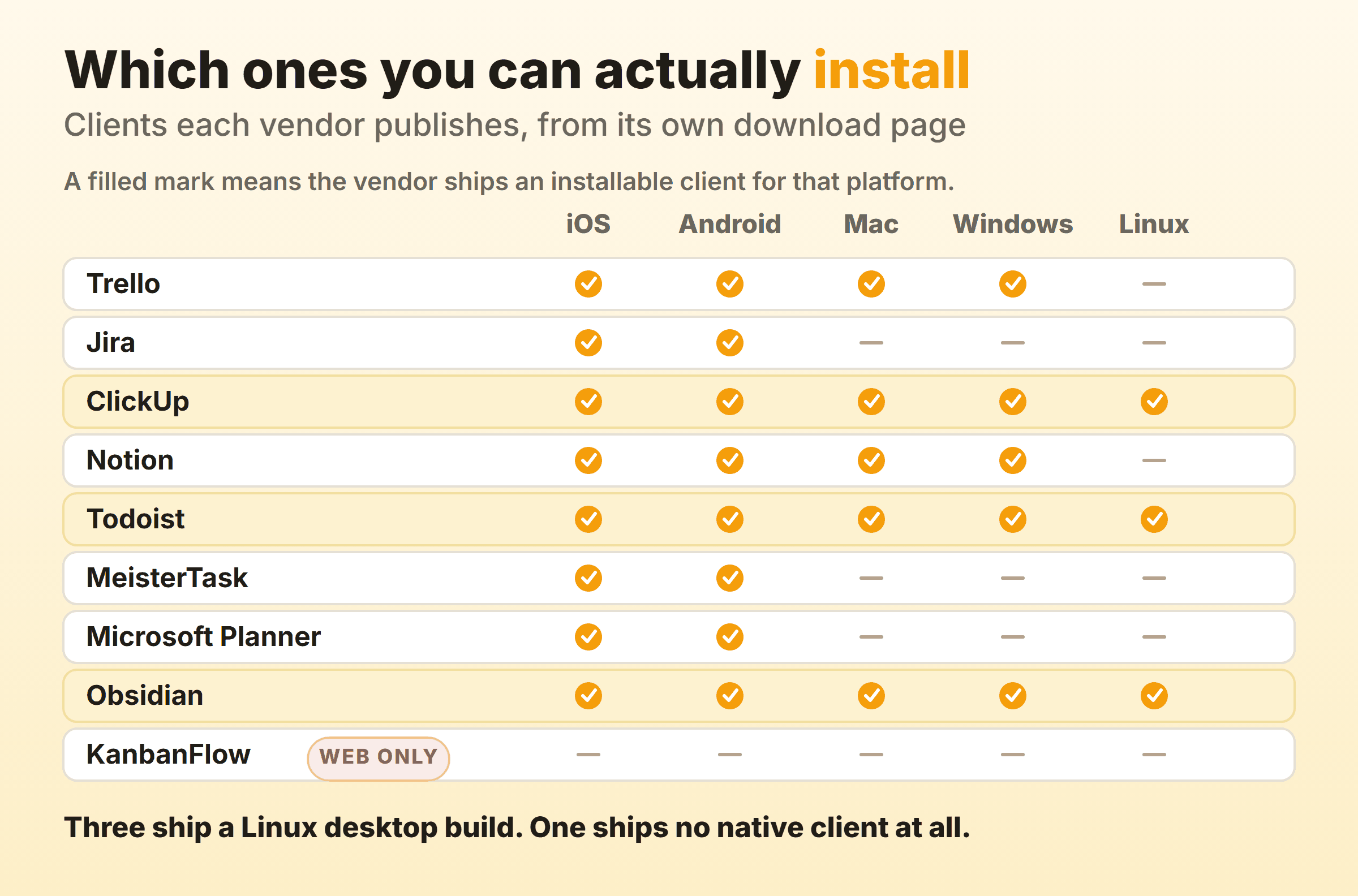
Vendors also retire mobile clients, and almost nobody checks that before committing. Microsoft’s support page states that the Microsoft Lists mobile apps for Android and iOS were retired in mid-November 2025, and recommends switching to the mobile web version instead. Anyone who had built a daily habit on that app woke up to a bookmark. Checking who still ships a client removes a good share of the market.
What to Check Before You Install a Kanban App
Four checks, roughly in the order they kill options:
- A native client for your device. Not “mobile friendly”. An App Store or Google Play listing published by the vendor, with a minimum OS version you can meet. An old iPad fails this alone.
- What the phone build lets you do. Several mobile kanban apps are triage tools. Comment, tick, attach, move on. Planning still happens on a bigger screen.
- Behaviour with no connection. Very few kanban tools document this at all. Read the ones that do, line by line.
- The shape of the free tier. Free plans cap boards, projects, collaborators or storage, and the limit that stops you is rarely the advertised one.
Kanban Apps Compared
Every cell below is the constraint you meet first, taken from each vendor’s pricing page or documentation and checked in September 2026.
| App | The limit that bites first | Best for | Wrong for |
|---|---|---|---|
| Trello | 10 collaborators per Workspace on Free | Teams who want the board on every device they own | A team of twelve hoping to stay free |
| Jira | Column constraints only on company-managed spaces | Teams whose work already lives in Jira | Solo users and plain task lists |
| ClickUp | 60 MB of storage on Free Forever | Mixed fleets that include Linux desktops | Anyone who wants one small app |
| Notion | Blocks limited past one member, 5 MB uploads | Writing-heavy teams whose docs matter most | Delivery teams who want the board to push back |
| Todoist | 5 personal projects on the Beginner plan | Working offline and syncing later | People who think in columns first |
| MeisterTask | 3 projects on the free plan | A small business running two or three boards | Teams past that third project |
| Microsoft Planner | Needs a Microsoft 365 tenant | Teams already inside that tenant | Everybody outside it |
| Obsidian + Kanban plugin | The plugin is looking for new maintainers | Personal boards on your own disk | Any shared or collaborative board |
Trello: A Client for Every Device Most Teams Own
Trello ships an installable client for almost every device a team already owns. Its platforms page lists an iOS app, an Android app, a Mac app on the App Store and a Windows app from Microsoft, alongside the browser version. The iOS listing, published by Trello, Inc., covers iPhone, iPad and Apple Vision and asks for iOS or iPadOS 18.6 as a floor. Older hardware stays on the web.
The free tier is roomy where you expect and tight in one spot, because Trello’s pricing page gives Free unlimited cards, up to 10 boards per Workspace and up to 10 collaborators per Workspace, with a 10 MB cap on each file. Standard is $5 per user per month billed annually or $6 billed monthly, and Premium runs $10 annually against $12.50 monthly.
The collaborator cap bites long before the board cap does, so a team of twelve is paying by the second month. More in the Trello kanban setup.
Jira: The App for Teams Whose Work Already Lives There
Atlassian publishes native Jira apps for iOS and Android, and its mobile page is refreshingly plain about their purpose. It sells push notifications about critical projects, creating and editing work items, and attaching files. Boards get no mention. That matches how I see these apps used, which is triage and comment between meetings.
Jira pulls ahead on the desktop board. Atlassian’s documentation on configuring columns applies to company-managed spaces and offers a constraint of either “Work item count” or “Work item count, excluding subtasks”. Go past the maximum and the column header turns red. Drop under the minimum and it turns yellow. Built-in, no plugin, and a working work in progress limit feedback loop.
Skip it if you are one person with a to-do list, or if you run team-managed projects and want those constraints, since the docs scope them to company-managed spaces. Configuration steps are in the Jira kanban board guide.
ClickUp: A Desktop Build for Every Operating System
ClickUp is one of three tools here with a Linux desktop build. The download page lists Mac, Windows and Linux desktop apps, iOS and Android mobile apps, a Chrome extension and an Outlook add-in. If one person on the team runs Ubuntu, that narrows things fast.
ClickUp sells itself as software to replace all software, and the board is one view inside something that also wants your docs, goals and chat. Teams I have run got real value from that when they were buying three tools anyway. Others just wanted a board. Free Forever gives unlimited tasks and unlimited members with 60 MB of storage, which is what runs out first, and from there Unlimited costs $7 per user per month billed yearly, Business $12.
Setup notes sit in the ClickUp kanban guide.
Notion: A Board in the Same App as the Docs
Notion puts the board beside the documents it refers to, which for some teams beats any flow feature. The desktop page offers macOS builds for Apple Silicon and Intel, plus Windows builds as MSIX or .exe, x64 or ARM64. Its iOS app, published by Notion Labs, Incorporated, runs on iPhone, iPad and Apple Vision from iOS 18.0.
It hands you a database view. Notion’s help describes a board as grouping database pages by a property, commonly status, assignee or priority. No per-column cap appears in that documentation, so the discipline lives with the team. For a writing-heavy group that trade works out, and the Notion kanban setup walks through which property to group by.
The free plan is generous for one person and starts counting the moment a second joins. Notion’s pricing page limits blocks past a single member, caps external guests at 10, and holds file uploads to 5 MB. A delivery team that wants the board to push back should look elsewhere.
Todoist: The Best Behaved When the Connection Drops
Todoist has the broadest platform list on this page, covering Linux, Mac, Windows, iPhone, iPad, Android, Apple Watch and WearOS. It also handles a dead connection better than anything else here, and its help centre is specific about it. You can add, delete or change tasks with no internet connection, and those changes sync automatically once you are back online. One warning in the same article deserves repeating. Do not close the app, log out or clear local data before the sync finishes, because unsynced changes are deleted.
Understand what you are buying. Todoist’s pricing page lists a board layout on every tier including the free Beginner plan, which carries five personal projects against 300 on Pro. It is a list app with a board layout, which frustrates anyone who designs their states before their tasks. Start from the kanban board side instead.
MeisterTask: A Dedicated Kanban Board App for iOS and Android
MeisterTask is a board tool first, with apps on iOS and Android and a web version, and its free plan carries unlimited tasks, unlimited team members and up to three projects.
Three projects covers a small business running one client board, one internal board and one backlog. It stops covering anything the day a fourth client signs, which is when you decide whether to pay or move the board.
Microsoft Planner: The Board App a Microsoft 365 Tenant Already Includes
Basic Planner is already paid for if your organisation runs Microsoft 365, with a separate licence needed only for the premium plans, and its mobile apps are current. Microsoft’s Planner for Android help page says you can do most of the things you can do in Planner for web, with a slightly different look and feel, and adds one thing the web version cannot do at all, which is pulling photos straight from the device camera. Deleting a plan still sends you back to the browser.
The board is deliberately plain. Buckets and cards, no column cap, no cycle time chart. For plenty of small teams that is the appeal, and the Planner kanban walkthrough covers setup. Outside a Microsoft tenant it is not an option, and any team that will eventually want flow metrics will outgrow it.
Obsidian and the Kanban Plugin: Local Files, No Account, One Warning
Obsidian with the Kanban plugin is the only entry here where the board is a file you own outright. Obsidian runs on Windows, Mac, Linux, iOS and Android, and its site is direct about the model. Notes are stored privately on your device so you can reach them quickly even offline, in open file formats. The plugin creates markdown-backed boards, so the board is a text file any editor can open.
The plugin’s repository now lives under GitHub’s community-archive organisation, and the README opens by saying the Kanban plugin is looking for new maintainers, which is why this entry sits last. Latest release 2.0.51, licence GPL-3.0. It works today. Nobody is promising it still will in two years, which I can live with on a personal board and would not accept on a team’s.
There is no server, so there is no realtime anything, and two people editing the same file is a sync conflict waiting to happen. The Obsidian kanban guide covers the file layout.
What a Phone-Sized Kanban Board Cannot Do
A phone screen is about one column wide, and that geometry decides what a mobile kanban app can honestly do. Reading the board, adding a card, leaving a comment, ticking a subtask, attaching a photo. All fine. Anything that needs the whole workflow in view at once goes badly: reordering columns, changing a cap, reading a cumulative flow diagram, editing six cards in a row.
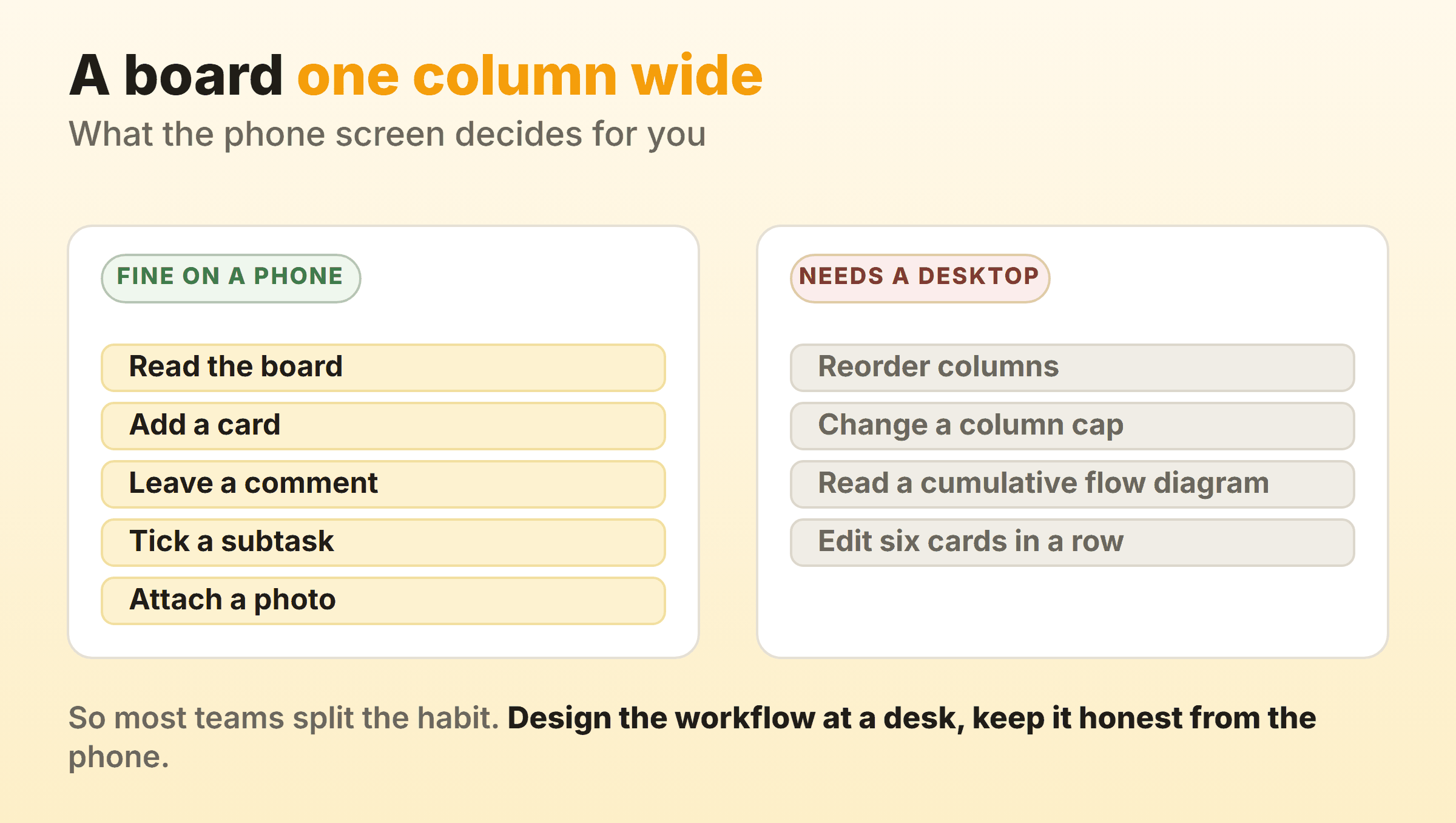
Most teams end up with a split habit because of it. The desktop kanban board is where the workflow gets designed and the weekly review happens, and the phone is where the board gets kept honest in between. Teams get this wrong by choosing for the desk and then finding there is no phone client at all.
Our own tool sits on the desktop side of that split, and I would rather say so than sell around it. Kanbanee runs in the browser on every platform with nothing to install, column drag works on desktop only, there is no realtime sync and no API yet, and WIP limits stay off until you switch one on per column. Free covers two boards you own with unlimited members, and Pro costs $6 a month or $48 a year. If your board genuinely lives in your pocket, install something native.
Which Kanban Apps I Left Out, and Why
KanbanFlow has work in progress limits and a Pomodoro timer built in, which is more flow discipline than most of this list. Its site offers a mobile web app instead of native clients, which keeps it in the browser.
Wekan is MIT licensed, self-hostable and actively developed, and it runs in a browser. Vikunja is AGPLv3, free to self-host, and offers list, kanban, gantt and table views, though its site names no official mobile app. Both belong in the open source kanban roundup.
If price rather than platform drives your shortlist, start from the free kanban board options. For the wider field of kanban project management software, including tools with no app at all, the kanban board software comparison goes deeper. Mac users weighing a native client against a browser tab should read the kanban apps for Mac.
FAQ
What Is the Best Kanban App for Android?
Trello, for coverage. Google Play listing, the same board syncing to the Mac and Windows desktop apps, 10 boards on Free. If the device belongs to a Microsoft 365 organisation, Planner for Android does most of what Planner for web does and adds camera capture. For a personal Android kanban board with no account, Obsidian plus the Kanban plugin works, maintainer warning attached.
What Is the Best Kanban App for iPad?
Trello and Notion both list iPad in their App Store compatibility, requiring iPadOS 18.6 and iPadOS 18.0 respectively. Check that first. An older iPad will not install the current build, and an iPad in landscape holds three columns, which makes it the best kanban board you will get away from a desk.
What Is the Best Kanban App for Personal Use?
Ownership usually decides it. Obsidian with the Kanban plugin keeps the board as a markdown file on your own device, works offline and costs nothing. Todoist suits people who want a personal task app with a board layout and reliable offline sync. Trello’s free plan handles 10 personal boards without asking for a card.
What Is the Best Kanban App for a Small Business?
Start from the free tier’s shape. Trello’s cap of 10 collaborators per Workspace surprises growing teams, MeisterTask allows unlimited members but only three projects, and basic Planner costs nothing extra if Microsoft 365 is already on the invoice. Work out which limit you hit first, then compare paid tiers.
Is There a Desktop Kanban Board That Works Offline?
Obsidian with the Kanban plugin, since the board is a local markdown file and the site states notes are stored privately on your device for offline access. Todoist documents offline changes that sync on reconnection, with the caveat about closing the app too early, and most other desktop kanban apps are web applications in a window.
Do Any Kanban Apps Enforce a Column Limit?
Very few enforce anything. Jira’s column constraints turn the header red past the maximum and yellow under the minimum on company-managed boards, which signals rather than blocks. Most tools with caps treat them as soft limits you can cross on purpose. That is the right design, because the conversation a red badge starts is the entire point of a column limit.