
SAP Kanban: Control Cycles, Supply Areas and the Kanban Board
Updated at
The Answer
SAP kanban is a pull-based replenishment method inside SAP’s production planning area, shipped as application component PP-KAB, and what it moves around is containers of material, not task cards. SAP Help defines it as controlling production and material flow from physical material stock in production, with replenishment triggered only once a set quantity has been consumed. Two master data objects carry it. A production supply area names the spot on the shop floor where material is staged, and a kanban control cycle ties that area to whoever refills it, holding the container count, the quantity per container and exactly one replenishment strategy. An operator then changes a container status, for example by scanning a barcode, and depending on the strategy that change can create a production order, a purchase order or a stock transfer. The SAP Kanban Board is Fiori app F4630, which monitors those circulating containers.
What Is Kanban in SAP?
Kanban in SAP is the replenishment component of Production Planning and Control, carried under the application component code PP-KAB. The Kanban (PP-KAB) documentation states the purpose without decoration: material required on a regular basis is continually kept available in small quantities in production, and replenishment is triggered only when a certain quantity has been consumed. Entries in the system, it adds, are reduced to a minimum, for example to the input of a bar code. Learn two words first. The line consuming a part is the demand source, whoever refills it the supply source.
SAP is direct about what this buys. The same page says the production process is designed to control itself, with manual posting effort reduced as far as possible, and it names shorter lead times and lower stock levels as the effects. If the mechanic is new to you, the wider picture of kanban in manufacturing covers where it came from.
Where Kanban Sits in the SAP Product Line
- SAP S/4HANA documents it as Kanban (PP-KAB), and SAP’s migration reference files the component under Production Planning and Control (PP).
- Scope items. SAP’s What’s New entry for Manage Production Supply Areas in S/4HANA 2023 lists three: 1E3 (Material Replenishment with Kanban - External Procurement), 4B3 (In-House Production) and 4B4 (Stock Transfer). A warehouse variant has its own SAP Best Practices test script, Warehouse Kanban Supply into Production (3VT_IT).
- SAP EWM plugs in through the stock transfer strategies, which SAP documents with separate variants for decentral EWM.
What Does the SAP Kanban Process Look Like End to End?
The SAP kanban process is a status loop on a container. Somebody, or a scanner, says this one is empty, and the status change makes the system act.
- A container sits at the supply area with status Full. The line withdraws from it.
- Somebody sets it to Empty. SAP creates whatever replenishment element the control cycle’s strategy specifies.
- The supply source makes, picks or ships the container quantity.
- The container is set back to Full, and that status change can post the goods receipt.
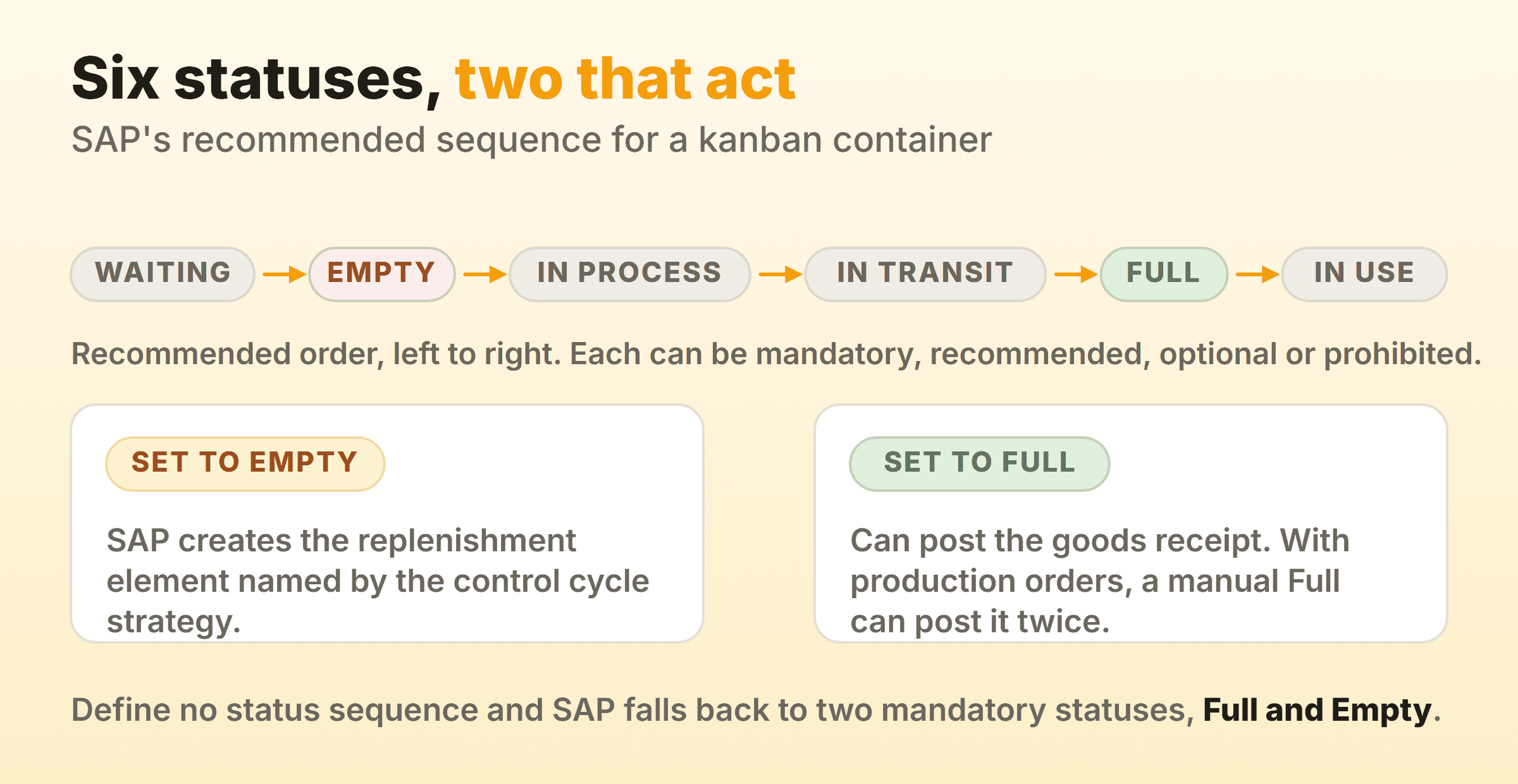
Step four bites in real implementations. SAP’s page on replenishment using production orders warns that where confirmation and goods receipt are not linked, setting a container to “Full” by hand posts the goods receipt twice, once at the status change and again when the production order is confirmed. Message CO823 set to error type E is the documented answer, since the manual change then lands the container in status “Error” instead.
Which Statuses Does a Kanban Container Move Through?
Six. SAP’s status sequence page gives the recommended order as “Waiting”, “Empty”, “In Process”, “In Transit”, “Full”, “In Use”. Each status in the sequence you assign to the control cycle is mandatory, recommended, optional or prohibited. Define none and SAP falls back to two mandatory statuses, “Full” and “Empty”. Start there, because making “In Process” and “In Transit” mandatory sounds like visibility until you count the scans it costs per container per day.
What Triggers the Kanban Signal?
Three documented routes trigger the kanban signal.
- A scan. SAP’s Set Kanban Container Status (F3717) documentation describes barcode readers in keyboard wedge mode, with the container identifier and the next status both in the barcode. Scans collect in an Entered list, so a mis-scan comes out before Save commits it. The app lists desktop, tablet and smartphone as supported devices, and it can scan with the device camera once that setting is switched on.
- A board screen. The Kanban Board (F4630) triggers the signal as well as displaying it, as does Display Kanbans: Demand View (PK13N), which SAP’s warehouse kanban script uses to set containers to Empty and Full.
- A quantity withdrawal, where an operator records how much came out instead of declaring the container empty. The same F3717 app has a Withdraw Quantity option for this. A withdrawal can move a container from “Full” to “In Use”, and withdrawing the complete quantity moves it to “Empty”.
What Master Data Does SAP Kanban Need?
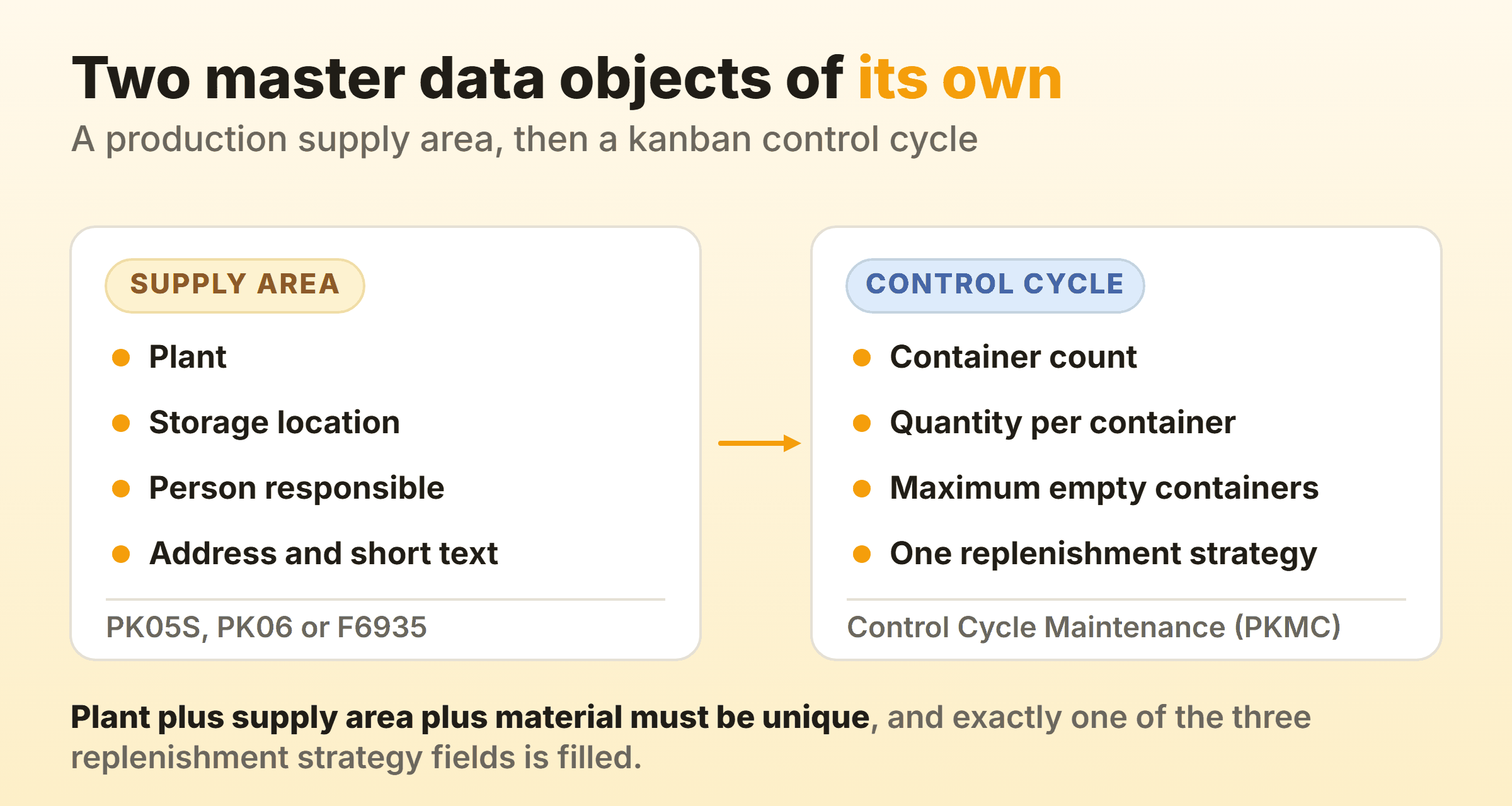
SAP kanban needs two master data objects of its own. Everything else it touches already exists.
Production Supply Area
SAP describes a production supply area, or PSA, as an interim storage facility on the shop floor used to provide material directly to the line or work centre. The definition page is unglamorous about what qualifies: shelving areas, an area marked off on the floor, special boxes.
It gets a plant, a storage location and a person responsible, and goods movements post to that location. One rule catches people out. Several supply areas can share a storage location, but one area cannot span two, and where several share a location the stock overview totals them together.
SAP’s data migration reference names two apps for checking supply areas, Production Supply Area - Fast Entry (PK05S) and Maintain Production Supply Area (PK06), and S/4HANA 2023 added Manage Production Supply Areas (F6935) for creating, editing and deleting them. The migration object also carries an address and requires at least one short text per area.
Kanban Control Cycle
The kanban control cycle defines the relationship between the demand source and the supply source, and every number lives in it. SAP’s classic control cycle page lists kanban circulation, meaning the number of containers and the quantity per container, then a maximum number of empty containers, the replenishment strategy, flow control settings such as the status sequence, packing instructions with a number of load carriers, automatic kanban calculation, print control and a delivery address.
Three constraints from SAP’s control cycle migration object are easy to trip over:
- Each cycle is category K for classic kanban or I for event-driven kanban. One field, two worlds.
- The combination of plant, production supply area and material has to be unique.
- Exactly one of the three replenishment strategy fields has to be filled. Not two, not zero.
You maintain it in the Manage Kanban Control Cycles app, which SAP’s status sequence page names, and the migration object gives Control Cycle Maintenance (PKMC) as the back-end transaction.
Maximum Number of Empty Containers deserves a warning. The classic control cycle page says the limit is only used for information and evaluation purposes. Exceed it and the supply source view of the kanban board shows a red traffic light on that control cycle line, provided the Display Signal field has been added under Settings, Control Cycle Display. Nothing is blocked, so the number buys you a warning light and no more than that.
Which Replenishment Strategies Does SAP Kanban Offer?
SAP kanban offers three families of replenishment strategy, and the family decides which document the empty signal creates. Customizing for Kanban holds the strategies, and a control cycle points at one, as SAP’s production order strategy page spells out for in-house production.
| Family | Documented strategies | What the signal creates |
|---|---|---|
| In-house production | Manual kanban, run schedule quantities, reporting points, production orders with or without MRP, container control | For example a production order or a run schedule quantity |
| External procurement | Standard purchase orders, stock transport orders, scheduling agreements, summarized JIT calls, source list, container control | A purchasing document or a summarized JIT call |
| Stock transfer | Reservation, direct transfer posting, WM-managed storage locations, EWM-managed storage locations, container control | A reservation, a transfer posting or a warehouse task, request or delivery |
Container control appears in all three families, which is easy to miss when you read the strategy list one family at a time.
Forward scheduling is the general rule with kanban, and the production order type SAP delivers for it is PPK1. For backward scheduling with event-driven kanban, SAP points to the standard order type PP01.
How Does SAP EWM Kanban Work?
SAP EWM kanban is a branch of the stock transfer family. SAP’s kanban documentation files replenishment from EWM-managed storage locations under the stock transfer strategies, with stock transfer by delivery, by warehouse task or by warehouse request, plus warehouse task and warehouse request variants for decentral EWM.
SAP’s warehouse kanban script shows the feel of it. Setting a container to Empty in PK13N creates one warehouse task automatically, and once an operative confirms it in Process Warehouse Tasks (F4595) the kanban status is set to Full automatically.
What Does the SAP Kanban Board Show You?
The SAP kanban board shows circulating containers coloured by status, grouped under the control cycle they belong to. SAP’s Kanban Board documentation gives it app ID F4630 and describes a tool for monitoring circulating containers, with statuses and errors shown in different colours. The standard display shows each control cycle with two columns for material and supply area, then one section holding that cycle’s containers.
That layout description is worth reading twice, because I read it expecting columns and found attributes. The two columns describe the control cycle. A container never crosses into another column as work progresses. It changes colour where it sits, and after a refresh the section re-sorts containers by the status sequence.
SAP’s feature list is practical. Filter by plant, supply area, material and container status, add more characteristics behind Adapt Filters, sort and group control cycles in the table settings, then save the result as a view. The board shows classic and event-driven control cycles in status Released or Locked. You can change a container status directly, including putting one stuck in “Error” back to its previous valid status if you have the authorization, and create containers for an event-driven cycle without leaving the screen.
It has a rough edge SAP documents openly. Search is restricted to control cycles, and the suggested workaround for a container ID is your browser’s own find function, which only covers the containers currently loaded on the page. For evaluations, SAP’s kanban documentation lists separate apps, among them Monitor Kanban Containers and Kanban Control Cycles Analysis.
How Do Classic and Event-Driven Kanban Differ?
Classic and event-driven kanban differ in whether containers exist before anybody asks for them. SAP’s kanban documentation lists four procedures in total, and the choice between these two is made per control cycle, which carries category K for classic or I for event-driven.
Classic kanban fixes the loop in advance. The control cycle names how many containers circulate and how much each holds, and with the production order strategy an Empty signal creates an order for that container quantity. Stable, high-frequency parts belong here.
Event-driven kanban does the opposite. An event-driven cycle can sit with no containers at all. Containers are created as they are needed, straight from the kanban board if you like, and SAP’s board documentation says a container in an event-driven cycle is deleted when its status is set to “Empty”. If you searched for “e kanban sap”, separate the ideas. SAP’s event-driven kanban is one procedure inside PP-KAB, while the broader category of electronic kanban systems means replacing paper cards with records in any system at all.
The remaining two are narrower: kanban with quantity signal, which SAP documents alongside the withdrawal route covered above, and one-card kanban, which the control cycle sets up through a special trigger logic in the Trigger Replenishment field on its Flow Control tab.
How Does SAP Decide the Number of Containers?
SAP decides the number of containers through the automatic kanban calculation, which SAP’s classic control cycle page says determines the number of kanban containers or the container quantity. The same page bases both numbers on average consumption, the replenishment lead time of a container, and fluctuations in consumption and in lead time. The calculation’s own documentation goes further, with topics on smoothing requirements, calendar buffers and capacity-based calculation for in-house production. Rerun it when demand shifts, because every one of those inputs moves.
This calculation decides how much stock you hold, so it is where the kanban inventory trade-off gets made. Too few containers and a line stops waiting for a refill. Go the other way and the cap stops doing its job. SAP’s own prerequisites carry the honest warning here. Consumption should stay relatively constant over a period longer than the replenishment lead time, and the supply source should manage a large number of small lots in a short period. Parts failing both tests do not become well behaved because somebody put them in a control cycle.
Is the SAP Kanban Board the Same as a Team Kanban Board?
No. The two share a name and a Japanese origin and very little else. SAP’s board tracks containers of physical material against control cycles, coloured by a status that scans, apps and postings set. A team board tracks work against columns people move cards through by hand, and its limit sits on the column rather than a circulating container. Both are pull systems, and the resemblance stops there.
So the distinction matters when somebody asks for “a kanban board” in an SAP shop. If they mean material replenishment, PP-KAB is the answer and a task tool is no substitute for it. Seeing who is working on what is a separate tool. On our own product board in Kanbanee, WIP limits are off by default and stay soft once you set one, so dragging a card in over the limit is never blocked. Same information-only compromise SAP made with Maximum Number of Empty Containers. A hard block teaches people to route work around the board.
FAQ
Which transaction or app opens the SAP kanban board?
The Kanban Board is Fiori app F4630, and SAP’s warehouse kanban script also uses Display Kanbans: Demand View (PK13N). Control cycles live in the Manage Kanban Control Cycles app, with Control Cycle Maintenance (PKMC) as the back-end transaction. For supply areas, SAP names Production Supply Area - Fast Entry (PK05S), Maintain Production Supply Area (PK06) and Manage Production Supply Areas (F6935).
Can you run SAP kanban without MRP?
Yes. SAP documents kanban without MRP and kanban with MRP as separate topics. If you do combine them, the production order strategy with MRP reduces planned orders from the MRP run by the production orders that Empty signals create, which SAP’s production order strategy page says gives you a preview, lets you plan components and keeps the data for the kanban calculation up to date.
Can you read or write SAP kanban data from outside the system?
Yes. SAP’s migration objects load production supply areas and kanban control cycles from staging tables, and SAP’s kanban documentation covers service interfaces for kanban in SAP S/4HANA as a topic of its own.