
Kanban for Students: How to Run Coursework on a Board
Updated at
The Answer
Kanban for students is a board that shows every assignment you owe and, more usefully, caps how many of them you are allowed to have open at the same time. Five columns work better than three. This term, This week, Doing, Waiting on, Submitted. Set the cap on Doing in study hours rather than in cards, because two essays and a lab report is a perfectly sensible number of cards and a completely unrealistic sixteen hours. Everything after that is upkeep. Pull work from This term into This week once a week, move a card only when the work genuinely changed state, and let Waiting on hold whatever a group partner or a tutor owes you. The student boards I have watched fail usually die around week three, and the cause is nearly always the same: the board quietly turned into a second to-do list that nobody was pulling from.
What Is a Kanban Board for Students?
A kanban board for students is a visual map of coursework where every assignment is a card and every column is a state that assignment can actually be in, so you read your workload off a board instead of rebuilding it each morning from a syllabus, two group chats and whatever you half-remember from last Tuesday. The mechanics are the same ones factories and software teams use. The columns are different, because coursework moves differently.
The word is Japanese for signboard, and it started on Toyota’s assembly lines under Taiichi Ohno in the late 1940s as a physical card that travelled with a bin of parts. Empty bin, card goes back upstream, that is your signal to build more. No card, no production. Kanban carried that idea into office work in the 2000s, and the half that survived the journey is the visual half. The signalling half, the bit that says you may not start something new until you finish something old, is the half that makes it work for a student.
Here is the part worth being blunt about. A board is not a productivity system. It will not make you want to write the essay. What it does is stop you from being wrong about how much you have taken on, which turns out to be the thing most students are wrong about.
Why Does Kanban for Students Beat a To-Do List?
Kanban for students beats a to-do list because a list has exactly two states, done and not done, and almost all of your academic stress lives in the enormous space between them. Started and abandoned. Drafted but unread. Waiting on a lab partner. Written, needing a reference check. A list flattens all of that into an unticked box, so a task you are two hours from finishing looks identical to one you have not opened.
That flattening has a cost you can feel. In 1927 Bluma Zeigarnik reported that people recalled interrupted tasks better than ones they had finished, which is often quoted as proof that open loops sit in your head rent free. Later replications have been mixed, so I would not lean hard on it. The everyday version needs no research at all: six half-started assignments produce six background hums, and the hum does not care that you have decided to ignore five of them.
A kanban study board fixes this by making the middle visible and then limiting how wide it is allowed to get. You can see that four things are open. You can see which one has been open longest. And when the fifth arrives, the board asks a question a list never asks, which is what you intend to finish first.
How Do You Build a Kanban Board Study Plan?
Build a kanban board study plan in three passes: draw the columns your work really moves through, write one card per deliverable rather than per subject, and decide where the board is going to live. Twenty minutes, once. Most of the boards I have seen fail were lost in these twenty minutes, usually because somebody copied a three column template that was designed for a software team.
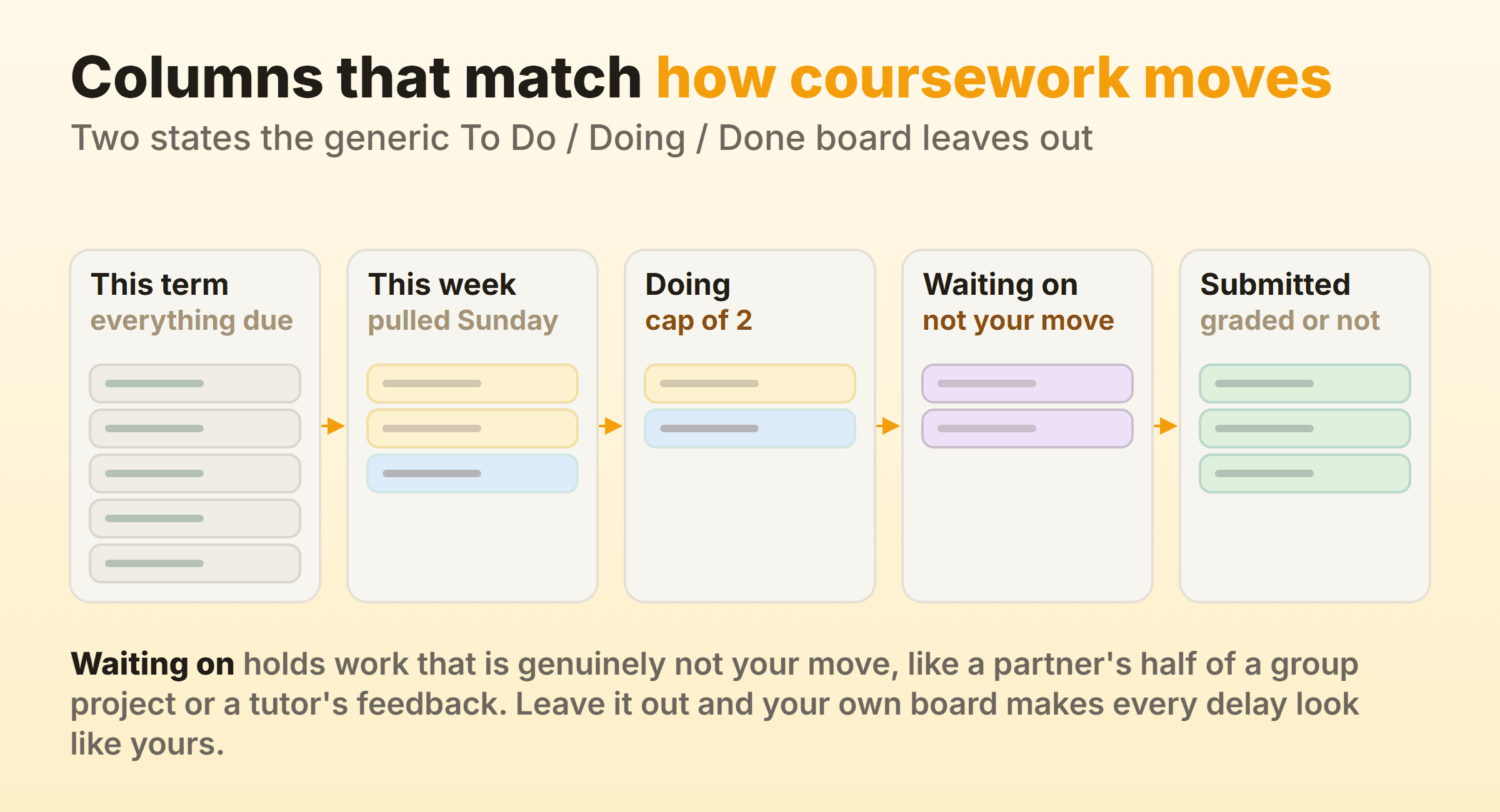
Columns That Match How Coursework Moves
To Do, Doing and Done is the wrong shape for a term. Two states are missing and both of them matter more than the ones you kept.
The first is the difference between everything due by December and everything you intend to touch this week. Lump them together and your first column has forty cards in it, at which point you stop reading it. Split them and This term becomes an inventory you check on Sundays while This week stays short enough to scan.
The second is Waiting on. Coursework stalls for reasons that have nothing to do with you. A partner has not sent their section. A tutor has your draft. The reading you need is out on loan until Thursday. Park those cards in their own column and two things happen. Your Doing column stops lying about how busy you are, and you get a list of people to chase that writes itself.
Five columns is my recommendation and also close to my limit. Add a Reading column, a Drafting column and a Proofing column and you have built a workflow you will maintain for nine days.
What Goes on a Card
One card per deliverable, never one card per module. “Chemistry” is not a task and will sit in This term until it becomes an emergency. “Chem lab report 3, results section” is a task, and you can tell at a glance whether it is done.
Size the cards so each one is roughly a study session. If a card cannot plausibly be finished in two or three hours, split it, because a card you can never move is a card you learn to stop looking at. Put the deadline on it. Put the hours you think it needs on it too, in the title if your tool has nowhere better, since you will need that number in a moment.
Where the Board Should Live
Paper works. A whiteboard with sticky notes, or index cards on a corkboard, has one real advantage over every app: it is in the room, and you cannot close the tab. The catch is that it does not come to the library with you.
Digital wins on portability and on group work, and any tool with columns will do the job. Trello, Asana, ClickUp and Basecamp all have free tiers. Notion is the one students already have open, and it handles this fine once you find where the board view hides, which the walkthrough on kanban in Notion covers. Whatever you pick, check that it can log time against a card, because the hour cap in the next section is only as good as the hours you actually record.
What Should a Student’s Work in Progress Limit Be?
A student’s work in progress limit should be set in study hours, not in number of cards, and that single change is what separates a board that helps from a board that just decorates. Count your realistic study hours for the week. Not your available hours. The ones you will actually spend, which is always fewer than the timetable implies. Then let cards into Doing until their estimated hours reach that number, and stop.
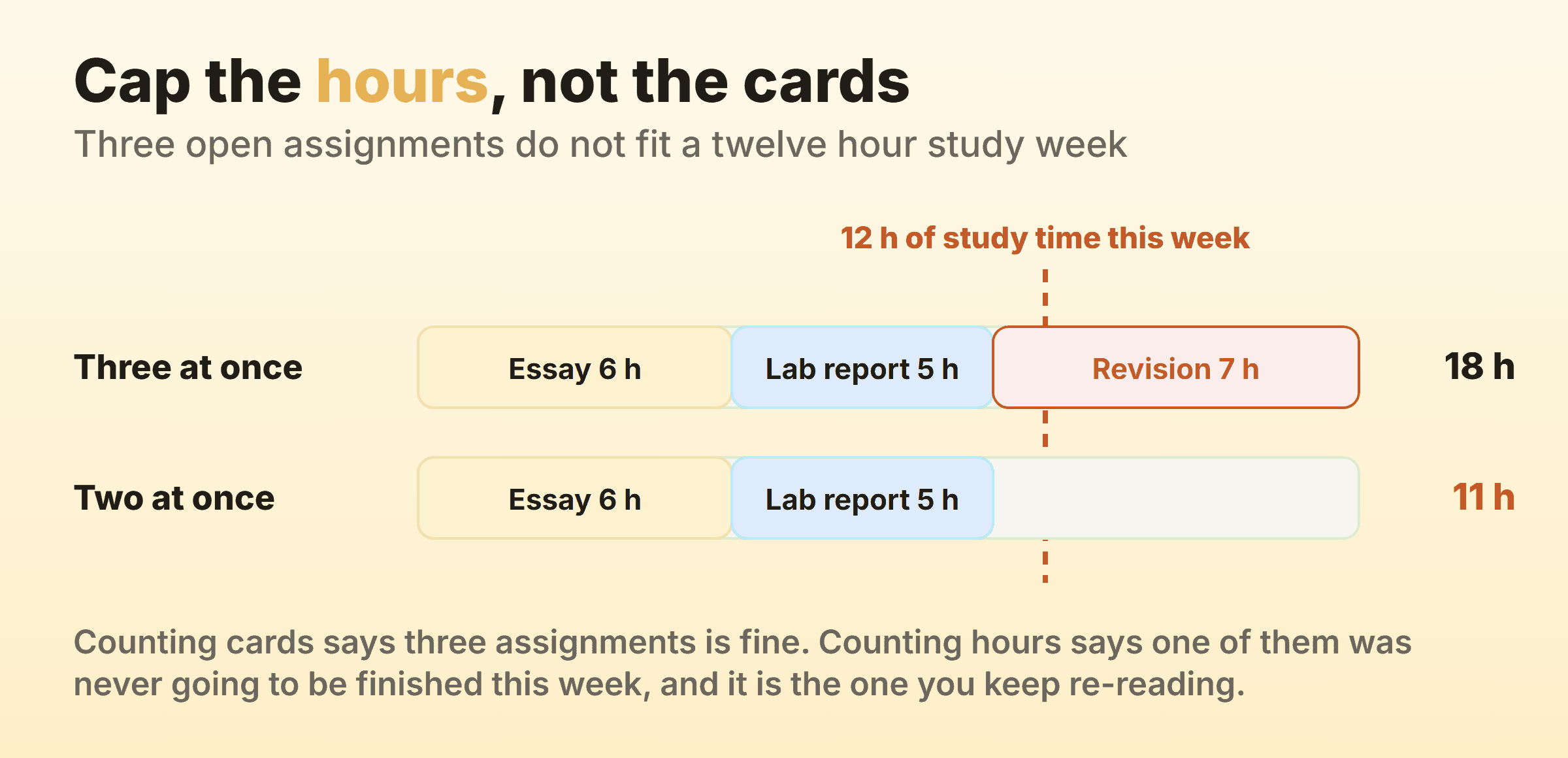
Three open assignments sounds moderate. Six hours for the essay, five for the lab report, seven for exam revision, and you have committed to eighteen hours in a week where you have twelve. Nothing on the board flagged it, because three is a small number. The overflow does not announce itself as overflow either. It shows up as the one assignment you keep opening, reading, and closing again.
Two rules keep this honest. Log the real hours as you go, because your estimates are wrong for the first month and only the log will tell you by how much. And treat the cap as a signal rather than a fence. The version that works is a column header showing a live count against your number, turning red once you are over, while still letting you drag the card across anyway. That last part matters. A tool that physically refuses to let you start revision the night before an exam is a tool you will abandon rather than obey. The general case, and why soft limits outperform hard ones, is in the piece on WIP limits.
Should You Run One Board or Two?
Run two boards once your term has more than about six live commitments, because a single board mixing a dissertation chapter with a Tuesday problem set forces you to reread the whole thing every time you want to know what to do next. The horizons are different, so the boards should be too.
Board one is the term. Every module, every assessment, every deadline, sorted by date. You look at it on Sunday and at almost no other time, and its job is to make sure nothing surprises you in week nine.
Board two is the week. It holds only what you pulled across, it carries the hour cap, and it is the one you actually work from. On Sunday you pull, on Friday you look at what did not move and ask why, which takes four minutes and is the closest thing to a retrospective a student needs.
The temptation is to skip board one and keep the term in your head. That works right up until two deadlines that felt far apart turn out to be four days apart, which you would have seen in October.
How Do You Use a Kanban Board for a Group Project?
Use a shared board for a group project and put names on cards, because the recurring failure in group work is not laziness, it is four people who each believe someone else is handling the middle section. A card with one owner and one deadline removes the ambiguity that argument runs on.
Three habits make it hold. Every card gets exactly one owner, since a card owned by everybody is owned by nobody. Anything you have handed to another person goes into Waiting on with their name attached, so the board records who is holding what and nobody has to send the accusatory message. And you agree in the first meeting on what Submitted means, because “done” meaning drafted to one person and formatted and referenced to another is how groups discover on deadline day that they have three versions of one file.
One honest caveat about tooling. A board is not a shared document, and most of them will not show you a partner’s edits as they type. If two of you need to write into the same section at once, do that in a document and let the board hold only who owns it and when it is due.
Can Younger Students and Kids Use a Kanban Board?
A kanban board for kids works, and usually works better on paper than on a screen, because the point at that age is the physical act of moving something. Three columns is plenty. To do, Doing, Done. A magnetic whiteboard on the fridge, or a sheet of card with sticky notes, and one rule that matters more than the layout: only one card in Doing.
Cards should be single actions a child can picture. Not “homework” but “spellings, page 12”. Keep the total small, because a board with twenty cards on it reads as an accusation. Six or seven is a week.
The finishing move is the bit adults skip. Let them move the card themselves, and leave the Done column visible until the end of the week rather than clearing it nightly. A full Done column on Friday is the whole reward, and clearing it every evening quietly deletes it.
Why Do Student Kanban Boards Get Abandoned?
Student kanban boards get abandoned for four reasons, and none of them is that kanban does not work for studying. I have watched all four happen.
The board becomes a second to-do list. Cards go in, nothing comes out, and within a fortnight it is a museum of intentions you are avoiding. The fix is the weekly pull. If nothing moved from This term to This week on Sunday, the board is already dead and you have not noticed.
There is no limit on Doing. Without a cap the board reports your overload accurately and does absolutely nothing about it, which is a demoralising combination.
The cards are too big. “Dissertation” sat in Doing for five weeks and taught you that the board is decorative.
And the board lives somewhere you never go. If opening it is a deliberate act, it loses to the phone every time. Pin the tab, or put the paper board where you sit down.
What Is Kanban University, and Should a Student Get Certified?
Kanban University is the body that certifies trainers and practitioners in the Kanban Method as codified by David J. Anderson, and it is built for working teams rather than for students managing coursework. It issues the Team Kanban Practitioner credential and the Kanban Management Professional designation, the latter earned through the Kanban System Design and Kanban Systems Improvement courses. Accredited trainers deliver the classes and set their own prices, so there is no single published fee.
Should a student get certified? For running your own degree, no. Nothing in this article needs a credential, and the syllabus is built around service delivery, classes of service and flow metrics across teams, none of which apply to one person and eleven deadlines.
It is a different question if you are heading into delivery, operations or product work after graduating, where Team Kanban Practitioner is the short entry level class and does occasionally turn up in job adverts. Just be clear about which of the two things you are buying. Running your coursework on a board is a habit, and habits are free.
FAQ
Is a kanban board better than the Pomodoro technique for studying?
They answer different questions, so most people who stick with either end up using both. Kanban decides what you work on and how much you allow yourself to have open. Pomodoro decides how you sit through the next twenty five minutes once that is settled. A board with no timer leaves you staring at the right card. A timer with no board makes you very productive on whatever you happened to open.
How many columns should a student kanban board have?
Five is the sweet spot for university work: This term, This week, Doing, Waiting on, Submitted. Three is enough for school-age students or for a single module. Past six, maintenance costs more than the board returns, and the first thing to go is accuracy.
Can I use a kanban board for a dissertation or thesis?
Yes, and it is one of the better uses, provided you break the thesis into cards of two or three hours each rather than by chapter. Chapters are months long and a card that cannot move in a week teaches you to ignore the board. Add a Waiting on column for supervisor feedback, since that wait is often the longest single delay in the whole project.
Do I need paid software for a student kanban board?
No. Paper costs nothing and works, and every mainstream tool has a free tier that covers one person’s coursework. Kanbanee’s free plan covers two boards you own, which is the term board and the week board, with unlimited people on them. The paid tier is $6 a month or $48 a year and its draw is the reporting suite, which is genuinely useful for a team and mostly overkill for a single student.
What is a kanban learning board?
A kanban learning board is the same board applied to things you are teaching yourself rather than things that are being graded. The columns usually become something like Want to learn, Learning, Practising and Comfortable, and the useful discipline is identical: cap how many topics you are allowed to be part-way through, because a course you are forty percent into is worth roughly nothing until you finish it.