
Kanban Implementation: How to Roll It Out Step by Step
Updated at
The Answer
A kanban implementation puts the method on top of the process your team already runs, so nothing gets replaced and nobody’s title changes. You draw the real workflow as columns, move every live item onto that kanban board, write down the rules the team half-follows already, then cap the columns where work in progress collects. That part takes an afternoon. The evidence is the slow half. Cycle time and throughput say nothing useful for two to four weeks, and about ninety days pass before you can judge a change against where you started. Teams that skip the policies and the caps end up with a task tracker that has tidier columns.
What Does a Kanban Implementation Actually Change?
A kanban implementation changes what the team can see and how much it allows to run at once. It leaves alone who reports to whom, what anyone is called, and how the work arrives in the first place.
The restraint is deliberate. Four principles sit behind the kanban methodology: start with what you do now, pursue incremental change, respect current roles and titles, and encourage acts of leadership at every level. Kanban University’s guide is explicit that kanban gets applied to an existing process instead of replacing one. Which is why a rollout survives contact with teams that would flatly refuse a scrum one.
Four things are new by the time you finish:
- A kanban board that matches reality, including the waiting stages nobody had drawn before.
- Explicit policies covering what done means in each column and who pulls next.
- WIP limits on the columns where work collects.
- A feedback rhythm, plus the flow numbers to feed it.
Everything else stays. Your ticketing tool, your estimates if you use them, the release process, the org chart. People call this the kanban framework, the kanban model, the kanban approach or the kanban technique, and the label matters less than the difference underneath it. A framework hands you a process to adopt, while the kanban method works on the one you already have, which is also how kanban in agile teams tends to arrive with no reorganisation attached.
What Do You Need Before You Start?
Three conditions have to hold before you start, and only the last one is hard.
Work arrives as countable items. A request, a ticket, a design, a contract to review. Teams whose output is one continuous stream have nothing to count and nothing to cap, though most teams do have items and have simply never got round to naming them.
The process has more than one stage. At least two states past doing, which in practice means some flavour of review or waiting. Where every item goes to one person and comes back finished, a board will show you very little.
Then the hard one. Somebody has to be willing to leave a card sitting in the queue while the column ahead of it is full. WIP limits do nothing without that, and the numbers written on the columns become decoration.
You do not need a new tool, a certification, a coach, or permission from outside the team. Nor a redesigned process. Estimates are optional and always were.
One caveat before you spend a week on this. Kanban will not fix demand that outruns capacity. It surfaces the gap in about a fortnight, which is useful and makes for a bad week, and the arithmetic underneath stays exactly where it was.
How Do You Implement Kanban Step by Step?
The seven kanban steps below are how to implement kanban on one team, and their order carries more weight than any single one of them, because limits argued over before the policies exist never survive the first argument.
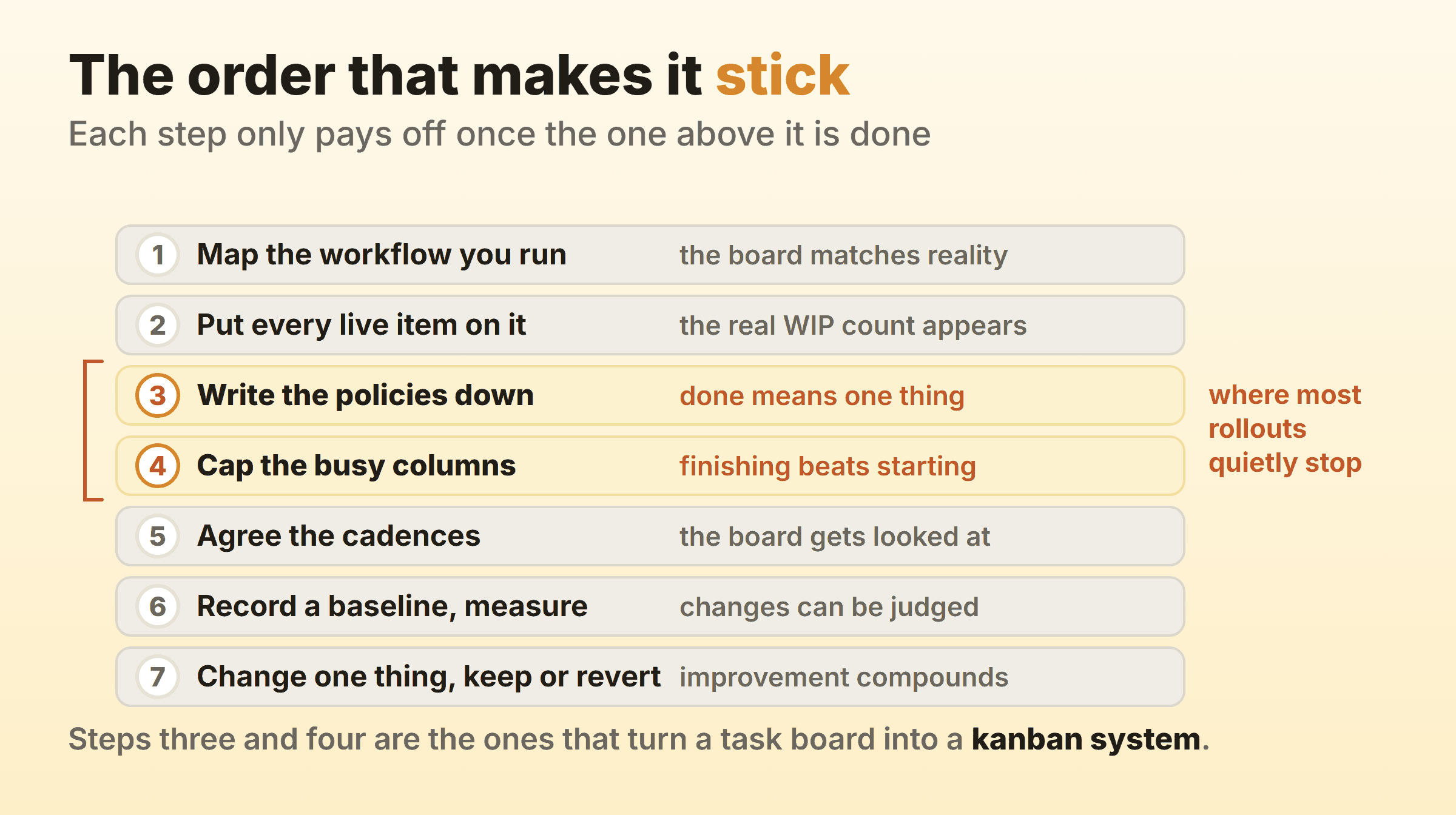
Step 1: Map the Workflow You Actually Run
Draw the stages your work really passes through, one column per stage. Include the ugly ones. “Waiting for client”, “ready for QA” and “sitting in somebody’s inbox” are all real kanban stages, and they tend to be where the time goes.
Resist tidying. On day one the temptation is to draw the process you wish you ran, and a board describing an aspirational kanban process flow tells you nothing about the actual one. Five to seven columns covers most teams. Past ten you are probably drawing task types when you meant states.
Step 2: Put Every Live Item on the Board
Roadmap entries stay off. In-flight work goes on, all of it, including the favour somebody agreed to on Slack last Thursday.
This is the uncomfortable step and it does more work than any of the others. On the boards I have set up, the count lands at three or four times what the team guessed beforehand. Write that number down while it is still embarrassing, because it is the most persuasive figure the whole rollout will produce.
Step 3: Write the Policies Down
Write out the kanban rules your team is already applying inconsistently. What done means for each column. Who is allowed to pull the next item. What happens when something genuinely urgent lands at four on a Friday.
Two lines per column will do. “Done in Review = a second person approved it and comments are resolved” beats a page of process documentation, since an unwritten policy cannot be improved while nobody agrees on what it currently says. Teams skip this step more than any other, and skipping it is why the WIP limits in step four get argued about a fortnight later.
Step 4: Cap the Columns Where Work Collects
Put a number on the columns where cards pile up. Doing, review and testing usually earn one. Backlog and done never do.
Start with the people who pull from that column, plus one. Three developers pulling from Doing gives you a cap of four, or three if two of them pair most days. Week one will feel too tight, which is the intended sensation, and you adjust once a fortnight of data is in. WIP limits goes into the arithmetic properly, including what to do about a cap that gets hit every single day.
Do not set the cap at whatever the board already shows. Capping at current work in progress constrains nothing, and the team gets to conclude that the technique does not work here.
Step 5: Agree How Often You Look at It
Pick two or three cadences and put them in the calendar. A daily standup walked right to left, a weekly session to refill the top of the queue, a retrospective every two to four weeks. That set carries a small team a long way.
The canonical list runs to seven meetings, up as far as a quarterly strategy review, and one team needs two or three of them at most. Skip all of them and the board drifts out of date inside a month, after which the implementation dies without anybody announcing it.
Step 6: Record a Baseline, Then Measure
Write down four numbers before you change anything else. Items in flight. How many finished last month. The age of the oldest card. How long the last ten finished items took end to end.
Nobody reconstructs these later. Six weeks in, the memory of what the place was like beforehand has gone, and you are left arguing about vibes. Flow metrics covers cycle time, throughput and cumulative flow properly, though those four numbers will prove or sink the rollout on their own.
Step 7: Change One Thing and Judge It
Change one thing, run it for two weeks, keep it or revert it. Lower a limit by one, or split a column that has been hiding a queue. Writing down a policy for expedited work is another good first move.
One change at a time sounds slow. Two simultaneous changes produce a result nobody can attribute to either of them. That loop is what the kanban system exists to support, and teams are still running it three years in.
Is There a Formal Kanban Implementation Approach?
Yes. The kanban method’s implementation approach is called STATIK, short for Systems Thinking Approach To Introducing Kanban, developed by David Anderson and taught through Kanban University’s courses. Worth reading once you know how kanban works day to day.
STATIK puts analysis in front of the board. You identify the services the team provides, work out what makes each one fit for purpose from the customer’s side, catalogue the current sources of dissatisfaction, then analyse demand and capability before modelling the workflow, discovering classes of service and designing the kanban system itself. The last step is socialising that design with everyone it touches and negotiating the rollout.
The extra front half earns its keep when a team serves several customer types with different expectations, or when there is a live argument about what the team is even for. A support desk handling incidents and change requests through one queue is the classic case. One team with one queue gets to the same place by Friday on the seven steps above, and the demand analysis keeps until real numbers exist.
How Long Does a Kanban Implementation Take?
The board takes an afternoon. The first useful data arrives in two to four weeks, and a defensible before-and-after comparison lands at about ninety days.
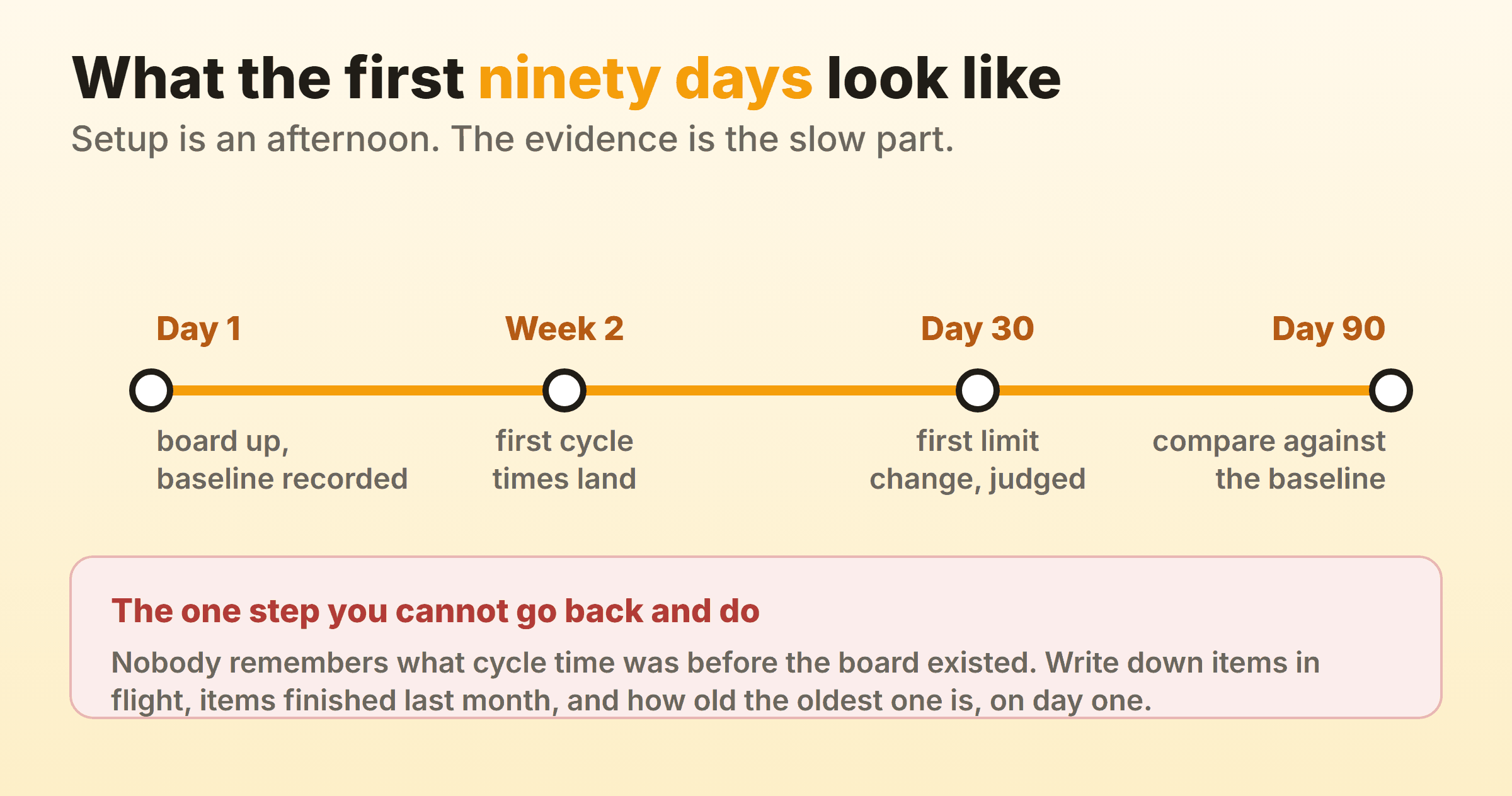
Week one is setup and shock. The board goes up, everybody sees how much is in flight, and somebody points out that the process on the wall looks nothing like the one described in last month’s planning meeting. Cycle times start landing across weeks two to four, and the first pattern almost always shows up in a column nobody suspected. In my experience that column is review, and the cards have been ageing there invisibly for months.
Around day thirty you make the first real change and let it run. By day ninety there are three data points, which is when the numbers stop being noise. Treat anybody promising results inside a fortnight as describing the setup.
How Do You Know the Kanban Implementation Worked?
The implementation worked if the four baseline numbers moved: fewer items in flight, shorter cycle time, throughput holding or climbing, and no card quietly ageing past a month.
Steady throughput while WIP falls is the result to want. Same output, less work in flight, which is what Little’s Law predicts and what shortens the wait for everybody downstream. Throughput falling alongside WIP normally means the caps went too tight too fast, and the fix is to loosen one column by one card.
Card movement counts get quoted a lot and mean very little, since a busy board is a long way from a flowing one. Utilisation is worse, because people being busy was never the constraint. A kanban team can run at full tilt and still deliver slowly, so read the four baseline numbers and ignore how busy the week felt.
Where the numbers refuse to move after ninety days, the cause is nearly always step three or step four. Check whether anybody has actually left a card in the queue since the caps went up.
Why Do Kanban Implementations Fail?
Kanban implementations fail in a handful of predictable ways, and nearly all of them trace back to a skipped step.
- The board went up and the limits never did. The most common outcome by a wide margin. You get the visibility and none of the behaviour change.
- Columns named after people. “With Sam” describes a person, so the board stops making sense the week Sam is on holiday. Name the state the work is in.
- The board stopped matching reality. Updated once a week, an hour before the standup, for the benefit of the standup, which makes it a report.
- Limits set at whatever was already there. Nothing gets constrained, and the team concludes kanban does not suit their kind of work.
- Everything is expedited. Half the cards carrying an urgent flag means none of them do, and the queue is run by whoever asks loudest.
- Rolled out to twelve teams in one week. Nobody has been through a full ninety day cycle, so nobody can defend it when the first awkward question lands.
- The tool got picked before the process got drawn. Columns end up matching the software’s default template, and the work has to bend around them.
Should You Implement Kanban on a Wall or in Software?
Start on a wall if the team sits together, and move to software as soon as you need history. Sticky notes cost nothing and need no licence, which removes the usual excuse for putting the board off another week. Their one weakness is that they keep no record of anything.
Step six forces the decision. Cycle time, throughput and a cumulative flow diagram all depend on knowing when each card entered and left each column, and no wall keeps that. Photographing the board weekly is a real workaround, and it holds up until somebody has to turn thirty photographs into a number.
Going digital, keep the tool subordinate to the process you drew. Kanbanee ships WIP limits off by default, set per column from the column menu with a checkbox and a number pre-filled at 3. The badge shows count over limit and turns red above the cap, and the limit stays soft, so a drag is never blocked and the team decides what to do about the red. Cycle time, weekly throughput and the cumulative flow diagram come off the board’s own history, which is the part step six depends on. The gaps are worth knowing too. There is no realtime sync yet, since the board polls instead of pushing, column dragging is desktop only, and there is no public API.
How Do You Extend Kanban Beyond One Team?
Extend it one team at a time, once the first team has been through a full ninety days and can put the numbers on a screen. A second team tends to ask for a board after seeing that chart, so no announcement from above is required. It should copy the habit and draw its own columns. Standardising column names across an organisation is a tidy instinct and a bad one, since a design team’s states are not a support desk’s states, and a shared template forces both of them to fudge.
The board worth building next usually spans a handoff. Where a request leaves one team’s Done and lands in another team’s Backlog is where most of an organisation’s delay hides, and neither board can see it. Draw that one long before anybody starts talking about scaling frameworks.
FAQ
How long does it take to implement kanban?
Setup takes an afternoon and the first useful data arrives in two to four weeks. Plan for ninety days before calling it, since three data points are the minimum for telling a trend from a wobble.
Can you implement kanban without WIP limits?
You can put up the board, and plenty of teams stop there. Limits are what separate a kanban system from a task board. Drawing the workflow shows you where the problem sits, and capping the column is the part that changes how anybody behaves.
Who should run a kanban implementation?
Whoever does the work, with a facilitator instead of an owner. Kanban has no equivalent of the scrum master role, no new job titles and no certification requirement. A team lead or delivery manager tends to convene the first mapping session and then step back.
How is implementing kanban different from implementing scrum?
Kanban asks for a board and some limits, while scrum asks for new roles, a fixed cadence and a team willing to hold sprint scope, so the start is far easier. Month six is where it gets harder. Nothing in kanban forces anybody to look at the board, so the discipline has to come out of the cadences you agreed in step five.