
Asana Alternatives: 8 Tools Matched to Why You Are Leaving
The Answer
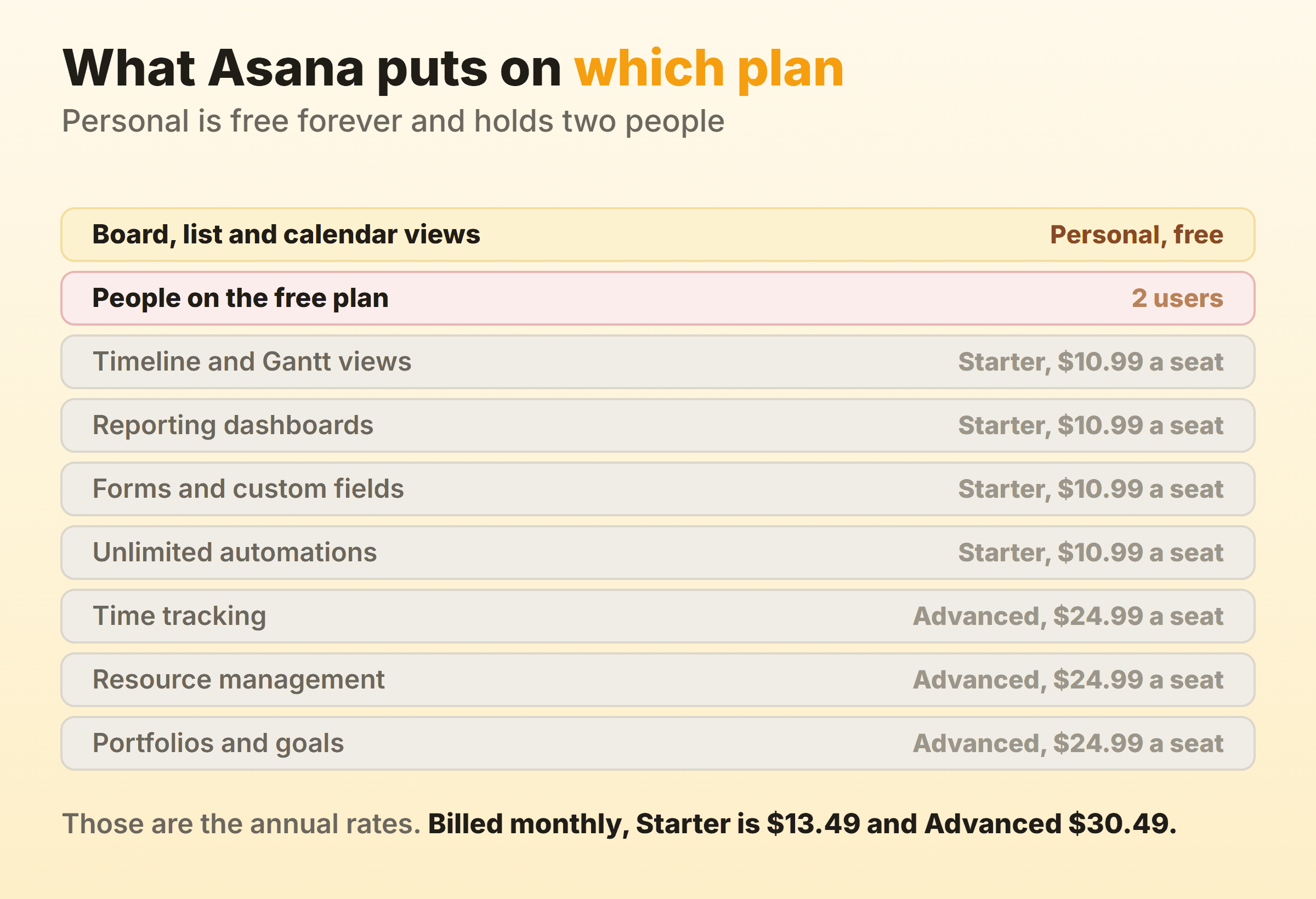
The Asana alternatives worth a migration are the ones that fix the exact line on your renewal notice, and only two lines ever hurt. Asana’s free Personal plan holds 2 users, so hiring a third person costs $10.99 per user per month on Starter, billed annually. Timeline, Gantt, reporting dashboards, forms and custom fields all begin on Starter. Time tracking, resource management, portfolios and goals wait for Advanced at $24.99 per user per month billed annually. Find your gap, then match it. Jira is free forever for 10 users and puts board, timeline, and reports and dashboards on that free plan. ClickUp ships native time tracking and resource management on Unlimited at $7 per user per month billed yearly. Trello’s Standard plan runs $5 per user per month billed annually. Basecamp charges no per-user fee at all. Microsoft Planner sits inside a Microsoft 365 bill you already pay.
Why Do Teams Start Looking for an Asana Alternative?
Teams start looking for an Asana alternative at renewal, when the seat count and the plan name collide. I have watched three versions of this happen, and the headline price is the least common one.
Start with the free plan. Asana’s pricing page describes Personal as being “For one or two people managing personal projects” and lists a hard 2 users. Two. So you cannot add a third teammate without upgrading.
Then there is the way seats get sold. That same page answers the question “How can I add people to my plan?” with a ladder: increments of 1 between 2 and 5 total users, increments of 5 up to 30 users, increments of 10 up to 100, increments of 25 up to 500, and increments of 50 above that. A team of eleven does not buy eleven seats.
The feature ladder is the one people describe as the tool changing on them. Starter unlocks timeline and Gantt views, reporting dashboards, unlimited automations, forms, custom fields, custom templates and unlimited free guests. Advanced, at $24.99 per user per month billed annually and $30.49 billed monthly, is where unlimited portfolios, goals, resource management, approvals and proofing, and time tracking live. Asana AI meters separately now. Starter includes 5 requests per user per month capped at 50 per account, and past that prepaid packs run $0.50 per AI request with on-demand billing at $0.60.
Asana is a good product that has become an expensive place to keep a simple board. Our guide to Asana board view covers what that board does and does not do, so this page stays on the money and the move.
Asana Alternatives Compared, and What Each One Closes
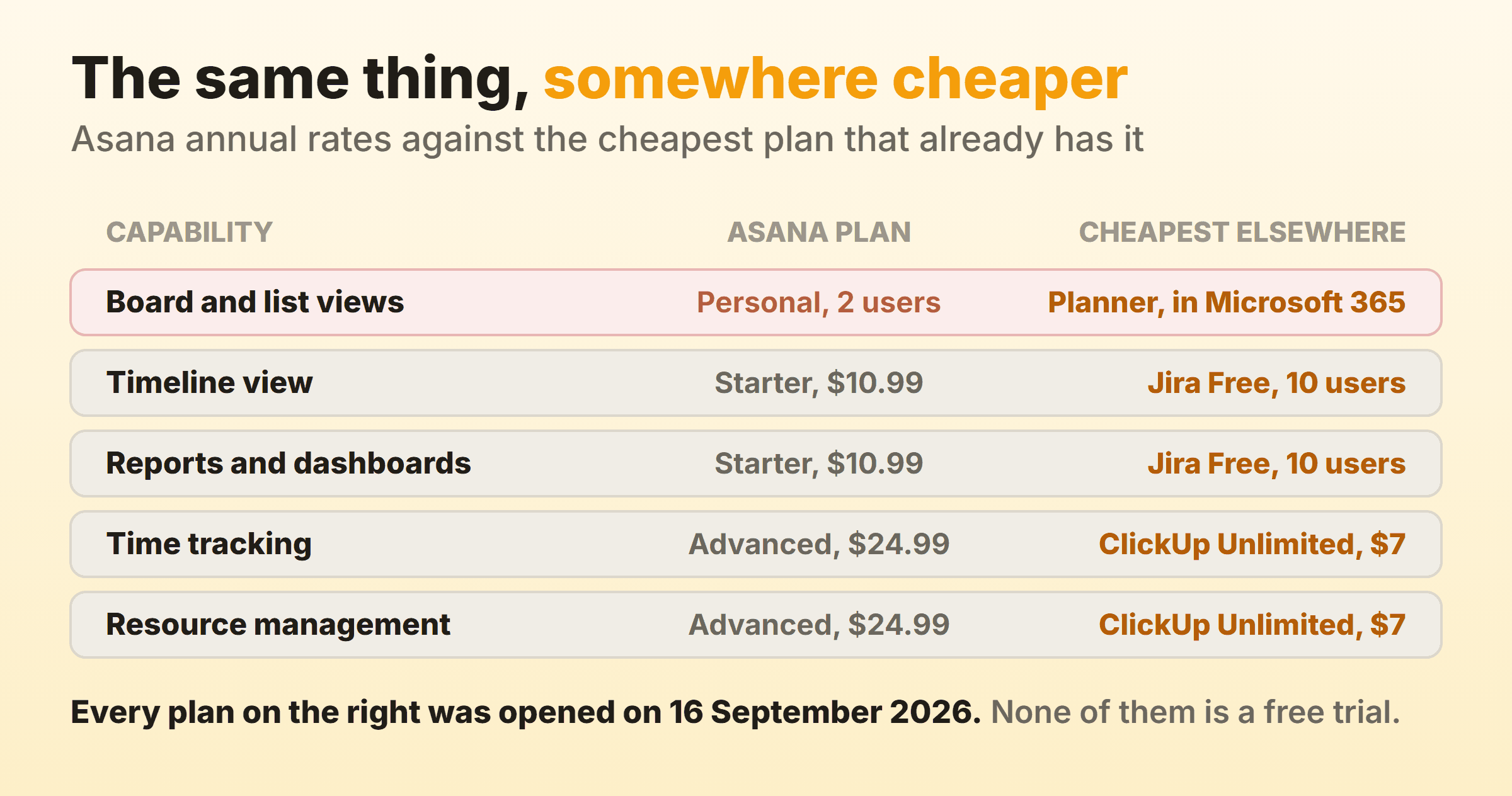
The best Asana alternatives are the ones that close your specific gap, so read the third column first. Every price came off the vendor’s own pricing page on 16 September 2026.
| Alternative | Who it suits | What it fixes | Entry price on 16 September 2026 |
|---|---|---|---|
| Trello | Small teams who want the board and nothing else | The per-seat number itself | Free up to 10 collaborators, Standard $5 per user per month billed annually |
| ClickUp | Teams stuck on Asana Advanced | Time tracking and resource management, four tiers cheaper | Free Forever, Unlimited $7 per user per month billed yearly |
| Jira | Teams of 10 or fewer who need reports | Views and dashboards that Asana gates on Starter | Free forever for 10 users |
| monday.com | Teams who want the same shape, different vendor | Nothing structural, and that is the point | Free for 2 seats, Basic from EUR 9 per seat per month billed yearly |
| Notion | Teams whose docs and tasks keep drifting apart | Two subscriptions collapsing into one | Free, Plus $10 per seat per month billed yearly |
| Basecamp | Growing headcount on a fixed budget | Per-seat billing, removed entirely | Freelancer $25 per month flat, Studio $59 per month flat |
| Wrike | Teams who need a free plan with no stated user cap | The 2-user free ceiling | Free, Team $10 per user per month billed annually |
| Microsoft Planner | Anyone already paying for Microsoft 365 | A second bill for a board | Included in Microsoft 365, Planner Plan 1 $10 per user per month paid yearly |
Eight, and no more. I could not tell you what sat in slot fourteen of the twenty-entry versions.
Trello: The Cheapest Seat That Still Draws a Board
Trello has the cheapest credible seat here. Trello’s pricing page puts Standard at $5 USD per user per month if billed annually, $6 billed monthly, against Asana Starter’s $10.99 on the same terms. Premium runs $10 per user per month billed annually and $12.50 billed monthly. Enterprise is $17.50 per user per month billed annually.
Check the free plan before counting it as a win. Free covers up to 10 collaborators per Workspace, which beats Asana’s 2 comfortably, though the same comparison table marks unlimited boards as false on Free. Dashboard view, which Trello calls its reporting tool, needs Premium. So do Timeline, Table, Calendar and Map. The reporting dashboard you lost on Asana Starter sits two paid tiers up here, at $10 per user per month billed annually.
Trello earns the switch when your team wants a board, cards and automation and nothing past that. If the charts are what pushed you off Asana, this puts the same wall 99 cents lower and you have gained nothing except a smaller invoice. Our Trello kanban guide has the board mechanics.
ClickUp: Time Tracking and Resource Management Four Tiers Cheaper
ClickUp carries native time tracking and resource management four tiers below where Asana puts them. ClickUp’s pricing page lists Native Time Tracking, Unlimited Gantt Charts, Resource Management, Goals and Portfolio Management, and Unlimited Storage on the Unlimited plan at $7 per user per month billed yearly, $10 billed monthly. Every one of those items sits on Asana Advanced at $24.99 per user per month billed annually. Business, at $12 per user per month billed yearly and $19 billed monthly, adds Unlimited Dashboards with Advanced Cards and Portfolio Workload Management.
ClickUp Free Forever carries Unlimited Free Plan Members and Kanban Boards, with storage as the ceiling instead of headcount at 60MB.
Take ClickUp if you can name the Advanced feature that made you leave. The cost is surface area, because ClickUp hands you a great deal of product you did not ask for, and your first week goes on switching things off. The ClickUp kanban guide covers the board once you are inside.
Jira: Free Forever for 10 Users, Reports Included
Jira is free forever for 10 users, and the reports come with it. Atlassian’s Jira pricing page says “Free forever for 10 users” and puts backlog, list, board, timeline, calendar and summary views, reports and dashboards, 150 automation steps per subscription per month and 2 GB of storage on that plan. Asana charges $10.99 per user per month billed annually for timeline and dashboards. Jira gives both away up to 10 people.
Paid Jira prices by team size. Set the pricing page to 10 users on monthly billing and Standard reads $9.05 per user per month with Premium at $18.30. Push the team size field to 300 and Standard falls to $7.91 per user per month.
Take the free plan if you are ten or fewer and you want the reporting back. Jira is also the heaviest tool here in vocabulary and defaults, so a five-person content team meets words like epic and backlog on day one. See the Jira kanban guide for how the board behaves.
monday.com: The Same Shape, and the Same Seat Maths
monday.com gives you the same shape of tool and much the same seat maths. monday.com’s pricing page caps the free plan at 2 seats and 3 boards, which is the exact ceiling that pushed you off Asana. Basic starts at EUR 9 per seat per month on yearly billing, Standard at EUR 12 and Pro at EUR 19, with a footnote that prices exclude tax and “The price is determined by the user’s billing country”, so the figure you see depends on where you bill from.
Timeline and Gantt views begin on Standard. Time tracking waits for Pro. Portfolio management and resource management are Enterprise features, one tier further out than Asana puts them.
This is a lateral move, so go in wanting the board builder and the automation recipes. Anyone switching to save money will be disappointed by the second invoice. The monday.com kanban guide covers the board side.
Notion: One Workspace Instead of Two Subscriptions
Notion replaces Asana plus whatever document tool you pay for alongside it. Notion’s pricing page, with the currency selector set to USD and yearly billing, shows Plus at $10 per seat per month and Business at $20 per seat per month, with Enterprise on request.
The free plan has a specific shape worth checking against your team. Pages and blocks are unlimited for individuals but limited once a workspace has two or more members, file uploads cap at 5 MB, page history keeps 7 days, and the external guest limit is 10.
Notion is the right call when your specs, notes and tasks live in three places. A Notion board is a database view and behaves like one, so a column is a filter on a property rather than a station with a cap on it. The Notion kanban guide walks through that.
Basecamp: A Flat Bill With No Per-User Fee
Basecamp bills by project count and ignores headcount entirely. Basecamp’s pricing page leads with “No per-user fees, everyone’s included”. Free covers 1 project with 5 users max. Freelancer is $25 per month flat for up to 3 active projects and 20 users max. Studio is $59 per month flat for up to 10 active projects, 25 GB and unlimited users. Pro is $99 per month flat for up to 25 active projects. The Unlimited Edition costs $299 per month billed annually.
Do the arithmetic against your own headcount first. Studio at $59 a month flat covers unlimited people, and Asana Starter at $10.99 per user per month billed annually passes that figure somewhere around the sixth person.
Basecamp suits a team growing faster than its budget, which is most of the teams that write to me about this. The cap moves from people to active projects, and the board, which Basecamp calls Card Tables, is deliberately plain. The Basecamp kanban guide shows what that looks like.
Wrike: A Free Plan That Does Not Count Your Users
Wrike has the free plan with the fewest people-shaped limits. Wrike’s pricing page lists Free at $0 per user per month with no stated user range, then Team at $10 per user per month for 2 to 15 users and Business at $25 for 5 to 200, noting that the amount shown is priced per month and billed on an annual per-user basis. Pinnacle and Apex are quoted on request.
Team stops at 15, so a sixteenth hire forces Business at $25, a penny more than Asana Advanced costs. Free is genuinely free for a whole group though, which Asana’s Personal plan never was.
Wrike works if you want a real team on a free plan this week and a decision later. Check the 15-user ceiling against your hiring plan before the import. The Wrike kanban guide covers the board.
Microsoft Planner: The Board You Have Already Bought
Microsoft Planner is the alternative that costs nothing new. Microsoft’s Planner pricing page lists Microsoft Planner as “Included in Microsoft 365” with Grid, Board, Schedule and Chart views, real-time collaboration and basic plan templates. Planner Plan 1 costs $10.00 per user per month paid yearly and adds sub-tasks, backlogs and sprints, task dependencies, and Calendar, Timeline (Gantt) and People views. Planner and Project Plan 3 runs $30.00 per user per month paid yearly.
So the board view Asana gives you free, and the timeline Asana charges $10.99 per seat a month for, both sit on a subscription most companies already hold or on a $10 per user per month add-on to it.
Check this one first if your company runs on Microsoft 365, because the honest outcome might be that you cancel Asana and add nothing. It is also the thinnest product here. The Microsoft Planner kanban guide is the place to test that.
What Do You Lose by Leaving Asana?
The alternatives to Asana all have free plans, and every one of those free plans has a ceiling. Nobody checks it before the migration.
Asana’s Personal plan gives unlimited tasks and projects, unlimited storage at 100MB per file, and 100-plus free integrations to 2 people. ClickUp’s free plan gives unlimited members and 60MB of storage. Jira’s gives 10 users and 2 GB. Trello’s gives 10 collaborators per Workspace, without unlimited boards. monday’s gives 2 seats and 3 boards. Notion’s limits pages and blocks the moment a second member joins. No free plan here gives everything away. Work out which of those ceilings your team reaches first, because that is the one you will be arguing about in March.
The paid shape changes too. Asana Starter includes no user seat limits and unlimited free guests, which is genuinely generous once you are paying anything at all. Wrike’s Team plan stops at 15 users. Basecamp caps active projects. You will be living inside whichever limit you pick, so read it before the import.
Which Asana Alternative Matches Your Reason for Leaving?
Tools like Asana all demo well, so the decision has to come from your complaint. Say out loud the sentence you would use to explain the switch to your finance lead, then read the line that matches it.
- A third person joined and the free plan died: Jira, free forever for 10 users.
- We need time tracking or resource management: ClickUp Unlimited, $7 per user per month billed yearly.
- The seat price is the whole problem: Trello Standard at $5 per user per month billed annually, or Basecamp with no per-seat fee at all.
- Headcount is growing faster than the budget: Basecamp Studio, $59 per month flat, unlimited users.
- We already pay Microsoft: Planner, included in Microsoft 365.
- Our docs and tasks keep drifting apart: Notion Plus, $10 per seat per month billed yearly.
- We just want a different vendor: monday.com, and expect similar gates.
One more note, since this guide comes from a board tool. Kanbanee will not suit most people reading this. Free is 2 boards you own with unlimited members, Pro is $6 a month or $48 a year, work in progress limits are soft and stay off until you switch them on, the reports (time by member or label, weekly throughput, cumulative flow, cycle time) are Pro only, and there is no realtime sync, no API and no column dragging outside a desktop browser. None of that helps a forty-person rollout that needs portfolios and SSO. For three people who want one board with a cap on the middle column it is enough, and so are several of the free kanban tools in that roundup.
Whatever you land on, take the gap you wrote down into the trial and test only that. Give yourself a fortnight, import one real project, and see whether the thing that pushed you off Asana is still there on day fourteen.
FAQ
What is the best free Asana alternative?
Jira, if your team is 10 people or fewer. Its free plan carries board, timeline and calendar views plus reports and dashboards, which Asana puts on Starter at $10.99 per user per month billed annually. Above 10 people the free Asana alternatives worth a look are ClickUp, whose Free Forever plan allows unlimited members with storage capped at 60MB, and Wrike, whose free plan states no user range at all. All three beat Asana’s Personal plan, which holds 2 users.
Which Asana competitors charge the least per seat?
Trello Standard at $5 USD per user per month billed annually is the lowest per-seat price among the mainstream Asana competitors, followed by ClickUp Unlimited at $7 per user per month billed yearly. Jira Standard sits at $9.05 per user per month at a team size of 10 on monthly billing. All three come in under Asana Starter’s $10.99 per user per month billed annually.
Are there apps like Asana that do not charge per user?
Basecamp is the clearest one. Its pricing page leads with “No per-user fees, everyone’s included” and charges by active project count instead, at $25 per month for Freelancer, $59 for Studio, $99 for Pro and $299 per month billed annually for the Unlimited Edition. Studio and above carry unlimited users.
What software is most similar to Asana?
monday.com and ClickUp come closest in shape, both offering several views over one task database with automation and per-seat pricing. monday.com feels nearest in daily use. ClickUp covers more of what Asana reserves for Advanced, at Unlimited pricing of $7 per user per month billed yearly.
Does Asana still have a free plan?
Yes, under a new name. The old free tier is now called Personal, costs nothing, and holds 2 users with unlimited tasks and projects, list, board and calendar views, and 100-plus integrations. The paid tiers above it are Starter, Advanced and Enterprise, with an Enterprise+ option for stricter security and compliance needs.