
Best Kanban Board Software: 9 Tools Compared for 2026
Updated at
The Answer
The best kanban board is rarely the one with the longest feature list, because almost every tool in this category draws the same columns and the same cards. The second half of the method is where they split. Can you cap a column, does the tool make it obvious once you go over that cap, and does it record how long work took without you exporting a spreadsheet first. Trello, Notion, Asana and Microsoft Planner give you the picture and stop roughly there. Jira, KanbanFlow, Businessmap and a couple of lighter tools go on to give you the controls. Start from the constraint you cannot change, an existing tool estate, a hosting rule, a team of five with nobody spare for admin, and the shortlist gets short fast.
What Separates the Best Kanban Board Software From a Nice Board?
The best kanban board software supports the half of the method that changes behaviour. Columns and draggable cards are table stakes, every tool below has them, and comparing that half of the feature list tells you nothing at all.
The Kanban Guide, published by Orderly Disruption Limited and Daniel S. Vacanti, Inc. and last updated in May 2025, is blunt about the part that matters. It says members of a kanban system “must explicitly control the number of work items in a workflow from started to finished”, and it names four measures of flow: work in progress, throughput, work item age, and cycle time. Read that as a shopping list and your comparison table collapses to four questions.
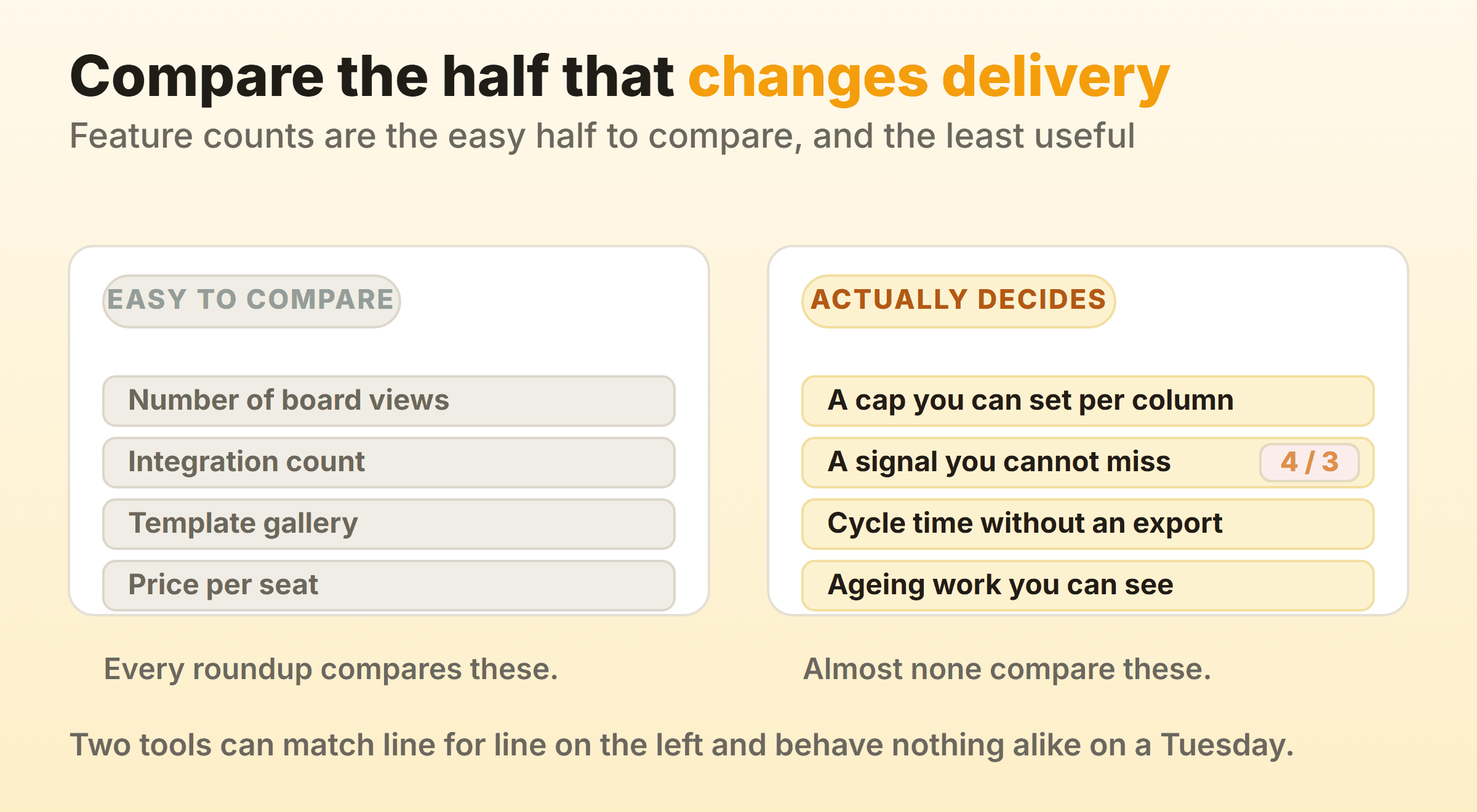
- A cap you can set per column. A work in progress limit on a column is the single feature that turns a task board into a kanban system.
- A breach nobody can miss. A cap that lives only in a settings panel gets forgotten inside a fortnight. The count belongs on the column header, in a colour that changes once you go past it.
- Cycle time the tool recorded itself. A number it kept because it watched the cards move, and never asked you to rebuild it in a spreadsheet.
- Work you can watch getting old. Work item age is the one measure you can act on while the item is still open, and almost nothing surfaces it.
Two products can match line for line on views, integrations and templates and behave nothing alike on a Tuesday afternoon when four things are open and a fifth arrives. The nine below are ordered by how much help they give you then.
Which Constraint Should Decide Your Shortlist?
Your binding constraint should decide the shortlist, because in most teams it already has before anyone opens a comparison page. A team with a Jira licence and a security review process is not adopting a separate board, whatever any roundup says about it.
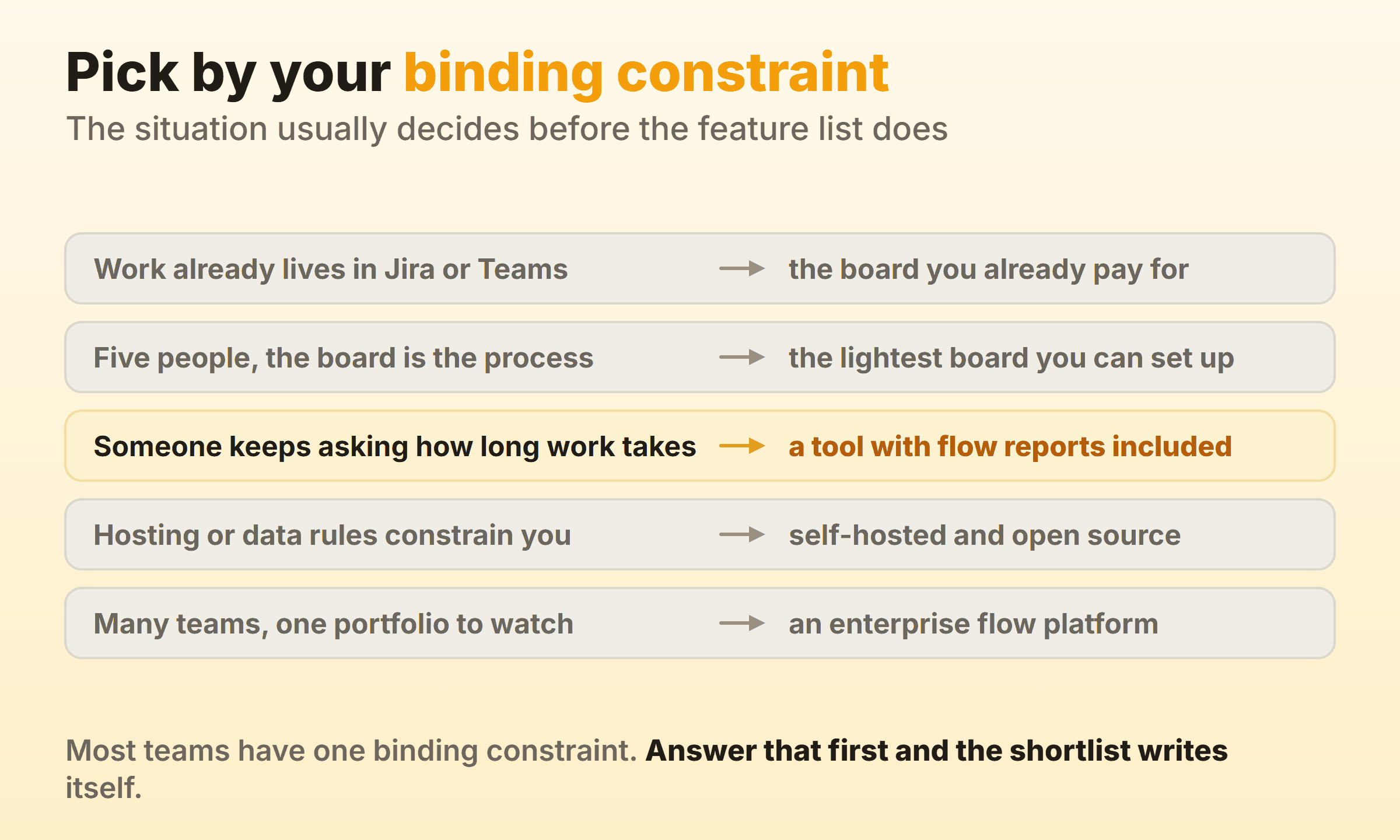
Only one of those five ends where you started, on the board you already pay for. The other four point somewhere new: the lightest board you can set up, a tool with flow reports included, something you host yourself, or an enterprise flow platform. Work out which line is yours before you read another comparison table, because it removes most of this list before you have compared a single feature.
Kanban Board Software Compared
| Tool | Per-column WIP limit | Flow reporting | Best for |
|---|---|---|---|
| Trello | Power-Up | Power-Up | The fastest possible start |
| Jira | Column constraints | Control chart, cumulative flow | Teams whose work is already there |
| KanbanFlow | Built in | Cumulative flow, throughput, cycle time | Kanban plus time tracking |
| Businessmap | Built in | Flow analytics and forecasting | Many teams, one portfolio |
| Our own board | Built in | On the paid tier | Small teams wanting flow controls |
| Notion | None published | None published | A board beside your docs |
| Asana | None published | Custom fields only | Board view in a wider platform |
| Microsoft Planner | None published | None published | Work that lives inside Teams |
| Wekan | Per-list setting | None published | Self-hosted and open source |
Checked against each vendor’s own documentation. Where a vendor publishes no WIP limit or flow reporting, the cell says so. Prices move often enough that any number printed here would be stale within a quarter, so read the vendor page before you commit budget.
Trello: The Fastest Board to Get Running
Trello is the best kanban board software for getting a team looking at the same work by lunchtime. Lists run left to right and cards sit inside them. Drag one and its state changes. Nobody needs training, the template gallery covers most workflows, and the free tier is generous enough that many small teams never leave it.
You are buying the visible half. Trello has no native cap on how many cards a list holds, and WIP limits arrive through a Power-Up such as Kanban WIP by Corrello or List Limits. Cycle time and cumulative flow are the same story. That is a fair description of what a board tool is, and it explains how a board with To Do, Doing and Done ends up as a to-do list in three piles.
Pick it when speed of adoption is the whole problem. Once somebody senior starts asking why work takes as long as it does, you have outgrown it.
Jira: The Right Answer When Work Already Lives There
Jira is the best kanban tool for software teams whose issues, releases and automation already run through it, and the board is better than its reputation suggests. Set a column constraint under Board settings and Jira shows a min and max on the column header. Atlassian’s own documentation puts it plainly: constraints “trigger a visual indicator when a minimum or maximum number of work items appear in a column”, and the header turns red when the maximum is exceeded.
A Jira kanban board also gets the control chart and the cumulative flow diagram, which between them give you cycle time percentiles and a picture of where the queue is building. Both ship as built-in board reports rather than add-ons, and for many teams those two charts are the reason to stay put.
Small teams pay for all of it. One board’s behaviour is spread across board settings, project settings, a workflow scheme and a filter, and changing a status means finding an admin with twenty spare minutes.
KanbanFlow: A Dedicated Kanban Tool With Timers Built In
KanbanFlow was built as a kanban tool first, and the difference shows in what it bothers to include. Its feature list leads with limiting work in progress, then time tracking with a Pomodoro option and a stopwatch, then analytics covering cumulative flow, throughput, cycle and lead time, plus Monte Carlo forecasting.
A cap and a timer on the same card is an unusual combination. If you bill hours, or just want to know where the day went, it removes a second tool from the stack.
The interface has been around a long time and looks it. I would not put it in front of a team that has just come off Linear.
Businessmap: Portfolio Kanban Across Many Teams
Businessmap, which most people still know as Kanbanize, aims at organisations running kanban across many teams at once, and it bills itself as Enterprise PPM Software, one platform for all of your strategic and project work, with the kanban vocabulary running through the whole product.
A card on a management board expands into the team board underneath, so the portfolio view and the delivery view stay connected where two separate systems would drift apart inside a quarter. Linked boards are the reason to look at it at all, and flow analytics come with them.
Wrong tool for a team of six. The setup work, the vocabulary and the price all assume an organisation with a delivery function, and a squad with a backlog will drown in it.
Flow Controls Without the Enterprise Weight
I run our own product board on this one, so weigh the entry accordingly. Kanbanee exists because of the gap in the middle of this list, where Trello-simple tools have no caps and tools with real flow controls arrive with an implementation project attached. A WIP limit is a checkbox and a number on the column menu, the badge shows count against limit and turns red once you go over, and the cap stays soft so the drag always works. Timers and a full time log sit on the card. Cycle time, weekly throughput and a cumulative flow diagram come with Pro at $6 per month or $48 per year, and the free plan covers two boards you own with unlimited members. Reading those charts is covered in the kanban metrics guide.
There is no realtime sync yet, so the board polls instead of updating live. Column reordering is desktop only. And there is no API and no integrations, which rules it out if your board needs to talk to anything else.
Notion: A Board That Sits Next to Your Docs
Notion suits teams who want the board in the same workspace as the specs and databases it refers to. Board view is a database layout, so the same rows can be a table on Monday and a board on Tuesday, and every card opens as a full page. Notion’s documentation files the feature under the flat title “Board view” and covers grouping, sub-grouping and card properties without reaching for the word kanban once.
Group by a status property and you have a workflow board in a minute. Choose person as the grouping and you get a pretty picture that hides where work is stuck, which is the mistake I see most often in Notion workspaces.
No WIP limit, no cycle time. A Notion kanban board shows where work sits and does nothing about how much of it is open at once.
Asana: Board View Inside a Broader Work Platform
Asana treats the board as one layout among list, timeline and calendar, and any project can switch to it without copying anything. Columns are the project’s sections, so the structure follows the work into every other view. Asana’s kanban boards page uses the word freely even though the interface just says Board.
Rules automation earns its keep here. Moving a card into a section can assign an owner, set a due date or notify someone, covering much of the policy work a kanban team otherwise does by hand.
There is still no per-column cap, and no cycle time the tool records for you. Asana’s own FAQ on that page answers the cycle time question by pointing you at custom fields or rules to stamp start and end dates, then a dashboard to chart them. That is a reporting project, not a feature, and somebody has to own it.
Microsoft Planner: The Kanban Board Already Inside Teams
Planner is the best kanban board for Microsoft Teams for one unanswerable reason: you already have it. Buckets are columns, tasks are cards, and Microsoft’s own task documentation has you drag a task from one column to the next and regroup the board by bucket, assigned to, progress, due date or labels. Pin a Planner tab to a channel and the board sits beside the conversation about it. Procurement is done, which settles plenty of arguments early.
Flow control is not part of the offer. Planner publishes no WIP limit and no cycle time reporting, so a team that wants work to finish faster needs something sitting beside it.
Wekan: Open Source and Self-Hosted
Wekan is the open source kanban board to look at when data cannot leave your infrastructure. It is MIT licensed, runs on your own server, and the project is alive, with a README claiming fixes land many times a day. Lists carry a WIP limit setting, including a soft variant, which puts it ahead of several commercial products here.
You pay for that in operations. Running a Node application, a database and its backups, with upgrades landing on you at four on a Friday afternoon. Teams without somebody who enjoys that should stay hosted.
Which Tools I Left Out, and Why
Wrike, ClickUp, Smartsheet and monday.com all have a board view and appear in most kanban roundups. In each the board is a display surface for a wider work management product, and kanban is one view among six or seven. Basecamp fits the same pattern, with its card table as one tool in a project next to the message board and to-dos. If you are buying one of those platforms anyway, the board will be adequate. Buy one purely to run kanban and you have paid for a lot of surface area nobody asked for.
Miro and FigJam are out for a different reason. A sticky note on a canvas runs a workshop well enough, and it cannot run a workflow at all, because nothing underneath it knows what a state is.
Kanban Best Practices That Survive Any Tool
Kanban best practices outlast whichever tool you pick. The software only decides how much friction each one costs you, and all five carry across everything above.
- Cap the middle before anything else. One number on the busiest column, set roughly to the number of people working in it. Kanban WIP limits work best when they start slightly uncomfortable.
- Name columns after states. In Design survives a reorganisation and With Sarah does not, and the kanban columns guide covers the rest of it.
- Keep the board to one wall of work. Nobody reads a board with fourteen columns on it, so split it in two or collapse the stages where no decision gets made.
- Give swimlanes to classes of service. An expedite lane capped at one earns its place. A lane per team member turns the board into a set of private to-do lists.
- Watch card age as well as position. A card stuck in Review for eleven days needs a conversation today. A card in Backlog for eleven weeks can wait, and only one of the two looks urgent on the board.
None of it requires flow analytics. Having them mostly saves you the argument about whether the numbers are right.
FAQ
What Is the Best Kanban Board Software for a Small Team?
The lightest tool that still lets you cap a column. Trello with a WIP limit Power-Up gets there, KanbanFlow natively, and so does any small dedicated board tool. Avoid anything needing a workflow scheme before the board works.
Is There a Genuinely Free Kanban Board?
Several. Trello, Notion, Asana and Microsoft Planner all offer a free kanban board a small team can use indefinitely, and Wekan is free in both senses if you host it. Free tiers usually cap board count, automation and reporting while leaving the board alone, so read the limit on the feature you care about.
What Is the Best Kanban Board for Microsoft Teams?
Microsoft Planner in almost every case, because it is already licensed and pins into a channel as a tab. Teams needing WIP limits or cycle time have to add a second tool, since Planner publishes neither.
Is There Anything Better Than Trello?
Trello is hard to beat at what it does. The parts it leaves out are another matter, and a dozen tools cover those. If the board looks fine and work still takes too long, you need a column cap and cycle time reporting, which is a different product category altogether.
What Is the Best Open Source Kanban Board?
Wekan is the most established option, MIT licensed, actively maintained, and it supports per-list WIP limits. Budget for the hosting effort. The licence costs nothing and the server time is where your spend actually lands.
Do We Still Need a Kanban Tool if We Run Scrum?
A sprint board is already a kanban board in shape and every tool above will serve one. The limits differ. Scrum limits work by sprint scope agreed at planning, kanban by a per-column cap that applies every day. Scrumban teams want both, which points them at the tools with real column constraints.
The Rest of the Tools Guide
Twenty-three spokes go further than one roundup can.
Start with budget when that is the binding constraint. Best free kanban boards compares free tiers on whichever limit runs out first, which is rarely the one the pricing page leads with, and open source kanban covers the self-hosted options with the licence and maintenance status of each project attached. Best kanban apps is the wider roundup across desktop and mobile.
If you already have a tool and want out, kanban alternatives works through the switching cost nobody budgets for, and KanbanFlow alternatives does the same for the dedicated kanban tool teams most often shortlist against a general board. Trello alternatives narrows the question to the tool most people are actually leaving.
Kanban tool reviews is a checklist for judging a board yourself rather than a scoreboard, which matters once you notice how few review sites test whether WIP limits do anything. Mac shops should read kanban for Mac first, because several tools sold as native turn out to be web wrappers.
Building rather than buying puts you in kanban libraries, which names the drag and drop primitives worth starting from and the two archived packages that still rank well enough to catch people out. Markdown kanban covers the boards that live in a text file instead of a database.
Leaving one tool in particular is its own question, so the switching guides take them one at a time: Trello, Jira, Asana, Notion, ClickUp, monday.com, Wrike, Smartsheet and Basecamp. Two wider roundups sit beside them for readers who have not settled on kanban at all: best project management software and best task management software. At the newer end, Vibe Kanban and Cline kanban both cover running a board over AI coding agents. AI kanban covers the AI features built into mainstream boards and which of them are worth paying for. If the board you want sits inside a tool you already pay for, kanban in other tools maps the board views across Microsoft, Google, Atlassian and the work platforms.