
Best Free Kanban Board: 9 Free Plans Compared for 2026
Updated at
The Answer
The best free kanban board is whichever one runs out of the thing you need last, since all nine here draw the same columns and let you drag cards between them. Trello’s free plan stops at 10 boards and 10 collaborators per Workspace. Jira is free forever for 10 users. Asana’s Personal plan holds two. ClickUp hands out seats without counting them and then rations storage at 60MB. Different wall entirely. Want a cap on how much work can sit in one column at once, without paying? Only four qualify, and one needs a free Power-Up. Work out which ceiling your team hits first, and most of the page below stops mattering before you have compared a single feature.
What Does a Free Kanban Board Actually Give You?
Every free kanban board on this page gives you the same visible half of the method. Columns, cards, drag one to change its state, invite somebody to look at it. Nobody charges for that any more, and comparing free kanban board software on that half of the feature list is a waste of an afternoon.
The ceilings are where they differ, and they come in three unrelated shapes. Some plans ration seats, so everything works until the seventh person joins and the invite button stops. Others count objects, usually boards or blocks or megabytes. A third group hands you almost everything and holds back the controls, which is how you end up on a free plan with unlimited cards and no way to cap a column.
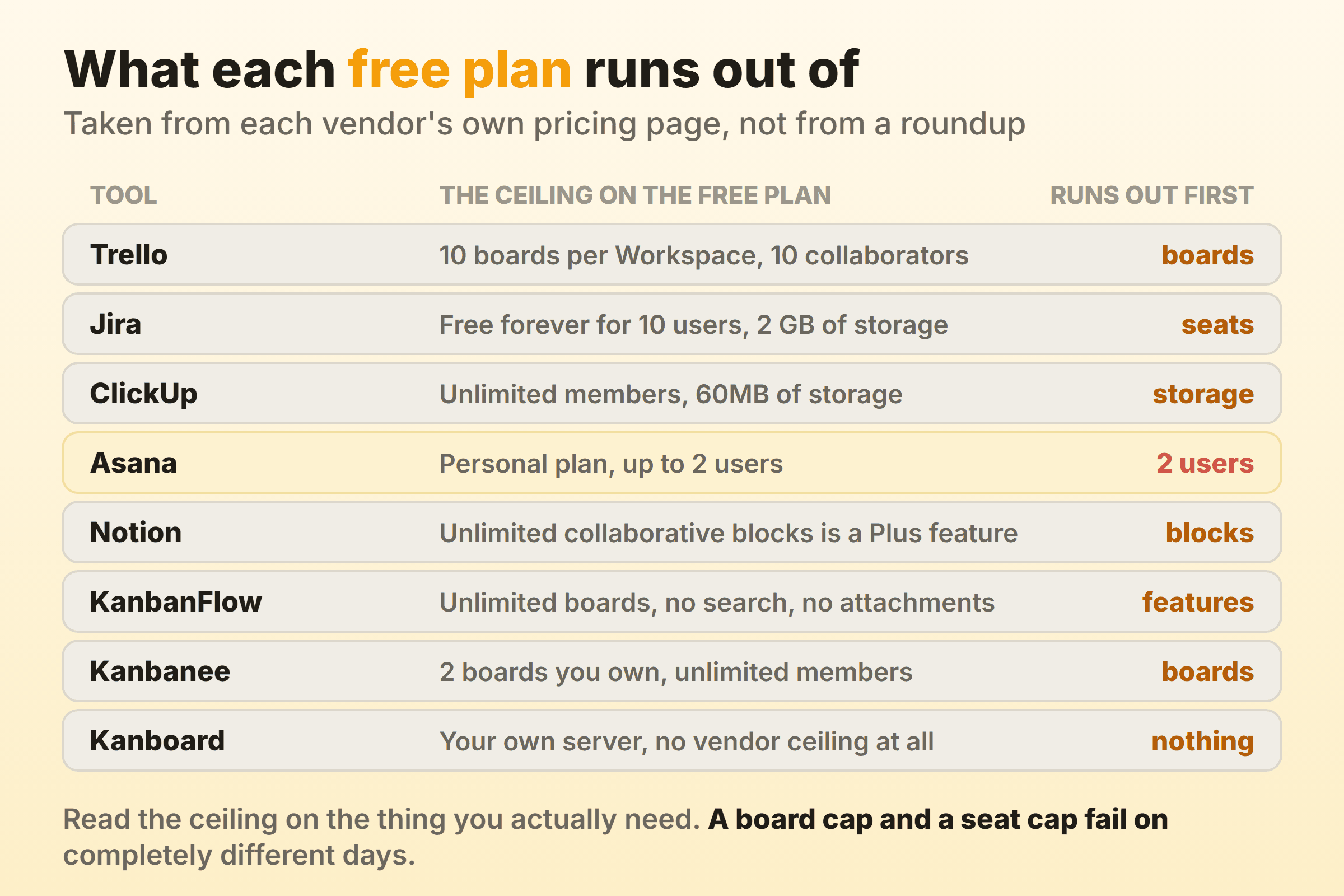
Read the ceiling that applies to you. A team running one board for two years will never notice a 10-board cap, and a two seat cap ends the conversation on day one for everybody else.
Free Kanban Boards Compared
| Tool | What the free plan caps | Per-column cap on free | Suits |
|---|---|---|---|
| Trello | 10 boards, 10 collaborators per Workspace | Yes, via a free Power-Up | The fastest possible start |
| Jira | 10 users, 2 GB storage, 1 site | Column constraints, company-managed spaces | Work already inside Atlassian |
| KanbanFlow | No search, no attachments, no flow charts | Built in | Kanban with timers attached |
| ClickUp | 60MB storage, Gantt and Timeline rationed by use | No, Business plan and above | One tool for everything |
| Notion | Collaborative blocks, file uploads | Not published | A board beside your documents |
| Asana | 2 users | Not published | One person, or two |
| Our own board | 2 boards you own | Built in | Small teams wanting flow controls |
| GitHub Projects | No seat, board or storage cap | Not documented | Work that already lives in issues |
| Kanboard | Nothing, you own the server | Built in | Self-hosted and open source |
Every cell above was checked against the vendor’s own pricing or documentation page in September 2026. Rankings of the best free kanban software go stale quickly, because free tiers get rewritten far more often than paid ones. Open the pricing page yourself before you move a team onto one.
Trello: Ten Boards, Ten People, and a Free Power-Up That Caps Lists
Trello’s free plan gives you 10 boards per Workspace and 10 collaborators per Workspace, with unlimited cards and unlimited storage at 10MB per file. Its pricing page also promises 250 Workspace command runs per month for automation. For a team of five running one board, none of that is a constraint you will meet this year.
Read the line about unlimited Power-Ups per board twice, because that is where kanban actually arrives. Trello publishes a List Limits Power-Up made by Trello Inc, which promises to “Set a limit on your lists and we’ll highlight the list” once the card count goes past it. Install that, put a number on your Doing list, and a free Trello board does the one thing that separates kanban from a task list. I have almost never seen a free Trello board with it switched on.
What you do not get is any record of how long a card took. No cycle time and no cumulative flow. When a stakeholder asks why the last release slipped, the board has nothing to say about it. The 10-collaborator cap also applies to the whole Workspace, which catches out agencies who add a client to each project. More on the board mechanics in the Trello kanban guide.
Jira: Free Forever for Ten Users
Jira is free forever for 10 users, and Atlassian’s pricing page lists what those ten get: unlimited projects and tasks, backlog and board and timeline views, reports and dashboards, 150 automation steps per subscription per month, 2 GB of file storage, one site, and support from the Atlassian Community. Email notifications are capped at 100 per day, which is a limit nobody notices until a busy Monday.
Column constraints are the part people miss. Atlassian’s own documentation says the column header changes colour when a constraint is breached, red for a maximum exceeded and yellow for a minimum not met, and describes constraints as available in company-managed spaces. The docs stay quiet on which plans reach them, so check it on your own site before you promise anyone.
A single board’s behaviour lives across board settings, project settings and a filter, so changing one status is a twenty minute job for somebody with the right permissions. Ten free seats is generous, and worth a good deal less than it sounds if nobody on the team wants to own the configuration. The Jira kanban board guide covers what that setup involves and where the twenty minutes go.
KanbanFlow: WIP Limits and Both Timers Without Paying
KanbanFlow puts work in progress limits on the free plan. Rare enough to lead with. Its pricing comparison marks WIP limits, unlimited boards, unlimited tasks, subtasks, recurring tasks, a stopwatch timer, a Pomodoro timer, Pomodoro statistics and a time spent report as available at zero cost. Premium runs $5 per user per month.
For a two person shop, a cap on the middle column and a timer on the same card covers most of what you need from a free kanban app.
Then you hit the gaps, and they are strange ones. Search is Premium. So are file attachments, swimlanes, custom fields, revision history, every integration, and every chart in the analytics section except the print view, including cumulative flow, cycle and lead time, throughput and Monte Carlo forecasting. A board with four hundred cards and no search function stops being usable, and that is the upgrade trigger for most teams, well before anybody misses a flow chart. Alternatives are covered in more depth over on the KanbanFlow alternatives page.
ClickUp: Unlimited Members, Sixty Megabytes
ClickUp’s Free Forever plan gives unlimited tasks and unlimited free plan members, then caps storage at 60MB. Kanban boards, calendar view, collaborative docs and sprint management all sit in the free tier, and so do dashboards. What the free plan rations is use: ClickUp’s own view limits allow 60 uses each of Gantt, Timeline and Workload view, while native time tracking and Goals start on the paid Unlimited plan. Automations stop at 5 active rules and 100 actions a month.
Sixty megabytes is roughly a dozen screenshots. Teams who attach design files or PDFs to cards will hit it almost immediately, and teams who write everything in the description field will never notice it at all.
ClickUp does cap a column, just not for free. Its Work in Progress Limits put a count against a limit in each Board view column and turn the counter red over capacity, and the documentation places them on the Business plan and above. On the free plan you get a board with unlimited people on it and no mechanism to stop all of them starting something new, which is the exact failure mode kanban was built to fix. The ClickUp kanban setup is still useful to know if the wider platform is already your workspace.
Notion: A Free Board Beside the Documents It Refers To
Notion’s free plan is aimed at one person. The pricing page describes it as being for individuals to organise personal projects and life, and includes databases with subtasks, dependencies and custom properties, which is what a Notion board is built from underneath. Unlimited collaborative blocks and unlimited file uploads both sit on the Plus plan, so shared work carries a ceiling that solo work does not.
Board view is a database layout, so the same rows are a table on Monday and a board on Tuesday, and every card opens as a full page with whatever documentation you want inside it. For a writer, a researcher, or anyone whose work is mostly text, that is genuinely the best free online kanban board available.
There is no published column cap and no cycle time. Group by person instead of status and you get a beautiful picture that hides exactly where work is stuck, which is the most common mistake I see in Notion kanban workspaces.
Asana: Two Users, and That Is the Free Plan
Asana’s free tier is the Personal plan, and the pricing page states it plainly: “Up to 2 users can collaborate for free.” Everything else about it is generous. Unlimited tasks and projects, list and board and calendar views, unlimited storage with a 100MB cap per file, status updates, and over a hundred free integrations.
Two seats. That makes it a personal kanban app with room for one collaborator, and a perfectly good one. Timeline, Gantt, reporting dashboards and unlimited automations all begin on the Starter plan, so a third person joining triggers a paid decision.
Worth knowing before you spend a weekend building a workspace in it. There is a fuller walkthrough in the Asana kanban guide.
A Free Plan Built Around the Column Cap
I run our own product board on this one, so read the entry with that in mind. Kanbanee came out of the gap in the middle of this list, where the simplest free boards have no caps at all and the tools with real flow controls arrive with a configuration project attached. The free plan covers 2 boards you own with unlimited members, which inverts the usual trade, since most free tiers ration people and hand out boards.
Setting a limit is a checkbox and a number on the column menu. The badge shows the count against the limit and turns red once you go over, and the limit stays soft, so the drag always works and nobody has to email an admin. Timers and a full time log sit on the card. Cycle time, weekly throughput and a cumulative flow diagram come with Pro at $6 per month or $48 per year.
There is no realtime sync, so the board polls for changes instead of updating live. Column reordering is desktop only. And there is no API and no integrations yet, which rules it out entirely if your board needs to talk to anything else.
GitHub Projects: Free If the Work Already Lives in Issues
GitHub Projects costs nothing on the GitHub Free plan, which GitHub’s pricing page lists alongside unlimited private repositories. For an engineering team the appeal has little to do with the board and everything to do with what is on it, because the cards are the actual issues and pull requests rather than copies somebody has to keep in sync.
The documentation explains that the board layout puts issues, pull requests and draft issues into columns you define, and that the column field can be Status or any other single select or iteration field. Change the field and you get a different board over the same work.
No column limit appears in that documentation. Nothing stops eleven issues piling into In Progress, and a stakeholder who does not already live in GitHub is unlikely to ever open the board, which matters if the people asking for updates are not developers. Setup detail lives in the GitHub kanban guide.
Kanboard: Free Forever If You Run the Server
Kanboard is free in the licence sense. The project is distributed under the MIT License, describes itself as self-hosted with a super simple installation, and names limiting work in progress second in its own summary of what it does, right after visualising the work. Version 1.2.54 shipped on 29 August 2026, mostly security fixes, so the project is alive and being looked after. Wekan is the other MIT-licensed option if you want to compare two.
Nobody caps your seats or your boards, and no vendor decides next quarter that your plan now includes fewer things.
You run a PHP application and a database, and the backups belong to nobody until the day they matter. Upgrades land on whoever installed it. Self-hosting is the right answer when data genuinely cannot leave your infrastructure, and everyone else should price a day of somebody’s time before committing to it. There is a wider list of these in the open source kanban roundup.
How to Pick the Best Free Kanban Board for Your Situation
Start with the constraint you cannot change, the same way you would when choosing from the full kanban tools comparison. One or two people writing mostly text? Notion, or Asana Personal. A team of five or six with no budget wants Trello or ClickUp, or Jira if headcount stays under ten and somebody is willing to own the configuration. And anyone whose data cannot leave the building is looking at Kanboard, whether they like the interface or not.
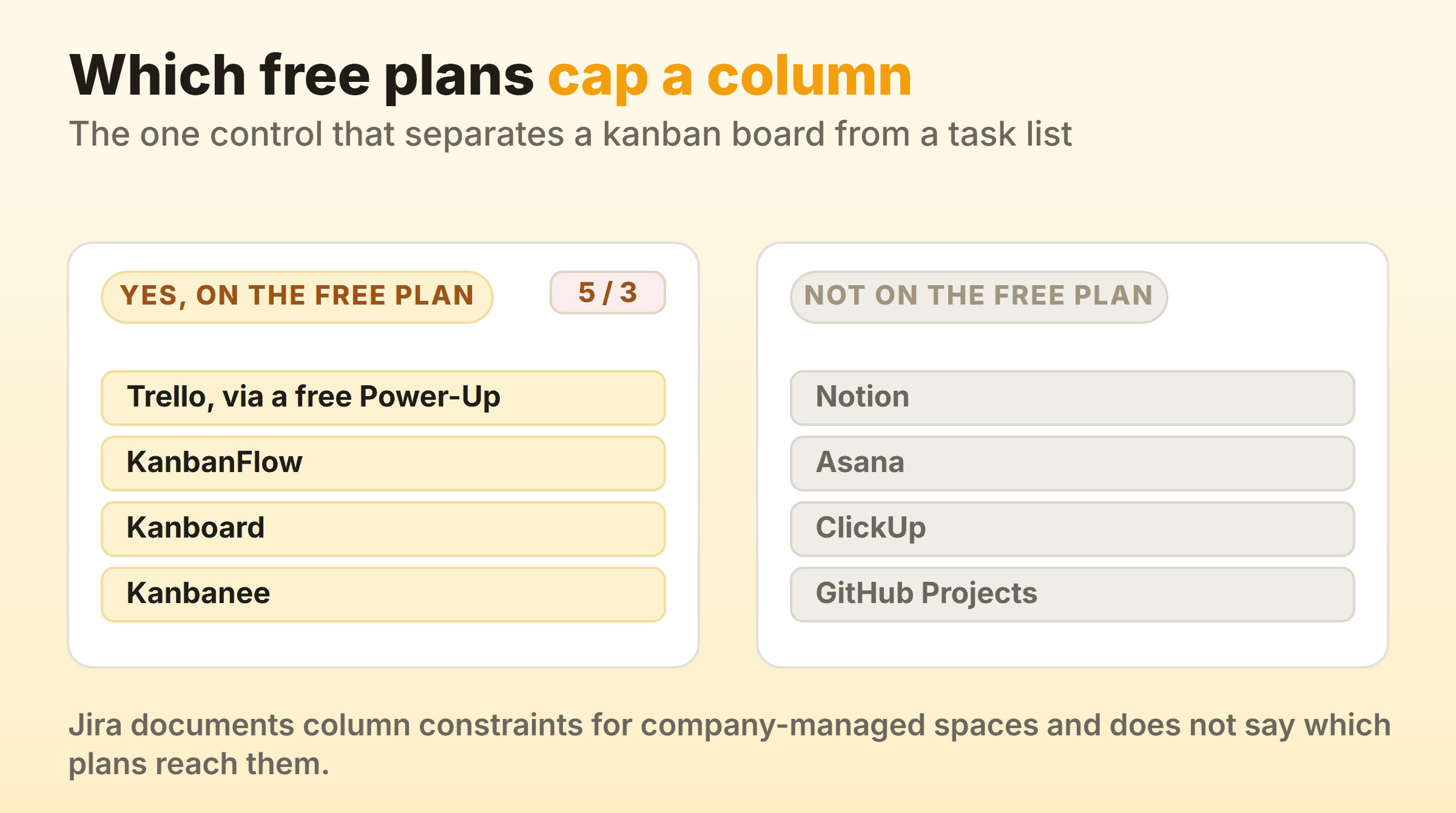
If the reason you are here is that work takes too long, the picture above is the whole decision. Four of the free kanban tools on this page let you cap a column, four give you no way to do it without paying, and everything after that is preference.
When a Free Kanban Board Stops Being Free
Free plans end in one of three ways, and only one of them is a surprise. Seats run out when somebody joins. Storage and board counts drain slowly enough that you get a fortnight of warning, usually as a banner nobody reads.
The third one is the awkward one. Somebody senior asks how long work is taking, and most free plans here answer that question with silence. Jira Free ships reports and dashboards, and Kanboard’s analytics include a cumulative flow diagram, average lead and cycle time and average time spent in each column, because nobody is charging you for a server you already run. Everywhere else flow reporting is the first thing behind the paywall, which makes sense from the vendor’s side, because it is the number that proves the tool is worth money. Reading those charts once you have them is covered in the kanban metrics guide.
Find the export before you need it, whichever way you go, and make sure it produces something you could rebuild a board from rather than a PDF of the current view.
FAQ
What Is the Best Free Kanban Board for Personal Use?
Notion, if your work is mostly writing and research. Asana Personal for plain task lists, and KanbanFlow when you want a timer and a column cap on the same card. All three are free indefinitely for one person. Personal boards rarely hit seat limits, so judge them on how fast a card is to create.
Is There a Free Kanban Board With No Limits At All?
Only the self-hosted ones. Kanboard and Wekan are both MIT licensed, so nobody caps your boards, seats or storage, and you carry the server instead. Every hosted free tier limits something, and that includes the kanban board apps whose pricing pages lead with the word unlimited.
Can a Free Kanban Board Do WIP Limits?
Four on this page can. KanbanFlow and Kanboard include them at no cost. Trello gets there through a free Power-Up made by Trello Inc, and our own free plan puts the setting on the column menu. Notion, Asana and GitHub Projects document no per-column cap at all, and ClickUp keeps its Work in Progress Limits on the Business plan and above.
Does Microsoft 365 Have a Kanban Board?
Planner has one. Microsoft’s own task documentation has you drag a task from one column to another and group the board by Bucket, Assigned to, Progress, Due date or Labels. Whether it counts as free depends entirely on the Microsoft 365 licence your organisation already holds, so ask whoever owns that bill. Setup detail is in the Planner kanban guide.
Does Google Have a Free Kanban Board?
Google does not ship a dedicated kanban product. Teams who want one inside Workspace usually build it in Sheets with a column per status, which holds up fine on a small board and falls apart somewhere past fifty rows. The kanban in Google Sheets walkthrough has the template.
What Is the Best Free Kanban App for a Startup?
Trello or ClickUp, on headcount. Trello’s 10 collaborators per Workspace covers a founding team comfortably, and ClickUp’s unlimited free members covers a bigger one as long as nobody attaches large files against that 60MB. Jira deserves a look if you are under ten people and expect to stay in the Atlassian ecosystem, since ten free seats with real reports is the most generous offer on this list.