
Markdown Kanban: The File Formats and the Tools That Read Them
Updated at
The Answer
A markdown kanban board is a plain text file where headings are the columns and list items are the cards, so the board you look at is only whatever tool happens to be reading that file. Four conventions are worth knowing. The todo.md convention writes columns as level three headings and tasks as GitHub checkbox items. The Obsidian Kanban plugin marks a note with kanban-plugin: board in its frontmatter, writes lanes as level two headings and cards as - [ ] items, and reads a bracketed number at the end of a lane name as that column’s limit. Mermaid’s kanban diagram draws a board as a picture inside any document whose renderer is new enough. Editor extensions such as Kanban Markdown for VS Code stretch the idea to a folder, giving every card its own file with a drag-and-drop view on top. All four make the same trade, which is that you gain git history and grep and lose the column-entry timestamps flow metrics are built from.
What Is a Markdown Kanban Board?
A markdown kanban board is a markdown file structured so a plugin can draw it as columns and cards, and so a person can still read it as a list once the plugin is gone. That second half is the whole appeal. Nothing lives in a database, nothing needs exporting, and the file outlives the tool that made it.
The dialects differ in their details and agree on the idea. In the single-file dialects a heading starts a column, a list item under it is a card, and metadata rides at the end of the card line. Per-card layouts move that metadata into frontmatter at the top of each card file.
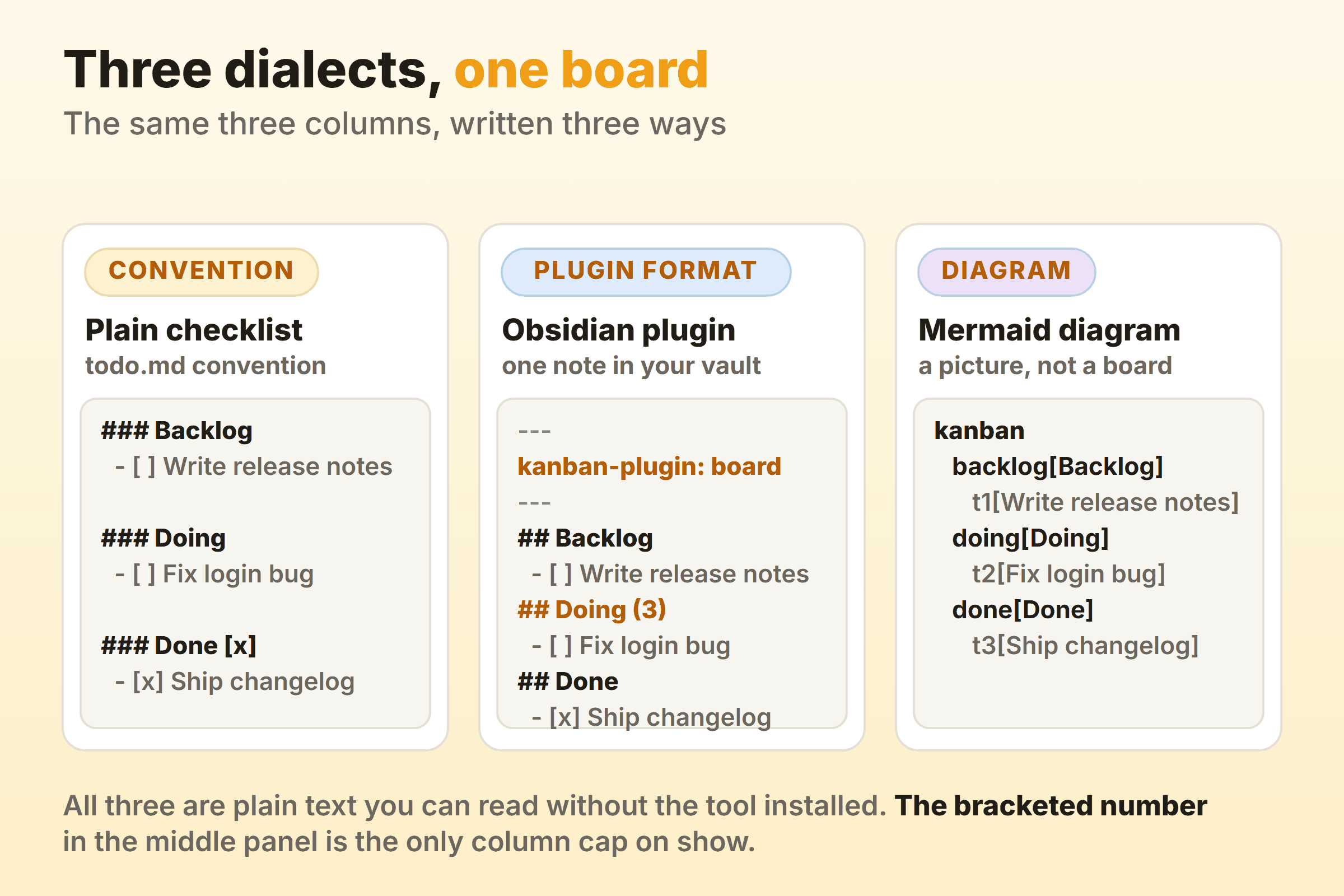
Because the columns are headings you type by hand, the discipline a tool would normally impose has to come from you instead. Name each one after the state the work is in, the way you would name board columns anywhere. A column named after whoever is holding the work goes stale the week that person changes team. I have inherited enough boards to stop arguing about it.
The Plain Checklist Convention
The plain checklist convention has a written spec, and it fits on one screen. The todo.md format uses ### for column names and GitHub-flavoured checkboxes for tasks, calls the checkboxes optional, and requires a completed column’s name to contain a tick or [x]. Tags, mentions, estimates, dates and ticket ids go at the end of the task title, and a task indented two spaces under another is a sub-task or a description.
### Doing
- [ ] Rewrite the CSV importer ~3d #api @nathan 2026-09-19
  - [ ] Handle quoted commas

### Done [x]
- [x] Ship the release notes
The spec repository was last pushed to in August 2023. Conventions do not rot the way code does, and the readme itself points to a VS Code kanban extension for viewing the file as a board.
What Does the Obsidian Kanban Markdown Format Look Like?
The Obsidian Kanban markdown format is three rules deep, and you can read all three in the plugin’s own source. Board notes carry kanban-plugin: board in their frontmatter, the line the parser builds for new boards from export const frontmatterKey = 'kanban-plugin'. Lanes are written back out as ## followed by the lane title. Cards are written as - [ ] followed by the card text, with the character between the brackets carrying the done state.
A fourth rule sits on top of those three, and it is easy to miss. parseLaneTitle runs the regex /^(.*?)\s*\((\d+)\)$/ over every lane name. On a match the digits become that column’s maximum and the brackets drop off the title. On no match the maximum is zero, which is what every lane without a number gets. So ## Doing (3) sets a limit of three cards, and ## Doing (max 3) sets no limit at all, because the pattern accepts digits between the brackets and nothing else. The column reads as limited to a human and has no limit as far as the plugin knows. WIP limits are the mechanism the whole method rests on, and this one lives inside a column name, so it disappears the moment somebody renames the column carelessly.
The plugin repository is GPL-3.0 licensed and sits in a GitHub organisation called community-archive, although the repository itself is not archived and was last pushed to in March 2026. That organisation name reads like a warning. I would not treat it as one, not the way a stalled dependency is, since the plugin’s entire output is headings and checkboxes. The install walkthrough and the core Bases kanban view are in the Obsidian kanban guide.
How Do You Write a Mermaid Kanban Diagram?
A Mermaid kanban diagram opens with the kanban keyword, writes each column as columnId[Column Title], and writes each task as taskId[Task Description] indented under its column. The official syntax page documents task metadata with @{ ... }, and the keys it lists are assigned, ticket and priority, where priority accepts 'Very High', 'High', 'Low' or 'Very Low'.
kanban
  todo[Todo]
    t1[Rewrite the CSV importer]
  doing[In progress]
    t2[Fix the flaky login test]@{ ticket: MC-2037, assigned: 'nathan', priority: 'High' }
  done[Done]
    t3[Ship the release notes]
ticketBaseUrl goes in the diagram config, and the literal #TICKET# inside it is swapped for each task’s ticket value, which turns a ticket label into a working link out to your tracker.
Kanban arrived in Mermaid 11.4.0, whose release notes read “Adding Kanban board, a new diagram type”, and the current release is 12.0.0, published on 10 September 2026. Version is what bites here, because anything pinned to a Mermaid older than 11.4.0 will not draw one. GitHub’s diagram documentation tells you to confirm the Mermaid version currently in use by running the info command inside a Mermaid code block, and warns that running a third-party Mermaid plugin can cause errors. Run that once in a scratch file and you know whether a kanban block in a GitHub repo renders or shows a parse error.
What comes back is a rendered diagram. The syntax page covers columns, tasks, task metadata and a single config option, all of it written as text, so changing the board means editing that text. Good for a roadmap in a readme. Useless as the board a team works from daily. An interactive version inside a page of your own is a job for one of the kanban libraries.
Which Editors Read a Markdown Kanban File?
Two editors covered here read a markdown kanban board directly: Obsidian through the Kanban plugin above, and VS Code through extensions such as Kanban Markdown by LachyFS. The extension you choose is also the file format you commit to, because the extension decides how the files are laid out.
Kanban Markdown by LachyFS makes that plain. Its repository is MIT licensed and was last pushed in July 2026, and its readme describes a drag-and-drop board backed by a folder, not a single file. Each card is its own markdown file, stored under .devtool/features/ by default and organised into subfolders by status, with YAML frontmatter carrying id, status, priority, assignee, dueDate, created, modified, labels and order.
That is the opposite choice from the Obsidian plugin and the todo.md convention, where the whole board is one file. If the board itself should be open source and self-hosted instead of files in your repo, the self-hosted options are a separate comparison.
One Board File or One File per Card?
The choice between one board file and one file per card decides what git shows you and what happens when two people work at once. Syntax you can change later. This you mostly cannot.
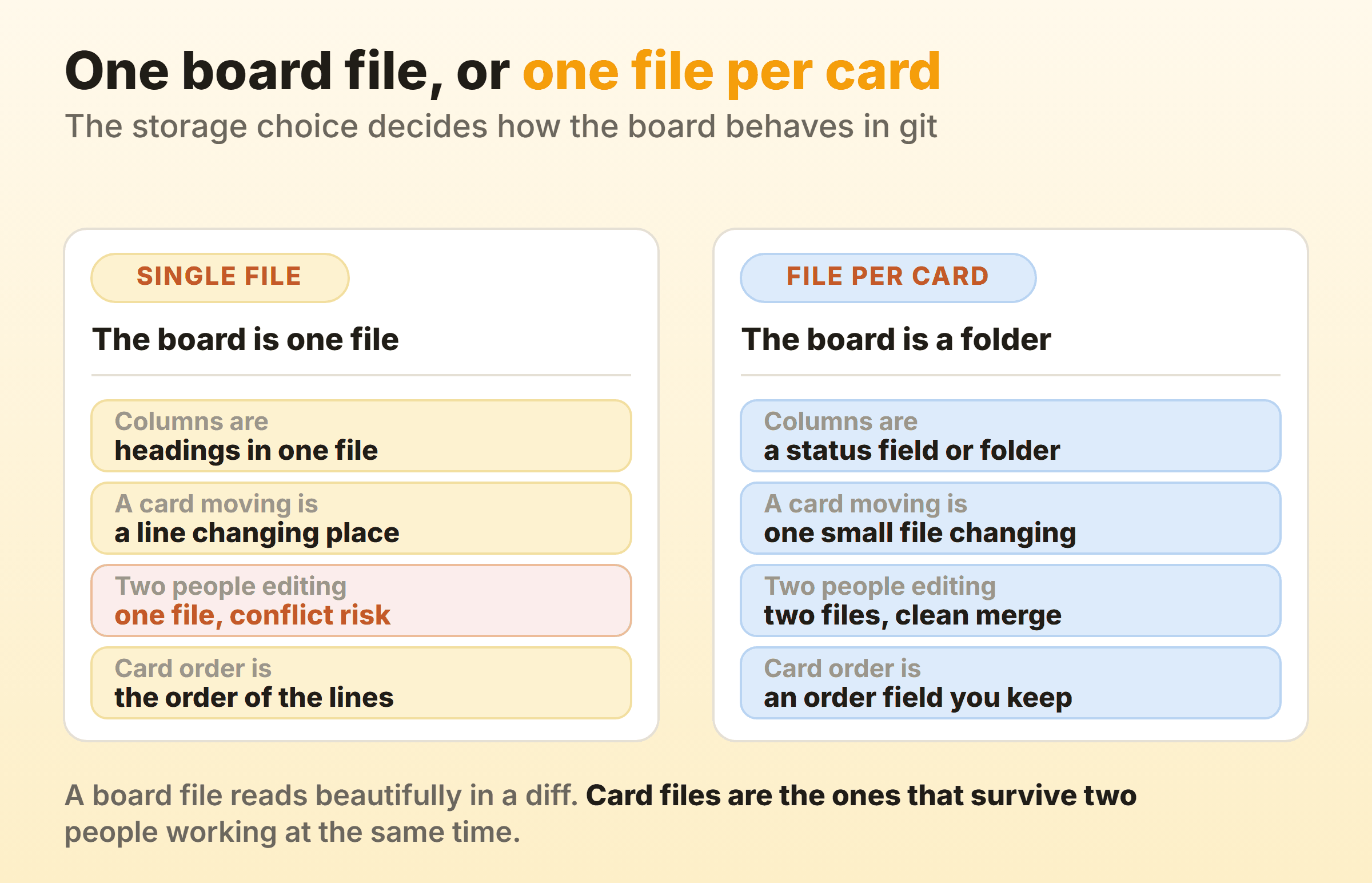
A single board file makes a card move show up as a line changing place, and that diff is a pleasure to read. It also puts everybody in the same file, so two people moving cards within the same hour can produce a merge conflict in the one file the entire team touches.
One file per card inverts both halves. A move changes one small card file, its status field and, in the LachyFS layout, the status subfolder it sits in, so two people moving different cards touch different files and merge cleanly. Card order stops being the order of the lines and becomes something you store, and the LachyFS layout stores it in an order field.
Pick by team size. Working alone, the board file wins on readability. Three or more people committing to the same repo, and the card files will save you a Wednesday.
Why Keep a Kanban Board in Markdown?
Keep a kanban board in markdown because every tool you already own works on it, no integration required:
- Version control works. A git log on the board shows when it changed and who committed the change, a card history that needs no extra tooling.
- Search reaches every card. grep, ripgrep and find-in-files all see card text, because cards are plain text in files.
- Sync needs no sync feature. Whatever moves files between your machines moves the board.
- Nothing is trapped. There is no export button, because there is nothing to export from.
- Your editor is the card editor. No modal, no round trip, no waiting on a save.
Cards stay thin, and that is deliberate. A markdown card is a line of text with a few key-value pairs after it, or a short file with frontmatter on top. A hosted tool’s kanban card can carry comments, attachments and a time log as well. Plenty of work moves faster without them.
What Does a Markdown Kanban Board Not Record?
Every format above records where a card sits now, and none of the documented fields records when it got there. Read the fields back and you can see it. The Obsidian plugin writes a finished card as - [x] Ship the release notes and adds no timestamp to the line. The LachyFS frontmatter carries created and modified, which tell you when the file changed, not which column it changed into. The todo.md convention puts a date at the end of a title only if you type one there. None of that is column-entry data, so cycle time, weekly throughput and a cumulative flow diagram have nothing to work from. Transitions can be reconstructed from commits, and flow metrics rebuilt by git archaeology are a small project, not a report.
One bracketed number in an Obsidian lane name is the only column limit the four formats document, and it lives in heading text anyone can retype. A limit that fragile works only while somebody keeps an eye on it.
Kanbanee is where I work, so read the next bit as disclosure. It records which column a card entered and when, so cycle time, weekly throughput and a cumulative flow diagram are reports you open. Those sit on Pro at $6 per month or $48 a year. It is also a hosted board, not a file in your repo, with no API and column dragging that works on desktop only.
When Is a Markdown Kanban Board the Right Choice?
A markdown kanban board is the right choice when the work already lives in a repo or a vault and nobody outside the team has to report on it. Three cases where it is plainly correct:
- A solo board. One person, one file, no accounts, and a board still readable in ten years.
- A roadmap in a readme. A Mermaid block that updates in the same pull request as the code it describes.
- A repo where the tasks are the code. Cards beside the files they refer to, moving in the same commits.
It becomes the wrong tool the moment any of these is true:
- Somebody asks how long work takes here. That answer needs column-entry timestamps, and no format above documents a field for them.
- More than two people move cards daily. A board file turns into a merge conflict generator.
- A limit has to hold. Only the Obsidian format documents a column limit at all, and it sits in a heading anyone can retype.
I run both, and the split holds up fine. Specs, notes and half-formed thinking stay in markdown. The board the team opens every morning lives somewhere that keeps a record of itself, because the day somebody asks for that record is not the day to start collecting it.
FAQ
Can you make a kanban board in markdown?
Yes, with no tool at all. Write a heading per column and a checkbox item per card, which is what the todo.md convention formalises. Extensions add a drag-and-drop view on top, and the file stays the file.
What is the best markdown kanban tool?
It depends where you already work. In a vault, the Obsidian Kanban plugin, since its boards stay readable as ordinary notes. In VS Code, Kanban Markdown by LachyFS, which keeps one file per card. For a board in documentation, Mermaid.
Does GitHub render a Mermaid kanban board?
That depends on the Mermaid version GitHub is running, and GitHub’s documentation says how to find out. Run the info command inside a Mermaid code block to see the version in use, then compare it against 11.4.0, the release that added the kanban diagram type. The same check is worth trying on other hosts that render Mermaid.
How do you set a WIP limit on a markdown kanban board?
In the Obsidian Kanban plugin, put the number in brackets at the end of the lane name, as in ## Doing (3). The parser accepts digits between those brackets and nothing else, so (max 3) sets no limit. The other formats here do not document a column maximum, so a limit there lives in your head and not in the file.
Can two people share a markdown kanban board?
Sharing a markdown kanban board means sharing the files, through a git repository, a synced folder or whatever moves your vault. No server holds the board, so there is nothing to send an invite from. Two people is fine. Six people in one board file, and somebody spends the afternoon resolving conflicts.
Is a markdown kanban board the same as a task list?
Nearly, and the difference is the headings. A task list is checkbox items in a file. A markdown kanban board groups those items under headings that name the state each one is in, which is what turns a list into columns.