
Kanban Board Examples: 8 Layouts You Can Copy
Updated at
The Answer
A kanban board example is a working layout you can copy: the columns a team moves work through, the cap on the column where the work happens, and what each card carries. The most-copied kanban board example is three columns wide (To do, Doing, Done) with a limit of two or three on the middle column, and nearly every board below is that shape with extra stages added where work piles up. Eight examples follow with their exact column names, running from a personal board through software, content, support and sales teams to a physical whiteboard and the original manufacturing kanban system.
What Should You Look At in a Kanban Board Example?
Look at three things in a kanban board example, in this order: the column names, the caps, and what a card carries.
The column names tell you the stages that team’s work really passes through, including the boring waiting stages other teams hide. The caps are the numbers next to a column heading. Most people skip them when they copy a board. The card content is what someone can tell about an item without opening it.
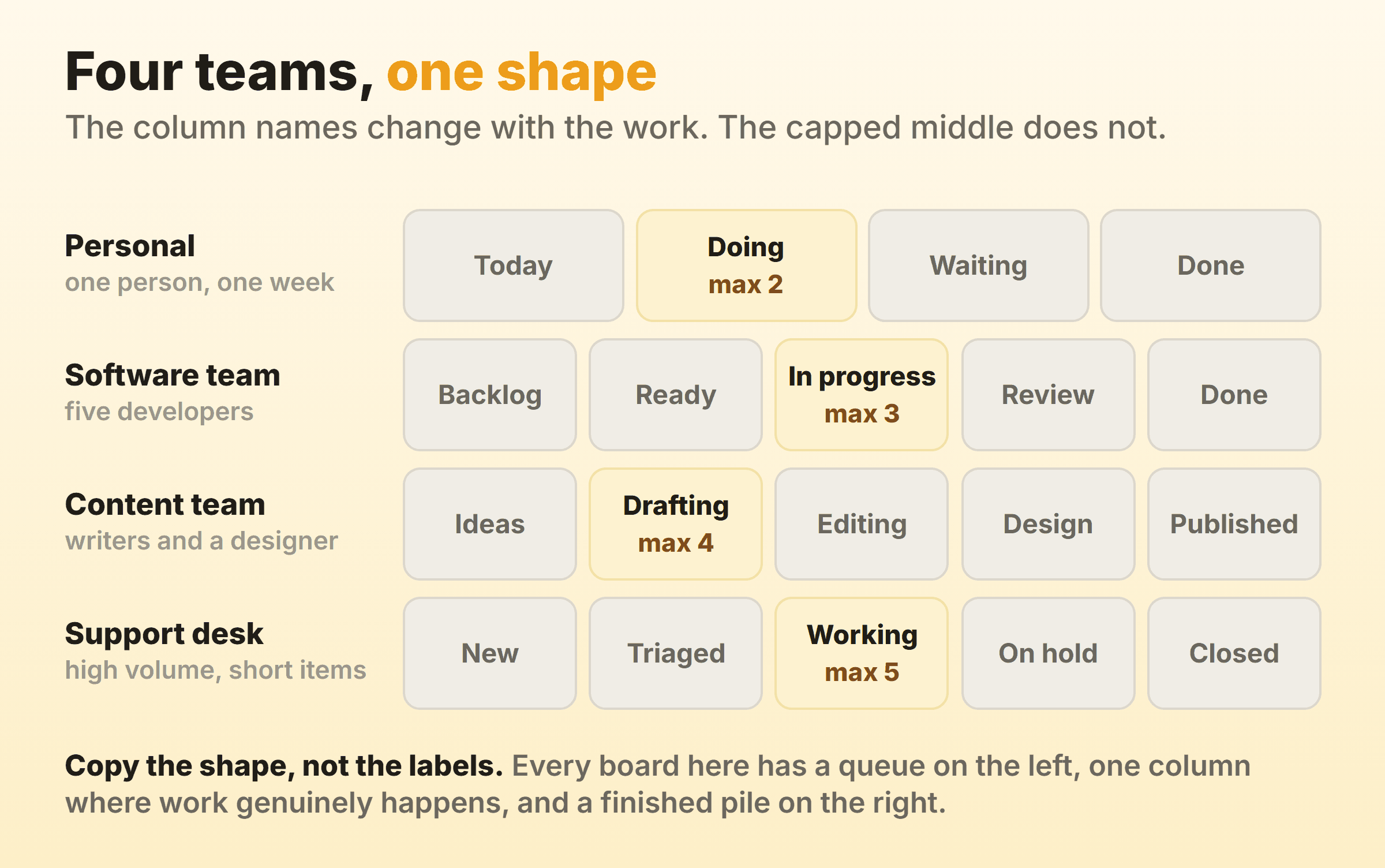
Copying the words instead of the shape is where this goes wrong. A marketing team adopts Backlog, In progress, In review, Done because a software example used those labels, then ends up with a board that describes nobody’s work. Same four boxes, no information. The structure travels between teams even when the vocabulary does not: a queue, one place where work is happening, a cap on that place, and a finished pile. Kanban columns goes deeper on naming and how many to run.
A Simple Kanban Board Example: To Do, Doing, Done
The simplest kanban board example is three columns and one rule: nothing enters Doing until something leaves it.
Columns: To do | Doing (max 3) | Done
That is the whole design, and it suits a team of two to five people doing one kind of work. It stays useful for months longer than most people expect. The cap is the piece that gets dropped first when teams copy a sample kanban board out of a template gallery, and it is also the piece that makes this a board rather than a to-do list arranged sideways.
Pick the cap by counting the people who pull work, then add one. Three people, cap of four. Run it a fortnight before you touch it again. WIP limits covers how to tune the number once the column starts turning red on you.
Personal Kanban Board Example
A personal kanban board example uses the same three columns with a smaller cap and a lane for things you are waiting on.
Columns: Today | Doing (max 2) | Waiting | Done
The Waiting column is what makes a personal board worth the effort. A lot of stalled work is parked on a reply, a delivery, an approval or a form somebody else has to sign, and once that has a column of its own you stop counting it as work in progress and stop feeling permanently behind.
Kanban examples in everyday life run on this layout. Job applications move through Applied, Phone screen, Onsite, Offer. A house move gets Packed, In the van, Unpacked, and coursework gets Reading, Drafting, Submitted. My own board caps Doing at two, which sounds severe until the week you try three and finish none of them.
Software Development Kanban Board Example
A software development kanban board example splits the middle of the board so that code waiting for review stops looking like code being written.
Columns: Backlog | Ready (max 4) | In progress (max 3) | In review (max 2) | Done
Ready is a short queue refilled once a week, so nobody starts an item nobody has thought about. In review is capped harder than In progress, because review is where teams lose days quietly, and a cap of two forces someone to stop writing and start reading.
Most agile boards also carry a swimlane across the top for production incidents, capped at one. It is the only work allowed to jump the queue. Giving it a lane instead of a special sticky colour keeps the exception countable.
Content and Marketing Kanban Board Example
A content team’s kanban board example is longer than a software one because the pipeline has distinct stages, each with a different person doing the work.
Columns: Ideas | Drafting (max 4) | Editing (max 3) | Design | Scheduled | Published
Ideas is uncapped and messy on purpose. Everything from Drafting rightwards is capped, and the cap on Editing is the one that usually bites, since a single editor is the constraint on most content teams whatever the org chart says.
The swimlanes on a marketing board tend to split by channel instead of by priority: blog, email, social, paid. Then anyone can see what is going out this week without opening a card.
Support Desk Kanban Board Example
A support desk kanban board example runs shallow and wide, because volume is high and each item is short.
Columns: New | Triaged | Working (max 5) | Waiting on customer | Closed
Waiting on customer changes the day-to-day more than any other column here. A ticket parked for four days on a customer reply would otherwise sit in Working, inflating every number the team reports and hiding how much of the queue is actually theirs to move.
Caps on a support board usually sit per person rather than per column, one of the few places a personal limit beats a column limit. Two open tickets each, five agents, cap of ten.
Sales Pipeline Kanban Board Example
A sales pipeline is a kanban board example most people have used without calling it one, since the stages are the deal stages.
Columns: Lead | Qualified | Demo booked | Proposal sent | Won or lost
Here the card content does the work, and the columns mostly take care of themselves. Deal value, next action, next action date. When half the cards carry no next action the board has quietly turned into a report, and the weekly review becomes twenty minutes of reading names aloud.
Cap Qualified rather than the later stages. Rep capacity runs out at the conversation stage, and an uncapped Qualified column is how a pipeline fills with deals nobody has touched in a month.
Physical Kanban Board Examples
Physical kanban board examples are sticky notes on a whiteboard with the columns marked out in tape, and they still beat software for a co-located team in the first month.
One note per item, written by hand, which caps the description at about a dozen words and forces people to split anything vague. Column headings go on index cards taped above the lanes so they stay easy to rename. The cap is written in marker next to the heading. Some teams add a dot in the corner of a note for each day it has been stuck, a crude cycle time counter that costs nothing.
You give up history, metrics, and any board at all for the person working from home on Thursday. A photo every Friday is not a substitute. Most teams I have worked with run a physical board for a few weeks to settle the workflow, then move the same columns into a tool once the arguing stops.
Manufacturing Kanban System Example
The original kanban system example has no columns at all. It is a card that travels with a bin of parts and comes back as a request to make more.
Toyota’s two-bin version works like this. Each part number has two bins on the line, each with a card. A worker empties the first bin, pulls out the card, and sends it upstream. That card is the only authorisation to produce a replacement bin, so production is pulled by real consumption instead of pushed by a forecast. Taiichi Ohno took the idea from American supermarkets, where a shelf gets refilled when it empties rather than when head office guesses.
Every kanban system example on a whiteboard descends from that card. The column is the shelf, the WIP limit is the number of bins, and moving a card out of Done is the signal that the next item can start. Kanban University still names the first course in its management track Kanban System Design, where the system being designed is the flow of signals through a workshop.
What Does a Good Kanban Board Design Look Like?
A good kanban board design is one a stranger can read from three metres away without asking a question. That test rules out most of what people add to boards.
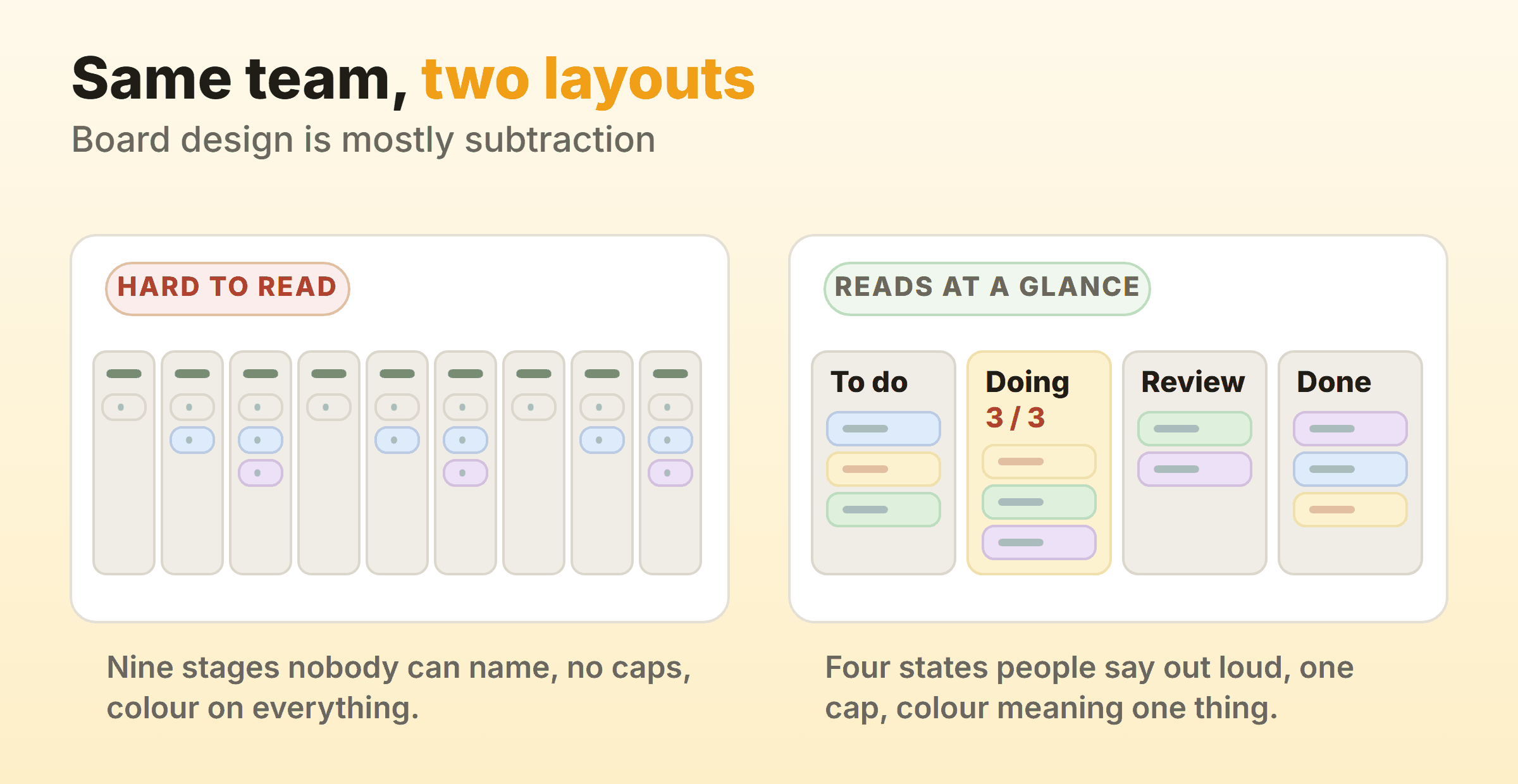
Five rules hold up across every board layout above:
| Copy this | Ignore this |
|---|---|
| Three to seven columns | Column counts above seven |
| Names your team says out loud | Job titles as column names |
| One cap on the busiest active column | A cap on every column at once |
| Colour meaning exactly one thing | Colour as decoration |
| A Done column cleared weekly | A Done column with 300 cards in it |
The clean kanban board UI design examples people collect on Dribbble are minimalist mostly by subtraction. One accent colour, generous space between cards, four facts at most on a card front, no visual noise past that. Nobody studies a board. They glance at it on the way to a meeting, and anything that needs more than a glance is costing attention for nothing.
Here is a real board rather than a diagram, so you can see where the pieces land in an actual kanban board interface:
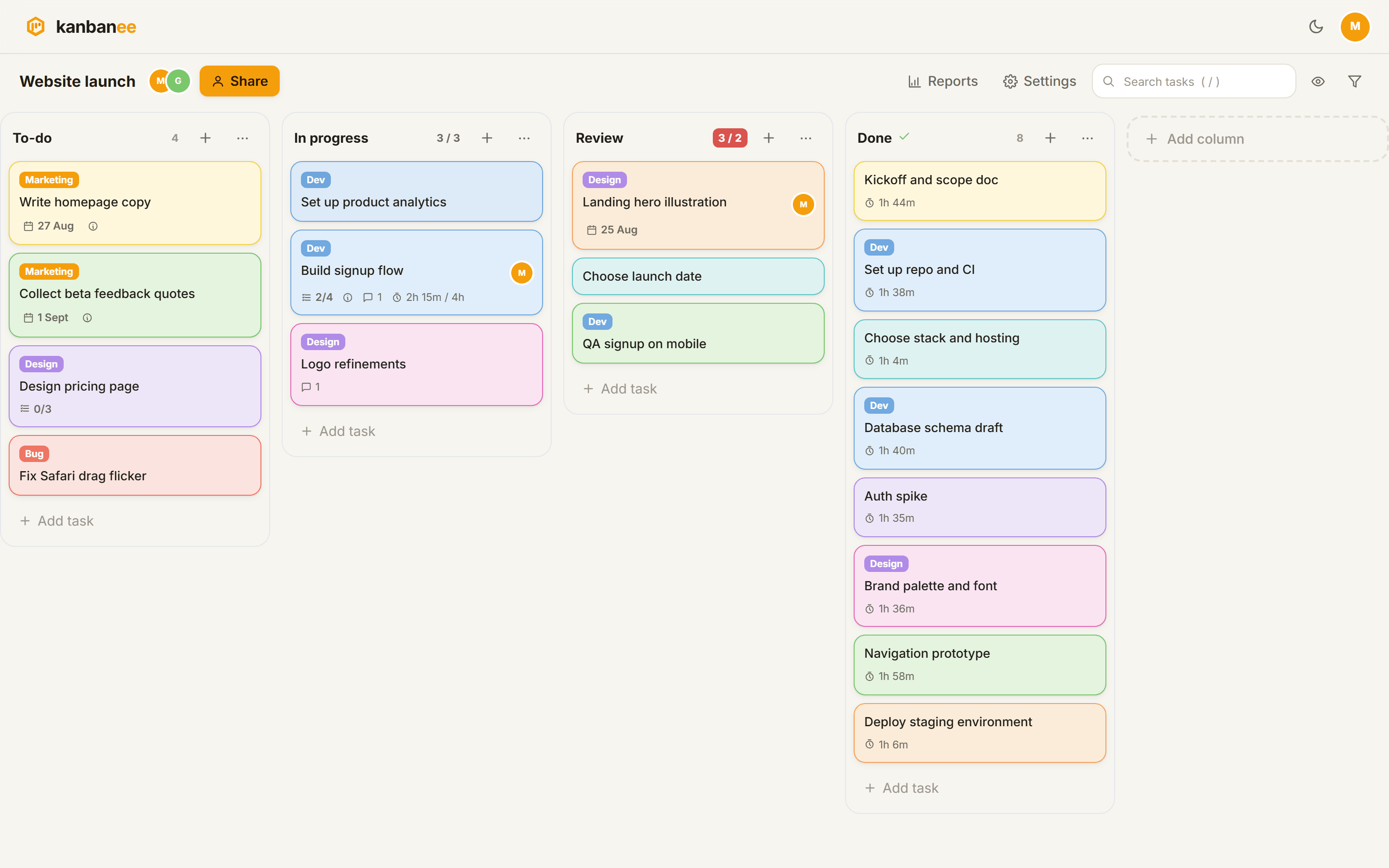
Four columns, labels doing one job (Dev, Design, Marketing, Bug), and a count badge next to each heading. In progress sits at 3 of 3 and Review shows 3 of 2 in red, which is the board naming the queue before anyone has run a report. In Kanbanee that cap is soft, so the drag still works and the badge just goes red, and the signal worth watching is how long it stays that colour. For turning that history into a chart, kanban metrics covers cycle time and the cumulative flow diagram.
How Do You Turn an Example Into Your Own Board?
Start from your real workflow, then use the examples above to check your work. Five steps, one afternoon.
- Write down where work waits. Not the stages you would like to have. The places items sit for a day or more, including the ones that embarrass you.
- Delete any stage work passes through in under an hour. Those are steps in a process, not states worth a column.
- Name each remaining stage the way people say it out loud. In review beats With QA. Waiting for client tells you who to chase, where Blocked leaves you guessing.
- Put one cap on the column where things pile up. People who pull from it, plus one. Only that column, for now.
- Define Done in writing. Merged, deployed and the customer has it are three different columns, and teams argue about this for years.
Run it a fortnight untouched. Then add exactly one column, wherever cards visibly collect, and cap that too. Most boards stop growing at five or six columns, and the ones that keep growing are usually tracking a process somebody else owns.
FAQ
What is a simple kanban board example for beginners?
To do, Doing, Done, with a limit of three on Doing. A basic kanban board needs nothing else on day one. Write your current work onto cards, put them in the right column, and resist adding a fourth column for two weeks. If work keeps stalling in one place, that place is your next column.
What does a kanban card look like in these examples?
A card front carries a short title, one label, an owner, and a due date if the date is real. Everything else lives inside it: description, subtasks, comments, attachments, time logged. If someone has to open a card to work out what to do about it, the front is missing something.
Where can I find kanban board images, icons or screenshots?
Icon sets name the kanban icon inconsistently. Search for “columns” and “board” too before deciding a set does not have one. For a kanban board image in a deck, a screenshot of your own board takes ten seconds and shows your actual work. Stock libraries like Unsplash carry photos of physical boards covered in sticky notes, and a flat illustration works fine as a slide header, though both show somebody else’s workflow, which is the same trouble as copying a template.
Which tools have a built-in kanban view?
Plenty of project management and business software ships one. Odoo has a kanban view that groups records by stage for pipelines and projects, Directus offers a kanban layout for collections, and most dashboard products embed a kanban widget for task lists. The board is the same object every time. The difference that matters is whether the tool lets you put a WIP limit on a column, and a surprising number still do not.