
Kanban Swimlanes: Types, Row Headers and When to Skip Them
Updated at
The Answer
Kanban swimlanes are horizontal rows running across every column of a kanban board, grouping cards by work type, team, client or urgency while the columns carry on handling the stages. A card travels left to right through the columns and keeps its lane the whole way. The types worth knowing are classes of service, work type, team or client, and project phase. Two or three rows is plenty for most boards. The one that earns its place almost everywhere is an expedite lane for urgent work capped at a single card, and the rest are worth adding only when two kinds of work follow the same stages under different rules. Every row needs a header carrying the category name, a cap, a one-line pull policy and a colour matching the card labels, because a row with nothing but a name on it is decoration. Skip lanes entirely when a coloured label and a filter would tell you the same thing.
What Are Kanban Swimlanes?
A kanban swimlane is a horizontal row that holds one category of work across all the columns of the board, so the column a card sits in gives you its stage while the row gives you the kind of work, and unlike the column, the row almost never changes.
The vocabulary is scattered and none of it matters much. Kanban lanes, kanban swim lanes, swimlane kanban, kanban board swimlanes. Same row. Physical boards drew them in masking tape across the whiteboard and the digital ones kept the word.
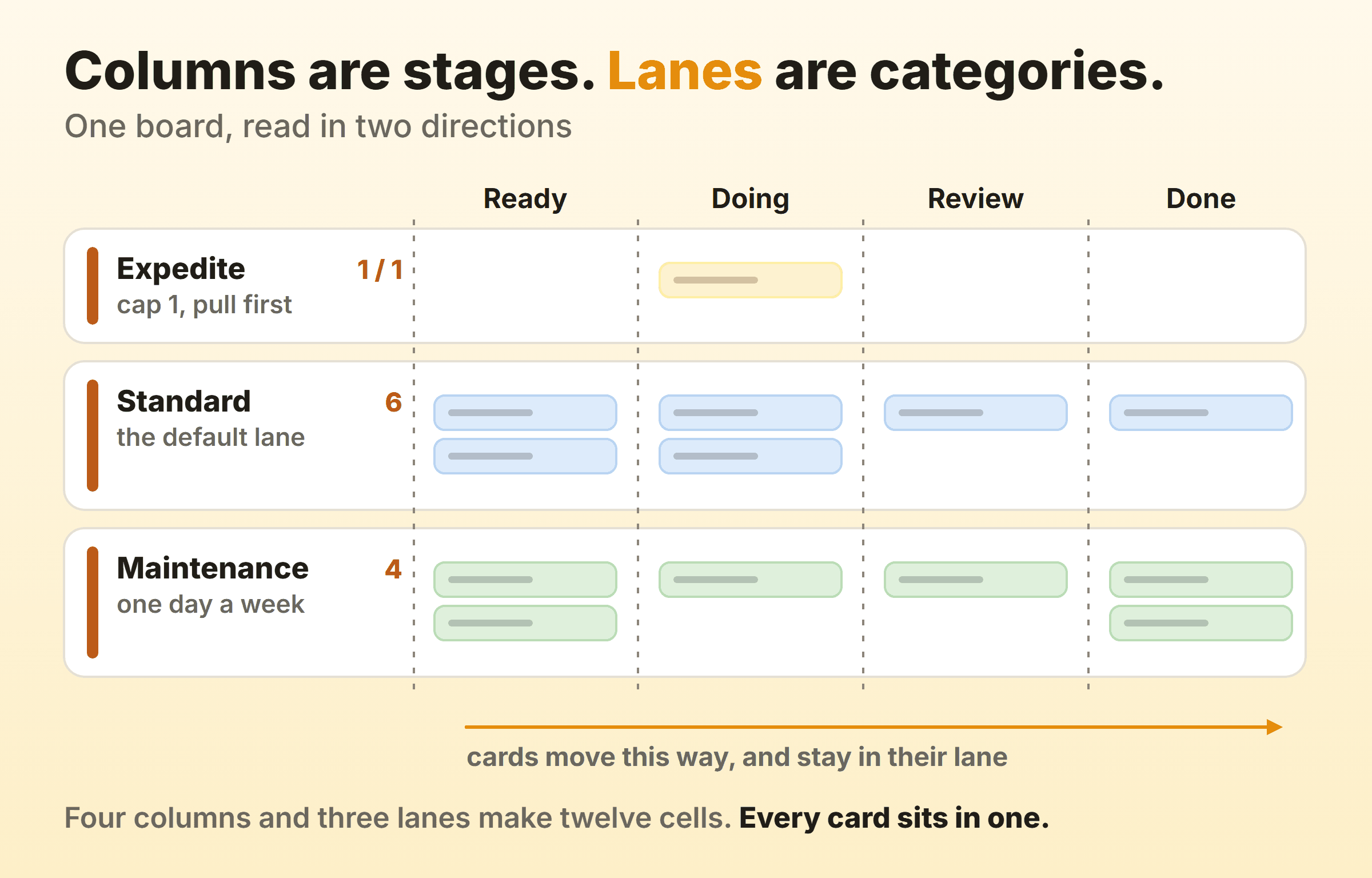
A card in the expedite lane is still expedited when it reaches review, so whoever picks up reviews takes it first without asking anyone. A red label does the same job right up until somebody stops looking at labels.
Lanes do not add stages. They slice the stages you already have into rows. If the open question is how many stages the board needs at all, that is a kanban columns problem and no amount of horizontal slicing will answer it.
Swimlanes and Swimlane Diagrams Are Different Things
A swimlane diagram is a process flowchart with a horizontal band per role or department, drawn once to document how a process runs. A kanban swimlane is a row on a live board with cards crossing it daily. Same metaphor, different artifact. Search for swimlanes on its own and you land mostly in flowchart territory, which is worth knowing before you lose an afternoon to Visio tutorials.
What Types of Kanban Swimlanes Are There?
Four types cover nearly every kanban board with swimlanes: classes of service, work type, team or client, and project phase. They are not interchangeable. Stacking two of them onto one board is the quickest way to make it unreadable.
Classes of Service
Classes of service split work by what the delay costs you, and this is the row I would add to a board before any other. Four classes turn up repeatedly:
- Expedite. Drop everything. One card at a time, and taking one means stopping something else.
- Fixed date. A real deadline sits behind it. A regulatory filing, a contract, a conference.
- Standard. Everything else, which is most of the board.
- Intangible. No deadline and nobody asking, but it costs you later. Refactoring, documentation, version upgrades.
An expedite lane in kanban changes behaviour on day one, because it gives the team a legitimate home for the thing the CEO just asked for instead of quietly wedging it into the middle of the board. Then the cap has to hold. A row carrying three urgent cards has stopped being a class of service, and the wider policy set that idea belongs to sits in kanban principles.
Work Type
Grouping by work type puts planned project work in one row and the unplanned stream in another. Support tickets, bugs, small requests. Separating them earns its keep because a ticket clears in an afternoon while a project item runs for weeks, and averaging the two produces a cycle time that describes nothing you actually do.
I am less certain about giving repetitive tasks their own row. It works when the same card shape returns every week and the steps are already common knowledge, and it clutters the board when the repetition amounts to three or four cards a month.
Team, Client or Product
People ask about this one most, usually phrased as how to use kanban lanes for team-specific tasks. A lane per team works when the teams share a workflow but not their work, and it makes each team’s workload countable at a glance. Picture two content pods drafting, editing and publishing through the same four columns, each with its own row. It falls over the moment a card needs both pods, because a card can only sit in one lane and somebody has to pick.
Lanes per client or per product have the same shape and the same failure mode. Agencies tend to run them well, since client work rarely crosses rows. On a portfolio board the crossing happens most weeks, and by month two the rows have stopped meaning much.
Project Phase or Iteration
Lanes per phase or per iteration age badly. Discovery, Build and Launch as three rows looks tidy in week one, and by week six the Launch row holds everything while nobody has touched Discovery. Phases are stages, which makes them columns. And a lane name with a date in it commits you to renaming it forever.
How Do You Design a Swimlane Row Header?
The row header is the strip down the left edge of each lane, and a working one carries four things: the category name, a cap, a one-line pull policy and a colour. Most boards ship with the name alone, which is how lanes end up as decoration.
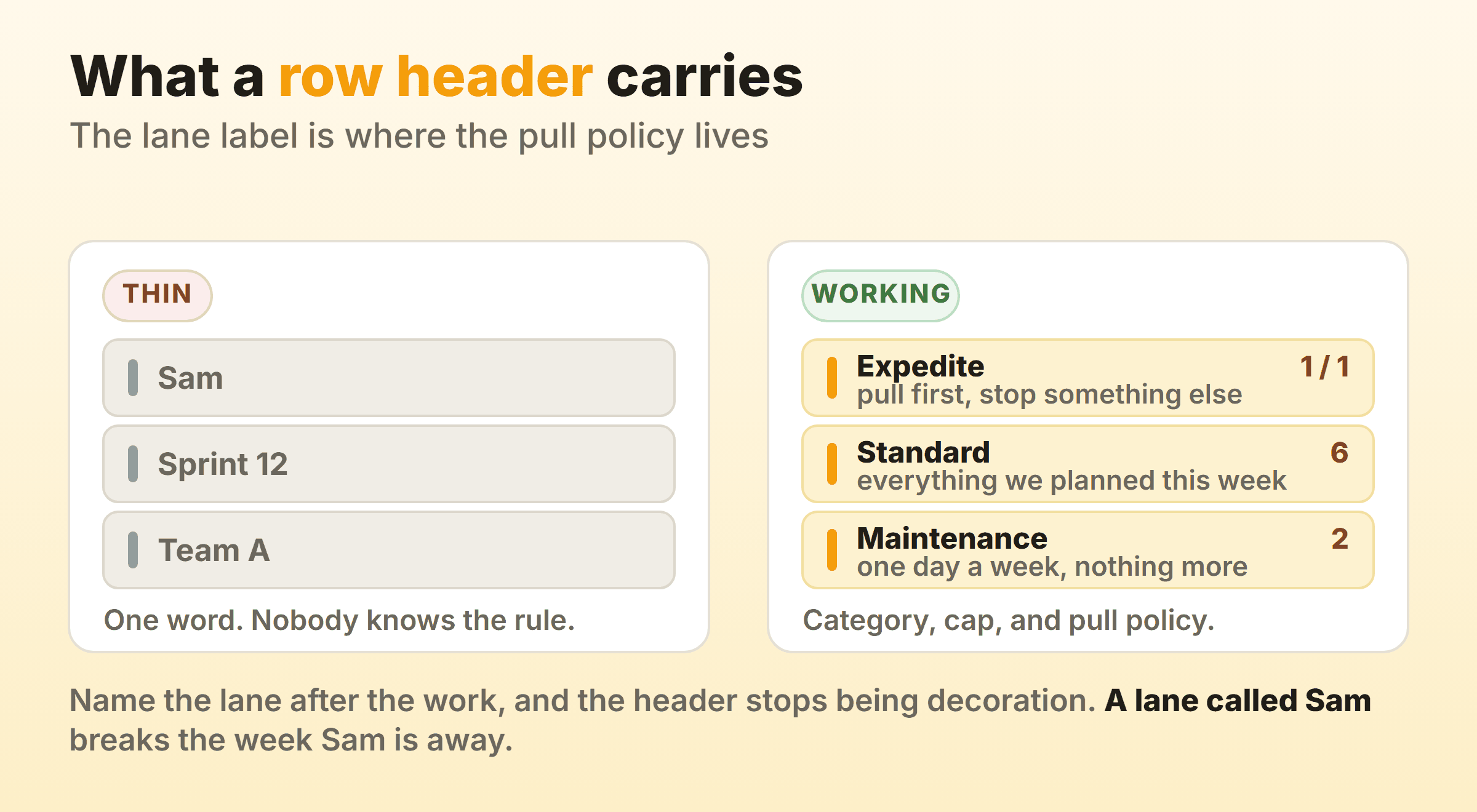
Name the lane after the work. A row called Sam breaks the week Sam is on holiday and breaks permanently when Sam leaves. Same rule that governs column names. The label should still read correctly after a reorganisation.
Put the cap in the header. Where a lane has a work in progress limit, the count belongs in the header in the same count over limit shape a column uses. A number that lives only in the team agreement gets checked twice and then forgotten.
Write the pull policy on one line. “Pull first, stop something else” for expedite. “One day a week, nothing more” for maintenance. Almost every board skips this, and it is the line that ends the recurring argument about whether a card belongs in a row.
Match the colour to the card labels. If expedite cards are red and the expedite row is grey, every reader does the translation themselves, every time.
Header patterns worth copying:
| Pattern | Header reads | Works because |
|---|---|---|
| Class of service | Expedite / 1 of 1 / pull first, stop something else | The cap and the rule sit in the same glance |
| Capacity split | Maintenance / 2 / one day a week, nothing more | The lane behaves as a budget rather than a category |
| Team lane | Content pod / 4 / own backlog, shared columns | Says what the lane owns and what it shares |
| Catch-all | Standard / no cap / everything else | Names itself the default so nothing gets stranded |
Put the most urgent lane at the top. That is where eyes land, and it is where a standup starts if you walk the board from the right. Expedite goes on top with standard underneath, and anything slow and deliberate belongs at the bottom where it will not pull attention. Keep the count down too. Three rows reads comfortably, five is the ceiling on a laptop screen, and past that the board scrolls vertically and loses the single-glance read that made it worth building.
Should Kanban Swimlanes Have Their Own WIP Limits?
Yes for the expedite lane, usually no for the rest. A lane cap is a horizontal limit and a column WIP limit is a vertical one, so running both on one board lets two rules disagree about the same card.
Cap the columns first. Add a lane cap only where the row exists to protect something scarce. Expedite qualifies, because the point of a dedicated urgent row is that it sits empty most of the time. A maintenance lane capped at two is really a capacity allocation wearing a WIP limit costume, which is fine as long as nobody expects it to behave like a column cap.
Where both caps exist, the column limit is the one that bites, since it is the one the team hits daily. On our own product board the Doing column is capped and no row is, and that only works because there are two rows and one of them is empty most weeks.
Kanban Swimlane Examples
Layouts that hold up, with the columns doing ordinary work and only the rows differing:
| Team | Columns | Swimlanes | Why |
|---|---|---|---|
| Support desk | Triage, Doing, Waiting on customer, Done | Expedite (cap 1), Tickets, Internal work | Keeps the outage path clear of the ticket queue |
| Marketing | Ideas, Drafting, Review, Scheduled | Campaign, Always-on, Ad hoc | Campaign work carries dates, always-on does not |
| Product team | Ready, Building, Review, Done | Expedite (cap 1), Feature work, Maintenance | Protects the maintenance slice that otherwise never gets done |
Each of them keeps the lane count small, puts the interrupt row on top, and leaves people out of the row names entirely.
When Should You Not Use Swimlanes?
Skip swimlanes when a label and a filter answer the same question, which covers most boards.
Every card has to belong to exactly one lane, the board grows taller, and phone users scroll past half-empty rows to find anything. That is a structural commitment you keep paying for. A label costs nothing and a card can carry several at once. If all you want is to see the design work, filter by the design label and everything else drops out of view until you clear it.
Kanbanee has no swimlane rows. Instead there is a per-board label manager, eight card colours, and a filter bar combining member, colour, label and due status, hiding everything that does not match while each column keeps a count of what does. That covers three of the four lane types above. Classes of service are the exception, because a filter can hide standard work but it cannot stop somebody starting a second expedite. For that you need the cap, or enough discipline to behave as though you had one.
Other cases where a row is the wrong tool:
- A lane per person. The board turns into a set of personal to-do lists sharing a background, and pull stops happening because everybody works their own row.
- A lane per project on a busy board. Ten projects means ten rows, nine of them half empty. Use separate boards, or labels.
- A lane added to make something visible once. Invisibility is usually a column problem. Work that is invisible because it is waiting wants a queue column.
FAQ
What are swimlanes on a kanban board?
Swimlanes on a kanban board are horizontal rows cutting across every column, grouping cards by category. A card occupies one row and one column at a time, moves right as it progresses, and keeps its row throughout. Columns carry the process, and the row says what sort of work is moving through it.
What is the difference between a kanban board and a swimlane?
The board is the whole apparatus of columns, cards and the rules governing them. A swimlane is one horizontal row inside it. A spreadsheet and a row gets you close as an analogy, though it breaks down quickly, because a lane can carry its own WIP limit and its own pull policy in a way a spreadsheet row cannot.
What is an example of a kanban swimlane?
An expedite lane. It sits at the top of the board, holds one card at a time, and anything in it gets pulled ahead of everything else. A support team running a kanban board with swimlanes might have exactly three rows: expedite for outages, one for customer tickets, one for internal work.
How many swimlanes should a kanban board have?
Two or three. Five is the practical ceiling, past which the board is taller than the screen and the single-glance read disappears. Wanting a sixth row is usually a sign you want a second board.
Do agile and scrum boards use swimlanes too?
They do, and the mechanics are identical. Agile swimlanes and scrum swimlanes are the same horizontal rows, on a board that happens to run in sprints. Scrum teams often give each story its own row with its tasks beside it, a layout kanban boards rarely bother with because there is no sprint boundary to organise around.