
How to Use Kanban: Board Setup, Daily Habits and Common Mistakes
Updated at
The Answer
Learning how to use kanban takes an afternoon of setup and about a fortnight of honesty. You draw the stages your work already passes through as columns, put every live item on the board, then cap the columns where work collects so nothing new starts until something finishes. After that the routine is small. Cards get pulled from the right instead of handed out from the left, the board gets ten minutes each morning, and whatever has been sitting still longest gets attention before anything newer. Without the caps, a board shows you the same overload in a tidier format.
How Does Kanban Work?
Kanban works by turning spare capacity into a visible signal. Each card is one piece of work. Each column is a state that work passes through, and the number in the column header is the most you have agreed to hold in that state at once. A full column tells everyone to stop starting and go help finish.
So how does a kanban board work once cards start moving? The pull comes from the right. Somebody with room takes the top card from the column to their left and moves it forward. Nobody gets handed work. That one change is what separates a kanban system from a status board, because it makes the queue in front of every stage impossible to ignore.
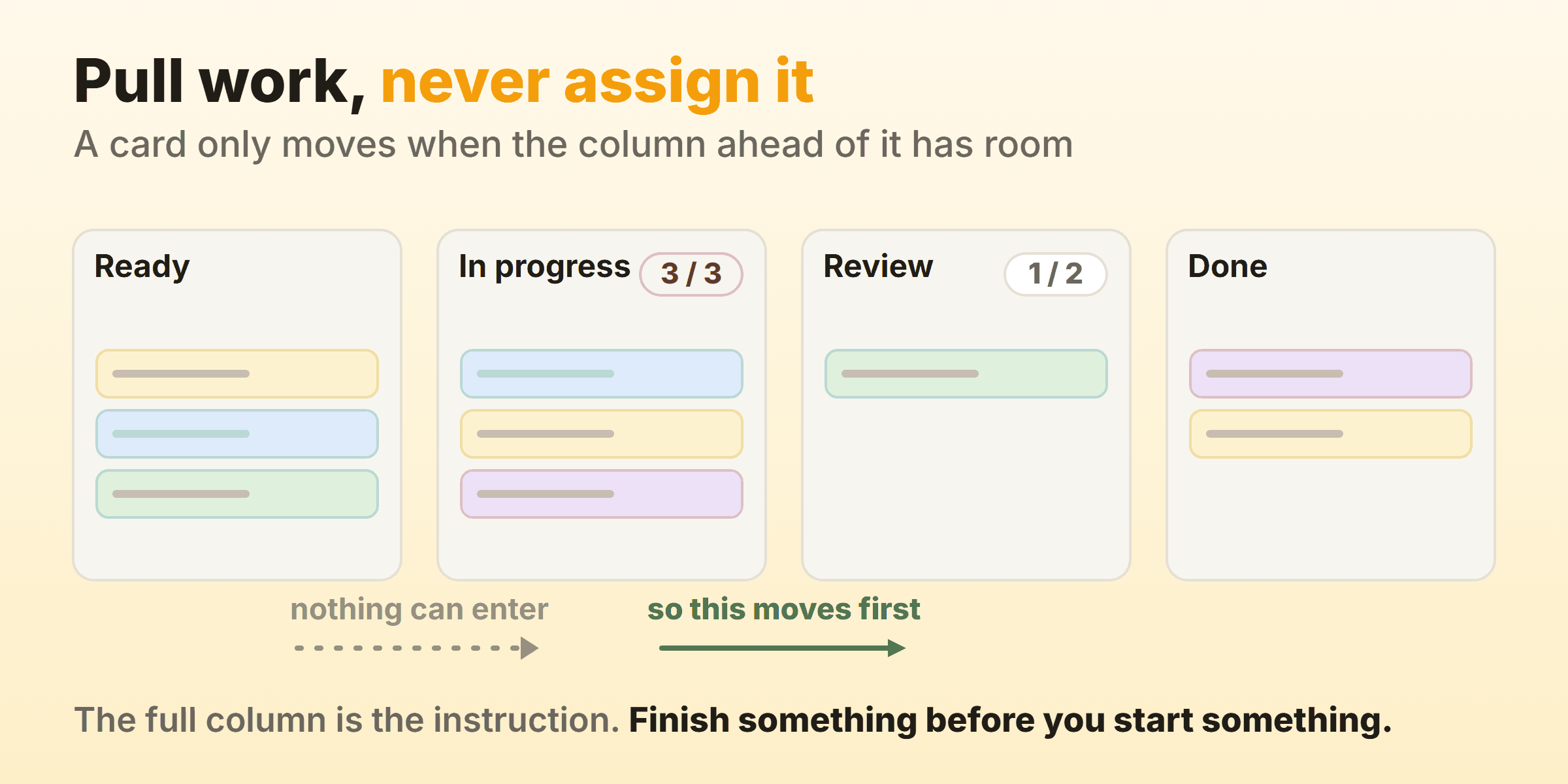
How a kanban board works does not change with the medium, so a wall of sticky notes and a browser tab behave identically. The mechanic came from Toyota, where Taiichi Ohno used physical cards in the late 1940s so an upstream stage only built parts once a downstream stage signalled it had room. David Anderson carried the logic into knowledge work and published Kanban in 2010. The parts became tickets and the rule came across unchanged.
How Do You Set Up a Kanban Board?
You set up a kanban board in four steps, and the first two take longer than anyone expects.
Map the Columns You Actually Have
Write down the statuses your work really passes through. The kanban board workflow you draw has to match what happens, including the states nobody wants to put on a board. Waiting for review and waiting on a client are states too, and so is the day a card spends in nobody’s hands after a handoff. A board showing Backlog, Doing and Done hides every one of those queues, and the queues are where the weeks go. Name each column after the state of the work rather than the person holding it, because “with the designer” stops meaning anything the week the designer is on leave. Five to seven columns covers most workflows.
Put Every Live Item on the Board
All of it, including the half-finished thing somebody has been quietly carrying since April. This is the uncomfortable step. Teams I have run through it usually find two to four times more work in flight than they believed, and that discovery is the point of the exercise. Write the number down before you do anything else, because it is the only clean baseline you will ever get.
Cap the Columns Where Work Collects
Pick the columns where cards pile up and give each one a number. A sane starting point is the number of people who pull from that column plus one. Then leave it alone for a fortnight and watch what the board does before anybody argues about the figure. WIP limits goes deeper on choosing the number and on what to do when the cap starts hurting, which it will.
Write the Policies Where People Can See Them
Three sentences on the board beat a wiki page nobody opens. What does done mean for each column. Who is allowed to pull next. And the awkward one, what happens when something urgent lands at 4pm on a Friday. Unwritten rules get applied differently by every person who touches them, and a policy nobody agrees on cannot be improved.
How to Use Kanban Day to Day
Once it is built, how to use a kanban board comes down to two habits. Move the card the moment the state changes, and walk the board once each morning from right to left.
Getting daily updates onto the board is the habit everything else depends on. If cards move at 5pm, or worse in a Monday meeting, the board describes last week and people quietly go back to asking each other. The card moves before the person does. Finished a review? Drag it, then pick up the next thing.
Walking the board right to left shifts the standup from activity to flow. Start at the column nearest Done and ask what would get that card out today, then work leftwards. Most standups never reach the backlog, which is fine, because delay does not live in the backlog.
The cap handles the rest. When a column is full somebody has to stop and help instead of starting something new, and that small moment of friction is the entire mechanism. On our own board in Kanbanee the column header shows the count against the limit and turns red once you go past it, and the drag is never blocked. Blocking it only teaches people to park work somewhere the board cannot see.
How Do You Group Tasks by Priority on a Kanban Board?
To group tasks by priority on a kanban board, rank each column top to bottom and give genuinely urgent work its own swimlane. The top card is what anybody pulls next. That ordering is your ranking system, and it beats a priority field because it forces one queue instead of fourteen tickets all stamped High.
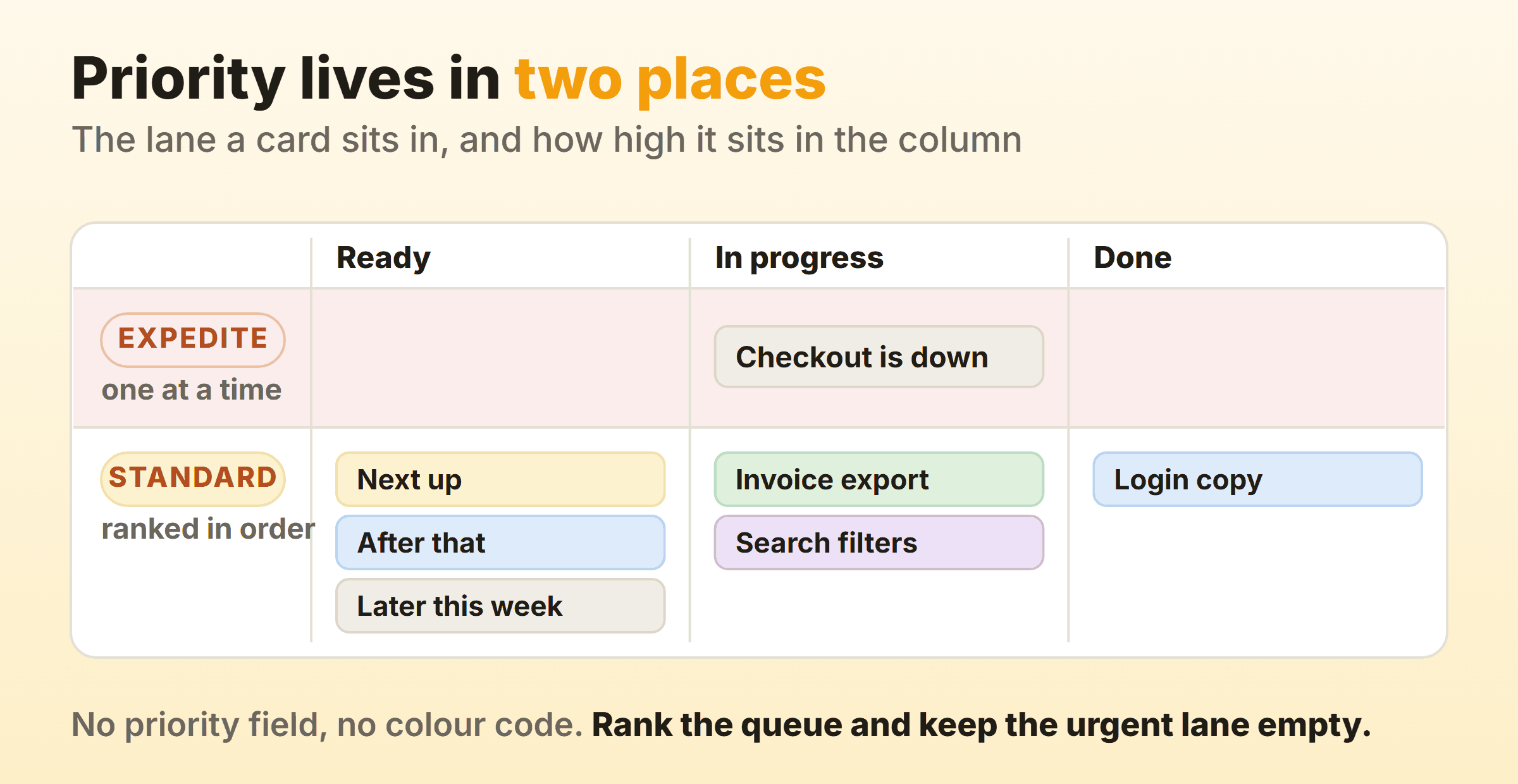
Above the standard lane, keep one expedite lane with a limit of one. Whatever sits in it jumps every queue and everything else waits. The limit is what makes the lane honest, since a lane holding five urgent items has become a second backlog. If that lane is occupied more than a day or so a week, the problem sits upstream in how work arrives, and no amount of board design fixes it.
Colour coding by urgency sounds appealing and falls apart around the twentieth card. Labels for the type of work earn their place, so bug, feature and chore are worth tagging. Urgency labels tend to record who asked loudest, and they stop being useful within a month.
How Do You Handle Blocked Tasks on the Board?
Handle blocked tasks by marking them where they stand, never by dragging them backwards. Put a blocker label on the card carrying two facts, the date it blocked and who has to act. A card blocked since Tuesday waiting on a client reply is a different animal from one blocked an hour ago on a code review.
Blocked cards keep counting against the WIP limit. Teams argue about this and the argument matters, because exempting them means a column holding four blocked items still looks like it has room, so somebody starts a fifth thing while nothing moves. If the cap suddenly feels tight once blockers count, the cap is telling you something true.
Give blocked work the first five minutes of the standup, oldest blocker first. Anything stuck for more than two days needs a named person chasing it, and a note on the card does not count as chasing. When the same external dependency blocks you every single week, it has earned its own column, so the wait finally shows up in your cycle time.
How Do You Identify Bottlenecks Using the Board?
You identify bottlenecks using a kanban board by finding the column where cards arrive faster than they leave. The queue in front of that stage grows week on week while everything downstream sits idle. Cards waiting in it also start showing higher ages than cards anywhere else on the board, which is the more reliable sign, since a queue can look healthy during a quiet week.
Cycle time settles the argument. Measure how long items take from the moment work starts to the moment they are genuinely done, then look at the spread. An average hides the three-week outlier everybody remembers. A cumulative flow diagram tells the same story in pictures, and bands that widen over time are queues growing. Flow metrics covers cycle time, throughput and how to read a CFD without fooling yourself.
Then go after the constraint itself. Adding a column does nothing. Throwing people at a stage that is already thrashing tends to make it slower. Lowering the WIP limit upstream of the bottleneck, so less arrives in the first place, is the cheap move almost nobody tries first.
When Should You Use Kanban?
Use kanban when work arrives continuously and priorities shift faster than your planning cycle. The quick test for when to use kanban is whether a two-week commitment would still be intact by Wednesday afternoon. Support desks, operations, marketing, maintenance and recruitment mostly fail that test, which is why boards suit them so well. Kanban also fits teams whose items vary wildly in size, since it measures how long things actually took instead of asking anyone to squash them into equal units.
The other strong case is a team that cannot reorganise. No titles change, no ceremonies become mandatory, and the board can go up on top of an existing agile process without permission from anyone outside the room.
When Kanban Is the Wrong Choice
Kanban is the wrong choice when you need a forcing function. A team that habitually leaves everything until the final week benefits from a sprint boundary in a way a continuous flow board never will. Fixed-scope work against a hard external date, a regulatory release or a conference launch, runs more comfortably inside a timebox. And a team with no discipline about updating the board gets nothing at all here, because every signal kanban produces depends on the board being true. Kanban vs scrum works through the cadence, roles and metrics differences properly.
What Are the Benefits of Using Kanban?
Most of what teams get from kanban comes from the cap. Limiting work in progress shortens how long each item takes, and Little’s Law puts a number on it. Average cycle time equals work in progress divided by throughput. Halve what is in flight without changing your output rate and each item finishes in roughly half the time.
Visibility of the queues is the second benefit, and it changes what people argue about. Once the waiting states are drawn, the conversation stops being about who looks busy and starts being about why the review column has held six cards since Tuesday.
Forecasting without estimation comes next. Thirty finished items give you a cycle time distribution, and a distribution answers “when will this be done” with a range and a confidence level attached. Eighty-five percent of items finishing inside nine days is a sentence you can put in front of a stakeholder and defend a month later.
Then there is the entry cost, which sits near zero. To use kanban effectively you need no new roles, no reorganisation and no commitment anybody has to argue for in a planning meeting.
What Are the Common Pitfalls of Using Kanban Boards?
Almost every pitfall of using kanban boards is the board drifting away from what is really happening.
No limits at all. A board with columns and no caps is still a to-do list. It looks organised and changes nothing, because the thing that improves flow is the moment somebody cannot start.
Clutter. Old cards pile up until the board stops being readable. Archive Done at the end of each week and give the backlog a rule, something like nothing older than 90 days without a fresh reason to keep it.
Done as a graveyard. Cards land in Done and sit there for months. Done should mean delivered, and if what it really means is “a developer finished”, add the column that ends the journey.
Too many columns. Every retrospective wants to add one. Nine columns means nine drags per card and a board nobody has updated by Thursday. Merge anything that is neither a real handoff nor a real wait.
Priority encoded everywhere except the order. Colours, labels, custom fields, and then a column where nothing is ranked. Rank the column.
Updating the board during the standup. A board that is only true for fifteen minutes a day makes every decision taken outside that window a blind one.
FAQ
How long does it take to learn kanban?
The mechanics take an hour. Kanban board tutorials past that point hit diminishing returns fast, because the hard part is holding a WIP limit while a stakeholder wants their thing started today. No kanban tutorial prepares you for that conversation. Give it two weeks of real use before you judge it, and treat learning kanban after that as a monthly read of your own numbers.
How do you estimate in kanban?
Mostly you do not. Kanban swaps estimation for measurement, so you count how long your last thirty items took and use the 85th percentile as the answer. If item sizes vary enormously, split them by type and keep a separate distribution for each. Teams who still want a rough size for planning conversations usually settle on three buckets and leave point scales alone.
How do you calculate the number of kanban cards in manufacturing?
The standard formula multiplies average daily demand by the replenishment lead time in days, adds a safety buffer, then divides by the container quantity. Average daily demand comes from what was actually consumed over a representative period, never from a forecast. This is the manufacturing side of kanban, and it shares little with a software board beyond the signalling idea.
Can you run kanban without software?
Yes, and a wall of sticky notes is often the better first version, because everybody walks past it and can see how kanban works without opening anything. Physical boards run out of road once the team is distributed, once you want cycle time data, or once cards start going missing. Plenty of teams begin on a wall and move to a digital board when they want the numbers.
Does kanban work for personal task management?
It does, with smaller numbers. A personal board whose Doing column is capped at two is the most useful version of kanban most people will ever run. I cap my own at two, and the only rule I keep is that nothing enters Doing until something leaves.