
Confluence Kanban Board: Databases, Jira Macros and Whiteboards
Updated at
The Answer
Confluence has no kanban board of its own and nothing in the macro browser called a kanban board macro, so a Confluence kanban board is always one of three other things wearing the name. In Confluence Cloud the closest match is a database displayed in board layout, where the cards are database entries and the columns come from one tag field. The Jira macros are the second route, and they put a list of work items or a chart on the page rather than a board, because the interactive board embed only ever worked on Data Center through the Agile Wallboard Gadget. Whiteboards are the third, and they suit work that is still being shaped. None of the three enforce a WIP limit or record cycle time.
Does Confluence Have a Kanban Board?
Confluence does not have a kanban board as a built-in feature. No board object, no column configuration, nothing in the macro browser that answers to the name. Confluence is a documentation product that grew sideways into structured content, and the board most people picture when they search for kanban in Confluence is the Jira board they already use, sitting on a page next to the spec.
What Confluence Cloud does have is databases, and any database can be displayed in board layout. Cards are rows. Columns are the options of a field. Drag a card across and the field value on that row changes, which is the same trick every database-backed board plays, Notion included. It is a real board and it belongs to Confluence rather than to Jira.
The confusion is worth naming early, because it decides everything downstream. Ask where the cards should live before you ask which macro to use.
What Are the Ways to Get a Kanban Board in Confluence?
There are four ways to get a kanban board in Confluence, and they split cleanly into two families: boards where Confluence holds the cards, and boards that are a window onto work held in Jira.
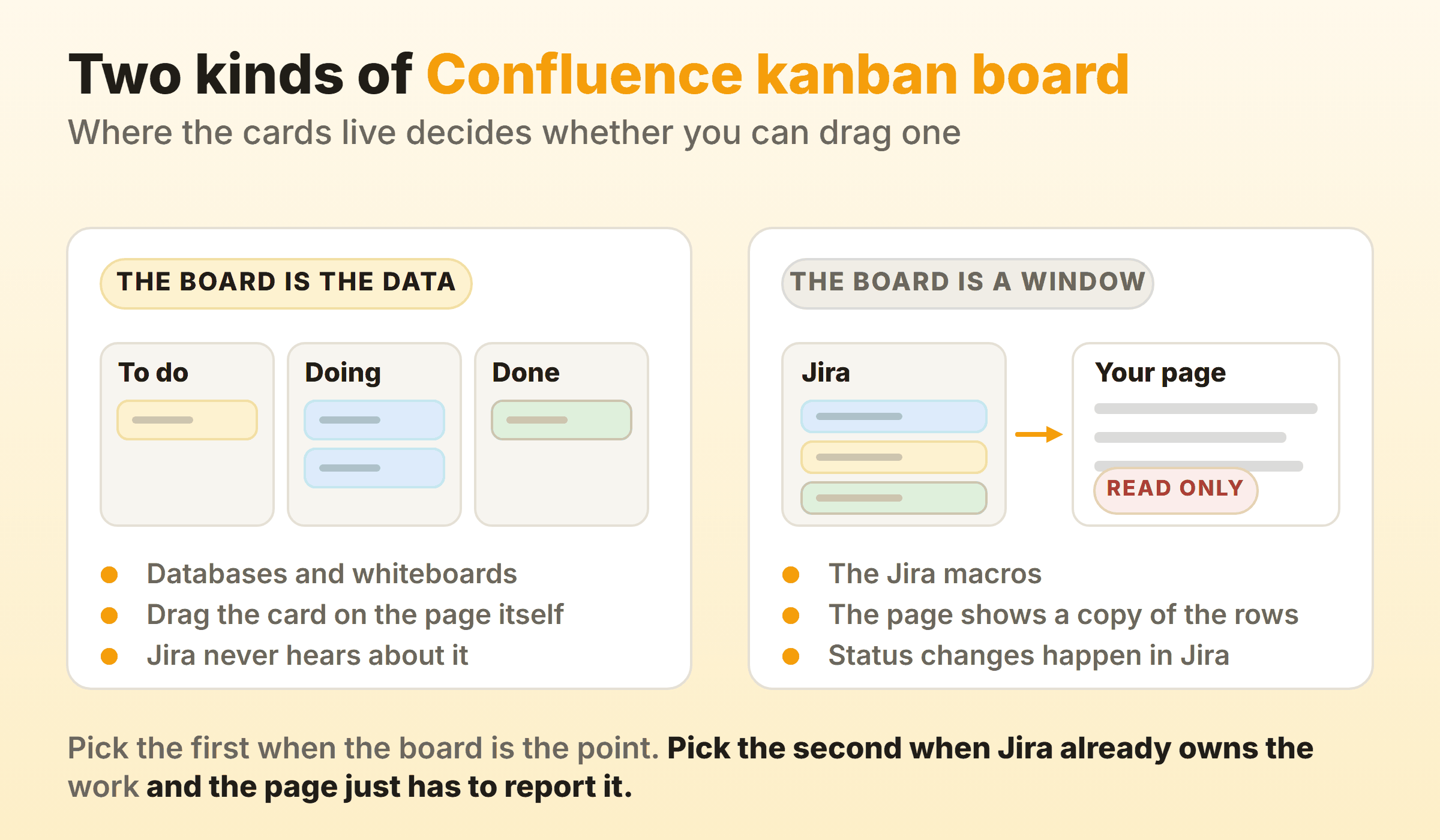
Which family you are in decides what a drag actually does. Cards held in Confluence move when you push them, and nobody in Jira ever finds out. Cards held in Jira do not move from the page at all under the Cloud macros, because the page is showing a copy, and the real change has to happen back in Jira. The Data Center gadget is the one exception, and it earns that by rendering the live Jira board inside its own frame rather than a copy of it.
| Route | Where cards live | Drag on the page | Suits |
|---|---|---|---|
| Database, board layout | Confluence | Yes | A team board that belongs with the docs |
| Jira work items or chart macro | Jira | No | Reporting Jira work inside a page |
| Agile Wallboard Gadget | Jira | Yes, inside the gadget | A live board on a wall display, Data Center only |
| Whiteboard sticky notes | Confluence | Yes | Shaping work before it becomes Jira items |
The Atlassian Marketplace sells purpose-built board apps as a fifth option. They are a legitimate answer and a licensing conversation, so treat them the way you would any paid add-on rather than as a free fix.
How Do You Build a Kanban Board in Confluence With Databases?
You build a kanban board in Confluence with databases by creating the database, adding a tag field for the states, then switching the view to board layout so those tags become columns. Four steps, and about ten minutes.
Step 1: Create the database
Create a database the way you create a page, then add an entry per piece of work. Give it a name column and whatever else the team actually reads on a card. Resist the urge to model everything on day one. I built one of these with eleven fields and ended up reading four of them, and the other seven just made the side panel longer.
You can embed the database in an ordinary page afterwards, which is how most teams end up using it. The board sits under the heading that explains the work.
Step 2: Add the tag field the columns will come from
Board layout groups entries by a tag field, so that field has to exist before the board does. Add one called Status and give it the states your work really passes through: to do, in progress, in review, done. Name the state, never the person doing it. Columns named after people stop making sense the week somebody leaves.
Step 3: Switch the view to board layout
Open the view menu, choose Edit view, and pick the board layout. Then select the tag field to group by, and each of its options becomes a column. Atlassian’s own layouts and options documentation covers the details, and the useful line in it is that you add a column with the plus beside the last one, which creates a new tag item rather than a board-only column. Cards can be dragged up and down within a column and across into another.
Cover images come from an image field or the header image of a linked page. Good on a mood board. I turn them off on anything the team works from daily, because a wall of thumbnails buries the one line on the card that matters.
Step 4: Add a second grouping if you need swimlanes
A 2026 update to Confluence databases added a second grouping dimension, which draws swimlanes across the board. Group by status for the columns and by owner or team for the rows and you get a two-dimensional view without building a second board. Worth switching on once the board has more than about fifteen cards on it. Below that it mostly adds a row of headers to scroll past.
One caveat from the docs that catches regulated customers out. Databases are not available in the Atlassian Government environment, so if that is where you work, the database route does not exist and the macros are your only option.
Is There a Confluence Kanban Board Macro?
There is no Confluence kanban board macro. Search the macro browser for one and you will find three candidates that are close enough to be mistaken for it, none of which is named that, and only one of which renders an actual board.
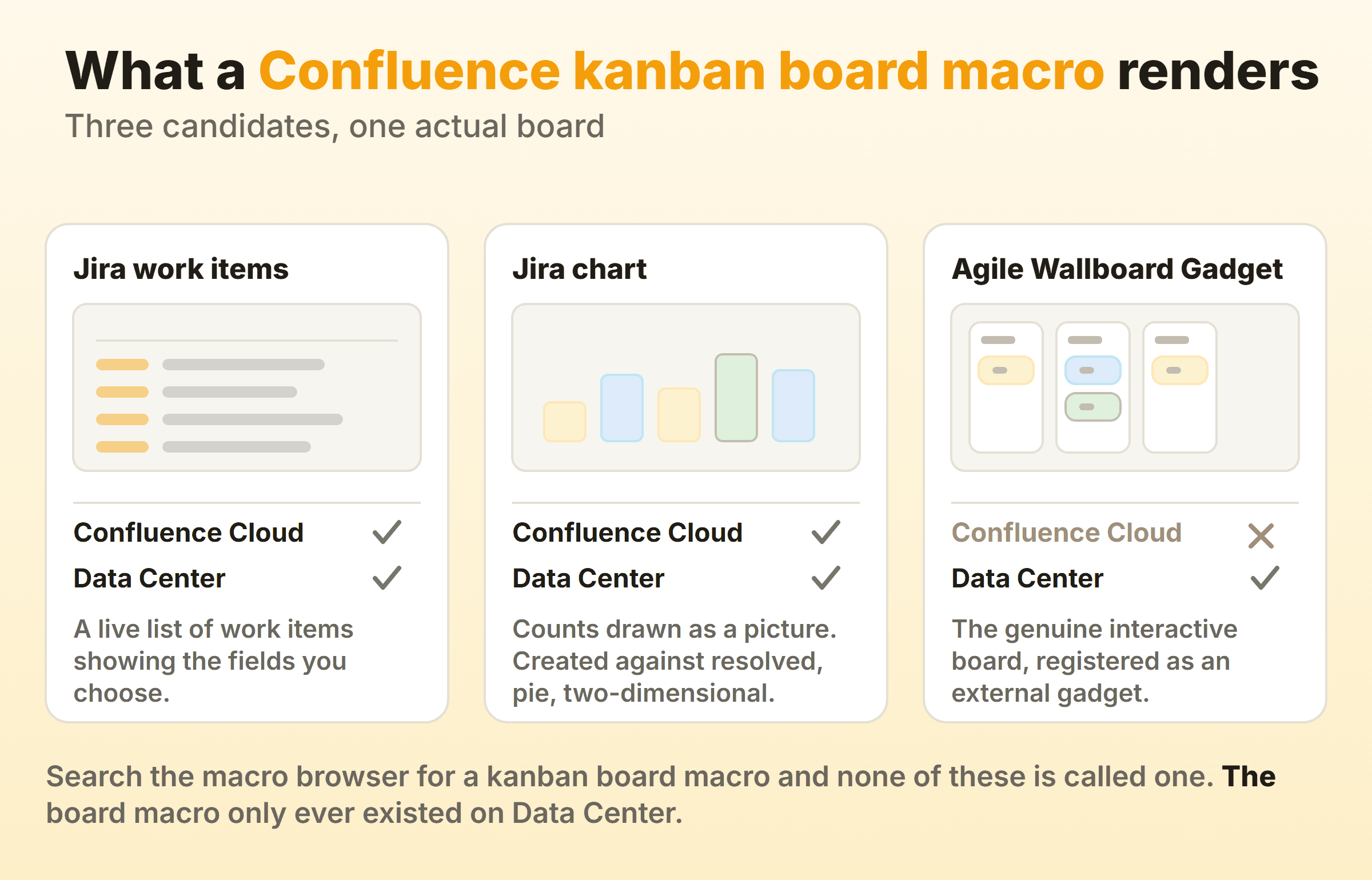
The Jira work items macro is the one people reach for first. It queries Jira, then draws the results as a list with whatever fields you pick, and you can add, remove and reorder those fields. Live data, real links back to Jira, and a setting for how many work items come back. It is still a table though, and a table has no columns to drag between.
The Jira chart macro renders counts as a picture. Created against resolved, a pie by assignee, a two-dimensional table. Under a status heading in a weekly update it earns its place, but nobody has ever dragged anything on a pie chart.
The Agile Wallboard Gadget is the genuine interactive board, and it is the whole subject of Atlassian’s knowledge base article on adding a Jira kanban board to a Confluence page. Getting it working takes an application link between Jira and Confluence, then a trip to the gadget directory to register the Jira base URL as a gadget feed, then the macro browser, then a login and approve step against Jira. Doable, and fiddly enough that you want a Confluence admin in the room while you do it.
The method is Data Center only, which that article flags at the top and which is why so many people arrive at it from a Cloud search and leave confused. The gadget does not appear in Confluence Cloud, so if you are on Cloud, there is no supported way to embed an interactive Jira kanban board on a page at all. Link to the board and let people click through, or build the board in a database instead.
Can a Confluence Whiteboard Work as a Kanban Board?
A Confluence whiteboard works as a kanban board in the loosest sense, and genuinely well for the stage before a board. Sticky notes are cards. Draw three sections, drag stickies between them, and you have something that looks and behaves like a board within about a minute.
Whiteboards earn their keep at the handoff. Select a sticky and choose to create a Jira work item from it, pick the site, space and work type, and the idea becomes a tracked item. Atlassian’s guide to integrating whiteboards into your Atlassian workflow walks through that conversion, along with smart sections, which apply a preset Jira action to any work item dragged into them so a bulk field change becomes a drag.
It falls down the moment the work has to last. A whiteboard has no schema, so nothing stops two stickies saying the same thing, and nothing tells you a card has been sitting in the middle section for three weeks. Run the workshop on it, then move the outcome somewhere with structure.
Can You Set WIP Limits on a Confluence Kanban Board?
You cannot set WIP limits on a Confluence kanban board, on any of the routes. A database board column will hold eleven cards as happily as three, and it will not tell you which of those two it is holding. The Jira macros inherit whatever the Jira board does, and the page itself adds nothing.
That matters more than it sounds, because a WIP limit is the mechanism that turns a picture of work into a system that changes behaviour. Without one you have a wall chart. A pleasant one, sitting neatly under the spec, showing you that fourteen things are in progress without ever suggesting that fourteen is the problem.
The same gap applies to measurement. Confluence does not record when an entry entered a column, so there is no cycle time, no throughput and no cumulative flow diagram to be had. You can approximate with a date field and manual discipline. Nobody I have watched try it has kept it up, because the discipline is the expensive part and the numbers are only ever as good as the last person who remembered to fill the field in.
When Should the Kanban Board Live Outside Confluence?
The board should live outside Confluence when moving cards is the daily job rather than an occasional update. Two questions settle it. Does anyone need a cap on work in progress, and does anyone ask how long things take? If both answers are yes, Confluence is the wrong home and no macro is going to fix that.
Keep the board in Confluence when the work is small, self-contained and already documented there. A content calendar, say, or an onboarding checklist, or a quarterly initiative with nine deliverables in it. The value in those cases is that the board sits beside the page explaining it, and nobody is going to ask for a cycle time chart.
For everything else a purpose-built board is the honest answer. Kanbanee is one of them, and the difference is narrow enough to state plainly. A per-column WIP limit is a checkbox and a number, the badge shows count against limit and turns red once you go over, and cycle time, throughput and a cumulative flow diagram come out of the board recording when each card entered a column. It gives up everything Confluence is good at in return. No wiki, no pages, no documentation surface, and no Jira integration yet. Plenty of teams run both, with the spec in Confluence and a link from the page to wherever the cards actually move.
FAQ
Do you need Jira to run a kanban board in Confluence?
No. Databases and whiteboards are Confluence features and need no Jira licence, application link or admin involvement. Jira only enters the picture for the macro routes, and those need a working application link between the two products before any macro will return anything.
Can you turn a Confluence page table into a kanban board?
Not directly. A table on a page is formatted text, and there is no conversion that reads it as structured entries. Rebuild it as a database if you want columns you can drag between. Tedious for fifty rows, quick for the fifteen most tables actually hold.
Does the Jira macro on a Confluence page update by itself?
Yes. The macro queries Jira when the page renders, so the fields it shows reflect the state of the work items at that moment rather than the state when somebody wrote the page. What it will not do is let anyone change that state from the page.
Can one Confluence database have two kanban boards?
Yes. Views are separate from the data, so add a second view over the same database, group it by a different tag field, and you have two boards over one set of entries. A status board for the standup and an owner board for one-to-ones, staying in sync because both are reading the same rows.
How many columns should a Confluence kanban board have?
Three to five for most teams. Every extra column is another place work can stop, and on a Confluence board you have no badge and no timer telling you it has stopped. Start with to do, doing and done, then split only when you can name the specific handover the split makes visible.