
Kanban Excel Template: How to Build a Board That Counts
Updated at
The Answer
A kanban excel template is a spreadsheet where every task is one row and a single Status column decides which board column that task sits in. You can build one in about fifteen minutes: an Excel table with Task, Status, Owner, Started and Finished columns, a drop-down on Status, conditional formatting that colours each row, and a COUNTIF in the header showing a live WIP count. That last piece is what nearly every free kanban board excel template leaves out, and without it you have a coloured to-do list. Excel handles a personal board or a team of two or three perfectly well. Past that, the cut-and-paste tax and the missing shared editing usually cost more than a tool does.
Can You Build a Kanban Board in Excel?
You can build a kanban board in Excel, and it works better than people expect, because a kanban board is a table underneath. Every card is a row. Each board column is one value in a single field. Excel is a table with formulas bolted on, so the fit is closer than the drag-and-drop screenshots suggest.
The most convincing example I have seen came out of a government department. The US Department of Labor published an Excel-based kanban board on GitHub with issue tracking, WIP management, cycle time, throughput and forecasting built into the workbook. The repository was archived in January 2024 and released under Creative Commons, so it is still there to read if you want to see how far a spreadsheet can be pushed.
Excel gives you filters, pivot tables, real formulas, printing that works, and a file everyone on the team already knows how to open. It will not let you drag a card. Nobody gets a notification when something changes, no record survives of who moved what and when, and two people editing at once is only safe if the file lives in SharePoint or OneDrive.
Those trade-offs are worth accepting for a while, and I will come back to where they stop being. Before any of that, the layout decides whether the spreadsheet can count anything at all.
Which Layout Should an Excel Kanban Board Use?
Two kanban board layouts compete here, and picking the wrong one costs you every formula that comes after it.
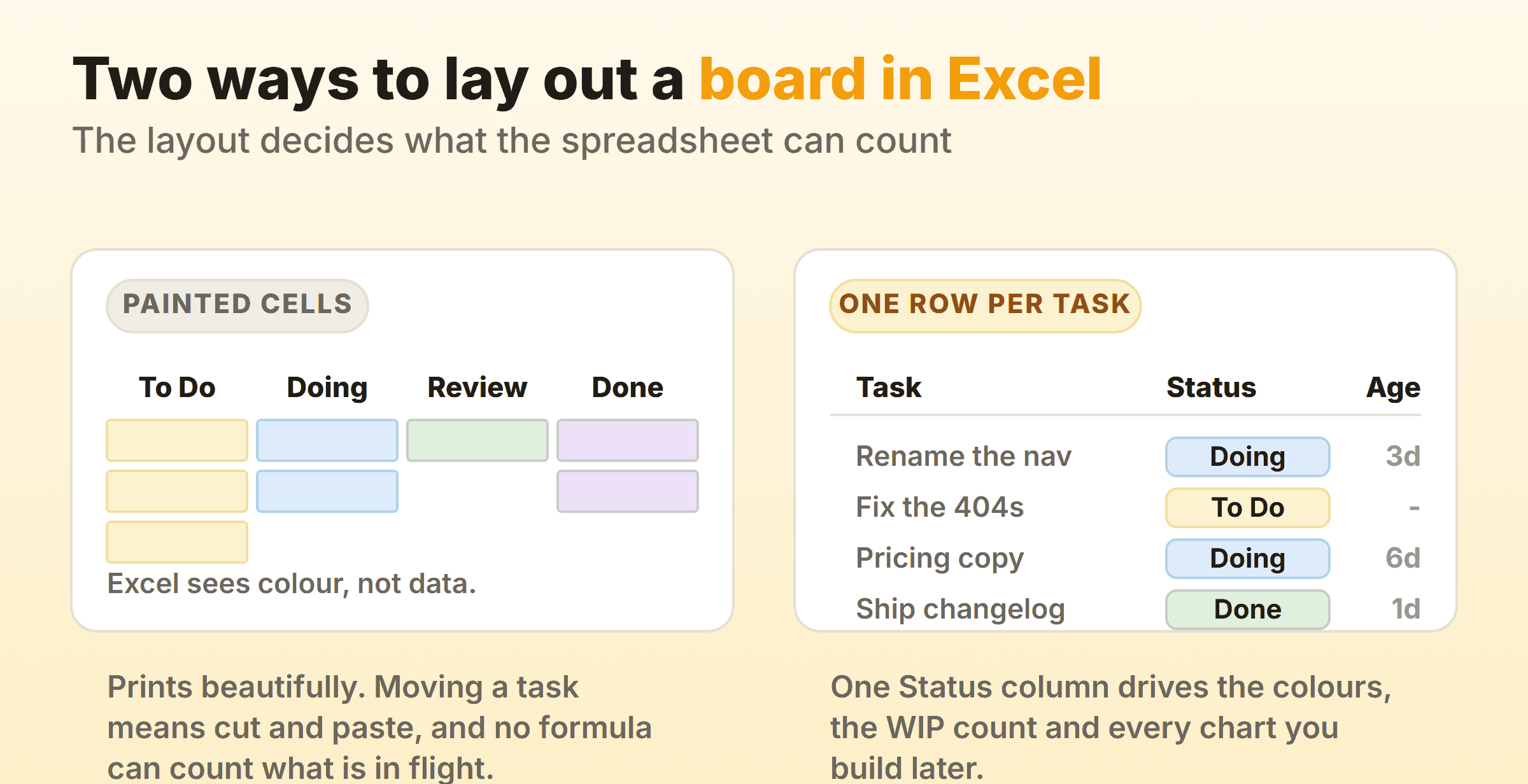
Painted cells. You merge a few cells, write column names across the top, and fill in a coloured block per task. It looks exactly like a kanban board and it prints well. To Excel it is a picture. Counting a coloured cell needs a macro, moving a task means cut and paste, and one careless drag wipes a row with nothing left behind. Most galleries hand you an excel kanban board template built exactly this way.
One row per task. Each task is a row. A Status column holds “To Do”, “Doing”, “Review” or “Done”. It reads as a spreadsheet, which puts people off, and every serious kanban spreadsheet ends up here anyway. Vertex42 publishes a free kanban template for Excel and Google Sheets that makes the same call, and says so on the page: horizontal lanes, one row per card.
The compromise is to build the table, then generate a board view from it on a second sheet with a filter or a slicer. Data lives in one place, and you rebuild the disposable picture whenever it drifts.
Whichever layout you pick, keep the status names short and stable, because they end up hard-coded inside formulas. The same column naming rules that apply to a real board apply harder here. Rename “Doing” to “In Progress” in month three and you will spend an afternoon repairing COUNTIFs.
How to Create a Kanban Board in Excel, Step by Step
To create a kanban board in Excel, build the table first and add the board behaviour on top of it. Most guides to how to make a kanban board in Excel run far longer than they need to. Four steps, no macros.
Step 1: Build the task table
Put your columns in row 1, select the range, and press Ctrl+T to turn it into a real Excel table. Name it Tasks in the Table Design tab. A table auto-expands when you add a row, so formulas and charts pick up new tasks without anyone remembering to widen a range.
| Column | Why it earns a place |
|---|---|
| Task | The thing being done, written as an outcome |
| Status | The board column. Drives everything else |
| Owner | Who has it. One name, never two |
| Started | Date work actually began, not the date it was requested |
| Finished | Date it hit Done. Cycle time needs both |
| Blocked | Yes or blank. Makes stuck work filterable |
| Notes | Everything that does not deserve a column of its own |
Skip priority and estimates on the first version. Add them when a real argument makes you want them.
Step 2: Put a drop-down on Status
Select the Status column, go to Data, then Data Validation, choose List, and type your column names separated by commas. Microsoft’s guide to creating a drop-down list covers the variations across versions. Do it even if everyone types carefully. A stray “doing ” with a trailing space silently breaks every count you build in step 4.
Step 3: Colour the rows by status
Select the data rows, then Home, Conditional Formatting, New Rule, and pick “Use a formula to determine which cells to format”. Enter =$B2="Doing" with B as your Status column, and set a fill. Repeat per status. Microsoft’s page on conditional formatting walks through the dialogue if the rule editor fights you.
Lock the column with the dollar sign and leave the row number relative. Get that backwards and only column B changes colour, which is the mistake I run into most often in a half-built kanban excel spreadsheet.
Step 4: Add the board view
Insert a slicer on Status through Table Design, then Insert Slicer, and you get clickable buttons that filter the table to one status at a time. The simplest kanban board example Excel can produce is four copies of that table on a second sheet, each filtered to one status. Crude. It takes two minutes and gives you something to put on a screen in a standup, though it still counts nothing, and the WIP cap is where that starts to matter.
How Do You Add WIP Limits to an Excel Kanban Board?
You add WIP limits to an Excel kanban board with a COUNTIF that counts the rows in each status and a conditional format rule that turns the count red once it passes the cap.
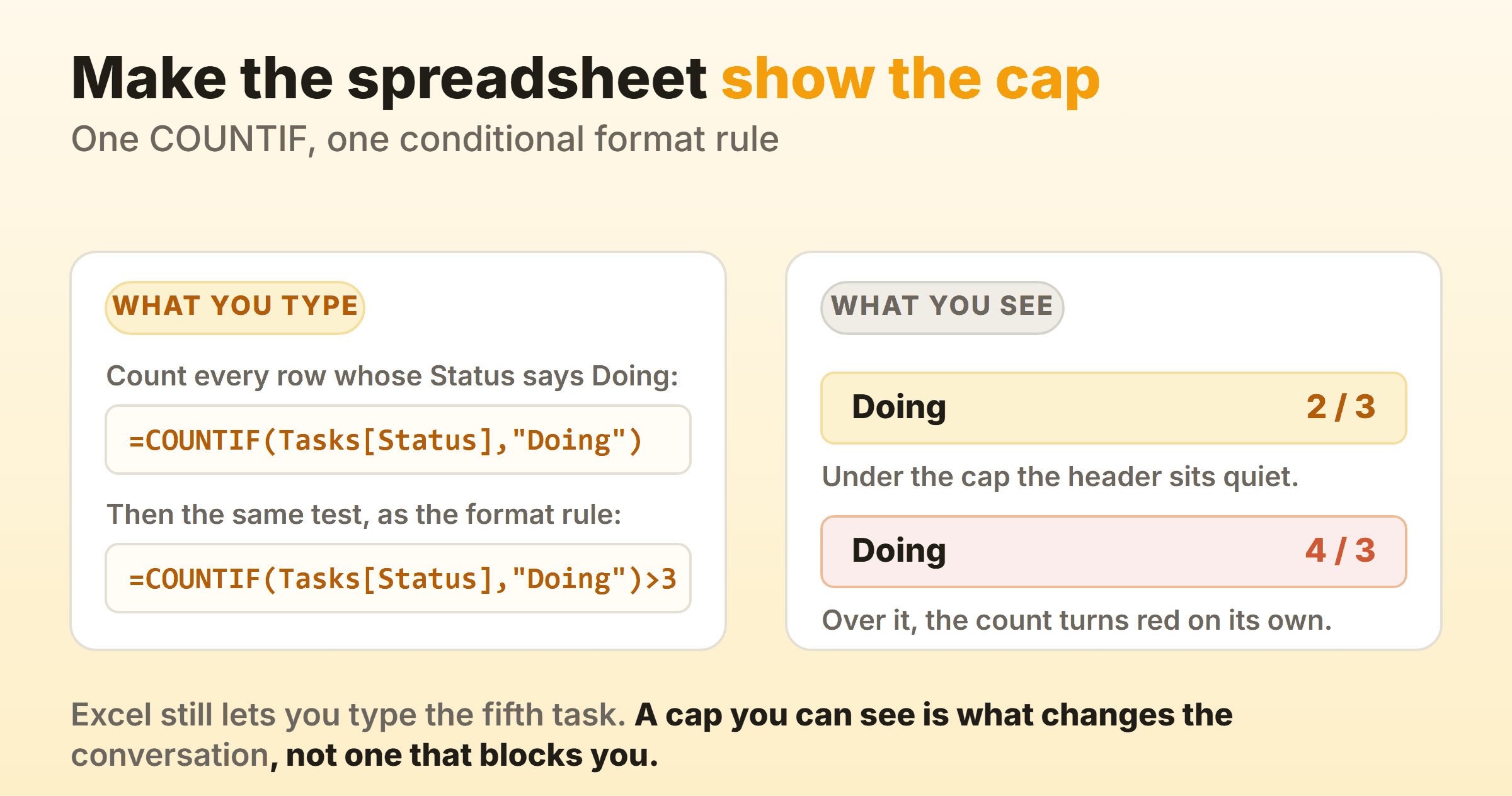
=COUNTIF(Tasks[Status],"Doing")                 how many are in flight
=COUNTIF(Tasks[Status],"Doing")&" / 3"          the badge, reading 4 / 3
=COUNTIF(Tasks[Status],"Doing")>3               the conditional format rule
Put the badge in a cell above your board view, apply the third line as a formula-based conditional format on that same cell, and pick a red fill. The header reads 4 / 3 in red the moment somebody starts a fourth task.
Excel will not stop them. Neither will most kanban tools, and that is correct behaviour. A WIP limit works as a signal, and once the signal sits on the sheet where everyone can see it, breaching the cap becomes a decision somebody makes in front of the team. On our own board I cap Doing at 2 and go over it perhaps once a fortnight, always on purpose.
Set the first cap at your team size. Five people, cap of five, then argue it down over the next month.
Can an Excel Kanban Board Show Cycle Time and Throughput?
An excel kanban board can show cycle time and throughput the moment it holds Started and Finished dates, and this is one place a spreadsheet outruns several free tools.
Add a Cycle column to the table and put the week starts in a spare column:
=IF([@Finished]="","",[@Finished]-[@Started])                    days per finished item
=COUNTIFS(Tasks[Finished],">="&$G1,Tasks[Finished],"<"&$G1+7)    items finished that week
=PERCENTILE.INC(Tasks[Cycle],0.85)                               the 85% number
An average cycle time of five days tells a stakeholder almost nothing when half the work finishes in two days and the rest drags on for a fortnight. The percentile survives that objection, and “Eighty-five percent of our items finish inside nine days” is a sentence you can defend in a planning meeting.
For a kanban board excel dashboard, chart the weekly finished count as a line and the status counts over time as a stacked area. That is a kanban dashboard Excel builds from one pivot on Finished date and Status, and the stacked area is a cumulative flow diagram. Three charts and a percentile cover most of what teams actually look at. Kanban metrics explains what each chart is telling you.
Almost every automated kanban excel template you find leans on VBA macros. That means a macro-enabled file, which corporate IT may block and which will not run in Excel for the web at all. The formulas above run everywhere.
What Goes on a Kanban Card Template in Excel?
The row is already the card in a row-based sheet, so a kanban card template excel download comes down to which columns exist. Task, Status, Owner and the two dates carry a board on their own. Everything else is optional, and most of it is drag.
Physical cards are the other reason people search for this. If your team runs a wall board and wants a printable kanban board template, set up a second sheet with a grid of six boxes per page, each box pulling from one table row with a formula like =INDEX(Tasks[Task],1), then print onto card stock. Keep the sheet as the source of truth so a stale card can be reprinted in ten seconds.
Avoid kanban cards templates that duplicate what the row already holds. The moment a card says something the table does not, you are running two systems that disagree.
Where Do You Find a Free Kanban Excel Template?
Free kanban templates for Excel come from three places, and they are not equally useful. The wording you type barely changes the result. Search kanban template excel, or excel kanban template free, or kanban board excel template free download, and the same small set of galleries comes back every time.
- Template galleries. The Smartsheet kanban board templates page ranks in the top three for nearly every one of those wordings, and it does hand over usable files. Vertex42’s agile board is free for private use.
- Microsoft itself. The planners and trackers gallery on Create carries project trackers and to-do lists, but nothing labelled kanban, which is why this search sends everybody to third parties.
- The one built by practitioners. The Department of Labor workbook linked earlier is the only free download I have seen that ships WIP management, cycle time and forecasting in the same file.
Before you download any kanban board template excel file, check four things:
- Is it a table or a picture? Painted cells with no Status column cannot be counted, filtered or charted.
- Does it hold dates? No Started and Finished columns means no cycle time, ever.
- Does anything show a WIP count? Most free templates skip this. Vertex42’s page does not mention WIP limits at all.
- Does it need macros? A .xlsm file is a support problem in most companies. An excel kanban board template free of macros travels further.
If a free kanban board excel template fails the first two checks, rebuild it. Fifteen minutes, using the four steps above.
When Does an Excel Kanban Board Stop Working?
An excel kanban board stops working around the point where more than three people need to touch it on the same day. For personal kanban Excel holds up for years, since none of what follows applies when nobody else opens the file.
Someone has the file open, someone else edits the copy in their downloads folder, and by Thursday two versions of the truth exist. OneDrive and Excel for the web fix the co-authoring part. They do not fix the rest. Your task moves and nobody tells you, cards carry no comment thread, a status change leaves no history, attachments have nowhere to live, and the whole thing is unusable on a phone.
Kanbanee covers the specific things a spreadsheet cannot: WIP limits as a per-column setting with a badge that turns red over the cap, a built-in stopwatch and Pomodoro timer instead of a hand-typed hours column, and cycle time, throughput and cumulative flow charts generated from the board. Free covers two boards you own with unlimited members. Pro is $6 a month or $48 a year. It has real gaps too: no realtime sync yet, column dragging is desktop only, and there is no API.
You keep the spreadsheet habit either way. Most tools export a board to CSV, a CSV opens in Excel, and the pivot table you built stays useful for whatever the tool’s own reports do not cover. Run the spreadsheet until it hurts, then move, and keep a monthly CSV export for whatever analysis the tool will not do.
FAQ
Can you create a kanban board in Excel?
Yes. Make a table with a Status column, add a drop-down on it, colour the rows with conditional formatting, and add a COUNTIF badge showing work in progress against a limit. That covers what a board is for: the work and its state are visible, the cap sits next to the column name, and everything on the sheet can be counted.
Does Microsoft 365 have a kanban board?
Microsoft 365 includes Planner, which has a board view with cards and columns. It is a separate app from Excel and it does not read your spreadsheet. If you want the board and the formulas in one file, Excel remains the only Microsoft answer.
What are the four rules of kanban?
There is no canonical set of four rules. Kanban has four foundational principles about how to adopt it: start with what you do now, agree to pursue change incrementally, respect current roles and titles, and encourage leadership at every level. Six core practices sit alongside them, of which visualising the work and limiting work in progress are the two you feel immediately.
How do you export a kanban board to Excel?
Most kanban tools export a board as CSV from a board or reports menu, and Excel opens a CSV directly. Save it as .xlsx afterwards so your formatting survives. If the export gives you one row per card with a status and dates, every formula in this article works on it unchanged.
Is a Google Sheets kanban board any different?
The structure is identical. COUNTIF, data validation and conditional formatting all exist in Sheets under the same names, so the table, drop-down, WIP badge and cycle time column port across without edits. Sheets handles simultaneous editing better. Stay in Excel if you care about pivot tables and about getting a clean printout.