
Google Sheets Kanban Board: How to Build One and When to Stop
Updated at
The Answer
A Google Sheets kanban board is one row per task with a Status dropdown deciding which stage that task sits in. Sheets ships no board view, so you assemble one: convert the range to a table, set Status as a dropdown column, group the table by that column, and add a COUNTIF badge showing each stage against its cap. Twenty minutes, no add-on, no macro. Since August 2026 Google does offer a real drag-and-drop board inside Sheets through Sheets canvas, though only on paid Workspace and Google AI tiers. Everyone else builds the grouped table, and it carries a personal board or a team of two or three without complaint.
Does Google Sheets Have a Kanban Board?
Google Sheets has no kanban board in the free product, and as of August 2026 that answer comes with a paid exception.
What you get by default is a grid. No cards, no columns, nothing to drag. The closest native thing is tables, which landed in May 2024 and brought column types plus a group by view that clusters rows under whichever column you pick. Aim that at a Status column and you have a board rotated ninety degrees. Stages become group headers, cards sit under them as rows, and the count beside each header keeps itself current.
The exception is Sheets canvas. Google announced it in August 2026 as a Gemini-powered way to turn a spreadsheet into an interactive app from a written prompt, and the announcement names a kanban board among the things it builds, one where you “drag and drop cards to update progress in real time”. Dragging a card rewrites the source sheet underneath, and an edit typed into the sheet redraws the board. So the answer is now yes, with an asterisk.
The asterisk is the availability line. Sheets canvas goes to Business Standard and Plus, Enterprise Standard and Plus, the Google AI Pro and Ultra consumer plans, and the Education AI add-ons. A free personal Google account is not on that list. Rapid release domains started on 10 August 2026 and scheduled release domains from 31 August, and Google limits the feature to the web and to accounts with their language set to English. A qualifying plan is still no guarantee it has reached you.
Which leaves most people building the thing by hand. The rest of Google’s near misses, from Tasks to Keep to Gmail’s multiple inboxes, are laid out in the Google Workspace roundup. Inside Sheets the layout you choose decides how much of the board can count.
Which Google Sheets Kanban Layout Actually Works?
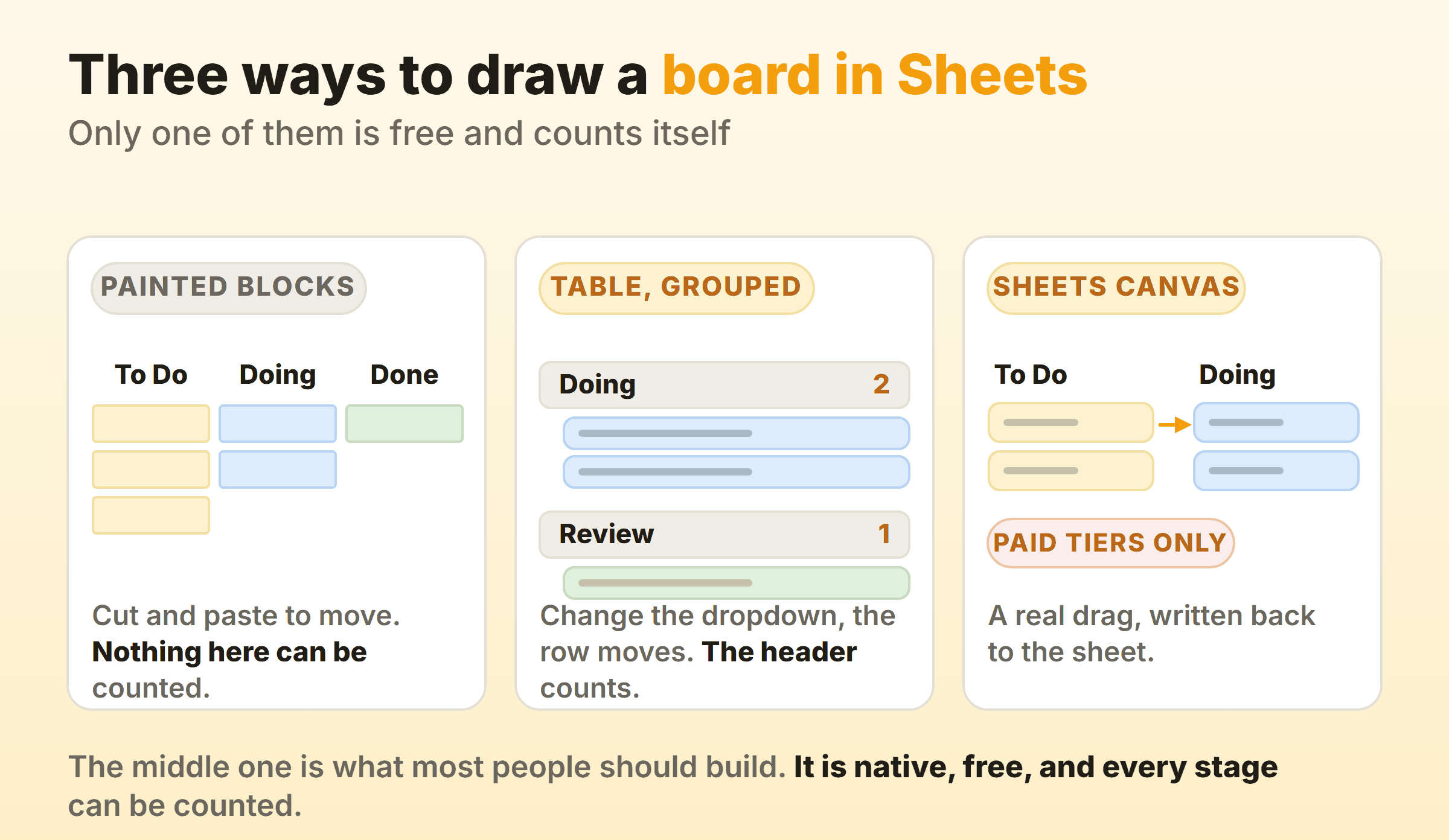
Two layouts are open to everybody, and a third needs a paid plan.
Painted blocks. Write stage names across row 1, merge a few cells underneath each one, and fill each block with a color. It looks like a board from across the room and it prints beautifully. To Sheets it is decoration. Moving a card means Ctrl+X and Ctrl+V, counting what is in flight needs a script, and one bad paste erases a task with no trace left behind. Most galleries hand you a Google Sheets kanban board template built exactly this way.
A table grouped by Status. One row per task, one Status column, and a group by view that clusters the rows under their stage. It reads as a spreadsheet rather than a board, which puts people off. Every kanban spreadsheet that survives past month two ends up here regardless, because this is the only version where a formula can see the work.
Sheets canvas. The paid route described above. Real cards, real dragging, and the sheet stays the source of truth underneath.
Pick the middle one unless canvas is already switched on for you. Then settle the stage names before you write a single formula, because they end up buried inside COUNTIFs, dropdown rules and conditional formats. Renaming one in month three means hunting down every place it hides. Four stages is plenty to start with.
How Do You Make a Kanban Board in Google Sheets, Step by Step?
To make a kanban board in Google Sheets, build the table first and hang the board behavior off it. Most walkthroughs on how to make a kanban board in Google Sheets stop at the coloring. Four steps, no add-ons.
Step 1: Turn the range into a table
Put your headers in row 1, select the range, then go to Format and choose Convert to table. Sheets applies formatting, gives the table a name, and lets you refer to it in formulas as Tasks[Status] rather than a range that breaks the moment somebody inserts a row.
| Column | Column type | What it is for |
|---|---|---|
| Task | Text | The outcome. Long descriptions belong in a linked doc |
| Status | Dropdown | The stage. Drives the grouping and every count |
| Owner | People chip | One person. Work owned by two people is owned by nobody |
| Started | Date | When work began, which is rarely when it was asked for |
| Finished | Date | When it reached Done. Half of every cycle time calculation |
| Blocked | Checkbox | Filterable in one click. The reason goes in a comment |
No priority column and no estimates on version one. Both of them invite a week of argument before the board has shown you anything worth arguing about.
Step 2: Make Status a dropdown column
Click the Status column header, open the column type menu, and set it to Dropdown. Type your stage names and give each one a color. Sheets renders them as chips, which is the closest a spreadsheet gets to a card label.
Do this even if everyone on the team types carefully. One stray “doing ” with a trailing space breaks every count you write in step 4, and the dropdown makes that impossible.
Step 3: Group the table by Status
Open Insert, then Tables. Then click the down arrow beside the Status column heading and choose Group by column. Sheets collapses the table into one section per stage with a count on each header. That grouped view is the board.
The order of the groups follows the order of the values in the dropdown, so put those in workflow order rather than alphabetically. To Do, Doing, Review, Done. Moving a task now means changing one dropdown, and the row travels to its new group on its own.
Most guides on how to create a kanban board in Google Sheets finish here. It is where the useful part starts.
Step 4: Show the count against a cap
The group header counts the cards for you. Nothing on it says how many belong there, and that is the number worth arguing about. Put your caps in two spare columns, stage names in A and numbers in B, then build the badge beside them:
=COUNTIF(Tasks[Status], A2)                    cards currently in that stage
=COUNTIF(Tasks[Status], A2) & " / " & B2       the badge, reading 4 / 3
=COUNTIF(Tasks[Status], A2) > B2               the conditional format rule
Apply the third line as a custom formula rule on the badge cell with a red fill. The moment somebody starts a fourth task in a three-card stage, the badge turns red on its own.
Nothing stops that fourth task, which is the point. A cap earns its keep as an argument rather than a lock, and an argument only does any work where people can see it happening.
Keeping the numbers in cells instead of inside the formulas matters more than it sounds. Raising a cap turns into something a person types, sitting in the version history with a name and a timestamp against it, rather than a quiet edit inside a formatting rule nobody opens again. Put the cap cells on the board tab too. A number parked on a second sheet is a number nobody reads.
Where Do the Dates Come From on a Google Sheets Kanban Board?
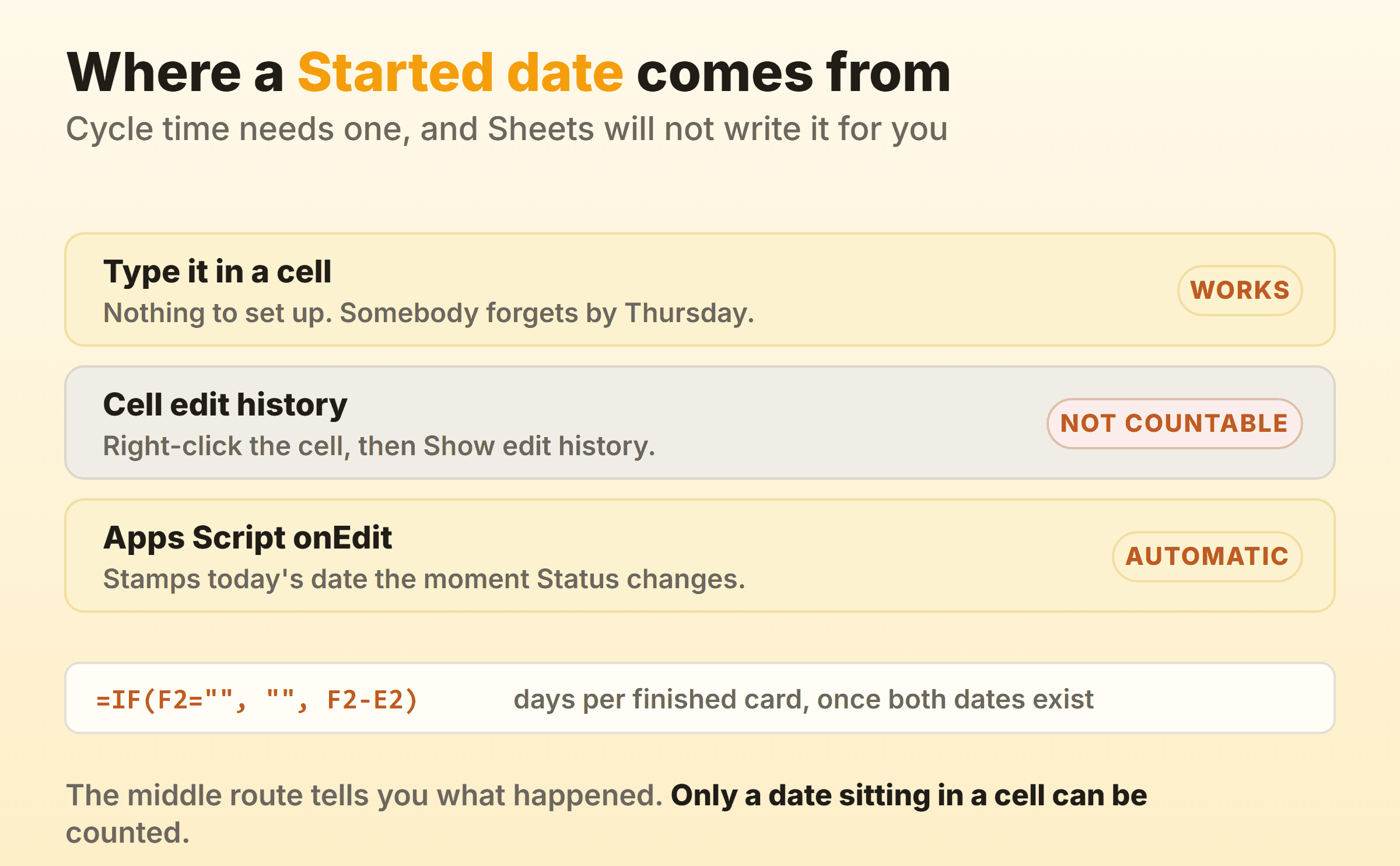
Dates on a Google Sheets kanban board come from one of three places, and only two of them produce something a formula can read.
Typing them. Free, instant, and reliable for about a fortnight. Then a Tuesday gets busy and half the Started column is blank.
Cell edit history. Right-click any cell and choose Show edit history, and Sheets tells you who changed it, when, and what it said before. Genuinely useful when two people disagree about when something moved. No formula can read an edit history though, so nothing in there will ever feed an average or a chart.
An Apps Script onEdit trigger. A dozen or so lines of JavaScript that watch the Status column and stamp today’s date into Started or Finished when the value changes. Unlike a VBA macro in an Excel workbook, this runs on Google’s servers rather than in the file, so there is no macro-enabled format for corporate IT to block and nothing for a colleague to click through a warning about.
Once both dates exist in cells, the arithmetic is ordinary:
=IF(F2="", "", F2-E2)                          days from start to finish
=PERCENTILE(FILTER(H2:H, H2:H<>""), 0.85)      the 85% number
=COUNTIFS(F2:F, ">="&J2, F2:F, "<"&J2+7)       cards finished in that week
Skip the average. Cycle times on a real board are lopsided, a cluster of quick items and a long tail of things that sat blocked, and the mean lands in the gap between them where almost nothing actually happened. A percentile answers what people are really asking, which is how much time to allow. Chart the weekly finished count as a line, stack the stage counts over time as an area chart, and a free spreadsheet has produced a cumulative flow diagram.
Is There a Free Google Sheets Kanban Template Worth Downloading?
A free Google Sheets kanban template is worth downloading once it survives three questions, and the first one eliminates a lot of them.
The wording of the search changes nothing. Try google sheets kanban template, kanban template google sheets, kanban google sheets template, kanban board template google sheets, or kanban board google sheets template free, and the same small set of pages comes back each time. Smartsheet keeps a collection of them. Zapier publishes a do-it-yourself walkthrough with the files attached. Google’s own contribution is the set of pre-built tables that shipped alongside the tables launch, covering project management, inventory and event planning, and every one of them is a table rather than a board.
So before a downloaded Google Sheets kanban board template becomes the place your week lives, open it and ask:
- Can a formula see the stages? Look for a Status column. If the stages exist only as blocks of color, nothing in that file can be counted, grouped or charted, and what you have downloaded is a drawing.
- Are there two date columns? Started and Finished. Without both, the template can never answer how long anything takes, which is the question a board gets asked in every review.
- What does it want access to? Templates that arrive as a Marketplace add-on can ask for far more than the one file, up to your whole Drive. Read the consent screen rather than clicking past it.
A Google Sheets kanban template free of all three problems is rarer than the search results make it look. Rebuilding from the four steps above usually costs less time than auditing somebody else’s file.
Can a Google Sheets Kanban Board Work for a Team?
A Google Sheets kanban board works for a small team better than the equivalent Excel file does, because co-editing is free, on by default, and does not need anybody to remember where the shared copy lives. Three settings are worth turning on before anybody else opens the file.
Filter views. Under Data, choose Create filter view. An ordinary filter belongs to the file, so narrowing the board to your own cards narrows everybody else’s screen too, and Google’s help page on filter views says plainly that anyone with edit access can change a shared filter. A filter view applies to your screen alone. On a board three or four people watch at once, this is what stops the standup turning into an argument about whose filter is on.
Protected ranges. Lock the header row and the cap cells. It costs a minute and prevents the specific accident where somebody sorts the table by Owner and nobody can find anything.
Conditional notifications. Under Tools, choose Conditional notifications, and set a rule that emails somebody when the Status column changes to Review. It is the nearest thing a spreadsheet has to a card assignment. Know the limits before you rely on it. Google’s documentation restricts the feature to certain work or school accounts, rules out group addresses and non-Google recipients such as Outlook and Yahoo, and warns that mail can arrive late and batched.
Past four or five people the sheet starts to creak in ways no setting fixes.
When Does a Google Sheets Kanban Board Stop Working?
A Google Sheets kanban board stops working at the point where the board needs to hold a conversation, not just a state. For a personal board none of what follows applies, and I have watched a solo Google Sheet kanban board run happily for years.
A row cannot hold a comment thread, a checklist, an attachment or a due-date reminder. Status changes leave no readable history beyond one cell at a time. The mobile app renders a grid, which means the board is unusable on the way to a meeting. Nobody hears about anything unless you set up conditional notifications, which needs a work account. And the board never notices that a card is late, because a due date in a spreadsheet is a number that quietly went past.
Kanbanee exists for the point where those things start costing more than a subscription does. A work-in-progress limit is a checkbox and a number in the column menu, the badge reads count against limit and goes red once you pass it, and dragging past the cap stays allowed, which keeps a limit a conversation instead of a wall. Timers and a full time log are built in, and cycle time, weekly throughput and a cumulative flow diagram arrive as reports on the paid plan rather than as something you assemble. Free covers two boards you own with unlimited members. Pro is $6 a month or $48 a year. The gaps are honest ones: no realtime sync yet, no API, and column dragging that works on desktop only.
None of that makes kanban in Google Sheets a bad idea. Run the sheet until it hurts, and when it does, take a CSV export with you. Every board tool produces one and Sheets opens it, so the pivot table you built does not die in the migration.
FAQ
Does Google have a kanban board?
Not as a standard feature of any free Google product. Google Tasks has lists rather than columns, Keep has notes, and Sheets has the grid. The paid Sheets canvas board announced in August 2026 is the first real kanban board Google has shipped, and it needs a Business, Enterprise, Google AI Pro or Ultra plan.
Can you make a kanban board in Google Docs?
You can draw one. Insert a table with four columns, put a stage name in each header cell, and type tasks underneath. A Google Docs kanban board prints well and looks fine on a wall. Docs cannot count, group, sort or chart any of it, so what a kanban board Google Docs gives you is a picture of a board. Build the real thing in Sheets and paste a screenshot into the doc if somebody wants it there.
How do you move a card on a Google Sheets kanban board?
Change the Status dropdown on the row. In a grouped table the row relocates itself to the new stage and both group counts update. On a painted-blocks layout there is no shortcut, and you cut the cells and paste them into the next block by hand.
Is Excel or Google Sheets better for a kanban board?
It depends how many people touch it. Co-editing, filter views and per-cell edit history are free and switched on by default in Sheets, where an Excel file has to live on OneDrive before two people can safely open it at once. Excel repays you later instead, in pivot tables and in printing. The structure is the same in both, so the table, dropdown, cap badge and date columns port straight across to a kanban board in Excel.
Is there a kanban template from Google itself?
No. The pre-built tables that came with the tables launch cover project management, inventory and event planning, and every one of them is a table rather than a board. Every Google kanban template you find is third-party, which is why the three questions above matter.