
Google Kanban Board: Every Route Inside Google Workspace
Updated at
The Answer
Google Workspace has no kanban board. Tasks is a list, Keep is a wall of notes, Sheets has no board view, and AppSheet offers eleven view types without a kanban among them. So a Google kanban board is always something you assemble. Draw the columns by hand in a Sheet, point a third-party viewer at your Google Tasks lists and let it redraw them as columns, or install a Marketplace add-on that stores its boards in your Drive. All three work. None of them will stop a column filling up, and that is the part I would want to know before picking one.
Does Google Have a Kanban Board?
Google does not have a kanban board. There is no board app in Workspace. Nothing hides in the Sheets view menu, and the admin console has no kanban tile waiting to be switched on.
Google Tasks is the surface people mistake for a board. It gives you lists, subtasks and due dates, and a list has no columns in it. Sheets has tables now, with filter views and group by views that stack rows into collapsible groups you scroll down through. AppSheet is Google’s own app builder, and its view types run calendar, card, chart, dashboard, deck, detail, form, gallery, map, onboarding and table. Kanban is not in that list.
Ask it as “does Google Workspace have a kanban board” and you get the answer a personal Gmail account gets. Paying more changes nothing. What Google hands you is a box of parts, and which part you pick up depends on whether you need cards that move or a board the whole team can open.
Which Google Apps Come Closest to a Kanban Board?
Plenty of Google apps get called a kanban board somewhere on the internet, and they fall short in different places. Ask whether you can drag a card, then ask who else can open it, and the shortlist gets short fast.
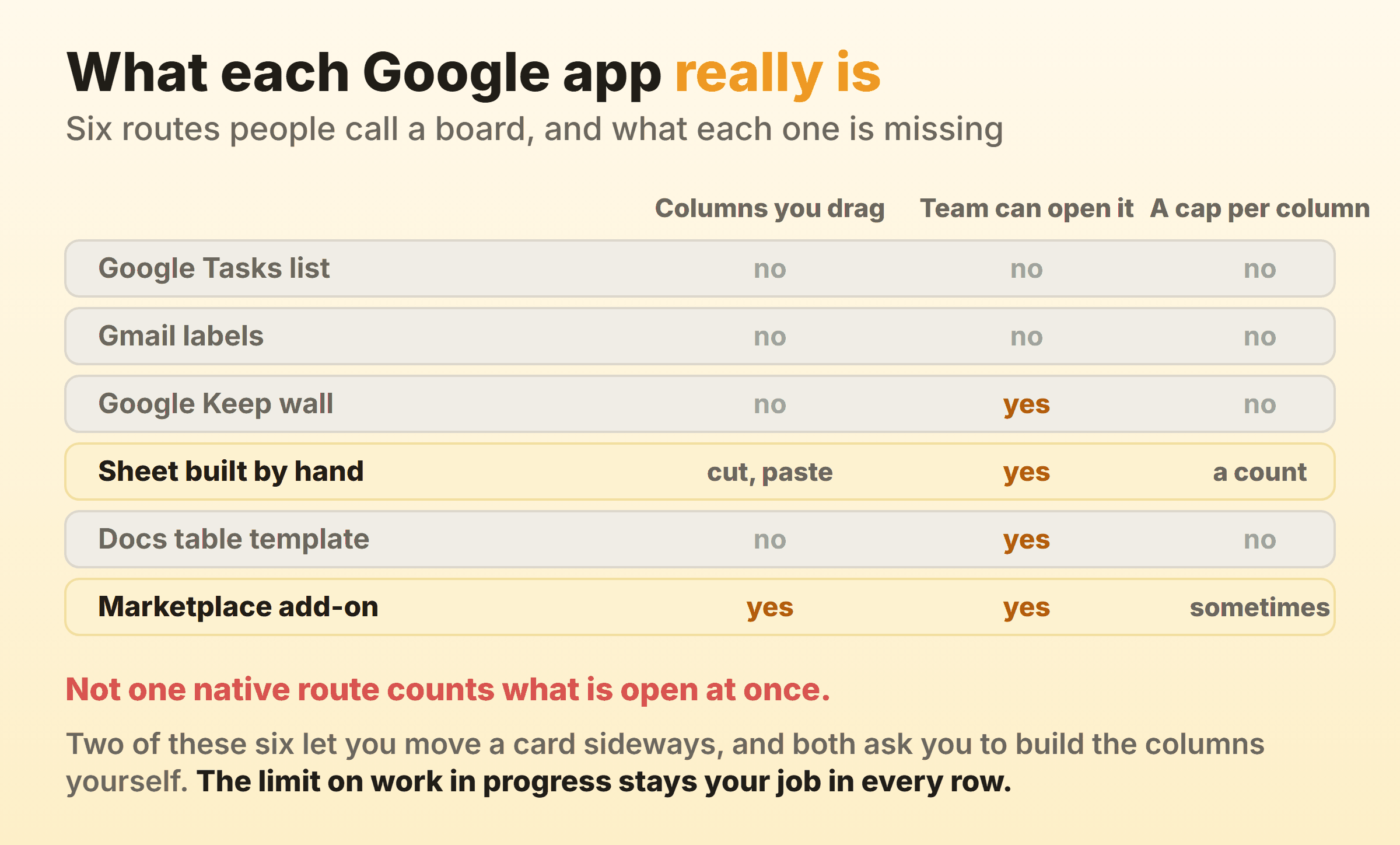
- Google Tasks gives you a flat list with subtasks hanging off it. Closest thing Google has to a card. Zero columns, so a Google Tasks kanban view exists only once you point another app at the same data.
- Google Keep is a wall of notes you drag around, label and color. Dragging a Keep note changes nothing about it, so a Google Keep kanban board is wallpaper with good search.
- Google Sheets has no board view, and it is still the only native place you can build columns that behave like columns. Its own section is below.
- Google Docs ships table templates for a product roadmap and a review tracker. Both are tables with a dropdown chip in the status cell, so a kanban board in Google Docs is something you read top to bottom.
- Google Drive stores files and has no board of its own. Every Google Drive kanban board you have come across is an add-on writing into a Drive file.
- Google Calendar puts tasks that carry a due date next to your meetings. Handy. Nothing in Calendar sorts work into stages, so a Google Calendar kanban board is not a thing.
- Google Chat has group tasks inside a space, the one shared task list Google hands you. Flat list again.
Two of those are worth actually building on. Knowing about the rest saves you a morning hunting for a setting that never shipped.
How Do You Make a Kanban Board in Google Sheets?
You make a kanban board in Google Sheets by giving each stage its own block of cells and moving a card between blocks with cut and paste. Nothing to switch on, because Sheets has no board mode. The board is a layout you draw.
The drawn board puts stage names across row 1, one per block of two or three columns, with cards as merged cells underneath. Conditional formatting gives each block its own fill color so it reads as a column from across the room. Ctrl+X in one block, Ctrl+V in another, and the card has moved.
The table with a status column is one row per task, one column named Status, and a group by view that clusters rows by that status. Uglier. It survives contact with other people, and every formula you write later reads it without complaint.
Either way, two formulas earn their keep on day one:
=COUNTA(C2:C40)under a stage counts the cards sitting in it.=IF(COUNTA(C2:C40)>3,"OVER","")turns that count into a warning the moment the stage passes three.
Type the second one. A number that only appears when you have gone too far gets noticed. Leave the count on screen permanently and by Thursday it has turned into furniture, sitting there beside the tab nobody clicks any more. The same two layouts show up in a kanban board in Excel. Excel does the counting more comfortably, and then you spend the week mailing versions of the file around.
That is the honest free kanban board Google route, costing nothing past the account you already have. It does assume the work arrives as tasks. Plenty of teams get theirs as mail instead.
Can You Run a Kanban Board Inside Gmail?
Gmail has no kanban board, and one Gmail setting gets surprisingly close to a kanban for Gmail. Multiple inboxes splits the inbox into extra sections, each driven by a search query, and lets you choose where those sections sit.
Label your mail Open, Pending, Waiting and Closed. Give each label a section and set the position to the right of the inbox. Four stages then sit side by side on one screen, built out of settings you already own, and that is about as close to a Gmail kanban board as the product gets. It costs nothing.
Moving a thread means relabeling it, which is where this starts to fray. No section carries a count, so nothing tells you Waiting has swollen to nineteen. A thread also carries a whole conversation with five people in it, where a card carries one piece of work with one owner. Support queues and small shared inboxes are where this pays off. It stops being enough the moment a single item of work needs subtasks of its own.
Anything inside Gmail that behaves like a real board is a Chrome extension or a Marketplace add-on painting over the inbox. Check what a viewer on Google Tasks gives you before you go there.
What Is the Fastest Free Kanban Board for Google Tasks?
The fastest free kanban board for Google Tasks is a third-party viewer that reads your existing task lists and draws each list as a column. TasksBoard is the one you find first, and its own page bills itself as a free online kanban board powered by Google Tasks.
Your task lists become the columns. So the column set is whatever you named your lists. Make four lists called Backlog, Doing, Review and Done before you open the viewer, and the board arrives already shaped.
Drag a card from one column to the next and the task moves between two Google Tasks lists. Nothing is copied and nothing is mirrored, so the change shows up in the Tasks panel in Gmail a second later and on your phone after that. Tasks assigned to you from a Doc comment or a Chat space drop into your lists too, which means the board picks them up while you are doing something else.
Then you try to show it to somebody. TasksBoard does offer shared boards, and that sharing is the viewer’s own layer rather than anything Google hands you, because the Google Tasks lists underneath still belong to one account.
Can a Google Kanban Board Be Shared With a Team?
A Google kanban board built on Tasks can only be shared by the app you view it in, never by Google itself, because a Google Tasks list is private to the account that owns it. The Tasks help pages document lists, subtasks, due dates and notifications, and nowhere in them is there a way to hand one of those lists to somebody else.
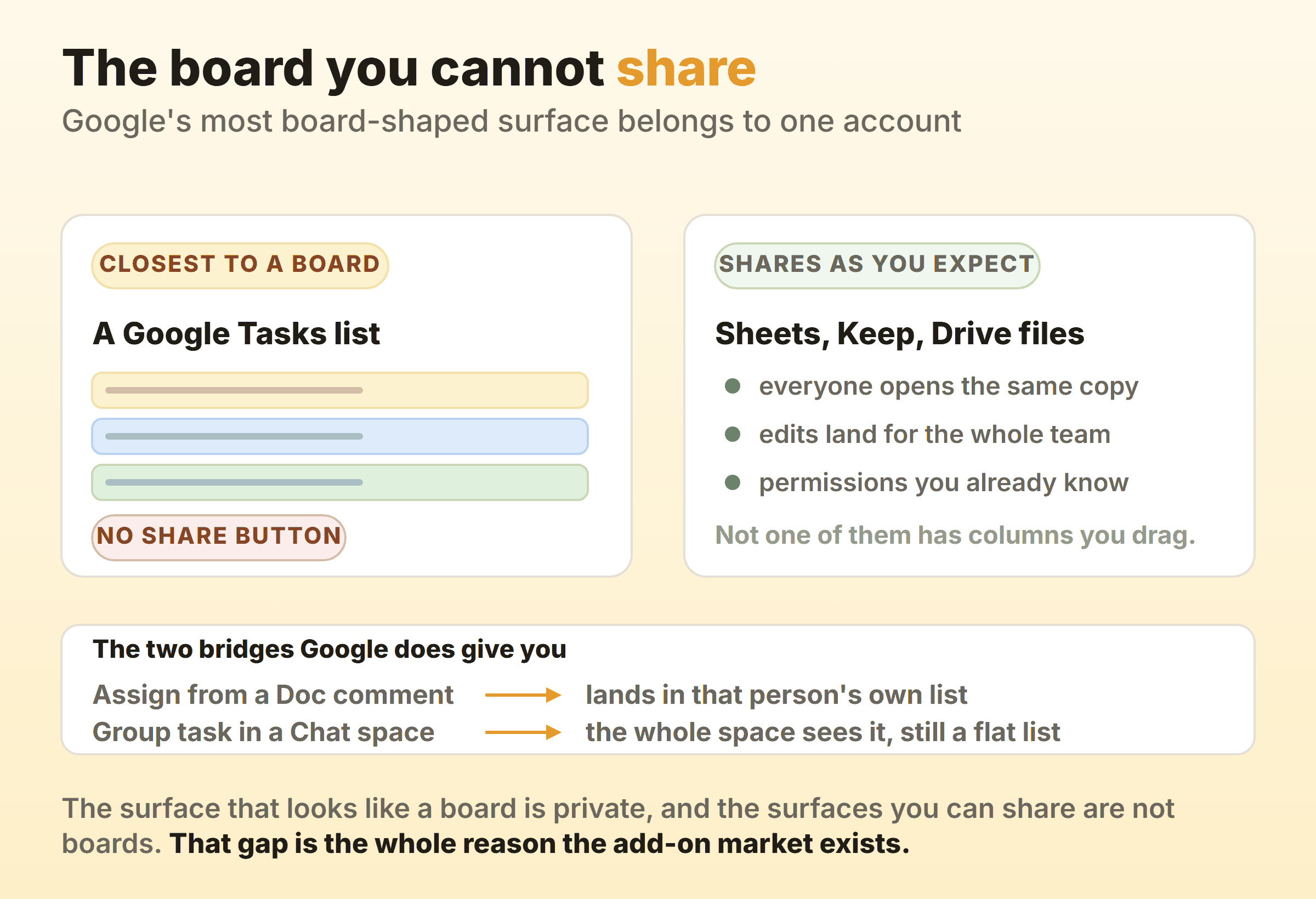
Everything Google shares well sits on the other side of that wall. A Sheet, a Keep note and a Drive file all open for the whole team under permissions you already understand, and not one of them has a column you can drag a card into.
Assignment from a Doc comment gets one task across. Type a name into a comment, tick the box, and it lands in that person’s own Tasks list, which you cannot see. One task at a time.
Group tasks in a Google Chat space do better. Everyone in the space sees them, and a task assigned inside a space also appears in the assignee’s personal list. A genuine shared task list, then, and still a flat one with no stages in it.
So nothing native to Google both holds stages and shares them. The surface closest to a board never leaves your account, everything Google lets you share is a document with a list inside it, and a whole add-on category grew out of that gap.
What Do Google Workspace Marketplace Add-Ons Add?
Google Workspace Marketplace add-ons add the board Google left out, and they bolt it onto storage and permissions you already run. Kanbanchi is the one you meet first. Its listing describes kanban boards, Gantt charts, time tracking and team dashboards, with boards stored in Google Drive, cards created from Gmail, dates pushed into Calendar and data exported to Sheets.
Storage is the real argument for going this way, because a board that lives as a Drive file is shared with plain Drive sharing and nothing new. Leavers lose access the day their account is suspended. Shared drives behave the way your admin already configured them, and nobody has to be invited into a second product.
You pay for that in permissions. Installing an add-on of this kind grants access to Drive files and to your account’s email address, which in most companies means an admin has to say yes first.
None reliably adds a cap. Kanbanchi’s listing runs through kanban, Gantt, time tracking and dashboards without mentioning work in progress once, and it is far from alone in that. So the closest thing to a kanban board in Google Workspace is a board that lives on Drive and counts nothing.
What Does No Google Kanban Board Do?
No Google kanban board holds a work in progress limit, and none of them records cycle time. Both absences are quiet, which is how teams live with them for a year.
A work in progress limit is a maximum number of cards allowed in one column, and its whole job is to be inconvenient at the moment somebody wants to start a sixth thing while five are open. A COUNTA in a Sheet will tell you the number is six. It cannot put itself in front of the person about to make it seven, and by the time anyone reads that cell the decision is three days old.
Cycle time needs a timestamp for the moment a card enters a stage and another for the moment it leaves. Google Tasks keeps no such history. A Sheet keeps it only if somebody types the dates in by hand, every time, forever, and nobody does that past week three. So flow metrics on a Google board are simply unavailable, and the question of how long work takes here gets answered from memory.
Kanbanee came out of that hole. A limit is a checkbox and a number in the column menu, the badge shows the count against the limit and turns red once you pass it, and the drag is never blocked, so the board argues with you and then lets you through. Cycle time, weekly throughput and a cumulative flow diagram come with Pro at $6 a month or $48 a year. Free covers two boards you own, with unlimited members on them. The holes are real too: no realtime sync yet, no API, and column dragging that only works on desktop. If your team lives inside Google and the board is mostly a status picture, none of that is worth a migration.
Which Google Kanban Route Should You Pick?
Let the constraint choose and the table gets short.
| Your situation | Route |
|---|---|
| One person, tasks already in Google Tasks | A viewer that turns your lists into columns |
| A team, no budget, no admin approval | A Sheet with stage blocks and a COUNTA cap |
| A team on Workspace with admin approval | A Marketplace add-on storing boards in Drive |
| Mail is the work, and every card is a thread | Gmail multiple inboxes with labeled sections |
| The board needs to enforce a cap | A dedicated kanban tool |
Four of those five give you a Google kanban tool that reports the situation, and reporting is most of what a board is for. The fifth is for the team that has already tried reporting and watched In progress sit at nine cards for a month.
FAQ
Should a hand-built board live in Google Sheets or Google Docs?
Sheets, and it is not close. A Google Docs kanban board is a table, and tables in a document count nothing and color nothing by rule. Docs table templates do a real job, which is holding a status table inside a plan people read start to finish. Anything you intend to move through stages belongs in a Sheet.
Is there a free kanban board for Google?
Yes, two of them. A Sheet you build yourself costs nothing at all. A viewer sitting on top of Google Tasks usually has a free tier covering one person, with paid plans for teams and history, and that pricing moves often enough to be worth checking on the day. Neither becomes a free online kanban board for a whole team without a shared Sheet or a paid seat.
Does Google have a scrum board?
No. A Google scrum board hits the same wall as a Google kanban board and then one more, since a sprint wants a start date, a commitment and a burndown chart. Faking the columns in Sheets is easy enough. Sprint boundaries and velocity are a second layer of hand work on top, and the teams I have watched try it moved to a real tool inside two sprints.
Does G Suite have a kanban board?
G Suite is the old name for Google Workspace, and the rebrand shipped no board with it. There was no native one under the old name either. Anything sold as a G Suite kanban board or a Google Suite kanban board is a Marketplace add-on or a Chrome extension drawing a board over apps that never had one. Same goes for anything marketed today as a Google Workspace kanban board.
Can two people edit the same Google kanban board at once?
Depends entirely on where the board lives. In a Sheet, two editors work the way they always do in a Sheet, with live cursors and no conflict. Google Tasks cannot, since the lists underneath belong to one account. An add-on board can, because it is a Drive file and Drive has handled this for years.