
Obsidian Kanban: How to Build a Board and Where It Stops
Updated at
The Answer
Obsidian runs kanban two ways, and neither one is an app you log into. The Kanban community plugin turns a single markdown note into a board, where every column is a level two heading and every card is a checkbox line, so the note stays readable with the plugin switched off. Obsidian 1.14 then added a kanban view to Bases, the core database feature, which arranges notes you already keep into columns by one property. Both write plain files that sit in your vault. The plugin will cap a column if you write the number into the list name, Bases will not cap anything at all, and neither one records how long a card sat where it sat, which makes an Obsidian kanban board a good picture of the work and a poor instrument for measuring it.
Can Obsidian Do Kanban?
Obsidian can do kanban, and for years only through a community plugin. Two surfaces exist now. They are different shapes underneath.
The Kanban plugin is what people mean when they say Obsidian kanban. You install it, make a board, drag cards between lists. The board is a file you type into, and it holds cards that exist nowhere else in the vault.
Obsidian’s other kanban surface shipped with the app. Its documentation for Bases views lists kanban alongside table, cards, list and map, added in version 1.14, and describes it as notes displayed as cards in columns based on a property you group by. No install, no community store, and no maintenance question hanging over it.
One question decides which of the two suits you. Are your tasks already notes, or are they one-line thoughts you would never bother making a note for?
How Do You Make a Kanban Board in Obsidian?
To make a kanban board in Obsidian, install the Kanban plugin, run its create board command, name the lists, and start adding cards. Three minutes, give or take.
Step 1: Install the Kanban Plugin
Open Settings, go to Community plugins, turn off Restricted mode if it is still on, then hit Browse and search for kanban.
Look carefully at what comes back. That search returns several boards with near-identical names and wildly different histories behind them. The one every guide means is Kanban by mgmeyers, and Obsidian Stats puts it past 2.6 million downloads. Several of the lookalikes sit in the low hundreds.
Install, then enable.
Step 2: Create the Board
Open the command palette and run Create new board. Right clicking a folder and picking New kanban board does the same job in a specific place. Either route leaves you with a file called Untitled Kanban, which you rename like any note.
A third route comes with one restriction. Convert empty note to Kanban turns a note into a board, and the word empty is doing real work there. A note with paragraphs in it will not convert.
Step 3: Name the Lists After States
Click Add a list, type a name, press enter. Each list you make becomes a column on the board.
Name every list for the state the work is in. “In review” survives a resignation. “With Sam” stops meaning anything the week Sam leaves, and every inherited board I have opened with a column named after a person had two columns doing the same job within a quarter.
Three lists is a good start. Backlog, Doing, Done. Add a fourth once you can point at work that waits somewhere the board hides, which for most teams is the gap between finished and reviewed.
Step 4: Add Cards and Move Them
Click into a list, type the card text, press enter to keep going. Markdown works inside cards, so internal links, tags and dates behave normally, and a card linking to a note becomes a handle on it.
The rest of the board sits behind a right click. That list menu carries edit list, archive cards, insert list before, insert list after, archive list, delete list, and a sort submenu. Archiving answers the Done column that grows forever, and it can sweep every completed card off in one go. “Mark cards in this list as complete” is not in that menu, despite what a few tutorials say. It is a checkbox inside the edit form.
Nothing in that menu caps a list either. The cap exists, though, and it hides somewhere you would never think to right click.
What Does an Obsidian Kanban Board Look Like as Markdown?
An Obsidian kanban board is a markdown file carrying kanban-plugin: board in its frontmatter, level two headings for the lists, and checkbox items for the cards. Open that same note in source mode and the board vanishes, leaving a to-do list anybody could read.
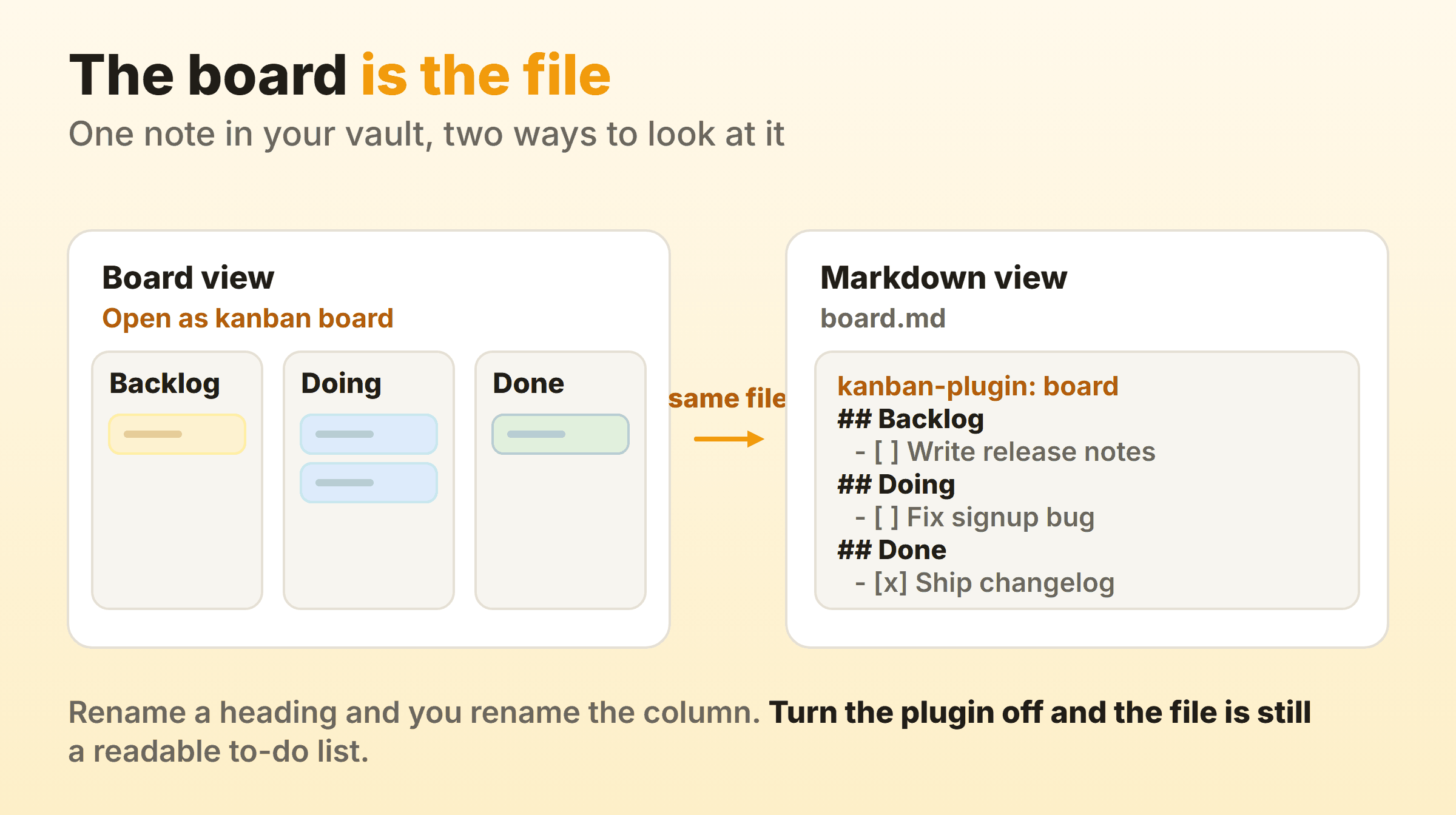
The frontmatter line is the switch. Obsidian reads it and opens the note as a board instead of text. Delete the line and you have an ordinary note back, with every card still sitting there as a checkbox.
That one design decision earns the Obsidian kanban board plugin most of its reputation, and it pays off in ways a hosted board cannot:
- Version control works. A git diff on a board file shows you which card moved and when, in a format a human can read.
- Search reaches every card. Obsidian search finds card text, and so does grep, because the cards are lines in a file.
- Sync works without a sync feature. Anything that moves markdown between your machines moves the board, because a board is one file.
- Nothing is trapped. There is no export step, because there is nothing to export from.
Renaming a heading renames a column, and it works the other way round too, so you can restructure a board in a text editor on a machine that has never had Obsidian installed. I would not make a habit of that, but the option being there is reassuring.
What Is the Bases Kanban View?
The Bases kanban view is a core Obsidian feature, added in version 1.14, that shows notes as cards in columns grouped by one property. Nothing to install, since Bases ships with the app.
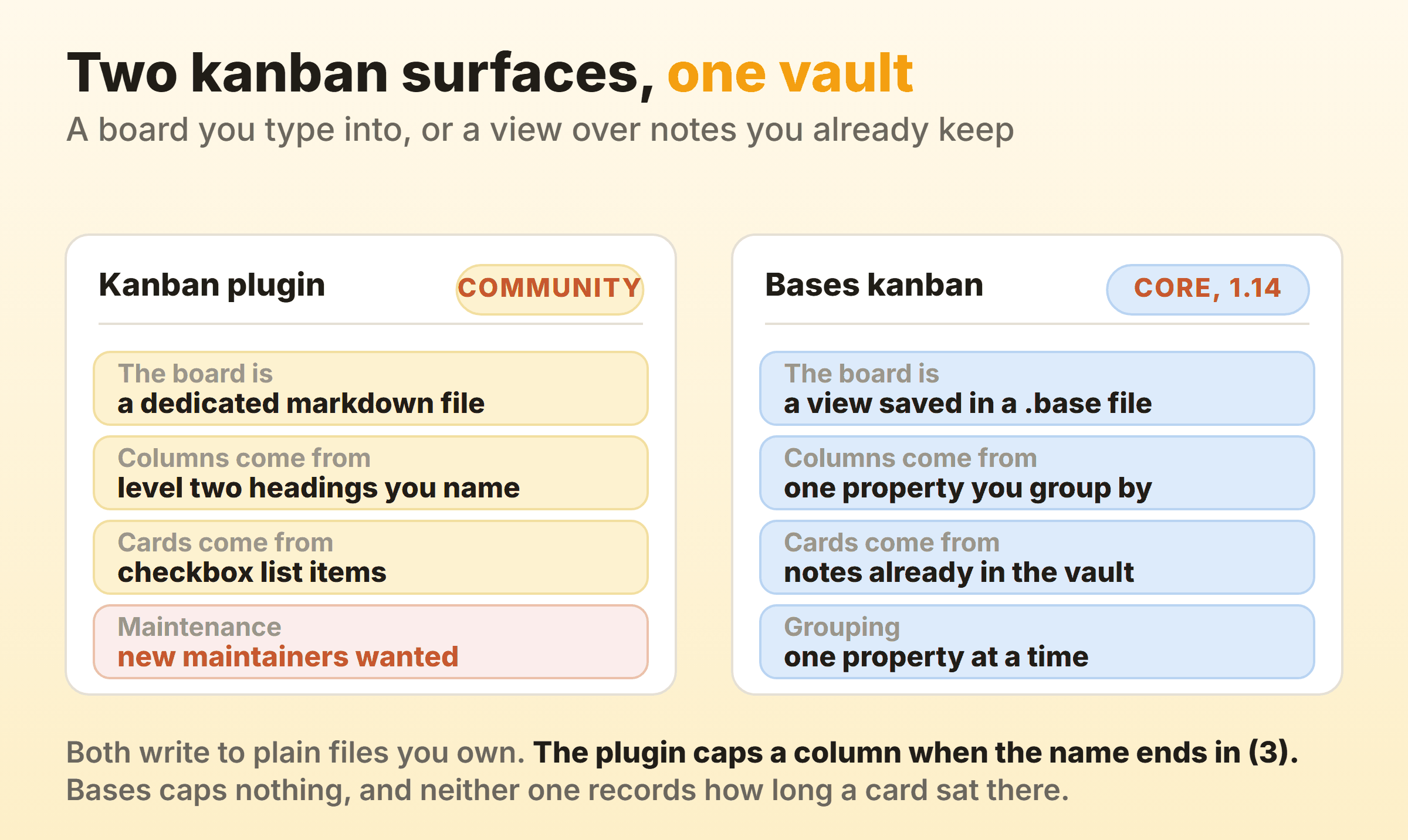
What separates the two is what a card is made of. On a plugin board, a card is a line of text living inside the board file. In Bases, a card is a note that already exists somewhere in your vault, and the column it lands in follows the value of the property you grouped on.
Which makes the choice mechanical:
- Every task is already a note, with a status property and a body you write in? Use Bases.
- Cards are one-liners you would never make a note for? Use the plugin.
- Half and half? Run both, on different work, and stop trying to make one of them cover everything.
Anyone who has used a Notion database will find Bases familiar. A Notion kanban board is a database view grouped by a status property, and Bases works the same way. Both inherit the same ceiling, which is the section after next.
Obsidian also groups by a single property at a time, so plan around it, since a board split by status and by owner at once is not on offer from either surface.
Which Obsidian Kanban Plugin Should You Use?
For most vaults, the Kanban plugin by mgmeyers, with your eyes open about who is looking after it. It has the downloads, and the alternatives copy its file format.
The part nobody puts in a tutorial is who is maintaining it. The plugin repository now sits inside the community-archive organisation on GitHub, an org that describes itself as a home for plugins kept alive by the community, and its readme opens by asking for new maintainers. The last release, 2.0.51, landed on 31 May 2024.
It matters less than it sounds. A stalled plugin holding your work in a proprietary database is a genuine problem. One whose entire output is headings and checkboxes is a much softer risk, and the worst realistic case is that you keep the file and read it as a list.
The smaller community boards are a different calculation. Several read and write the same board format, so they are cheap to try and cheap to abandon. Check the download count and the last release date before trusting one with a year of work.
Can You Set WIP Limits on an Obsidian Kanban Board?
Yes, in the Kanban plugin, by putting the number in brackets at the end of the list name. Bases has no equivalent. This is the least advertised useful feature in the plugin, and most guides to Obsidian kanban miss it completely.
Rename a list to Doing (3) and the plugin reads the brackets as a limit of three. It strips them off the displayed title, so the column still reads Doing, and the badge beside it changes from a plain card count to count against limit. Push a fourth card in and the badge reads 4 / 3 and picks up a bold error background. The card still goes in. Nothing blocks the drag.
Card counts appear beside every list title by default, with a setting to hide them if they get noisy, and hiding them hides the limit badge with them.
Four things worth knowing before you rely on it:
- The number lives in the heading. The markdown line is
## Doing (3), so the cap is part of the column name. Rename the column carelessly and you have silently deleted it. - Only digits parse.
Doing (3)works.Doing (max 3)sets no limit at all, because the parser wants a number between the brackets and nothing else. The column looks capped to a human and is not capped to the plugin. - It never refuses. The badge turns red and the card lands anyway, which is the correct design for a soft limit and useless against somebody who has decided not to look.
- Bases has nothing. Group notes into columns all you like, no column has a maximum.
WIP limits are the mechanism that makes kanban do anything at all, and without one a board is a status display people update on Fridays. The cap turns “I will start the next thing” into “I will go and help finish the thing that is stuck,” which is the whole behaviour change the method exists to produce. A red badge does that job about as well as a red badge can, which is to say it works on a team that already wanted to be told.
Can You Measure Cycle Time on an Obsidian Board?
Not natively. Neither surface stamps a card when it enters or leaves a column, so the raw material for flow metrics is absent from the file.
You can get partway there by hand. Switch on “Add date and time to archived cards” and the plugin stamps each card as it is archived, which gives you the finish end of the calculation. The setting is off until you find it, the start date is yours to record, and cards nobody archives give you nothing.
Throughput is easier, since it only needs counting. Archive completed cards every Friday and the archive tells you how many things finished. How long each took stays a mystery, and a cumulative flow diagram needs the file exported and the chart built elsewhere.
For a solo vault this barely matters. You can already feel that review is where things go to die. It starts to matter the week somebody asks how long work takes here and the honest answer is a shrug.
Does an Obsidian Kanban Board Sync Between Devices?
An Obsidian kanban board syncs however your vault syncs, because the board is a file like every other note. Obsidian Sync, iCloud, Dropbox, Syncthing, a git repository, all of them move a board the same way they move anything else in the folder.
One caution comes with that. Two devices editing the same board file at once is a merge conflict waiting to happen, and a board is the one file everybody on the project touches. Close it on the laptop before you open it on the phone. Boring advice, and it heads off the mess where a sync conflict quietly duplicates a column.
When Does an Obsidian Kanban Board Stop Being Enough?
An Obsidian kanban board stops being enough the moment somebody needs a number out of it. Showing you what is in flight right now, it handles fine, and with a cap in a list name it will even flag a column that has swollen. What it will not do is tell you how long any of it took. Three signs turn up again and again:
- Doing has held nine cards for a month and nobody has said anything about it.
- Somebody senior asks how long work takes here and the answer involves opening a file and counting.
- Two people are editing the same board and the vault has started producing conflict copies.
None of that is a reason to abandon Obsidian. For thinking, writing and a personal system that outlives whatever app is fashionable, a vault of markdown is hard to beat, and a board written today is still readable in a decade.
Kanbanee is built for the other case, and I want to be precise about where it actually differs. Its WIP limits behave much as the plugin’s do, per column, soft, a badge showing count against limit that turns red once you go over. The difference is that the limit is a column setting rather than characters inside the column name, so renaming a column cannot quietly remove the cap and nobody has to remember that the brackets take digits only. The larger difference sits underneath, where cycle time, throughput and a cumulative flow diagram are built-in reports, because the board records when a card entered a column and neither Obsidian surface does. The honest trade is a hosted board and little else: no vault, no notes, no local files, no API yet.
Plenty of people run both, and the split is sensible. Notes, specs and thinking stay in Obsidian. The board a team looks at every morning lives somewhere that can still answer the question in six months.
FAQ
Is the Obsidian kanban plugin free?
Yes. The Kanban plugin is a free community plugin, and the Bases kanban view is part of the app, so kanban in Obsidian costs nothing on top of whatever you already pay for Obsidian itself.
Which Obsidian kanban plugin is best?
Kanban by mgmeyers, for almost everyone. The store also carries newer boards with similar names and a few hundred downloads between them, which is fine for a trial and thin for a year of real work. Check two numbers before you commit: the download count and the date of the last release.
Where is the Obsidian kanban plugin documentation?
The plugin readme on GitHub links out to the full docs, and the repository is also where the issues and the roadmap live. Since the project moved into the community-archive organisation, treat that readme as the current word on maintenance.
Can you use an Obsidian kanban board on mobile?
Yes. Boards open on Obsidian mobile and the cards are all there. Dragging a card across columns on a phone screen is fiddly enough that most people open the card and edit it instead. True of nearly every kanban tool, so hardly a quirk of this one.
Can you turn an existing note into a kanban board?
Only if it is empty. The plugin’s convert command explicitly takes empty notes, so a note you have already written in will not become a board that way. To keep the content, make a fresh board and move the text across as cards, or add the board property to a note whose body you have already restructured into headings and checkboxes.
Can two people share one Obsidian kanban board?
Not as a board on its own. There is no per-board sharing, so two people on one board means two people on one synced vault or shared folder, both of them editing the same file. Two people sharing a household vault, fine. A team of six, and somebody spends Wednesday untangling conflict copies.