
AI Kanban: Which Board AI Features Are Worth Paying For
Updated at
The Answer
AI kanban is one name for three different products, and most search results mean AI features inside an ordinary work board, where the ones worth paying for read a card and fill something in. Notion’s Basic autofill writes a summary or a category into a database property, Trello sets a due date from the words in a card title, and a thread summary saves you reading every comment. All three are cheap to check because the source sits right beside the output. Board generation earns a single run at the start, as long as you replace the columns it guessed. Generated status reports and checklists put claims in writing for you, so somebody who knows the work reads them before anyone relies on them. The billing differs by vendor, bundled into Trello’s paid plans, metered in credits at monday.com and in Asana’s AI Studio, or sold as a second per-user subscription at ClickUp. None of it decides what gets pulled next or where the column cap sits. The other two meanings are boards that hand work to AI agents, such as Vibe Kanban, Cline Kanban and Hermes Agent’s board, and factory software that forecasts replenishment.
What Does AI Kanban Actually Mean?
AI kanban means one of three different things depending on who is using the term.
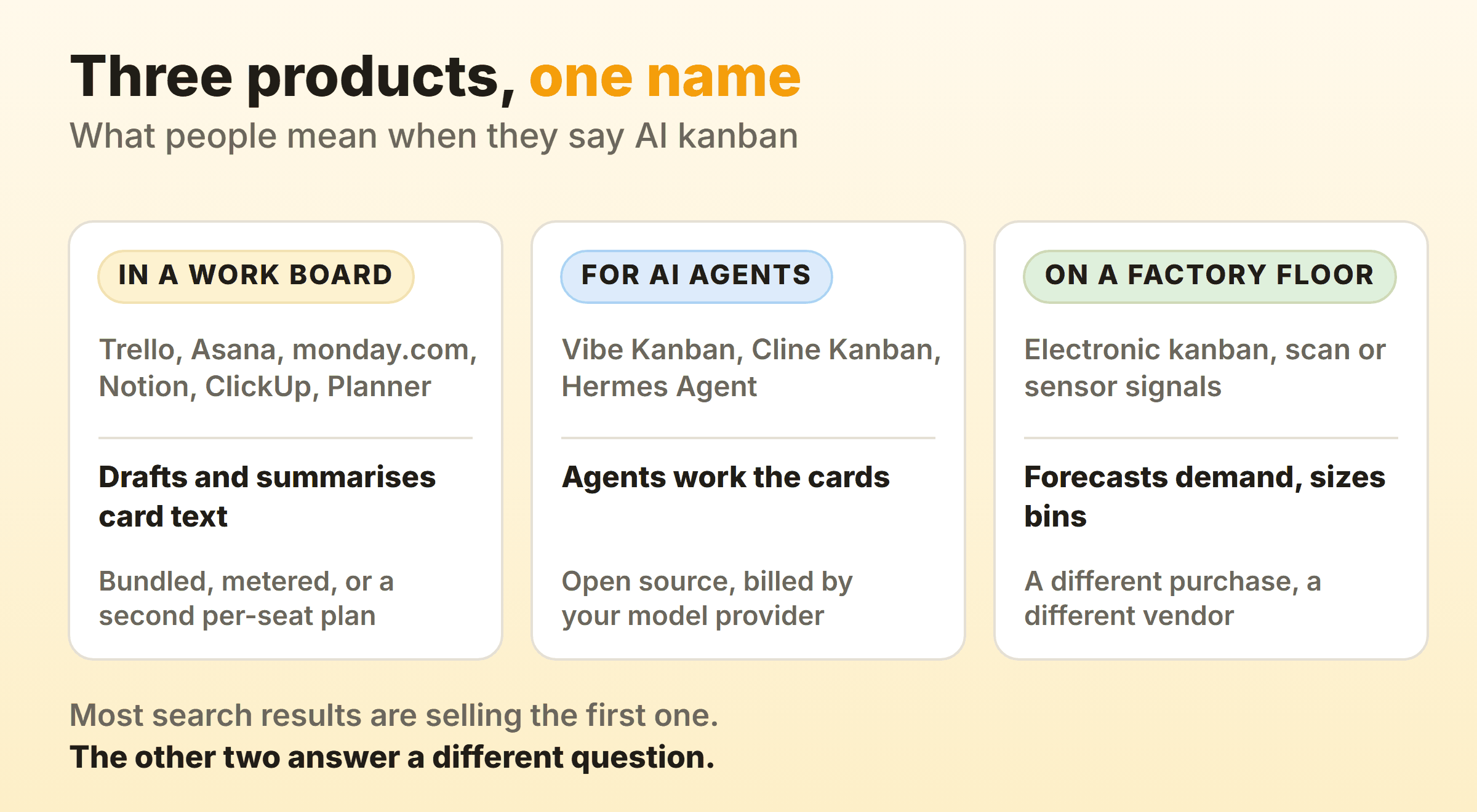
Start with the feature set, since that is the meaning most search results are selling. Trello, Asana, monday.com, Notion, ClickUp and Microsoft Planner have each attached a language model to the board you were already using. The board did not change and neither did the card. Some of the typing is done for you now, and depending on the vendor you pay for it through a higher tier, a credit allowance or a second subscription.
Agent boards are a genuinely different object. The cards on them are worked by software agents instead of people, and they get their own section further down.
The factory floor shares almost nothing with either. Electronic kanban replaced the paper card with a scan or a sensor reading, and the AI sitting on top of that forecasts demand and sizes bins. E-kanban is the page you want if that is the problem. None of the tools below are built for a parts bin.
What AI Features Do Mainstream Kanban Tools Ship?
Mainstream kanban tools ship four kinds of AI feature: board generation, summarising, card field autofill, and automation you describe in plain language. Every vendor I checked offers some mix of the four.
Board and Card Generation
Board generation turns a description into columns and cards. Atlassian’s list of AI features in Trello opens with “Create boards with AI”, and the same page names merging several cards into one, generating a checklist on the back of a card, recommending focus time, and generating images for board backgrounds and card covers. Kanban Tool’s AI Assistant does a smaller version of the same job, suggesting task cards for a column and to-do items inside a card.
Ask a generator for a sales pipeline and you get a plausible CRM board back. The columns will be the generic ones everybody uses. A model that has never watched your team work cannot know that half your delay lives in a waiting-on-legal state you have not named yet, so treat what comes back as a first draft of the layout and nothing more.
Summaries and Status Writing
Summarising reaches furthest of the four, because a long card is a wall of comments and nobody reads all of it. Trello uses Rovo to generate, shorten and summarise the text in card descriptions and comments. Microsoft’s Copilot in Planner, still labelled a preview, offers four suggested prompts, and one of them is “Get a status report”. Asana’s pricing page lists Smart status on projects, which drafts status reports from your project data.
Who reads the output matters more than how good it is. A summary pulled off a card thread for somebody joining late is cheap to verify, since the source sits right underneath it. Send a generated status report to a stakeholder and nobody in that conversation is positioned to check it against anything. It reports what the board says. Which is only what is true if everybody kept their cards honest last week.
Card Field Autofill
Autofill writes a card field from content already sitting on the card. Notion’s AI autofill fills a database property with a summary, a translation, an extracted detail or a category, and Notion is unusually specific about the edges. Basic autofill “is included in Business and Enterprise plans” and burns no credits. It “only uses content in the specific row or page (not across all your Notion pages)”, and you can set it to run when a page is created or edited. Anything needing web or workspace search moves to Custom Agent autofill, which does consume Notion credits.
Trello does a narrower version, reading a date out of the card title and setting the due date from it, for new cards written in English. ClickUp lists unlimited AI Fields in Everything AI, the higher of its two paid AI tiers, and Asana’s pricing page describes Smart fields, which suggest and fill in custom fields.
This is the category I would switch on first. The model copies from a source three inches away, the output fills one field, and a wrong answer shows up at a glance.
Natural-Language Automation
Natural-language automation covers two things, an AI step inside a rule and a rule you describe in plain language. monday.com builds the first kind out of AI blocks, which its help centre says “can be used in AI Columns, Automations, and in the workflow builder”. Its AI credits documentation charges 8 credits per AI block action, counts every action on the same item inside 24 hours once, and bills subitems separately as entities of their own. AI workflows burn credits per run and carry a plan cap on top of that. Standard accounts get up to 3 active workflows, Pro 20, Enterprise 250. Asana’s Words to workflows is the second kind, where you describe the workflow you want in plain language and Asana AI builds it.
Six months later somebody asks why cards keep jumping to Review on a Tuesday, and a rule created in one sentence is exactly as hard to find as a rule built out of dropdowns.
What Does AI on a Kanban Board Cost?
AI on a kanban board costs you a second subscription, a bucket of credits, or a plan upgrade. Which of the three you land on changes how much of it your team actually uses.
| Tool | How the AI is sold | The number worth knowing |
|---|---|---|
| ClickUp | A second per-user subscription | Brain AI at $9 per user per month and Everything AI at $28, both billed yearly, on top of the workspace plan |
| monday.com | Metered credits | 8 credits per AI block action, 120 credits per meeting hour of AI Notetaker |
| Asana | One credit pool for the account | AI Studio Basic at 50,000 credits a month on Starter, 75,000 on Advanced, 200,000 on Enterprise |
| Trello | Bundled into the paid tiers | Every AI feature except the MCP server sits on Standard, Premium and Enterprise |
| Notion | Split by how far it reads | Basic autofill included on Business and Enterprise with no credits, Custom Agent autofill on credits |
| Microsoft Planner | A premium or Copilot licence | Copilot in Planner is open to Planner and Project Plan 3 or 5 and Microsoft Copilot licence holders, still as a preview |
ClickUp’s pricing page lists workspace plans at $7 per user per month for Unlimited and $12 for Business when billed yearly, then prices AI in a block of its own further down the page. Brain AI costs $9 per user per month and Everything AI $28 on yearly billing, or $14 and $33 month to month, with AI Super Credits sold at $10 per 10,000 on top of either. Run that across ten people and the AI line can comfortably beat the line for the product itself.
AI Studio Basic on Asana’s pricing page is quoted per billing account per month, not per seat, so the 50,000 credits on Starter are one pool for everybody on that billing account, however many seats it has. Its Personal plan lists no AI Studio credits at all.
Metering changes behaviour, and monday.com sends notifications at 80% and 100% of the account’s credit limit so admins see the ceiling coming. Once a team works out that a click costs something, they stop clicking. Point the credits at the boring high-volume work and leave exploratory prompting to whoever already pays for a chat subscription.
Which AI Kanban Features Are Worth Turning On?
The AI kanban features worth turning on are the ones that read the board and hand you the result. Writing to the board on your behalf needs a much better reason.
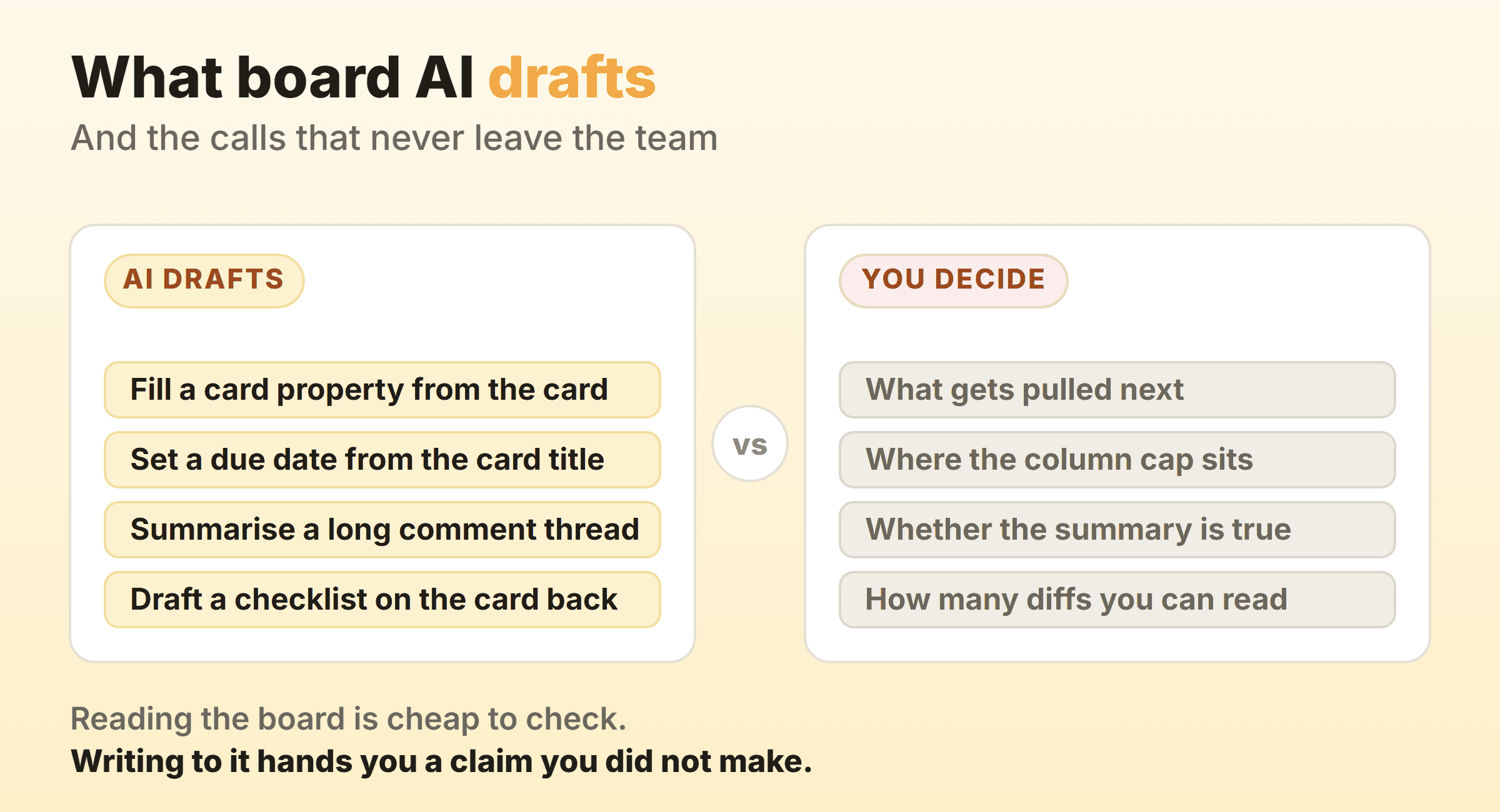
Reading is cheap to check. Take a summary property, an extracted due date, or a category applied from the card text. The evidence sits directly under the output, so a bad answer takes about two seconds to spot, and that holds whether the vendor bundles the feature or charges credits for it.
When something writes for you instead, you inherit a claim you did not make. A generated status report goes out to people who cannot see the board. Checklists carry a quieter version of the same problem, because they decompose the sentence you typed rather than the work itself, so the step nobody thought of is still missing.
Board generation sits between the two. Run it once at the start, keep the cards, throw away the columns it guessed and put your real states in. Every board I have run had at least one column no generator would have invented, usually a queue named after whoever we were waiting on.
Can AI Forecast When Work Will Finish?
AI can help forecast when work will finish, but the maths doing the forecasting is Monte Carlo simulation run over your own history, not a language model.
55 Degrees, who build flow analytics for Jira and Azure DevOps, describe the method plainly. The simulation runs on historical throughput or cycle time data, and “even a few weeks’ worth of data is enough to start”. Out comes “a realistic range of outcomes associated with a probability of success, rather than a fixed, single date”, phrased as an 85 percent chance of finishing twenty items instead of a promise about the 14th.
A model reading your cards can only report what the cards say. The simulation works from what your team actually finished, which is the one honest input to a date. Gaps in the card history skew it. So do columns you renamed last month, and no amount of model quality rescues either. Sort the flow metrics out first and your planning conversations get shorter.
What Does AI Not Fix on a Kanban Board?
AI does not fix the two mechanisms that make a kanban board work, the cap on the column and the decision to pull.
Neither Trello’s AI features page nor Kanban Tool’s AI Assistant page mentions a WIP limit, and that is no surprise, because a limit is a commitment about your capacity and no model knows what yours is. A board without one looks finished and behaves like a to-do list. Cards pile up in Review, everybody starts a second item while they wait, and the board stops being a pull system while still looking exactly like one.
Nobody I have worked with was ever held up by how fast the words got written. What held us up was finished work waiting for somebody to look at it, and drafting faster only adds to that pile. My own Doing column caps at two, a number I got from watching myself over a couple of months. No settings page suggested it.
Kanbanee handles the cap the way I want it handled. Off until you set one, a badge showing count against limit, red the moment you go over, and the drag never blocked, because the point of a cap is to make somebody notice. Reports sit on the Pro plan at $6 a month or $48 a year, and the free plan covers two boards you own with unlimited members on them. It ships no AI features, no API, no realtime sync yet, and column dragging that only works on desktop. Read that list before you pick it for the wrong reason, and the tools hub covers the alternatives if any of those gaps matter to you.
Where Do Kanban Boards for AI Agents Fit?
Kanban boards for AI agents fit beside the board your team plans on rather than in place of it, because what moves across them is work handed to software agents.
Vibe Kanban came from BloopAI, creates a git worktree when you add a repository to a workspace, and has been sunsetting since April 2026. Cline Kanban starts with npx kanban, gives each card its own worktree, links cards into dependency chains, and calls itself a research preview. Both run a CLI coding agent you have already set up, and Claude Code and Codex are on both supported lists.
Nous Research’s Hermes Agent takes a different shape. Its Kanban board lives in a SQLite file at ~/.hermes/kanban.db, described in the docs as “a durable task board, shared across all your Hermes profiles, that lets multiple named agents collaborate on work without fragile in-process subagent swarms”. Each task has one assignee, a named agent profile, and moves through statuses from triage to done, with blocked and review along the way. Agents create, complete and block cards themselves by calling tools such as kanban_create, kanban_complete and kanban_block. Code is only one use. The docs describe research teams and persistent named assistants next to engineering pipelines, and a task gets a git worktree only when you pick that workspace kind, because the default is a scratch directory deleted when the task completes.
Whichever you run, plan around the person accepting the output. Agent work should still be accepted by somebody accountable for it, whether it arrives as a diff, a pull request or a research summary, so cap the review column on your software team’s board and start new agent work only as fast as that column clears.
FAQ
Is there a free AI kanban board?
Not from the mainstream work boards I checked, where a free plan gets a trial at most. ClickUp’s AI pricing block gives its Free Forever plan trial access to advanced AI features, and Notion’s Free plan lets you trial AI capabilities including autofilling databases. monday.com lists AI features as available from its Basic plan, and Asana’s Personal plan lists no AI Studio credits. Atlassian states that “all the features besides the Trello MCP server are available on web and desktop to Standard, Premium, and Enterprise plans”. The MCP server is open to any Trello user, but it connects Trello to an outside AI assistant rather than adding AI to the board. Copilot in Planner comes with a Planner and Project Plan 3 or 5 licence or a Microsoft Copilot licence, and Microsoft offers a 30-day trial to people without a premium licence. If free is a hard requirement, look at the agent boards. Vibe Kanban and Cline Kanban are open source under Apache 2.0 and Hermes Agent under MIT, so the bill comes from your model provider rather than from the board.
Can AI create a kanban board from a prompt?
Yes, and several tools list it as a headline feature, Trello’s “Create boards with AI” among them. Expect a generic layout with plausible cards sitting in it. Keep the cards. Rewrite the columns so they match the states your work genuinely passes through, then add the caps. How to create a kanban board covers the part a generator skips.
What is an AI agent kanban board?
An AI agent kanban board is one where software agents, not people, pick up and work the cards. In Vibe Kanban and Cline Kanban each piece of agent work runs in its own git worktree against your repository. Hermes Agent tasks belong to a named agent profile and can pass through review and several agent runs before they are marked done. Either way the board tracks agent work, so it sits next to your delivery board instead of replacing it.
Does AI kanban apply to manufacturing?
It applies, and it is a different purchase entirely. On a factory floor the AI forecasts demand and sizes replenishment instead of writing card descriptions, because the card there is a signal to make or move parts. The question is whether that signal fires at the right moment. Start with e-kanban before you talk to a project-board vendor.
Can AI set WIP limits for you?
None of the AI feature lists I read from Atlassian, Notion, monday.com or Microsoft names a WIP limit among its capabilities. The number depends on how many people you have, how long review takes and how much interruption the team absorbs, and none of that lives on the board. Pick it yourself. Start lower than feels comfortable and raise it only once the column keeps emptying.
Should AI write my status updates?
Only where somebody who can see the board reads it before it goes out. A generated update summarises what the cards say, and cards drift away from the truth between one Friday and the next. A first draft the team lead edits in ninety seconds beats writing from scratch and keeps a person accountable for the claim. Do not schedule one to send itself.