
Cline Kanban: Setup, Worktrees, Dependency Chains and Limits
Updated at
The Answer
Cline Kanban is a standalone local web app for running CLI coding agents side by side, started with npx kanban from the root of a git repository. It finds whichever CLI agent you already have installed and opens a board in your browser on 127.0.0.1:3484, with no account required. One card is one task for one agent. Press play and Kanban cuts an ephemeral git worktree plus a terminal for that card alone, so half a dozen agents can work at once without fighting over a branch. The card face carries the agent’s latest tool call. Open the card to read a diff, click a line to leave a comment the agent picks up, then hit Commit or Open PR and move the card to trash, which deletes the worktree and keeps a resume ID. Cmd or Ctrl click links two cards into a dependency chain, and with auto-commit switched on a finished card fires the next one unattended. Cline calls the whole thing a research preview. The board tracks agent runs, and the documentation covers create, start, review, ship and trash while saying nothing about column limits, queue time or cycle time.
What Is Cline Kanban?
Cline Kanban is a local web application that runs CLI coding agents in parallel, shipped by Cline Bot Inc. as the kanban package on npm and open sourced under Apache 2.0 at github.com/cline/kanban. The repository sums itself up in one line: launch a local web app that runs CLI agents in parallel.
The README is refreshingly blunt about its own maturity. Kanban is a research preview, and it “uses experimental features of CLI agents like bypassing permissions and runtime hooks for more autonomy”. Read that line twice before pointing it at a repository that matters. Bypassing permissions is what lets a card finish while you are away from the keyboard. It is also the reason I would not start one without a clean working tree and a recent push behind me.
Cline’s installation page lists four ways to run Cline: the IDE extension, the CLI, the SDK, and Kanban. Four install paths, four different things to run, and installing the extension does not put a board on your machine.
Is there a kanban board inside the Cline extension?
No. The Cline extension in VS Code and JetBrains is a sidebar chat agent that prompts you before each action unless you switch on auto approve, and Cline’s own installation page lists the board as a separate install path rather than something the extension carries. Kanban is a separate program you start from a terminal, and it works just as happily when the agent behind it is Claude Code or Codex. Worth knowing before you spend twenty minutes hunting through extension settings for a board view that was never there.
How Do You Set Up Cline Kanban?
You set up Cline Kanban with one command, run from the root of a git repository.
# run it without installing anything
npx kanban

# or install it globally
npm i -g kanban
kanban
Kanban starts a local server, works out which CLI agent you have installed, and opens the board in your browser. There is no account step and no config file to write.
The Node version trips people up. Cline’s Kanban docs list Node.js 18 or later as the prerequisite, while the published package’s own manifest on npm declares an engines field of Node 22 or later, and the Dockerfile in Cline’s remote access guide builds from node:22. Two of those three agree. Treat 22 as the floor and the docs figure as stale.
Then check the version you are running. Cline published a high severity advisory in July 2026, CVE-2026-62678, on a runCommand endpoint that executed shell commands without validating the Host header, which left it reachable through DNS rebinding from any page a user happened to visit while Kanban was running. Everything up to and including 0.1.65 is affected. Version 0.1.66 carries the fix, and the current published release is 0.1.70, so a fresh install lands well clear of the bug. The exposure sits with anyone still holding an old global copy.
Which agents does Cline Kanban run?
Cline Kanban runs CLI-style coding agents, and the docs name Cline CLI, Claude Code, Codex and OpenCode, with other runtimes selectable in settings. It detects what you have installed. Staying agnostic about the agent is the part I value most, because the board acts as a control surface and whichever CLI I already pay for slots underneath it instead of being replaced by another subscription.
How Does the Cline Kanban Board Work?
The Cline Kanban board works one card at a time, and pressing play on a card sets off everything that follows.
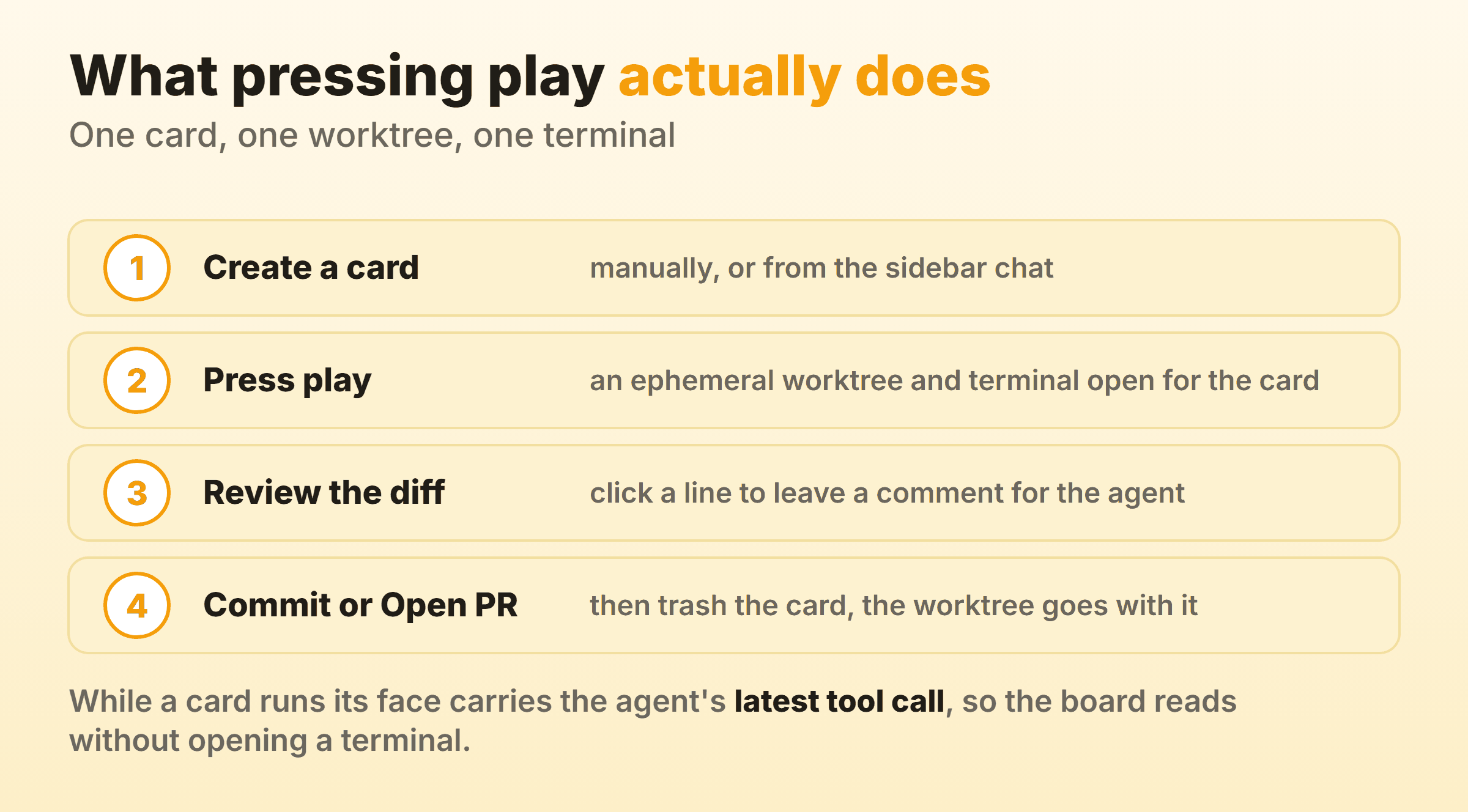
You create a card by typing a task into the board, or you open the sidebar chat and ask an agent to break a piece of work into cards for you. Kanban injects board management instructions into that chat session, which is why the agent can add cards, link them and start them without you touching the board yourself.
Kanban cuts an ephemeral git worktree the moment you press play, an isolated checkout where the agent edits files without touching your working directory or any other card’s. Gitignored directories like node_modules get symlinked in from the main repo, which is the difference between starting six agents and sitting through six installs. The core workflow docs are honest about the trade. If your agents need to write to gitignored files, those writes land on the symlink target, which is your main repo’s copy. The README goes further and tells you to use something else in that case.
Hooks push the agent’s latest message or tool call onto the card face while it works. That string is the status. It is enough to read twenty cards at a glance, which beats opening twenty terminals.
Click a card and you get the agent’s terminal interface beside a diff of everything that changed in that worktree, measured against your base branch. The diff can be scoped. A checkpointing system narrows it to a range of messages instead of the whole cumulative pile. Click any line in the diff to leave an inline comment and it goes back to the agent as feedback, so a wrong approach gets corrected without rewriting the task description. A Script Shortcut in settings puts a play button in the navbar for something like npm run dev, which saves asking an agent to start your own dev server.
Shipping is two buttons. Commit turns the worktree into a commit on your base branch. Open PR creates a branch and a pull request. Either way Kanban hands the agent a prompt to do the git work and untangle conflicts if the base branch moved while the agent was busy. Move the card to trash afterwards and the worktree is deleted, with a resume ID kept so the task can be picked up later. That same move to trash is what fires a linked card.
How Does Cline Kanban Handle Multi-Agent Orchestration?
Cline Kanban handles multi-agent orchestration through two mechanics, parallel worktrees and linked cards.
Every started card gets its own worktree and its own terminal, so two agents editing the same file never see each other. The conflict surfaces later, at the ship step, where the agent is asked to work through whatever the base branch did in the meantime.
Linking is where the automation lives. Cmd click on Mac, Ctrl click on Windows and Linux, connects one card to another. When a linked card completes and is moved to trash, the next card in the chain starts on its own. Watch that trigger, because it catches people out. Completion alone does not fire the chain. The move to trash does. Switch on auto-commit and auto-PR in settings and the loop closes, so one task finishes, commits itself, and kicks off the next with nobody in the room.
Calling that a scheduler oversells it. Nothing in the documentation describes a cap on how many cards can run at once, which means your ceiling is the machine, the disk, and whatever rate limit your model provider applies. Every running card is a full worktree plus a live agent session billed to whatever plan or key you configured. Ten cards is not ten times the throughput when your provider is queueing seven of them.
Each finished card also produces a diff that a person has to read, and getting through six of those carefully takes most of an afternoon.
Where Cline Kanban Stops Behaving Like Kanban
Columns and cards are the part of kanban you can see. The limits underneath them are what make it a pull system, because a capped column is what makes a queue visible at all. Cline Kanban ships the columns without the limits.
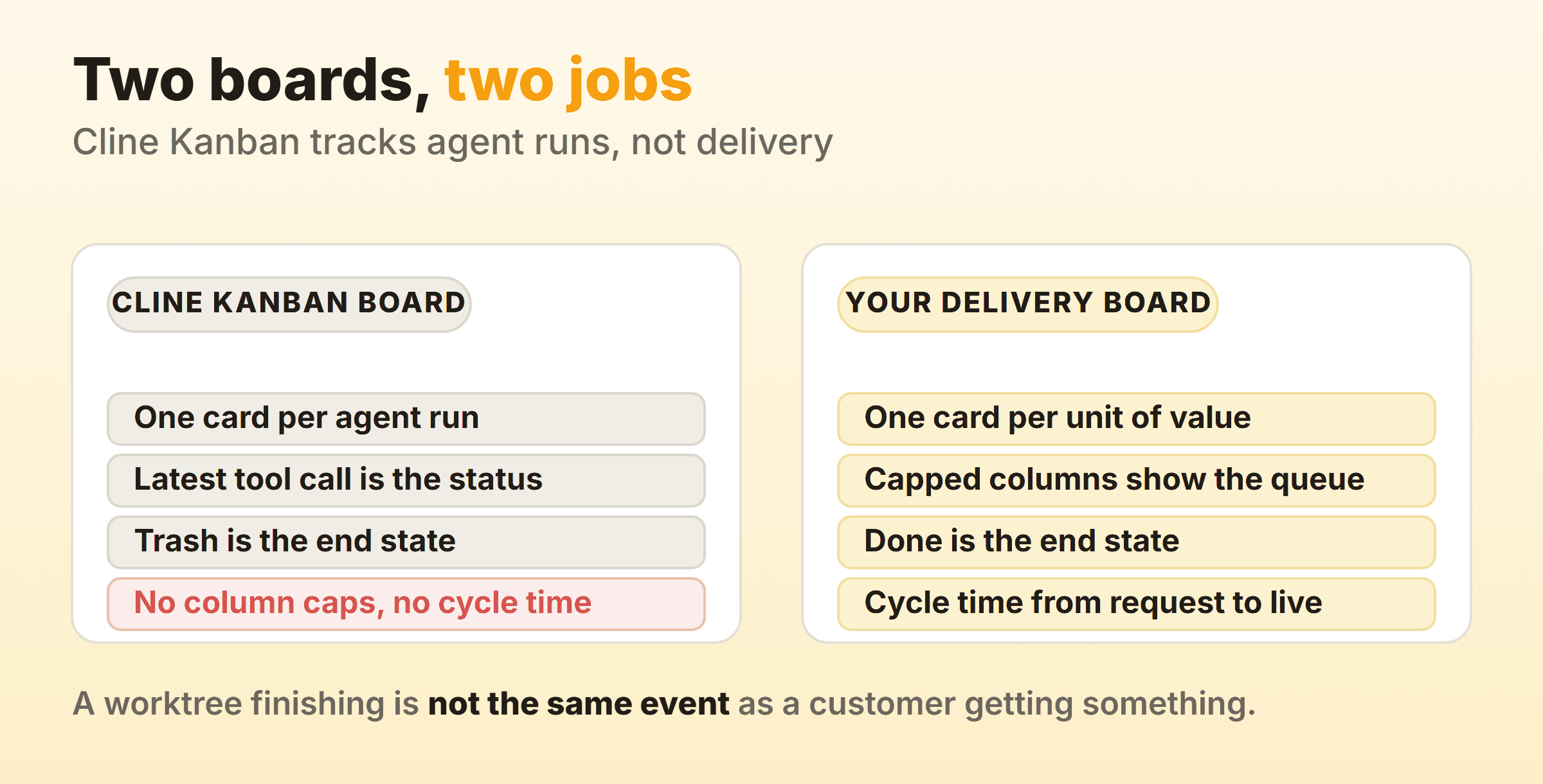
Across all three Kanban pages Cline publishes there is no column limit. No cap. Nothing turns a colour when a column fills up. Fair enough for a tool whose columns track a process running on your laptop, and it means WIP limits have to live in your head. Mine sits at three. Six agents running is six diffs arriving for one reviewer, and I would rather read three properly than skim six at five o’clock.
Work leaves a Cline board by going to trash, which deletes the worktree. Trash is the end state, and a board whose end state erases the card cannot tell you how long anything took. Cycle time, throughput and a cumulative flow diagram are all absent. The clock you want runs from the moment somebody asked for the change to the moment a user could use it, the one the board keeps runs from play to trash, and those two numbers can differ by a week.
The docs describe a card lifecycle instead of a fixed set of columns. Every state in that lifecycle describes what a program is doing. A delivery board for the same team would carry a column for waiting on review and another for waiting on release, which on every software team I have run is exactly where the delay hides. Cline’s docs never claim otherwise, which is worth remembering when you read a comparison that treats the word kanban as a feature list.
Should You Run a Separate Board Alongside Cline Kanban?
Yes, run a separate board alongside Cline Kanban as soon as any part of your work stops being a code change. The two boards hold different objects and answer different questions, and the overlap between them is small.
Agent runs live on the Cline board. One card, one worktree, a lifetime measured in minutes, gone once the branch merges. As a queue of jobs for machines it works very well.
Your delivery board carries something slower: one card per unit of value, ending in a Done column that keeps the card instead of deleting it. A customer request, the design that has to happen first, the review, the release, and the two weeks a ticket spent waiting on a decision no agent was ever going to make. Cards there outlive twenty agent runs. Kanbanee is the board I keep for that, with a soft column cap that shows the count against the limit and turns red when you go over without ever blocking the drag, plus cycle time and a cumulative flow diagram on the paid tier at $6 a month. Its gaps are real and worth naming: no realtime sync yet, no API, and column reordering that only works on desktop.
If your delivery board belongs next to the code, GitHub projects give you soft column limits and issues as cards. For a wider look at the field, our kanban tools hub covers the options, and Vibe Kanban comes at agent orchestration from a different direction. For the AI features inside mainstream boards, such as card summaries and auto-filled fields, the AI kanban page sorts out which are worth paying for.
FAQ
How do you use Cline Kanban day to day?
Run npx kanban in your repo, add two or three cards, press play on one. Read the diff when it finishes, comment on any line that looks wrong, then Commit or Open PR and move the card to trash. Once that loop feels ordinary, start linking cards and switch on auto-commit for chains where you trust the outcome. Going from one simultaneous card to five takes about a minute. Pick the number from your own reading capacity, since the machine will always offer more.
Does Cline Kanban work with Claude Code and Codex?
Yes. The docs list Cline CLI, Claude Code, Codex and OpenCode as supported runtimes, with others selectable in settings, and Kanban detects the CLI agent you already have installed when it launches. That agent-agnostic design is the main reason to look at Kanban ahead of a board tied to one vendor.
Can you set WIP limits on a Cline Kanban board?
Not through the tool. None of Cline’s three Kanban documentation pages describe a column limit or a count against one, so any cap on concurrent work is a cap you keep yourself. The useful number in practice is how many diffs one person can read carefully in a sitting, which for most of us is smaller than the machine can produce.
Is Cline Kanban free?
The Kanban application is open source under Apache 2.0 and needs no account to launch. What it costs is whatever the agent underneath costs, since Kanban drives a CLI agent you have already configured and billed. Check the pricing of that agent.
Is it safe to open a Cline Kanban board to your network?
Only on a network you trust completely. Kanban binds to 127.0.0.1 on port 3484 by default, and kanban --host 0.0.0.0 opens it to every device on your LAN, which on an office network means a lot of devices you do not control. Cline’s own remote access guide states the stakes plainly, warning that Kanban “provides full access to your git repository and terminal”. For reaching it from outside the house it recommends Tailscale ahead of a public tunnel. Good advice.
What happens to a card you move to trash?
Trashing a card deletes its ephemeral worktree and frees the disk, and Kanban keeps a resume ID so the task can be continued later. It is also the event that starts the next card in a dependency chain, which is why trash behaves as a completion signal. Ship the work before you trash the card.