
Vibe Kanban: What It Is, How to Run It, and What the Sunset Changed
Updated at
The Answer
Vibe Kanban is an open-source board for running coding agents rather than people, published by BloopAI under the Apache-2.0 licence and started with one command, npx vibe-kanban. You write an issue, open a workspace against it, and the tool cuts a git worktree, hands the agent a branch, a terminal and a dev server, then streams the diff back so you can leave inline comments and open a pull request without changing windows. Ten agents are wired in, Claude Code and Codex among them. Then bloop shut down. The announcement went up on 10 April 2026 and gave the hosted kanban issues, comments, projects and organisations thirty days, and what still runs on your own machine is the execution half: workspaces, worktrees and agent sessions. The code stays on GitHub under Apache-2.0, so the board itself is recoverable by anyone willing to self-host it.
What Is Vibe Kanban?
Vibe Kanban is a task manager for coding agents. Written in Rust and shipped through npm, it runs locally with the interface in a browser tab. The repository sits at BloopAI/vibe-kanban, and when I checked on 10 September 2026 it carried roughly 28,000 stars, 3,000 forks, 383 open issues and 156 open pull requests, from a repository created in June 2025.
Searches split across three names for one thing. Vibe Kanban is the product, vibe-kanban is the npm package that starts it, and BloopAI is the GitHub organisation belonging to Bloop AI Limited, the company that built it. So “bloopai vibe kanban” and “vibe kanban bloopai” both land on the same repository.
bloop launched it in June 2025 on a bet about how engineers now spend a working day. You describe a job to an agent, wait, then read a diff. Build the interface for that and the editor becomes somebody else’s problem, which is exactly the call they made. There is no code editor anywhere in Vibe Kanban. It hands you off to yours through an Open in VSCode button and stays out of the way.
How Does Vibe Kanban Work?
Vibe Kanban works by splitting planning from execution. Issues sit on the kanban board with a title, description, priority, tags and parent-child links between them. Execution happens somewhere else entirely, in a workspace, which is a disposable environment built around a git worktree.
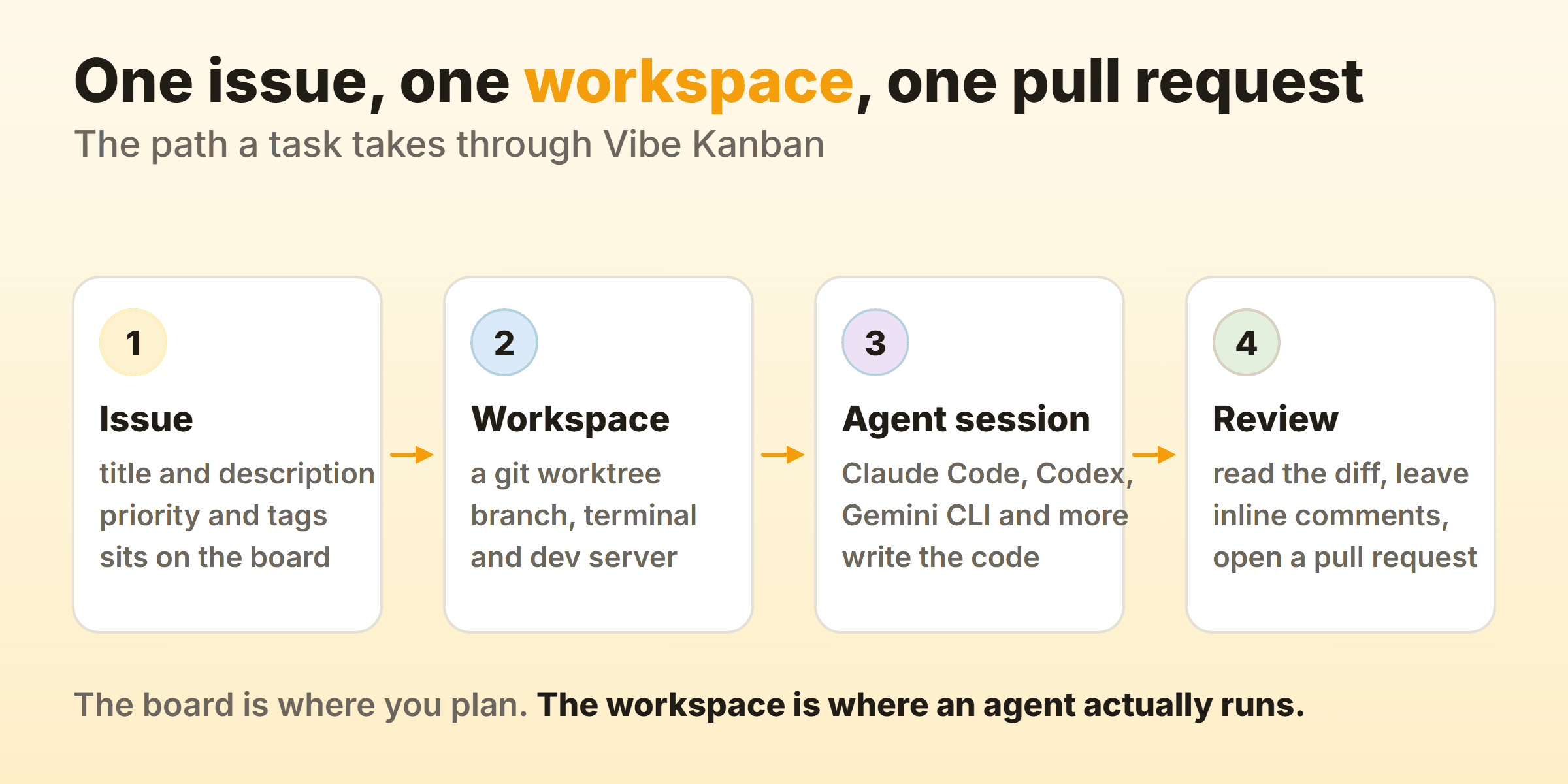
A workspace holds one task and can span several repositories, each with independent git state, so a change touching a frontend and a backend repo lives in one place. Inside it you get a terminal, a dev server and a preview browser with device emulation. You can watch the change render while the agent is still working on it. Sessions are the conversation threads, and starting a second session against the same workspace is how you get around an agent running out of context without throwing away the task.
Review happens in the changes panel. You get syntax-highlighted diffs and inline comments that go straight back to the agent, then a pull request with a generated description once you are satisfied. The GitHub integration sitting behind that button is a wrapper around the GitHub CLI, so gh has to be installed and authenticated on your machine before a pull request can go anywhere. Press Create PR without it and Vibe Kanban walks you through the setup rather than failing quietly. macOS users get offered a Homebrew install at that point. On Windows and Linux you get a page of instructions and do it yourself.
Which Coding Agents Does Vibe Kanban Run?
Vibe Kanban runs ten coding agents. The supported agents page names Claude Code, OpenAI Codex, GitHub Copilot CLI, Gemini CLI, Amp, Cursor Agent CLI, OpenCode, Factory Droid, Claude Code Router and Qwen Code.
You authenticate each one yourself, in its own CLI, before Vibe Kanban can drive it. The README treats that as a prerequisite and not as a setting you configure in the app. Agent profiles then let you save configurations covering planning mode, model selection and permission level, and swap between them at the moment you start a task. Handy when you want the expensive model on a database migration and something cheap on a typo.
How Do You Install and Run Vibe Kanban?
You install nothing permanently. One command runs it:
npx vibe-kanbanThe vibe-kanban CLI is a thin wrapper. Running it pulls the binary, starts a local server and opens the board in your browser. Check your Node version first, because the package engines field declares 20.19 or newer and that is the requirement most people trip over. First launch asks for a preferred coding agent, an IDE and notification settings, all three changeable later.
Then it asks you to sign in with GitHub or Google. You can skip that under More options, and the docs are honest about what skipping costs you. No account means no kanban board, and the issues and team features go with it. That warning was written while the service was still running, which makes it read strangely today.
Building from source is a different list. Rust stable, Node 20 or newer, pnpm 8 or newer, then pnpm i and pnpm run dev. That route matters if you plan to fork the thing, and forking is the realistic long-term option here.
What Does the Vibe Kanban MCP Server Do?
The Vibe Kanban MCP server exposes the board to outside MCP clients, so Claude Desktop, Raycast or an agent running inside Vibe Kanban itself can list projects, read issues and kick off work without a human touching a card. It is local only. The MCP server documentation says outright that it runs on your computer and cannot be reached through a publicly accessible URL.
Wire it up from the MCP Servers settings page, or by hand:
{
  "mcpServers": {
    "vibe_kanban": {
      "command": "npx",
      "args": ["-y", "vibe-kanban@latest", "--mcp"]
    }
  }
}
--mcp launches the stdio server and anything after it passes through to the vibe-kanban-mcp binary. The tool set covers context, organisations, projects, issues and workspaces. Start with get_context, which hands back the project, issue and workspace metadata for whatever session called it. Read that page with the shutdown in mind, because a fair few of those tools address objects that lived on the hosted service and not on your own disk.
Is Vibe Kanban Still Maintained?
No company maintains Vibe Kanban any more. The README carries the line “Vibe Kanban is sunsetting” above everything else, and the shutdown post of 10 April 2026 explains it. The vast majority of users sat on the free tier, bloop could not find a business model it wanted to chase, the company closed, and the project was left to whoever wants to maintain it.
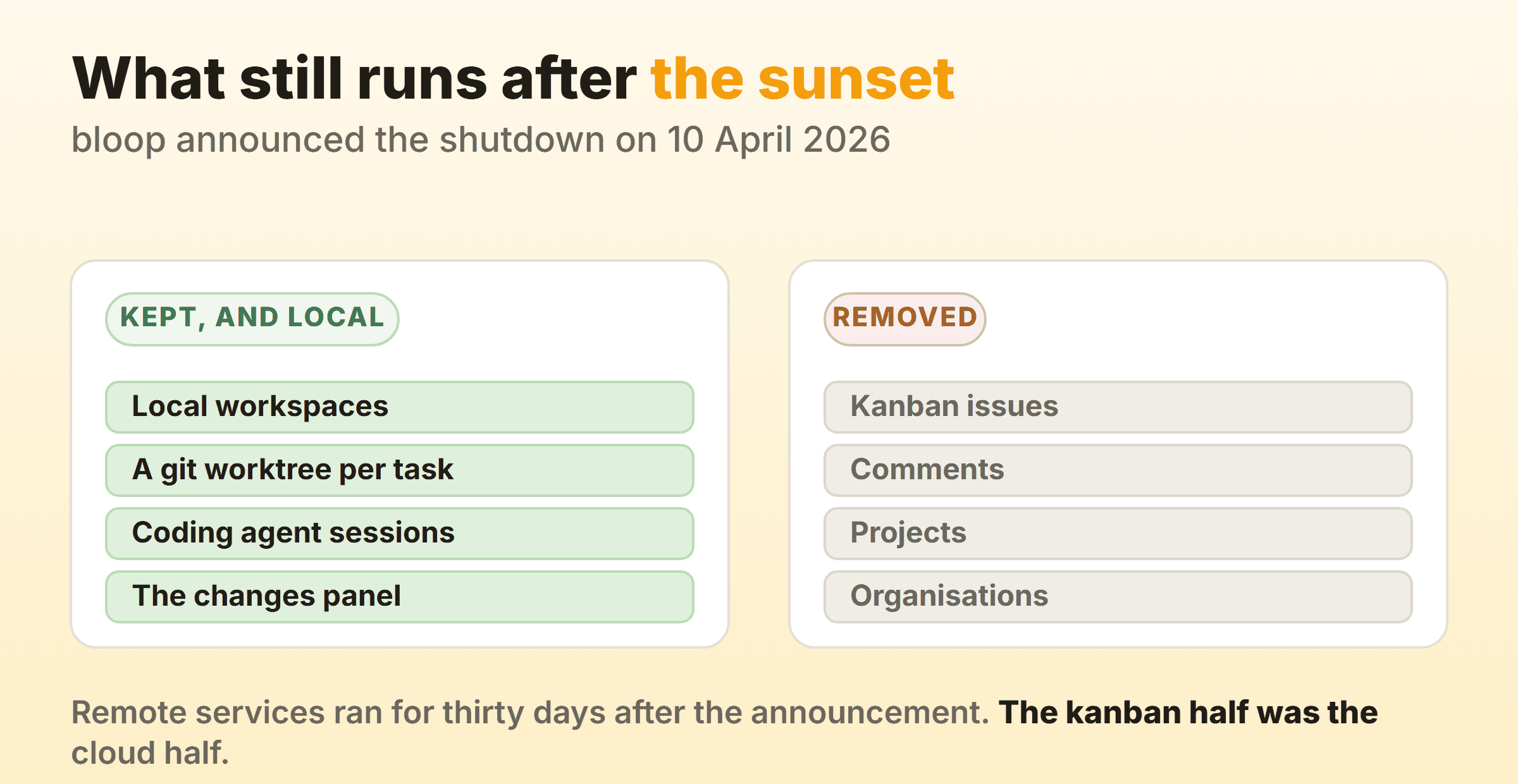
The post gave remote services thirty days, and named kanban issues, comments, projects and organisations as the parts going with them. Refunds went out for invoices paid in the previous thirty days, subscriptions were terminated, and the final release shipped a data export so people could pull their issues out before the lights went off. Local workspaces got carved out of all of it and keep working, and so do the worktrees, the agent sessions and the changes panel that live inside them.
No commit has landed since. The repository is not archived. Its last push was 24 April 2026, version 0.1.44 reached npm the same day, and that was the 198th version published to the package since June 2025 and, as of 10 September 2026, the last one. 383 issues and 156 pull requests sit open. The shutdown post promised a roadmap for the community-maintained edition within a few weeks, and no release has followed it. I would check both of those again before committing anything important, because a fork could pick this up next month and the star count will not tell you either way.
What Does Vibe Kanban Cost?
Vibe Kanban costs nothing to run. The pricing page is still live and still lists a free tier, a paid per-seat tier and an enterprise tier, but the shutdown post says subscriptions were terminated and recent invoices refunded, so there is no plan left to buy. Running it against your own machine never cost anything to begin with.
That leaves the licence, which is Apache-2.0. Commercial use, modification and private forks are all permitted, so a company can build on this code without asking anyone, and there is nobody left to ask anyway.
Is Vibe Kanban a Real Kanban Board?
Vibe Kanban takes the kanban board as a layout. Cards you drag between columns. The machinery that makes a board change how work flows never came with it, and the documentation index shows that up quickly enough, carrying no page on WIP limits and nothing at all on cycle time or throughput.
Fair enough, given the job it does. It still leaves a gap, in a place people do not go looking for one. Your real ceiling is how many diffs one person can read carefully before the reading goes sloppy, and starting more agents does nothing about that number. Fire off six workspaces in parallel and you have built a review queue with no column to hold it and no cap to compare it against, which is the same failure a dev team hits when everybody picks up a second ticket while waiting on code review.
Flow metrics go the same way. Cycle time on an agent task runs in minutes, which drains most of the meaning out of the number. Then there is the wait between a diff landing and somebody approving it, which nothing in the tool records at all. Boards built for people exist to make that queue visible. Kanbanee turns a column header red the moment the count passes the WIP limit you set, keeps the drag working anyway because a limit should start an argument instead of blocking one, and ships those limits switched off until you pick a number yourself. It has no API and no realtime sync either, so it will not be orchestrating anything for you.
Should You Still Install Vibe Kanban?
Install it if you want a local multi-agent runner and you are comfortable owning the code, because npx vibe-kanban still works, workspaces still cut their worktrees, and Apache-2.0 means any fork you make is yours. Read the open issues first. Then ask whether you would be the one fixing them.
The board is recoverable if you want it back. The self-hosting guide covers running Vibe Kanban Cloud on your own server through Docker Compose, and the shopping list is short. A Linux box with 2GB of RAM at minimum and 10GB of disk, a domain pointed at it, and OAuth credentials from GitHub or Google, or a bootstrap admin account when you would sooner not involve either. An afternoon plus a server bill, and issues, projects and organisations come back under your own control.
Anyone who came here wanting a board to run a team on should keep looking. Cline now ships its own board as a research preview. You launch it with npx kanban, the same worktree-per-task idea sits underneath, and the Cline write-up goes through it. Where people are the constraint, the tools roundup compares the general-purpose options and the open-source page covers what you can host yourself without a vendor to outlive. Work that already lives in pull requests does better on a GitHub project board, with one agreed place to argue about priorities.
FAQ
Does npx vibe-kanban still work?
Yes. Version 0.1.44 from 24 April 2026 is still published on npm, and the shutdown post says outright that local workspaces carry on working. Skipping the account costs you the kanban board, the issues and the team features, so plan on local workspaces or on self-hosting the cloud component yourself.
What does the Apache-2.0 licence let me do with the code?
Apache-2.0 permits commercial use, modification, distribution and private forks, and it includes an express patent grant from the contributors. Two obligations. Keep the licence and copyright notices, and state what you changed. Nothing in there requires you to publish your own changes, which is where Apache-2.0 parts company with the GPL family.
Can Vibe Kanban run several coding agents at once?
Yes, and the isolation is the reason it works. Each workspace gets its own git worktree, so two agents editing the same repository never collide on the same files. Sessions add a second axis, letting you run more than one conversation inside a single workspace, which is how you keep going after an agent burns through its context.
What is the difference between an issue and a workspace?
An issue records what needs doing. It lives on the board with a title, description, priority and tags, and issues were part of the hosted service that closed. A workspace is the disposable environment where an agent does the work, created against a task on your own machine, wrapping a git worktree with a terminal and a dev server, and it keeps working with no account at all.
Does Vibe Kanban replace a project management tool?
No. It manages agent work instead of people’s work, it has no WIP limits and no cycle time reporting, and nothing in it shows how long a card has been sitting still. Teams needing both keep their delivery board somewhere else and treat Vibe Kanban as the place code gets written.