
KanbanFlow Alternatives: 8 Tools Compared on Flow Data
Updated at
The Answer
Most KanbanFlow alternatives replace about a third of it. KanbanFlow bundles three things: a board with work-in-progress limits, a stopwatch and Pomodoro timer that runs on the card, and a set of flow charts. Its pricing page puts unlimited boards, unlimited tasks, WIP limits, subtasks and both timers on the free plan, then holds the cumulative flow, cycle and lead time and burndown charts, the Excel import and export and the API behind Premium at $5 per user per month. So which of the three did you open last month? Only the board, and almost anything below will do. If it was the charts, four of these eight qualify, and if you billed hours against the built-in timer, fewer than that.
What Are You Actually Replacing When You Leave KanbanFlow?
You are replacing up to three things at once, and most people need only one back. KanbanFlow’s own feature list runs from visualising work to limiting work in progress, then time tracking with a Pomodoro technique timer and a stopwatch timer, then analytics covering cumulative flow, throughput, cycle and lead time, and Monte Carlo forecasting. A REST-based API with webhook support sits underneath, along with Excel import and export. The split that decides your shortlist is not on that page but on the pricing one. The board and both timers are free. The charts, the Excel import and export and the API are Premium.
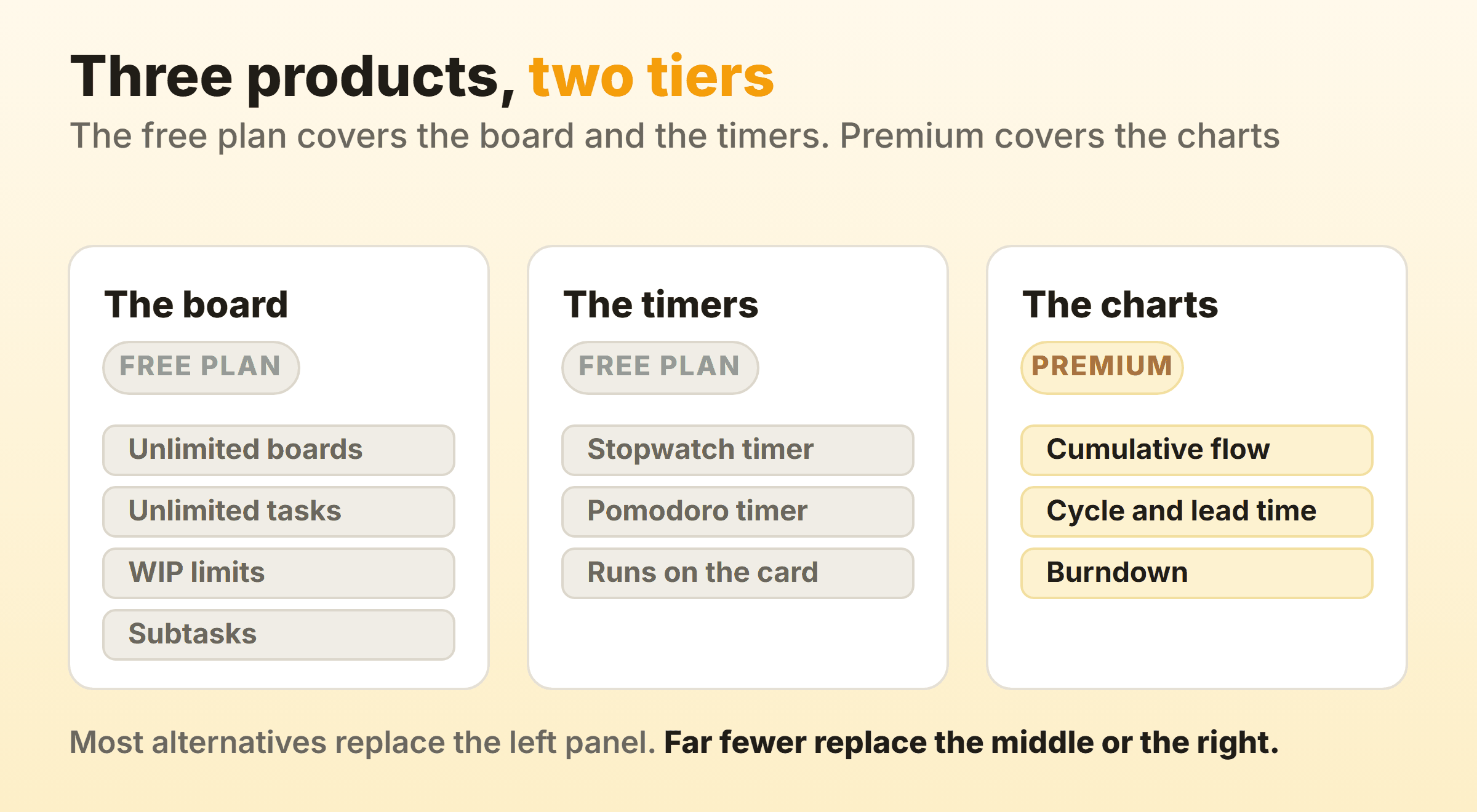
Everything after this point turns on that split. Every tool here draws columns and drags cards, so comparing the board half tells you nothing. Time tracking thins the field, because most project tools treat it as a reporting add-on rather than a button on the card. Flow charts thin it further, and they are the piece teams miss six weeks after switching.
What Kanban Flow Means When It Is Not a Product Name
Kanban flow is the movement of work across a board from request to done, and the phrase predates the product by decades. Two meanings, one name. Which is why a search for it returns a signup page and a Toyota history lesson together.
A kanban flow board is any board that shows work and constrains it. A kanban flow chart or flow diagram means the cumulative flow diagram, where a widening band is a queue building upstream. Teams ask for kanban flow training when the gap is a board nobody trusts, and one WIP limit teaches more in a fortnight than a workshop.
Kanban Flow Metrics That Decide Your Shortlist
Kanban flow metrics are the reason people go looking for a KanbanFlow alternative, because the board is easy to replace and the numbers are not. Four measures cover most of it.
- Cycle time. From the moment work started to the moment it finished.
- Lead time. Same clock, started when the request arrived. The customer feels this one.
- Throughput. Items finished per week, and the input to any honest forecast.
- Work item age. How long each open card has sat there. The only one you can still act on.
Flow efficiency is the fifth, the share of an item’s elapsed time that was active work rather than waiting. Ask who provides analytics on kanban flow efficiency and the honest answer is that very few tools name it as a chart, because the calculation needs your board to separate working states from waiting first. Cycle time and throughput are the two worth checking a shortlist for by name.
KanbanFlow Alternatives Compared
| Tool | Per-column WIP limit | Timer on the card | Flow charts included | Best for |
|---|---|---|---|---|
| Kanban Tool | Yes, four limit types | Enterprise plan only | Cumulative flow, lead and cycle time, breakdown | The closest like-for-like |
| Jira | Column constraints | Not in the docs I read | Control chart, cumulative flow | Work that already lives there |
| Trello | Not in list settings | Not in the docs I read | Not in the docs I read | The fastest start |
| Businessmap | Not checked here | Not checked here | Not checked here | Many teams, one portfolio |
| Our own board | Yes, soft cap with a red badge | Yes, stopwatch and Pomodoro | On the paid tier | A modern board with both halves |
| Wekan | Not named in the README | Not named in the README | Not named in the README | Self-hosted and MIT licensed |
| Planka | Not named in the README | Stopwatch | Not named in the README | Self-hosted, licence permitting |
| Notion or ClickUp | Notion no, ClickUp on Business and above | Not checked here | ClickUp documents a Cumulative Flow card | A board beside work you already have |
Every cell traces to a page I opened while writing this, and where I could not confirm something the cell says that rather than guessing. Prices I have left out apart from the two I quoted.
Kanban Tool: The Closest Like-for-Like Swap
Kanban Tool matches KanbanFlow’s shape more closely than anything else here. Start there if your complaint was the interface. Its WIP limit documentation describes four ways to cap a column: by tasks, by estimated hours, by difficulty, and per user. One more axis than most tools bother with.
The reporting holds up too. The analytics documentation names a Breakdown Chart, a Lead and Cycle Time Diagram, a Cumulative Flow Diagram and a Changelog. Its homepage also advertises hosting Kanban Tool on your own servers, which matters when data cannot leave the building.
Check one thing first. That same analytics page states the time tracking and reporting feature is available exclusively on the Enterprise service plan, so if the timer is why you are leaving, price that against your seat count before anyone migrates a board.
Jira: When the Work Already Lives There
Jira is the right KanbanFlow alternative when your issues, releases and automation already run through it. Set a column constraint under board settings and, in Atlassian’s own words, constraints trigger a visual indicator when a minimum or maximum number of work items appear in a column. Go past the maximum and the header turns red. Under the minimum, yellow.
The control chart shows the cycle time or lead time for your product, version or sprint, and the cumulative flow diagram is an area chart of the statuses your work items sit in. Both pages apply to company-managed spaces only, so check which kind of project you are in first. For a lot of teams those two charts are the whole reason to stay put.
You pay in administration. One board’s behaviour is spread across board settings, project settings, a workflow scheme and a filter, so changing a status means finding somebody with permissions and twenty spare minutes. Our kanban in Jira guide covers setup.
Trello: The Fastest Board, With Everything Else Bolted On
Trello gets a team looking at the same work by lunchtime, which counts when nobody will adopt anything complex. Lists run left to right, cards sit inside them, and dragging one changes its state.
The other two thirds are missing. Atlassian’s documentation on customising cards and lists covers archiving a list, changing its colour, collapsing it and moving it. A cap on how many cards the list holds is not among those settings. Anything past lists and cards comes from Power-Ups, which Atlassian describes as a way to bring additional features to your boards. That same page says many Power-Ups are free while others carry service costs from the third-party developers who build and maintain them, so a WIP limit or a cycle time chart on a Trello board depends on somebody outside Atlassian keeping it alive.
Pick it if KanbanFlow was a shared to-do list to you and the charts went unopened. Our kanban in Trello guide covers its limits as a kanban system.
Businessmap: Portfolio Kanban Across Many Teams
Businessmap aims several sizes above KanbanFlow, at organisations coordinating many teams rather than one team that liked a timer. Its homepage pitch is about delivering outcomes rather than tasks, with Portfolio Workspaces to increase visibility across projects and connect planning with execution.
The kanban thinking underneath is serious. Its guidance on limiting work in progress covers capping per person, per stage and for the whole system, and recommends the top of a column turn red when a limit is breached.
It earns the place for a genuine multi-team rollout. For six people replacing a $5 per user tool, wrong size. I did not open its product docs for this piece, so the feature cells above say so.
Our Own Board: Caps, Timers and Reports Without the Legacy Interface
I should declare the interest, since I work on it. Kanbanee was built for the same job KanbanFlow does, and it answers the complaint that brings people to a page like this one, that a tool built in the early 2010s looks like it.
What maps across. Per-column WIP limits, off by default, set from the column menu, with a badge showing count over limit that turns red past the cap. The cap is soft and the drag is never blocked, because a limit that stops you working teaches people to route around the board. A stopwatch and a Pomodoro timer run on the card and stay visible in the top bar. Weekly throughput, cycle time and a cumulative flow diagram sit on Pro at $6 a month or $48 a year, and Free gives you two boards you own with unlimited members.
Three gaps that will decide this for some of you. The board polls rather than updating the instant a colleague moves something, so there is no realtime sync. No public API yet either, which rules this out if you built anything on KanbanFlow’s webhooks, and column reordering is desktop only, though cards move fine on a phone.
Wekan: Self-Hosted and Genuinely MIT Licensed
Wekan is the option when hosting rules rather than features are forcing the move. The repository describes it as the open source kanban built with Meteor, states that WeKan is released under the very permissive MIT license, and carries no archived banner. MIT means you can fork it and nobody changes the terms on you later.
Its README names no WIP limit and no cycle time or cumulative flow reporting, so treat the analytics third of KanbanFlow as gone. You also take on upgrades, backups and whatever breaks at eleven at night.
One more check before you shop this category, because not every self-hosted board on the usual lists is alive. The standalone Focalboard repository carries a banner saying it is currently not maintained and asking for volunteer maintainers, and it still turns up on roundups as live. Read the repository before you trust the listicle, this one included. Our open source kanban roundup goes deeper here.
Planka: Self-Hosted, But Read the Licence First
Planka is the lighter self-hosted board, and the one where the licence deserves a minute. Its repository describes the project as fair-code distributed under the Fair Use License and the PLANKA Pro/Enterprise License. Fair-code and open source are different things, whatever a roundup that lumps it in with Wekan implies, and the difference can stall a legal review.
The README also flags that upgrading a Community installation to Pro happens in place and runs one way, with no downgrade back to Community, so it advises taking a backup first or trying it on a copy. Read that twice if you own the server.
Read its Community column carefully too. The README table gives Community a stopwatch and due dates on cards, custom fields, webhooks and a documented REST API, and puts recurring cards on the Pro side only. WIP limits and flow charts appear on neither side. So it replaces the board and the timer, and leaves the numbers behind.
The Board Inside the Suite You Already Pay For
The cheapest KanbanFlow alternative is a board view your company already licenses, and both Notion and ClickUp ship one. The cap is what separates them.
Notion’s board documentation covers grouping, card size, properties and hidden columns, and names no per-column limit, so you get the picture without the constraint. That is how a board with To Do, Doing and Done quietly becomes a to-do list in three piles. ClickUp does have one, with a catch: its Work in Progress Limits page puts the feature on the Business plan and above, shows count over limit in the column header, and states you can still move a task into a column that is already over. Check which plan your company actually bought before you count on it. Our guides to kanban in Notion and kanban in ClickUp cover what each does with limits and reporting.
Which Alternative Fits Your Reason for Leaving?
Your reason for leaving does most of the shortlisting.
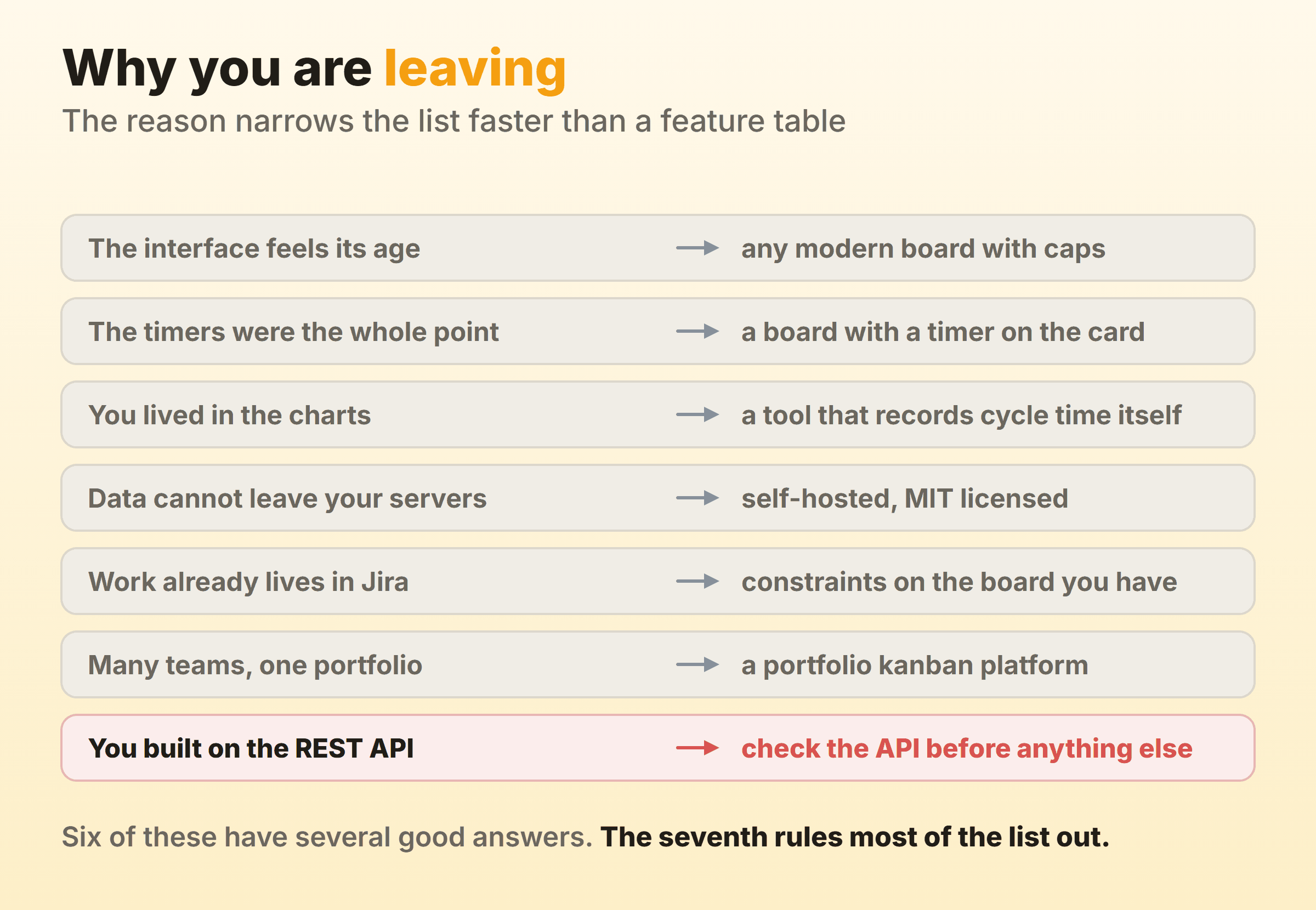
Six of those reasons have several good answers. The seventh does not. KanbanFlow publishes a REST-based API with webhook support, and if anything in your stack depends on it, most of this list is already out. Check the API docs of your shortlist first. Migrating a board takes a weekend, and an integration rebuild is a project with its own budget.
When Staying on KanbanFlow Is the Right Call
A page titled alternatives has an obvious bias. Staying put is often the right call. KanbanFlow’s free plan includes WIP limits, unlimited boards, unlimited tasks, subtasks and both timers, which is more of the method than several paid tools on this list hand you at any price. The interface looks its age, sure. It still costs less than a migration plus retraining plus the fortnight where nobody trusts the board.
I would not move if you use the API. Nor if your team bills hours off the built-in timer and the alternatives put time tracking on a higher tier. And if the only complaint is the visual design, you are spending real money on a better-looking version of something that works.
How Do You Move a Board Without Losing the History?
Export first, then run both boards for a fortnight. KanbanFlow does Excel and CSV export, so the card data comes out in a format any tool can read, but the pricing page puts export on Premium, so budget one paid month if you have been sitting on the free plan. Your login keeps working either way.
The history behind the charts rarely survives. Cycle time and throughput are computed from column transition timestamps, and a card export carries the current state without the trail of moves that made it. Assume your new tool starts its flow data at zero on day one. Survivable if you plan for it. The bad version is finding out in month two while somebody senior waits on a trend line.
Keep the old account open until the new board has thirty finished items and can draw a curve of its own. Our roundup of the best kanban apps covers the wider field.
FAQ
Is there a free KanbanFlow alternative that keeps WIP limits?
Start with the one you are leaving. KanbanFlow’s own free plan includes WIP limits, which makes free by itself a weak reason to switch. Our soft caps sit on the free tier too. Jira has a free plan for up to ten users, but its column constraints are documented for company-managed spaces only, so check which kind of space you get before counting on them. The self-hosted boards are shakier than the roundups imply, because neither the Wekan nor the Planka README names a WIP limit at all.
Which tools report kanban flow efficiency?
Almost none report flow efficiency as a named chart, because the board has to separate active states from waiting states first. Cycle time and a cumulative flow diagram appear in Kanban Tool, Jira and our own reports. Add a waiting column, measure how long cards sit there, and do the division yourself.
What is a kanban flow chart?
A kanban flow chart, or kanban flow diagram, normally means the cumulative flow diagram, a stacked area chart with one band per column and days along the bottom. A band that widens shows work arriving in that state faster than it leaves. It finds queues nobody knew about, and migrations lose it most often.
Will my KanbanFlow login still work while I trial something else?
Yes. KanbanFlow’s pricing page lists a free plan at $0 with no time limit, so an account you stop paying for does not lock you out of your board. Run both in parallel for a fortnight. Migrating on a Friday only proves the boxes moved, and two weeks of overlap shows whether the new kanban flow app replaced the habit.
How much kanban flow training does a switch need?
Less than people expect for the board, because moving cards explains itself in every tool here. The hour that matters goes on agreeing what a column cap means and what happens when a column is full. Have that once, write the answer on the board, skip the workshop.