
Kanban for Mac: 7 Board Apps and Setups Compared
Updated at
The Answer
Kanban for Mac comes down to three routes, and one of them is already sitting in your Dock. Apple Reminders has a real column view. Give a list sections called Doing and Waiting, choose View then as Columns, and you have a board that costs nothing and follows you to an iPhone. Downloaded apps are the second route, Kanri and Trello and Notion and Obsidian among them. Browser boards are the third and install nothing at all. Very little here is native in the AppKit sense. Ask a different question first: can the board cap a column, and does it record how long anything took. Reminders does neither.
What Counts as Kanban for Mac?
Kanban for Mac covers three different things, and vendors use the phrase for all three. Knowing which one you are looking at saves an afternoon.
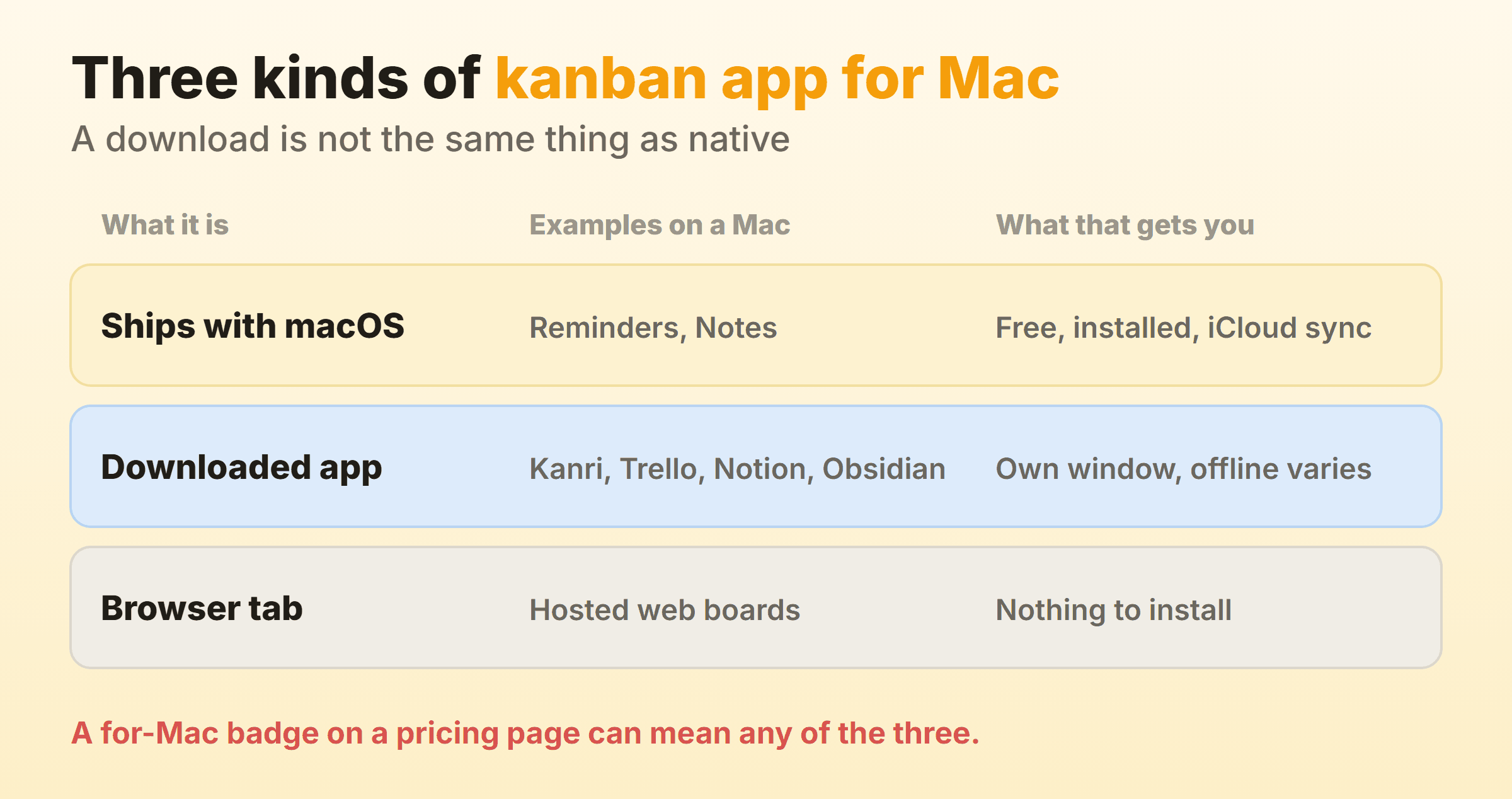
The first group ships with macOS. Nothing to install, no account, iCloud carries it to your other devices, and the price is zero forever. The second arrives as a disk image or a Mac App Store download and opens in its own window with its own Dock icon. Most of these are web code in a desktop shell. Purists mind. The practical effect is that the feature list rarely differs from the browser version. The third group is a browser tab with a Mac screenshot on the marketing page.
Telling them apart takes a minute. Open the vendor’s own site instead of a comparison page and look for a download link or an App Store listing. No download link means no Mac app, whatever the badge says. Read the listing too, because it names the seller, the minimum macOS version and the date of the last update. Three years without an update tells you plenty.
Platform is the smaller half of this decision anyway, and the half that matters has nothing to do with macOS. The Kanban Guide, version 2025.5 from Orderly Disruption Limited and Daniel S. Vacanti, Inc., says kanban system members “must explicitly control the number of work items in a workflow from started to finished” and names four measures of flow: work in progress, throughput, work item age and cycle time. Columns and draggable cards are the easy half. A WIP limit and a record of cycle time are the half most Mac kanban software leaves to you.
Apple Reminders: The Board Already on Your Mac
Apple Reminders is the only kanban board that ships with macOS, and most Mac owners have never turned the view on. Apple’s own guide puts it plainly: on your Mac you can view a reminder list “as a long list or with columns for the sections in the list”. Add sections to a list and each section title becomes a column heading.
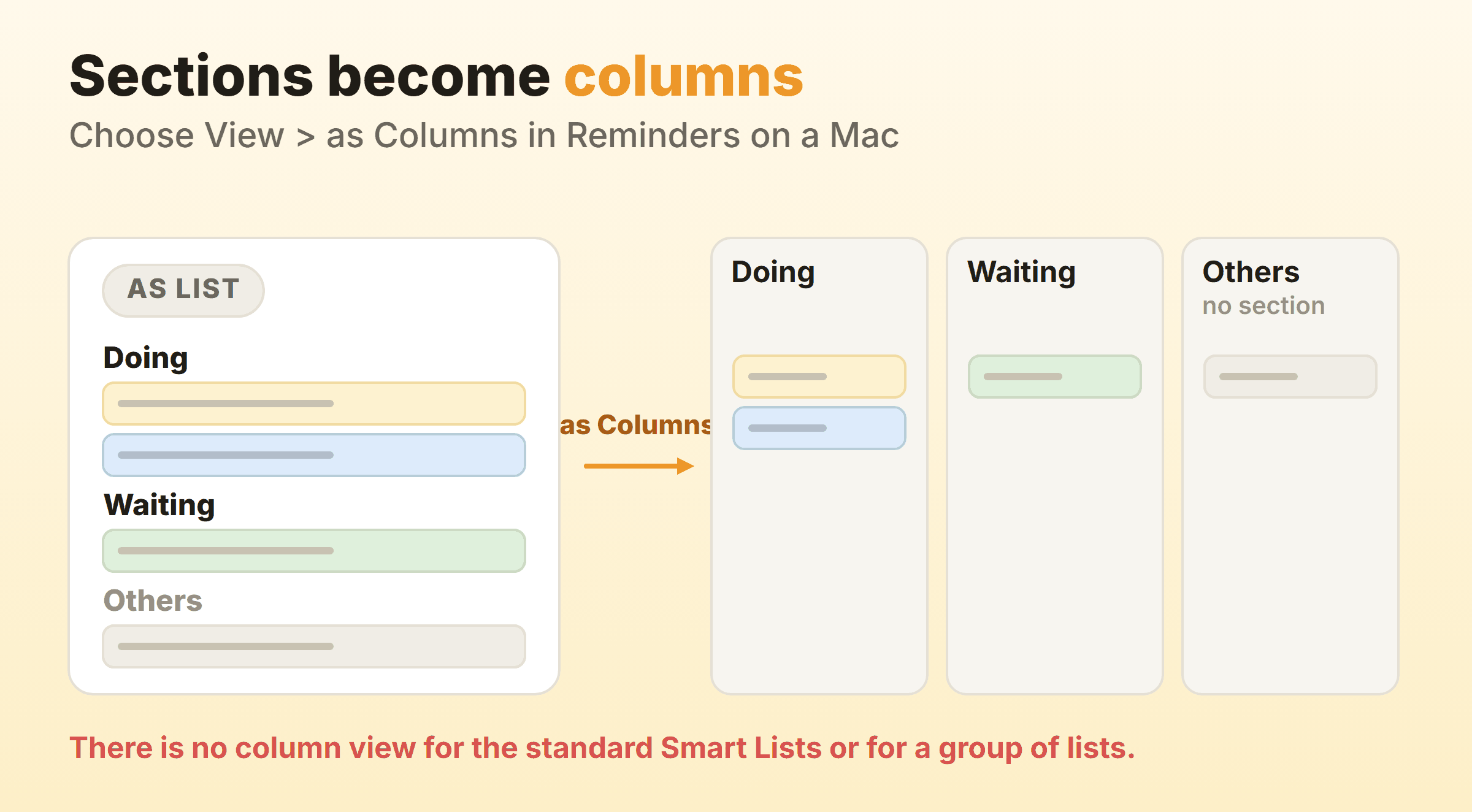
The setup takes about four minutes:
- Make a new list and name it after the work rather than the project.
- Add a section for each state the work passes through. Doing, Waiting and Done beat naming them after people, which is the column naming rule that survives every reorganisation.
- Choose View then as Columns.
- Drag reminders between columns as the work moves.
You cannot choose column view for the standard Smart Lists or for a group of lists, so the board only works on a list you made yourself. Anything sitting outside a section collects under a heading called Others, which is either a useful inbox or an eyesore depending on your temperament. Apple also notes that its guide assumes updated reminders in iCloud and that some features are missing on accounts from other providers, so an Exchange or Google account may not behave.
What you do not get is the controlling half. Nothing caps a column and no count sits on the heading. Reminders also keeps no record of when a reminder entered a state, which rules out cycle time before you start. On a personal kanban board that costs nothing and syncs everywhere, fair trade. A team trying to work out why everything takes three weeks will outgrow it inside a month.
Apple Notes: The Board You Have to Fake
Apple Notes has no board view, so an Apple Notes kanban board is something you assemble by hand from parts built for other jobs. The Mac user guide covers adding a table, using tags and using Smart Folders. Columns are not in it.
A table with one column per state gives you the picture at the cost of retyping text between cells. Tags plus Smart Folders get closer, because a folder collecting everything tagged #doing behaves like a column that updates itself. Neither lets you drag a card.
Keep the board in Reminders and the thinking in Notes, with links between the two.
Kanri: An Offline Board That Arrives as a Disk Image
Kanri is an offline kanban app for macOS that you download, open and use without an account. Its repository calls it a “Modern offline Kanban board app for Windows, MacOS and Linux made with Tauri and Nuxt”, it is GPL-3.0 licensed, and it carries around 2,000 stars on GitHub. Offline storage in one JSON file sits on the feature list beside subtasks, due dates, tags and a Trello import.
The latest tagged release, 0.8.2 from September 2025, ships separate aarch64 and x64 disk images, so Apple Silicon and Intel Macs each get a proper build. The repository was pushed to in September 2026, so development continues even though tagged releases are occasional.
Kanri’s own feature list does not mention work in progress limits, and no sync service sits behind it, so a board you build on the MacBook stays on the MacBook. One Mac and one set of local files, with no account to create. If you want a macOS kanban app because you do not want a company holding your task list, this is the shortest route there.
Trello: The Mac App Store Route
Trello is the Mac kanban app with the least friction, because Atlassian publishes it on the Mac App Store as a free download. Apple’s listing carries the details: seller Trello, Inc., free, requires macOS 12.0 or later, version 2.16.7. Last updated on 19 August 2026. Recent, which is more than several apps in this category can claim.
Trello’s own App Store description is honest about what the desktop build adds. Native notifications, a Quick Add window, multiple windows for two boards at once, a global shortcut, and one line that describes the deal exactly: “All Trello shortcuts work just like the web, including keyboard shortcuts, drag & drop and more.” The Mac app is the web board with macOS conveniences bolted on.
That includes the gap. A per-list cap is not part of the board and arrives through a Power-Up, the same as in the browser, which the kanban in Trello guide walks through. Take it when getting five people onto the same board today is the whole problem.
Notion: A Board Beside Your Documents
Notion puts a kanban board on a Mac through a desktop app you download from Notion’s own site instead of the App Store, with separate macOS Apple Silicon and macOS Intel x64 builds on the download page. The board is a view onto a database. Notion’s help centre describes board view as something that “groups your database pages by a specific property”, so pages you already keep as a table regroup into columns by status, assignee or priority.
A grey number sits beside each column heading, showing the card count by default and switchable to another calculation. A live count enforces nothing on its own, though it is the number a cap is built on, and eleven cards under a heading that says Doing tends to end the argument by itself. Notion’s documentation describes no per-column work in progress limit, and the kanban in Notion guide goes through the setup. Pick it when the board needs to sit beside specs and meeting notes.
Obsidian and the Kanban Plugin: Boards Stored as Markdown
Obsidian turns a Mac into a kanban board through a community plugin that keeps each board as a markdown file inside your vault. The desktop build is a universal disk image, version 1.13.7 as I write. There is an iOS app too. The plugin’s description is a single line: “Create markdown-backed Kanban boards in Obsidian.”
Read the repository before you install it. Roughly 4,500 stars and a GPL-3.0 licence, but it now lives in a GitHub organisation named community-archive, its README opens with the sentence “The Kanban plugin is looking for new maintainers”, and the last push was in March 2026. It installs. Boards render. Nobody is on the other end of a bug report, which is worth knowing on the day you find a bug.
You accept that for the file format. Your board is a text file you can read, grep and put in version control, and it survives the plugin disappearing. It also caps a column, which almost nothing else here does. Put a number in parentheses at the end of a lane title, as in Doing (3), and the heading shows the count against that number and marks the lane once you go past it. The published plugin documentation never mentions this, so the source is the only place it is written down. The kanban in Obsidian guide covers what the boards look like underneath.
A Browser Board With Caps Built In
Kanbanee is the browser option, and I run our own product board on it, so weigh this entry accordingly. It exists because of the gap in the middle of this list, where most of the easy tools have no caps and the tools with real flow controls arrive with an implementation project attached. A WIP limit is a checkbox and a number on the column menu, off until you switch it on, the badge shows count against limit and turns red once you go past it, and the cap stays soft so a drag is never blocked. Cycle time, weekly throughput and a cumulative flow diagram come with Pro at $6 a month or $48 a year. Free is two boards you own with unlimited members.
There is no Mac app of any kind, so this is a browser tab and belongs in the third row of that first diagram. No realtime sync yet, no API, and column reordering is desktop only. If you came to a Mac kanban page wanting files on your own disk, Kanri or Obsidian is the better answer.
Mac Kanban Software Compared
| Tool | How it reaches your Mac | Where the board lives | Per-column cap | Best for |
|---|---|---|---|---|
| Apple Reminders | Built into macOS | iCloud | Not offered | A free board you already own |
| Apple Notes | Built into macOS | iCloud | No board view at all | Notes about the work |
| Kanri | Free download, Apple Silicon or Intel | On your Mac | Not stated | One machine, no account |
| Trello | Free on the Mac App Store | Atlassian’s servers | Power-Up only | The fastest possible start |
| Notion | Free download from notion.com | Notion’s servers | Not stated | A board beside your docs |
| Obsidian plus Kanban plugin | Free download, universal | Markdown in your vault | Yes, undocumented lane syntax | Boards that stay plain text |
| Our own board | Browser tab, nothing to install | Our servers | Built in and soft | Caps and flow reports without setup |
Every cell was checked against the vendor’s own page, App Store listing or repository in September 2026. Not stated means the vendor documents no cap, and prices move often enough that any figure printed here would be stale within a quarter. The wider kanban tools comparison covers what is not Mac specific.
What Happens on iPhone and iPad
Most people who set a board up on a Mac want the same board on a phone by the end of the week. This is where the built-in option pulls ahead.
Reminders keeps its sections across devices, and Apple’s iPhone guide says you can “view the sections as columns and easily move items to different columns”. Dragging a card between columns on a phone is something most kanban iOS apps never manage, and it costs nothing. The same holds for kanban on iPad, where the extra width fits the columns without squeezing them.
Trello and Notion both publish iPhone and iPad apps alongside their Mac builds, and Obsidian has an iOS app, though whether your vault reaches it depends on which sync service you chose. Kanri is the exception: its repository lists Windows, macOS and Linux, with no iOS kanban app. Our own board runs as mobile web with column snap and long-press drag.
An iPad kanban board works. On a phone it degrades into a list with extra swiping, because five columns do not fit on that screen and nothing I have tried gets around the width.
Two Mac Kanban Tools to Stop Searching For
Two names keep surfacing in Mac kanban roundups, and neither is somewhere to start now.
Kanbanier is the first, still carried by the software directories, which is how I came to check it. Its Mac App Store page returns a 404, and Apple’s own lookup service returns no result for the Mac app ID or the iOS one. The vendor site is still up and still selling the app, with its download buttons pointing at listings that are not there any more. The app is gone and the write-ups have outlived it.
Focalboard is the other one. Its README opens with a warning: “This repository is currently not maintained.” The download links are still there underneath it. Nobody is fixing what they hand you.
Every self-hosted board deserves the same check. Read the date of the last commit instead of the star count, because stars are cumulative and maintenance is not. WeKan, to pick a counter-example, had a commit on the day I wrote this. The open-source kanban guide covers the maintained options.
FAQ
Does Apple have a kanban board?
Apple has one in Reminders. Add sections to a list, choose View then as Columns, and the section titles become column headings you can drag reminders between. Apple never calls it kanban and there are no WIP limits, but the board is real, free and syncs through iCloud.
What is the best kanban software for Mac?
Whichever constraint is binding decides it. If free and already installed is the whole brief, Reminders. For local files with no account behind them, Kanri or an Obsidian vault. Trello gets a team moving this afternoon. Once you want a column cap and recorded cycle time, the candidates shrink to tools built for flow, and that list is short.
Is there a free kanban app for Mac?
Several. Reminders is free with macOS, Kanri is free and open source, Trello’s Mac App Store download costs nothing, and Obsidian describes itself as free without limits, with a commercial licence encouraged rather than required. Free tiers on hosted boards vary a lot in what they cap, which the free kanban tools guide breaks down.
Can I use a kanban board for personal projects on a Mac?
Yes, and personal use is where the built-ins are strongest. One list with three sections, a rule that no more than two things sit in Doing, and a weekly clear-out of Done covers most personal work. The how to use kanban guide has the routine, and the cap is the part most people skip.
Does a kanban board work on an iPad?
An iPad kanban board works well. Reminders shows its column view there, Trello and Notion both ship iPad apps, and the width fits four or five columns without horizontal scrolling.