
Kanban Tool Reviews: How to Evaluate a Board Yourself
Updated at
The Answer
Kanban tool reviews measure how satisfied a self-selected group of users felt about a product, which is a different question from whether the board will still fit your workflow in six months. Run your own review instead. Seven checks settle it: whether the board is the product or a view over records kept elsewhere, whether you name the columns or the tool names them for you, what the work in progress limit does when you go past it, whether cycle time comes out without an export, how your data leaves, who has to occupy a paid seat, and whether anybody is still maintaining the code. An afternoon inside a trial account answers most of that. None of it shows up in a star average.
What Do Kanban Tool Reviews Actually Measure?
Kanban tool reviews measure sentiment, sampled from the minority of users who agreed to write one. Reviewers are accurate about support response times, billing surprises and how the first week felt. Coverage thins out around flow, because nobody sits down on a Tuesday evening to review a column limit.
The search itself has a wrinkle in it. Type the phrase into Google and most of page one is aggregator profiles of one particular product named Kanban Tool, sold at kanbantool.com, whose homepage advertises time tracking next to cumulative flow and cycle time reports. If you meant that product, you have found it. Most people typing those three words mean the category, and the category is not what page one is answering.
Reviews also age badly. One written two versions ago describes software that has shipped since, and the parts that changed are usually the parts you were trying to evaluate. A tool can add per-column caps and flow reports and still carry a top-voted review complaining that neither exists, because almost nobody goes back to edit a review after a release.
Why the Same Tool Earns Five Stars and Two Stars
The same tool earns five stars and two stars because the reviewers were doing different jobs. Someone tracking a personal reading list and a delivery manager coordinating four squads on one board are not evaluating the same product, and averaging them produces a number that describes neither.
Read the one and two star reviews first. Ignore the verdict and look at the workload sitting behind it. If the angry ones all describe boards far larger than yours will ever be, their complaint is not yours to inherit. If they describe your exact team size, you have learned something no feature comparison was going to tell you.
What Should Your Own Kanban Tool Review Cover?
Your own kanban tool review should cover the seven things a public review almost never tests, and each one is answerable by doing something specific inside a trial account.
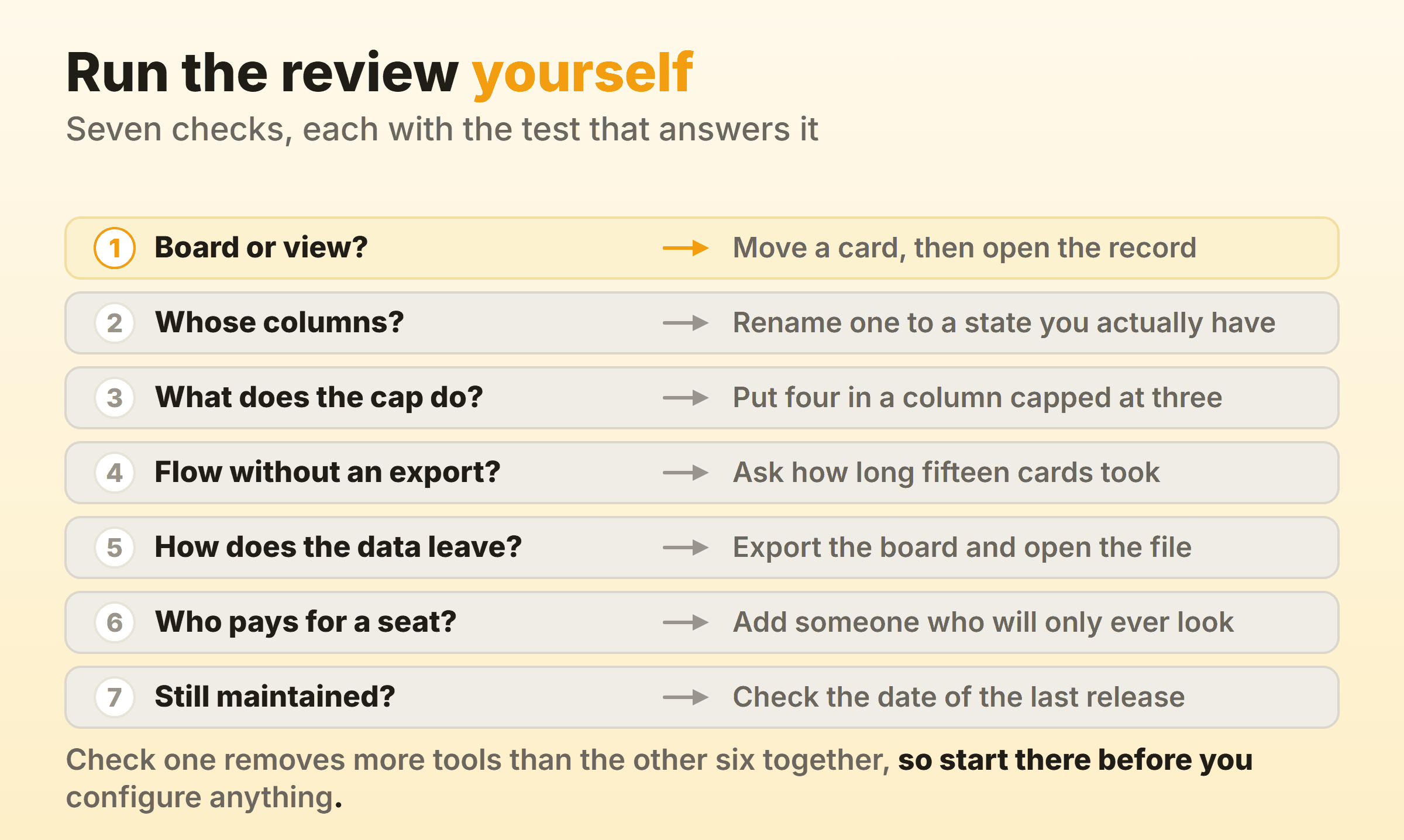
Check one disqualifies more tools than the other six put together, which is why it goes first. Do it before you spend an afternoon configuring anything.
Is the Board the Product or a View on Something Else?
The board is either the product itself or a view rendered over records that live somewhere else. That single distinction shapes how a tool behaves, and it sets a ceiling on how much of the kanban method you can run inside the thing.
In a dedicated kanban tool the board is the object. Kanban Zone states the model on its homepage, where columns are the workflow states and cards are the commitments. Planview AgilePlace, which the product pages still label as formerly Planview LeanKit, lets you define lane and sub-lane limits and shows visual cues as a lane fills up. Configuration goes deep in this family because the board is the thing being sold.
In the second family the board is one layout among several. Linear documents that nearly all views can be shown in board layout in addition to list view, grouped by status out of the box and by project, priority, cycle or label if you prefer, with an extra dimension available as swimlanes. Todoist goes one step further and makes the two the same thing. In its board layout each section is displayed as a column, and the layout choice syncs to everyone in the project, so nobody keeps a private list view while the rest of the team looks at a board.
Boards That Write Back to a Record
Boards that write back to a record behave differently again, because the card is a rendering of a row that other systems also read and update.
Zoho CRM shows the shape of it. Its Kanban view is only available on modules that contain picklist fields, since the columns are the picklist options, and dragging a record between columns changes the status on the record itself. Zoho even documents a ceiling. Build a view on a picklist carrying more than 75 options and it categorises the first 75, then warns you about the rest.
ServiceNow splits the difference. A freeform Visual Task Board holds personal task cards that, per the platform documentation, represent records on the Private Task table instead of on incident or change, and it opens with three default lanes called To Do, Doing and Done. A guided board binds to real task records. Both look like the same board, and only the guided one moves an incident when you drag a card.
In Dynamics 365 Sales the drag itself is conditional. There are two opportunity Kanban views, one whose lanes are opportunity statuses and one whose lanes are stages of the Sales Process business process flow, and in the second you can move a card only to the next or previous lane, with every other lane dimmed while you drag. The same page notes that the Kanban view is not supported in the mobile app and that it appears at all only once an administrator has added the Kanban control to the Opportunity entity.
The clearest warning of the lot is written into OpenProject’s own documentation, where the page on basic boards says that if you move work packages between the lists, there will be no changes to the work package itself, while its action boards do update status, assignee or version on the drop.
| Family | The card is | Moving a card |
|---|---|---|
| Dedicated kanban tool | The work item | Changes its state in the only system holding it |
| Board as a layout | One rendering of a task | Changes whatever the grouping field is |
| Board over a record | A row in a CRM or ITSM table | May update the record, or may change nothing |
Check one is a job of about a minute: move a card, open the underlying record in a second tab, and see what changed. If nothing did, you are looking at a picture of your workflow with no control attached to it, and no amount of configuration later is going to attach one. Our kanban software roundup compares nine tools on the controls that decide this.
What Does the WIP Limit Actually Do?
The work in progress limit in most tools changes a colour and stops there. Blocking a drag because a column is already full is rare enough that it is worth testing in the trial instead of assuming it from a feature list.
Jira sets the pattern. Atlassian’s guide to configuring columns describes minimum and maximum constraints per column, with the header turning red once the maximum is exceeded and yellow when the minimum is not met, and it says outright that the values have no impact on the number of work items displayed. Adobe is blunter. Workfront lets you set a different limit on each column, then explains in the kanban configuration docs that the limit is simply a visual warning which does not restrict the team, that the maximum you can set is 100 items per column, and that the warning message is displayed only the first time the limit is exceeded.
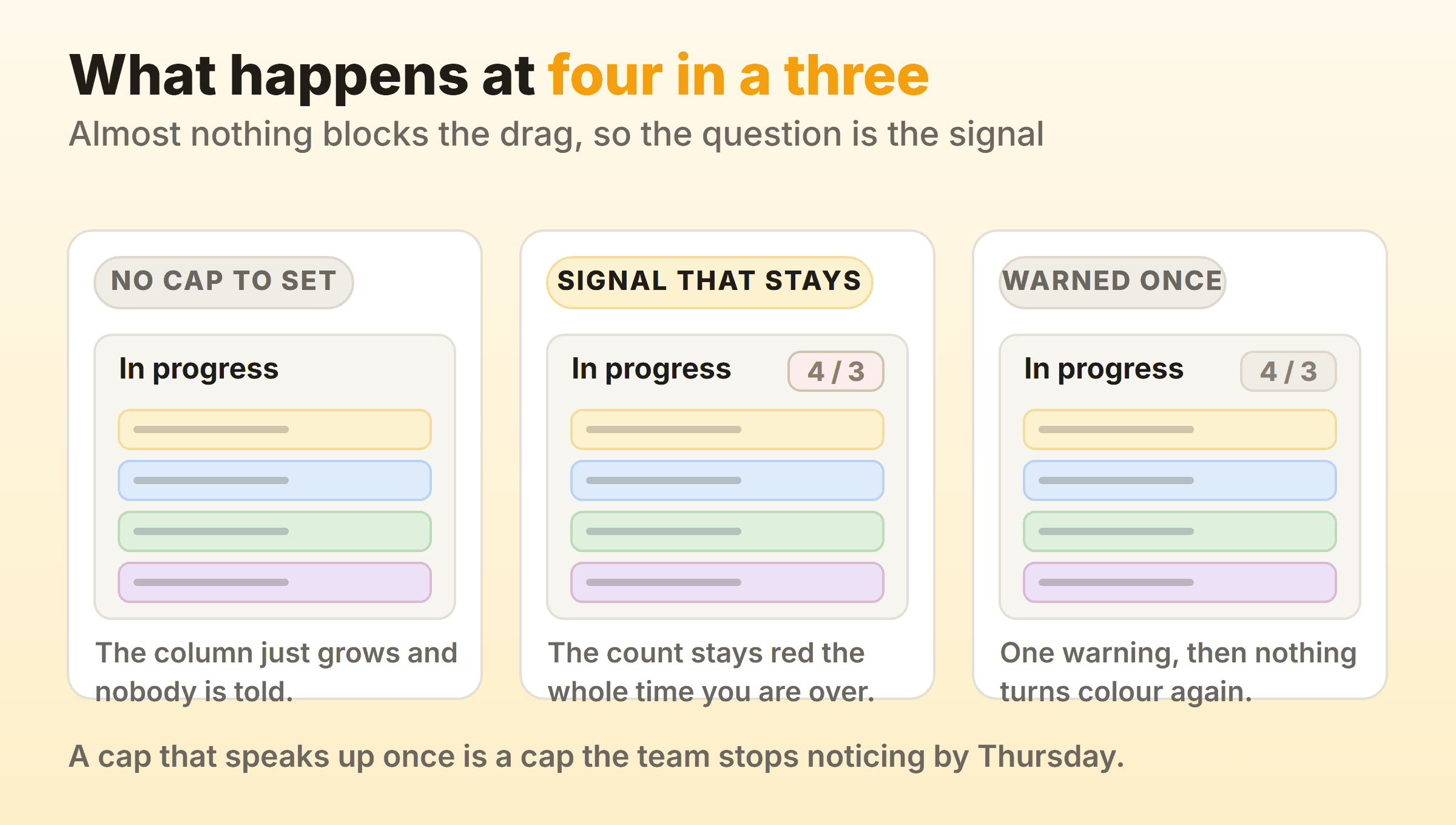
That last detail is worth stopping on. A cap that speaks up once and then goes quiet stops registering with the team somewhere around Thursday, which makes the trial question a question about the signal. How loud is it, and how long does it last once somebody ignores it? Our own board at Kanbanee ships WIP limits off by default and never blocks a drag either, on the view that people route around a hard stop, but the count sits on the column header and stays red the whole time you are over.
Put four cards in a column capped at three, then leave the tab for ten minutes. Come back and look at the header. If it has quietly returned to normal, you have your answer about that cap.
Can the Tool Measure Flow Without an Export?
A kanban tool can measure flow without an export when it kept the timestamps itself, and this check separates a task board from something you can improve. Cycle time, throughput, work item age and a cumulative flow diagram are the four numbers worth asking for.
Kanban Tool lists a cumulative flow diagram and cycle time reports on its homepage next to its time tracking. Planview AgilePlace points at its card and board metrics as the way to understand bottlenecks, delays and work item health. Plenty of otherwise capable tools carry nothing of the sort, and the tell is a help centre that answers reporting questions by explaining how to export to a spreadsheet.
Ask the trial one question after a fortnight. How long did these fifteen cards take, counting from the day work started to the day they finished? If the answer needs a download, you will stop asking by month three. The four flow metrics are cheap to collect while the cards are still moving and expensive to reconstruct afterwards.
What Happens to Your Data, Your Seats and Your Bill?
Your data, your seats and your bill decide whether the tool survives its second year, and no review score covers any of them.
Start with export. Create a board, add cards with attachments and comments, export it, open the file. Did the comments and the history come out with the cards, or did you get titles and column names? An export that carries only the surface leaves you stuck on the day you want to move.
Count seats next. The stakeholder who wants Friday visibility, the account manager and the finance lead will never move a card, and if every one of them needs a full licence, the quote you were given has little to do with your renewal. Viewer roles and guest access vary wildly between tools, and a promising free tier tends to run out right about here.
Licence terms matter for anything self-hosted or embedded. Wekan describes itself as completely open source and free software under an MIT licence, while Nextcloud Deck is a kanban style organisation tool integrated with Nextcloud, published under AGPL-3.0. Those two impose different obligations once you modify and redistribute. The same care applies to kanban libraries if you are building a board into your own product. Webix Kanban, for one, is a commercial JavaScript component that you buy separately or inside a team pack.
Is Anyone Still Maintaining It?
You can find out whether anyone is still maintaining a tool in about ninety seconds, and most buying guides never spend them, which is how abandoned projects keep turning up in recommendations.
Focalboard is the case worth knowing. Its README still describes an open source, self-hosted project management tool and an alternative to Trello, Notion and Asana, while the GitHub repository carries a notice saying it is currently not maintained, a request for anyone interested in becoming a maintainer, and a pointer to a separate Mattermost plugin repository. All of that sits at the top of the repository page, in public, and none of it reached the review sites.
For a self-hosted candidate, open the repository and look at four things: an archive or maintenance banner at the top, the date of the most recent commit on the default branch, whether releases are still being cut, and how maintainers are answering recent issues. Ask the same question about plugins. Redmine’s own feature list names a Gantt chart and a calendar and no board at all, so a Redmine kanban board arrives through the plugin directory, and the thing your team stares at every day is then maintained by whoever wrote that plugin. That is a second repository to check. On a commercial product the equivalent pages are the changelog and the status page. A vendor with nothing in its changelog since spring is worth an email before a purchase order. Our guide to open source kanban tools covers the same ground project by project.
How Do You Run a Trial That Ends in a Decision?
You run a trial that ends in a decision by putting real work on the board for two weeks and writing down what you will accept before you start, because a feature tour expires along with the trial and settles nothing.
- Recreate twenty real items. Sample data behaves itself. Your actual backlog has one card open since March and one nobody can categorise, and those two are what expose a tool.
- Name the columns after your states. If you cannot express the way your work really moves, stop there. Our guide to board columns covers what a workable set looks like.
- Break one limit deliberately. Cap a column at three and add a fourth.
- Invite the person least likely to enjoy it. Give them viewer access and ask them to find one thing without help.
- Run a standup off it. A board that cannot carry a ten minute standup will not survive a Monday.
- Export on the last day. Then decide.
Write the acceptance criteria down before day one. Trials fail as evaluations because the thing you meant to test gets forgotten around the third integration you did not need. And if your shortlist came out of a roundup and not out of your own constraints, our page on kanban tool alternatives is worth a pass before you commit an afternoon to any of them.
FAQ
Are kanban tool reviews on comparison sites worth reading?
Yes, for support quality, billing surprises and onboarding friction, which are hard to test in a fortnight. For flow controls they are close to useless, because reviewers rarely run a board under load long enough to care about column limits or cycle time reporting.
Does every kanban tool have WIP limits?
No, and most of the ones that do treat the limit as advice. Todoist’s board layout documentation does not mention work in progress limits anywhere, while Jira and Adobe Workfront both implement them as visual warnings that never block a move. Test the behaviour, since a feature list will say yes either way.
Is a kanban view inside a CRM the same as a kanban board?
A kanban view inside a CRM is a board over records, so it shares the visual grammar and gives up the flexibility. Zoho CRM builds its columns from picklist options, which means your columns are whatever that field already offers, and adding a stage means editing a field that reports and automations elsewhere depend on.
Should I pick an open source kanban tool?
Pick one if you have somewhere to host it and someone who will patch it, and read the maintenance signals before you commit. Wekan under MIT and Nextcloud Deck under AGPL-3.0 are live projects carrying different licence obligations. A repository whose README says it is no longer maintained is a different proposition entirely.
How long should a kanban tool trial run?
Two weeks, as long as real work goes on the board from day one. You need enough time for a few items to finish, because the questions that decide the purchase are all about what the tool recorded while nobody was watching it.
What is the product actually called Kanban Tool?
Kanban Tool is a commercial product at kanbantool.com, which is why searches for reviews of kanban tools return so many profile pages about it. Its own materials list time tracking, a cumulative flow diagram and cycle time reports. The seven checks apply to it the same way they apply to everything else on your shortlist.