
Trello Alternatives: 7 Kanban Boards Compared on the Gaps
Updated at
The Answer
The Trello alternatives worth a migration are the ones that close whatever Trello hands to somebody else, and two things get handed off. A cap on a list comes from a Power-Up. Dashboard view, which Trello’s pricing page calls its reporting tool, sits on Premium and Enterprise. Start with whichever of those stings. Jira makes the column cap a board setting and is free forever for 10 users. KanbanFlow puts work in progress limits and two timers on its free plan. ClickUp shows a count against a limit in Board view column headers, on the Business plan at $12 per user per month billed yearly. Kan imports Trello boards into an AGPLv3 codebase, PLANKA and Kanboard can run on hardware you control under licences that are nothing alike, and a flow-first board makes the cap a checkbox. All seven draw the same columns you have now. Write the gap down first.
What Do Trello Users Run Into First?
Trello users run into three ceilings, and none of them is card count. Cards are unlimited on every plan.
First, the cap. It arrives as a Power-Up. List Limits, made by Trello Inc and carrying over a million installs, promises to “Set a limit on your lists and we’ll highlight the list if the number of cards in it passes this limit.” Trello’s pricing page puts unlimited Power-Ups per board on the Free plan and saves its fee warning for partners, noting that “Some Power-Ups by our partners require an additional subscription fee.” So a cap made by Trello itself is within reach of a free board. It is still a Power-Up rather than a board setting, with its own listing, support contact and privacy policy link.
Second, reporting, which teams discover late. The same pricing page marks Dashboard view false on Free, false on Standard, true on Premium and Enterprise, and Timeline, Table, Calendar and Map views sit in the same row group. Standard costs $5 per user per month billed annually, $6 billed monthly, and reaches none of them. Install whatever you like to count your cards. Trello’s own charts start two tiers above the free plan.
Third, the free ceiling. Up to 10 boards per Workspace, up to 10 collaborators per Workspace, 250 Workspace command runs a month for automation, unlimited storage at 10MB per file, unlimited Power-Ups per board. Custom Fields, list colours and collapsible lists begin on Standard. Our Trello kanban guide covers what the board does with all of that.
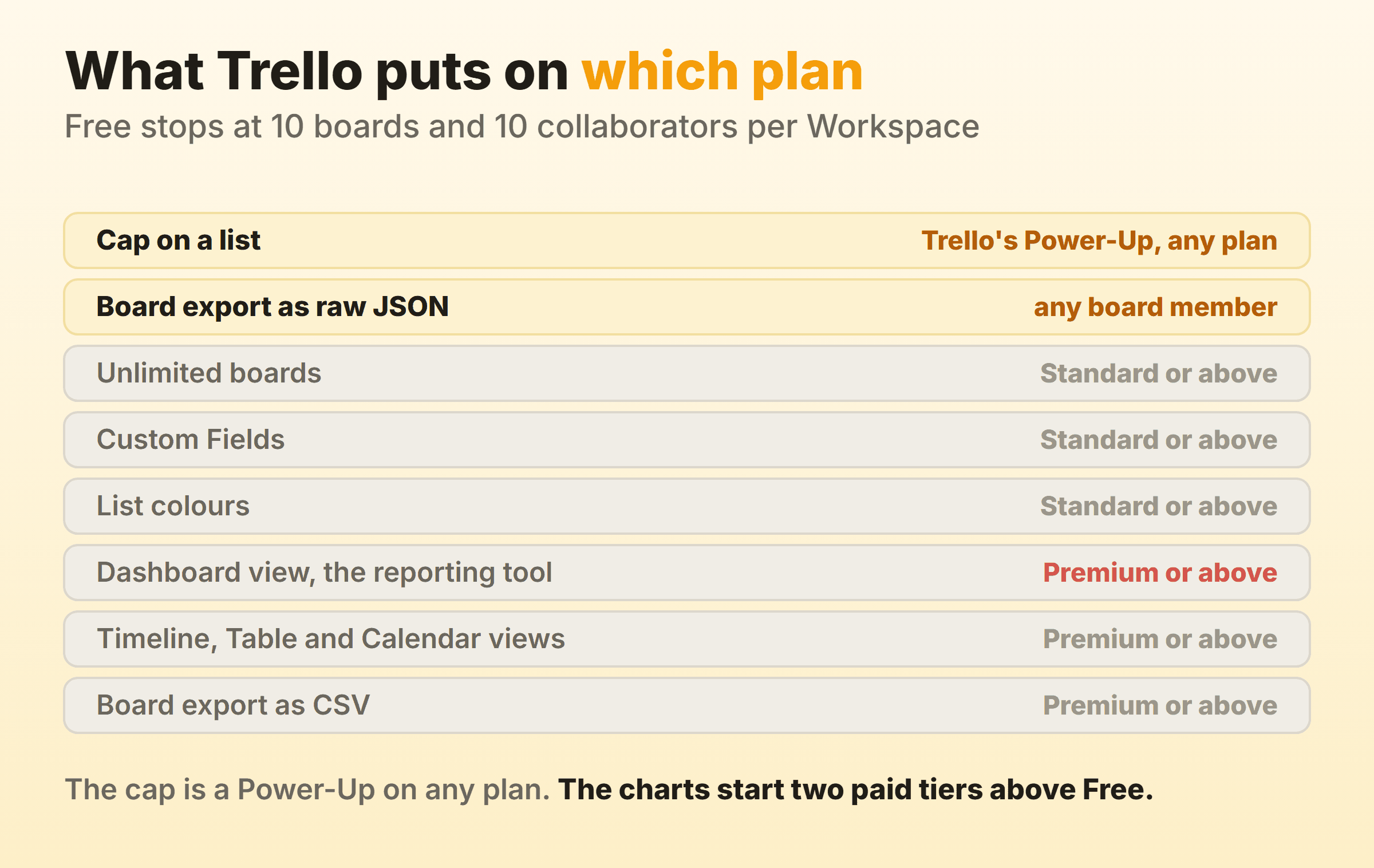
Only one of those three ceilings has a fix inside Trello that costs nothing extra, and it is the cap. If that is the thing that annoys you, install the Power-Up on Monday and stop reading here. The other two mean Premium, a Power-Up vendor, or the rest of this page.
Trello Alternatives Compared, and What Each One Closes
| Alternative | What it closes | Price on 15 September 2026 | Read this first |
|---|---|---|---|
| Jira | Column constraints are a board setting, red over the maximum | Free forever for 10 users | Constraints are documented for company-managed spaces |
| KanbanFlow | WIP limits plus stopwatch and Pomodoro, free | Free, Premium $5 per user per month | Search, attachments and CSV import are Premium |
| ClickUp | Count against limit in a Board view column header | Free Forever, Business $12 per user per month billed yearly | WIP Limits need Business or above |
| Kan | A documented Trello import into an open source board | Free for 1 user, Teams $8 per user per month | The hosted free plan is a single seat |
| PLANKA | Self-hosted board with a Trello JSON importer | Free Community edition, paid Pro | Fair-code licence, source available |
| Kanboard | Column highlighted once you pass the WIP limit | MIT licensed, you run the server | The install and the backups are yours |
| Our own board | Soft per-column cap and native timers | Free for 2 boards, Pro $6 a month | No realtime sync and no API |
Every price, tier and licence in that table came off the vendor’s own pricing page, help centre, homepage or repository on 15 September 2026. Free tiers get rewritten constantly. Open the page yourself before you move anybody onto one.
Jira: A Column Cap That Is a Board Setting
Jira makes the column cap a board setting, which is the cleanest single reason a Trello team lands there. Atlassian’s documentation on configuring columns describes a maximum and a minimum per column, and what each does to the header. Go past the maximum number of work items and it turns red, while a minimum that is not met turns it yellow. The page is scoped to company-managed spaces and tells you how to check your space type, so do that before you promise anything to the team.
Constraints trigger a visual indicator, in Atlassian’s words, and they count every work item in the column, including ones a quick filter hides. That is the behaviour a Trello team was using a Power-Up to fake.
Atlassian’s pricing page lists Jira as free forever for 10 users, with unlimited goals, projects, tasks and forms, the backlog, list, board, timeline, calendar and summary views, reports and dashboards, 150 automation steps per subscription per month and 2 GB of storage. Ten seats with reports included is a different offer entirely from Trello Free, where the charts are two paid tiers away.
The cost here is configuration. A single board’s behaviour spreads across column settings, status mapping and the board filter, and somebody has to own that, since only a space administrator or a board administrator can configure the board. On a team of six, that somebody is whoever complained least. Kanban in Jira walks the setup.
KanbanFlow: The Cap and Both Timers Without Paying
KanbanFlow puts WIP limits on its free plan, which is rare enough to lead with. Its pricing comparison marks WIP limits, unlimited boards, unlimited tasks, subtasks, filters and recurring tasks as available at no cost, alongside a stopwatch timer, a Pomodoro timer, Pomodoro statistics and a time spent report. Premium is $5 per user per month, with a 10 percent discount when paying per year.
For two people who want a cap on the middle column and a timer on the same card, that is the whole job done for nothing.
Read the rest of the free column before you commit a board to it. Search is Premium. So are file attachments, swimlanes, custom fields, custom colours, revision history, two-factor authentication, every integration, and everything in the analytics and reporting section bar the print view, a group that takes in cumulative flow, cycle and lead time, burndown, throughput and Monte Carlo forecasting.
Excel and CSV import is a Premium line too, so a bulk load of your Trello export is not among the free features.
ClickUp: One Suite, and the Cap Behind the Business Plan
ClickUp has a real per-column cap and charges for it. Its help centre on Work in Progress Limits puts availability in one line. “Work in Progress Limits are available on the Business Plan and above.” The behaviour underneath is the right shape. The column header shows count against limit, the counter reads green under capacity, yellow near or at it and red over it, and the documentation is explicit that the limit stays soft, since “You can create, move, or update tasks even if it makes a particular column go over the limit.” A Workspace owner or admin has to switch the ClickApp on first.
Business is $12 per user per month billed yearly, $19 billed monthly, on ClickUp’s pricing page. Trello Standard is $5 billed annually. Six people moving for the column cap take on $72 a month against the $30 they were paying, and the rest of the suite has to earn the difference.
If you trial it on Free Forever first, check your storage, because the pricing page lists 60MB for that plan. More on the board mechanics in kanban in ClickUp.
Kan: An Open Source Board That Imports Your Trello Boards
Kan pitches itself squarely at Trello users, and it ships the Trello import to match. Its repository introduces it as “The open-source project management alternative to Trello” and lists board visibility, workspace members, Trello imports, labels and filters, comments, an activity log and templates, with integrations marked coming soon. It states the licence plainly, too. “Kan is licensed under the AGPLv3 license.”
The hosted free plan is one seat. Kan’s pricing page gives Free a single user with unlimited boards, unlimited cards, board templates, checklists and 10mb file uploads, then Teams at $8 per user per month adds workspace members, a custom workspace username, invite links, unlimited file uploads and email notifications for mentions. Trello import appears on all three plans, Free included.
For a team of five the arithmetic is unkind. Trello Free carries ten collaborators at no cost, Kan’s hosted free plan carries one, so a team-sized move means $8 a seat or your own server. The README’s self-hosting route is Docker Compose, and on your own install the Trello import wants a Trello app API key and secret set as environment variables. AGPLv3 is copyleft, which procurement treats very differently from MIT.
PLANKA and Kanboard: Two Self-Hosted Boards, Two Unlike Licences
PLANKA and Kanboard can both run on hardware you control, and their licences are not remotely equivalent, so read those before you look at any screenshots.
Kanboard is distributed under the MIT License, describes itself as self-hosted with a super simple installation, and names the cap in its own summary of the product. You can “Limit your work in progress to be more efficient”, it says, with the column highlighted once you are over. It is free and open source, so there is no seat price to watch and no plan to be rewritten next quarter. You own the install and the backups.
PLANKA’s repository describes the project as fair-code, distributed under the Fair Use License and the PLANKA Pro/Enterprise License, and its licence notes lead with “Source Available: The source code is always visible”. The repository’s own summary offers a free Community edition, with PLANKA Pro for organisations, and its comparison table keeps calendar, timeline and map views, guest roles and SSO for Pro. Check the licence against your policy before you install, especially if that policy asks for an OSI-approved licence.
PLANKA documents a way in from Trello. Its Trello import page has you open a project, create a board, click Import, select Trello and pick the JSON file, then names what stays behind. “User information and attachments from Trello won’t be imported”, and one checklist per card is the limit. Wider options in our open source kanban roundup.
A Board Where the Cap Is a Checkbox
A purpose-built flow board only earns a row here if it ships the controls the general tools leave to a Power-Up or a paid tier. I run our own product board on this one, so weigh the entry accordingly.
Kanbanee was built for that narrow gap. Setting a limit is a checkbox and a number in the column menu, pre-filled at 3, and nothing is capped until you tick it. The badge shows count against limit and turns red over the cap, and the limit stays soft, so the drag always works. Stopwatch and Pomodoro timers sit on the card with a full time log behind them. Free covers 2 boards you own with unlimited members, which inverts the usual trade, since most free tiers ration people and hand out boards. Cycle time, weekly throughput and a cumulative flow diagram come with Pro at $6 a month or $48 a year.
Plenty of readers should skip it, and I would rather say so here than have you find out in week three. There is no realtime sync, so the board polls for changes instead of updating live, there is no API, and column drag is desktop only. If half your Trello cards link to Confluence pages, go to Jira.
What Survives the Move Off Trello?
What survives the move off Trello is decided at the export end, before any importer gets involved. Atlassian’s export documentation splits it by plan and role. “All board members can export a board to raw JSON format”, while CSV needs a Premium Workspace, and a whole-Workspace export is Premium and admin-only. The same page says the JSON export includes the 1,000 most recent actions on a board, comments among them, and that comments are not included in the CSV export at all.
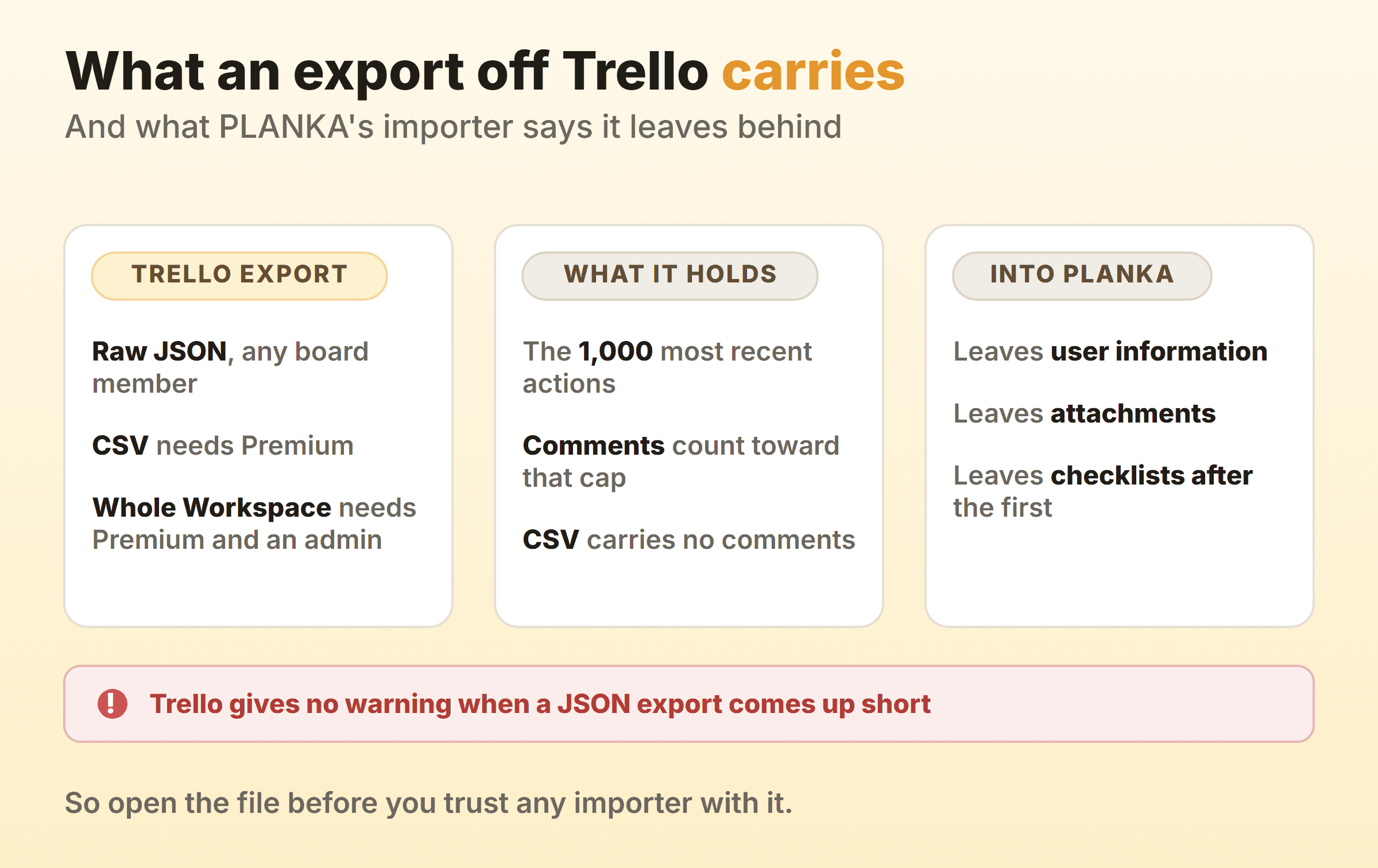
PLANKA’s import page spells out the consequence. Trello “does not provide a warning if the JSON export is incomplete”, so a busy board can hand you a file that looks whole and is not. Atlassian’s route to every comment is the Premium Workspace export, and PLANKA’s is a JSON export of your own built on the Trello REST API. Verify the JSON yourself, whatever you are feeding it into.
Then read your destination’s own list of exclusions before you pick. On PLANKA it is user information, attachments, and every checklist after the first.
Ask every importer what it does with the timestamp trail of when each card entered and left each list, because that trail is the raw material for every number in a flow metrics report, and on a busy board the 1,000-action cap has already trimmed it. Export the raw JSON before you cancel anything, even with nowhere to put it yet.
Which Alternative Fits Your Reason for Leaving?
Start from the ceiling you hit. Every Trello kanban alternative here draws the same columns, so fancying a tool is how teams end up with the same board in a different colour, and the wider kanban alternatives guide takes the same line.
- You want a cap and nothing else. Install List Limits and stay put. Leaving Trello over this is a weekend spent replacing a Power-Up.
- You want the cap and a timer, for nothing. KanbanFlow on free, with search, attachments and every chart behind Premium.
- You are ten people or fewer and can stomach configuration. Jira Free, where column constraints do the job a Power-Up was doing.
- You want one tool for docs, chat, goals and boards. ClickUp, with Business budgeted from day one if the cap is the point.
- Your data cannot leave the building. Kanboard for MIT. Kan if AGPLv3 suits you and the Trello import matters. PLANKA once fair-code passes your policy.
- You want flow controls without a configuration project. That is the narrow slot our own board sits in.
Whatever you pick, write the missing capability down in one sentence before you move. If that sentence is about how the board looks, your migration weekend is better spent renaming six columns.
FAQ
What is the best free alternative to Trello for kanban?
KanbanFlow, if a column cap for nothing is the point, since its pricing page puts WIP limits and both timers on the free plan. Jira Free if you are ten users or fewer and want reports included. Kanboard when free means you own the server. We compare the wider field in the free kanban boards roundup.
Does Trello have WIP limits?
The cap comes from a Power-Up. List Limits is made by Trello Inc, and Trello’s Free plan includes unlimited Power-Ups per board. What the listing promises is a highlight once the card count passes the number you set, a signal rather than a lock, which is how a WIP limit is supposed to behave.
Will my Trello export bring everything with it?
Not on its own. JSON export is open to all board members and CSV requires a Premium Workspace, but Atlassian’s export page says the JSON holds the 1,000 most recent actions on a board, and PLANKA’s import documentation warns that Trello gives no warning when the export is incomplete. Check the file size and the oldest action in it before you trust the import, and expect the importer to leave something behind, such as the user information and attachments PLANKA names.
Is it worth leaving Trello just for the reporting?
Sometimes, and the arithmetic takes a minute. Trello’s Dashboard view arrives on Premium at $10 per user per month billed annually, so six people pay $60 a month for it. A reporting Power-Up on top of a cheaper Trello plan is the other route. Price both against the tool you are considering, because comparing either one to Trello Free flatters it.
Which Trello alternative feels most like Trello?
Kan’s repository introduces it as the open-source project management alternative to Trello, its pricing page talks in unlimited boards, lists and cards, and it imports your existing Trello boards. PLANKA is the self-hosted one people reach for when the interface matters, with its own Trello importer documented. Both keep the same three-object vocabulary, so nobody has to relearn what a column is.