
Gantt Chart vs Kanban: What Each One Shows and When to Use It
Updated at
The Answer
A Gantt chart and a kanban board answer different questions, which is why the gantt chart vs kanban argument never quite settles. A Gantt chart plots tasks against calendar time and draws the dependencies between them, so it tells you when something finishes and what has to happen first. A kanban board plots work against state and carries no time axis at all, so it tells you what is in progress right now and where cards are stuck. Reach for a Gantt chart when somebody outside the team owns the date and you already know the order of the work. A board earns its place when work arrives unpredictably and your actual problem is that everything gets started and nothing gets finished. Plenty of teams keep both, one for the milestone layer and one for the daily one.
What Is a Gantt Chart?
A Gantt chart is a bar chart of a schedule. Tasks down the vertical axis. Calendar time across the horizontal one, with the width of each bar showing how long that task is expected to take. Arrows between bars carry the precedence, meaning which task cannot start until another finishes.
Henry Gantt designed it somewhere around 1910 to 1915, for scheduling factory production. Karol Adamiecki got there first. He drew the same idea in 1896, called it a harmonogram, and published it in Polish and Russian, which is why almost nobody outside Poland has heard of him.
Every bar is a claim about a duration and a start date, which makes the whole thing a model of the future, and models need maintaining. The US Government Accountability Office publishes a Schedule Assessment Guide listing ten best practices for keeping a project schedule reliable. Ten separate practices, for one chart. Nobody ever announces that a Gantt chart has gone stale, so people keep planning from it for weeks after it stopped being true.
What Is a Kanban Board?
A kanban board shows work in states. Columns are the stages an item passes through, cards are the items, and you read it left to right. No time axis anywhere. A card sitting in Review tells you it is in review and says nothing about when it leaves.
The idea came off the Toyota production line in the late 1940s, where Taiichi Ohno used physical cards to signal that the next batch of parts should be pulled instead of pushed. Knowledge work borrowed it decades later and kept the load-bearing piece, a cap on how much sits in progress at once. That cap has a name, work in progress limits, and skipping it is how a board ends up as a to-do list turned sideways.
Look at what the board gives up. No durations. No dependency arrows, no baseline to measure against, no way to say which week anything lands. The trade buys accuracy, because moving a card is the same action as doing the work.
Gantt Chart vs Kanban Board: How Do They Compare?
Gantt charts compare to kanban boards on five points: the axes, the ordering, the cost of a change, who keeps the thing current, and what each one measures. Most of what turns up in a kanban board vs gantt chart comparison falls out of those five points.
| Gantt chart | Kanban board | |
|---|---|---|
| Horizontal axis | Calendar time | Workflow state |
| What one unit shows | A task with a start, an end and a duration | A card in whatever column it sits in now |
| Sequencing | Explicit, drawn as dependency arrows | Implicit, the order of the queue |
| Question it answers | When will this be done | What is in flight and what is stuck |
| Handling change | Replan, then reflow every dependent bar | Move a card, reorder the queue |
| Limits work by | Assigned dates and resources | An explicit cap per column |
| Kept current by | Whoever owns the plan | Everyone, as they move their own cards |
| Core measures | Variance against baseline, critical path | Cycle time, throughput, work in progress |
| Fails when | Nobody updates it | Nobody caps the columns |
What Each One Plots
The axes carry the whole kanban vs gantt chart difference. Put time on the horizontal and the chart is committed to predicting something, while state on that axis lets a board describe the present and stay quiet about the future.
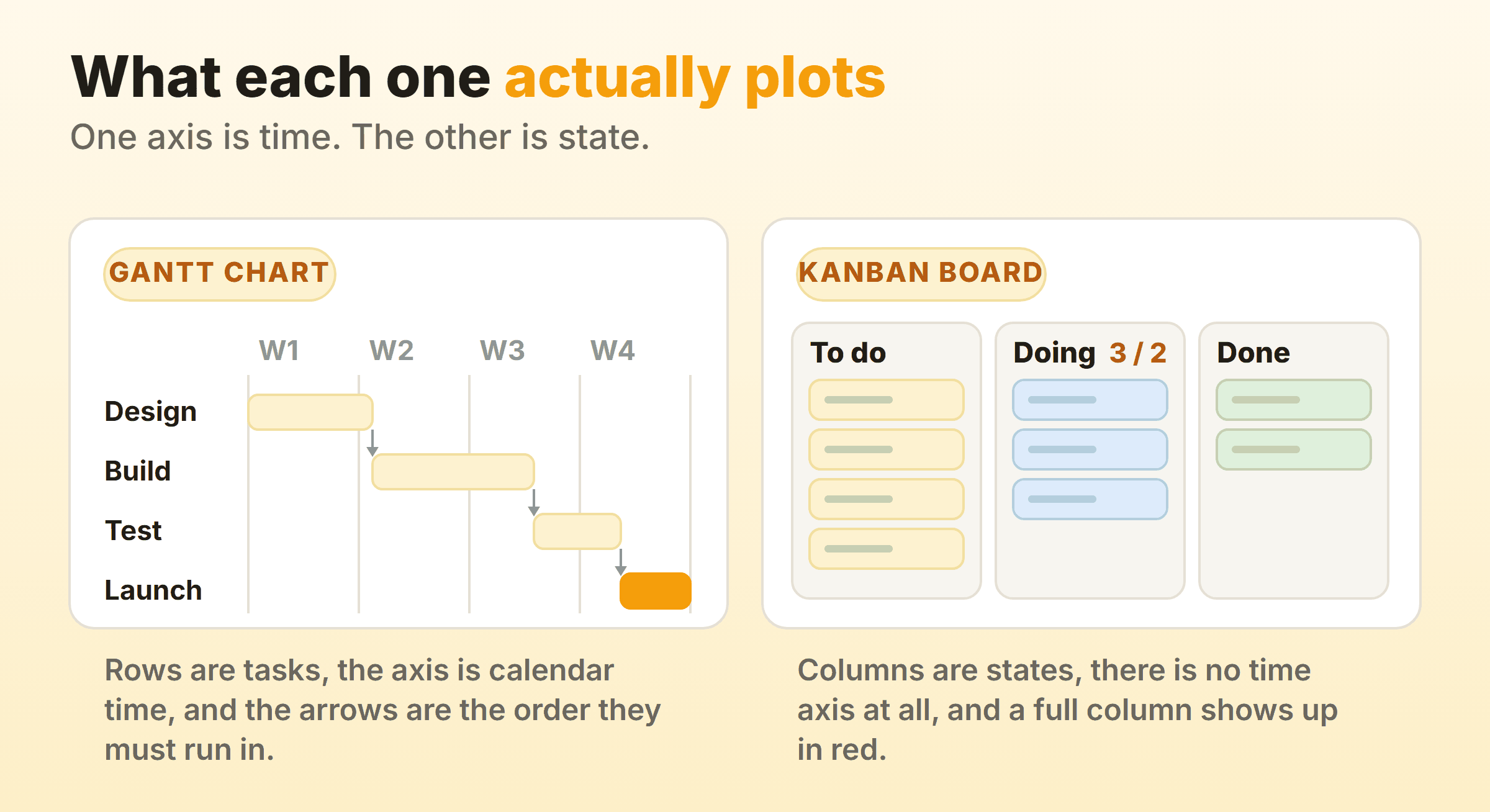
Watch what each one hides. The Gantt chart above cannot tell you that three things are in progress at once, because in-flight count sits on neither axis. Nothing on the board says Launch is meant to land in week four. Neither view is wrong, they are answering different questions, and a team with only one of them stays blind to whatever the other covers.
How Each One Handles Change
Change is cheap on a board and expensive on a Gantt chart. A new priority on a board means dragging a card to the top of the queue. The board is correct again immediately. The same request on a Gantt chart means changing a duration, pushing every dependent bar to the right, then deciding whether the end date you have just produced is one you can say out loud.
That expense is the chart doing its job. A Gantt chart makes the cost of a change visible before anyone agrees to it, which is what you want with a contract or a launch date on the line. On a team where priorities genuinely move every week, paying that cost weekly is absurd, and the board is the right call.
Who Keeps It Up to Date
A board updates itself as a side effect of work. Cards move because somebody finished a thing and wants the next thing, so no separate reporting step exists to skip. A Gantt chart needs a person whose job includes updating it.
Gantt charts decay quietly. Week one is accurate, week three is roughly right, and by week eight the bars describe a project that no longer exists. I have inherited a few of those, a chart untouched for a month sitting next to a team that had been busy every day of it.
When Should You Use a Gantt Chart?
Use a Gantt chart when somebody outside the team owns the date and the work has a known order. Four situations make it the right call.
- A hard external deadline. A conference, a regulatory filing, a building handover. When the date cannot move you have to work backwards from it, and backwards from a date is what the chart is built for.
- Real dependencies between groups. If the electrician genuinely cannot start until the plasterer finishes, that constraint deserves an arrow. A board shows a blocked card. The chart shows the four weeks the blockage costs.
- Somebody outside the team needs the plan. Clients, funders and steering committees ask when. Handing them a board answers a question they did not ask.
- Work that happens once. House builds, migrations, event production. The sequence is known upfront and rarely repeats, so the planning effort pays for itself.
All four depend on knowing the sequence before you start. Guess at it instead and you spend a day a week maintaining a chart that describes a project you are not actually running.
When Should You Use a Kanban Board?
Use a kanban board when work arrives unpredictably and next month’s sequence is genuinely unknowable. Support queues, ops, marketing, internal platform teams. You know roughly how many requests land each week and nothing at all about which ones.
Boards also suit work where the items are similar in size, because throughput then says something useful about next month while a per-item estimate says very little. They suit teams that pick their own order, since the people moving cards are the people choosing what comes next. And they treat one problem directly. Too much started at once, and capping the columns stops the pile growing. Being overloaded and being late are different diagnoses, and a schedule only ever treats the second one.
If your work has this shape but you keep feeling the pull of fixed iterations, read kanban vs scrum next. Flow against sprints is a separate decision. Harder, too.
What Chart Does Kanban Use Instead of a Gantt Chart?
Kanban uses three charts instead of a Gantt chart, all built from the card history: the cumulative flow diagram, the cycle time chart and the throughput chart. Search for kanban charts and you mostly get pictures of boards, which is how this part goes missing.
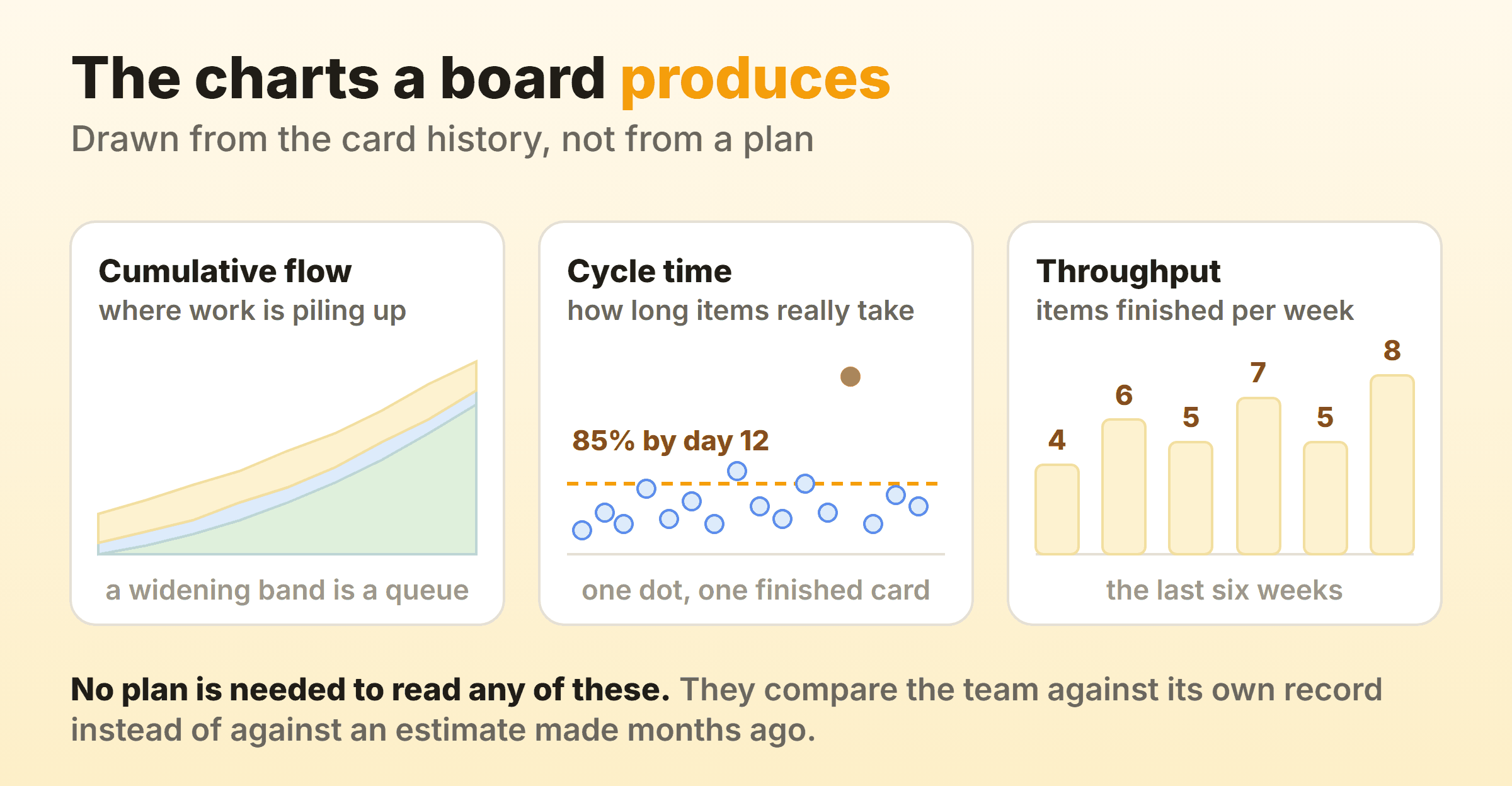
A Gantt chart measures a project against a plan drawn before the work started. These three use the team’s own record from the last few months, so the baseline sharpens every week instead of drifting.
Cumulative Flow Diagram
A cumulative flow diagram stacks the count of items in each column over time. Bands that widen are queues. A swelling middle band over a flat bottom band means work is going in faster than it comes out, and reading one takes about four seconds after you have seen two or three.
The Kanban Guide does not require this chart, or any chart. It defines four measures, work in progress, cycle time, throughput and work item age, and leaves the pictures to you. Cumulative flow is a convention that grew up around the practice.
Cycle Time
Cycle time is the elapsed time between an item starting and that item finishing, which makes it the closest thing kanban has to a duration estimate. Plot every finished item as a dot and the shape of your delivery shows up. A dense band of ordinary items, plus the outliers that took three times as long.
Report it as a percentile. Eighty-five percent of items finish within twelve days is a forecast somebody can hold you to, and a six day average describes nothing that actually happened to anyone.
Throughput
Throughput counts how many items finish per unit of time, usually a week. Six weeks of it is the best capacity number you will get for planning the next month, and the board has already recorded every bit of it. No extra work at all. The kanban metrics guide covers how to read all three. None of them will hand you a date for a specific card, which is where a schedule model still earns its place.
Can You Use Kanban and Gantt Together?
You can use kanban and gantt together, and the version that survives puts them at different altitudes. The Gantt chart holds milestones and cross-team dependencies, the board holds the tasks, and neither one is asked to do the other’s job.
The Two Layer Setup
Run the Gantt chart at the milestone layer, ten or fifteen bars covering phases and external commitments. The board takes everything below that. Keep the link between the two loose on purpose, so that a milestone corresponds to a group of cards and is done when those cards are done.
Fifteen bars can be updated in ten minutes on a Friday afternoon. Two hundred cannot, so the two hundred bar version dies quietly somewhere around week six, usually without anyone noticing until a milestone slips.
Where the Hybrid Breaks
The hybrid breaks when both views track the same items. Every card gets a bar. The bar needs a date, and somebody now has to keep two systems agreeing about work nobody has re-estimated since the kickoff meeting. That somebody stops eventually, usually without telling anyone.
Dates on individual cards cause a subtler problem. The board starts behaving like a schedule, with people starting work early to hit a date instead of pulling when a slot opens. The cap stops meaning anything. Keep dates on the milestone layer and out of the columns.
Which Tools Support Both Gantt Charts and Kanban Boards?
Tools that support gantt charts and kanban boards over one set of records are now the norm, including Jira, Asana, ClickUp, monday.com, Smartsheet and Microsoft Project. Switching between the gantt, kanban and calendar views redraws the same underlying records. Platforms combining dashboards, gantt, kanban views under one login sell exactly that, and the pitch is honest as far as it goes. Plenty of teams settle the gantt vs kanban argument by buying one of these and then never opening the second tab.
Dual view tools are heavier, though. Every field the Gantt view needs, meaning start dates, durations and dependency links, has to be filled in by somebody before that view says anything at all. Adopt one for the board, never populate the schedule fields, and you get an empty Gantt tab on a bill sized for both.
So ask who maintains the dates, by name, and what happens to the board the day that person leaves.
Kanbanee sits on the other side of that line on purpose. It is a board with WIP limits, timers and flow reports, and it has no Gantt or timeline view at all. Timeline was ruled out of the first version deliberately. If your work needs a real schedule model, put that layer in a scheduling tool and keep the board for daily flow.
FAQ
Is a kanban board better than a Gantt chart?
Neither wins in general. A board shows the current state of ongoing work and caps how much runs at once. For putting a sequence and a date in front of people outside the team, the chart is the obvious tool. Pick by whichever question you get asked most often.
Can a kanban board show dependencies?
Not natively. Boards mark that a card is blocked, usually with a label or a dedicated column, but they do not draw the relationship between two cards the way a Gantt chart does. Teams carrying heavy cross-team dependencies usually keep a chart for that reason alone.
Does kanban work when the project has a fixed deadline?
Yes, though the forecasting works differently. Count the items left, divide by your weekly throughput, and check the answer against the deadline. No critical path is involved. Individual items stay unpredictable under this method, which is fine, because a deadline is about the batch.
What is a kanban gantt chart?
A kanban gantt chart is usually a tool feature: one dataset shown as a board in one tab and as a timeline in another. It is a view toggle. Whether it earns its keep depends entirely on somebody maintaining the dates the timeline reads from.
Do agile teams still use Gantt charts?
Many do, at the programme level. The chart carries quarterly milestones and cross-team commitments while teams run their own boards underneath. The two hundred row Gantt chart of individual tasks has mostly gone, which is fair, since it was never accurate for more than a fortnight.