
Kanban Workflow: How Work Actually Moves Across a Board
Updated at
The Answer
A kanban workflow is the ordered set of states a piece of work passes through between the request and the delivery, drawn left to right as columns so anyone can see where every item currently sits. Cards advance by pull. A card crosses into the next column when that column has room for it, rather than when the person upstream has finished with it, and that one rule is what separates a kanban board workflow from a to-do list wearing headings. The columns are a claim about how your team really operates, so when the board and the week disagree, you redraw the board.
What Is a Kanban Workflow?
A kanban workflow is the path your work takes from someone asking for it to someone using it, cut into named states. Each state gets a column and each item of work gets a card, so the board becomes the surface where that path is drawn.
Any kanban workflow board is built from three parts. The states become your columns, the work items become cards, and a third piece sets out when a card may legally cross from one state into the next. Most teams nail the first two on day one and then skip the third for about a year.
That third part is where the word “system” starts to earn itself. A visual kanban system with no agreed rules is a wallchart with sticky notes on it. Add the rules and you get something that reports its own faults, because a card that cannot legally move is a card that is stuck, and now the board says so instead of somebody having to remember.
Kanban workflows differ wildly between teams, which catches out people arriving in search of a template. Marketing runs brief, draft, edit, legal, schedule. A support desk needs triage, diagnose, fix and verify. An agile kanban board built for software development might go ready, in development, in review, in test, released. The kanban methodology refuses on purpose to hand you a starting set of columns, because it is designed to sit on top of the process you already run.
How Does a Kanban Workflow Work?
A kanban workflow works by pull. Work enters at the left, moves right one state at a time, and each move happens because the receiving column has capacity, not because the sending column is done with it. Requests travel backwards down the board even though the work travels forwards.
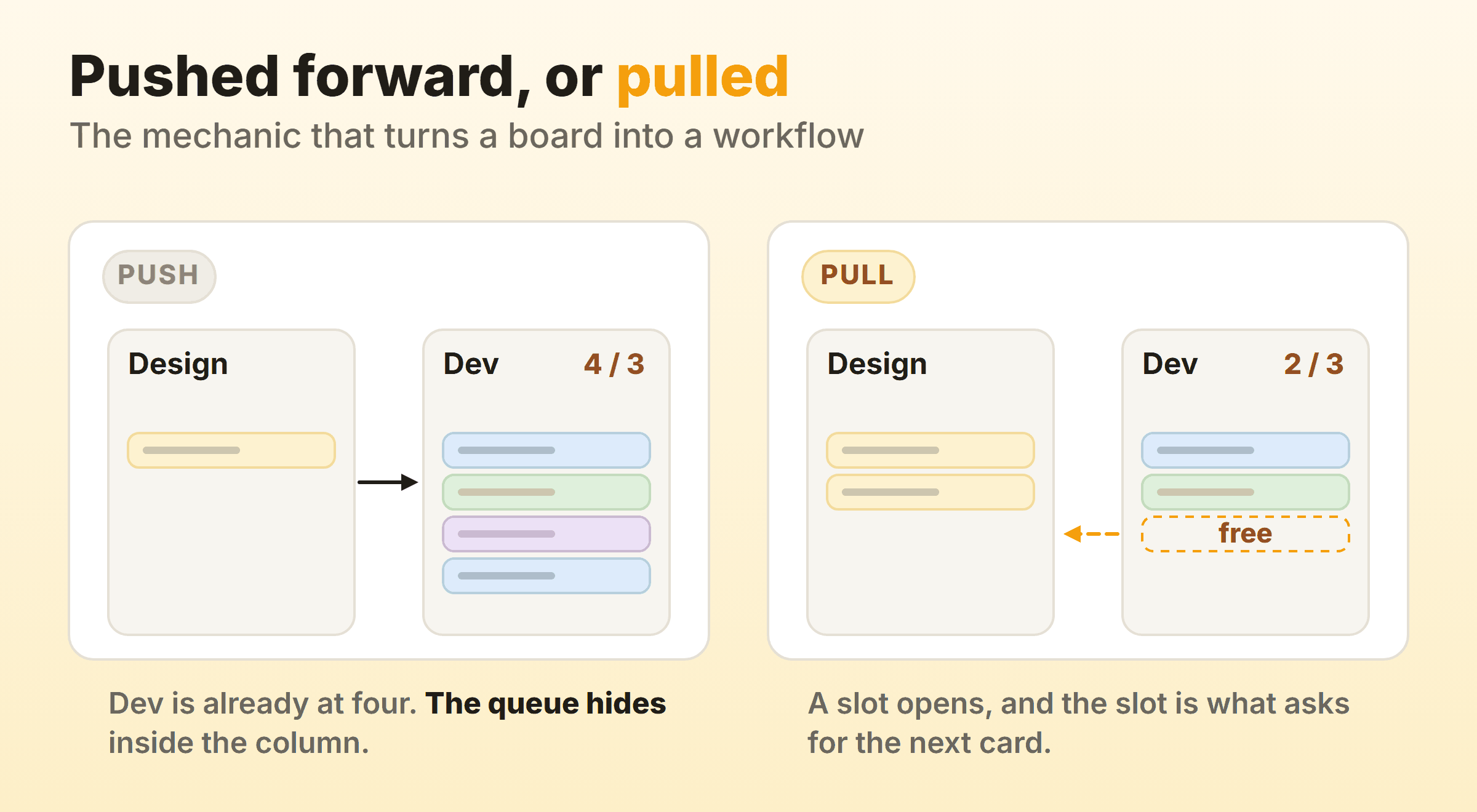
Push is the default nearly everywhere else. A designer finishes a mockup, hands it to a developer already carrying four things, and the mockup joins a pile nobody calls a queue because it lives inside somebody else’s column. Pull flips the trigger. The developer finishes an item, a slot opens, and that free slot is what draws the next card across.
For any of that to bite you need a number, and the number is a WIP limit per column. Leave the caps off and every column has infinite room. Pull then reverts to push inside a fortnight, quietly, with nobody ever deciding to abandon it.
Kanbanee ships WIP limits switched off. You turn one on from the column menu with a checkbox and a number, after which the badge reads as count over limit and goes red once the column sits above its cap. Dragging still works. Blocking the drag outright only teaches people to route around the board, whereas a soft cap keeps the fifth item visible and makes somebody say out loud why it is the exception.
How Do You Design a Kanban Workflow?
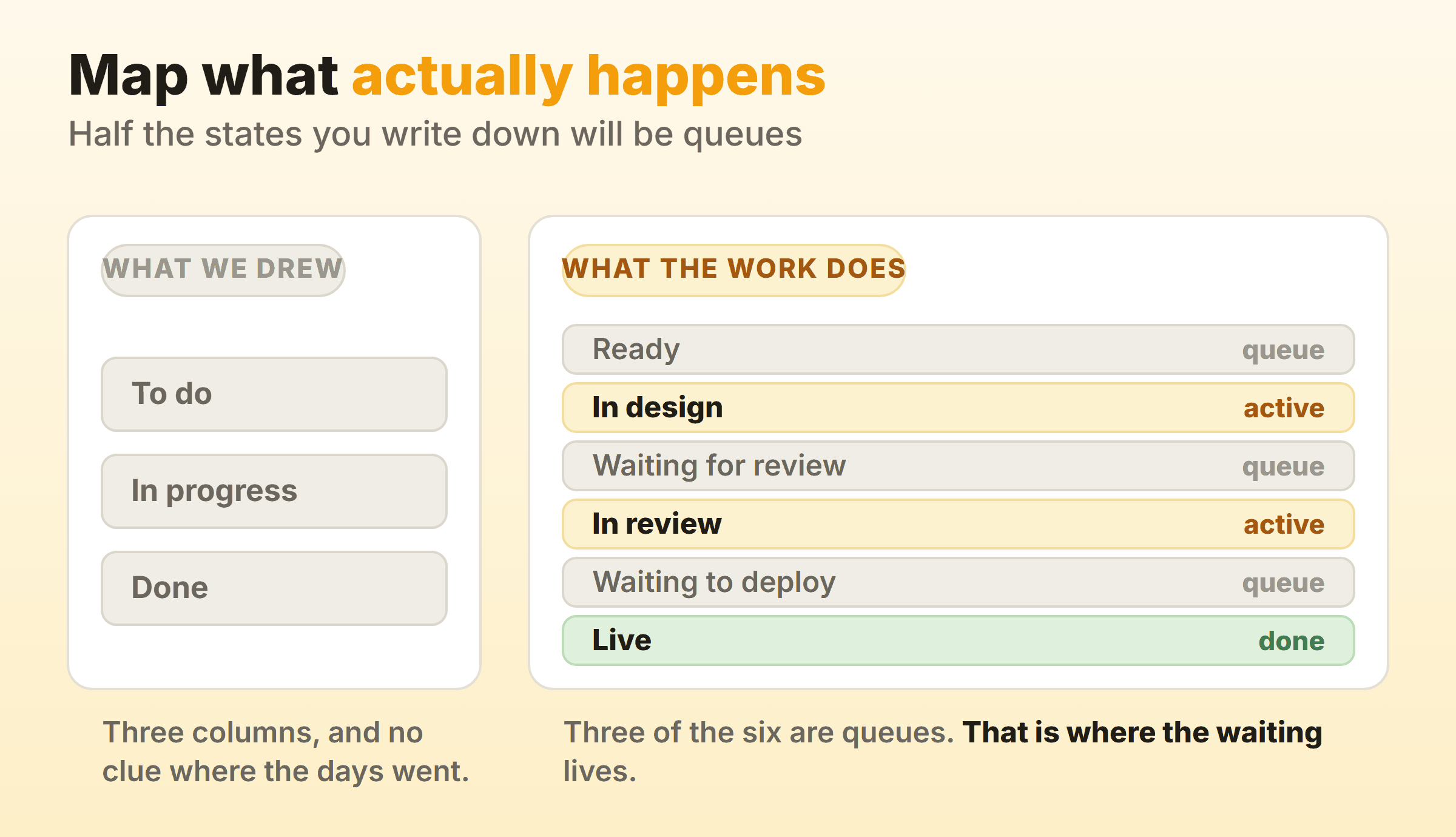
You design a kanban workflow by writing down the states your work already passes through, then drawing a column for each one. Most teams do this backwards. Or rather, most teams never do the writing-down half at all. They copy To do, In progress and Done off a screenshot, then spend half a year wondering why the board never tells them anything they did not already know.
Start From What Actually Happened
Pick one item that shipped last month and trace it backwards. Where did it sit? Who had it? What was it waiting on between the moment somebody picked it up and the moment it went live? Write every one of those down as a state, in order, unedited and ugly.
The list you end up with will be longer than the board you have. On our own product board that exercise produced nine states for something we were drawing in three columns, and four of the nine turned out to be pure waiting.
Split the Active States From the Queues
Sort your list into two kinds of state. Active states are the ones where a person is doing something. Everything else is a queue. It might be waiting on a reviewer, a client, a decision, or a deploy window, and none of that counts as work. Give those queues their own columns instead of folding them into whichever active column comes next.
Splitting queues out is the change I would make first on almost any board. An item parked in a column called In progress might be half coded, or it might have been sitting nine days on a client answer, and the board looks identical either way. Split that into In progress and Waiting on client and it starts reporting where your time goes. Flow efficiency, meaning the share of an item’s total elapsed time that anyone actually spends working on it, is the number this unlocks, and no board can compute it until it can tell an active column from a queue.
Choose a Column Count You Can Defend
Six to eight columns fit most teams, and a support desk juggling several request types will want a couple more. Under four and the board hides too much. Go past ten and cards need constant shuffling, so people quietly stop updating around week three.
Test each column with one question: what decision changes because this state is separate? No answer means it merges into its neighbour. A column added so a manager can watch progress will rot, because nobody working the board needs it to do their job. How you name them matters just as much, and kanban columns goes through the naming rules properly.
Agree What Moving a Card Means
Write one line per boundary saying what has to be true before a card crosses it. Merged and deployed to staging. Client replied in writing. A second approval logged on the doc, with a name attached to it. Those lines are your explicit policies. They take about twenty minutes to write, and they are the kanban process in the only sense that matters, since everything else on the board is rectangles. Written down, they also settle the argument that otherwise reopens every time somebody wants to skip review, which is how a workflow keeps running continuously and does not stall for a debate.
What Makes a Kanban Workflow Continuous?
A continuous workflow in kanban means work gets pulled in one item at a time whenever capacity appears, with no batch boundary that everything has to start and stop against. There is no sprint to commit to. No Friday when the current batch gets declared over.
The practical difference shows up on a Tuesday. Running two-week batches, an urgent request landing on day three waits eleven days, unless somebody agrees to break the sprint open for it. On a continuous flow board it joins the ready queue, gets pulled when the next slot frees up, and nothing had to break. That is most of what people mean when they list absorbing interruption among the benefits of kanban.
Continuous does not mean unplanned, which is the assumption I spend the most time correcting. Replenishment is what kanban planning looks like in practice, usually weekly, and the team refills a short ready queue from the backlog. That meeting tops up a queue, with no commitment to a fixed scope, so a bad estimate costs you one item and not a fortnight.
How Do You Move From a List to a Kanban Workflow?
Moving from a list-based tool to a kanban workflow starts with a single question: what states does everything on this list actually pass through? A list gives you order and stops there. Task forty-two could be finished, blocked, or untouched since March, and the list renders it the same way in all three cases.
People arrive at this from every direction, usually carrying a Trello board built for a different team or a spreadsheet with a Status column that four people fill in differently. Outliners like Workflowy grew a kanban view. Notion databases get flipped from list to board. Whichever kanban software you land on barely changes the outcome, since the columns only mean something if the team agreed on them before the cards arrived.
The transition itself takes an afternoon. Map your existing status values onto columns, and where a status has no column, decide whether it deserves one or belongs inside a state you already drew. Move the live work across. Leave the archive behind entirely, because a board carrying finished tasks from last year teaches nobody anything.
Then run it untouched for two weeks. That instruction is the one everybody skips. Every workflow customisation in kanban is a guess about how your team behaves, and a fortnight of watching real cards get stuck replaces the guess with evidence.
How Do You Optimise a Kanban Workflow?
Kanban workflow optimisation comes down to finding the state where work piles up and attacking that one state, instead of pushing everybody everywhere to go faster. The board hands you the pile for free. Whichever column sits consistently fullest is your bottleneck, and it is usually somewhere nobody suspected.
Kanban improves workflow through four moves, roughly in order of payoff.
Lower the WIP limit on the busiest column. Counterintuitive, and the biggest lever you have. Fewer items in flight means each one finishes sooner, which is Little’s Law doing the work rather than anybody typing faster.
Split the bottleneck column into doing and done. If Review holds both the items being reviewed and the items already reviewed and waiting for pickup, a slow reviewer and a slow handoff look exactly alike. Splitting the column tells you which one you have.
Add a queue column in front of the bottleneck. Once the wait is visible and countable, the case for another reviewer writes itself.
Delete a column. Rarely considered. A state that never holds a card longer than an hour is doing nothing except adding a click.
Check whether any of it worked using cycle time and throughput, never by feel. Change one thing, wait three or four weeks, compare. Kanban metrics covers which numbers are worth watching and how often. Give a change a full month before judging it, because a cumulative flow diagram needs several weeks of history before a new column shows up in the bands at all.
Where Kanban Workflows Break
I have watched a lot of boards go quiet. The same causes keep coming back.
The first is the board drawn once and never redrawn. Your process shifts every few months, so a kanban team running a workflow that has looked identical for a year is looking at a picture of something that no longer exists.
Then there is the Done column that never empties. Cards pile up for months, the board takes ten seconds to load, people stop scrolling. Archive weekly.
Third, the column that exists for reporting rather than for work. Somebody wanted visibility, a state got added, and now every card needs an extra move that changes nothing about the work itself. The reverse happens as well, where a state everybody genuinely used gets deleted because it made the board look untidy in a screenshot. In both cases nobody asked the people who work the board.
And over-customisation, which is the one that arrives with a new tool. Swimlanes per project, colour coding on three separate dimensions, and a card template with eleven required fields. Nobody reads any of it. A kanban board wants to be readable in about five seconds from across a room, and every customisation you bolt on spends part of that budget.
If you are unsure which of these you have, walk the board on a Monday morning and count the cards that have not moved since the Monday before. That number, plus the column most of them are sitting in, is your next change.
FAQ
What is the difference between a kanban board and a kanban workflow?
The board is the surface you draw on. On it sit the ordered states plus the rules for crossing between them, and those two things together are the workflow. Plenty of teams run a board with no workflow at all: three columns, no limits, no policies, and cards that drift rightwards whenever somebody remembers to move them.
How many columns should a kanban workflow have?
Six to eight suits most teams. Under four hides the queues where delay accumulates, and over ten creates enough card-shuffling that the board goes stale. You are counting decisions here, so if separating a state changes nothing about what anyone does next, merge it.
Can a kanban workflow have parallel or branching paths?
Yes, and swimlanes are the usual way to draw them. A horizontal lane per work type, per team, or per class of service lets several workflows share one board while each keeps its own limits. True branching inside a lane, where a card goes to one of two possible next states, is normally a sign the item should be split.
How do you handle blocked tasks in a kanban workflow?
Mark the card and leave it where it is. A blocked task stays in the state where it stopped, picks up a flag or a label, and keeps counting against that column’s WIP limit. Shunting it into a Blocked column hides the problem, since the count in the column where work actually broke drops back down and starts looking healthy.
Does a kanban workflow work for a team of one?
Yes, and the queue columns matter even more. Solo work is mostly waiting on other people, so a board with Waiting on client and Waiting on review as genuine columns will show you where your week really goes.