
Asana Kanban Boards: What Board View Does and What It Leaves Out
Updated at
The Answer
Asana has a kanban board and files it under the name board view, one layout among list, timeline and calendar that any project can switch to in a click. It costs nothing on the free plan, needs nothing installed, and the columns you drag cards between are the project’s sections, so the structure follows you into every other view. Then the ceiling arrives. An Asana kanban board carries no work in progress limit, keeps no record of cycle time, and never pushes back when a column fills up, which makes it a good picture of where work sits and no help at all with how much of it is open at once.
Does Asana Have a Kanban Board?
Asana has a kanban board, and the word kanban appears almost nowhere inside the product. The marketing uses it freely, and Asana’s kanban boards page is built around the term. The app itself just says Board.
Board view sits in the row of tabs at the top of every project, next to List, Timeline, Calendar, Gantt and Dashboard. Any project can wear any of them. Switching to the Asana kanban view does not copy anything or create anything, because the tasks underneath stay exactly where they were and only the shape on screen changes.
That is the mechanic worth holding on to. A board in Asana is not a separate kind of project. It is a way of looking at the project you already have, which is why a list somebody built in March can be a kanban board this afternoon and go back to being a list on Friday.
Board view is also free. It ships on the Personal plan alongside list and calendar, and the paid tiers charge for what surrounds a board rather than for the board itself.
How Do You Create a Kanban Board in Asana?
To create a kanban board in Asana, choose Board as the layout while you are creating the project, or open a project you already have and click the Board tab. The first route gives you an empty board with a few default sections. Most of the time the second one is what you want.
Step 1: Switch a Project You Already Have
Switch an existing project to board view rather than building a fresh one beside it. Asana makes this cheap and people still get it wrong.
I have lost count of the workspaces running one piece of work twice, once as a list somebody set up in January and once as a board somebody else set up in March. Nothing reconciles them. A view is a lens over one set of tasks. A second project is a second set of tasks, and somebody now spends part of every Friday keeping the two honest.
Step 2: Name the Columns After States
Each column on the board is a section, and each section in list view is a column. One object, two shapes. Add a column and you have added a section. Rename a column and the section renames with it everywhere.
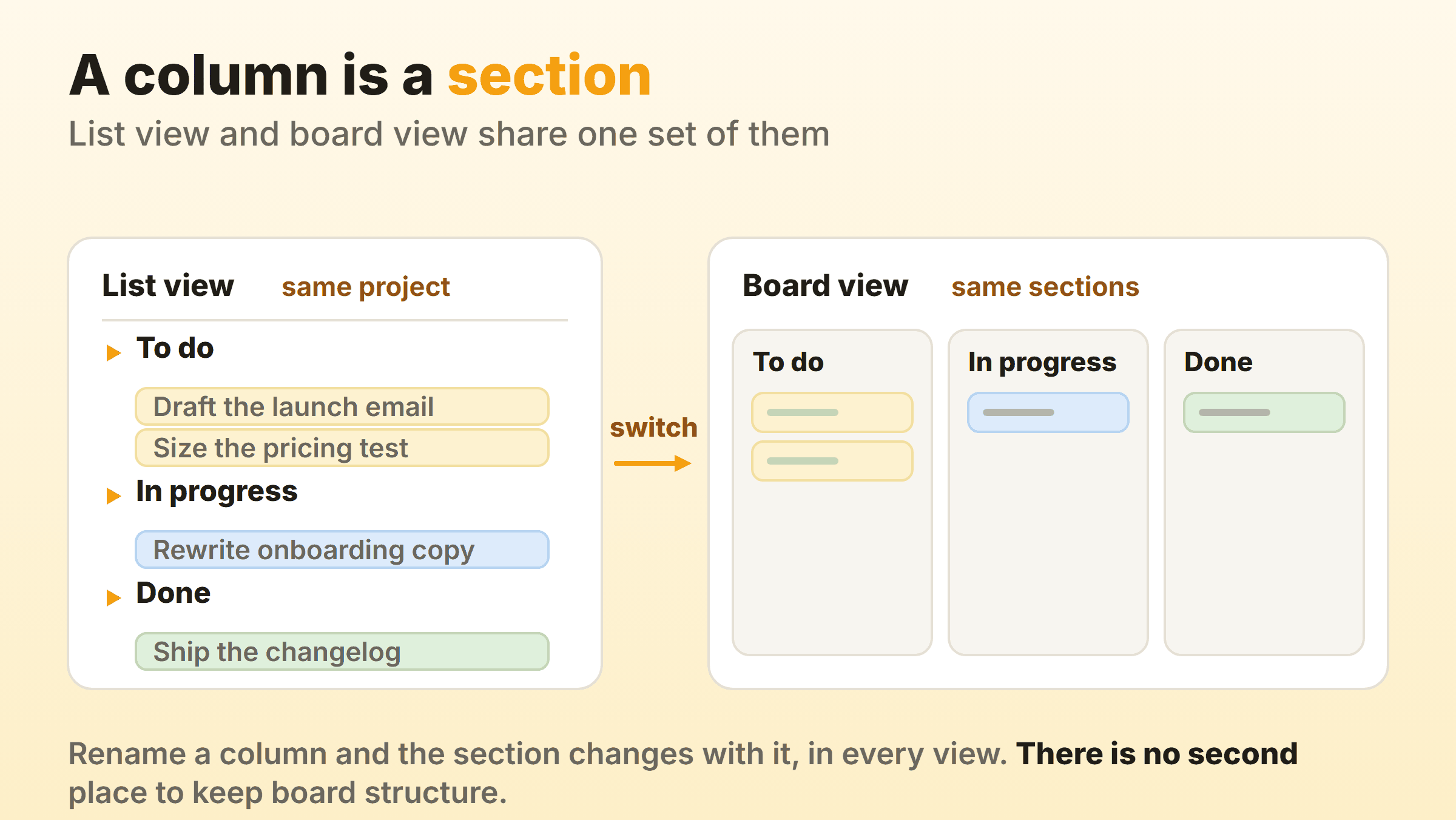
This is mostly good news. It means the board cannot drift away from the list, and anyone who prefers a list still sees the same workflow. It also means there is exactly one place to keep your board structure, so a column named for a person leaks into every view your team uses.
Name each column after what is happening to the work. “In review” survives a resignation. “With Priya” stops meaning anything the week Priya leaves, and every inherited board I have seen with a column named after a person ended up with two columns doing the same job.
Three to five columns is plenty for a first board. Add a fourth once you can point at work that genuinely waits somewhere the board is currently hiding.
Step 3: Cut What the Card Shows
Asana kanban board tasks are ordinary Asana tasks, so each card can carry an assignee, a due date, subtasks, dependencies, attachments, comments and any custom field on the project. Card appearance controls what surfaces on the front.
Show two fields. Three at the outside. Assignee and due date answer almost every question somebody asks while looking at a board. A card wearing eight fields has quietly turned back into a table row, which defeats the point of switching.
Step 4: Leave Rules Until the Board Stops Moving
Rules are Asana’s automation, and on a board they mostly move cards between sections or set a field when a card lands somewhere. They are genuinely good. They are also the fastest way to lock in a workflow you have not tested yet.
Run the board by hand for two weeks first. The columns will change at least once in that time, and a rule pointed at a section you deleted is a support ticket waiting to happen.
What Does an Asana Kanban Board Look Like in Practice?
An Asana kanban board is a row of grey columns, each with its name at the top, a task count beside the name, and a stack of white cards below. Adding a card at the top of a column drops it straight into that section. Dragging one sideways changes its section, and nothing else about the task moves.
The count in the header is worth a second look, because it is the only number the board volunteers. It counts cards. That is all it does, at two cards and at twenty.
People run everything on these boards, from a personal task list to a whole department’s intake. These Asana kanban board examples use column sets that hold up in real use:
| Board | Columns |
|---|---|
| Product work | Backlog, Ready, In progress, In review, Shipped |
| Content pipeline | Idea, Drafting, Editing, Scheduled, Published |
| Creative requests | New request, Scoped, In design, Client review, Approved |
| Hiring | Applied, Screening, Interviewing, Offer, Hired |
| Bug triage | Reported, Reproduced, Fixing, Verifying, Closed |
One warning about the examples you find online. Every polished screenshot is a template loaded with forty sample cards. Your board in week one holds about nine and looks nothing like it, which is normal and not a sign you have done it wrong.
Which Asana Kanban Features Need a Paid Plan?
Board view is free and most of the machinery around it is not. Asana’s pricing page puts Personal at zero, Starter at $10.99 per user per month billed annually, and Advanced at $24.99 on the same terms. Here is how the Asana kanban features split across that line:
| Feature | Personal (free) | Starter and above |
|---|---|---|
| Board view and sections | Yes | Yes |
| Tasks, subtasks, comments, due dates | Yes | Yes |
| Custom fields | No | Yes |
| Rules and automation | No | Yes |
| Swimlanes on board | No | Yes |
| Reporting dashboards | No | Yes |
| Timeline and Gantt | No | Yes |
Read that table as a kanban practitioner and the free plan gives you the drawing and none of the instrumentation. No custom fields means no way to tag work types. No rules means every card moves by hand. No dashboards means the only count you get is the one in the column header.
Per user, per month, is the other half of the arithmetic. A team of eight on Starter is paying for eight seats every month whether or not the eighth person has opened the board since March.
Can You Set WIP Limits on an Asana Kanban Board?
No. Asana has no work in progress limit on a column, no per-column cap, and no way to tell a column it is holding too much. Asana’s own kanban page is straight about the workaround, saying work in progress “can be limited by using custom fields and rules”.
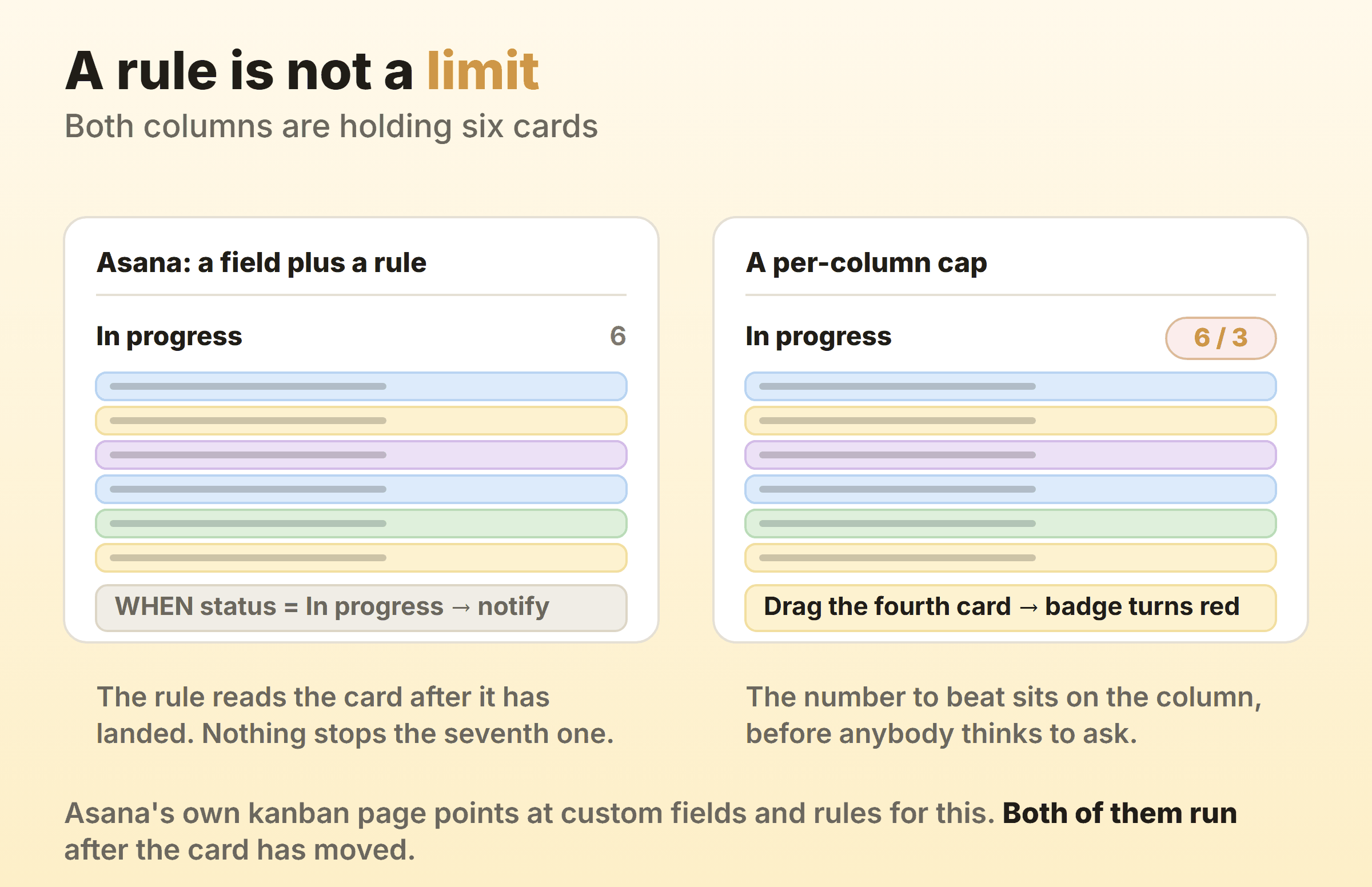
That sentence is doing a lot of work. A custom field plus a rule can count cards and tell somebody about it. Neither one can stop the seventh card landing, and neither one is visible at the moment the person is deciding whether to start something new.
WIP limits are the mechanism that turns a board into a method. Without one you have a status display that people tidy up before the Monday meeting. The cap is what makes finishing something feel more urgent than starting something.
Three workarounds circulate. I would rank them like this:
- Write the cap into the column name. In progress (max 3). Costs nothing, works on a disciplined team of three, and fails the first time somebody is in a hurry.
- Add a rule that notifies the lead when a card enters the column. Better than nothing, and it fires after the card has already landed. You are now relying on a person to undo a decision somebody else has made.
- Build a dashboard chart of cards per section. Accurate, and nobody looks at a dashboard while dragging a card.
Every one of them has the same hole in it. A limit does its job in the second before somebody breaks it, and all three of these arrive afterwards.
Do Asana Kanban Boards Have Swimlanes?
Yes. Asana added swimlanes to board view in July 2025, so the board can now be split into rows as well as columns. Rows group by section, by assignee, or by a single select custom field, and the feature is on Starter and above.
This closed a gap that had been open for years. Asana kanban swimlanes let you run one board where the columns are workflow states and the rows are, say, client or work type, which is the layout most agencies were faking with separate projects.
Use them sparingly. Two dimensions of grouping look impressive in a demo and read as clutter by week three, especially when the rows are people. A board grouped into rows by assignee tells you who is busy and hides where the work is stuck, which is the one thing a board is for. If you want the reasoning behind that, the guide to swimlanes goes through when a second dimension earns its place.
Can You Measure Cycle Time on an Asana Board?
Not natively. Asana stamps a task with a creation date and a completion date, and a move between sections does get written to the task activity feed, but reporting cannot reach that feed. The raw material for flow metrics exists and never reaches a chart.
Reporting dashboards, on Starter and above, build charts from task and field data in bars, lines, donuts and a burn-up. Useful charts. None of them is a cumulative flow diagram, and none of them is a cycle time distribution.
The clearest evidence for that comes from Asana itself. Its app directory lists Nave precisely to add a cumulative flow diagram, cycle time scatterplot, aging chart and throughput run chart to Asana projects. Third parties do not build what the host already ships.
You can approximate. A rule that stamps a date field when a card enters a section, a second date field when it enters another, and a formula between them gives you a rough cycle time on paid plans. It costs two custom fields and two rules per measured stage, and it starts on the day you build it rather than covering the six months you actually want to look at.
For a team of four shipping a few things a week, none of this matters much. You can already see review is slow. It starts to matter the week somebody senior asks how long work takes here and you would rather answer with a number than a feeling.
Are Asana Kanban Board Templates Worth Using?
An Asana kanban board template is worth about ten minutes of setup and nothing more. Asana publishes a kanban board template, and the template gallery has dozens of variations by team and industry.
What a template hands you is a set of sections, some custom fields, and sample tasks. What it cannot hand you is your workflow, because its columns came out of somebody else’s process and its fields answer questions your team has never asked.
If you do start from one, do this:
- Delete every sample task. All of them.
- Rename the sections to the words your team already says in standup.
- Delete any custom field you cannot explain in one sentence.
- Run it for two weeks before adding a single thing back.
Most people do step one and stop. The board then fills with fields nobody maintains, and a month later the whole thing feels like admin rather than a plan.
When Is an Asana Kanban Board Not Enough?
An Asana kanban board runs out of road when you need the board to change what the team does rather than record it. Three signs turn up again and again:
- In progress has held nine cards for a month and nobody has said anything.
- Somebody asks how long work takes and the honest answer involves exporting a CSV.
- The project carries six views with filters that one person understands, and that person is on holiday.
None of that is an argument against Asana as project management software. Kanban is one view inside a platform that also does portfolios, goals, forms, timelines and workload, and if your organisation runs on those, the board is a feature you get for free rather than a reason to leave.
Evaluate Asana on kanban boards alone, though, and the gaps are real. No caps, no flow metrics, and per-seat pricing for the automation that papers over the first two.
Kanbanee was built for the other case. WIP limits are set per column from the column menu, stay off until you switch them on, show as a count against the limit, and turn red once you go over. The cap never blocks a drag, so the board argues with you and then lets you do it anyway. Cycle time, weekly throughput and a cumulative flow diagram come built in on Pro, which is $6 a month or $48 a year with unlimited members on your boards. The honest trade is that you get a board and very little else. No portfolios, no goals, no forms, no realtime sync, and no integrations yet. If you are weighing a move instead, Asana alternatives compares the tools people switch to and what each one fixes.
Plenty of teams run both without much friction. Company planning stays in Asana, and the daily board moves somewhere that can hold a cap of three.
FAQ
Is the Asana kanban board free?
Yes. Board view is part of the free Personal plan, so a kanban board in Asana costs nothing to build and nothing to run. The paid plans add custom fields, rules, swimlanes and dashboards, which is where most of the kanban-adjacent capability lives.
Which is better for kanban, Asana or Jira?
Jira, if you want kanban specifically. Jira boards carry a real column constraint and ship a control chart and cumulative flow diagram in the box, which are the two things Asana leaves out. Asana wins on almost everything else, including how quickly a non-technical team will actually use it. Pick Jira when the board needs to enforce something, and Asana when the board mainly needs to communicate.
What are the disadvantages of Asana for kanban?
The disadvantages are specific rather than general. No WIP limits, no native cycle time or cumulative flow reporting, board structure that cannot differ from list structure because both are the same sections, and per-user pricing that puts rules and dashboards behind a paid seat for everybody on the team.
Can you group an Asana board by a custom field instead of sections?
Yes. Board view has a Group by control, so the columns can follow the options of a single select custom field rather than the project’s sections. Custom fields are a paid feature, so this is a Starter and above answer. It is also the cleanest way to get columns that differ from your list view sections.
Does the Asana kanban board work on mobile?
It works, with roughly one column on screen at a time and a swipe between them. Cards open as full task pages and read well on a phone. For moving work, open the card and change its section from inside rather than fighting a drag on a small screen.