
Basecamp Alternatives: 8 Tools Compared on What Basecamp Skips
The Answer
Most people hunting for Basecamp alternatives are not running from the bill, they are running from what Basecamp deliberately left out. Its feature list runs to to-dos, message boards, chat, a calendar, Kanban card tables, Hill Charts, check-ins, docs, reports and The Lineup, which plots whole projects on their start and end dates. Task dependencies, a task-level timeline and workload views are not on it. Time tracking is, but it is excluded on Free, Freelancer and Studio and only arrives on Pro at $99 a month flat. Pick by the gap you have. ClickUp bundles Gantt charts and native time tracking into Unlimited at $7 per user per month billed yearly. Asana puts timeline, Gantt and reporting dashboards on Starter at EUR 10.99 per user per month billed annually. Teamwork.com suits agencies billing by the hour. Notion carries dependencies inside databases on the free plan. Trello, monday.com and OpenProject cover simpler, more visual and self-hosted. One piece of arithmetic first: under about six people, Basecamp’s flat fee is the expensive option.
Why Do Teams Leave Basecamp?
Teams leave Basecamp for missing structure rather than price, and it is nearly always the same three things.
First, dependencies. You get to-dos with assignees, due dates, subtasks and comments, plus Card Tables, which the pricing page calls “our take on Kanban for process tracking”. What you do not get is a way to say this task cannot start until that one lands. The features page never mentions dependencies, Gantt charts, critical path or resource management. The one timeline it does describe is The Lineup, which plots every project on its start and end dates rather than the tasks inside them. That is a design decision at 37signals, and it holds up until a client asks when a thing ships and the answer depends on four other things.
Second, reporting. Reports and Automatic Check-ins ship on every plan and answer “what happened this week” well enough. Neither answers how long a request takes from arrival to delivery. Once you are asking that, you want flow metrics.
Third, and this contradicts every review post written before this year: Basecamp does track time now. It just does not do it on the plan you are probably on.
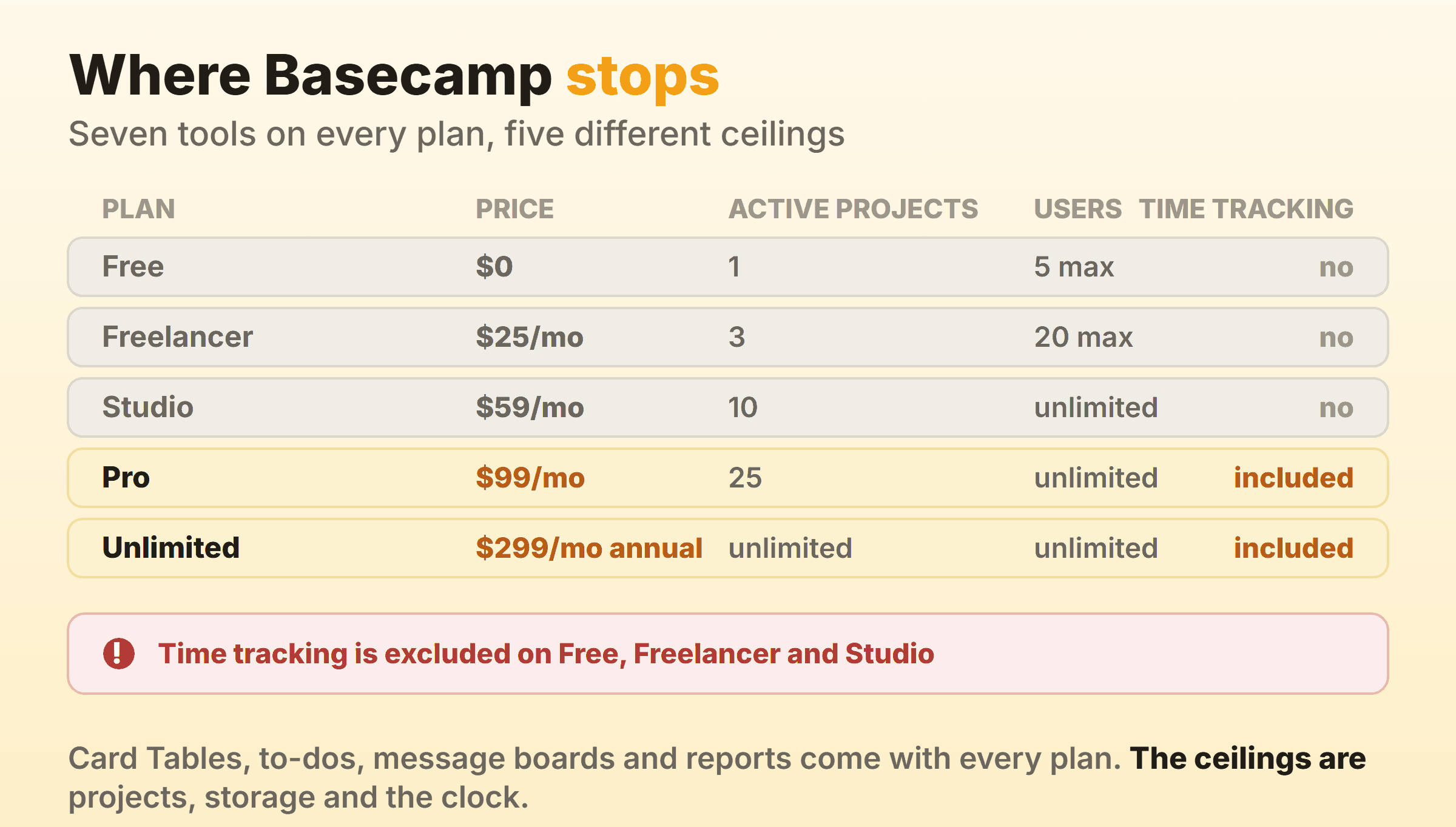
Read that last column carefully. Fetch basecamp.com/pricing as raw HTML and the excluded rows read identically to the included ones, because the only thing separating them is a CSS class on the list item. That is how comparison posts ended up awarding Freelancer a stopwatch. Render the page and Free, Freelancer and Studio all carry a red cross beside that row instead of a tick. On Studio, the plan Basecamp labels “Not sure? Start here”, you pay $59 a month flat and cannot log an hour.
The money cuts both ways too.
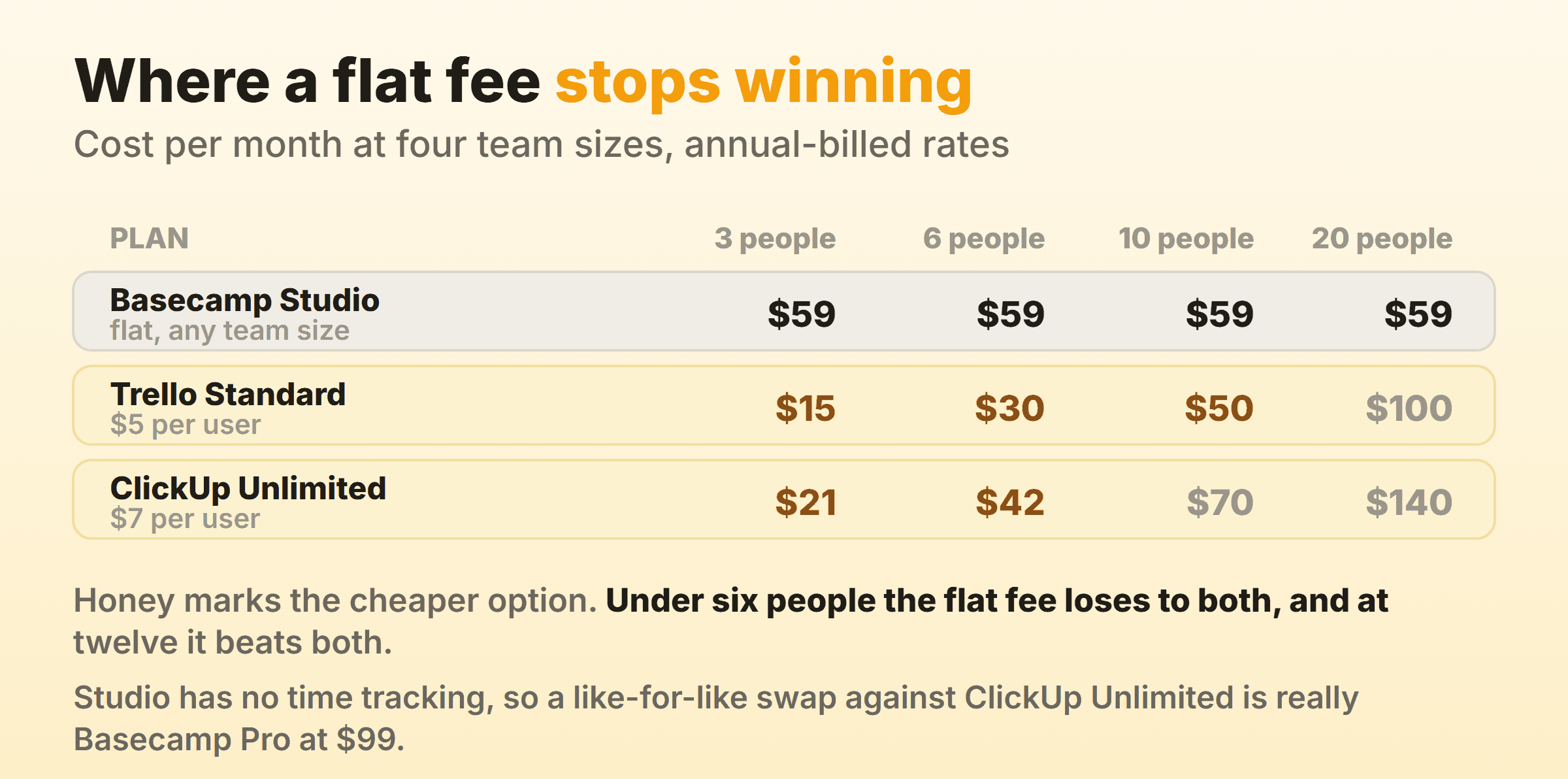
A flat fee is a bargain at thirty people and a bad deal at three. Three people on Studio pay $59 a month. The same three pay $15 on Trello Standard and $21 on ClickUp Unlimited, both on annual billing. “No per-user fees, everyone’s included” carries two caps the headline skips: Free stops at five users and Freelancer at twenty, so the unlimited part starts at Studio. Above that line it is true, and it only starts paying once you have enough people for it to bite. If your team is five, you are probably about to save money.
Basecamp Alternatives Compared
| Alternative | Who it suits | The thing it fixes | Entry price |
|---|---|---|---|
| ClickUp | Small teams wanting one tool | Gantt, dependencies and time tracking on one tier | Free Forever, then $7 per user per month yearly |
| Asana | Teams coordinating across groups | Timeline and Gantt views plus reporting dashboards | Free for 2 users, then EUR 10.99 per user per month annually |
| Teamwork.com | Agencies billing by the hour | Billable time, retainers, invoices from logged hours | Free for 5 users and 5 projects, then per user |
| monday.com | Teams that found Basecamp too grey | Dashboards, board views and heavy automation | Free for 2 seats, then EUR 9 per seat per month annually |
| Notion | Teams whose real problem is the docs | Databases with subtasks and dependencies, free | Free, then EUR 9.50 per seat per month yearly |
| Trello | Teams finding Basecamp too heavy, not too light | Less tool, less money, nothing to configure | Free for 10 collaborators, then $5 per user per month annually |
| OpenProject | Teams that must host their data | Gantt, relations and time tracking on your hardware | Community edition free, unlimited users |
| Our own board | A team that only wants a board | A soft per-column cap and a built-in stopwatch | Free for 2 boards, Pro $6 a month flat |
Every price and tier name there came off the vendor’s own pricing page on 16 September 2026, rendered in a browser rather than fetched as HTML. Asana, monday.com and Notion price in the visitor’s billing currency and all showed euro when checked, so those three are quoted in euro and the rest in US dollars. Vendors rewrite these monthly, so open the page yourself first.
ClickUp: Everything Basecamp Skips, on One Cheap Tier
ClickUp answers all three gaps with one paid tier, which is the whole reason a Basecamp team lands here. ClickUp’s pricing page puts Unlimited Gantt Charts, Native Time Tracking, Unlimited Storage, Resource Management and Goals on Unlimited at $7 per user per month billed yearly, $10 billed monthly. Business at $12 billed yearly adds Unlimited Dashboards and Unlimited Timeline Views.
Free Forever is real but tight: unlimited tasks, unlimited free plan members, Kanban Boards, Collaborative Docs, and 60MB of storage. Sixty megabytes will not hold one client’s brand assets, so treat it as a trial rather than a destination.
The honest cost is attention, not money. Basecamp’s appeal is that there is nothing to set up. ClickUp is the opposite, and six people moving there will spend a week arguing about statuses before anyone gets faster. If that sounds bad, skip to Trello. If it sounds fine, kanban in ClickUp covers the board.
Asana: A Timeline That Actually Understands Dependencies
Asana is the pick when the missing piece is scheduling. Asana’s pricing page puts Timeline and Gantt views on Starter at EUR 10.99 per user per month billed annually, EUR 13.49 billed monthly, and describes them as where you “Visualize schedules on a timeline and dive into task dependencies and progress with interactive Gantt charts.” Starter also brings reporting dashboards, unlimited automations and unlimited free guests.
The free Personal plan carries 2 users, which rules it out as a team trial. Native time tracking sits two tiers up on Advanced at EUR 24.99 per user per month billed annually, so a shop moving for the clock should compare that against Basecamp Pro at $99 a month flat, not against Starter.
Watch the seat maths. Asana’s FAQ says seats go up one at a time between 2 and 5 users, then in fives up to 30. A seven-person team buys ten seats, and so does a six-person one. That is the mirror image of the flat fee you are leaving. Kanban in Asana covers the boards.
Teamwork.com: Built for the Agencies Basecamp Was Built For
Teamwork.com aims at the client-services crowd Basecamp has always served, and the focus shows in the feature list. Its pricing page puts “Track and report billable time” on the entry Basics plan alongside Gantt, Table, List and Board views. Accelerate adds workload planning with live capacity, time budgets and retainers, client invoices built from logged time, and 20,000 automations.
The free plan is a genuine trial for a small shop: 5 projects, a maximum of 5 users, 100 automations, and task, list, board, Gantt and table views. Paid plans are per user per month, with an annual option marked as a 29 percent saving.
One caution on the price. When I opened that page the currency symbol rendered as a stray ampersand beside every figure, and the structured data behind the page named different plans at different rates from the cards, Deliver and Grow rather than Basics and Accelerate. Read the plan cards yourself and check what your card gets charged. The capability claim is solid and the number is not.
monday.com: Colour, Views and a Three-Seat Floor
monday.com is the move for a team that left because Basecamp felt grey. Boards, dashboards and automations make the same work look like something you could hang on a wall. Its pricing page puts Timeline and Gantt views, calendar view, guest access, automations and integrations on Standard at EUR 12 per seat per month billed annually, EUR 14 billed monthly. Time tracking and advanced board views arrive on Pro at EUR 19 per seat per month billed annually, EUR 24 monthly. Basic is EUR 9 per seat per month billed annually.
Two limits catch Basecamp refugees. The free plan stops at 2 seats and 3 boards, so it is a look rather than a pilot. And monday’s FAQ says plans start from 3 users, so a solo consultant pays for three. Coming off a plan with no per-user fee, that floor stings more than the rate. Monday.com alternatives goes further, and kanban in monday.com covers the board.
Notion: When the Real Problem Was the Docs
Some teams do not want a project tool. They want the wiki Basecamp’s Docs and Files tool half-delivers, with tasks attached. That is Notion, and its free plan is generous on exactly the axis this article cares about.
Notion’s pricing page lists “Databases including subtasks, dependencies, custom properties and more” under Free. Dependencies, at no cost, in a tool most people file under note-taking. Plus at EUR 9.50 per seat per month billed yearly, EUR 11.50 billed monthly, adds unlimited charts, unlimited collaborative blocks and unlimited file uploads. Business at EUR 19.50 per seat per month billed yearly brings SAML SSO and private teamspaces.
The verdict is half warning. Notion will do everything Basecamp did and more, and none of it until somebody builds it. Basecamp hands you a working project on day one. Notion hands you a blank page and a database engine. Teams who enjoy that trade love it. Teams who wanted to stop configuring software end up back where they started. Kanban in Notion shows what that board looks like.
Trello: The Answer If Basecamp Felt Like Too Much
Trello is the option nobody lists, because it is a step sideways rather than up. If your account is mostly one card table and a message board, you are paying $59 a month for a to-do list with a chat room attached.
Trello’s pricing page gives Free up to 10 collaborators and 10 boards per Workspace, unlimited cards and unlimited Power-Ups per board. Standard at $5 per user per month billed annually, $6 monthly, unlocks unlimited boards, Custom Fields and advanced checklists. Premium at $10 billed annually adds Calendar, Timeline, Table, Dashboard and Map views.
What you give up is real. No message board, no client mode, no docs. Trello is a board, and everything around it is somebody else’s app. If that reads as a downgrade, it is. If it reads as relief, it is that instead. Trello alternatives covers where it runs out.
OpenProject: Free, Open Source, and Yours to Run
OpenProject is the straight answer for anyone searching Basecamp open source. Its Community edition is described as “free of charge with unlimited users and projects” and as “The self-managed, free and open source software for secure project management”, on your own infrastructure.
The feature list covers Gantt charts, Kanban and sprint boards, time and cost tracking, and work package relations including “successor or predecessor, blocked by, part of”. Every gap in this article, closed at once, on hardware you control. Team planner, resource management and single sign-on are Enterprise add-ons.
The cost is a server and somebody to keep it alive. If you hoped to buy support instead, check the minimums on OpenProject’s pricing page first. With US dollars and a one year term selected, Basic is $7.25 per user per month at a 25 user minimum, Professional $13.50 on the same floor, Premium $19.50 at 100. Billing monthly instead adds $1.25 per user. For a team of eight, the paid tiers are not for you and the Community edition is. Our open source kanban roundup covers licences.
Our Own Board: The Narrow Option, and Who It Is Wrong For
I should be direct, since this sits on our own site. Kanbanee is a kanban board with WIP limits and native timers, and for most people reading a page about leaving Basecamp it is the wrong tool.
It replaces the Card Table and nothing else. No message board, no client mode, no docs, no scheduling. Free covers 2 boards you own with unlimited members. Pro is a flat $6 a month or $48 a year. WIP limits are soft and off by default, so a drag is never blocked. The reports, time by member or label, weekly throughput, cumulative flow diagram and cycle time, are Pro only. There is no realtime sync, no API, and column drag is desktop-only.
Take it if the only Basecamp tool you use is the card table. Everyone else needs more, and the wider field lives in our kanban alternatives roundup.
What You Lose by Leaving Basecamp
Every tool above is more capable than Basecamp and most are worse to live with, which is the part these posts skip.
You lose the flat fee. No per-user pricing means a project never stalls while somebody decides whether a freelancer is worth a seat. Elsewhere every extra body is a line item, and you will start rationing access without meaning to.
You lose the client wall. Client mode is one of the few genuinely hard things Basecamp does well, and most alternatives approximate it with guest permissions you have to get right yourself. Get that wrong once and the migration has cost more than it saved.
You lose the simplicity, which people underestimate. Seven tools and no settings worth arguing about is a feature. ClickUp, monday.com and Notion all invite a team to spend a fortnight designing a system instead of doing work, and big organisations feel it hardest, which is why kanban for enterprise spends so long on governance.
And you lose Card Tables, which are better than their reputation. If the board is the only part annoying you, our guide to Basecamp Card Tables covers the three columns you cannot rebuild and the ways around the missing cap. That beats moving five people.
FAQ
Is there a free alternative to Basecamp?
Several. ClickUp Free Forever gives unlimited tasks and unlimited free plan members with 60MB of storage. Trello Free covers 10 collaborators and 10 boards per Workspace. Notion’s free plan includes databases with subtasks and dependencies. Teamwork.com Free allows 5 users and 5 projects. OpenProject’s Community edition is free with unlimited users if you host it. Basecamp’s own free plan is the tightest here, at one project and five users.
What is the closest alternative to Basecamp?
Teamwork.com is closest in shape, since it targets the same client-services teams and bundles projects, time and client work in one place. Notion is closest in spirit, because both treat documents as first-class rather than attachments. Nothing matches the flat fee, unlimited users and deliberately short feature list together.
Does Basecamp have Gantt charts or dependencies?
Basecamp’s features page lists to-dos, message boards, chat rooms, a calendar, Kanban card tables, Hill Charts, check-ins, docs, reports and The Lineup. Gantt charts, dependencies, critical path and workload views are not on it. The Lineup plots whole projects on their start and end dates and the Schedule tool is a calendar for deadlines and milestones, so neither is a dependency-aware timeline over tasks.
Which Basecamp plan includes time tracking?
Pro at $99 a month flat and the Unlimited Edition at $299 a month billed annually. On the pricing page the row carries a red cross on Free, on Freelancer at $25 and on Studio at $59. Easy to get wrong, because the excluded rows are only distinguishable in a rendered page.
Are Basecamp alternatives cheaper than Basecamp?
Below about six people, almost all of them. Three people cost $15 a month on Trello Standard and $21 on ClickUp Unlimited, both on annual billing, against $59 a month flat for Basecamp Studio. The crossover falls between eight and twelve people, and above that the flat fee wins and keeps winning as you hire.