
Monday Alternatives: 8 Tools Compared on Seats and Price
The Answer
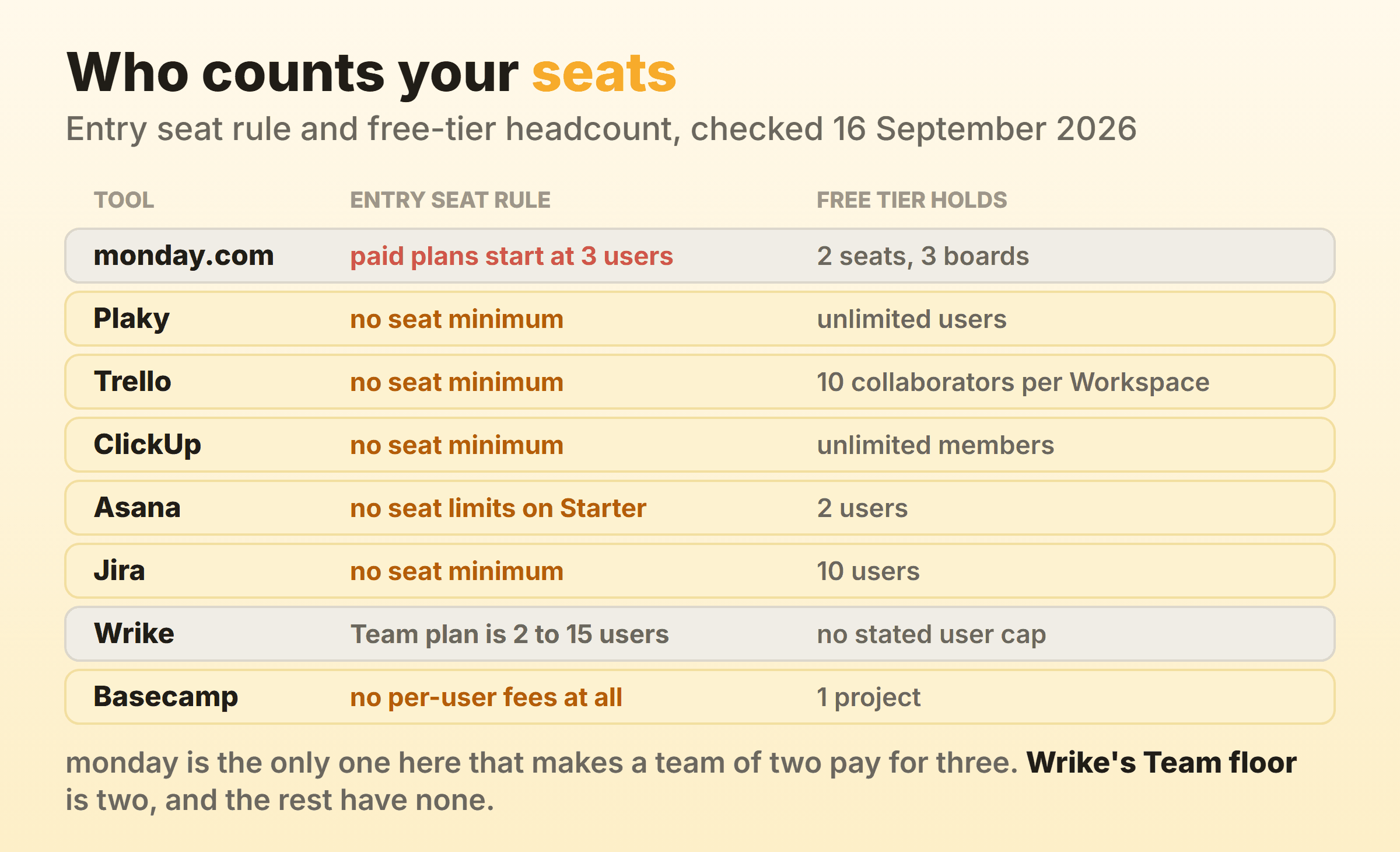
Most monday alternatives get chosen on looks, and the thing pushing people out is almost always the bill. monday.com sells per seat, its pricing page says plans start from 3 users, and its free plan stops at 2 seats, so a pair who outgrow Free buy a third seat nobody sits in. Match the fix to that number. Plaky’s free plan is priced for unlimited users, ClickUp’s Free Forever carries unlimited members, Jira is free forever for 10 users, and Trello is free for 10 collaborators per Workspace. Asana’s Starter plan says in as many words that it has no user seat limits, Basecamp charges a flat fee with no per-user fees, and Wrike gives you a free Board view before banding Team at 2 to 15 users. Write your number down before you open a single trial.
What Makes Teams Leave monday.com?
Teams leave monday.com over the seat count, and the board usually has nothing to do with it. monday’s pricing page answers “How much does monday.com cost?” with a sentence worth reading twice: “Plans start from 3 users.” The same page puts the Free plan at “Up to 2 seats”, three boards and three Docs.
Those two numbers do not meet. Two people on Free who want an automation or a Gantt view cannot pay for two seats, so they pay for three and leave one empty.
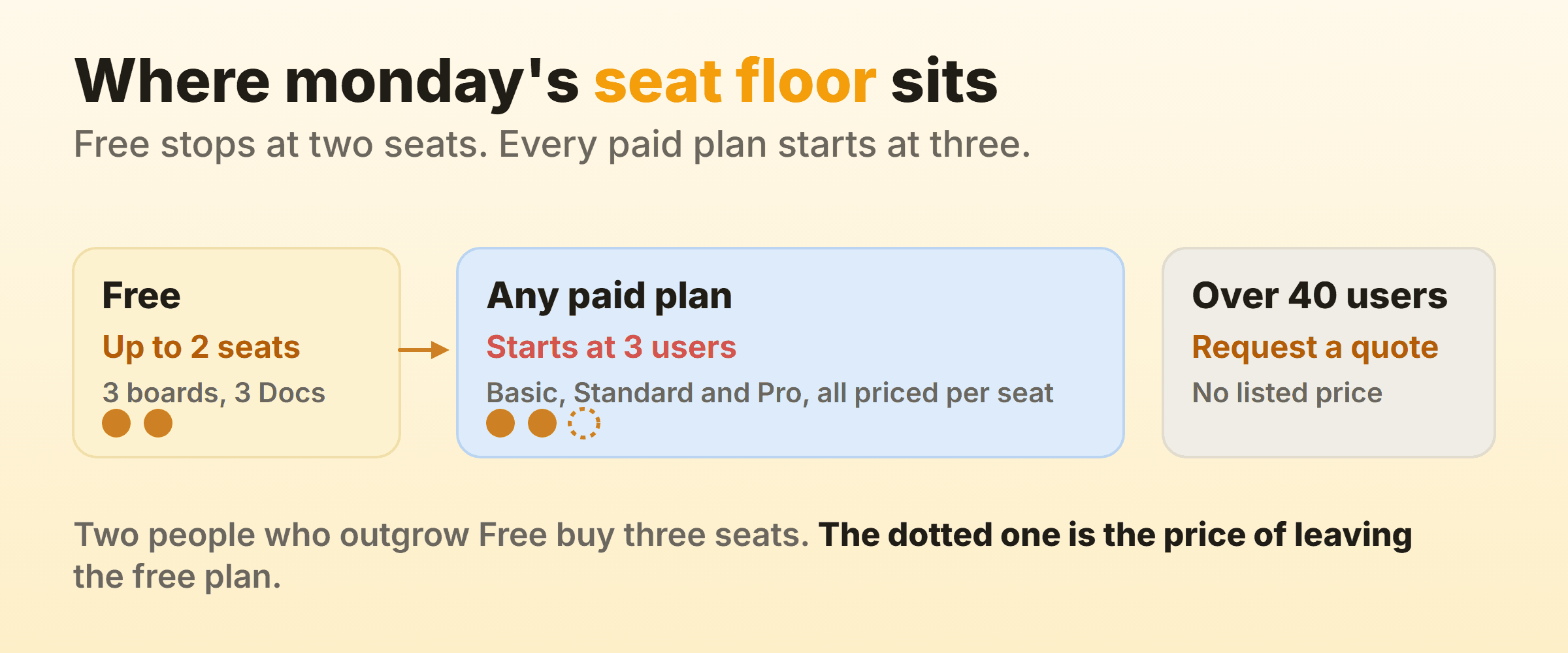
The rate compounds it. On the page I loaded with yearly billing selected, Basic listed at 9 a seat per month, Standard at 12 and Pro at 19, under a footnote explaining the currency: “Prices do not include tax. The price is determined by the user’s billing country.” Mine came up in euro. Check yours at your own checkout. Blogs go stale, this one included. Annual billing takes 18 percent off, and above 40 users there is no listed price at all, only a quote.
Tiering does the rest of the damage. Time tracking is a Pro line, and automations run at 250 actions a month on Standard against 25,000 on Pro, so a busy board hits the metering long before it hits a missing feature.
None of that is a verdict on the board. The monday.com kanban view is capable and ships on every plan including Free. People leave over the seat floor, then talk themselves into a story about the board on the way out.
Monday Alternatives Compared on Seats and Price
| Alternative | Who it suits | What it fixes | Entry price on 16 September 2026 |
|---|---|---|---|
| Plaky | Two or three people who want monday’s shape free | Free plan priced for unlimited users | Free, Pro $3.99 per seat per month billed annually |
| Trello | A team that only opened the board view | 10 free collaborators per Workspace, no seat floor | Free, Standard $5 per user per month billed annually |
| ClickUp | Teams replacing the whole platform | Unlimited members on Free Forever | Free Forever, Unlimited $7 per user per month billed yearly |
| Asana | Teams wanting the same breadth, no minimum | Starter states no user seat limits | Starter $10.99 per user per month billed annually |
| Jira | Software teams of ten or fewer | Free forever for 10 users, reports included | Free for up to 10 users |
| Wrike | Teams trying a board before paying | A free plan that includes Board view | Free, Team $10 per user per month billed annually |
| Basecamp | Anyone tired of seat arithmetic | Flat monthly fee, no per-user fees | Free for 1 project, Freelancer $25 a month flat |
| Our own board | One team whose whole job is the board | Soft per-column caps and native timers | Free for 2 boards, Pro $6 a month |
Every price below came off the vendor’s own pricing page or help centre on 16 September 2026, loaded in a browser. No review sites. Free tiers get rewritten without notice, so check yours before you move anybody.
Plaky: A Free Plan With No Seat Count at All
Plaky removes the seat floor outright, because its free plan is priced “for an unlimited number of users”. Plaky’s pricing page puts unlimited spaces, boards, items and views on that plan, along with unlimited Table, Kanban and Chart views, member and admin roles, 6 fields per board, a 7-day activity log and 10 MB per file. The two-person team monday just quoted for three seats pays nothing at all.
Pro is $3.99 per seat per month billed annually, or $4.99 monthly, and it files off the free plan’s edges: unlimited fields, a Gantt view, private boards, a viewer role, 1,000 automation actions a month and a 6-month activity log. Plaky is unusually plain about what a seat is, stating that every active or invited user on the User management page occupies one, owner and admins included. Those dollar figures are what the page shows after switching its own currency selector to the United States.
Trello: The Cheapest Way to Keep Only the Board
Trello is the cheapest sensible landing spot if the board is the only part of monday you used. Trello’s pricing page lists Free at “$0USD” with “Free for up to 10 collaborators per Workspace”, up to 10 boards per Workspace and 250 Workspace command runs a month. Standard is $5 per user per month billed annually or $6 monthly, and Premium is $10 per user per month billed annually or $12.50 monthly.
Ten free collaborators against monday’s two is the headline, and for a lot of small teams the migration ends right there.
The catch is the one Trello has always had. A per-list cap appears nowhere in the plan comparison, on any tier, and the reporting views arrive on Premium. If WIP limits are why you are shopping, read our alternatives to Trello piece first. Board mechanics are in kanban in Trello.
ClickUp: The Like-for-Like Platform Swap
ClickUp is the closest replacement for what monday actually is, a platform that happens to contain a board. ClickUp’s pricing page puts “Unlimited Free Plan Members” on Free Forever alongside unlimited tasks, kanban boards and 60MB of storage. Unlimited is $7 per user per month billed yearly or $10 monthly. Business is $12 per user per month billed yearly or $19 monthly.
Unlimited members on a free plan is the direct answer to a two-seat cap.
Read the plan line on the column cap before you budget, though. ClickUp’s help centre on Work in Progress Limits says they “are available on the Business Plan and above”, and an owner or admin has to switch the ClickApp on first. The column header then shows count against limit, running green, yellow then red, and the cap stays soft, since “You can create, move, or update tasks even if it makes a particular column go over the limit.” Six people who need that are looking at $72 a month billed yearly. More in kanban in ClickUp and ClickUp alternatives.
Asana: No Seat Minimum, Same Two-Person Free Plan
Asana kills the minimum and keeps the free ceiling, which makes it half a fix. Asana’s pricing page lists “No user seat limits” as a Starter feature in plain text, so a team of two pays for two. Starter is $10.99 per user per month billed annually or $13.49 monthly. Advanced is $24.99 per user per month billed annually, and that is where native time tracking, resource management, portfolios and goals live.
The free plan will feel familiar in the wrong way. Personal is described as “For one or two people managing personal projects” and lists “2 users”, the same headcount monday gives away, with unlimited tasks and projects and list, board and calendar views underneath.
So Asana answers the three-seat rule for teams that were always going to pay somebody. Anybody hoping to pay nobody wants the free tiers above. Starter does carry unlimited free guests, unlimited automations, forms and reporting dashboards. Setup is in kanban in Asana and the rest in Asana alternatives.
Jira: Free Forever for Ten Users
Jira gives a ten-person team the whole product for nothing, which nothing else on this page quite matches. Atlassian’s pricing page labels the Free plan “Free forever for 10 users” at $0 and lists unlimited goals, projects, tasks and forms, the backlog, list, board, timeline, calendar and summary views, reports and dashboards, 150 automation steps per subscription per month and 2 GB of storage.
Reports on the free plan is the line that matters here, since monday keeps its charts on Pro.
The column cap lives in the board settings here. Atlassian’s documentation on configuring columns covers a minimum and a maximum number of work items per column and turns the column header red once the maximum is exceeded, counting every item whatever a quick filter is hiding. That page is scoped to company-managed spaces, so check your space type first.
What you pay instead is setup. Board behaviour spreads across column configuration, status mapping and the board filter, and somebody has to own it. On a marketing team of six, Jira is usually the wrong trade. Kanban in Jira walks the build, and Jira alternatives covers the way back out.
Wrike: A Free Board View, Then Its Own Seat Bands
Wrike is the one alternative here that also bands its plans by headcount, so read it with the suspicion that brought you to this page. Wrike’s pricing page puts Board view and Table view on the Free plan at $0 per user per month with no stated user cap, then lists “2 to 15 users” under Team at $10 per user per month and “5 to 200 users” under Business at $25, billed on an annual per-user basis.
The floor is two, and the free plan includes the board, so a team can try the thing before anybody pays.
Where it bites is Business. A five-user minimum at $25 is $125 a month whether or not the fifth person exists, which is monday’s own trick at a bigger number. Wrike earns that money on resource planning and proofing, and none of it changes the board. See kanban in Wrike and Wrike alternatives.
Basecamp: A Flat Fee That Ends the Seat Arithmetic
Basecamp deletes the per-seat question. Basecamp’s pricing page opens with “No per-user fees, everyone’s included. Simple fixed prices” and prices the account instead, as a flat monthly fee: Freelancer at $25 a month, Studio at $59, Pro at $99 and the Unlimited Edition at $299 a month billed annually. The Studio panel spells out “UNLIMITED users, no per-user fees” beside 10 active projects and 25 GB of storage. Free is one project.
Run the arithmetic before you flinch at $59. Twelve people on a mid-tier per-seat plan clear that comfortably, and the gap widens with every hire.
Basecamp does have a board and is honest about its ambition for it, describing “Card Tables is our take on Kanban for process tracking” among the features included with every package. Card Tables is a place to move cards, and Basecamp’s own feature list stops at process tracking, with no column cap or cycle time named anywhere on the page, so a stalling board is something you notice by eye. See kanban in Basecamp and Basecamp alternatives.
A Board Where the Cap Is a Checkbox
A single-purpose board only belongs here if it ships the controls the platforms put behind a tier. I run our own product board on it, so weigh the entry accordingly.
Kanbanee is built for the narrow case where the board is the entire job. A limit is a checkbox and a number in the column menu, pre-filled at 3 and off until you tick it, and the badge shows count against limit and turns red over the cap while still letting the drag through. Free covers 2 boards you own with unlimited members. Cycle time, weekly throughput, a cumulative flow diagram and time by member or label sit behind Pro at $6 a month or $48 a year.
Most people reading this should not pick it, and I would rather say so now than have you find out in week three. There is no realtime sync, so the board polls instead of updating live, and there is no API. Column reordering works on desktop only. If monday was holding your CRM, your forms and three departments, moving here is a downgrade with extra steps.
What Do You Lose by Leaving monday.com?
What you lose by leaving monday.com is the platform around the board, and the estimate always comes in low because nobody audits the parts they touch twice a month. Dashboards that combine boards, Workload, portfolios, forms, Docs, 200-plus templates and the separate CRM, dev and service products all go.
You also lose a structural convenience that is invisible until it is gone. Because monday builds kanban columns out of a status column, one rename updates every view, filter, automation and dashboard widget at once. On most alternatives the board’s columns are their own object, so renaming a column and renaming a status become two jobs.
The part nobody checks until the weekend of the move is the timestamp trail of when each card entered and left each column. That trail is the raw material behind every number in a flow metrics report, and almost no export carries it. Export before you cancel anything, even with nowhere to put it yet, and ask the destination what its importer drops.
Which monday.com Alternative Fits Your Reason for Leaving?
Start from the number that made you open this page. Every tool here draws the same three-object board, which is how teams end up with the same workflow in a different colour.
- You are two people and refuse to pay for three. Plaky Free for unlimited users, or ClickUp Free Forever for unlimited members.
- Ten people or fewer, and reports matter. Jira Free, if somebody will own the configuration.
- You only ever used the board. Trello Standard at $5 per user per month billed annually, with no per-list cap in the plan comparison.
- You want the same breadth without the minimum. Asana Starter, which states no user seat limits.
- Headcount is growing and the per-seat bill hurts. Basecamp, where the fee is flat and nobody counts users.
- You want to try a board before paying anybody. Wrike Free, with its 2-to-15 band waiting on Team.
- The board is the whole job and you want caps and timers. That narrow slot is where our own tool sits.
Wider roundups sit next door in kanban alternatives and project management software. Whichever way you go, write the missing capability down in one sentence first. If that sentence describes how the board looks, rename six columns on Monday and keep your money.
FAQ
Does monday.com really have a minimum number of users?
Yes. monday’s pricing page states “Plans start from 3 users” in its own FAQ, and the Free plan is capped at “Up to 2 seats”. A two-person team stepping off Free buys three. Above 40 users the page stops showing a price and asks for a quote instead.
What is the best free alternative to monday.com?
Plaky if headcount is the issue, since its free plan is priced for an unlimited number of users and includes Kanban, Table and Chart views. ClickUp Free Forever gets you the wider suite. Jira Free suits ten users or fewer who want reports included. Our free kanban boards roundup covers the rest.
Which monday.com competitor is closest to monday.com itself?
ClickUp and Asana. Both are platforms where the board is one view among a dozen. ClickUp matches monday’s breadth. Asana matches the feel, and its Starter plan drops the seat minimum that starts this search.
Is there a cheaper monday.com alternative that still does kanban properly?
Plaky Pro at $3.99 per seat per month billed annually is the cheapest paid tier here, and Kanban view is already on its free plan. For a per-column cap, Jira Free puts column constraints in the board settings at no cost, and ClickUp puts Work in Progress Limits on Business at $12 per user per month billed yearly.
Will my monday.com boards move to another tool intact?
Partly. Card-level data usually survives, meaning names, owners, due dates and descriptions. Board views, automation recipes, dashboards and the column history rarely do, and that history is what any future board view report would have rested on. Expect to rebuild the automations by hand.