
Smartsheet Alternatives: 7 Tools That Keep Grid, Board and Gantt
The Answer
The Smartsheet alternatives worth a migration keep a grid, a board and a Gantt over one set of rows, which is what a sheet does and what a kanban app on its own never will. Which of the seven below suits you depends on why you are going. Smartsheet Pro caps you at 10 Members, its free Contributors cannot edit a cell, and a report on that plan reads from exactly one sheet. Wrike puts Table view and Board view on its free plan and charges $10 per user per month billed annually for the Gantt. monday.com reaches Timeline and Gantt views on Standard at $12 per seat per month billed annually, and ClickUp Unlimited runs $7 per user per month billed yearly with Unlimited Gantt Charts. Airtable, Notion and Grist hand back a database rather than a schedule. Work out your reason, then read the table.
Why Do Teams Leave Smartsheet?
Most teams leave Smartsheet over the seat arithmetic, and everything else is downstream of it.
Smartsheet’s pricing page puts Pro at $12 per Member/month billed monthly, $9 per Member/month billed yearly, scoped to “1-10 Members, unlimited Contributors”. Unlimited free Contributors sounds like the whole company is covered. Then you read what one is allowed to do. Smartsheet’s seat types page gives them viewing rights on sheets, reports and dashboards shared with them, plus comments and attachments under Commenter permissions, and stops there: Contributors “can’t create items, edit content, or share items with others.” Guests can edit when shared as Editor, and the same page says the Guest seat type is not available on Pro plans. So on Pro, everyone who touches a cell is a paid Member, and ten is the ceiling.
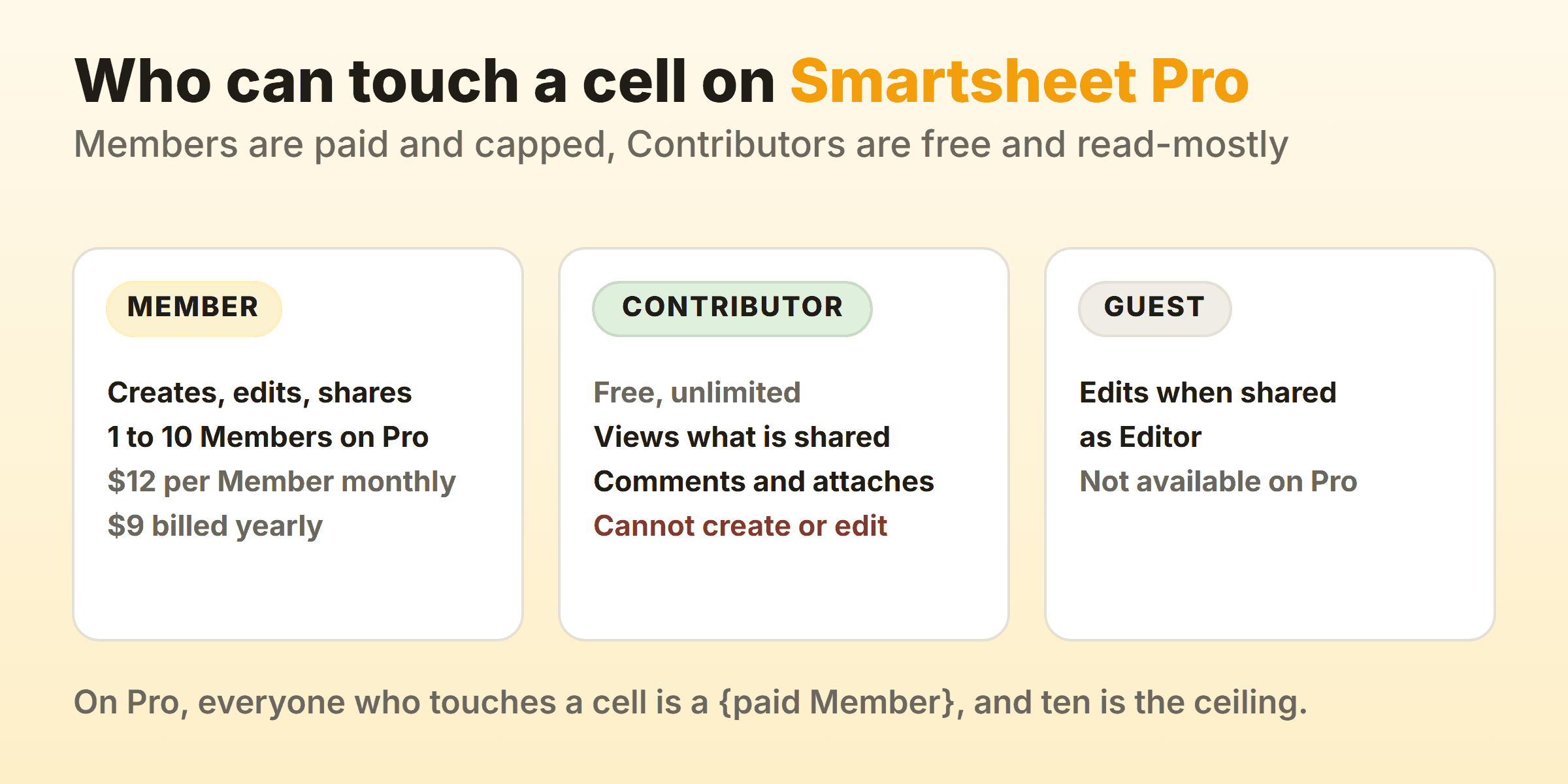
Reporting is the other pinch. That same comparison table lists Sheets per report as 1 on Pro against Unlimited on Business, and Widgets per dashboard as 10 against Unlimited. A Pro report pulls from a single sheet. Timeline view, Workload tracking and conditional form logic all wait for Business, at $24 per Member/month billed monthly or $19 billed yearly, with a three Member minimum.
One more nudge has nothing to do with money. Smartsheet is retiring card view from sheets through 2026, and our Smartsheet kanban guide covers what its replacement does and where it stops.
Smartsheet Alternatives Compared, and What Each One Fixes
| Alternative | Who it suits | What it fixes | Entry price on 16 September 2026 |
|---|---|---|---|
| Wrike | Teams wanting Smartsheet’s shape without the Member cap | Table view and Board view are both on the free plan | Free, Team $10 per user/month billed annually |
| monday.com | Teams moving together who want a like-for-like grid | Gantt arrives one tier up rather than two | Free for 2 seats, Standard $12 per seat/month billed annually |
| ClickUp | Budget-led teams that need scheduling early | Unlimited Gantt Charts on the first paid tier | Free Forever, Unlimited $7 per user/month billed yearly |
| Airtable | Teams whose sheet was always a database | Linked tables instead of cross-sheet lookups | Free for 5 editors, Team $20 per seat/month billed annually |
| Asana | Teams whose problem is ownership, not the rows | Timeline and Gantt on the entry paid plan | Free for 2 users, Starter $10.99 per user/month billed annually |
| Notion | Small teams who want three views for nothing | Table, board and timeline on one free database | Free, Plus $10 per member/month billed annually |
| Grist | Teams who want real formulas and their own server | Spreadsheet behaviour back, self-hosting optional | Free, Pro $8 per user/month billed annually |
Every price, tier and limit above came off the vendor’s own pricing page on 16 September 2026, in US dollars, with the annual toggle on where one exists. Currency deserves a glance before you budget, because monday.com states that the price is determined by the user’s billing country, and Smartsheet and Notion both carry a currency selector that does not default to dollars everywhere. These pages get rewritten quarterly. Open yours before you move anybody.
Wrike: Table View and Board View Without Paying
Wrike is the closest structural match here, and the free plan is why. Wrike’s pricing page gives the $0 tier project and task management, Board view and Table view, then pitches that table straight at the reader you are: “Love using a spreadsheet to track your work? No problem! Our table view offers the flexibility and collaboration you need in a format you’re familiar with.” Grid and board over one set of tasks, before anybody pays.
The Gantt costs. Team is $10 user/month for 2 to 15 users and brings Interactive Gantt charts and a shareable dashboard, while Business runs $25 user/month for 5 to 200 users. There is no monthly column on that page, which the footnote explains: “The amount shown is priced per month and billed on an annual per-user basis.”
My reservation is the one I have about Smartsheet. Wrike carries spaces, folders, projects and custom item types, and six people can burn a fortnight arguing about hierarchy before a task moves. Kanban in Wrike covers the board half.
monday.com: The Like-for-Like Move, One Tier Later
Check which plan carries the Gantt before you budget for monday.com, because Basic is not it. monday.com’s pricing page holds Timeline and Gantt views for Standard, promising you can “see all upcoming work in a visual timeline & use Gantt charts to ensure you’re meeting deadlines successfully.” Standard is $12 per seat per month billed annually, $14 billed monthly. Basic sits below at $9 annually and $12 monthly with no Gantt, and the Free plan stops at 2 seats and 3 boards, which disqualifies it for anyone leaving Smartsheet over seat limits. Pro is $19 annually, $24 monthly. Every one of those figures carries monday.com’s own footnote that the price is determined by the user’s billing country, so load the page where you will be invoiced.
Now do the comparison properly. Six people on monday Standard costs $72 a month on annual billing, against $54 for six on Smartsheet Pro at the yearly rate, except only paid Members edit there and every monday seat can. Count the people who need to type. Kanban in monday.com covers the board side.
ClickUp: The Cheapest Route to a Gantt Chart
ClickUp assembles grid, board and Gantt for less than anything else on this page that has all three. ClickUp’s pricing page gives Free Forever 60MB storage, unlimited tasks, unlimited free plan members, Kanban Boards, Calendar View and one form. No Gantt in that list. It shows up on the next tier as Unlimited Gantt Charts, next to unlimited storage and unlimited custom fields, and Unlimited costs $7 per user per month billed yearly or $10 billed monthly. Business is $12 per user per month billed yearly, adding unlimited dashboards with advanced cards and unlimited timeline views.
Price is not the problem here. ClickUp also ships docs, chat, whiteboards, goals and mind maps into the same workspace, so a team that wanted a sheet with a board attached now owns a suite needing an administrator. Leaving Smartsheet for fewer moving parts and landing here is an odd trip. More on the columns in kanban in ClickUp.
Airtable: When the Sheet Was Always a Database
Airtable fits the team whose Smartsheet had grown lookup columns, a second sheet of reference data and a formula nobody will admit to writing. Airtable’s pricing page holds the Free plan to 1,000 records per base and 5 editors. That editor number decides it for most teams. Team is $20 per seat per month billed annually, $24 billed monthly, lifting you to 50,000 records per base and adding Gantt and timeline view, and Business is $45 per seat per month billed annually. Linked records take over from the cross-sheet lookup, and the same table renders as a grid, a kanban board or a Gantt without copying anything.
Your spreadsheet reflexes are what you pay with. Airtable’s formula field documentation says so plainly: “A formula field automatically calculates a value for every record in a table using a formula you write.” You write field names where a spreadsheet takes cell ranges, and the same page states that Airtable formulas cannot reference values in the cells of other records. The clever thing sitting in row 47 has nowhere to land. Kanban in Airtable shows the board over the same records.
Asana: Strongest Timeline, Thinnest Grid
Asana answers a question about ownership rather than arithmetic, which makes it right for a narrow slice of Smartsheet leavers. Asana’s pricing page gives Personal $0 forever for 2 users with list, board and calendar views and unlimited tasks and projects. Starter is $10.99 per user per month billed annually, $13.49 billed monthly, and that tier opens Timeline and Gantt views, reporting dashboards, custom fields, forms and unlimited free guests. Advanced is $24.99 per user per month billed annually, $30.49 monthly. Watch that free guest line, since it is the nearest thing here to the Contributor model, except guests can be handed edit rights.
Then there is List view, a task list with custom field columns rather than a sheet. Nobody paste-fills a range in it. If your team thinks in rows and ranges you will feel that in week one, and if it thinks in assignees and due dates you never will. Kanban in Asana covers the board.
Notion: Three Views of One Database, On the Free Plan
Notion hands a small team the table, the board and the timeline over one database without charging, and nothing else on this page does that. Notion’s pricing page puts $0 against Free and lists databases with subtasks, dependencies and custom properties on it. Plus is $10 per member per month billed annually. Business is $20 per member per month billed annually.
Timeline view stands in for the Gantt, with one requirement to settle before you build. Notion’s timeline documentation states that “timelines only work if you have at least one date property in your database containing a range of dates.” A single due date draws nothing.
The limits arrive under load. Nothing in Notion’s timeline documentation offers a resource view, a baseline or a critical path, which is what you would expect from a wiki that grew databases rather than a scheduler that grew pages. Five people running a launch plan will not care, and the free tier is genuinely free rather than a 30 day tease. A construction programme is a different conversation. Kanban in Notion walks the board view.
Grist: The Spreadsheet Half, On Your Own Server If You Want
Grist is the one tool here that gives a Smartsheet user extra spreadsheet. Grist’s pricing page sets Free at unlimited documents, up to 5,000 records per document and 30 days of snapshot history. Pro is $8 per user per month billed annually, $10 billed monthly, raising the ceiling to 100,000 records per document, and Business is $24 per user per month billed annually with a five user minimum. The Grist Community edition costs $0, free and open-source, hosted on your own server with community support.
Read the widget list before you get attached. Grist’s page widgets documentation gives the types as Table, Card, Card List, Form, Chart, Calendar and Custom. Neither a Kanban widget nor a Gantt widget is among them. A board is buildable through the Custom widget route, and that is a project rather than a menu item.
Half an answer, then, and an honest half. Formulas and control over your own data put Grist first on this page, while needing a board and a Gantt puts it off the page entirely. The open source kanban roundup is your better read.
What Do You Lose by Leaving Smartsheet?
The cell goes first, and hardly anyone checks for it before migrating.
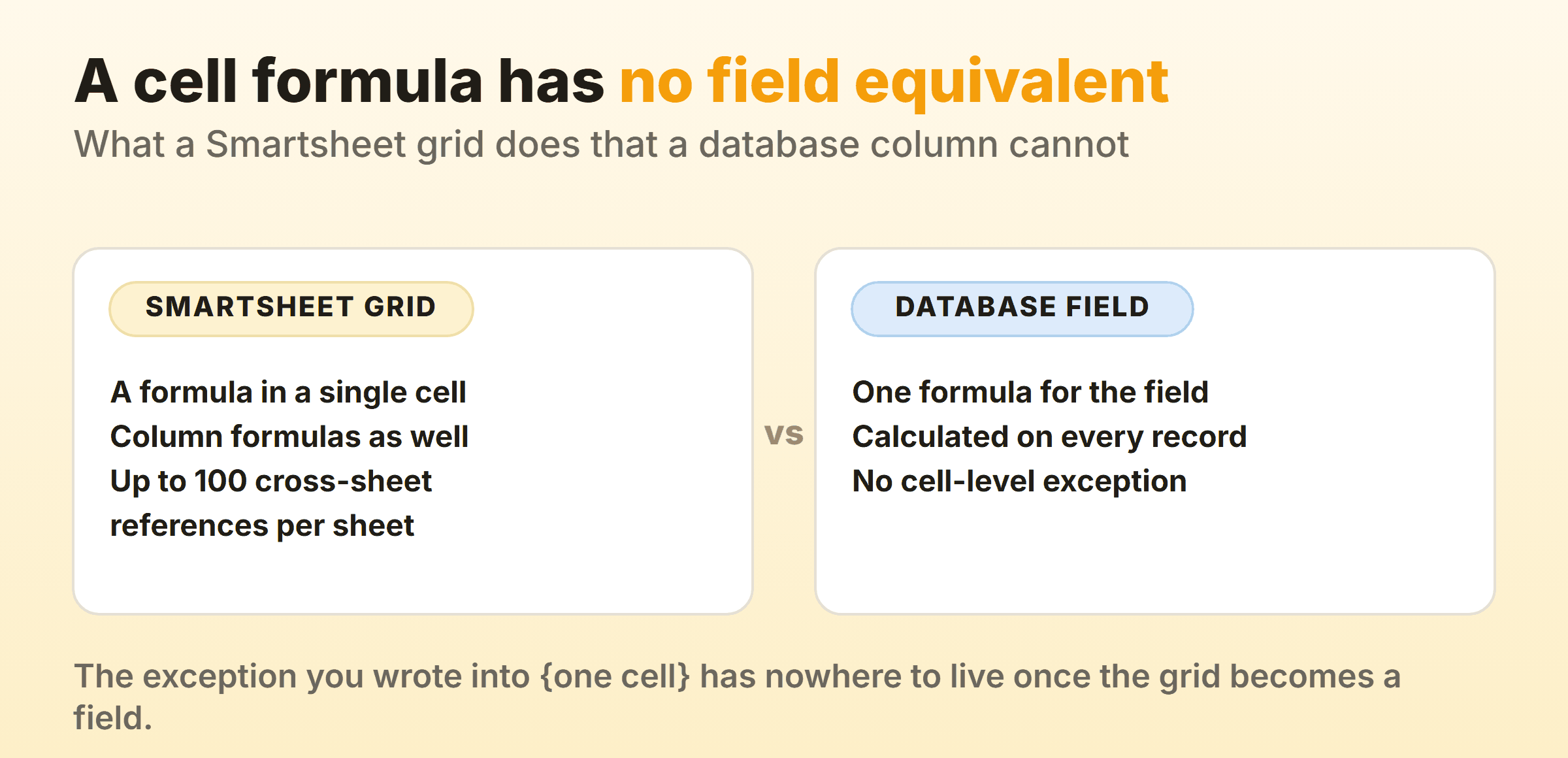
Smartsheet’s formula documentation lists formulas on Pro, Business and Enterprise, and describes the column version as the case where you “Build your formula in a cell, and quickly convert it to apply to every cell in the column.” The cell is where a Smartsheet formula starts, exactly as in Excel, and the column formula is the tidy-up. Airtable, quoted above, applies one formula to every record. An inherited sheet usually holds four one-off calculations nobody documented, and those are the ones that vanish.
Cross-sheet references change shape rather than disappearing. Smartsheet’s cross-sheet reference documentation allows no more than 100 distinct cross-sheet references per sheet and a maximum of 100,000 inbound cells in a reference range. Generous ceilings. The database tools swap that whole pattern for linked records, so rebuilding a lookup web is a design job rather than an import.
Your readers cost money afterwards. Unlimited free Contributors is a real advantage when most of your audience only looks and comments, and nothing here matches it outright. Asana’s unlimited free guests on Starter comes closest.
The Gantt survives, at least. Smartsheet puts Gantt view on Pro, and Wrike Team, monday Standard, ClickUp Unlimited, Airtable Team and Asana Starter all carry one within a few dollars. Read kanban versus Gantt before paying for either, since the two answer different questions and teams buy the wrong one all the time.
Which Smartsheet Alternative Fits Your Reason for Leaving?
Pick from the ceiling you hit. Every tool here draws a grid, so picking on looks lands you in the same spreadsheet with a different font.
- You ran out of Members. Wrike, with Table and Board free and the Gantt at $10 per user per month billed annually.
- Everyone needs to edit and you want one clean migration. monday.com Standard, budgeted at $12 per seat per month billed annually, since that tier holds the Gantt.
- Money is tight and you still need scheduling. ClickUp Unlimited, $7 per user per month billed yearly, suite included whether you wanted it or not.
- Your sheet was really a database. Airtable, record ceilings checked first, one-off formulas rewritten.
- The problem is who owns what. Asana Starter, and forgive List view.
- You are five people spending nothing. Notion Free, with a date range property on day one.
- You want formulas and your own server. Grist, knowing the widget list has no board and no Gantt.
One footnote for completeness. If a board with flow control is all you need, our own Kanbanee is free for two boards you own with unlimited members and $6 a month flat for the reports, and it is the wrong tool for most people reading this page. No grid view, no Gantt, no API. Anyone whose first instinct is to open a spreadsheet should skip it.
Whichever you pick, export your sheets before cancelling anything and rebuild one real project during the trial. Pick the ugliest project you own.
FAQ
What is the best free Smartsheet alternative?
Wrike, if a grid and a board at no cost is the ask, because its pricing page puts Table view and Board view on the $0 plan. Notion, if you want a timeline too, since table, board and timeline are all views of one free database. Grist, if formulas beat both. None of the three replaces Smartsheet Business, and the free kanban tools roundup covers board-only options.
Is there a Microsoft alternative to Smartsheet?
Microsoft Planner, if your company already pays for Microsoft 365. Microsoft’s basic versus premium comparison puts Grid, Board, Schedule and Charts views on the basic side, holding Timeline with a Gantt chart, dependencies, milestones and critical path for Premium. Grid and board for no extra licence is a real offer. Kanban in Planner covers the board itself.
Does Smartsheet have a free plan?
No. The pricing page shows four plans, Pro, Business, Enterprise and Advanced Work Management, with no free tier among them and only a trial. Pro starts at $9 per Member/month billed yearly. When free is the requirement, the shortlist runs Wrike, Notion, Grist, ClickUp Free Forever and Airtable at 1,000 records per base.
Which alternative to Smartsheet is closest to a spreadsheet?
Grist, by a distance. It keeps documents, records and real formula behaviour rather than treating the grid as one view of a task list. Airtable comes second and is a database first, which shows the moment you want a calculation in a single cell. Among the project tools, Wrike’s Table view is nearest. If the spreadsheet itself is the answer, our guides to kanban in Excel and kanban in Google Sheets cover what a sheet can and cannot do as a board.
Is monday.com better than Smartsheet?
Compare seats and views, not verdicts. Every monday seat can edit while a Smartsheet Contributor cannot edit anything, so nine people who all type into rows means nine paid seats either way and Smartsheet Pro’s ten Member ceiling arrives sooner. Smartsheet wins on formulas, carrying cell formulas as well as column formulas. monday wins on Gantt and Timeline landing together on Standard at $12 per seat per month billed annually. Score those against what you open weekly, and the project management software roundup covers the rest of the field.