
Best Project Management Software: 8 Tools and What Each One Fixes
The Answer
The best project management software is the one whose plan shape matches yours, because that is the part you cannot change later without a migration. Four shapes cover nearly everything sold here: a task list with views stacked on it (Asana, monday.com, ClickUp), a spreadsheet that schedules (Smartsheet), a Gantt chart with request intake bolted to the front (Wrike), and an issue tracker built around cycles (Jira, Linear). Basecamp is the outlier, a flat monthly bill and fewer moving parts on purpose. Entry paid tiers cluster in a narrow band whichever currency your account bills in, so the real decision is whether the tool can tell you when work lands, who is already overloaded, and what is waiting on what.
What Separates Project Management Software From a Task List?
Project management software separates from a task list at three questions a task list cannot answer: when, who, and what depends on what. Every tool below draws tasks. The split shows up the first time somebody senior asks for a date.
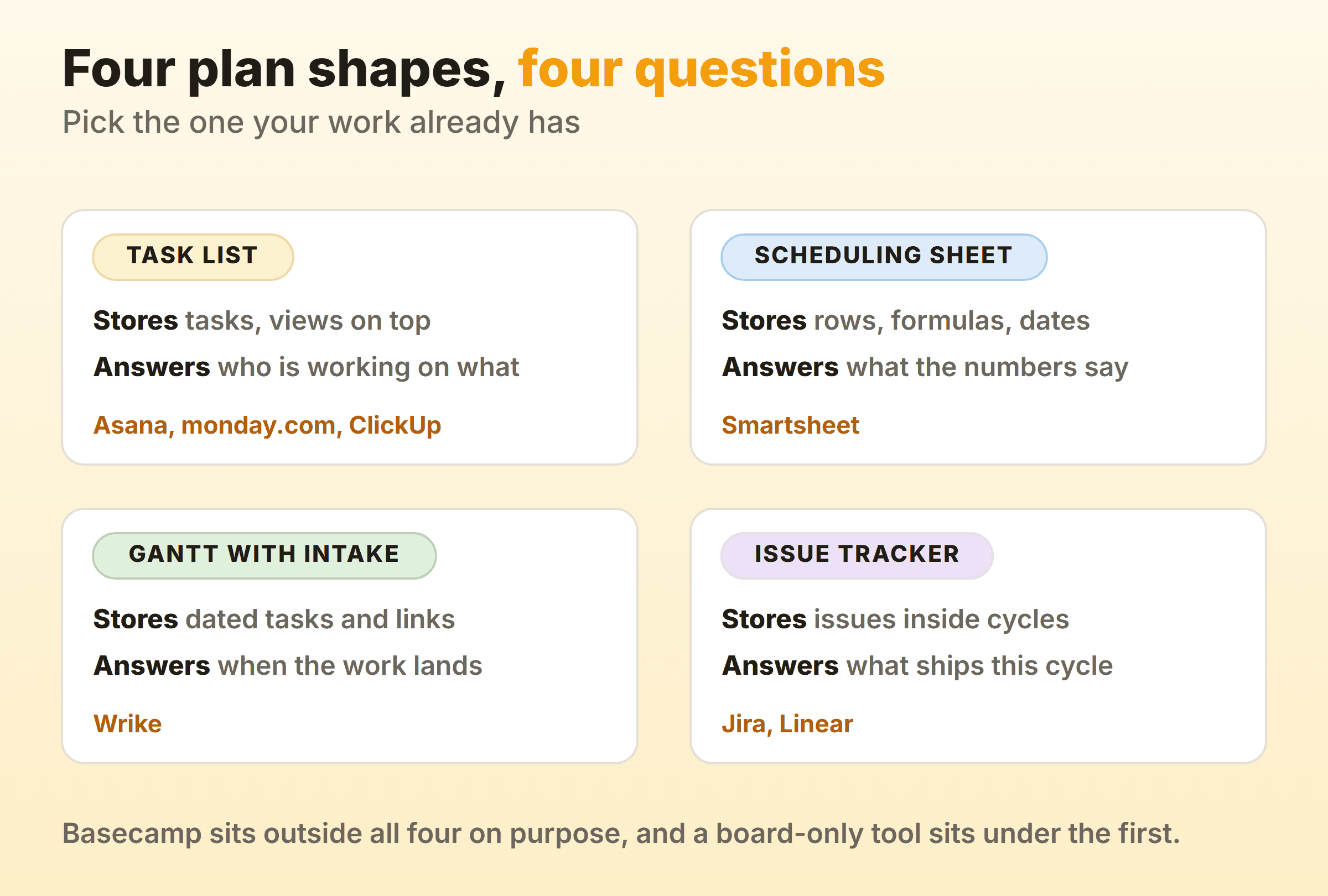
- What it stores natively. A board stores a card and a column. A scheduling tool stores a start date, a duration and a link to the task in front of it. Custom fields fake the second for about a quarter before it falls over.
- Whether dates move each other. Drag one task later. If nothing downstream shifts, you own a picture of a plan.
- Whether it knows how full a person is. Capacity and workload sit highest up almost every price list. Vendors know what that is worth.
- Where work arrives from. Intake forms and request queues, or a person who becomes the human form.
Kanban and Gantt answer different questions, which is the fastest way to halve a shortlist. Gantt answers when. Kanban shows what is stuck right now, a different job entirely, and teams needing both buy the scheduler and run a board inside it.
Best Project Management Software Compared
This project management software comparison uses four columns and no feature counts.
| Tool | Who it suits | The thing it fixes | Entry price |
|---|---|---|---|
| Asana | Cross-team work that must stay readable | Timeline and dependencies without a training week | Free for 2 users, then EUR 10.99/user/mo annual |
| monday.com | Teams who want to shape their own columns | Custom fields and automation without a developer | Free for 2 seats, then EUR 9/seat/mo annual |
| ClickUp | Teams folding four subscriptions into one | Gantt and resource management on the cheapest paid tier | Free Forever, then $7/user/mo yearly |
| Smartsheet | Plans that already live in spreadsheets | Formulas and a Gantt in the same grid | EUR 8/member/mo yearly, no free plan |
| Wrike | Agencies buried in inbound requests | Request forms that become scheduled work | Free, then $10/user/mo annual |
| Jira | Engineering owning the plan of record | Cross-project dependencies and capacity, at Premium | Free for 10 users, then $9.05/user/mo monthly at ten seats |
| Linear | Product teams who left Jira for the speed | Issue tracking with no administration layer | Free for 250 issues, then $10/user/mo yearly |
| Basecamp | Small firms tired of per-seat arithmetic | One fixed bill with unlimited people on it | Free for 1 project, then $25/mo flat |
Every price came off the vendor’s own pricing page on 16 September 2026, rendered in a browser rather than fetched as HTML. Asana, monday.com and Smartsheet price in the visitor’s billing currency and all showed euro here, so those three are quoted in euro and the rest in US dollars.
Asana: The All-Rounder That Stays Readable
Asana is the top project management software pick when several teams share work and the plan has to be legible to people who do not live in the tool. Lists, boards and calendars sit over the same tasks, and the structure holds as the workspace grows.
Asana Personal is free for 2 users, and Timeline and Gantt views arrive on Starter at EUR 10.99 per user per month billed annually, or EUR 13.49 billed monthly. Advanced at EUR 24.99 per user per month billed annually adds portfolios, goals and resource management within one portfolio. Capacity planning is Enterprise, which means a sales call. So a dependency-aware timeline sits on Asana’s cheapest paid tier, with no per-person capacity until you pay considerably more. If workload balancing is why you are shopping, price the higher tier first. One more thing to model: Asana sells seats in blocks of five above five users, so a six-person team buys ten. The Asana board view handles flow, though it publishes no column limits.
monday.com: Flexible Columns With a Small Free Ceiling
monday.com suits teams who want to build their own tool. Columns are typed, boards are composable, and a decent operations person can model a process in an afternoon that would take a Jira admin a week.
Read the pricing page before the trial ends. Free covers up to 2 seats and up to 3 boards. Basic is EUR 9 per seat per month on annual billing, EUR 12 billed monthly. Timeline and Gantt views, calendar view and guest access start on Standard at EUR 12 per seat per month on annual billing, and that tier meters automations and integrations at 250 actions per month each. Pro at EUR 19 on the same annual billing lifts that to 25,000 and adds time tracking. Portfolio management and resource management are Enterprise only. Two things catch buyers. Metered automation quietly stops firing once a busy board burns the month’s allowance. And the portfolio views most people assume come as standard sit behind a quote. Kanban in monday.com covers the board side.
ClickUp: The Most Features Per Dollar, and the Most Surface Area
ClickUp is the best project management software for teams consolidating several subscriptions, because its cheapest paid tier carries what rivals reserve for their middle plans. Unlimited is $7 per user per month billed yearly, or $10 monthly, and includes unlimited Gantt charts, unlimited storage, native time tracking, and resource management.
Check Free Forever before committing. Unlimited tasks, unlimited free plan members, kanban boards, sprint management, one form, and 60 MB of storage. That storage number is the wall most free workspaces hit first. Business at $12 per user per month billed yearly adds unlimited dashboards, unlimited timeline views and 5,000 automations a month. ClickUp’s AI plans are billed separately on top, at $9 per user per month for Brain AI and $28 for Everything AI, both on yearly billing, which is easy to miss on a first read. A lot of capability for the money, then, and enough surface area that somebody has to own the configuration. Kanban in ClickUp covers the board view.
Smartsheet: A Spreadsheet That Actually Schedules
Smartsheet wins when the plan already exists in a spreadsheet and nobody wants to give up formulas. Rows are tasks, columns are whatever you declare, and the Gantt is generated from the same grid rather than living in a separate module.
There is no free plan, only a 30-day trial. Pro is EUR 8 per member per month billed yearly and covers 1 to 10 members with unlimited free contributors, plus Gantt, table, board and calendar views. Business is EUR 17 per member per month billed yearly for 3 or more members and adds timeline view, workload tracking and unlimited automations. Resource Management is a separate add-on, eligible on Business and Enterprise and priced on request, so treat it as a line item rather than an included feature. The ten-member ceiling on Pro catches growing teams. Read the price as EUR 8 until member eleven, then EUR 17. The Smartsheet card view is a layer over the same rows.
Wrike: Built Around Requests Coming In
Wrike is the answer when work arrives from outside the team and intake is the real problem. Request forms feed tasks into projects with the right fields already populated, which beats a board somebody fills in by hand. Agencies and in-house marketing teams are the natural fit.
Free is $0 per user per month with board and table views. Team, at $10 per user per month, covers 2 to 15 users and adds interactive Gantt charts and a shareable dashboard. Business runs $25 per user per month for 5 to 200 users. Both paid figures are billed on an annual per-user basis, and Wrike’s pricing page says those rates apply only to purchases made on or after 21 January 2026. Advanced resource and capacity planning lives on Pinnacle, where you have to ask. Team also stops dead at fifteen users, so a team of fourteen planning to hire should model Business now. Kanban in Wrike covers the board.
Jira: Right When Engineering Owns the Plan of Record
Jira is correct when software delivery is the work and the plan has to live where the code does. Workflow configuration goes further than anything else here, and the reporting understands sprints and releases natively.
Atlassian’s pricing page puts Free at 10 users with 2 GB of storage. It also prices per seat by headcount rather than flat, so at a team size of ten Standard shows $9.05 per user per month and Premium $18.30 on monthly billing, while at three hundred users the same plans show $7.91 and $14.54. Bigger teams pay less per seat, which inverts the usual assumption. The feature split matters more than either number. Dependency management on Free and Standard is single-project, while cross-project dependencies, capacity management, Advanced planning and scenario modelling all begin at Premium. Coordinating several teams therefore means buying Premium, which roughly doubles the seat cost. Running many teams on one system is its own discipline, covered in kanban for enterprise teams, and the board mechanics sit in kanban in Jira.
Linear: Narrow on Purpose, and Fast
Linear is what product and engineering teams pick once Jira has become an administration job. Issues, projects, cycles and initiatives, a keyboard-first interface, and almost nothing to configure or argue about.
Free covers unlimited members, 2 teams, 250 issues and 10 MB file uploads. Basic is $10 per user per month billed yearly for 5 teams and unlimited issues. Business at $16 per user per month billed yearly adds unlimited teams, private teams and guests, Linear Insights and Linear Asks. Be clear about the trade, though. Linear’s plan comparison lists issues, projects, cycles and initiatives, and it does not list Gantt charts, workload tracking or capacity planning on any tier. That is deliberate. If you owe a client a dated plan with dependencies, Linear will not produce one.
Basecamp: A Fixed Bill and Deliberately Less
Basecamp is the only tool here where hiring does not change the invoice, once you are past the bottom two packages. Its pricing page leads with no per-user fees, and the packages are flat: Free for 1 project and 5 users, Freelancer at $25 a month for up to 3 active projects and 20 users, Studio at $59 for up to 10 projects, Pro at $99 for up to 25, and Unlimited at $299 a month billed annually with 1 TB of storage. Unlimited users starts at Studio, so a growing team on Freelancer still hits a wall at twenty. Its FAQ confirms that five hundred people on unlimited projects still costs about $300 a month.
Every package includes the same core tools: message boards, to-dos, card tables, group chat, scheduling, docs and files, and check-in reports. Basecamp describes card tables as its take on kanban for process tracking. What the list does not contain is a Gantt chart or task dependencies, and Basecamp has never pretended otherwise. For a small agency with a lot of contractors, the flat price beats the missing scheduling, because per-seat tools punish exactly that shape of business. For a dependency-heavy dated plan it is the wrong shelf. Kanban in Basecamp covers the card table.
Where a Kanban-Only Tool Is the Wrong Answer
A kanban-only tool is the wrong answer whenever the question is a date, a person’s capacity, or a dependency. That covers a large share of the people typing best project management tools into a search box, and it is worth saying plainly on a site otherwise devoted to kanban.
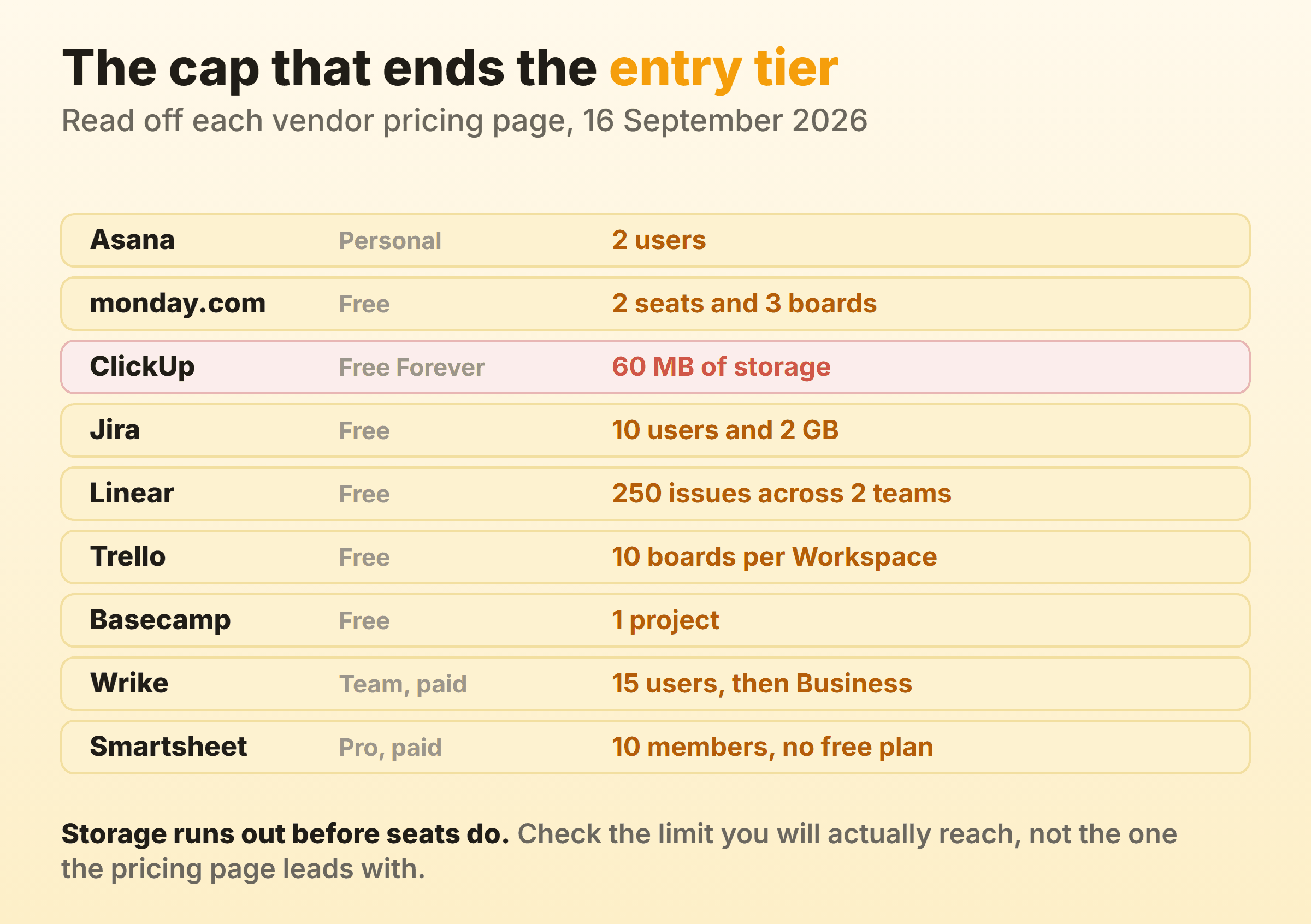
A board shows where work is stuck right now, which is the most useful daily view in software. It has nothing to say about whether the thing lands on the fourteenth. Trello is the reference point, free for up to 10 boards per Workspace with unlimited cards, then $5 per user per month billed annually. Our own tool, Kanbanee, sits in the same category and I run our product board on it, so discount this accordingly: free covers 2 boards you own with unlimited members, Pro is a flat $6 a month or $48 a year, WIP limits are soft and off by default, and the reports (time by member or label, weekly throughput, cumulative flow diagram, cycle time) are Pro only. No realtime sync, no API, and column dragging is desktop only. For most readers of this page it is the wrong purchase.
A date on a contract needs a schedule that recalculates, and a board has none. Share people across two projects and neither board can tell you how loaded anybody is. Outside requests need intake, or one person on the team quietly becomes the form. Inside a bigger tool the board still earns its place as the daily view, and WIP limits keep it honest.
What You Lose When You Switch Tools
Switching project management software costs more than the gap between two monthly prices. I have moved teams three times and the same losses repeat.
Context rather than tasks. Importers handle titles, assignees and due dates well, and they do not move the comment thread where the decision was made. That thread is usually the most valuable object in the account, and read access disappears with the subscription.
Automations and forms get rebuilt by hand in a different rule syntax. monday.com Standard allows 250 automation actions a month, ClickUp Business allows 5,000, and Jira Standard allows 400 automation steps per user per month, so the same set of rules is not even priced the same way twice.
Reporting restarts too. Cycle time, throughput and completion history go back to zero, which stings when you moved precisely to fix a delivery problem somebody is watching. Whatever pricing you were grandfathered into goes with it. Wrike states its published rates apply to purchases from 21 January 2026 onward, and vendors re-cut plans this way regularly. So run the new tool beside the old one for a full delivery cycle, and export everything before the final invoice.
FAQ
What Is the Best Project Management Software for Small Teams?
Whichever tool gives you a timeline without an enterprise conversation. Asana Starter at EUR 10.99 per user per month billed annually and ClickUp Unlimited at $7 per user per month billed yearly both clear that bar, and ClickUp adds resource management at the same tier. If headcount swings or contractors come and go, Basecamp’s flat pricing wins on cost, minus the Gantt chart and dependencies.
Is Free Project Management Software Good Enough?
Free project management tools work until you hit the cap the vendor chose, and the caps are oddly specific. Asana Personal stops at 2 users. monday.com Free gives you 3 boards across 2 seats, Jira Free allows 10 users and 2 GB, and ClickUp Free Forever hands out unlimited members on 60 MB of storage. Check the one you will actually reach.
Which Tools Include Gantt Charts on the Cheapest Paid Plan?
ClickUp on Unlimited at $7 per user per month billed yearly, Smartsheet on Pro at EUR 8 per member per month billed yearly, and Wrike on Team at $10 per user per month billed annually. Asana puts Timeline and Gantt on Starter at EUR 10.99 per user per month billed annually, and monday.com puts them on Standard at EUR 12 rather than Basic.
How Much Does Project Management Software Cost Per User?
Entry paid tiers here run from about 7 to about 11 per user per month on annual billing, in whichever currency your account bills in, and middle tiers roughly double that. The jump that actually hurts comes from a plan ceiling, such as Wrike Team capping at 15 users or Smartsheet Pro at 10 members.
Should a Small Team Use Jira?
Yes when the work is code and the reporting has to understand sprints and releases, and Free covers 10 users at no cost. No when the job is coordinating several projects, because cross-project dependency management and capacity management only begin on Premium, which is $18.30 per user per month at a ten-seat team size on monthly billing.
Where to Go Next
If the shortlist came down to one incumbent and a reason to leave it, the per-tool pages go deeper than a roundup can: Notion alternatives, Jira alternatives, Asana alternatives, ClickUp alternatives, monday.com alternatives, Wrike alternatives, Smartsheet alternatives and Basecamp alternatives. For work smaller than a project, task management software covers the lighter end.