
Best Task Management Software: 8 Tools Compared by Price and Limit
The Answer
The best task management software for you comes down to how many people touch the list. Alone, Todoist Pro at $5 per user a month billed annually covers almost everything, and on Apple hardware Things 3 wins if you never share. For two or three people, Todoist Business at $8 per user a month billed annually or Trello Standard at $5 on the same terms keeps the bill honest. Push past that and the category quietly renames itself, with Asana Starter asking $10.99 per user a month billed annually for timelines you may never open. Free works in two situations, which are Microsoft To Do inside Microsoft 365 and Google Tasks if your day happens in Gmail. Every price below came off the vendor’s own pricing page on 16 September 2026.
What Counts as Task Management Software, and What Does Not?
Task management software holds a task, a due date, a reminder and one owner. That is the whole job. A task management system turns into a project tool the moment it has to answer something harder, like what happens if this slips, who is overloaded next month, or which of eleven projects is quietly in trouble.
Crossing that line roughly doubles the entry price. Todoist Pro is $5 per user a month billed annually. Asana Starter, the cheapest tier carrying timeline and Gantt views plus reporting dashboards, is $10.99 per user a month billed annually and $13.49 per user a month billed monthly. There is no line item for dependency arrows, so you buy the whole tier.
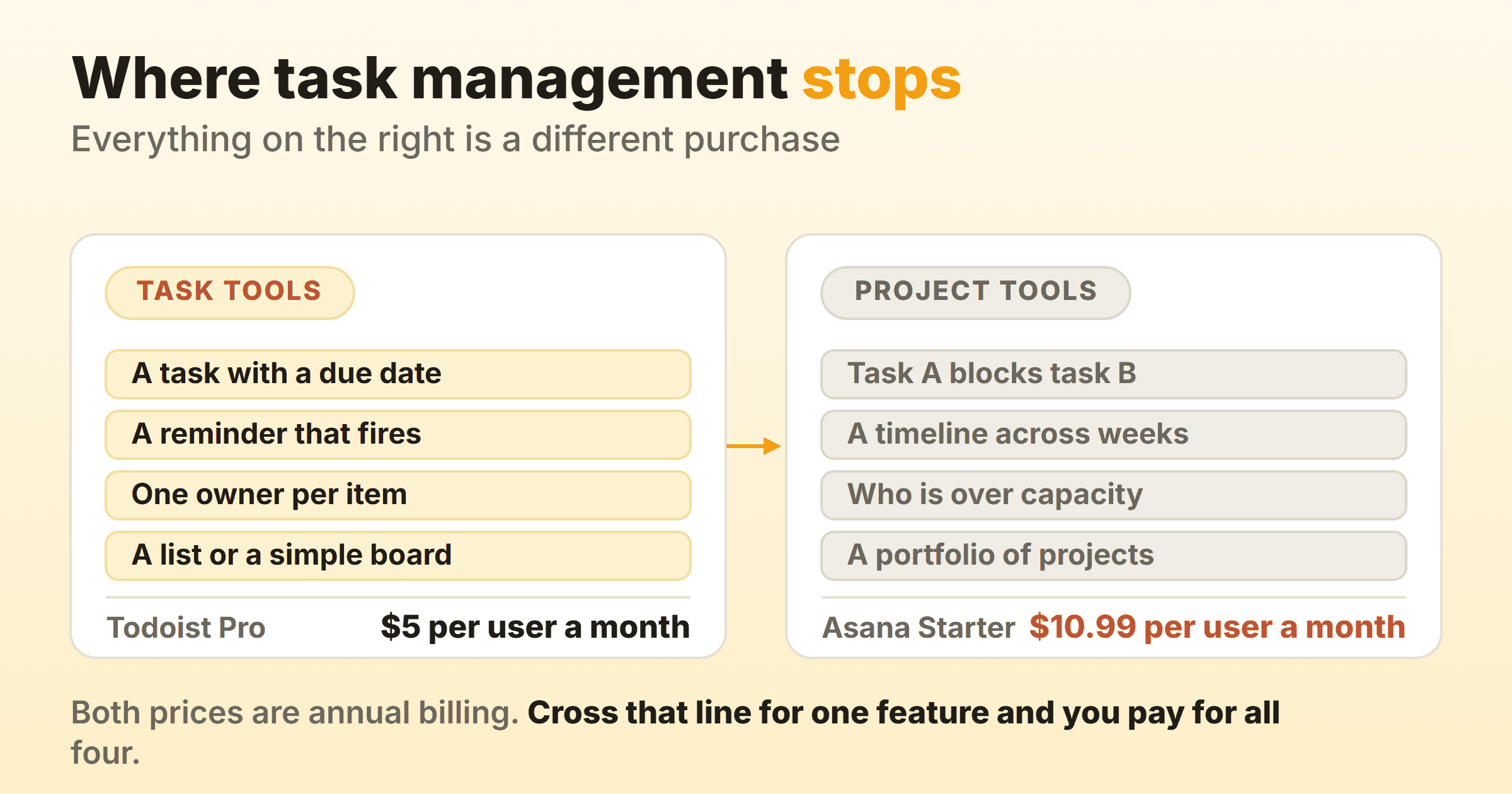
Most teams I watch cross that line for one feature. Someone wants a Gantt chart for a board meeting, and a year later everybody fills in custom fields nobody reads. If you truly need portfolios and capacity planning, the project management software comparison is the page for that.
The Best Task Management Software, Compared
Each row gives the first thing that stops you. If a board is what you are after, the kanban apps roundup covers that category separately.
| Tool | Who it suits | The thing it fixes | Entry price |
|---|---|---|---|
| Todoist | One person, or a team under ten | A free tier that still has reminders | Free, then $5 per user a month |
| TickTick | People who abandon lists by Thursday | Timer, habits, calendar in one app | Free, then a flat $49.99 a year |
| Things 3 | Solo Apple users who hate subscriptions | Renting a to-do list forever | $49.99 once on Mac, per device after |
| Microsoft To Do | Anyone in a Microsoft 365 tenant | Paying twice for a licensed app | Free |
| Google Tasks | People who live in Gmail | Tasks that miss the calendar | Included with the Google apps |
| Any.do | Households and shared errands | Four people and one grocery list | Free, then $4.99 per user a month |
| Asana | Teams assigning work across roles | Nobody knowing who owns what | Free for 2 users, then $10.99 per user a month |
| Trello | Teams who think in stages | A list hiding where work is stuck | Free, then $5 per user a month |
Paid figures are per user per month, billed annually, except TickTick Premium, which is one flat annual price, and Things 3, which is a one-off purchase per device.
Todoist: The Default That a Small Team Can Grow Into
Todoist is the task management app I recommend first, because its free tier is unusually complete and its paid tier is unusually cheap. Beginner is $0 and includes task reminders, list and board layouts, and five people per personal project. Most free plans ration collaborators down to nothing.
The caps land on structure instead: 5 personal projects, 3 filter views, 1 week of activity history, 5 MB uploads. Anyone who files by client hits five projects inside a month. Pro raises those to 300 personal projects, 150 filter views, 100 MB uploads and full reporting history for $5 per user a month billed yearly, which Todoist bills as $60 a year, or $7 monthly. Business is $8 per user a month yearly or $10 monthly, adding a shared team workspace, up to 500 team projects and 1,000 team members and guests.
Choosing blind, choose this. The one reason to skip it is wanting something its plan table never mentions, like a running focus timer.
TickTick: The Task Management App With the Timer Already In It
TickTick suits people who capture tasks fine and then never do them. Its homepage describes a built-in Pomodoro technique that breaks tasks into 25-minute intervals, and it ships a rich habit library with flexible tracking and statistics beside the task list. The same page lists yearly, monthly, weekly, daily and agenda calendar views. No other pricing page in this comparison advertises a focus timer and a habit tracker as core features.
The free plan is US$0 and tighter than Todoist’s where it counts: 9 lists, 99 tasks per list, 2 reminders per task, 2 members, 5 habits, one attachment a day. List and kanban views are both included. Premium is US$49.99 a year, which TickTick frames as less than US$4.17 a month, and lifts those to 299 lists, 999 tasks per list and 29 members. The upgrade page lists an annual plan only.
Best pick for people who keep restarting. Nine lists is restrictive enough that the free plan works as a trial and nothing more.
Things 3: A One-Time Purchase for One Person on Apple Hardware
Things 3 is the only tool here you buy once. Mac, iPad and iPhone are three separate App Store purchases rather than one licence that follows you across devices, so the real cost depends on how many of those three you own. The Mac app is $49.99 on the US App Store as a one-off purchase, and Apple sets prices by region, so read the current figure off each app’s own App Store page rather than from any roundup, this one included.
The comparison that matters is not the sticker. A one-off purchase stops rising and a subscription does not, so the longer you intend to keep the tool, the better Things looks against Todoist Pro at $60 a year or TickTick Premium at $49.99 a year. Work out your own break-even from today’s store prices and your own device count.
It runs on Apple hardware and it serves one person. Sharing is not what it is for.
Buy it to stop renting. Do not buy it hoping to share a list later.
Microsoft To Do: The Free Task List Your Employer Already Pays For
Microsoft To Do is free, and if your company runs Microsoft 365 it is already in the app launcher. There is no paid tier to compare, which is the whole argument for trying it first.
It works with Outlook tasks, so a flagged email becomes a task without a plugin, and that alone stops a lot of people drifting back to their inbox. My Day rebuilds a short daily list each morning, which suits the way most people plan. Check the current platform list on Microsoft’s own page before you commit a team to it, because that is the detail roundups get wrong most often.
Sharing exists, list-level and simple rather than the assignment machinery Asana sells. To lay the same tasks out as columns, kanban in Microsoft To Do covers what is possible.
Try this before you buy anything. Plenty of people pay for a task manager that does less than the one IT already licensed.
Google Tasks: The Personal Task Management App Hiding in Gmail
Google Tasks fixes one failure, which is tasks that never reach your calendar. Add a date and time and the task appears in Google Calendar. It comes with the Google apps rather than as a separate purchase, and it lives in the side panel of Gmail, Calendar, Docs and Chat rather than in an app you have to remember to open. On a work or school account an administrator controls whether it is available at all.
Repeating tasks and assigning a to-do to somebody else both exist inside the Google apps. Most people never find any of it.
Google does not market Tasks on filters, reporting or tags, and you should not pick it expecting them. As a task tracking tool it serves people whose real planning surface is a calendar, and it serves them well. What you give up by never paying is covered in the free kanban tools guide.
Right for people who already schedule everything, and poor for anyone who plans by project.
Any.do: Shared Lists for a Household, Not a Department
Any.do is the only tool here that prices a family properly. Family is $8.33 a month for four members billed annually, or $9.99 a month billed monthly, and includes a shared family space, a shared grocery list and up to four shared projects. Four seats on Asana Starter would run $43.96 a month billed annually.
The free Personal plan is marked free forever with no credit card, covering tasks and lists, reminders, calendar, a daily planner and sync across devices. Recurring tasks sit behind Premium, so the weekly bin reminder that is the whole point of a household list needs the paid plan at $4.99 per user a month billed annually or $7.99 a month billed monthly.
Good for shared personal life, thin for work. When four people need one list and nobody will learn a new tool, it is the path of least resistance.
Asana: Where Task Management Software for Teams Starts to Cost Money
Asana is where the category changes shape. Assignment and status are built into how it works, which makes it real task management software for teams, and it is the priciest entry here for exactly that reason.
The free Personal plan lists 2 users. Not ten. Two. It gives unlimited tasks and projects, list, board and calendar views and 100 MB per file, then stops the moment a third person needs an account. Starter removes seat limits and adds timeline and Gantt views, reporting dashboards, unlimited automations, forms and custom fields at $10.99 per user a month billed annually, $13.49 monthly. Advanced adds portfolios, goals and resource management at $24.99 per user a month billed annually.
Six people on Starter is $65.94 a month billed annually. The same six on Todoist Business is $48 a month on the same terms. The difference buys timelines and dashboards, so ask whether anyone opens them in month four. Teams wanting the structure without the bill should read the kanban in Asana walkthrough, because the board view is free.
Correct when work crosses roles and somebody is accountable for throughput. Overkill for a shared list.
Trello: Task Management Tools Shaped Like a Board
Trello turns the list sideways, and for many teams that alone makes work visible. Columns show where the work is jammed.
Free is $0 and gives unlimited cards, 10 boards per Workspace, free use for up to 10 collaborators per Workspace, unlimited storage at 10 MB per file and 250 Workspace command runs a month. Those caps are counted per Workspace, which is the trap, so eleven people means a paid plan even with one board. Standard is $5 per user a month billed annually or $6 monthly and unlocks unlimited boards, advanced checklists and custom fields. Premium at $10 per user a month billed annually or $12.50 billed monthly adds calendar, timeline, table, dashboard and map views.
Trello wins on what a single item can carry, so what belongs on a card is worth settling before you migrate. It loses because nothing pushes back when a column fills up. Setting it up properly is covered in kanban in Trello.
The best of these task management tools for stage-based work, and a bad fit for a personal daily list.
What Each Free Plan Runs Out Of First
Vendors sell free tiers on the feature list, and the cap is what actually decides things.
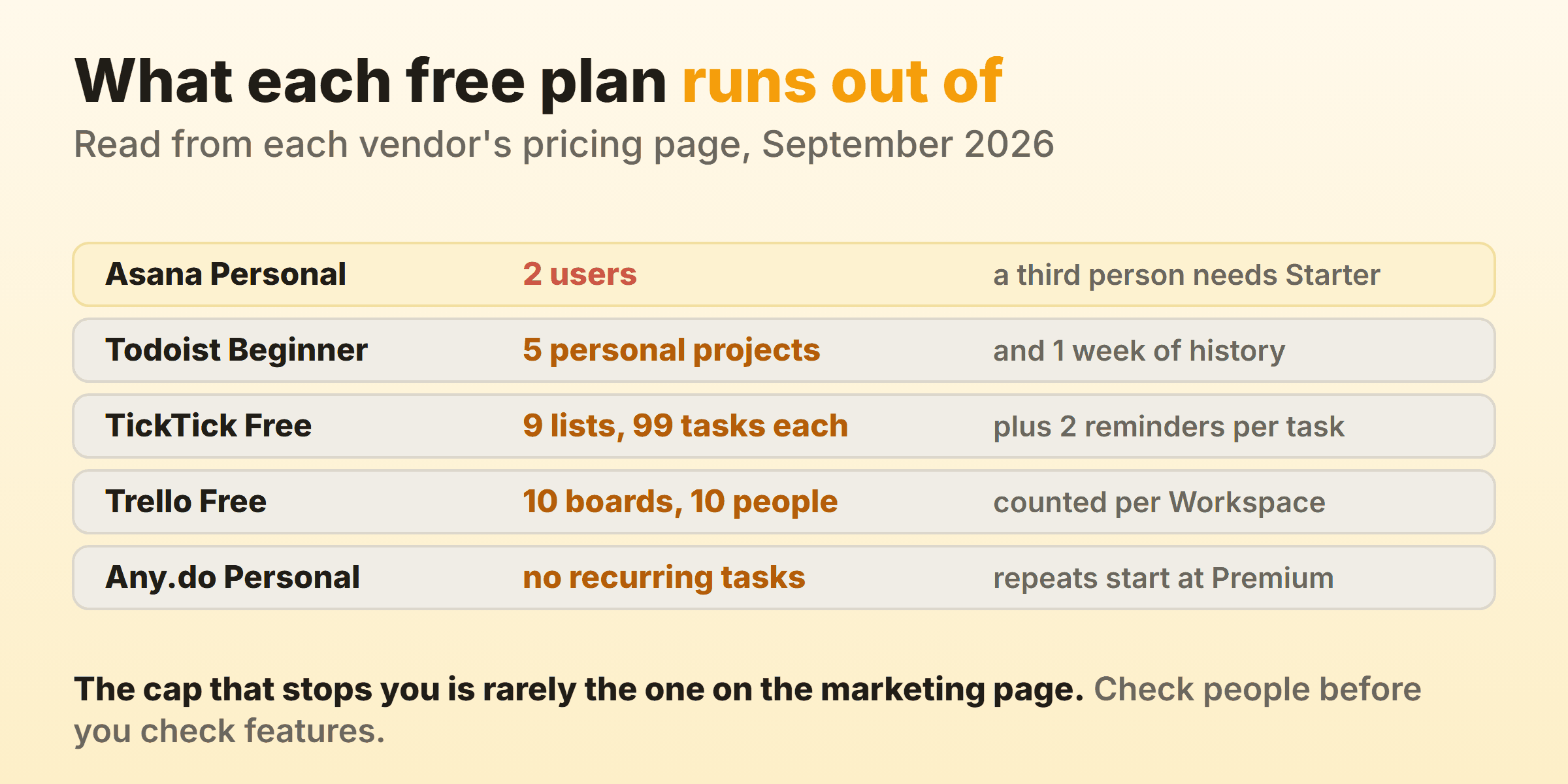
Microsoft To Do and Google Tasks sit outside that table because neither sells a paid tier to ration you into, which is part of why both keep turning up as the answer for a free task management app. Count the people before you count anything else.
What You Lose by Leaving Your Current Task Manager
People switch task managers casually, because the data is small and the export takes a minute. The cost shows up over the four weeks afterwards.
- Recurring rules and their history. Every repeat you tuned over two years arrives as a blank. Rebuilding twenty takes an evening, and you will forget three.
- Capture muscle memory. Typing a due date in plain language and having it read correctly is a habit your fingers own. A tool that parses differently costs a beat on every entry, which is the friction that kills a new system in week three.
- Reminders that already fire. Notification permissions, quiet hours and widget placement all reset. Until you rebuild them the new app is silent, and a silent task manager is a text file.
- Everyone else. A shared list moves only if every person moves. One holdout means two systems, and neither gets trusted.
Run both in parallel for two weeks before deleting anything, and export whatever the vendor allows on day one rather than the day you cancel.
Kanbanee is the wrong answer for most people reading this, and I would rather say so than sell around it. It draws a board with columns, so if you want a personal inbox that nags you on a phone, buy one of the apps above. It fits a small team that wants a column cap and flow reports without an implementation project behind them. Free covers two boards you own with unlimited members, Pro is a flat $6 a month or $48 a year, WIP limits stay off until you switch one on per column and never block a drag, and the reports (time by member or label, weekly throughput, cumulative flow diagram and cycle time) are Pro only. No realtime sync, no API, desktop-only column drag.
FAQ
What Is the Best Task Management App for Personal Use?
Todoist Pro at $5 per user a month billed annually if you want one tool that does everything well. Things 3 as a one-off App Store purchase if you would rather own than rent. TickTick at a flat US$49.99 a year if the problem is starting rather than remembering.
What Is the Best Free Task Management App?
Microsoft To Do inside Microsoft 365, because it is free, it has no paid tier and it reads Outlook tasks. Todoist Beginner otherwise, the only free tier here with task reminders that still allows five people on a personal project.
What Are the Best Task Management Tools for a Team of Five?
Todoist Business at $8 per user a month billed annually, so $40 a month for five, or Trello Standard at $5 on the same terms, so $25 a month. Trello Free covers up to 10 collaborators per Workspace, so five people can test a board first. Asana Starter would be $54.95 a month.
How Much Does Task Management Software Cost?
Personal plans cluster between $4 and $8 per user a month billed annually, team plans between $8 and $11 on the same terms. Todoist Pro is $5, Any.do Premium is $4.99, Todoist Business is $8 and Asana Starter is $10.99, all per user per month billed annually. Monthly billing costs more everywhere here: the same four are $7, $7.99, $10 and $13.49.