
Kanban Cards: What Goes on Them and How They Work
Updated at
The Answer
A kanban card is one piece of work made visible, sitting in whichever column matches the stage that work has reached. On a software or marketing board the card carries a title, a label or two, an owner, and enough detail that somebody can pick it up without asking a question first. In a factory it carries a part number, a pack quantity and an address, and it doubles as the authorisation to make or move that part. Same job in both places. A kanban card is a signal that gives someone permission to start something, and every other rule about kanban cards, from which fields belong on one to how many cards you release into a production loop, follows from that.
What Is a Kanban Card?
A kanban card represents a single work item, and dragging it from one column to the next is how a team reports progress without writing a status update. One card, one outcome. If two people could work on separate halves of it without talking to each other, you had two cards.
Kanban is Japanese for signboard, and the card behaves like one. Three things should be readable without opening it: what the work is, what stage it has reached, and who has it right now. Everything else is detail you click into.
People overrate the physical-versus-digital question. A sticky note on a whiteboard and a card in a browser are the same object doing the same job. They differ on memory. A sticky note has no idea when you started it, so the day you want cycle times you need software underneath.
What Goes on a Kanban Card?
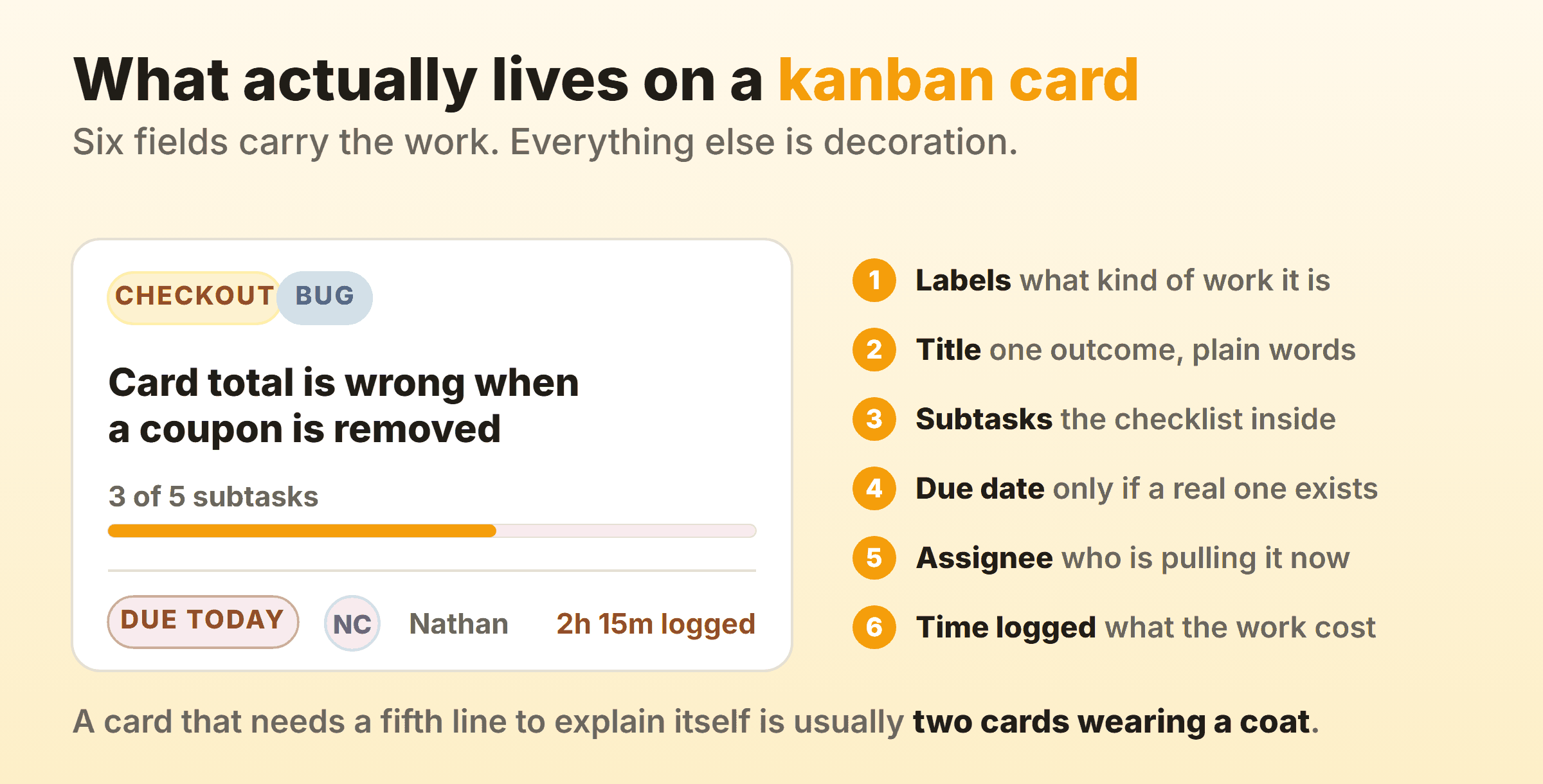
Six fields carry nearly all the value on a kanban card: a title, one or two labels, an owner, a due date when a real one exists, a checklist of subtasks, and the time logged against it. Everything past those six is optional and most of it is decoration.
The Title Does Most of the Work
Write the title as an outcome. “Checkout” is a topic. “Card total is wrong when a coupon is removed” is a card, because anybody reading it knows what finished looks like. On our own board I put every new card through one test. If the title does not tell you when the card is allowed to move to Done, it is not a title yet. Titles also decide whether the board reads from three metres away, which is where people stand at standup.
Fields That Earn Their Place Later
The rest of a card is what you open it to find. Context and links in the description, subtasks for a checklist that would otherwise spawn five thin cards, attachments, comments, time spent. Comments are the one people underrate. A decision argued out in chat and never written on the card is a decision the next person has to make again from scratch.
Custom fields and tags are where boards quietly go wrong. A field costs nothing on the day you add it and costs a little every time anyone fills it in, forever. Wait until you have missed the same information twice.
What to Keep Off a Card
Status, priority as a number, and percentage complete all duplicate something the board already tells you. The column says the status, and priority is just how high the card sits. Percentage complete is a guess wearing a lab coat, and it goes stale faster than any other field on the card, which is why most of my edits to kanban card design are deletions.
What Do Real Kanban Card Examples Look Like?
Most kanban card examples online were invented for the illustration. These six examples of kanban cards came off real boards, each written the way it would actually appear.
| Team | Card title | Labels | What else is on it |
|---|---|---|---|
| Software | Card total is wrong when a coupon is removed | Bug, Checkout | Steps to reproduce, five subtasks, one assignee |
| Content | Publish the Q4 pricing comparison post | Blog, SEO | Outline link, target keyword, campaign date |
| Support | Refund stuck on order 41882 | Escalation | Ticket link, what has already been tried |
| Design | Empty state for the reports page | Design, Reports | Figma link, the copy it needs, one reviewer |
| Personal | Renew passport | Admin | Appointment date, documents to bring |
| Manufacturing | Bracket A-2140, bin of 60 | Line 3 | Part number, pack quantity, supplying process, storage address |
That last row is the odd one out and also the original, since every card above it describes a task somebody will do. The bracket card describes a container of parts, and nobody holding it is being asked to think, which is where most of the software-versus-factory confusion comes from.
One sample kanban card I keep as a warning has the title “Reports”, the label “Important”, a blank assignee and no subtasks. Nobody can tell what starting it would involve. Any kanban card sample copied off a blog post has the same problem.
How Do Kanban Labels and Tags Work?
Kanban labels, kanban tags and colour coding are three names for one mechanism: a coloured marker that groups a card with others of the same kind. Keep each colour scheme to a single dimension. Mix work type with urgency in one palette and you get a board nobody can read, including the person who built it.
Four schemes worth copying:
- Work type. Feature, bug, chore, support. The default, and what most teams need.
- Class of service. Expedite, standard, fixed date, intangible. Rare and underused. This one changes how a card gets treated, since an expedite card jumps the queue and ignores the WIP limit.
- Component or team. Earns its place once more than one group pulls from the same board.
- Blocked. A flag on the card instead of a column of its own, so the card keeps its real position in the workflow while advertising that it is stuck.
Keep the palette under about six colours. Past that, people stop reading colours and read the text instead. Before adding a colour, ask whether it changes what somebody does next, because that question is the whole of effective colour coding for kanban tasks.
Kanbanee reports time by label, so your labelling scheme quietly becomes a cost breakdown. Label by work type and the report tells you what share of the week went to bugs. By client, which account is losing money.
How Small Should a Kanban Card Be?
Small enough to finish in a few days, and consistent enough that cards are comparable in size. Consistency is the part teams skip. A board of wildly uneven cards makes flow metrics meaningless, and two cards done this week tells you nothing when one took an afternoon and the other a fortnight.
Split cards by outcome. “Design the settings page” and “Build the settings page” is a phase split, and neither half delivers anything on its own, so the first one sits in Done looking finished while nothing has moved. Split by outcome and you get “Settings page, notifications tab” and “Settings page, billing tab”. Both can ship.
Subtasks are the release valve. When a card wants to become five cards and only one belongs on the board, the other four go inside as a checklist. The card stays whole and the progress bar shows where it is.
If your cycle time chart has a long tail, look at the cards in the tail before you go blaming the process. In my experience it is two or three oversized cards and the fix is a knife. Though I got that wrong on a support board once, where the tail was a broken handoff and cutting the cards up changed nothing.
How Do Cards Move Across a Kanban Board?
Kanban board cards move left to right through the board’s columns, one column per stage, and a card moves when work on it genuinely starts or ends. Assignment does not move it. That is the whole pull system in one sentence, because a card gets pulled by someone with capacity instead of pushed onto them by a manager.
A WIP limit counts the cards sitting in a column, so capping that column at three means the fourth card cannot start until one of the three leaves. That is the mechanism that turns a board into a flow system.
Moving cards backward on your kanban board is allowed, and pretending otherwise gives you worse data. A card going from Review back to In progress is rework, which is real and worth seeing. Most tools record only the current position though, so a card that bounced twice looks identical to one that sailed through. Leave a comment saying why it went back.
What Is a Kanban Card System in Manufacturing?
A kanban card system in manufacturing is a fixed number of cards in circulation, where each card authorises exactly one container of parts to be made or moved. The Lean Enterprise Institute defines a kanban as a signalling device carrying authorisation and instructions for production or withdrawal in a pull system, and that definition still governs how the cards get used on a shop floor. Both of the kanban card systems below run that loop, differing only on how many cards it takes.
A factory card carries different information from a software one. Part name and number, the supplying process or external supplier, the pack-out quantity, the storage address, and the address of the consuming process. Many carry a barcode now, so a scan at the point of use replaces the walk back with the card. That is the smart card kanban most plants mean by e-kanban.
Three types of kanban cards live in this world. A production kanban tells an upstream process to make something. A withdrawal kanban authorises moving parts from a store to the line. A signal kanban, often a triangular metal plate, triggers a batch once the stack of containers drops to its trigger point. In every case the kanban signal rides on one kanban container.
One-Card Kanban
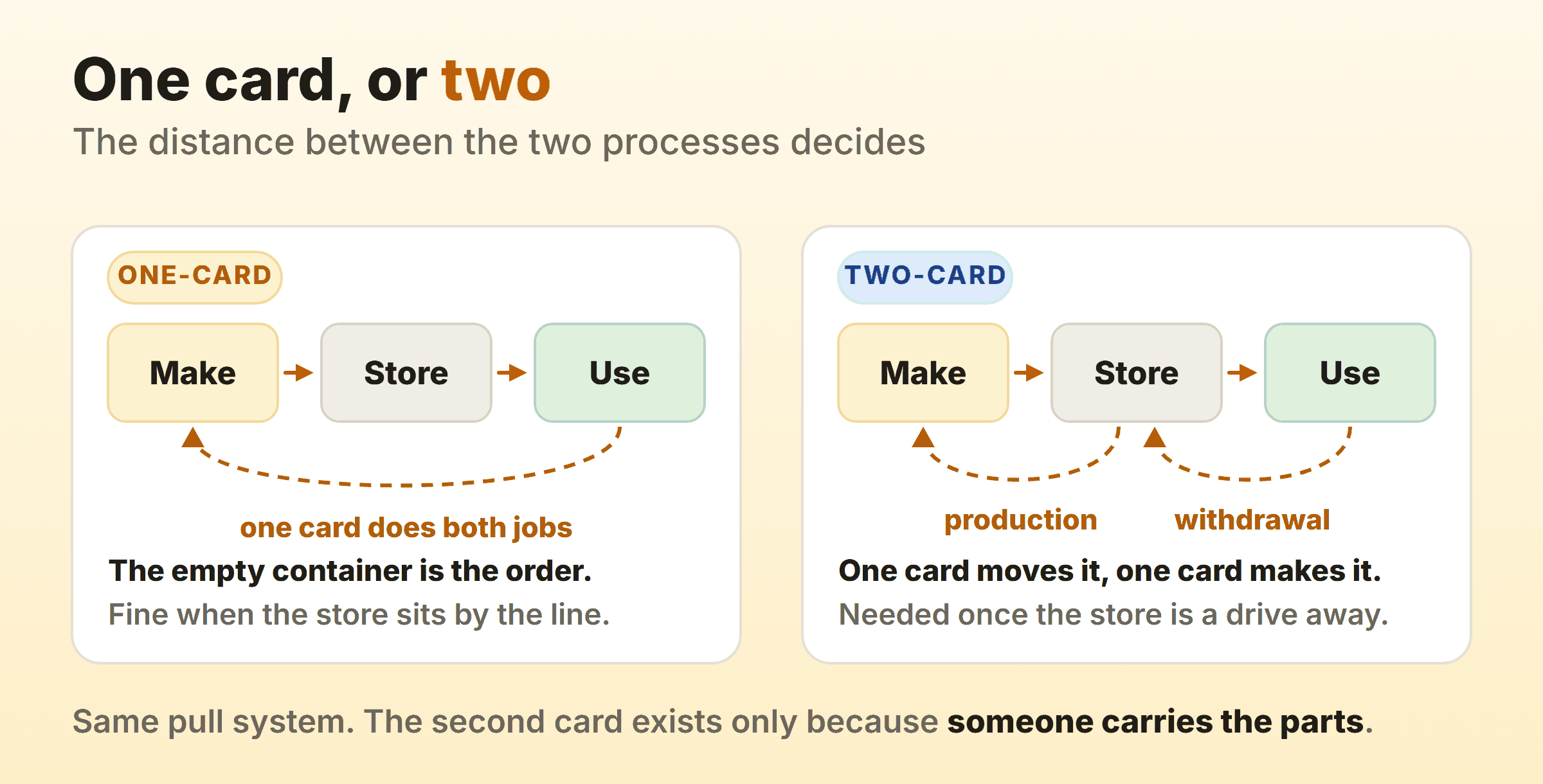
A one-card kanban system uses a single card per container, and the empty container coming back is itself the trigger to make more. That is the whole explanation. No separate move authorisation exists, because there is nothing much to authorise. The store sits beside the line, an operator empties a bin, bin and card travel a few metres back, and the supplying process starts on the next one.
The advantages of a one-card kanban system are all simplicity. Half as many cards to print, laminate and lose, and no material handler role to define. The card never leaves its container, so the system survives a short-staffed shift.
The limitations arrive with distance, and they are the real disadvantages of a one-card kanban system. A single card kanban system assumes the consuming process can see or reach the store, which makes it suitable for high-turnover parts that cycle constantly near where they are used. Slow movers are the awkward case. An empty bin can wait weeks before anyone reads it as a signal, so a low-turnover part wants an explicit production card.
Two-Card Kanban
A two-card kanban system splits the job in two. A withdrawal kanban authorises moving a container from the store to the line, and a production kanban authorises the upstream process to build a replacement. An operator opens the first container, pulls its withdrawal card and drops it in a collection box. A material handler picks it up, walks to the store, clips it to a full container and delivers that. The production card riding on that container goes back upstream as the order to make one more.
Nothing gets made or moved without a card, which is what makes this a genuine pull system. The second card exists because somebody has to carry the parts a distance, and that carrying needs its own authorisation.
How Many Kanban Cards Do You Need?
The number of kanban cards in a loop is demand across the replenishment lead time, plus a safety allowance, divided by how many parts fit in a container:
cards = (daily demand x replenishment lead time x (1 + safety factor)) / container quantityTake demand of 480 units a day, a replenishment lead time of 0.75 days, a 10 percent safety factor and 50 parts per container:
(480 x 0.75 x 1.10) / 50 = 7.92Round up, always, because rounding down starves the line. So eight cards. The kanban number of cards rounds up for the same reason a WIP limit is a cap you never aim at.
Once the loop is running, pulling a card out of circulation is how a lean team tightens the system and exposes whatever problem was hiding behind the slack, which is the identical move as lowering a WIP limit on a software board.
Do You Still Need Physical Kanban Cards and Card Holders?
On a shop floor, yes, which is why kanban card holders are a product you can buy. A card living on a bin gets handled by people in gloves, sprayed with coolant and occasionally run over, so it goes into a clear vinyl or rigid plastic sleeve that clips to the container. Skip the holder and the card turns unreadable inside a month, at which point the container has quietly stopped signalling.
If you print kanban cards yourself, a few things save trouble later:
- Print on card stock, then sleeve or laminate them.
- Number every card in the loop, as in 3 of 8, so a missing card announces itself.
- Put the part number in the largest type on the card, since that is what people read at arm’s length.
- Colour the card by line or supplying process, never by urgency.
You can buy kanban cards and card holders ready-made from industrial suppliers, and for a small loop a template and a laser printer do the same job. Durability is what the money buys, so match the kanban card holder to the environment.
For office and software teams the answer flips. Sticky notes on a wall beat any tool while everybody sits in one room, and they stop working the day one person joins from home. From then on a digital kanban card board earns its keep, because it remembers dates and can be read by someone who is not in the room.
FAQ
What is the purpose of a kanban card?
The purpose of a kanban card is to signal that one piece of work, or one container of parts, is authorised to move to its next stage. It carries enough information for the next person to act, and its position on the board carries the rest.
What are the two types of kanban cards?
Production kanban and withdrawal kanban. A production kanban tells an upstream process to make a container of parts. A withdrawal kanban authorises moving a container from a store to the process that consumes it. Signal kanban gets listed as a third type, triggering batch production at a set point.
Are kanban cards and tasks the same thing?
On a digital board, close enough. A card and a task are usually the same object. The distinction matters in manufacturing, where the card is attached to a container of parts and nobody is asked to do anything with it.
Where can I find a kanban card template?
Most kanban tools ship kanban cards templates with the fields already structured, and any of them will get you started. Better to write three real cards by hand using the six fields above, because a template arrives carrying somebody else’s fields.
How many kanban cards should one person work on at once?
One or two. Three is a stretch that usually means one card is parked. Treat it as a personal WIP limit and drop your own cap to two for a fortnight before you change anything else on the board.