
What Is a Kanban Board? Parts, Purpose and How It Works
Updated at
The Answer
A kanban board is a visual board holding every piece of work a team has taken on, shown as cards that move left to right through columns representing the stages of your process. Its one job is making invisible work visible. Look at a real board and you can see what is being worked on right now, what has been stuck waiting on somebody else since Tuesday, and which column is quietly swallowing the week. Reduced to essentials, what is a kanban board? Columns that match the process you genuinely run, one card per work item, and usually a cap on how many cards a column may hold, because that cap is what turns a tidy wall chart into something that changes behaviour.
What Is a Kanban Board?
A kanban board is a work management tool that displays tasks as cards on a board split into columns, where each column is one stage of work and each card moves rightwards as it progresses. Everything below expands that sentence.
The word is Japanese. Kanban means signboard or signal card, and the first ones were physical cards on a factory floor. Taiichi Ohno built the kanban system at Toyota in the years after the second world war, borrowing the idea from American supermarkets, where a gap on the shelf is what triggers a restock and no schedule is involved at all. Toyota still publishes its own account of the Toyota Production System and the just-in-time thinking those cards serve.
Software teams arrived decades later. David J. Anderson’s 2010 book Kanban applied the same signalling to knowledge work, where the inventory piling up is unfinished tickets instead of gearboxes.
Kanban project management is mostly this board plus one agreement about how much anyone starts at once. The kanban framework label gets attached to it constantly, which muddles things, because a framework replaces the process you have and the kanban method sits on top of it. A kanban team can adopt it on a Tuesday and nobody gets reorganised. Agile kanban is the same method with an adjective bolted on for the knowledge-work crowd.
The kanban board definition you meet in tool marketing runs looser, and under it any grid of cards qualifies. Keep the stricter reading. A board earns the name when the columns describe real states and the cards describe real work, and kanban board meaning gets stretched the moment somebody imports a template with another team’s process baked into it.
Set a board beside a to-do list and the difference shows up fast. A to-do list answers the next-action question and stops there. Where everything sits, who is blocked, and how long the middle of the board has been jammed are questions a list cannot hold, which is why forty items on a list feel like ambition while nine cards in a Doing column look like exactly what they are.
What Are the Parts of a Kanban Board?
A kanban board has five parts, and only the first three are compulsory: the board, the columns, the cards, work in progress limits, and swimlanes.
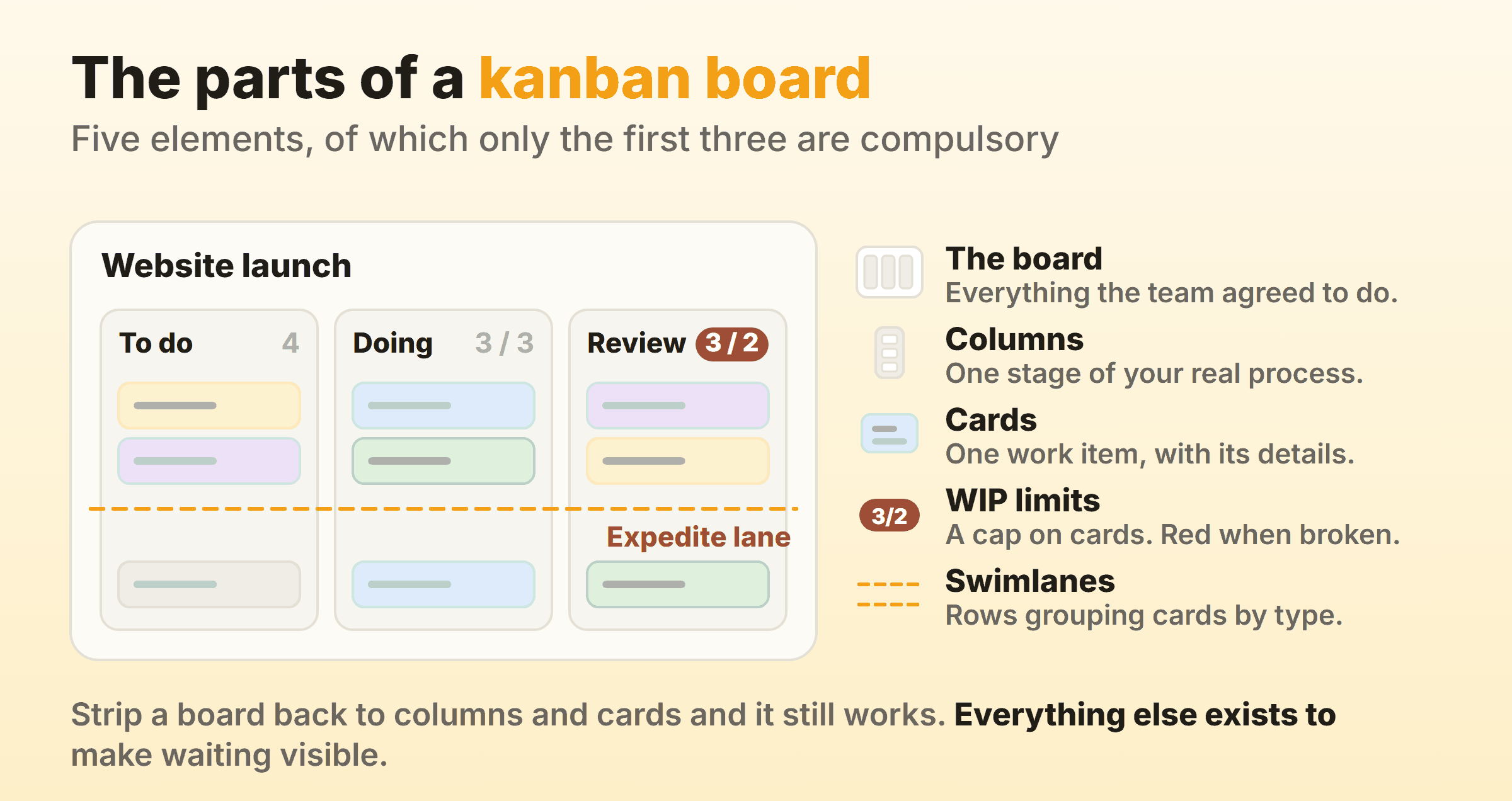
The board. One board per project, team or product, holding everything that group has agreed to work on. A board covering three unrelated projects stops being readable about a month in.
Columns. Each column is one stage the work passes through, read left to right from not started to finished. The set of them is your kanban workflow written down. Three is the usual starting point (To do, Doing, Done) and most teams settle between three and seven. Kanban columns are where boards go wrong most often, and the usual cause is copying somebody’s stages instead of writing down what the team really does.
Cards. One card, one work item, detailed below.
Work in progress limits. A number capping how many cards a column may hold at once. Without one, the board reports status and nothing else. Add one and it starts arguing back, which is the entire point of it, and WIP limits are the single change that does most for a board that already exists.
Swimlanes. Horizontal rows cutting across every column, used to separate kinds of work. An expedite lane for urgent items is the common case, and it saves renegotiating “this one is on fire” from scratch every time.
That is the entire kanban board structure. The key features of a kanban board are the same five in every tool that ships one, and the kanban structure does not get more elaborate at scale, so a fifty-person delivery board and a board run by one person on a laptop end up with identical anatomy.
What Goes on a Kanban Card
A kanban card carries one work item plus enough detail that somebody else could pick it up without asking a question. The kanban card format that survives contact with a real team stays short:
- A title a colleague can understand out of context
- One owner, and only one
- A label or type, so dev work is distinguishable from marketing work at a glance
- A due date, but only where a genuine one exists
- Subtasks for anything with more than a couple of steps
- A comment thread, so the discussion lives beside the work instead of scattered across chat
On the boards I run, the fields used constantly are the label, the subtask counter and the time log. The ones filled in once and never looked at again are due dates nobody actually agreed to. Useful to know before you design a card template with fourteen fields on it.
What Does a Kanban Board Look Like?
A kanban board looks like a set of vertical columns filled with small cards, drawn either on a wall with tape and sticky notes or rendered in a browser. Kanban software keeps the same kanban board format and adds what paper cannot do, such as a live count in the column header and a search box.
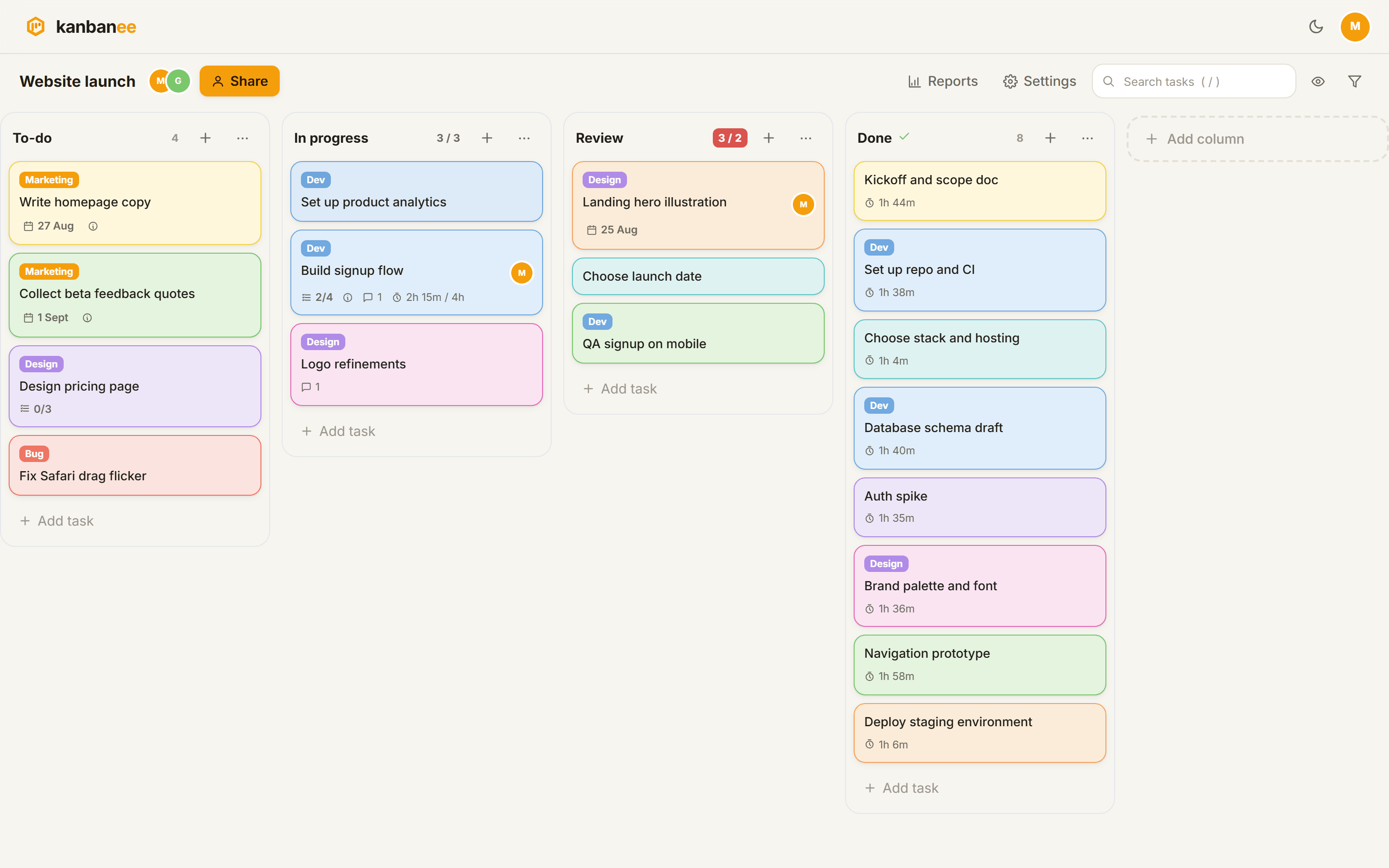
That is a real board, not a mock-up. Column headers carry a count, and where a cap is set the badge shows count / limit and turns red once the column goes over. Cards carry a coloured label, a due date, a subtask counter and time logged. The Review column sitting at 3 / 2 in red is the board doing its actual job, telling you that reviewing has fallen behind and that starting a fourth thing would make it worse.
Trello, Jira and Notion all ship a kanban-style board view and the layout barely differs between them, so what separates the tools is whether one will hold you to a limit or let the column grow.
Wall and browser are both a visual kanban system. Paper wins on visibility, since a wall board gets seen by everyone who walks past. What paper cannot do is tell you that cards sat in review for a median of six days last month, and for anyone whose team spans two time zones the wall was never really an option anyway.
What Does a Kanban Board Demonstrate?
A kanban board demonstrates four things a task list cannot show at all.
- How much is in flight. Count the cards sitting between the first and last column, then set that number beside whatever the team guessed before counting, because the gap is the useful part.
- Where work waits. Cards stack up in front of the constraint. That column is your bottleneck, and it is rarely the one people complain about in meetings.
- How old things are. A card untouched for three weeks looks identical to a fresh one on a task list. On a board it is the one everybody’s eye keeps snagging on.
- Whether finishing keeps pace with starting. If the left side grows faster than the right, unfinished work is piling up, and it behaves like a debt with interest.
Process manuals file this under the heading kanban board visual work control. Control overstates it. A board never physically blocks anyone from starting something, and the pressure it applies is entirely social. Nobody enjoys dragging a fifth card into a column that already holds four in front of the whole team.
So what is a kanban board used for? Deciding what to finish next on evidence that is already on the wall, and most of the benefits of kanban listed elsewhere come downstream of that single habit.
Is a Kanban Chart the Same as a Kanban Board?
A kanban chart usually means the kanban board itself, because chart and board get used interchangeably in casual conversation, but in flow reporting it means one of four specific charts drawn from the board’s history.
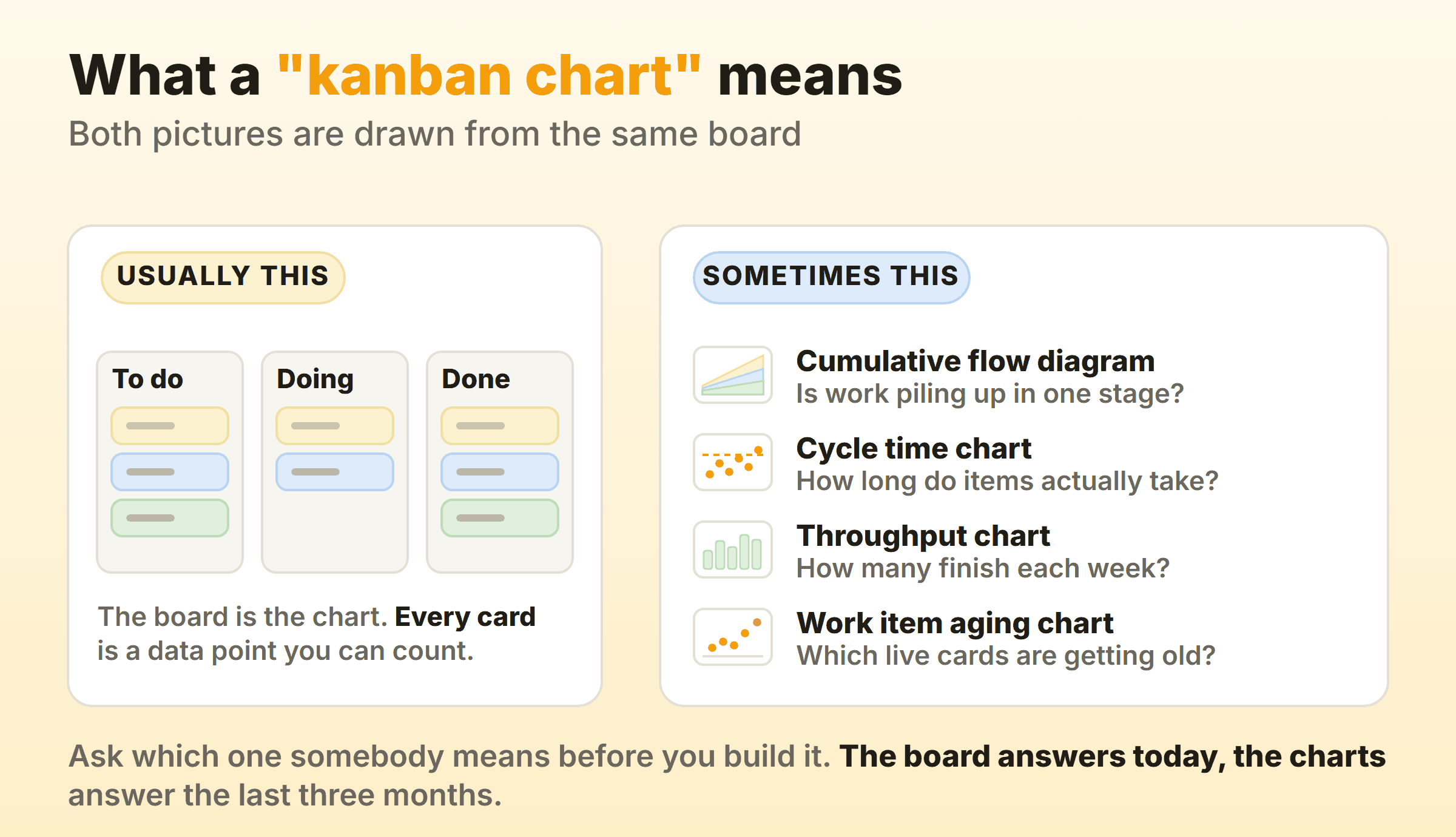
The ambiguity causes real confusion. Somebody asking for the kanban chart in a status meeting wants the board on screen. The same words in a reporting conversation mean numbers. A request for a kanban diagram or a kanban board diagram is nearly always the first kind. Ask which before you build anything.
Four kanban charts genuinely exist, and each answers a different question:
| Chart | What it answers |
|---|---|
| Cumulative flow diagram | Is work piling up in one stage? |
| Cycle time chart, sometimes called a kanban control chart | How long do items really take, and how variable is that? |
| Throughput chart | How many items finish each week? |
| The kanban work item aging chart | Which cards in progress right now are getting old? |
Those map onto the flow measures in the Kanban Guide, which names work in progress, throughput, work item age and cycle time as the things a kanban system tracks.
A kanban burn-down chart is missing from that list for a reason. Burndown assumes fixed scope inside a fixed time box and kanban supplies neither, which leaves the line nothing meaningful to fall towards, so teams who ask for a burndown are almost always asking a forecasting question, and percentile forecasting from cycle time answers that one directly.
These are also what people mean by a kanban chart automatic enough to skip the spreadsheet. Drawing a cumulative flow diagram by hand is possible once. Nobody does it twice. Any tool that records when a card entered and left each column can generate the whole set unattended, covering cycle time, weekly throughput and the cumulative flow diagram. Kanban metrics goes through how to read them once you have them.
How Does Work Move Across the Board?
Work moves across a kanban board by being pulled rather than pushed, and that pull is the whole kanban process. Somebody finishes a card, checks whether their column has room under its limit, and takes the next item from the left. Nobody hands out a week’s work in a batch on Monday morning.
The leftmost column holds committed work, ordered so the top item is next, and when a person frees up they pull from that top instead of starting something new. If pulling would break a limit, the correct move is helping clear whichever column is full, and that step feels wrong the first few times. Standing still while a queue drains looks like idleness. It is normally the fastest thing available. Little’s Law puts arithmetic behind that, since cycle time equals work in progress divided by throughput, so halving what is in flight halves how long each item waits, with nobody working any harder.
Where Kanban Boards Fall Down
Boards fail in four predictable ways, and all four are avoidable.
Board rot. A board nobody updates is worse than no board. It looks authoritative while lying to you, and the rot sets in when the columns quietly stop matching how the team really works, which happens after every reorganisation and most tool migrations.
No deadlines, by design. Kanban has no sprint boundary and no scope commitment, which leaves it with no built-in date either. A team that has to promise a stakeholder something ships on the 14th needs forecasting layered on top, and some would sooner take scrum’s fixed cadence.
Column sprawl. Nine columns feels thorough and reads as noise. Every extra column adds another drag, another argument about which state something is in, and a smaller increment of progress than anyone cares about.
Prioritisation stays your problem. A board displays order without deciding it. Teams occasionally expect the method to answer what is most important, and no version of kanban has ever done that.
Tools carry limits too, and ours belong here. Kanbanee has no realtime sync yet, so a colleague’s changes show up on the next poll. Column dragging is desktop only, though cards move fine on mobile with a long press. There is no public API or integrations at the moment. If your team runs a toolchain that has to talk to the board automatically, weigh that before anything on a feature list.
FAQ
What are the five key elements of a kanban board?
The board, the columns, the cards, the work in progress limits and the swimlanes. Some sources swap swimlanes out for a commitment point and a delivery point, the two moments where a card starts and stops being measured. Either list works as long as columns and cards are on it.
What is the difference between a scrum board and a kanban board?
A scrum board is cleared at the end of every sprint and holds only what the team committed to for that sprint. A kanban board runs continuously, so cards stay put across weeks and new work joins whenever capacity appears. Two boards can look identical column for column while running under completely different contracts. Kanban vs scrum works through the differences properly.
What are the six rules of kanban?
They come from Toyota’s factory floor, long before software: never pass on defective work, take only what is needed, produce only the quantity required, level the workload, use kanban to fine tune, and stabilise the process. Translating all six to a software board takes some liberty. The first two survive intact.
What are kanban boards used for outside software?
Manufacturing still runs the original, where a card triggers a restock. Past that, hiring pipelines, editorial calendars, support queues, sales pipelines and university coursework all fit the same three-column shape. The kanban board explanation is identical everywhere: any process with distinct stages and a queue between them is a candidate.
What is a kanban chart in PMP material?
The same flow charts covered above, taught under the heading of agile metrics. Cumulative flow diagrams and cycle time appear most often, because they apply to any pull system regardless of what the team calls its method.
Do you need a kanban board if you work alone?
Personal boards work well, and on a solo board the cap is what earns its keep. Three columns and a limit of two on Doing covers most setups. You get the same thing a team gets, which is seeing that you have started six things and finished none of them.
More on Board Anatomy
The board theme goes deeper on the two parts that decide whether a board earns its place:
- Kanban board columns covers how many to use, naming them after what happens to the work, and the queue column that exposes a bottleneck.
- WIP limits covers where to put the first cap, which number to start from, and what to do the day it turns red.
The rest of the board theme goes further:
- Kanban cards covers what belongs on the front of a card and what stays inside it.
- Swimlanes covers when a horizontal lane earns its place and when a label would have done.
- Board examples collects column sets that hold up in real use.
- How to create a kanban board walks the build, columns first and caps second.
- The kanban view covers the board as one view over records you already keep.
- Physical boards covers the wall version, and the month-three question it cannot answer.