
Jira Alternatives: 8 Tools Compared on What Leaving Costs
The Answer
The Jira alternatives worth a migration are the ones that take away configuration without taking away something you are quietly relying on. Jira Free is free forever for 10 users and includes reports, dashboards and 150 automation steps a month, so at that size leaving saves admin rather than money. Linear and Shortcut are the straight swaps for engineering teams who want fewer knobs. GitHub Projects is the free one when the work already lives beside the code. Trello and ClickUp suit mixed teams where half the board was never engineering. OpenProject and Plane are the open source Jira alternative picks for data that has to stay on your own hardware. Before any of it, read Atlassian’s export documentation, because the site backup leaves automation flows and third-party app data behind.
Why Do Teams Leave Jira?
Teams leave Jira for weight and admin, not for a missing feature. Jira does more than every tool on this page, and that capability arrives as configuration somebody has to own.
One board’s behaviour spreads across column settings, status mapping, the board filter and, in a company-managed project, a workflow belonging to a scheme a Jira admin controls. Our Jira kanban board guide walks that setup, and the length of it is the argument. None of those settings is hard. There are just a lot of them, in four different places.
Price is the second reason, and it deserves checking first. Atlassian’s pricing page calls the Free plan “Free forever for 10 users” and puts unlimited projects and tasks on it, with the backlog, board, timeline and calendar views, reports and dashboards, 150 automation steps per subscription per month, and 2 GB of storage. Set the team size selector to 10 and Standard shows $9.05 per user per month on monthly billing, or $900 a year for those ten seats annually.
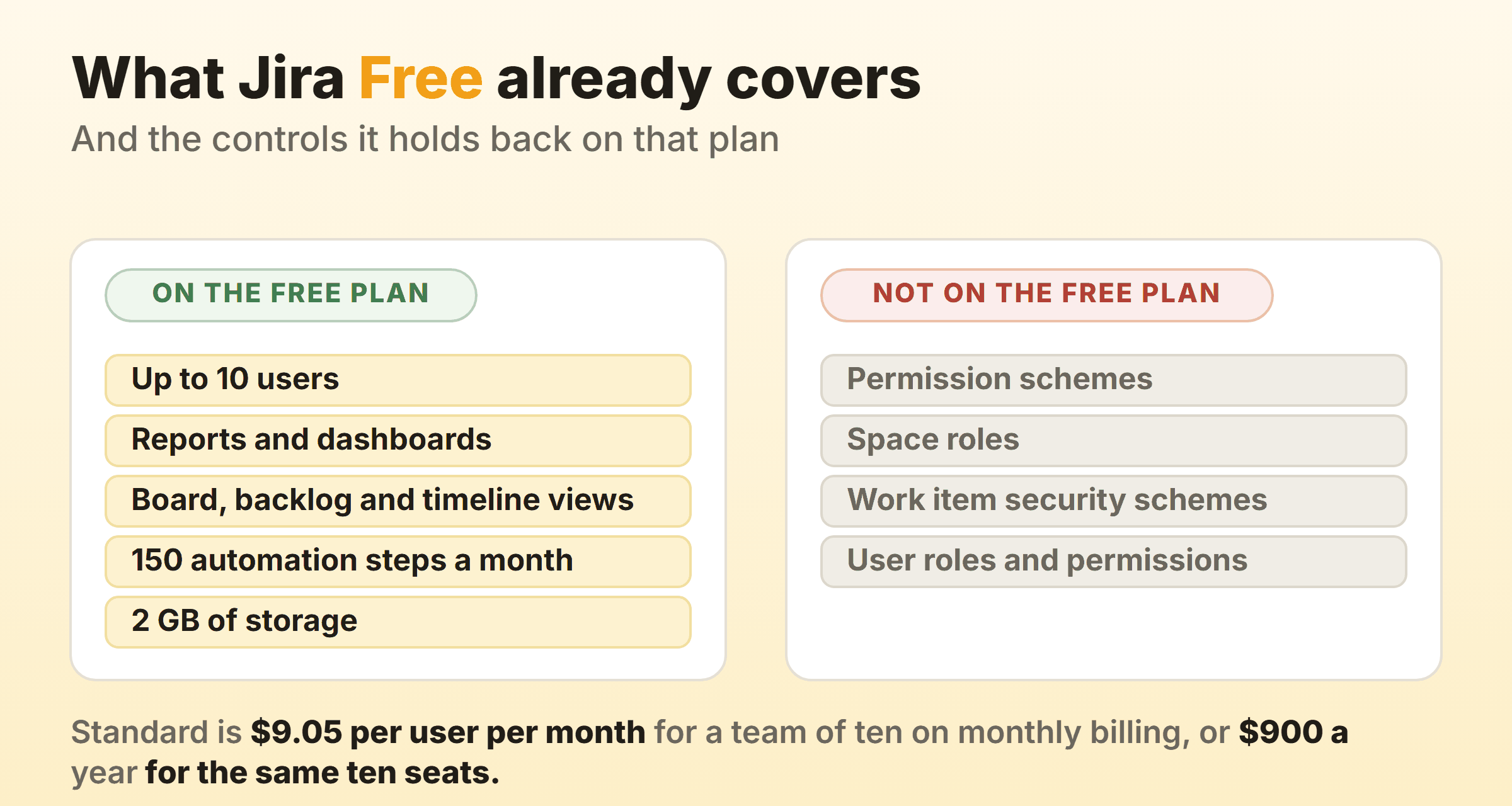
What Free withholds is the permissions layer. Atlassian’s page on permissions limitations in free Jira sites is blunt about it. On a free site you cannot “assign space roles”, “configure work item security schemes” or “restrict permissions using schemes”, and if you downgrade into Free, the schemes you already had are preserved but cannot be edited. User roles and permissions sit in the Standard column under “Everything from Free, plus”. A free Jira site is already simpler than the Jira people complain about, which is worth knowing before you decide the complaint is Jira itself.
Jira Alternatives Compared
| Alternative | Who it suits | What it fixes | Entry price on 16 September 2026 |
|---|---|---|---|
| Linear | Engineering teams tired of settings | Almost nothing to configure | Free for 2 teams and 250 issues, Basic $10 per user per month billed yearly |
| Shortcut | Small software teams that still want sprints | Jira’s shape without the scheme layer | Free for 10 users, Team $8.50 per user per month billed yearly |
| GitHub Projects | Teams whose work is issues and pull requests | One fewer tool, column limits included | Free on GitHub Free, Team $4 per user per month |
| Trello | Teams who only ever used the board | No workflow to maintain at all | Free for 10 collaborators per Workspace, Standard $5 per user per month billed annually |
| ClickUp | Teams replacing Jira and a wiki together | Docs, boards and sprints in one suite | Free Forever, Unlimited $7 per user per month billed yearly |
| OpenProject | Regulated teams needing self-hosting plus support | Open source with a vendor behind it | Community free, Basic $7.25 per user per month on a one-year subscription, 25-user minimum |
| Plane | Small teams wanting open source without a server | Cloud or self-hosted, same product | Free for 12 users, Pro $6 per seat per month billed yearly |
| Our own board | Two or three people who want a capped board | Column caps and timers with no setup | Free for 2 owned boards, Pro $6 a month flat or $48 a year |
Every price, cap and tier above came off the vendor’s own pricing page on 16 September 2026, at the billing toggle named in each row. Free tiers get rewritten constantly. Open the page yourself before you move anybody.
Linear: The Least Configurable Option, On Purpose
Linear removes settings rather than reorganising them. No permission schemes to inherit, no status-to-column mapping, no board filter to debug at 6pm.
Linear’s pricing page puts unlimited members on Free alongside 2 teams, 250 issues and 10MB file uploads. Basic is $10 per user per month billed yearly for 5 teams, unlimited issues and unlimited file uploads. Business is $16 per user per month billed yearly and adds unlimited teams, private teams and guests, and Linear Insights.
Read the 250-issue line twice. A Jira project of any age clears it during the import, so Free is an evaluation tool rather than a destination.
There is a gradual route out. Linear’s Jira integration offers Jira Sync for teams “that aren’t ready to fully switch over yet”, keeping linked Jira spaces and Linear teams in step during a pilot. The catch sits on the same page. Whoever creates the API token needs the ADMINISTER permission in Jira, which on a big instance means asking someone who may not want your pilot to work.
Right for product engineering, an audience we cover in kanban for software teams. Wrong the moment support and finance want cards on the same board.
Shortcut: Jira’s Shape Without the Scheme Layer
Shortcut keeps the concepts a Jira team already thinks in, which makes it the least disorienting swap here. Stories, epics, iterations, workflows, a board, minus the scheme administration.
Shortcut’s pricing page gives the Free Plan 10 users, 1 team, 1 workspace, 1 customizable workflow and 5G of storage, with kanban views, a roadmap, iterations, docs and the GitHub, Slack and Figma integrations. The plan comparison is where the free column gets interesting. Story Work in Progress Limits are marked unavailable on Free. So are Automations, and so is the Reports page with Metrics Dashboard, the group holding cycle time, lead time and the cumulative flow diagram.
Team Plan is $8.50 per user per month on the page’s default yearly toggle, and that tier is where WIP limits, multiple workflows, automations, every integration and 250G of storage arrive, with unlimited users and up to 5 teams. Business is $12 per user per month yearly.
For six engineers who liked Jira’s model and hated its upkeep, this is the closest thing to like for like. Budget Team from day one if flow reporting is part of why you are going.
GitHub Projects: Free, and Already Where the Code Is
GitHub Projects costs nothing on a plan most engineering teams already pay for, and it is the only board here that reads your pull requests without an integration. GitHub’s pricing page lists Free at $0 per user per month with unlimited public and private repositories and “Issues & Projects” included. Team is $4 per user per month.
The column cap is real and documented. GitHub’s board layout documentation says “The current count of cards and the column’s limit is displayed at the top of the column and is highlighted when the current count exceeds the limit”, and that the cap stays advisory, since “Setting a limit does not restrict anyone from adding cards that would exceed the column’s limit”. Limits are per view rather than per project, which trips people up in week one.
Custom fields have a ceiling. GitHub’s about Projects page states you can use up to 50 fields in a project, counting built-in metadata. Generous next to a spreadsheet, thin next to a Jira instance carrying eighty custom fields.
The real constraint is conceptual. A project is a view over issues and pull requests, so any card that is neither has to be a draft issue. Kanban in GitHub covers the mechanics.
Trello: The Board Without Any of the Rest
Trello is a Jira board with the machinery removed, which is either a relief or a disaster depending on which half of Jira you were using.
Trello’s pricing page makes Free free for up to 10 collaborators per Workspace, with unlimited cards, up to 10 boards per Workspace, unlimited Power-Ups per board, unlimited storage at 10MB a file and 250 Workspace command runs a month. Standard is $5 per user per month billed annually and $6 billed monthly. Premium is $10 per user per month billed annually and $12.50 billed monthly, and Premium is where the Calendar, Timeline, Table, Dashboard and Map views live.
There is no workflow here. No required fields, no transition screens, nothing stopping a card jumping three columns. Teams who only used Jira’s board find that liberating for a month. Teams who relied on a transition forcing an assignee find out in week two. Trello hands off a few things of its own, which we went through in the Trello alternatives comparison.
ClickUp: One Suite If You Are Replacing Confluence Too
ClickUp earns its place when the migration is bigger than the board. Cancelling Jira and a wiki in the same quarter makes one bill a genuine argument.
ClickUp’s pricing page puts unlimited tasks, unlimited free plan members, kanban boards, sprint management and collaborative docs on Free Forever, with 60MB of storage. Unlimited is $7 per user per month billed yearly and $10 billed monthly. Business is $12 per user per month billed yearly and $19 billed monthly.
The column cap sits behind Business. ClickUp’s help centre on Work in Progress Limits says it in one line: “Work in Progress Limits are available on the Business Plan and above.” The behaviour is the right shape, with the header reading count against limit, green under capacity, yellow near it, red over, and the cap staying soft, because “You can create, move, or update tasks even if it makes a particular column go over the limit.” A Workspace owner or admin switches the ClickApp on first.
Six people moving off Jira Free for the cap would pay $72 a month on Business at the yearly rate. The rest of the suite has to earn that. More on the board itself in kanban in ClickUp.
OpenProject and Plane: Two Open Source Jira Alternatives
Both run on hardware you control, and their commercial shapes have almost nothing in common, so team size usually decides.
OpenProject’s pricing page offers a free Community edition with, in its own words, “No minimum users”. The paid tiers get specific. At 25 users, on-premises, on a one-year subscription, with the currency toggle moved from euros to US dollars, Basic is $7.25 per user per month with a 25-user minimum, Professional $13.50 per user per month with the same minimum, and Premium $19.50 per user per month with a 100-user minimum. A team of six either runs Community unsupported or buys 25 seats it does not need.
Plane’s pricing page treats small teams better. The cloud Free plan is $0 per seat per month and lists 12 users, with projects and work items, cycles and modules, five layouts and unlimited views, work item intake, estimates and project pages. Pro is $6 per seat per month and Business $13 per seat per month on the page’s default yearly toggle. Self-hosting is a deployment path rather than a separate product.
Check the licence against your policy before either install. The wider field is in our open source kanban roundup.
A Small Board Where the Column Cap Is a Checkbox
A purpose-built flow board only belongs in a Jira comparison if it is honest about the difference in scale, so here is ours with that stated. I run our own product board on it.
Kanbanee gives Free 2 boards you own with unlimited members, and Pro is $6 a month or $48 a year, which is where cycle time, weekly throughput, the cumulative flow diagram and time by member or label live. A column cap is a checkbox and a number, off until you tick it, and the limit stays soft so the drag always works. Stopwatch and Pomodoro timers sit on the card.
Now the part that matters more here than on any other page. There is no realtime sync, there is no API, and column drag is desktop only. If you are leaving Jira because the licence stopped justifying six integrations, a board with no API is a step backwards rather than sideways. Two or three people who never needed Jira will be fine on it. A twenty-person engineering org will not, and saying otherwise would make the rest of this page worth less.
What Breaks When You Leave Jira?
What breaks on the way out of Jira gets decided in two places, and neither is the tool you are moving to.
Atlassian’s export documentation lists what a cloud backup carries: work items and field content including system and custom fields, board and sprint data, users and user group settings, comments, media files, and space configuration data covering workflows, global permissions, schemes, screens, custom field configuration, work types and board configuration. Then it lists what stays. The first two entries under “Data that can’t be exported” are automation flows and third-party apps and app data, and the list runs on from there. Read the small print under it, though, because the same page says automation flows can be exported and imported manually, which rescues them if you are moving to another Jira and does nothing for you if you are not. Two more lines matter before you book the weekend. Organisation admins can block exports outright, and backups that include attachments, avatars or logos need 48 hours between them.
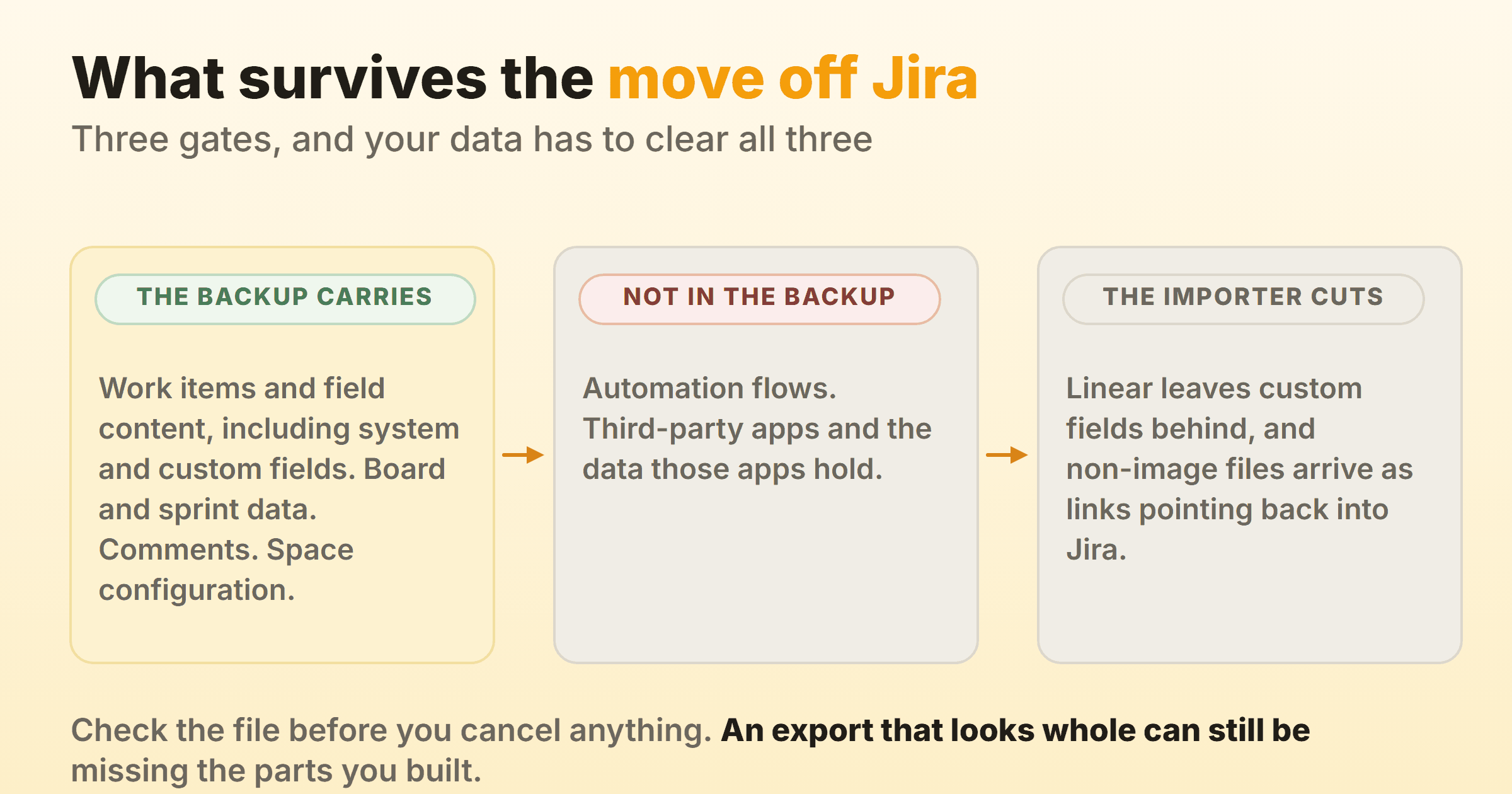
Then the importer takes its own cut. Linear’s Jira importer documentation publishes the whole mapping, and it is a good one: summary to title, description converted to markdown, assignee and creator matched on a best-effort basis, epics to projects, comments to comments, components to team-level labels, inline and attached images to image files. Under the table sits the sentence to plan around. “Please note that data not included above like custom fields will not import to Linear.” Non-image files get their own row and are “Imported as URLs pointing back to original file in Jira”, so your attachments stay inside the subscription you were about to cancel.
Three things go missing that nobody costs in advance:
- The permissions model. Nothing on this page has permission schemes. Most have roles, a couple have guests, and that is the ceiling.
- The history trail. Linear’s mapping carries the created date. The record of when a work item entered and left each status is not in that table, and that trail is the raw material behind every number in a flow metrics report.
- The automation you forgot you wrote. Rules that assign, transition, notify and close are excluded from the backup by name. The manual export Atlassian offers for them lands in another Jira, so on the way to anything on this page they get rebuilt by hand.
None of that argues for staying. It argues for exporting first, opening the file, and checking the parts you depend on are inside it.
Which Jira Alternative Fits Your Reason for Leaving?
Start from the complaint, not the shortlist. Every tool here draws the same columns, which is how teams end up with the same board in a different colour and the same problem in a new subscription. The broader kanban alternatives guide takes the same line, as does our roundup of general project management software.
- You ship software and want fewer settings. Linear, budgeted at Basic, because Free stops at 250 issues.
- You want Jira’s model with a tenth of the upkeep. Shortcut, on Team if WIP limits or flow reports are part of the reason.
- Your work is already issues and pull requests. GitHub Projects, free, with column limits and up to 50 fields.
- Only half the team is engineering. Trello if the board was all you used, ClickUp if a wiki is also going.
- The data cannot leave the building. OpenProject Community if you can support it yourself, Plane if 12 seats is enough.
- You are ten people or fewer and the complaint is the bill. Stay. Jira Free is free forever for 10 users and the reports are included.
Write the missing capability in one sentence before you move. If that sentence is about how the board looks, a migration weekend is an expensive way to rename six columns.
FAQ
What is the best free Jira alternative?
GitHub Projects, if your work is already issues and pull requests, because column limits and up to 50 project fields cost nothing on GitHub Free. Shortcut’s Free Plan carries 10 users with kanban views and iterations, though its comparison table marks WIP limits, automations and the metrics dashboard as paid. Plane’s cloud free tier lists 12 users. We compare the wider field in the free kanban boards roundup.
Is there a real open source Jira alternative?
Two, with very different commercial shapes. OpenProject publishes a free Community edition with no minimum users and sells support on top, starting at a 25-user minimum. Plane offers self-hosted deployment alongside its cloud plans. Read the licence before the feature list, because procurement treats copyleft and permissive licences as completely different questions.
What are the best Jira alternatives for small teams?
For a small software team, Shortcut and Linear reduce admin without reducing the model. For a team under ten where cost is the real complaint, the honest answer is that Jira Free is free forever for 10 users and already includes reports and dashboards, so the move needs a reason beyond price. A small board with soft column caps works when the team never used Jira’s workflow engine anyway.
Will my Jira data come with me?
Partly, and both ends document the shortfall. Atlassian’s export page says a cloud backup carries work items, custom field content, board and sprint data and comments, while automation flows and third-party app data are not in that backup. Linear’s importer publishes its own mapping and notes that anything outside it, custom fields included, does not import. Run the export, unzip it, look inside before you cancel.
Does any Jira alternative replace Jira workflow automation?
Not on a free plan. Jira’s pricing page puts 150 automation steps per subscription per month on Free and 400 per user per month on Standard, which is a lot of rules to rebuild. Shortcut lists automations on its paid tiers, ClickUp puts webhooks and automation integrations on Business, and GitHub Projects ships built-in workflows that set fields and archive items, with the GraphQL API and Actions for anything past that. Expect to rewrite, and expect the simplest rules to be the ones you miss.