
Kanban Alternatives: 16 Options for When the Board Is Not Working
Updated at
The Answer
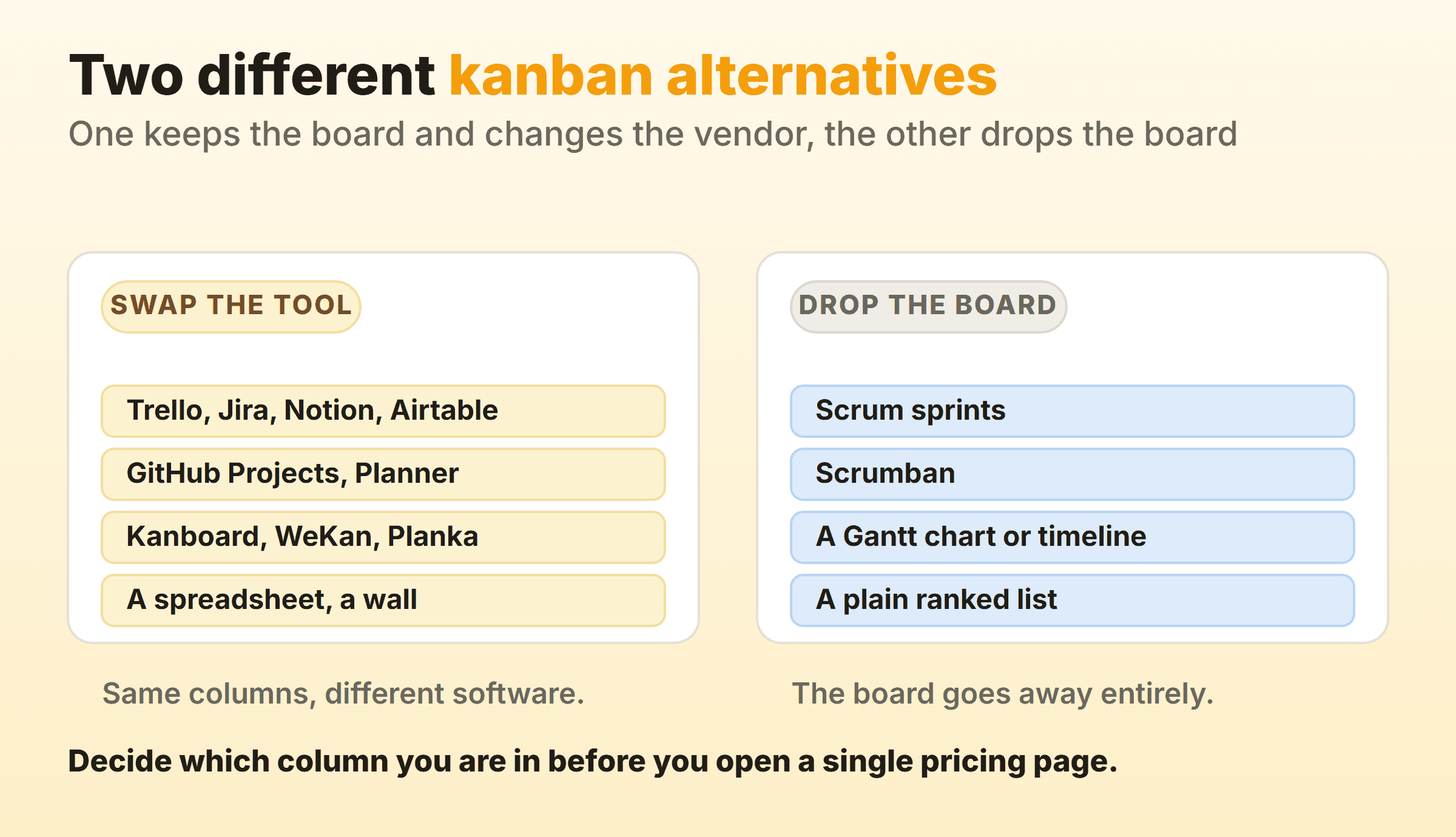
Kanban alternatives come in two piles, and mixing them up is why so many tool migrations change nothing. Pile one is other software that draws the same board. Trello, Jira, Notion, Airtable, GitHub Projects, Microsoft Planner, a self-hosted board such as Kanboard or WeKan, or the spreadsheet you already pay for. Switching between those pays off when your tool is missing something you can name, usually a cap on a column, a record of how long work took, or a hosting rule you cannot break. The second pile throws the board out. Scrum sprints, scrumban, a Gantt chart when the dates arrive from outside your team, a ranked list when there are under ten things open and one person working them. Four of the sixteen below are method changes. No pricing page gets you to those.
What Are You Actually Replacing?
What gets replaced here is the software or the method, and those two want opposite answers. Most people arrive here holding a complaint about a product, and underneath it sits one of two problems.
A board is a strategy for making flow visible. The Kanban Guide, published by Orderly Disruption Limited and Daniel S. Vacanti, Inc. and updated in May 2025, sets out three practices working in tandem: defining and visualising a workflow, actively managing the items in it, and improving it. A tool that does the first one and stops has a gap, and another tool with the same gap will not close it.
The second case shows up more than the roundups admit. A team where every item carries a date set by somebody outside the team is not running a pull system, whatever the columns say. Neither is one person with four tasks. Both got a board because everyone else has one.
Which Symptom Sent You Looking?
The symptom that sent you looking narrows the field faster than a feature table does. Most searches for kanban board alternatives start with one sentence somebody said in a retro. Find yours below.
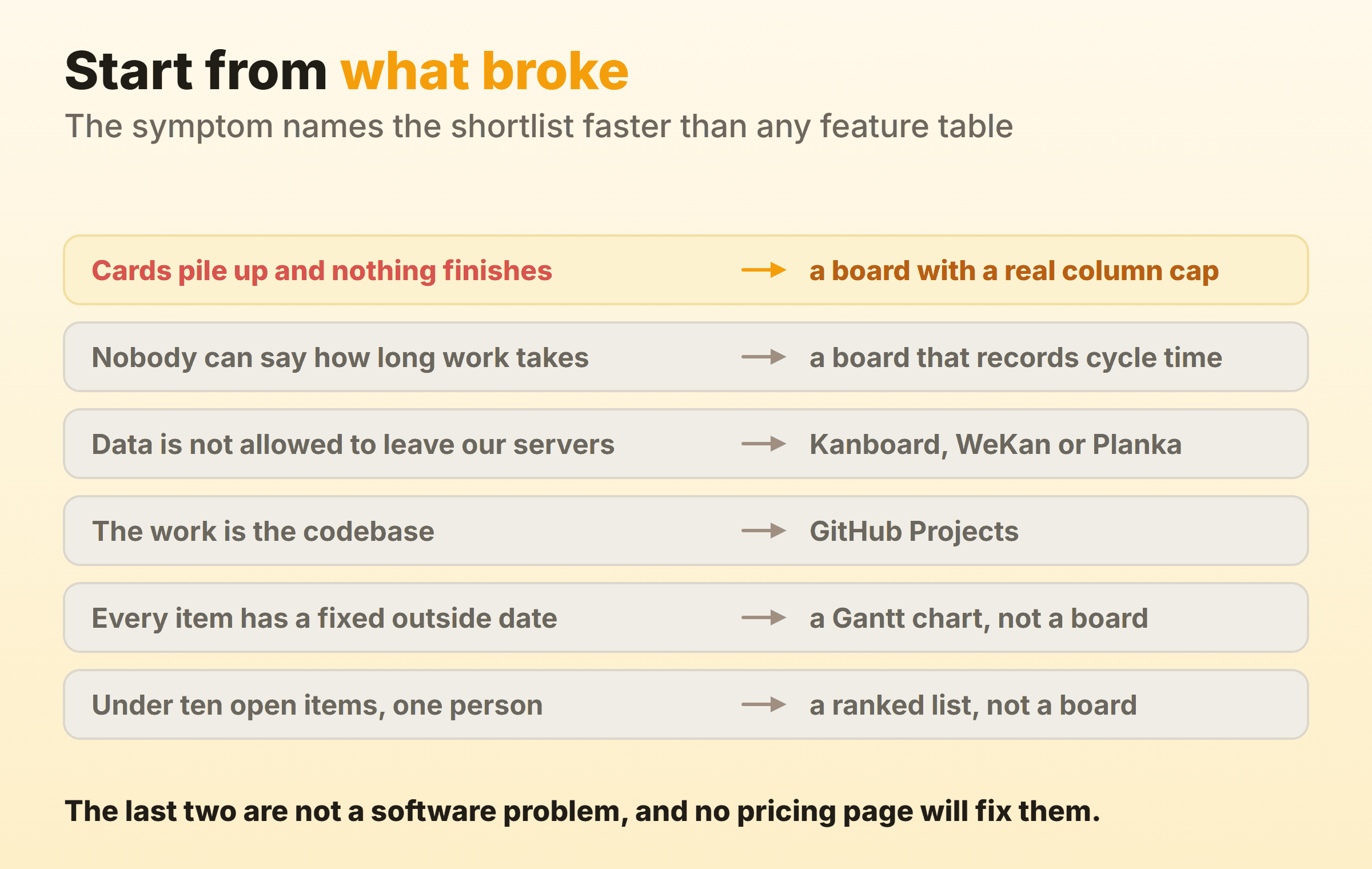
The first two symptoms usually share a cause, which is a board that counts nothing. They do not share a fix. Cards piling up wants a work in progress limit the tool puts in front of you. Nobody knowing how long work takes wants the tool to record when each card entered and left a column, which no cap will do on its own. The Kanban Guide is blunt about it. Members of a kanban system, it says, “must explicitly control the number of work items in a workflow from started to finished”. Several popular boards leave that entirely to you.
Kanban Alternatives Compared
| Alternative | What you are actually choosing | Best fit | Skip it when |
|---|---|---|---|
| Trello | The fastest possible setup | Getting everyone onto one board today | You need a cap or a cycle time |
| Jira | Column constraints that turn the header red | Software teams whose work is already there | Nobody wants to own the configuration |
| Notion or Airtable | A board that is a view over a database | Work that lives beside docs or records | The board is your main workspace |
| GitHub Projects | One of three layouts over issues and pull requests | Work that is the codebase | Work happens outside GitHub |
| Microsoft Planner | The board already inside your tenant | Teams standardised on Microsoft 365 | You want flow reporting |
| Kanboard | Documented WIP limits, MIT, in maintenance mode | Small teams that must host their own data | Nobody can run a server |
| WeKan | Documented WIP limits, self-hosted, MIT, still shipping | Open source rules that name a licence | You want a vendor to call |
| Planka | A source-available board under a Fair Use licence | Self-hosting with a modern interface | Your policy requires an OSI licence |
| Our own board | Soft per-column caps and built-in timers | A small team wanting flow controls now | You need realtime sync or an API |
| Vibe Kanban | A board that runs coding agents rather than people | Orchestrating agent work from the board itself | You need a project that is still maintained |
| A spreadsheet | Total control and zero automation | Fewer than about ten open items | Anyone needs state at a glance |
| A physical board | A wall nobody can ignore | One room, one team, one wall | Anyone works remotely |
| Scrum sprints | A fixed cadence instead of continuous flow | Work that batches into releases | Work arrives unpredictably |
| Scrumban | A capped board plus a planning rhythm | Teams leaving Scrum but keeping the cadence | Two vocabularies would confuse people |
| A Gantt chart | Dates and dependencies instead of states | Fixed outside deadlines | The plan changes weekly |
| A ranked list | Sequence instead of state | One person working a short queue | You keep starting things and finishing none |
Every feature claim above was checked against the vendor’s own docs or repository in September 2026. Prices move fast, so read the vendor page.
Trello: The Board Most Teams Pass Through
Trello is the board most teams pass through on the way in or the way out, which makes it the honest baseline here. Lists run left to right with cards inside them, and dragging one changes its state. Nobody needs training.
You are buying the visible half. Atlassian’s page on adding and customizing cards and lists covers list colour, collapsing and archiving. No option there sets a maximum number of cards. Dashboard view tiles count cards per list, per due date, per member and per label, which are headcounts. Nothing there records how long a card took, which is fine until somebody senior asks why a two-day task took three weeks. Our Trello guide covers the workarounds, and most of them mean installing something.
Jira: When the Board Has to Be an Issue Tracker
Jira earns its weight when the board also has to be the issue tracker and the thing your release process reads from. Atlassian documents column constraints on board columns. Set a maximum, and the header turns red once the count goes past it. Set a minimum and it turns yellow. That one behaviour separates a task board from a kanban system, and it is a standard board setting rather than an add-on.
The bill arrives as configuration. Somebody owns schemes, workflows and permissions, and on a team of six that somebody is you at eleven at night. Kanban in Jira covers the board setup.
Notion and Airtable: A Board That Is Really a Database View
Notion and Airtable give you a board that is a view over a database, which suits work that is really a set of records and frustrates work that is really a flow. Notion’s help pages describe board view as grouping database pages by a property, and note that boards can group by status, assignee, priority “and more”. Airtable’s kanban view does the same job, stacking records by a single select, user or linked record field.
The flexibility is real. One dataset, and the board, table and calendar are three ways of reading it. What Notion’s board documentation does not describe is a work in progress limit on a column, so the counting stays a human job. Reach for these when the board is a secondary view of something you already maintain. Deeper guides at kanban in Notion and kanban in Airtable.
GitHub Projects: A Board That Lives Beside the Code
GitHub Projects puts the board beside the code, which removes an entire category of stale-status problem from engineering work. GitHub’s documentation describes three view layouts, table, board and roadmap. The board spreads issues and pull requests across columns, and you point the column field at Status or any other single select or iteration field. Merge a pull request and the card moves on its own.
Whatever GitHub cannot see stays invisible. Design work and client sign-off never show up unless somebody adds a draft item by hand. No per-column cap appears in the project view documentation either. Details in kanban in GitHub.
Microsoft Planner: The Board Already Inside Your Tenant
Microsoft Planner is already in your tenant, licensed and governed, which settles the argument in a lot of organisations before it starts. Microsoft’s Planner FAQ lists Grid, Board, Schedule and Charts as the available views, and puts Timeline, People and Goals behind a Planner Plan 1 licence.
Be careful with anything written about it before last year. The same FAQ states that “as of August 2025, we retired Project for the web and the Project and Roadmap apps in Microsoft Teams and have transitioned users to Planner for the web and Planner in Teams”. Plenty of comparison articles still describe the old arrangement. Treat it as a task board with good access control, and read kanban in Planner for the setup.
Kanboard, WeKan and Planka: Boards You Host Yourself
Kanboard, WeKan and Planka answer the case where data is not allowed to leave your servers, and they differ more than the category suggests. Read the licence before the feature list.
Kanboard is MIT licensed and says on its own site that you can “limit your work in progress to be more efficient”, with the column highlighted once you go over. Its repository describes a project in maintenance mode, complete and bug-free by the author’s own account, with community patches still accepted, so expect stability and very little that is new.
WeKan is MIT licensed and openly developed, which is what you want when procurement names a licence rather than a product. It documents a per-list WIP limit too, so Kanboard is not the only self-hosted board that counts a column for you. Planka catches people out. Its repository calls the project fair-code, “distributed under the Fair Use License and PLANKA Pro/Enterprise License”, source available instead of conventional open source. The model is reasonable. The licence is a hard stop if your policy says OSI approved.
One warning covers this whole category. Focalboard appears on nearly every self-hosted list, and its repository now opens with a notice that it is “currently not maintained”. Check the repository yourself before deploying anything a listicle recommends, including this one. More options in our open source kanban roundup.
A Purpose-Built Flow Board for a Small Team
A purpose-built flow board only earns its place if it ships the controls the general tools leave out, and on a team of five that gap is narrow but real. You want a cap per column and a badge that changes colour once you cross it. Cycle time too, recorded by the tool without being asked.
That is the slot Kanbanee was built for, and it sits alongside eight other boards in the full tools comparison. Free covers two boards you own with unlimited members. Pro is $6 a month or $48 a year and adds unlimited boards plus the reports. WIP limits ship off by default and stay soft once you switch them on, so the badge goes red and the drag still works. Leaving one tool in particular has its own guide: Trello, Jira, Asana, Notion, ClickUp, monday.com, Wrike, Smartsheet and Basecamp.
Plenty of readers should walk straight past it, and I would rather say that here than have you find out in week three. There is no realtime sync. Two people on the same card see each other’s edits on a poll. No API, no integrations yet. Column reordering works on desktop only. If your work already lives in Jira, or your compliance team wants an audit export, look at another row.
Vibe Kanban and the Coding-Agent Boards
Vibe Kanban belongs to a newer category, boards built to orchestrate coding agents rather than people, and anyone searching for a vibe kanban alternative right now has a specific reason. The repository README opens with a notice that the project is sunsetting.
The idea underneath it survives that. You plan work as kanban issues, each issue gets an agent workspace, and you review diffs and open pull requests from the board. Claude Code, Gemini CLI and others sit behind the columns.
So the replacement question is whether your board needs to run the agents or only track what they produced. Boards attached to the repository handle the second job today. We cover the alternatives and what to migrate in the Vibe Kanban guide, with a related look at Cline as a kanban-driven agent.
A Spreadsheet You Are Already Paying For
A spreadsheet is the alternative nobody recommends and a surprising number of teams quietly run on. You own it already and everyone can use it. The honest version is a ranked table with a status column, never a fake board built from merged cells.
Moving a task means editing a cell instead of dragging a card. Sounds worse. Below about ten open items it barely registers. What you give up is any signal that arrives without somebody going to look for it. Nothing turns red and nothing counts itself. See kanban in Excel and kanban in Google Sheets for the least painful layouts.
A Physical Board on a Real Wall
A physical board on a wall is still the highest-signal option available to a team that shares a room, and it has earned its place here. Index cards and masking tape, and nobody can close it in a browser tab.
Capping a column goes physical too. Draw four boxes in Doing and the fifth card has nowhere to sit, which binds harder than any soft limit in software. It dies the moment one person works from home, and it leaves no history unless somebody photographs it every evening. Physical kanban boards covers the layouts that survive a real office.
Scrum Sprints Instead of Continuous Flow
Scrum sprints swap continuous flow for a fixed cadence, and work that batches naturally into releases fits that better than it fits a board. The 2020 Scrum Guide defines Sprints as “fixed length events of one month or less to create consistency”, with Sprint Planning, the Daily Scrum, the Sprint Review and the Sprint Retrospective inside them.
A sprint boundary forces a scope conversation that a continuous board never forces, because a board always has room for one more card.
It goes badly when work arrives unpredictably, and support teams spend every sprint renegotiating the sprint. Full comparison at kanban vs Scrum.
Scrumban: A Capped Board With a Planning Rhythm
Scrumban keeps the capped board and borrows the planning rhythm, which makes it the usual landing spot for teams walking away from Scrum without wanting to lose the cadence. Columns get limits and the retrospective stays. The fixed-length sprint is the part that goes.
Most teams arrive by accident, still running standups and retros months after abandoning sprint commitment, until somebody names it. Half the team ends up saying sprint and meaning fortnight, the other half saying flow and meaning whatever finished. Read scrumban before you formalise it.
A Gantt Chart When the Dates Come From Outside
A Gantt chart beats a board whenever the dates come from outside your team and the dependencies matter more than the states. A regulatory deadline does not care what column something is in. Neither does a venue booking.
Boards show what is happening now. Whether a fixed date is still reachable after two things slipped is a timeline question, and no amount of column tuning gets a board to answer it. The cost is replanning, because every change ripples through the dependencies and somebody has to keep it current. Kanban vs Gantt covers running both.
A Plain Ranked List
Nobody’s roundup of alternatives to kanban boards includes a plain ranked list, and it is still the right answer surprisingly often. One order, top to bottom, and you work from the top.
Below roughly ten open items a board adds ceremony without adding information, because the whole thing already fits in your head. It starts paying for itself once the number of things in flight passes what one person can track, which is the same point where a cap starts to matter.
You have outgrown the list when you keep starting things and finishing none of them. That is when a board with a real limit earns the switch, and our tool reviews go deeper on which ones enforce it.
FAQ
What is the best free alternative to Trello?
Depends whether free means no invoice or no vendor. For a hosted board at no cost, several tools run free tiers that carry a small team fine, and we compare them in the free kanban boards roundup. If free means you control the server, Kanboard and WeKan are both MIT licensed, both self-hosted and both document a work in progress limit on a column.
Is Vibe Kanban still maintained?
The repository README currently carries a sunsetting notice. The code is Apache 2.0 licensed and still public, so it stays readable and forkable, but treat it as a project winding down rather than one to standardise on. Anyone with an agent workflow built on top of it should plan a migration.
Can I move my board to another tool without losing history?
Rarely in full. Most tools export cards, titles, descriptions and current state cleanly. What usually does not survive is the timestamp trail of when each card entered each column, which is exactly the data your cycle time is calculated from. Export the raw history before you cancel anything, even with nowhere to put it yet, because flow metrics rebuilt from memory are worthless.
Are there alternatives to kanban in manufacturing?
Yes, and they predate the software argument entirely. Physical card systems on a shop floor can be replaced by electronic signals, reorder-point systems or a two-bin arrangement, all triggering replenishment the same way. See e-kanban for the electronic version and kanban inventory for sizing the signals.
Will switching tools actually fix anything?
Only if you can name the missing feature before you switch. Teams that move because the current board feels cluttered rebuild the same cluttered board somewhere else inside a month. Move because you need a cap, a cycle time record or a hosting arrangement you cannot get today and you will probably stay happy. Write the missing capability down first, in one sentence. If that sentence is about how the board looks, save your migration weekend and fix your column names instead.