
ClickUp Alternatives: 8 Tools Compared on What You Stop Carrying
The Answer
ClickUp alternatives get picked for the opposite reason Jira alternatives do. Almost nobody leaves ClickUp because it cannot do the thing. They leave because the help centre documents eighteen view types, six Hierarchy levels between a Workspace and a task and a long shelf of ClickApps an admin has to switch on, and the four columns they wanted are buried in there somewhere. So choose by what you want to stop carrying. Trello is the same board with nothing behind it, free for 10 collaborators. Linear trades breadth for keyboard speed. Asana keeps project structure and drops the suite at EUR 10.99 per user per month billed annually. Basecamp charges a flat fee with no per-user cost. KanbanFlow puts work in progress limits and two timers on its free plan, where ClickUp puts them on Business at $12 per user per month billed yearly. Todoist is the honest answer if you were running a list. Kanboard limits its own feature count on purpose.
Why Do People Look for ClickUp Alternatives?
People look for ClickUp alternatives because of volume. The product does more than almost anything it competes with, and doing more is the complaint.
Count the surfaces in ClickUp’s own documentation. The Hierarchy runs Workspace, Space, Folder, Subfolder, List and task, with nested subtasks arriving as a separate ClickApp on top. Intro to views names eighteen view types, from List and Board through Workload, Mind Maps and Embed. Then there is the ClickApps table, a long list of features that a Workspace owner or admin has to switch on before anybody else can use them.
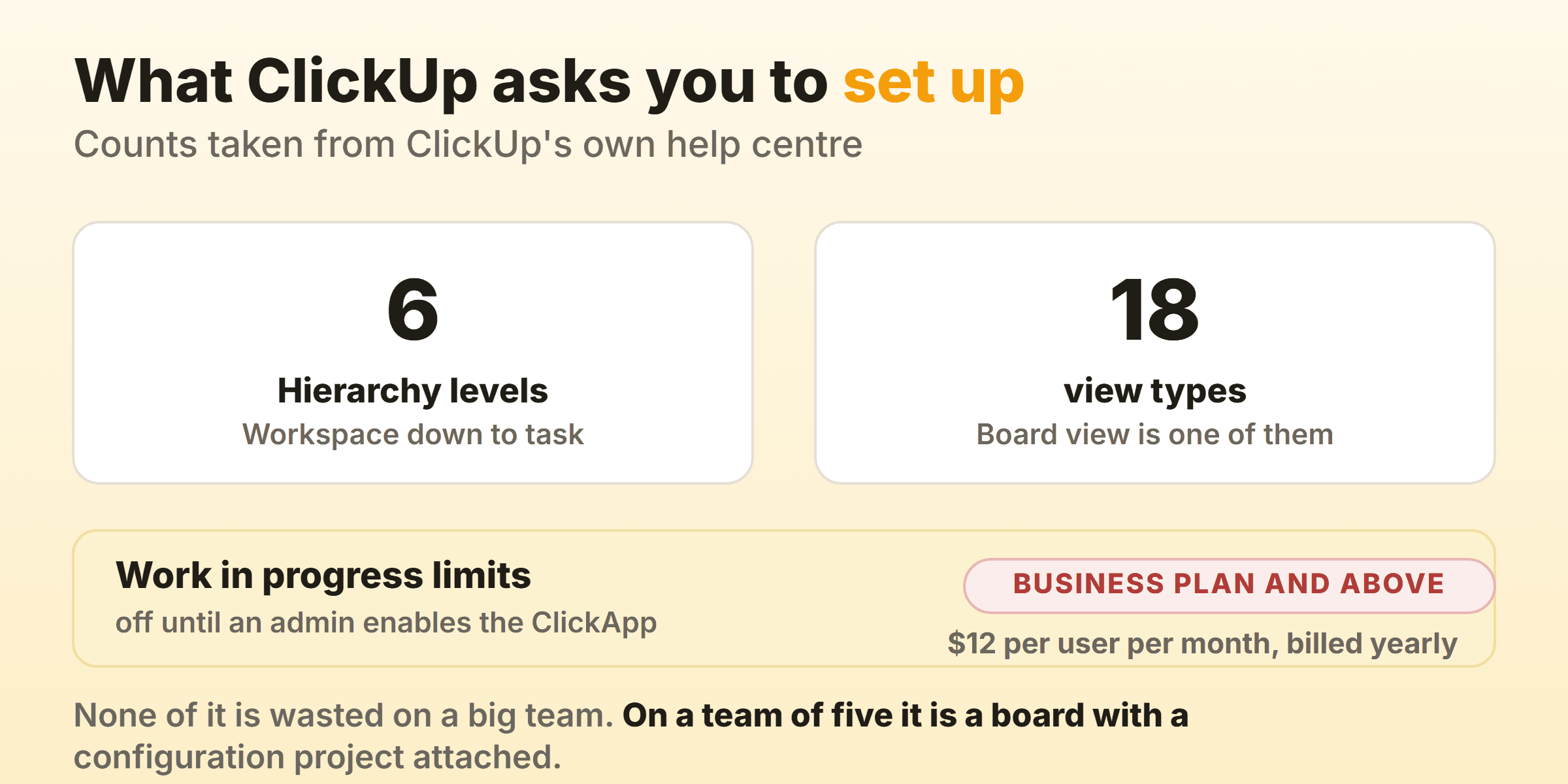
Then the part that stings on a small team. Work in Progress Limits are available on the Business Plan and above, and even there an owner or admin has to activate the ClickApp before a number appears in a column header. Business is $12 per user per month billed yearly and $19 billed monthly on ClickUp’s pricing page. The cheapest control in kanban sits two paid tiers up.
Billing compounds it. ClickUp’s pricing FAQ answers the upgrade question in one line: “To upgrade ClickUp, you’ll need to upgrade your entire Workspace, which means all members in your Workspace.” One person wanting one feature is a bill for everybody.
None of this is wasted on forty people running six departments through one Workspace, and our ClickUp kanban guide covers that board in detail. The question is whether you are paying for everything around it.
ClickUp Alternatives Compared
| Alternative | Who it suits | What it fixes | Entry price on 16 September 2026 |
|---|---|---|---|
| Trello | Only ever opened Board view | One object model, nothing to configure | Free for 10 collaborators per Workspace, Standard $5 per user per month billed annually |
| Linear | Product and engineering teams | Keyboard speed, a fixed opinion | Free for 2 teams, Basic $10 per user per month billed yearly |
| Asana | Needs structure, not a suite | Reporting without ClickApps | Free for 2 users, Starter EUR 10.99 per user per month billed annually |
| Basecamp | Tired of per-seat maths | No per-user fees on any plan | Free for 1 project, Freelancer $25 a month flat |
| KanbanFlow | Came to ClickUp for WIP limits | Caps and timers on the free plan | Free, Premium $5 per user per month |
| Todoist | One person running a list | An app that opens and closes again | Free, Pro $5 per user per month billed yearly |
| Kanboard | Wants to own the server | A feature count capped on purpose | MIT licensed, you run the install |
| Our own board | Wants flow controls only | Cap as a checkbox, timers on the card | Free for 2 owned boards, Pro $6 a month flat or $48 a year |
Every figure came off the vendor’s own pricing page, help centre or homepage on 16 September 2026. Free tiers get rewritten constantly. Open the page yourself.
Trello: The Same Board With Nothing Behind It
Trello is where most ClickUp leavers should look first, because it is the board without the platform. A card belongs to a list, a list belongs to a board. No Hierarchy, no ClickApp to enable.
Trello’s pricing page puts Free at $0 for up to 10 collaborators per Workspace with unlimited cards, Standard at $5 per user per month billed annually and $6 billed monthly, Premium at $10 per user per month billed annually, Enterprise at $17.50 per user per month billed annually. Unlimited boards, Custom Fields and list colours start on Standard. Dashboard view, which the page calls Trello’s reporting tool, plus Timeline, Table, Calendar and Map, start on Premium.
The catch is the thing you probably came for. Trello’s own plan comparison does not list a column limit on any tier, so a cap arrives as a Power-Up, and our Trello alternatives guide works through which one.
Linear: Speed Treated as a Product Decision
Linear answers the performance complaint more directly than anything else here, because keyboard control is the interface rather than a shortcut sheet bolted on, and its board layout docs set out the shortcuts and the grouping options before you commit to it.
Linear’s pricing lists Free at $0 with unlimited members, 2 teams, 250 issues and 10MB file uploads. Basic is $10 per user per month billed yearly for 5 teams and unlimited issues. Business is $16 per user per month billed yearly.
Read that free tier honestly. Two hundred and fifty issues is a wall a working team hits inside a quarter. And Linear is shaped around product development, so a marketing team wanting a calmer ClickUp will find that cycles and triage do not describe what they do.
Asana: Structure Without the Suite
Asana is the closest like-for-like swap when sprawl is the problem rather than the concept of a work management tool. Projects, custom fields, forms and reporting dashboards are all there, and none of them need an admin to turn them on first.
Asana’s pricing page puts Personal at free forever for 2 users, with unlimited tasks and projects, list, board and calendar views and 100MB per file. Starter is EUR 10.99 per user per month billed annually and EUR 13.49 billed monthly, removing the seat limit and adding timeline and Gantt views, reporting dashboards, unlimited automations and forms. Advanced is EUR 24.99 per user per month billed annually for portfolios, goals and resource management. Asana serves the currency of your billing country and gave us euros, so read your own number off the page before you budget.
The trade is the free plan. ClickUp’s Free Forever carries unlimited members, Asana’s Personal carries two, so a team of six comparing free tiers is comparing a real option with a trial. Kanban in Asana covers how its board behaves.
Basecamp: One Bill and No Per-Seat Maths
Basecamp removes the variable that makes ClickUp expensive, which is people. Its pricing page leads with no per-user fees on every package and meters projects and storage instead. Free is 1 project, 1 GB and a maximum of 5 users. Freelancer is $25 a month flat for up to 3 active projects, 5 GB and a maximum of 20 users. Studio is $59 a month flat for up to 10 active projects, 25 GB and unlimited users.
Card Tables is the kanban piece, and Basecamp puts it alongside message boards, to-dos, chat, scheduling and docs in every package, which is what it means by the same core features on every plan. What moves between tiers is the project count, the storage and, below Studio, how many people you can add.
So there are two ceilings to watch rather than a per-seat bill, and Basecamp notes that archived or deleted projects stop counting against the first one. An agency with eleven live clients on Freelancer hits that fast. Our Basecamp kanban guide walks through the board.
KanbanFlow: The Controls ClickUp Charges For
KanbanFlow earns a look from anyone who upgraded ClickUp specifically to cap a column. Its pricing comparison marks unlimited boards, unlimited tasks, WIP limits, a stopwatch timer and a Pomodoro timer as available on Free, with no time limit on that plan. Premium is $5 per user per month with a 10 percent discount for paying yearly.
Two controls on a free plan that ClickUp gates at $12 per user per month is the whole argument. Choosing the number is still your problem.
The billing contrast is sharper still. KanbanFlow’s FAQ says premium features can be enabled for selected boards while the rest stay shareable with anyone without a licence. ClickUp upgrades the entire Workspace or nothing.
Read the Premium column first, though. Search, file attachments, swimlanes, CSV import, API access and every analytics report including cumulative flow are all paid.
Todoist: When It Was Really a To-Do List
Todoist is the uncomfortable answer for a lot of people searching for alternatives to ClickUp, because plenty of ClickUp accounts are one person and a list. Board layout is on the free plan, so the columns survive the move.
Todoist’s pricing puts Beginner at $0 with 5 personal projects, list and board layouts, 3 filter views and a week of activity history. Pro is $5 per user per month billed yearly at $60, or $7 per user per month billed monthly, lifting that to 300 projects and 150 filters. Business is $8 per user per month billed yearly at $96, adding a shared workspace and up to 500 team projects.
What you buy is an app with a small enough idea of itself that it opens, takes the thing you typed and closes. A bad trade for anyone coordinating a handoff, since a personal project tops out at 5 people on every tier.
Kanboard: Deliberately Small, and Yours
Kanboard is the only tool here that makes restraint the pitch. Its homepage says there is no fancy user interface, that it focuses on simplicity and minimalism, and that the number of features is voluntarily limited. After ClickUp, reading that is a small act of therapy.
It also does the thing ClickUp charges for. Kanboard limits work in progress and highlights the column once you pass the limit, under the MIT License, with what it calls a super simple installation.
The cost is real and it is not money. You own the server, the upgrades and the backups, and nobody is on call for you at two in the morning. Sensible for a technical team, poor for a marketing department. Wider options sit in our open source kanban roundup.
A Board Where the Column Cap Is a Checkbox
A narrow board only earns a row here if it ships the controls ClickUp puts behind a plan. I run our own product board on this one, so weigh the entry accordingly.
Kanbanee does one job. Setting a limit is a checkbox and a number in the column menu, pre-filled at 3, with no admin step and no plan gate in front of it. The badge shows count against limit and turns red over the cap, and it stays soft, so the drag always works. Stopwatch and Pomodoro timers sit on the card with a full time log. Free is 2 boards you own with unlimited members. Time by member or label, weekly throughput, cumulative flow and cycle time come with Pro at $6 a month or $48 a year.
Most people reading this should not pick it, and saying so now is cheaper than you finding out in week three. No realtime sync, so the board polls rather than updating live. No API, which rules it out the moment your work leans on ClickUp automations. Column drag is desktop only.
What Do You Lose by Leaving ClickUp?
Two things, and only one of them is features.
The first is the free tier, which is genuinely good. ClickUp’s pricing page lists Free Forever with unlimited tasks, unlimited free plan members, collaborative Docs, kanban boards, sprint management and 60MB of storage. Unlimited members at no cost is rare. Asana’s free plan caps at 2 users and Trello’s at 10 collaborators.
The second is the export, and this is the one that catches people. ClickUp states it plainly: Free Forever and Unlimited plans can only export five List, Table, or Form views. Not five each. Five.
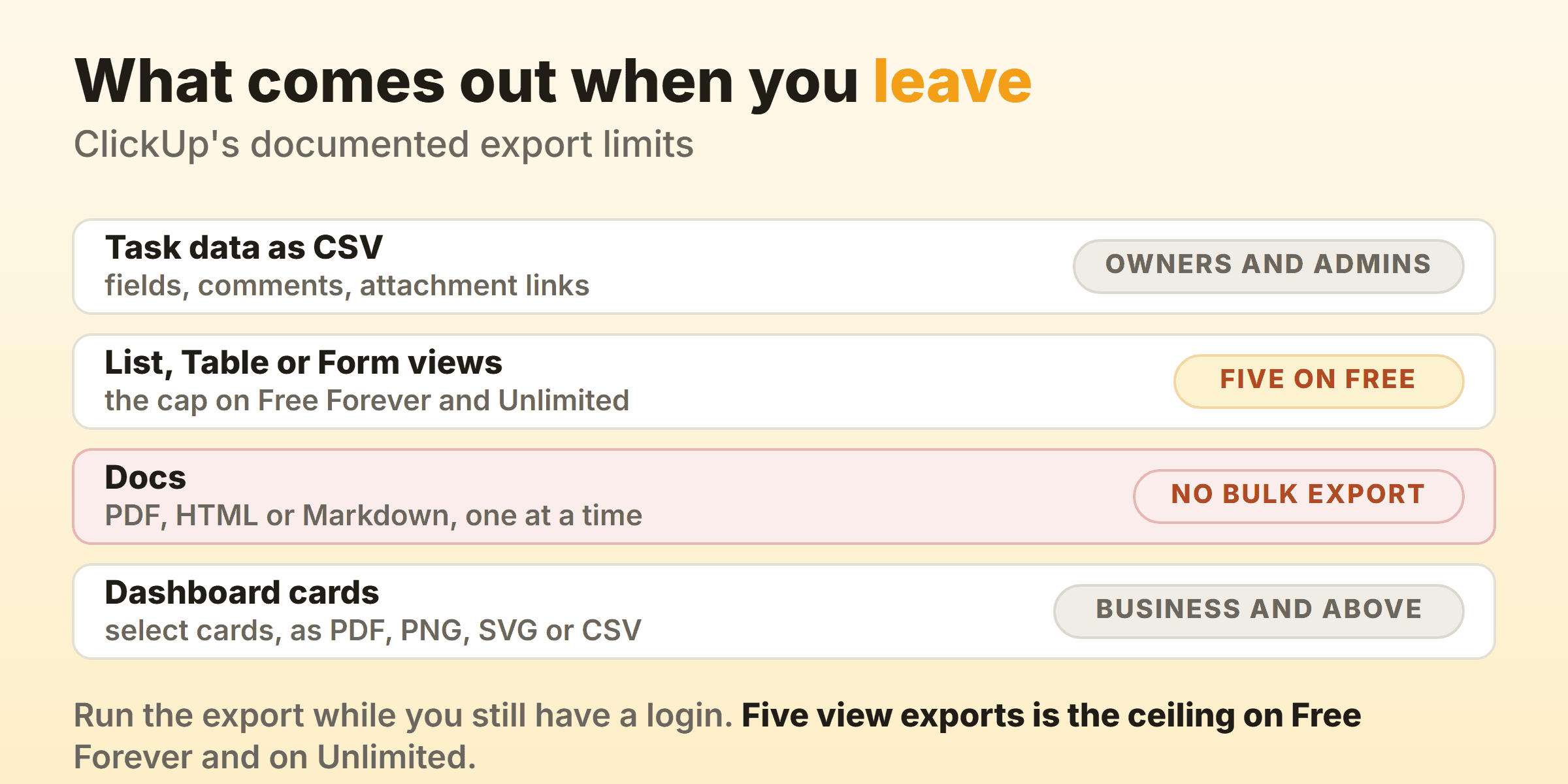
The rest of the export documentation fills the picture in. Task data leaves as a CSV holding fields and properties, attachment hyperlinks, time estimated and comments, and only owners and admins can run that Workspace export. Docs come out as PDF, HTML or Markdown one at a time, because bulk export of all Docs from a Workspace is not yet available.
Ask your destination what it does with the timestamps of when each task entered and left each status, because that trail is what every number in a flow metrics report is built from. Run the export while you still have a login.
Which ClickUp Alternative Fits Your Reason for Leaving?
Write the sentence that made you open this page, then match it against the list. Every board here draws the same columns you already have.
- Too much, and I only used the board. Trello, free for 10 collaborators.
- It feels slow and I live on the keyboard. Linear, if you build software. Budget for Basic, since the free cap is 250 issues.
- I still need projects, forms and reporting. Asana Starter.
- The per-seat bill is the problem. Basecamp, with a project count to watch instead.
- I upgraded purely for column limits. KanbanFlow Free, or our own board if you want native timers alongside.
- It was always one person and a list. Todoist, where board layout is free.
- The data stays on our hardware. Kanboard, MIT licensed, your server and your backups.
If none of those is your sentence and the honest reason is a noisy interface, spend an afternoon deleting Spaces and switching ClickApps off before you spend a weekend migrating. The wider project management software field is full of tools that feel just as busy by spring.
FAQ
What is the best free ClickUp alternative?
Depends which ClickUp feature you leaned on. Among free ClickUp alternatives, KanbanFlow wins if column caps and timers are the point, since its pricing comparison puts WIP limits, both timers and unlimited boards on Free. Trello Free covers 10 collaborators. Kanboard is free in the other sense, where you supply the server. More in our free kanban tools roundup.
Is ClickUp actually slow, or is that a setup problem?
Both answers get shouted online and I have no benchmark worth quoting, so here is the part you can test yourself. A Board view added at Folder or Space level renders every List beneath it, and the Hierarchy makes that easy to do by accident. Point a board at one List, group it by Status, and see whether it still feels heavy. If it does, the tool is the problem. If it does not, the problem is scope and it will follow you.
Does ClickUp have WIP limits?
Yes, on the Business Plan and above, once an owner or admin enables the Work in Progress Limits ClickApp. The counter then reads count against limit, green under capacity, yellow near or at it, red over it, and ClickUp states you can still create, move or update tasks even if that puts a column over. A cap that warns rather than blocks is how a limit should work.
Can I move my ClickUp data to another tool?
Partly, and the ceiling is lower than people expect. ClickUp’s export documentation says Free Forever and Unlimited plans can only export five List, Table or Form views, that only owners and admins can run the Workspace task export, and that bulk export of all Docs is not yet available.
Which alternative to ClickUp is cheapest for a team of five?
Three land on the same number. Trello Standard is $25 a month for five seats billed annually, KanbanFlow Premium is $25 a month for five users, and Basecamp Freelancer is $25 a month flat for up to 20 people. ClickUp Unlimited for the same five is $35 a month billed yearly and Business is $60 a month billed yearly, so the spread is $420 a year.