
Notion Alternatives: 8 Tools Matched to Why You Are Leaving
The Answer
The Notion alternatives worth a migration are the ones that fix the specific thing you are leaving over, and because Notion does four jobs at once, the right pick depends on which of them you used. If the per-member bill is the problem, Outline prices its cloud by team band at a flat $10 a month for one to ten people, and Superhuman Docs, which is where Coda now lives, counts paid seats per Doc Maker. Offline is Obsidian, notes as files on your own disk, free for personal use, with Anytype as the encrypted local-first option. Permissions push you toward Confluence, whose Standard plan carries space and page permissions. A tightening free tier points at AppFlowy, AGPLv3 with a self-hosting guide, or ClickUp Free Forever, which takes unlimited members. Airtable if the databases were the point. And if the only thing you still opened in Notion was a board, this is not a migration at all.
Why Do People Leave Notion?
People leave Notion for four reasons, and three of them have a published number behind them.
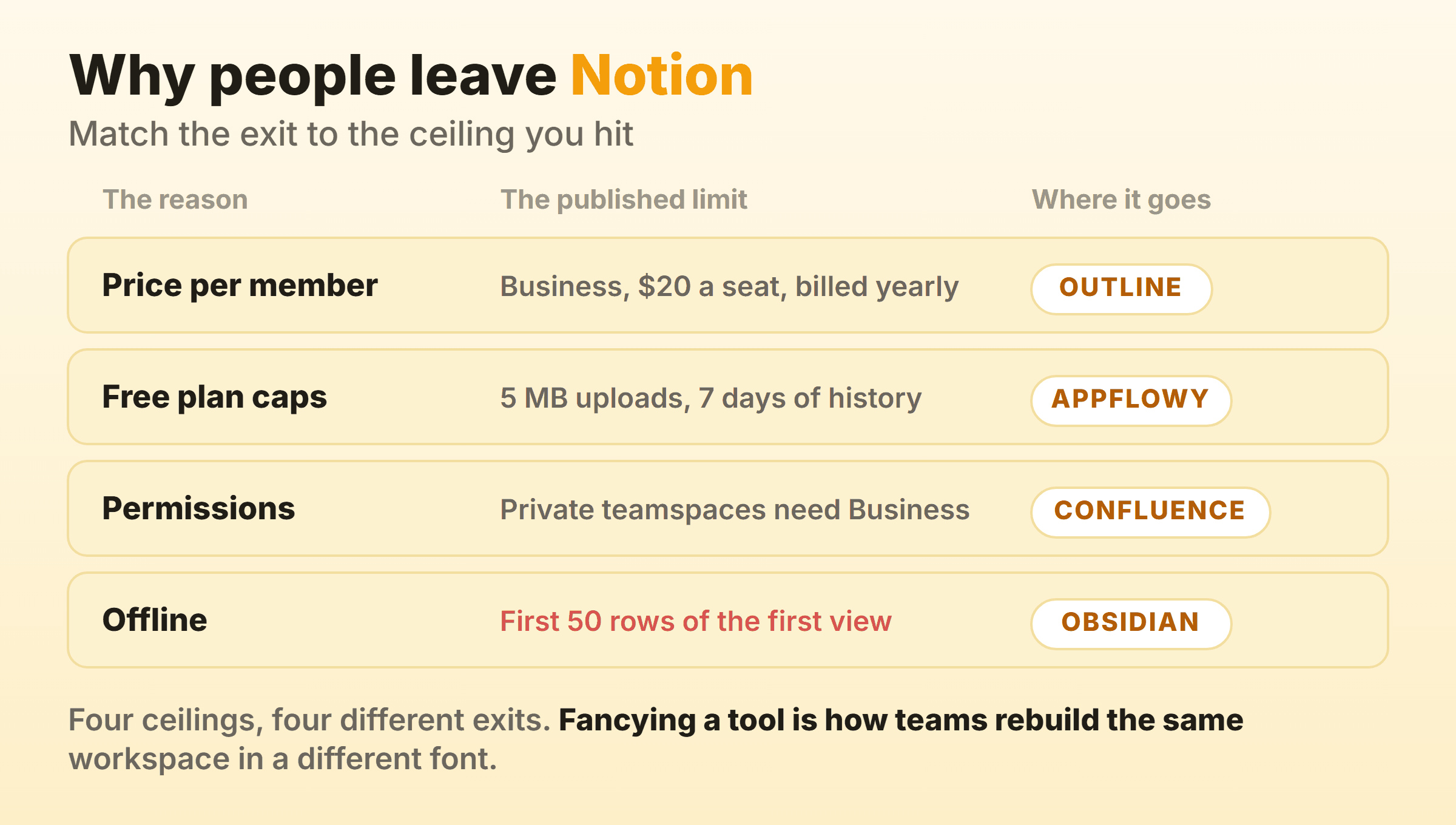
Price per member is the loudest. Notion’s help centre says the model “charges you based on the number of seats, or licenses, you are using in your workspace.” Add someone and the next invoice carries a retroactive prorated charge for them. Remove them and you wait, because “billing decreases take effect at your next billing cycle and are not prorated mid-cycle.” Notion’s pricing page puts Plus at $10 per member per month billed yearly and $12 per member per month billed monthly, Business at $20 billed yearly and $24 billed monthly on the same per-member basis. Twelve people on Business is $2,880 a year for a workspace that is mostly meeting notes.
Then the free plan, which changes shape the moment a second person joins. That same page marks pages and blocks unlimited for individuals but “limited for 2+ members”, caps file uploads at 5 MB, keeps 7 days of page history and allows 10 external guests.
Permissions sit higher up the price list than teams expect. Private teamspaces and granular database permissions are both Business lines, next to SAML SSO.
Offline is fourth and better than its reputation, with one catch. Notion’s offline documentation wants the desktop or mobile app, since “This feature isn’t available on web browsers”. Databases behave differently: “the first 50 rows of the first view of the database will also be downloaded for offline use.” Fifty rows. On a project tracker that is the top of the list and nothing else.
The fifth reason, the one everybody types into a forum, is that a big database got slow. I could not find a published figure from Notion to plan against, so I will not invent one. Airtable states a record ceiling per plan, which is at least a number you can hold a tool to.
Notion Alternatives Compared, and What Each One Fixes
| Alternative | Who it suits | What it fixes | Entry price on 16 September 2026 |
|---|---|---|---|
| Superhuman Docs | Teams who want docs and tables together | Paid seats counted per Doc Maker | Free plan, then priced per Doc Maker |
| Obsidian | One person with a large pile of notes | Notes live as files on your disk | Free for personal use |
| AppFlowy | Anyone who wants to read the source | AGPLv3 plus a self-hosting guide | Free forever, Pro US$10 per user per month billed annually |
| Anytype | Solo and small groups who want encryption | Offline-first, end-to-end encrypted | Free with 100 MB remote storage |
| Confluence | Companies where permissions are the problem | Space and page permissions from Standard up | Free forever for 10 users |
| Outline | Teams sick of per-seat arithmetic | Cloud priced by team band | $10 a month flat for 1 to 10 members |
| Airtable | People who mainly used the databases | A published record ceiling per plan | Free, Team $20 per seat per month billed annually |
| ClickUp | People who mainly kept tasks | Docs and kanban boards on the free plan | Free Forever, Unlimited $7 per user per month billed yearly |
| Our own board | Teams whose last Notion habit is a board | A soft cap per column | Free for 2 boards, Pro $6 a month flat or $48 a year |
Every price, tier and licence above came off the vendor’s own pricing page, help centre or repository on 16 September 2026. Free tiers get rewritten without warning. Open the page yourself before you move anybody.
Superhuman Docs: Where Coda Went
Coda is the alternative half the internet still recommends, and coda.io/pricing now redirects to Superhuman’s Docs plans page. Same lineage, new name, new suite around it. If you are working from a 2024 roundup, that is the first thing it got wrong.
The billing unit is the reason to look. Notion charges per member. Superhuman Docs prints its Pro and Business prices “per Doc Maker, billed annually”, with a higher figure billed monthly. On a team where four people build and twenty read, those models produce very different invoices.
Check the plan table before assuming parity, though. Free caps pages and objects as “Limited for shared docs” with 1Gb of attachments per doc and 7 days of version history, and Databases sit on Business carrying a Beta tag.
Obsidian: Notes as Files You Already Own
Obsidian answers the offline complaint by never having been online. Your vault is a folder of markdown files on your machine, which is why the pricing page can say “Free without limits. No sign-up required. No strings attached.”
Sync is the paid part at $4 per user per month billed annually, $5 billed monthly. A commercial licence runs $50 per user per year, and the FAQ softens even that, answering whether you have to pay for commercial use with “No. You are not required to pay for a commercial license”.
The trade is real. Sync does list collaboration on shared vaults, so this is not a single-player tool by decree, but the unit is still a folder of files rather than a shared database, and the pricing page describes nothing resembling teamspace permissions. It replaces the note-taking half of Notion and leaves the collaboration half where it was. Our markdown kanban guide covers what a plugin board on plain files can do, and the same applies to a kanban board in Obsidian.
AppFlowy: The Open Source Notion Alternative With a Licence You Can Read
AppFlowy is the open source Notion alternative that says so on the tin. Its repository leads with “The Open Source Alternative To Notion”, ships under AGPLv3, links a step-by-step self-hosting guide and promises “you have 100% control of your data.”
The hosted side is priced in dollars and says so. AppFlowy’s pricing page gives Free one collaborative workspace of up to 2 members with unlimited pages and blocks and 5 GB of storage. Pro runs US$12.50 per user per month billed monthly or US$10 per user per month billed annually, taking a workspace to 50 members and 100 guest editors, and the FAQ does the sums: “A Pro workspace with only you: $12.50 per month / $120 per year.” Guest editors in Pro cost nothing.
A Vault Workspace add-on at $6 per user per month billed annually is “Private and offline - AI runs locally, no data transfer”. One warning. AGPLv3 is copyleft, which procurement treats very differently from a permissive licence.
Anytype: Local-First, Encrypted, and Source-Available
Anytype is the one to check the licence on before you call it open source. The anytype-ts repository describes a “Local-first, peer-to-peer & end-to-end-encrypted knowledge OS for macOS, Windows & Linux” and releases it under the Any Source Available License 1.0. Source available sits a step short of OSI approved, and that gap matters to exactly the kind of organisation that went looking for it.
Anytype’s pricing starts free with 100 MB of remote storage, 10 shared channels and unlimited private channels, and the paid tiers buy storage plus unlimited shared channels. Everything lives on your device first and syncs peer to peer.
One person who wants Notion’s object model without Notion’s servers will be happy here. A marketing team of nine will not. Wider options sit in our open source kanban roundup.
Confluence: When Permissions Are the Reason
Confluence is the answer when a workspace has outgrown its permission model rather than its feature list. Read the free plan carefully first. Atlassian’s pricing page puts space and page permissions on Standard, Premium and Enterprise, and the note under that row says “The Free plan doesn’t allow permission settings for spaces or pages.” Free is free forever for 10 users with up to 2 GB of file storage, and if permissions are your leaving reason it is not the plan you want.
Standard shows at $5.42 per user per month and Premium at $10.44 with monthly billing selected, and annual billing saves up to 17 percent. Standard adds advanced permissions, free guest access, 250 GB of storage and a 250,000 user site limit. Premium takes pages, spaces and storage to unlimited.
Confluence replaces the wiki and stops there. The board is Jira, a separate product on the same pricing site with its own bill, so teams wanting both buy both. Kanban in Confluence covers what the pages side can do with columns.
Outline: A Wiki Priced by Band, Not by Seat
Outline is the direct answer to per-seat arithmetic. Its pricing page charges a flat $10 a month for a team of 1 to 10, a flat $79 a month for 11 to 100 and a flat $249 a month for 101 to 200, with annual pricing available and an On-Premises option for self-hosting. An eighth hire costs nothing extra. Number eleven moves you a tier.
The repository calls it “the fastest knowledge base for growing teams” and licenses it under BSL 1.1, worth reading rather than assuming.
Watch the free tier, because there is not one. The first 30 days are free, and after that “your knowledge base becomes read-only until a payment method is added”. Scope is documents too. The plan table runs to unlimited docs and version history, realtime collaborative editing, commenting and mentions, templating, groups and user permissions, API and webhooks, and nothing on it describes a database view, a record store or a board.
Airtable: When the Databases Were the Point
Airtable is where you go when what you loved in Notion was the database and everything else was scaffolding. Airtable’s pricing page states ceilings rather than leaving you to guess. Free carries unlimited bases at 1,000 records per base, up to 5 editors and 1 GB of attachments per base. Team is $20 USD per seat per month billed annually or $24 per seat per month billed monthly, at 50,000 records per base. Business is $45 per seat per month billed annually or $54 billed monthly, at 125,000 records.
The kanban side is genuinely there and it is not paywalled. Airtable’s kanban documentation marks plan availability as “All plan types” and stacks records by a single select, user, or linked record field, the same grouping idea a Notion board uses.
That five editor cap on Free is the line small teams trip over. More in our kanban in Airtable guide.
ClickUp: When All You Kept Was Tasks and a Board
ClickUp suits the reader whose Notion workspace quietly became a task list with a wiki bolted to it. ClickUp’s pricing page lists Free Forever with 60MB of storage, unlimited tasks, collaborative docs, kanban boards, sprint management and, unusually, unlimited free plan members. That last line is the direct counter to paying per seat. Unlimited is $7 per user per month billed yearly or $10 billed monthly, Business $12 per user per month billed yearly or $19 billed monthly.
Be honest about the shape of the thing. ClickUp is a large suite and that free storage ceiling is low, so a docs-heavy workspace full of attachments will hit it. Kanban in ClickUp covers the board mechanics, and ClickUp alternatives covers the exits.
What Does a Kanban Board Have to Do With Any of This?
A kanban board is one of the four jobs Notion does, and for a surprising number of people it is the only one still in daily use. Notion’s board is a database view rather than a separate feature, and our Notion kanban guide covers the setup and where it stops. Every tool above draws columns of some kind. None makes a team faster on its own.
If the board really is your leaving reason, replacing it takes an afternoon. Kanbanee is where I run our own product board, so weigh this entry accordingly. Free covers 2 boards you own with unlimited members, Pro is a flat $6 a month or $48 a year, and setting a WIP limit is a checkbox and a number in the column menu, off by default and soft, so the drag always works. Time by member or label, weekly throughput, cumulative flow and cycle time are Pro only.
It will be the wrong pick for most people reading this, and I would rather say so than have you find out in week three. No realtime sync, no API, column drag is desktop only. A workspace of meeting notes and a client wiki needs one of the eight above.
What Do You Lose by Leaving Notion?
What you lose by leaving Notion is the thing that made one page do four jobs at once. A Notion card is a database row, a full document, a permission boundary and a board item, all the same object. Split those across two tools and a human keeps them in sync.
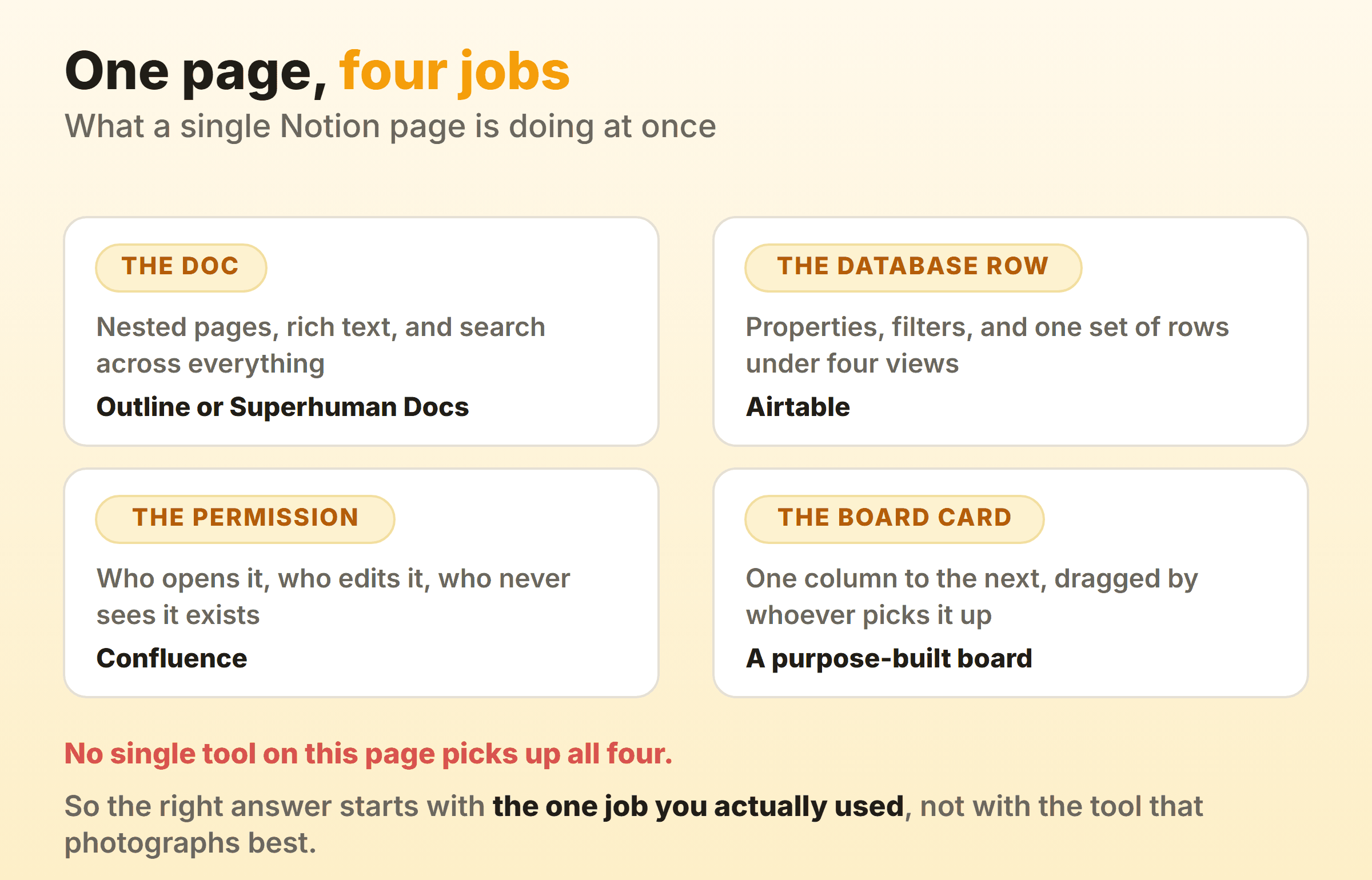
Some of it rebuilds. Some of it does not.
- The view stack. Table, board, calendar and timeline over one set of rows. Outline, Obsidian and Confluence do not offer that, so rebuilding it means a second tool. Our kanban view guide explains why the one-dataset-many-lenses idea is the part people miss most.
- The template library. Whatever a team spent two years building does not export as templates. It exports as pages.
- The single URL habit. One link opened the spec, the tasks and the discussion. Two tools means two links and a convention nobody follows.
Export before you cancel anything. Notion’s pricing table marks whole-workspace export as HTML, Markdown and CSV on every plan including Free, so pull the archive while you still have access. Then ask the destination importer what it keeps, because the timestamp trail behind any flow metrics you care about is usually the first casualty.
Which Notion Alternative Fits Your Reason for Leaving?
Start from the ceiling you hit. Screenshots of these alternatives to Notion all look much the same anyway, and each does part of the job well and the rest badly.
- The per-seat bill. Outline, priced by team band. ClickUp Free Forever if unlimited members beats storage.
- Offline and ownership. Obsidian for files any editor opens. Anytype when encryption is the requirement.
- The source code. AppFlowy under AGPLv3 with self-hosting documented. Read Anytype’s licence before classing it alongside.
- Permissions and scale. Confluence, free for 10 users, with page and space permissions starting on Standard at $5.42 per user a month billed monthly.
- The databases. Airtable, with a published record ceiling and kanban on every plan.
- Only the board is left. Then our task management software roundup is the shorter route.
Write the sentence explaining why you are leaving before you open a single trial. If it turns out to be about the sidebar, you have just talked yourself out of a lost weekend.
FAQ
What are the best free Notion alternatives?
ClickUp Free Forever if unlimited members is the point, since its pricing page puts collaborative docs and kanban boards on that plan. AppFlowy Free gives unlimited pages and blocks with 5 GB of storage, capped at a 2 member workspace. Confluence is free forever for 10 users, and Obsidian is free for personal use outright. Outline is the exception with a 30 day trial rather than a free tier. More in our free kanban boards roundup.
Is there a genuinely open source Notion alternative?
AppFlowy, released under AGPLv3 with a self-hosting guide in its repository. Outline is BSL 1.1 and Anytype ships under the Any Source Available License 1.0, which is source available rather than OSI approved. All three let you read the code. Only one is open source in the sense a procurement team means.
Which alternative to Notion works properly offline?
Obsidian, because no server is involved and your vault is a folder of markdown files. Anytype describes itself as local-first with peer-to-peer sync and end-to-end encryption. Notion is not hopeless either, since paid plans auto-download recents and favourites to the desktop and mobile apps, but its documentation limits a downloaded database to the first 50 rows of the first view.
Is Coda still worth considering?
Coda is now Superhuman Docs and coda.io/pricing redirects there. Still the docs-plus-tables idea that made it the standard Notion comparison, and still billed per Doc Maker. Read the current plan table rather than an old review, since Databases now carry a Beta tag and sit on Business.
Will my Notion content survive the move?
Pages, yes. Structure, mostly not. Whole-workspace export as HTML, Markdown and CSV is marked available on every plan, and every importer drops something, most often attachments, comments and the timestamps behind each status change. Export first, import into a throwaway workspace, then go looking for what is missing before you cancel.