
Wrike Alternatives: 7 Tools Compared on Seats and Statuses
The Answer
Wrike alternatives earn a migration when they close whichever gate you are already paying for, and Wrike has two. Seats come in bands, with Team sold for 2 to 15 users and Business for 5 to 200, so four people who need a Business feature buy five licences at $25 per user per month billed annually. Real-time reports and time tracking start on that same Business plan. Asana Starter advertises “No user seat limits” at $10.99 per user per month billed annually and puts reporting dashboards there too. ClickUp keeps time tracking on Unlimited at $7 per user per month and dashboards on Business at $12 per user per month, both billed yearly. Jira is free forever for 10 users with customizable workflows and dashboards included. Teamwork.com reports billable time on Basics at $9.99 per user per month billed yearly, above a three seat minimum of its own. Basecamp charges $59 a month flat for Studio and counts projects instead of people. monday.com sells seats in blocks, which keeps the arithmetic you are leaving. Name your gate before you shortlist anything.
Why Do People Leave Wrike?
People leave Wrike over two things, and both live on the pricing page rather than in the product.
The first is the seat band. Wrike’s pricing page lists Free at $0 per user per month, Team at $10 per user per month for “2 to 15 users”, and Business at $25 per user per month for “5 to 200 users”, with Pinnacle and Apex quoted on request, while the comparison table behind it puts the Free plan at unlimited users. Its footnote does real work: “The amount shown is priced per month and billed on an annual per-user basis.” Each band reads as a floor as well as a ceiling, so four people who need something from Business should price the move at five licences.
The second is what Business unlocks. Wrike’s plan comparison table marks Real-time reports unavailable on Free and Team, available from Business up. Time tracking, request forms, and folder and project permissions sit on the same line. Dashboards arrive one tier earlier on Team. Storage runs 2 GB per account on Free against 5 GB per user on Business.
A third gate only bites board users. That comparison table puts “Custom fields, workflows & statuses” on Team and above, but Wrike’s help centre is narrower about the board itself, saying that “Business, Legacy Enterprise, Pinnacle and Apex users can change the default workflow for the folder, project, or space from the Board view.” Our Wrike kanban guide covers where those board columns come from. If renaming them is what sent you looking, budget for Business.
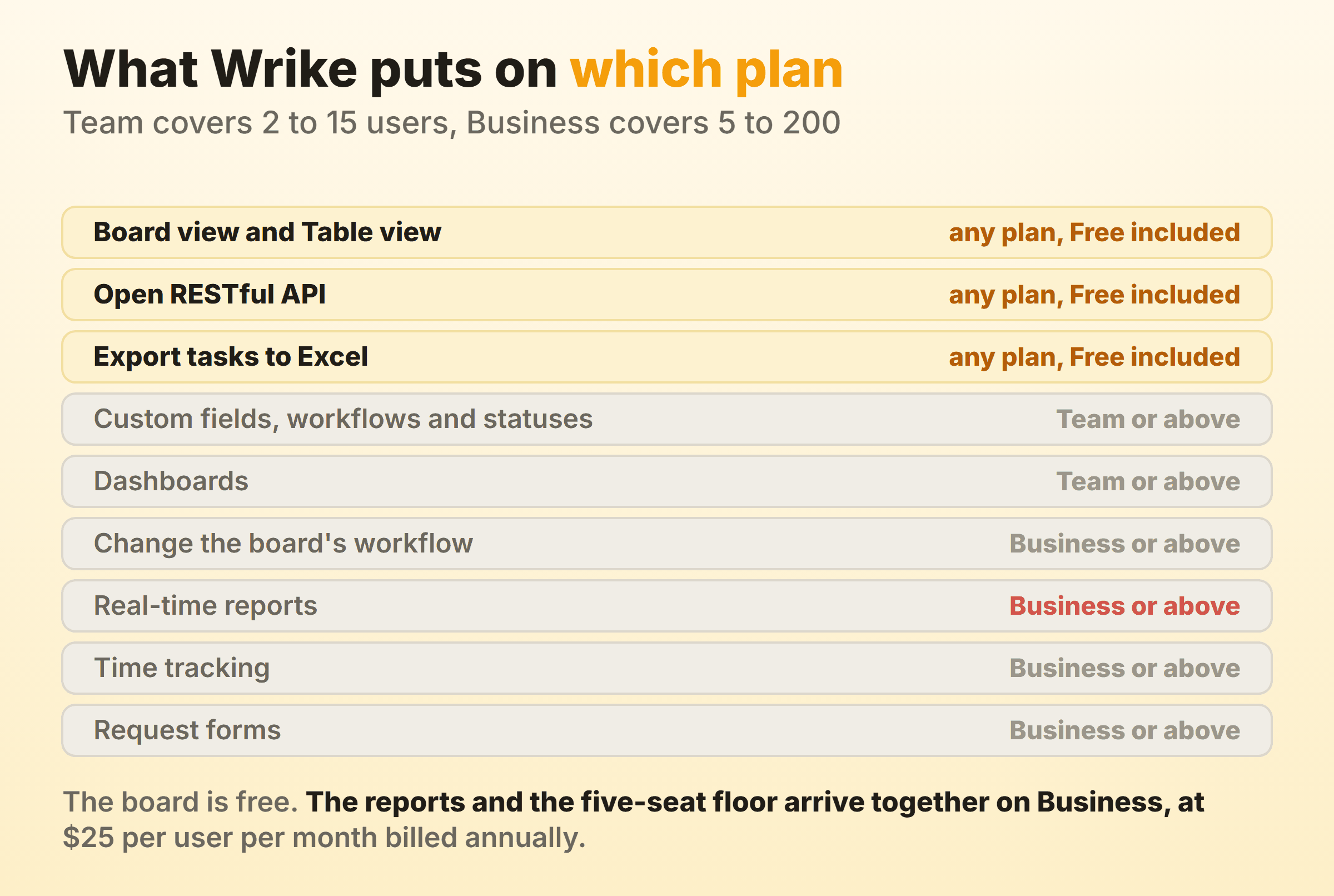
One thing Wrike does not gate is the exit, which matters at the end of this article.
Wrike Alternatives Compared, and What Each One Fixes
| Alternative | Who it suits | What it fixes | Entry price on 16 September 2026 |
|---|---|---|---|
| Asana | Marketing and ops teams wanting a like-for-like swap | “No user seat limits” plus dashboards on the first paid tier | Free for 2 users, Starter $10.99 per user per month billed annually |
| ClickUp | Teams who want the time log and the charts cheaply | Time tracking at $7, dashboards at $12 | Free Forever, Unlimited $7 per user per month billed yearly |
| Jira | Technical teams under ten people | Customizable workflows and dashboards with nothing to upgrade | Free forever for 10 users |
| Teamwork.com | Agencies billing clients for hours | Billable time on the first paid tier | Free for 5 users, Basics $9.99 per user per month billed yearly, 3 seat minimum |
| Basecamp | Teams tired of counting licences | Removes per-user pricing completely | Free for 1 project, Studio $59 a month flat |
| monday.com | Teams who want the closest visual rival | None of the seat arithmetic | Free up to 2 seats, then seat blocks priced by billing country |
| Our own board | A team whose only complaint was the missing cap | A per-column work in progress cap | Free for 2 boards, Pro $6 a month flat |
Every price and limit above came off the vendor’s own pricing page or help centre on 16 September 2026. Free tiers get rewritten without notice, and monday.com prices by billing country, so open the page where you will be invoiced. The rest of the kanban tools guide follows the same rule.
Asana: The Closest Swap, and It Drops the Seat Band
Asana is the closest swap for a Wrike team, and the seat band is the first thing it drops. Asana’s pricing page lists Starter at $10.99 per user per month billed annually and puts “No user seat limits” at the top of what that tier adds, alongside reporting dashboards, custom fields, forms and unlimited free guests. Advanced at $24.99 per user per month billed annually adds time tracking, goals, portfolios, resource management, and approvals and proofing.
The shape is familiar, shifted down a step. Reporting that Wrike keeps on Business at $25 sits on Asana Starter at $10.99. Time tracking that Wrike also keeps on Business lands on Asana Advanced at $24.99, so that one is a wash.
The counterweight is the free plan. Asana Personal is $0 for “2 users”, where Wrike Free is marked unlimited users. A twelve-person team running happily on Wrike Free is not saving money here. It is starting to pay.
Verdict: right if your bill is Business seats you do not fill, wrong if your Wrike account is a large free one. Our kanban in Asana walkthrough covers the board, and Asana alternatives covers the other direction.
ClickUp: Time Tracking at $7 and Dashboards at $12
ClickUp puts native time tracking on a $7 plan and dashboards on a $12 plan, two of the three things Wrike saves for Business at $25. ClickUp’s pricing page lists Free Forever with kanban boards, unlimited tasks, unlimited free plan members and 60MB of storage. Unlimited is $7 per user per month billed yearly, or $10 monthly, and adds native time tracking, unlimited custom fields and unlimited storage. Business is $12 per user per month billed yearly, or $19 monthly, and brings “Unlimited Dashboards with Advanced Cards”.
Statuses are the interesting part for anyone leaving over column names. ClickUp’s help centre says that “Owners, members, and admins can create, edit, and delete statuses by default” and attaches no plan to it, with Business Plus and Enterprise able to restrict that through advanced permissions. Renaming your columns is not a purchase.
The counterweight is that 60MB of free storage is a rounding error, and the settings surface takes a fortnight to learn. Kanban in ClickUp shows the board.
Verdict: the cheapest honest route out of Wrike for a team that wants a whole platform rather than a board.
Jira: Custom Workflows and Dashboards, Free for Ten Users
Jira hands over custom workflows and dashboards free for 10 users, the exact combination Wrike splits across two paid tiers. Atlassian’s Jira pricing page describes the free plan as “Free forever for 10 users” at $0, with backlog, list, board, timeline, calendar and summary views, “Reports and dashboards”, 150 automation steps per subscription per month and 2 GB of storage. Its feature table marks customizable workflows and custom fields available on Free.
Wrike Free, by its own table, has no custom fields, workflows or statuses and no dashboards. Same price. Very different board.
Standard and Premium are quoted per user through a team-size calculator, so the rate moves with the number of seats you type in. Check it at your own headcount rather than trusting an article, this one included.
The counterweight is vocabulary. Jira speaks in work items, sprints and backlogs, and a creative team spends its first month translating. Kanban in Jira is the honest tour, and Jira alternatives is there for when it does not take.
Verdict: unbeatable for ten or fewer technical people, awkward for anyone else.
Teamwork.com: Billable Time on the First Paid Tier
Teamwork.com tracks and reports billable time on Basics, its first paid tier, where Wrike keeps time tracking on Business. Teamwork.com’s pricing page lists Basics at $9.99 per user per month billed yearly with task, list, board, Gantt and table views, 300 projects and the line that matters here: “Track and report billable time”. Accelerate at $24.99 per user per month billed yearly adds smart intake forms, 20,000 automations, live capacity planning, time budgets and retainers, and client invoices built from logged time. The free plan runs 5 projects, a maximum of 5 users and 100MB of storage, with time logging included.
Read the user row before you celebrate, because Teamwork.com sets a floor of its own. Its plan comparison marks the Free plan “Max 5” users, Basics “Min 3” and Accelerate “Min 5”, and its published pricing summary repeats both minimums. Lower than Wrike’s five, and still a minimum. Two people pay for three.
Wrike sells hard to professional services, and the three things an agency opens daily are the time log, the workload view and the client invoice. Teamwork.com prices two of those below where Wrike puts the first.
Verdict: the shortest move on the list if billable hours sat behind a $25 seat. Less compelling if you never billed anybody, or if there are two of you.
Basecamp: A Flat Fee Instead of a Seat Count
Basecamp takes the seat count off the bill and charges a flat monthly fee whatever your headcount does. Basecamp’s pricing page leads with no per-user fees and fixed prices per package: Free for 1 project, Freelancer at $25 a month for 3 projects, Studio at $59 a month for up to 10 active projects with unlimited users, Pro at $99 a month for 25 projects, and the Unlimited Edition at $299 a month billed annually. Every package carries the same core tools, one of which the page describes as “Card Tables is our take on Kanban for process tracking”.
The arithmetic gets stark fast. Twenty people on Wrike Business is $500 a month. Twenty people on Basecamp Studio is $59, provided you can live inside ten active projects.
That proviso is the whole trade. Basecamp moves the limit from people to projects, and the core tool list it publishes for every package runs to message boards, to-dos, Card Tables, chat, scheduling, docs and check-ins, with no Gantt dependencies, portfolios, proofing or resource management among them. Kanban in Basecamp covers what Card Tables can do.
Verdict: right for a team whose Wrike invoice grows every time it hires, wrong for a PMO.
monday.com: The Obvious Switch Keeps the Seat Blocks
monday.com is the switch everyone suggests, and it keeps the seat blocks you were leaving. The monday.com pricing page sells work management per seat through a team size selector offering 3, 5, 10, 15, 20, 25, 30, 40, 50, 100 and 200 plus seats. There is no option for four. The free plan stops at “Up to 2 seats” and “Up to 3 boards”, against Wrike Free at unlimited users.
Then the footnote under every plan card: “Prices do not include tax. The price is determined by the user’s billing country.” Any monday.com figure in a comparison article is a figure for somebody else’s tax jurisdiction. Mine loaded in euro. Yours may not.
Feature placement rhymes with Wrike too. Time tracking sits on Pro, the third paid tier, the same move Wrike makes on Business.
Verdict: a prettier board than Wrike’s, and no answer to seats you are not using. Kanban in monday.com covers the board, and monday alternatives covers the exit from that one.
A Board Where the Column Cap Is a Checkbox
A board where the column cap is a checkbox only makes sense when the board was the whole job. Kanbanee sets work in progress limits per column from the column menu, ships them off by default, turns the badge red once you go over, and never blocks the drag. Free covers two boards you own with unlimited members. Pro is $6 a month or $48 a year, which is where cycle time, weekly throughput and the cumulative flow diagram live.
Now the honest part, because most people reading a Wrike alternatives article should not pick this. You are coming from a platform with request forms, proofing, resource management and a Gantt chart. None of that is here. No realtime sync either, no API, and column dragging works on desktop only.
It fits one narrow case: the board was the only part of Wrike anyone opened, and the missing cap was the only thing wrong with it. If what you want is the flow metrics rather than the platform around them, that is the trade.
Verdict: a board, priced like a board, limited like a board.
What Do You Lose by Leaving Wrike?
You lose two things by leaving Wrike, and only one of them is a feature.
The first is your comment history. Wrike’s Excel export documentation says all users except Collaborators, Contributors and Viewers can export, and that the file carries tasks and subtasks with their statuses, dependencies, assignees, start and due dates, duration and time log entries. Then the sentence that costs you a week: “Attachments and comments aren’t exported to Excel.” The file also stops at 65,000 rows. The tasks travel. The conversation around them does not.
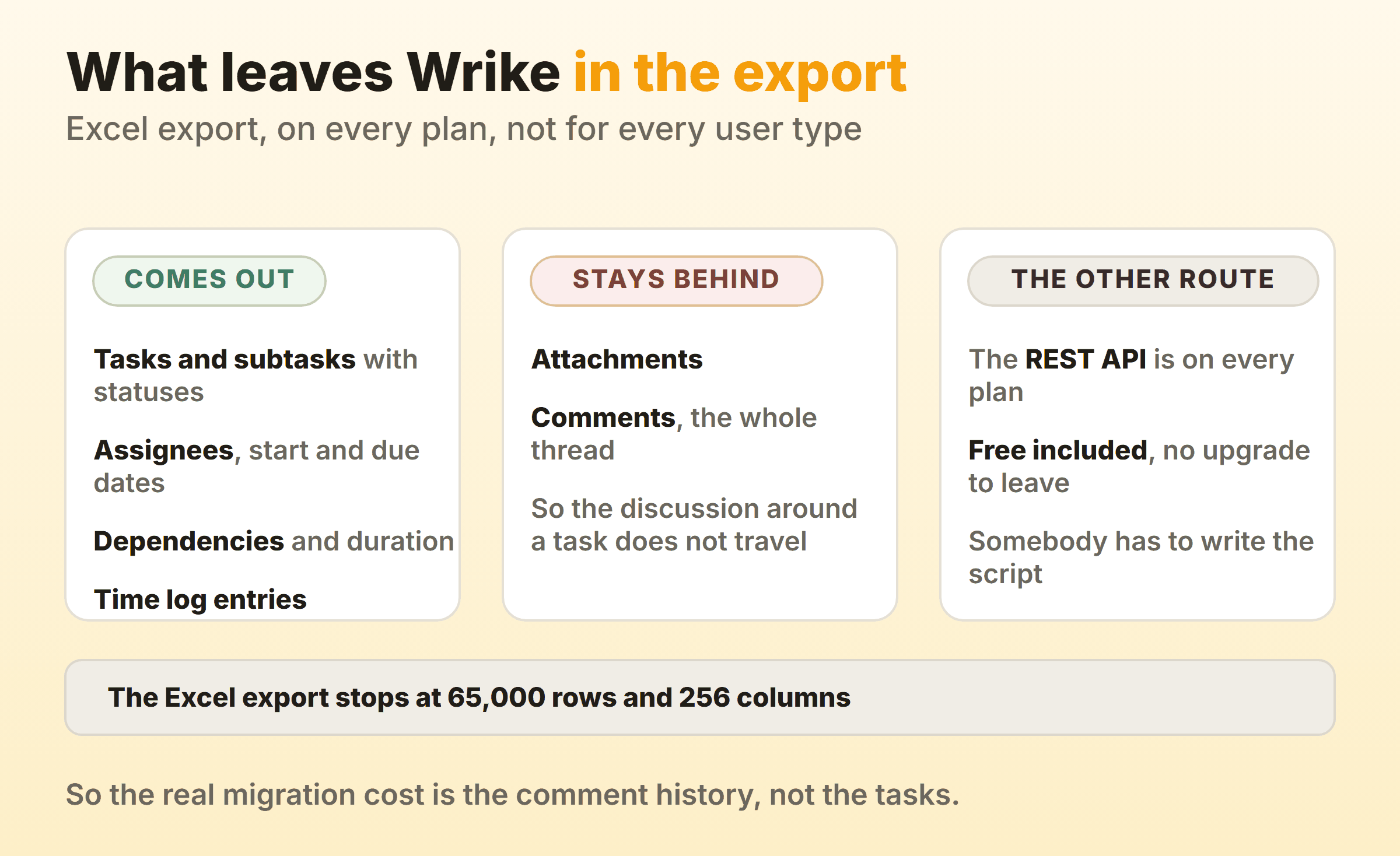
The Open RESTful API is on every Wrike plan including Free, so the comments and the files are reachable. Reaching them is a scripting job, and somebody has to own it.
The second loss is the Business-tier machinery you may not realise you lean on. Request forms, file proofing and approval, workload charts and folder-level permissions are all Business features in Wrike, and the cheap plan that fixes your reason for leaving often does not carry them. Asana puts approvals, proofing and resource management on Advanced at $24.99. ClickUp puts unlimited proofing on Business at $12. Teamwork.com puts live capacity on Accelerate at $24.99. All three of those are per user per month rates on annual billing. Price the replacement at the tier covering what you open on a Tuesday, not the tier in the comparison table.
Run the export before you cancel rather than after. The row limit alone tells you inside a minute whether your account fits in one file, which beats another afternoon of project management software roundups.
FAQ
What is the best free alternative to Wrike?
Jira, if your team is ten people or fewer. Atlassian calls its free plan “Free forever for 10 users” and includes customizable workflows, custom fields, and reports and dashboards, which is more than Wrike Free carries. ClickUp’s Free Forever plan states no user cap and includes kanban boards, though storage stops at 60MB. Teamwork.com allows 5 projects and 5 users. Asana Personal and monday.com Free both stop at 2. Our roundup of free kanban tools covers the board-only options.
Why does Wrike Business start at five users?
Wrike’s pricing page lists Business for “5 to 200 users” and Team for “2 to 15 users”, which reads as a floor as well as a ceiling on each plan. That is why a four-person team gets quoted for five. Confirm the minimum with Wrike sales before you budget, because the page states the band without saying how it is enforced.
Is monday.com cheaper than Wrike?
That depends on where you are billed and how many seats you buy, which is a worse answer than it sounds. monday.com’s pricing page says the price is determined by the user’s billing country, and its seat selector jumps from 3 to 5 to 10 rather than matching your real headcount. Wrike quotes $10 and $25 per user per month billed annually inside bands of 2 to 15 and 5 to 200. Both round you up. Price your own seat count on both pages on the same day.
Will my Wrike comments come with me?
Not through the Excel export. Wrike’s help article states that attachments and comments are not exported to Excel, while tasks, subtasks, statuses, dependencies, assignees, dates, duration and time log entries all come out. The REST API is on every plan including Free, so the comments are reachable if someone writes the script.
Does leaving Wrike mean losing request forms?
It means checking which tier of the new tool carries intake. Wrike puts request forms on Business and up. Asana lists forms on Starter at $10.99 and form branching on Advanced. ClickUp gives 1 form on Free Forever and unlimited forms on Unlimited at $7. Teamwork.com puts smart intake forms on Accelerate at $24.99. Those are all per user per month rates on annual billing. Intake is cheaper away from Wrike. It is rarely free.