
Microsoft Kanban Board: Where to Find One in Microsoft 365
Updated at
The Answer
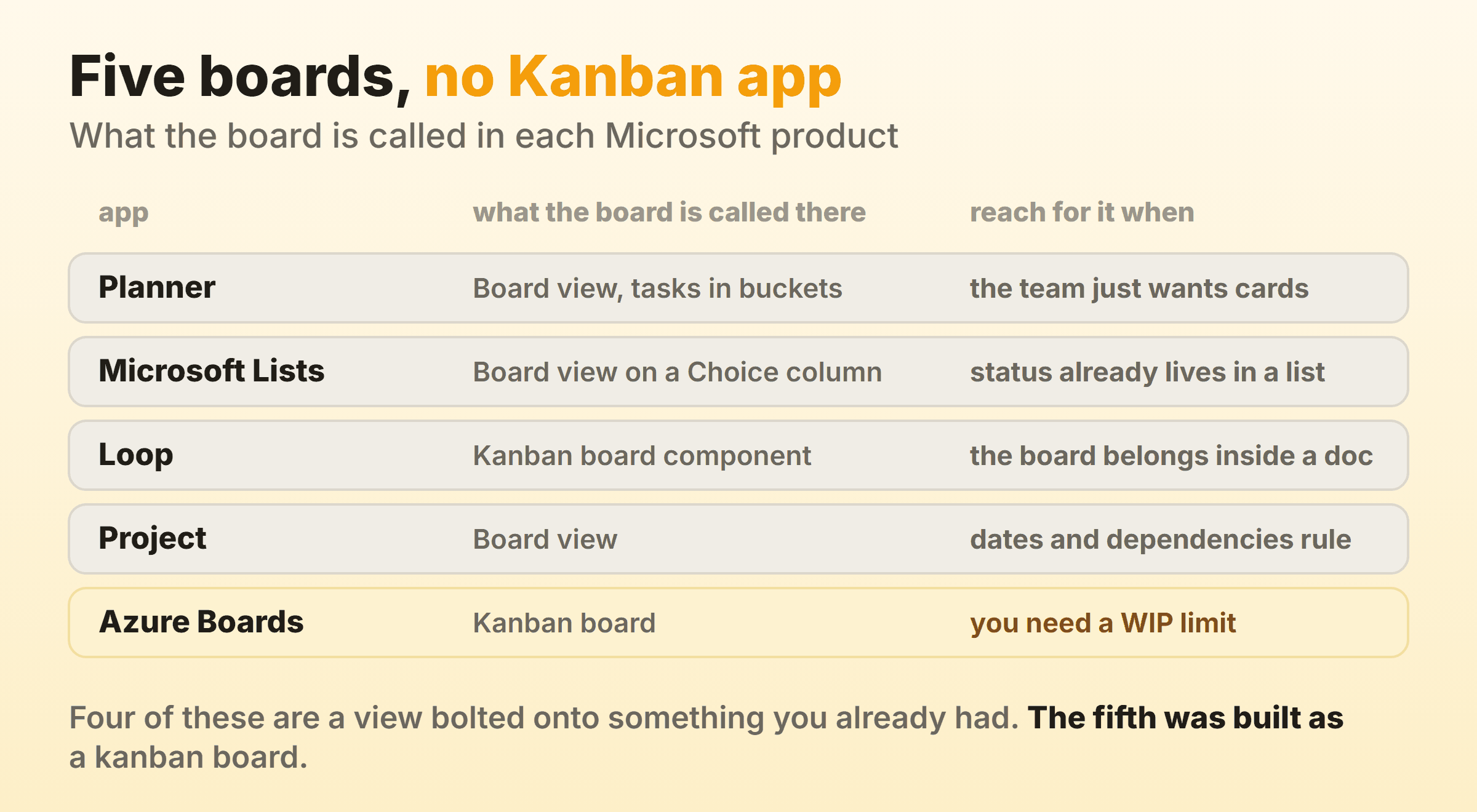
Microsoft never shipped an app called Kanban, so a Microsoft kanban board is always a board view bolted onto something you already pay for. Planner sorts tasks into buckets and is the right answer for most teams. Microsoft Lists turns a Choice column into board columns, Loop has a Kanban board component you drop straight into a page, and Project offers a board view for date-driven work. Azure Boards is the only Microsoft product designed as a kanban board from the start, with work in progress limits and a cumulative flow diagram, and it sits inside Azure DevOps rather than your Microsoft 365 licence.
Does Microsoft Have a Kanban Board?
Microsoft has a kanban board in five places and an app called Kanban in none of them. Type the word into the Microsoft 365 app launcher and nothing comes back, which is why the question gets asked at all. Every one of those boards is filed under a different name, and there is no Microsoft kanban app to search for.
One naming note before the list, since it clears up half the confusion. Microsoft renamed the Office 365 subscription plans to Microsoft 365 in April 2020, so Office 365 kanban boards and Microsoft 365 kanban boards are the same question. There is no Microsoft Office kanban board either, because Word, Excel and PowerPoint hold documents rather than tasks.
Each of these grew out of something that was not a board. Planner began life as a task list that learned to stand its buckets side by side, and Microsoft Lists is SharePoint list data wearing a board layout over the top. Loop works differently again. Its board is a component you type into a page, so the notes and the board share a document. Project sits on Gantt bars. Then there is Azure Boards, which nobody in a finance department expects, because it belongs to Azure DevOps and a Microsoft 365 subscription does not include it.
A board built as a view over a task list inherits that task list’s rules. None of them was designed around flow. The work in progress limit is where that shows.
Where Do You Find a Kanban Board in Microsoft 365?
You find a kanban board in Microsoft 365 in four apps, plus Azure Boards next door in Azure DevOps. Teams argue about which of the four to use because the overlap between them is genuine, and the argument is worth having, since a wrong pick becomes a migration on the day somebody wants a report the tool cannot produce.
Microsoft Planner
Planner is the default Microsoft kanban board and the one most teams should land on. Board view arranges tasks into buckets, you drag a card from one bucket to the next, and dragging a bucket header moves the whole column. Microsoft’s Board view guidance covers adding buckets. The control that earns its keep is Group by, at the top right, which regroups the same tasks by assignee, progress, due date, label or priority without touching the data.
Planner also shows up as a tab in Teams, which is where most people meet it. Microsoft merged To Do, Planner and Project for the web into one Planner app, so the tasks you see there arrive from several places at once.
Microsoft Lists Board View
A Microsoft Lists kanban board is a board view built out of a Choice column, and that requirement catches people out. Board view groups by Choice or Yes/No columns only. Point it at a Person column and the option is simply absent, which is the complaint that shows up over and over in Microsoft Q&A.
One more trap. A Choice column with multiple selections turned on will not appear as a grouping option either, so switch that off before hunting for a setting you think is broken.
Use this one when the work already lives in a SharePoint list. You get a board, the list keeps its columns and permissions, and every other view of that data carries on working.
The Microsoft Loop Kanban Board
Type /Kanban board on a Loop page and a board appears with To Do, In Progress and Done already in place. Rename those. Add cards, assign people, set due dates, and open any card for checklists and comments. The whole thing lives inside the document, so the notes above it and the board below are the same page.
Loop tables can also switch to a board layout, which needs one Text column and one Label column before the option unlocks. Useful when a table you built months ago has quietly become a workflow.
The sync question gets its own section further down, because the answer catches almost everybody out.
Microsoft Project Board View
Project has a board view, and it is the only Microsoft board that understands dependencies and a real schedule at the same time. Microsoft’s task board documentation covers the desktop client version. Cards on the board are tasks on the Gantt chart, so moving one changes the plan instead of a status field.
Project is billed apart from a standard Microsoft 365 subscription. If nobody on the team can name a dependency that matters, Planner does this job for free and with a tenth of the training.
Azure Boards
Azure Boards is the only Microsoft kanban board with a work in progress limit, and it is a different purchase. Microsoft’s kanban overview lists the flow machinery in one place: WIP limits per column, split columns that separate doing from done inside a single stage, swimlanes for expedited work, a definition of done attached to each column, a cumulative flow diagram covering up to thirty weeks, and cycle time and lead time widgets for the dashboard.
The Basic plan starts free for the first five users, then runs $6 per user per month according to the Azure DevOps pricing page. Engineering teams already living in Azure DevOps have the best kanban board Microsoft makes and often do not realise it. For anyone else it is the wrong building. The board arrives welded to repos, pipelines and work item types, and none of that is optional.
How Do You Build a Kanban Board in Microsoft Planner?
Building a kanban board in Microsoft Planner takes about four minutes, and three of those go on the buckets.
- Create a plan from Planner, or add a Planner tab to a Teams channel. A plan attached to a channel inherits that channel’s Microsoft 365 Group, so the membership is settled before you add a single task.
- Rename the starter bucket, then add the rest. The names carry the workflow, and this is the step people rush.
- Add tasks under the leftmost bucket. Title, assignee, due date. Nothing else yet.
- Turn on labels for the one or two distinctions that keep coming up in standup, blocked work most often.
- Check Group by is set to Buckets. Set it to anything else and the Add bucket option disappears, which sends somebody to a support forum most weeks.
Name the buckets after states rather than people. To Do, Doing and Done work fine on day one, and the first bucket worth adding after that is usually a waiting state, because that is where the delay you cannot currently see is sitting. Buckets named after a colleague stop meaning anything the week that colleague changes team.
Watch the bucket count. Nine buckets means horizontal scrolling on a laptop, and the ones off the right edge go stale within a fortnight.
Does the Loop Kanban Board Sync to To Do or Planner?
No. The Loop Kanban board component keeps itself in sync everywhere you paste it, and that is the whole of its sync. Its cards never reach Planner or To Do. Microsoft’s support team answered this directly on Microsoft Q&A, confirming there is no built-in way to push /Kanban board or /Table items into Planner, and that only /Task list and the Planner component do that.
So a card you assign lives on that page and nowhere else. It never lands in the assignee’s My Tasks, which is the list most people actually work from.
Use the /Task list component instead when sync matters. Task lists push into Planner, where Microsoft’s own documentation says a plan is created and the first task list maps to the first bucket in that plan. You lose the columns and gain a task that follows people around.
I would take the sync over the columns most weeks. A board people have to remember to open goes stale by Thursday.
Can You Set WIP Limits on a Microsoft Kanban Board?
You can set a WIP limit on a Microsoft kanban board in exactly one place, and that place is Azure Boards. No cap exists on a Planner bucket, a Microsoft Lists column, a Loop board column or a Project board, so every board inside a Microsoft 365 licence will let one column swallow eleven cards without a murmur.
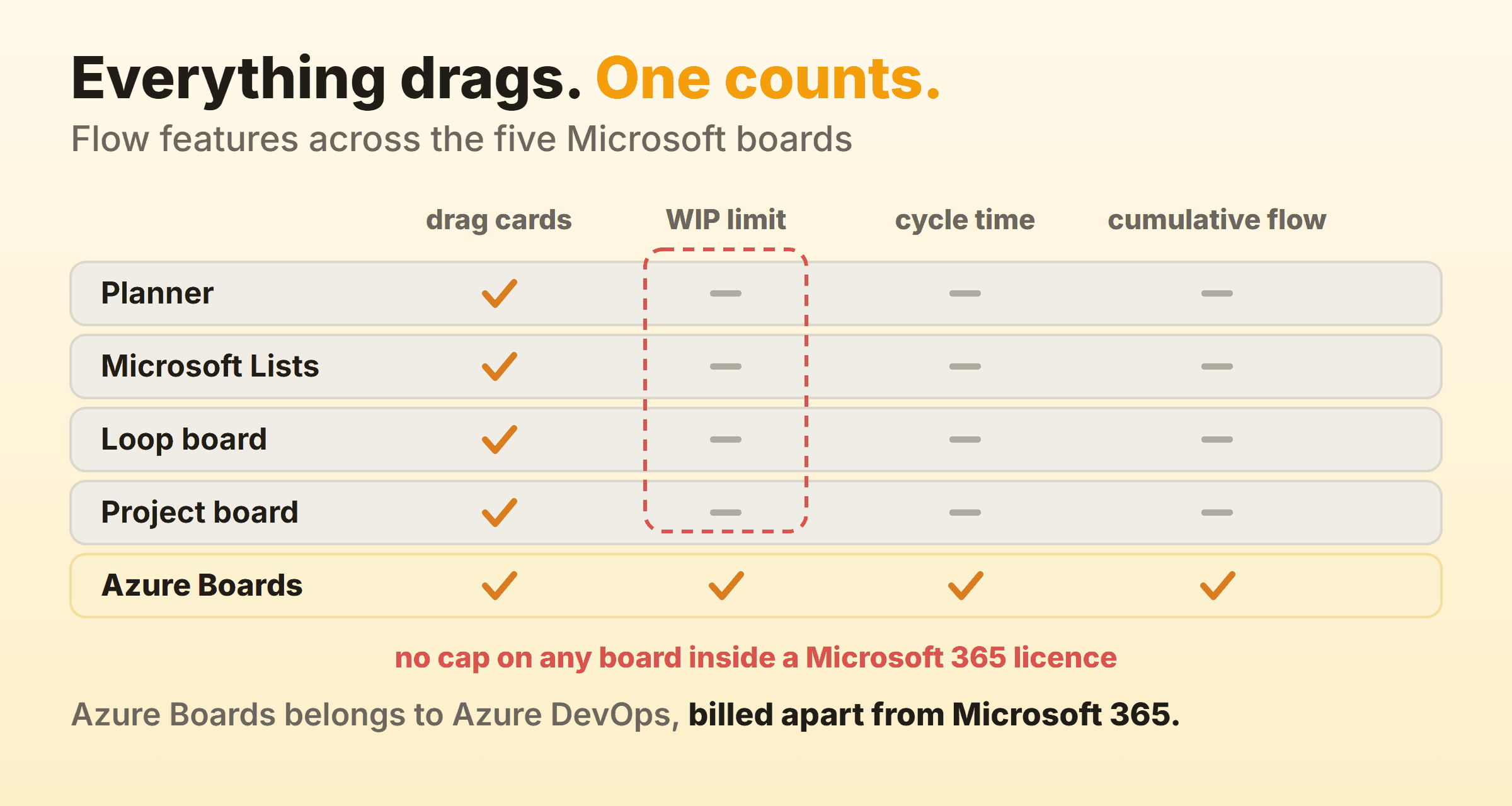
Azure Boards treats the cap as a soft constraint. Microsoft’s WIP limits article is blunt about it: you can exceed the limit, and the board highlights the column count so the team notices. It also suggests starting at two or three items per person in a stage, so three developers gives you a limit of six.
Writing the number into the bucket name is the cheap fix everywhere else. Doing (max 3). The whole implementation costs nothing and holds up on a disciplined team of four. The other route is a Power Automate flow that counts tasks in a bucket and posts to the channel once the count goes past a number. Those flows work. Nobody I have watched build one has still had it running six months later.
What Does Microsoft 365 Measure Instead?
Microsoft 365 measures progress instead of flow. Planner’s Charts view gives you four charts: status, bucket, priority and members. Enough for a Monday update. Cycle time is absent, and so is throughput. The reason sits upstream of the charts. No Microsoft 365 board records when a card entered or left a column, and that timestamp is the raw material every flow metric is built from.
Teams that want the numbers export tasks to Excel and do the arithmetic by hand. Power BI is the other route. Both work, and both quietly become somebody’s side project that stays theirs for as long as anyone wants the report.
Which Microsoft Kanban Tool Should You Choose?
Choose the Microsoft kanban tool that matches where the work already lives, then read the feature list second.
| If the work lives in | Use | Because |
|---|---|---|
| A Teams channel | Planner | Board view, buckets, and a tab everyone can find |
| A SharePoint list | Microsoft Lists | The board is a view, so the list keeps working |
| A Loop page or a doc | Loop Kanban board | The board sits next to the notes, with no sync |
| A schedule with dependencies | Project | Cards and Gantt bars are the same tasks |
| Azure DevOps | Azure Boards | WIP limits, cycle time, cumulative flow diagram |
Planner wins for most teams by a distance, and mostly on distribution. It comes with the subscription and it lives in the Teams channel people already have open. The Microsoft Marketplace also carries third-party kanban software that bolts onto SharePoint and Teams, which is where WIP limits come from if staying inside the tenancy is a hard requirement.
When Does a Microsoft 365 Kanban Board Stop Being Enough?
A Microsoft 365 kanban board stops being enough once you want the board to change what the team does instead of reporting what it did. You notice it when the Doing bucket has held nine tasks since June and nobody has mentioned it. Or when somebody senior asks how long work takes here and the honest answer starts with a CSV export. The quietest sign is a Power Automate flow that two people maintain purely to count cards, and nobody has ever asked why the board cannot do that itself.
None of that is a reason to leave Microsoft 365. The files, the mail and the permissions already live in one tenancy, and Planner sitting in the same channel as the conversation is a good default for as long as it holds.
Kanbanee exists for the case where the cap is the point. WIP limits go on per column, off until you switch them on, and the badge shows count against limit and turns red the moment you cross it. The drag itself is never blocked, so the board objects and then lets you do it anyway. Cycle time, throughput and a cumulative flow diagram come built in rather than assembled out of exports. It gives you a board and nothing around it. No wiki, no mail, no realtime sync and no integrations yet, which in a Microsoft shop means one more tab open.
FAQ
Is there a kanban board in Microsoft Teams?
Teams has no kanban board of its own. What you get is Planner added as a tab to a channel, which gives that channel a board with buckets, or a Loop component pasted into a chat. Both boards live elsewhere and appear in Teams, which is why searching Teams for kanban never finds one.
Does Outlook have a kanban board?
No. None of the view types Microsoft documents for classic Outlook is a board, so there are no columns and nowhere to drag anything. In new Outlook and Outlook on the web, flagged email lands in its own list in To Do, and To Do is a list app by design. Getting that work onto a board means moving it somewhere that has one, such as Planner.
Is the Microsoft kanban board free?
Planner, Microsoft Lists and Loop are included with a Microsoft 365 business subscription, so their boards cost nothing extra. Project is a separate licence. Azure Boards is free for the first five users on the Azure DevOps Basic plan and charged per user after that.
Can you build a kanban board in Excel instead?
You can, and the result is a grid of coloured cells that somebody updates by hand. No drag and drop, no card count. There is a full walkthrough in the guide to a kanban board in Excel, including where the approach falls over.
What is the difference between a bucket in Planner and a column on a kanban board?
A bucket is Planner’s name for a column, and the difference lives entirely in what the word suggests. Bucket suggests a container you sort things into. A column is a stage that work passes through, which is nearer to the job a kanban board is doing. Teams that hear container end up with buckets named after people or projects, and a board like that tells you who is busy while the place work is stuck stays invisible.
Does the Loop board work on a phone?
Loop has mobile apps and the board renders on a phone, though dragging cards between columns is fiddly. Opening a card and changing its column from inside is quicker. Every kanban tool I have used treats column dragging as a desktop gesture.